This is an automated email from the ASF dual-hosted git repository.

zhaoxinyi pushed a commit to branch main
in repository https://gitbox.apache.org/repos/asf/iotdb-docs.git
The following commit(s) were added to refs/heads/main by this push:
new 36e7d74f Stand Alone deployment document optimization (#409)
36e7d74f is described below
commit 36e7d74f00120e3fce849cb68e4cddae26580f31
Author: W1y1r <[email protected]>
AuthorDate: Wed Nov 13 11:50:44 2024 +0800
Stand Alone deployment document optimization (#409)
---
.../Cluster-Deployment_apache.md | 4 +--
.../Cluster-Deployment_timecho.md | 4 +--
.../Stand-Alone-Deployment_apache.md | 40 +++++++++++++++++++++-
.../Stand-Alone-Deployment_timecho.md | 38 +++++++++++++++++++-
.../Cluster-Deployment_apache.md | 4 +--
.../Cluster-Deployment_timecho.md | 4 +--
.../Stand-Alone-Deployment_apache.md | 40 +++++++++++++++++++++-
.../Stand-Alone-Deployment_timecho.md | 38 +++++++++++++++++++-
.../Cluster-Deployment_apache.md | 4 +--
.../Cluster-Deployment_timecho.md | 4 +--
.../Stand-Alone-Deployment_apache.md | 40 +++++++++++++++++++++-
.../Stand-Alone-Deployment_timecho.md | 38 +++++++++++++++++++-
.../Cluster-Deployment_apache.md | 4 +--
.../Cluster-Deployment_timecho.md | 4 +--
.../Stand-Alone-Deployment_apache.md | 35 +++++++++++++++++++
.../Stand-Alone-Deployment_timecho.md | 35 ++++++++++++++++++-
.../Stand-Alone-Deployment_apache.md | 35 +++++++++++++++++++
.../Stand-Alone-Deployment_timecho.md | 36 ++++++++++++++++++-
.../Cluster-Deployment_apache.md | 4 +--
.../Cluster-Deployment_timecho.md | 4 +--
.../Stand-Alone-Deployment_apache.md | 35 +++++++++++++++++++
.../Stand-Alone-Deployment_timecho.md | 35 ++++++++++++++++++-
22 files changed, 456 insertions(+), 29 deletions(-)
diff --git
a/src/UserGuide/Master/Deployment-and-Maintenance/Cluster-Deployment_apache.md
b/src/UserGuide/Master/Deployment-and-Maintenance/Cluster-Deployment_apache.md
index e2bb2839..41c914b5 100644
---
a/src/UserGuide/Master/Deployment-and-Maintenance/Cluster-Deployment_apache.md
+++
b/src/UserGuide/Master/Deployment-and-Maintenance/Cluster-Deployment_apache.md
@@ -142,7 +142,7 @@ cd sbin
./start-confignode.sh -d #"- d" parameter will start in the background
```
-If the startup fails, please refer to [Common Questions](#common-questions)
for solutions.
+If the startup fails, please refer to [Common Questions](#common-questions).
### Start DataNode
@@ -311,7 +311,7 @@ sbin/remove-datanode.bat [datanode_id]
```
## Common Questions
-1. After starting the confignode command, does the node fail to start multiple
times or receive prompts for running errors?
+1. Confignode failed to start
Step 1: Please check the startup log to see if any parameters that cannot
be changed after the first startup have been modified.
diff --git
a/src/UserGuide/Master/Deployment-and-Maintenance/Cluster-Deployment_timecho.md
b/src/UserGuide/Master/Deployment-and-Maintenance/Cluster-Deployment_timecho.md
index fa13621d..b52c9e95 100644
---
a/src/UserGuide/Master/Deployment-and-Maintenance/Cluster-Deployment_timecho.md
+++
b/src/UserGuide/Master/Deployment-and-Maintenance/Cluster-Deployment_timecho.md
@@ -142,7 +142,7 @@ cd sbin
./start-confignode.sh -d #"- d" parameter will start in the background
```
-If the startup fails, please refer to [Common Questions](#common-questions)
for solutions.
+If the startup fails, please refer to [Common Questions](#common-questions).
### Activate Database
@@ -352,7 +352,7 @@ sbin/remove-datanode.bat [datanode_id]
- Use the `ls -al` command: Use the `ls -al` command to check if the owner
information of the installation package root directory is the current user.
- Check activation directory: Check all files in the `./activation`
directory and whether the owner information is the current user.
-2. After starting the confignode command, does the node fail to start multiple
times or receive prompts for running errors?
+2. Confignode failed to start
Step 1: Please check the startup log to see if any parameters that cannot
be changed after the first startup have been modified.
diff --git
a/src/UserGuide/Master/Deployment-and-Maintenance/Stand-Alone-Deployment_apache.md
b/src/UserGuide/Master/Deployment-and-Maintenance/Stand-Alone-Deployment_apache.md
index 19b1bfd4..85bbfa05 100644
---
a/src/UserGuide/Master/Deployment-and-Maintenance/Stand-Alone-Deployment_apache.md
+++
b/src/UserGuide/Master/Deployment-and-Maintenance/Stand-Alone-Deployment_apache.md
@@ -110,6 +110,7 @@ Enter the sbin directory of iotdb and start confignode
```Shell
./start-confignode.sh -d #The "- d" parameter will start in the
background
```
+If the startup fails, please refer to [Common Questions](#common-questions).
### 4、Start DataNode
@@ -138,4 +139,41 @@ When the status is all running, it indicates that the
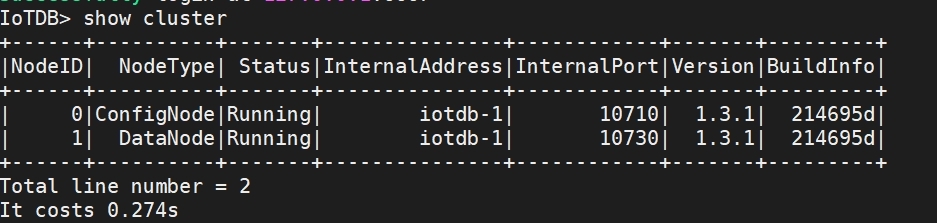
service has started succes
-> The appearance of 'Activated (W)' indicates passive activation, indicating
that this Config Node does not have a license file (or has not issued the
latest license file with a timestamp). At this point, it is recommended to
check if the license file has been placed in the license folder. If not, please
place the license file. If a license file already exists, it may be due to
inconsistency between the license file of this node and the information of
other nodes. Please contact Timecho [...]
\ No newline at end of file
+> The appearance of 'Activated (W)' indicates passive activation, indicating
that this Config Node does not have a license file (or has not issued the
latest license file with a timestamp). At this point, it is recommended to
check if the license file has been placed in the license folder. If not, please
place the license file. If a license file already exists, it may be due to
inconsistency between the license file of this node and the information of
other nodes. Please contact Timecho [...]
+
+## Common Questions
+
+1. Confignode failed to start
+
+ Step 1: Please check the startup log to see if any parameters that cannot
be changed after the first startup have been modified.
+
+ Step 2: Please check the startup log for any other abnormalities. If there
are any abnormal phenomena in the log, please contact Timecho Technical Support
personnel for consultation on solutions.
+
+ Step 3: If it is the first deployment or data can be deleted, you can also
clean up the environment according to the following steps, redeploy, and
restart.
+
+ Clean up the environment:
+
+ Execute the following on all nodes:
+
+ 1. Terminate all ConfigNode Node and DataNode processes.
+ ```Bash
+ # 1. Stop the ConfigNode and DataNode services
+ sbin/stop-standalone.sh
+
+ # 2. Check for any remaining processes
+ jps
+ # Or
+ ps -ef|gerp iotdb
+
+ # 3. If there are any remaining processes, manually kill the
+ kill -9 <pid>
+ # If you are sure there is only one iotdb on the machine, you can use the
following command to clean up residual processes
+ ps -ef|grep iotdb|grep -v grep|tr -s ' ' ' ' |cut -d ' ' -f2|xargs kill
-9
+ ```
+ 2. Delete the data and logs directories.
+
+ Explanation: Deleting the data directory is necessary, deleting the logs
directory is for clean logs and is not mandatory.
+ ```Bash
+ cd /data/iotdb
+ rm -rf data logs
+ ```
\ No newline at end of file
diff --git
a/src/UserGuide/Master/Deployment-and-Maintenance/Stand-Alone-Deployment_timecho.md
b/src/UserGuide/Master/Deployment-and-Maintenance/Stand-Alone-Deployment_timecho.md
index 9019f536..dc159b72 100644
---
a/src/UserGuide/Master/Deployment-and-Maintenance/Stand-Alone-Deployment_timecho.md
+++
b/src/UserGuide/Master/Deployment-and-Maintenance/Stand-Alone-Deployment_timecho.md
@@ -114,6 +114,7 @@ Enter the sbin directory of iotdb and start confignode
```shell
./start-confignode.sh -d #The "- d" parameter will start in the
background
```
+If the startup fails, please refer to [Common Questions](#common-questions).
### 4、Activate Database
@@ -182,4 +183,39 @@ When you see the display "Activated" on the far right, it
indicates successful a
## Common Problem
1. Multiple prompts indicating activation failure during deployment process
- Use the `ls -al` command: Use the `ls -al` command to check if the owner
information of the installation package root directory is the current user.
- - Check activation directory: Check all files in the `./activation`
directory and whether the owner information is the current user.
\ No newline at end of file
+ - Check activation directory: Check all files in the `./activation`
directory and whether the owner information is the current user.
+
+2. Confignode failed to start
+
+ Step 1: Please check the startup log to see if any parameters that cannot
be changed after the first startup have been modified.
+
+ Step 2: Please check the startup log for any other abnormalities. If there
are any abnormal phenomena in the log, please contact Timecho Technical Support
personnel for consultation on solutions.
+
+ Step 3: If it is the first deployment or data can be deleted, you can also
clean up the environment according to the following steps, redeploy, and
restart.
+
+ Clean up the environment:
+
+ Execute the following on all nodes:
+
+ 1. Terminate all ConfigNode Node and DataNode processes.
+ ```Bash
+ # 1. Stop the ConfigNode and DataNode services
+ sbin/stop-standalone.sh
+
+ # 2. Check for any remaining processes
+ jps
+ # Or
+ ps -ef|gerp iotdb
+
+ # 3. If there are any remaining processes, manually kill the
+ kill -9 <pid>
+ # If you are sure there is only one iotdb on the machine, you can use the
following command to clean up residual processes
+ ps -ef|grep iotdb|grep -v grep|tr -s ' ' ' ' |cut -d ' ' -f2|xargs kill
-9
+ ```
+ 2. Delete the data and logs directories.
+
+ Explanation: Deleting the data directory is necessary, deleting the logs
directory is for clean logs and is not mandatory.
+ ```Bash
+ cd /data/iotdb
+ rm -rf data logs
+ ```
\ No newline at end of file
diff --git
a/src/UserGuide/V1.3.0-2/Deployment-and-Maintenance/Cluster-Deployment_apache.md
b/src/UserGuide/V1.3.0-2/Deployment-and-Maintenance/Cluster-Deployment_apache.md
index 0be47c61..0b8cd478 100644
---
a/src/UserGuide/V1.3.0-2/Deployment-and-Maintenance/Cluster-Deployment_apache.md
+++
b/src/UserGuide/V1.3.0-2/Deployment-and-Maintenance/Cluster-Deployment_apache.md
@@ -142,7 +142,7 @@ cd sbin
./start-confignode.sh -d #"- d" parameter will start in the background
```
-If the startup fails, please refer to [Common Questions](#common-questions)
for solutions.
+If the startup fails, please refer to [Common Questions](#common-questions).
### Start DataNode
@@ -312,7 +312,7 @@ sbin/remove-datanode.bat [dn_rpc_address:dn_rpc_port]
## Common Questions
-1. After starting the confignode command, does the node fail to start multiple
times or receive prompts for running errors?
+1. Confignode failed to start
Step 1: Please check the startup log to see if any parameters that cannot
be changed after the first startup have been modified.
diff --git
a/src/UserGuide/V1.3.0-2/Deployment-and-Maintenance/Cluster-Deployment_timecho.md
b/src/UserGuide/V1.3.0-2/Deployment-and-Maintenance/Cluster-Deployment_timecho.md
index 4b55917a..7a4f167e 100644
---
a/src/UserGuide/V1.3.0-2/Deployment-and-Maintenance/Cluster-Deployment_timecho.md
+++
b/src/UserGuide/V1.3.0-2/Deployment-and-Maintenance/Cluster-Deployment_timecho.md
@@ -142,7 +142,7 @@ Start the first confignode of IoTDB-1 first, ensuring that
the seed confignode n
cd sbin
./start-confignode.sh -d #"- d" parameter will start in the background
```
-If the startup fails, please refer to [Common Questions](#common-questions)
for solutions.
+If the startup fails, please refer to [Common Questions](#common-questions).
### Activate Database
@@ -353,7 +353,7 @@ sbin/remove-datanode.bat [dn_rpc_address:dn_rpc_port]
- Use the `ls -al` command: Use the `ls -al` command to check if the owner
information of the installation package root directory is the current user.
- Check activation directory: Check all files in the `./activation`
directory and whether the owner information is the current user.
-2. After starting the confignode command, does the node fail to start multiple
times or receive prompts for running errors?
+2. Confignode failed to start
Step 1: Please check the startup log to see if any parameters that cannot
be changed after the first startup have been modified.
diff --git
a/src/UserGuide/V1.3.0-2/Deployment-and-Maintenance/Stand-Alone-Deployment_apache.md
b/src/UserGuide/V1.3.0-2/Deployment-and-Maintenance/Stand-Alone-Deployment_apache.md
index b1fe40c4..ab038212 100644
---
a/src/UserGuide/V1.3.0-2/Deployment-and-Maintenance/Stand-Alone-Deployment_apache.md
+++
b/src/UserGuide/V1.3.0-2/Deployment-and-Maintenance/Stand-Alone-Deployment_apache.md
@@ -110,6 +110,7 @@ Enter the sbin directory of iotdb and start confignode
```Shell
./start-confignode.sh -d #The "- d" parameter will start in the
background
```
+If the startup fails, please refer to [Common Questions](#common-questions).
### Start DataNode
@@ -138,4 +139,41 @@ When the status is all running, it indicates that the
service has started succes

-> The appearance of 'Activated (W)' indicates passive activation, indicating
that this Config Node does not have a license file (or has not issued the
latest license file with a timestamp). At this point, it is recommended to
check if the license file has been placed in the license folder. If not, please
place the license file. If a license file already exists, it may be due to
inconsistency between the license file of this node and the information of
other nodes. Please contact Timecho [...]
\ No newline at end of file
+> The appearance of 'Activated (W)' indicates passive activation, indicating
that this Config Node does not have a license file (or has not issued the
latest license file with a timestamp). At this point, it is recommended to
check if the license file has been placed in the license folder. If not, please
place the license file. If a license file already exists, it may be due to
inconsistency between the license file of this node and the information of
other nodes. Please contact Timecho [...]
+
+## Common Questions
+
+1. Confignode failed to start
+
+ Step 1: Please check the startup log to see if any parameters that cannot
be changed after the first startup have been modified.
+
+ Step 2: Please check the startup log for any other abnormalities. If there
are any abnormal phenomena in the log, please contact Timecho Technical Support
personnel for consultation on solutions.
+
+ Step 3: If it is the first deployment or data can be deleted, you can also
clean up the environment according to the following steps, redeploy, and
restart.
+
+ Clean up the environment:
+
+ Execute the following on all nodes:
+
+ 1. Terminate all ConfigNode Node and DataNode processes.
+ ```Bash
+ # 1. Stop the ConfigNode and DataNode services
+ sbin/stop-standalone.sh
+
+ # 2. Check for any remaining processes
+ jps
+ # Or
+ ps -ef|gerp iotdb
+
+ # 3. If there are any remaining processes, manually kill the
+ kill -9 <pid>
+ # If you are sure there is only one iotdb on the machine, you can use the
following command to clean up residual processes
+ ps -ef|grep iotdb|grep -v grep|tr -s ' ' ' ' |cut -d ' ' -f2|xargs kill
-9
+ ```
+ 2. Delete the data and logs directories.
+
+ Explanation: Deleting the data directory is necessary, deleting the logs
directory is for clean logs and is not mandatory.
+ ```Bash
+ cd /data/iotdb
+ rm -rf data logs
+ ```
diff --git
a/src/UserGuide/V1.3.0-2/Deployment-and-Maintenance/Stand-Alone-Deployment_timecho.md
b/src/UserGuide/V1.3.0-2/Deployment-and-Maintenance/Stand-Alone-Deployment_timecho.md
index e44df348..26850f2b 100644
---
a/src/UserGuide/V1.3.0-2/Deployment-and-Maintenance/Stand-Alone-Deployment_timecho.md
+++
b/src/UserGuide/V1.3.0-2/Deployment-and-Maintenance/Stand-Alone-Deployment_timecho.md
@@ -116,6 +116,7 @@ Enter the sbin directory of iotdb and start confignode
```shell
./start-confignode.sh -d #The "- d" parameter will start in the
background
```
+If the startup fails, please refer to [Common Questions](#common-questions).
### Activate Database
@@ -183,4 +184,39 @@ When you see the display "Activated" on the far right, it
indicates successful a
## Common Problem
1. Multiple prompts indicating activation failure during deployment process
- Use the `ls -al` command: Use the `ls -al` command to check if the owner
information of the installation package root directory is the current user.
- - Check activation directory: Check all files in the `./activation`
directory and whether the owner information is the current user.
\ No newline at end of file
+ - Check activation directory: Check all files in the `./activation`
directory and whether the owner information is the current user.
+
+2. Confignode failed to start
+
+ Step 1: Please check the startup log to see if any parameters that cannot
be changed after the first startup have been modified.
+
+ Step 2: Please check the startup log for any other abnormalities. If there
are any abnormal phenomena in the log, please contact Timecho Technical Support
personnel for consultation on solutions.
+
+ Step 3: If it is the first deployment or data can be deleted, you can also
clean up the environment according to the following steps, redeploy, and
restart.
+
+ Clean up the environment:
+
+ Execute the following on all nodes:
+
+ 1. Terminate all ConfigNode Node and DataNode processes.
+ ```Bash
+ # 1. Stop the ConfigNode and DataNode services
+ sbin/stop-standalone.sh
+
+ # 2. Check for any remaining processes
+ jps
+ # Or
+ ps -ef|gerp iotdb
+
+ # 3. If there are any remaining processes, manually kill the
+ kill -9 <pid>
+ # If you are sure there is only one iotdb on the machine, you can use the
following command to clean up residual processes
+ ps -ef|grep iotdb|grep -v grep|tr -s ' ' ' ' |cut -d ' ' -f2|xargs kill
-9
+ ```
+ 2. Delete the data and logs directories.
+
+ Explanation: Deleting the data directory is necessary, deleting the logs
directory is for clean logs and is not mandatory.
+ ```Bash
+ cd /data/iotdb
+ rm -rf data logs
+ ```
\ No newline at end of file
diff --git
a/src/UserGuide/latest/Deployment-and-Maintenance/Cluster-Deployment_apache.md
b/src/UserGuide/latest/Deployment-and-Maintenance/Cluster-Deployment_apache.md
index e2bb2839..41c914b5 100644
---
a/src/UserGuide/latest/Deployment-and-Maintenance/Cluster-Deployment_apache.md
+++
b/src/UserGuide/latest/Deployment-and-Maintenance/Cluster-Deployment_apache.md
@@ -142,7 +142,7 @@ cd sbin
./start-confignode.sh -d #"- d" parameter will start in the background
```
-If the startup fails, please refer to [Common Questions](#common-questions)
for solutions.
+If the startup fails, please refer to [Common Questions](#common-questions).
### Start DataNode
@@ -311,7 +311,7 @@ sbin/remove-datanode.bat [datanode_id]
```
## Common Questions
-1. After starting the confignode command, does the node fail to start multiple
times or receive prompts for running errors?
+1. Confignode failed to start
Step 1: Please check the startup log to see if any parameters that cannot
be changed after the first startup have been modified.
diff --git
a/src/UserGuide/latest/Deployment-and-Maintenance/Cluster-Deployment_timecho.md
b/src/UserGuide/latest/Deployment-and-Maintenance/Cluster-Deployment_timecho.md
index fa13621d..b52c9e95 100644
---
a/src/UserGuide/latest/Deployment-and-Maintenance/Cluster-Deployment_timecho.md
+++
b/src/UserGuide/latest/Deployment-and-Maintenance/Cluster-Deployment_timecho.md
@@ -142,7 +142,7 @@ cd sbin
./start-confignode.sh -d #"- d" parameter will start in the background
```
-If the startup fails, please refer to [Common Questions](#common-questions)
for solutions.
+If the startup fails, please refer to [Common Questions](#common-questions).
### Activate Database
@@ -352,7 +352,7 @@ sbin/remove-datanode.bat [datanode_id]
- Use the `ls -al` command: Use the `ls -al` command to check if the owner
information of the installation package root directory is the current user.
- Check activation directory: Check all files in the `./activation`
directory and whether the owner information is the current user.
-2. After starting the confignode command, does the node fail to start multiple
times or receive prompts for running errors?
+2. Confignode failed to start
Step 1: Please check the startup log to see if any parameters that cannot
be changed after the first startup have been modified.
diff --git
a/src/UserGuide/latest/Deployment-and-Maintenance/Stand-Alone-Deployment_apache.md
b/src/UserGuide/latest/Deployment-and-Maintenance/Stand-Alone-Deployment_apache.md
index 19b1bfd4..85bbfa05 100644
---
a/src/UserGuide/latest/Deployment-and-Maintenance/Stand-Alone-Deployment_apache.md
+++
b/src/UserGuide/latest/Deployment-and-Maintenance/Stand-Alone-Deployment_apache.md
@@ -110,6 +110,7 @@ Enter the sbin directory of iotdb and start confignode
```Shell
./start-confignode.sh -d #The "- d" parameter will start in the
background
```
+If the startup fails, please refer to [Common Questions](#common-questions).
### 4、Start DataNode
@@ -138,4 +139,41 @@ When the status is all running, it indicates that the
service has started succes

-> The appearance of 'Activated (W)' indicates passive activation, indicating
that this Config Node does not have a license file (or has not issued the
latest license file with a timestamp). At this point, it is recommended to
check if the license file has been placed in the license folder. If not, please
place the license file. If a license file already exists, it may be due to
inconsistency between the license file of this node and the information of
other nodes. Please contact Timecho [...]
\ No newline at end of file
+> The appearance of 'Activated (W)' indicates passive activation, indicating
that this Config Node does not have a license file (or has not issued the
latest license file with a timestamp). At this point, it is recommended to
check if the license file has been placed in the license folder. If not, please
place the license file. If a license file already exists, it may be due to
inconsistency between the license file of this node and the information of
other nodes. Please contact Timecho [...]
+
+## Common Questions
+
+1. Confignode failed to start
+
+ Step 1: Please check the startup log to see if any parameters that cannot
be changed after the first startup have been modified.
+
+ Step 2: Please check the startup log for any other abnormalities. If there
are any abnormal phenomena in the log, please contact Timecho Technical Support
personnel for consultation on solutions.
+
+ Step 3: If it is the first deployment or data can be deleted, you can also
clean up the environment according to the following steps, redeploy, and
restart.
+
+ Clean up the environment:
+
+ Execute the following on all nodes:
+
+ 1. Terminate all ConfigNode Node and DataNode processes.
+ ```Bash
+ # 1. Stop the ConfigNode and DataNode services
+ sbin/stop-standalone.sh
+
+ # 2. Check for any remaining processes
+ jps
+ # Or
+ ps -ef|gerp iotdb
+
+ # 3. If there are any remaining processes, manually kill the
+ kill -9 <pid>
+ # If you are sure there is only one iotdb on the machine, you can use the
following command to clean up residual processes
+ ps -ef|grep iotdb|grep -v grep|tr -s ' ' ' ' |cut -d ' ' -f2|xargs kill
-9
+ ```
+ 2. Delete the data and logs directories.
+
+ Explanation: Deleting the data directory is necessary, deleting the logs
directory is for clean logs and is not mandatory.
+ ```Bash
+ cd /data/iotdb
+ rm -rf data logs
+ ```
\ No newline at end of file
diff --git
a/src/UserGuide/latest/Deployment-and-Maintenance/Stand-Alone-Deployment_timecho.md
b/src/UserGuide/latest/Deployment-and-Maintenance/Stand-Alone-Deployment_timecho.md
index 9019f536..dc159b72 100644
---
a/src/UserGuide/latest/Deployment-and-Maintenance/Stand-Alone-Deployment_timecho.md
+++
b/src/UserGuide/latest/Deployment-and-Maintenance/Stand-Alone-Deployment_timecho.md
@@ -114,6 +114,7 @@ Enter the sbin directory of iotdb and start confignode
```shell
./start-confignode.sh -d #The "- d" parameter will start in the
background
```
+If the startup fails, please refer to [Common Questions](#common-questions).
### 4、Activate Database
@@ -182,4 +183,39 @@ When you see the display "Activated" on the far right, it
indicates successful a
## Common Problem
1. Multiple prompts indicating activation failure during deployment process
- Use the `ls -al` command: Use the `ls -al` command to check if the owner
information of the installation package root directory is the current user.
- - Check activation directory: Check all files in the `./activation`
directory and whether the owner information is the current user.
\ No newline at end of file
+ - Check activation directory: Check all files in the `./activation`
directory and whether the owner information is the current user.
+
+2. Confignode failed to start
+
+ Step 1: Please check the startup log to see if any parameters that cannot
be changed after the first startup have been modified.
+
+ Step 2: Please check the startup log for any other abnormalities. If there
are any abnormal phenomena in the log, please contact Timecho Technical Support
personnel for consultation on solutions.
+
+ Step 3: If it is the first deployment or data can be deleted, you can also
clean up the environment according to the following steps, redeploy, and
restart.
+
+ Clean up the environment:
+
+ Execute the following on all nodes:
+
+ 1. Terminate all ConfigNode Node and DataNode processes.
+ ```Bash
+ # 1. Stop the ConfigNode and DataNode services
+ sbin/stop-standalone.sh
+
+ # 2. Check for any remaining processes
+ jps
+ # Or
+ ps -ef|gerp iotdb
+
+ # 3. If there are any remaining processes, manually kill the
+ kill -9 <pid>
+ # If you are sure there is only one iotdb on the machine, you can use the
following command to clean up residual processes
+ ps -ef|grep iotdb|grep -v grep|tr -s ' ' ' ' |cut -d ' ' -f2|xargs kill
-9
+ ```
+ 2. Delete the data and logs directories.
+
+ Explanation: Deleting the data directory is necessary, deleting the logs
directory is for clean logs and is not mandatory.
+ ```Bash
+ cd /data/iotdb
+ rm -rf data logs
+ ```
\ No newline at end of file
diff --git
a/src/zh/UserGuide/Master/Deployment-and-Maintenance/Cluster-Deployment_apache.md
b/src/zh/UserGuide/Master/Deployment-and-Maintenance/Cluster-Deployment_apache.md
index 4364518d..cabbe51e 100644
---
a/src/zh/UserGuide/Master/Deployment-and-Maintenance/Cluster-Deployment_apache.md
+++
b/src/zh/UserGuide/Master/Deployment-and-Maintenance/Cluster-Deployment_apache.md
@@ -141,7 +141,7 @@ cd apache-iotdb-{version}-all-bin
cd sbin
./start-confignode.sh -d #“-d”参数将在后台进行启动
```
-如果启动失败,请到[常见问题](#常见问题)查看解决方案。
+如果启动失败,请参考[常见问题](#常见问题)。
### 启动DataNode 节点
@@ -310,7 +310,7 @@ sbin/remove-datanode.bat [datanode_id]
## 常见问题
-1. 启动confignode的命令后,节点多次启动失败或出现运行错误的提示?
+1. Confignode节点启动失败
步骤 1: 请查看启动日志,检查是否修改了某些首次启动后不可改的参数。
diff --git
a/src/zh/UserGuide/Master/Deployment-and-Maintenance/Cluster-Deployment_timecho.md
b/src/zh/UserGuide/Master/Deployment-and-Maintenance/Cluster-Deployment_timecho.md
index 3304df98..7977cbe1 100644
---
a/src/zh/UserGuide/Master/Deployment-and-Maintenance/Cluster-Deployment_timecho.md
+++
b/src/zh/UserGuide/Master/Deployment-and-Maintenance/Cluster-Deployment_timecho.md
@@ -142,7 +142,7 @@ cd iotdb-enterprise-{version}-bin
cd sbin
./start-confignode.sh -d #“-d”参数将在后台进行启动
```
-如果启动失败,请到[常见问题](#常见问题)查看解决方案。
+如果启动失败,请参考[常见问题](#常见问题)。
### 激活数据库
@@ -352,7 +352,7 @@ sbin/remove-datanode.bat [datanode_id]
- 使用 `ls -al` 命令:使用 `ls -al` 命令检查安装包根目录的所有者信息是否为当前用户。
- 检查激活目录:检查 `./activation` 目录下的所有文件,所有者信息是否为当前用户。
-2. 启动confignode的命令后,节点多次启动失败或出现运行错误的提示?
+2. Confignode节点启动失败
步骤 1: 请查看启动日志,检查是否修改了某些首次启动后不可改的参数。
diff --git
a/src/zh/UserGuide/Master/Deployment-and-Maintenance/Stand-Alone-Deployment_apache.md
b/src/zh/UserGuide/Master/Deployment-and-Maintenance/Stand-Alone-Deployment_apache.md
index b7cbcb1a..668e727a 100644
---
a/src/zh/UserGuide/Master/Deployment-and-Maintenance/Stand-Alone-Deployment_apache.md
+++
b/src/zh/UserGuide/Master/Deployment-and-Maintenance/Stand-Alone-Deployment_apache.md
@@ -110,6 +110,7 @@ cd apache-iotdb-{version}-all-bin
```shell
./start-confignode.sh -d #“-d”参数将在后台进行启动
```
+如果启动失败,请参考[常见问题](#常见问题)。
### 启动DataNode 节点
@@ -139,3 +140,37 @@ cd sbin

> 出现`ACTIVATED(W)`为被动激活,表示此ConfigNode没有license文件(或没有签发时间戳最新的license文件)。此时建议检查license文件是否已放入license文件夹,没有请放入license文件,若已存在license文件,可能是此节点license文件与其他节点信息不一致导致,请联系天谋工作人员重新申请.
+
+## 常见问题
+
+1. Confignode节点启动失败
+
+ 步骤 1: 请查看启动日志,检查是否修改了某些首次启动后不可改的参数。
+
+ 步骤 2: 请查看启动日志,检查是否出现其他异常。日志中若存在异常现象,请联系天谋技术支持人员咨询解决方案。
+
+ 步骤 3: 如果是首次部署或者数据可删除,也可按下述步骤清理环境,重新部署后,再次启动。
+
+ 清理环境:
+ 1. 结束所有 ConfigNode 和 DataNode 进程。
+ ```Bash
+ # 1. 停止 ConfigNode 和 DataNode 服务
+ sbin/stop-standalone.sh
+
+ # 2. 检查是否还有进程残留
+ jps
+ # 或者
+ ps -ef|gerp iotdb
+
+ # 3. 如果有进程残留,则手动kill
+ kill -9 <pid>
+ # 如果确定机器上仅有1个iotdb,可以使用下面命令清理残留进程
+ ps -ef|grep iotdb|grep -v grep|tr -s ' ' ' ' |cut -d ' ' -f2|xargs kill -9
+ ```
+ 2. 删除 data 和 logs 目录。
+
+ 说明:删除 data 目录是必要的,删除 logs 目录是为了纯净日志,非必需。
+ ```Bash
+ cd /data/iotdb
+ rm -rf data logs
+ ```
\ No newline at end of file
diff --git
a/src/zh/UserGuide/Master/Deployment-and-Maintenance/Stand-Alone-Deployment_timecho.md
b/src/zh/UserGuide/Master/Deployment-and-Maintenance/Stand-Alone-Deployment_timecho.md
index fba9e24d..cc292b77 100644
---
a/src/zh/UserGuide/Master/Deployment-and-Maintenance/Stand-Alone-Deployment_timecho.md
+++
b/src/zh/UserGuide/Master/Deployment-and-Maintenance/Stand-Alone-Deployment_timecho.md
@@ -114,6 +114,7 @@ cd iotdb-enterprise-{version}-bin
```shell
./start-confignode.sh -d #“-d”参数将在后台进行启动
```
+如果启动失败,请参考[常见问题](#常见问题)。
### 激活数据库
@@ -183,4 +184,36 @@ cd sbin
1. 部署过程中多次提示激活失败
- 使用 `ls -al` 命令:使用 `ls -al` 命令检查安装包根目录的所有者信息是否为当前用户。
- - 检查激活目录:检查 `./activation` 目录下的所有文件,所有者信息是否为当前用户。
\ No newline at end of file
+ - 检查激活目录:检查 `./activation` 目录下的所有文件,所有者信息是否为当前用户。
+
+2. Confignode节点启动失败
+
+ 步骤 1: 请查看启动日志,检查是否修改了某些首次启动后不可改的参数。
+
+ 步骤 2: 请查看启动日志,检查是否出现其他异常。日志中若存在异常现象,请联系天谋技术支持人员咨询解决方案。
+
+ 步骤 3: 如果是首次部署或者数据可删除,也可按下述步骤清理环境,重新部署后,再次启动。
+
+ 清理环境:
+ 1. 结束所有 ConfigNode 和 DataNode 进程。
+ ```Bash
+ # 1. 停止 ConfigNode 和 DataNode 服务
+ sbin/stop-standalone.sh
+
+ # 2. 检查是否还有进程残留
+ jps
+ # 或者
+ ps -ef|gerp iotdb
+
+ # 3. 如果有进程残留,则手动kill
+ kill -9 <pid>
+ # 如果确定机器上仅有1个iotdb,可以使用下面命令清理残留进程
+ ps -ef|grep iotdb|grep -v grep|tr -s ' ' ' ' |cut -d ' ' -f2|xargs kill -9
+ ```
+ 2. 删除 data 和 logs 目录。
+
+ 说明:删除 data 目录是必要的,删除 logs 目录是为了纯净日志,非必需。
+ ```Bash
+ cd /data/iotdb
+ rm -rf data logs
+ ```
\ No newline at end of file
diff --git
a/src/zh/UserGuide/V1.3.0-2/Deployment-and-Maintenance/Stand-Alone-Deployment_apache.md
b/src/zh/UserGuide/V1.3.0-2/Deployment-and-Maintenance/Stand-Alone-Deployment_apache.md
index 5f005b2d..d44c8f41 100644
---
a/src/zh/UserGuide/V1.3.0-2/Deployment-and-Maintenance/Stand-Alone-Deployment_apache.md
+++
b/src/zh/UserGuide/V1.3.0-2/Deployment-and-Maintenance/Stand-Alone-Deployment_apache.md
@@ -110,6 +110,7 @@ cd apache-iotdb-{version}-all-bin
```shell
./start-confignode.sh -d #“-d”参数将在后台进行启动
```
+如果启动失败,请参考[常见问题](#常见问题)。
### 启动DataNode 节点
@@ -140,3 +141,37 @@ cd sbin

> 出现`ACTIVATED(W)`为被动激活,表示此ConfigNode没有license文件(或没有签发时间戳最新的license文件)。此时建议检查license文件是否已放入license文件夹,没有请放入license文件,若已存在license文件,可能是此节点license文件与其他节点信息不一致导致,请联系天谋工作人员重新申请.
+
+## 常见问题
+
+1. Confignode节点启动失败
+
+ 步骤 1: 请查看启动日志,检查是否修改了某些首次启动后不可改的参数。
+
+ 步骤 2: 请查看启动日志,检查是否出现其他异常。日志中若存在异常现象,请联系天谋技术支持人员咨询解决方案。
+
+ 步骤 3: 如果是首次部署或者数据可删除,也可按下述步骤清理环境,重新部署后,再次启动。
+
+ 清理环境:
+ 1. 结束所有 ConfigNode 和 DataNode 进程。
+ ```Bash
+ # 1. 停止 ConfigNode 和 DataNode 服务
+ sbin/stop-standalone.sh
+
+ # 2. 检查是否还有进程残留
+ jps
+ # 或者
+ ps -ef|gerp iotdb
+
+ # 3. 如果有进程残留,则手动kill
+ kill -9 <pid>
+ # 如果确定机器上仅有1个iotdb,可以使用下面命令清理残留进程
+ ps -ef|grep iotdb|grep -v grep|tr -s ' ' ' ' |cut -d ' ' -f2|xargs kill -9
+ ```
+ 2. 删除 data 和 logs 目录。
+
+ 说明:删除 data 目录是必要的,删除 logs 目录是为了纯净日志,非必需。
+ ```Bash
+ cd /data/iotdb
+ rm -rf data logs
+ ```
\ No newline at end of file
diff --git
a/src/zh/UserGuide/V1.3.0-2/Deployment-and-Maintenance/Stand-Alone-Deployment_timecho.md
b/src/zh/UserGuide/V1.3.0-2/Deployment-and-Maintenance/Stand-Alone-Deployment_timecho.md
index 5dfe0f85..c5d44919 100644
---
a/src/zh/UserGuide/V1.3.0-2/Deployment-and-Maintenance/Stand-Alone-Deployment_timecho.md
+++
b/src/zh/UserGuide/V1.3.0-2/Deployment-and-Maintenance/Stand-Alone-Deployment_timecho.md
@@ -114,6 +114,7 @@ cd iotdb-enterprise-{version}-bin
```shell
./start-confignode.sh -d #“-d”参数将在后台进行启动
```
+如果启动失败,请参考[常见问题](#常见问题)。
### 激活数据库
@@ -182,4 +183,37 @@ cd sbin
1. 部署过程中多次提示激活失败
- 使用 `ls -al` 命令:使用 `ls -al` 命令检查安装包根目录的所有者信息是否为当前用户。
- - 检查激活目录:检查 `./activation` 目录下的所有文件,所有者信息是否为当前用户。
\ No newline at end of file
+ - 检查激活目录:检查 `./activation` 目录下的所有文件,所有者信息是否为当前用户。
+
+2. Confignode节点启动失败
+
+ 步骤 1: 请查看启动日志,检查是否修改了某些首次启动后不可改的参数。
+
+ 步骤 2: 请查看启动日志,检查是否出现其他异常。日志中若存在异常现象,请联系天谋技术支持人员咨询解决方案。
+
+ 步骤 3: 如果是首次部署或者数据可删除,也可按下述步骤清理环境,重新部署后,再次启动。
+
+ 清理环境:
+ 1. 结束所有 ConfigNode 和 DataNode 进程。
+ ```Bash
+ # 1. 停止 ConfigNode 和 DataNode 服务
+ sbin/stop-standalone.sh
+
+ # 2. 检查是否还有进程残留
+ jps
+ # 或者
+ ps -ef|gerp iotdb
+
+ # 3. 如果有进程残留,则手动kill
+ kill -9 <pid>
+ # 如果确定机器上仅有1个iotdb,可以使用下面命令清理残留进程
+ ps -ef|grep iotdb|grep -v grep|tr -s ' ' ' ' |cut -d ' ' -f2|xargs kill -9
+ ```
+ 2. 删除 data 和 logs 目录。
+
+ 说明:删除 data 目录是必要的,删除 logs 目录是为了纯净日志,非必需。
+ ```Bash
+ cd /data/iotdb
+ rm -rf data logs
+ ```
+
diff --git
a/src/zh/UserGuide/latest/Deployment-and-Maintenance/Cluster-Deployment_apache.md
b/src/zh/UserGuide/latest/Deployment-and-Maintenance/Cluster-Deployment_apache.md
index 4364518d..cabbe51e 100644
---
a/src/zh/UserGuide/latest/Deployment-and-Maintenance/Cluster-Deployment_apache.md
+++
b/src/zh/UserGuide/latest/Deployment-and-Maintenance/Cluster-Deployment_apache.md
@@ -141,7 +141,7 @@ cd apache-iotdb-{version}-all-bin
cd sbin
./start-confignode.sh -d #“-d”参数将在后台进行启动
```
-如果启动失败,请到[常见问题](#常见问题)查看解决方案。
+如果启动失败,请参考[常见问题](#常见问题)。
### 启动DataNode 节点
@@ -310,7 +310,7 @@ sbin/remove-datanode.bat [datanode_id]
## 常见问题
-1. 启动confignode的命令后,节点多次启动失败或出现运行错误的提示?
+1. Confignode节点启动失败
步骤 1: 请查看启动日志,检查是否修改了某些首次启动后不可改的参数。
diff --git
a/src/zh/UserGuide/latest/Deployment-and-Maintenance/Cluster-Deployment_timecho.md
b/src/zh/UserGuide/latest/Deployment-and-Maintenance/Cluster-Deployment_timecho.md
index 3304df98..7977cbe1 100644
---
a/src/zh/UserGuide/latest/Deployment-and-Maintenance/Cluster-Deployment_timecho.md
+++
b/src/zh/UserGuide/latest/Deployment-and-Maintenance/Cluster-Deployment_timecho.md
@@ -142,7 +142,7 @@ cd iotdb-enterprise-{version}-bin
cd sbin
./start-confignode.sh -d #“-d”参数将在后台进行启动
```
-如果启动失败,请到[常见问题](#常见问题)查看解决方案。
+如果启动失败,请参考[常见问题](#常见问题)。
### 激活数据库
@@ -352,7 +352,7 @@ sbin/remove-datanode.bat [datanode_id]
- 使用 `ls -al` 命令:使用 `ls -al` 命令检查安装包根目录的所有者信息是否为当前用户。
- 检查激活目录:检查 `./activation` 目录下的所有文件,所有者信息是否为当前用户。
-2. 启动confignode的命令后,节点多次启动失败或出现运行错误的提示?
+2. Confignode节点启动失败
步骤 1: 请查看启动日志,检查是否修改了某些首次启动后不可改的参数。
diff --git
a/src/zh/UserGuide/latest/Deployment-and-Maintenance/Stand-Alone-Deployment_apache.md
b/src/zh/UserGuide/latest/Deployment-and-Maintenance/Stand-Alone-Deployment_apache.md
index b7cbcb1a..668e727a 100644
---
a/src/zh/UserGuide/latest/Deployment-and-Maintenance/Stand-Alone-Deployment_apache.md
+++
b/src/zh/UserGuide/latest/Deployment-and-Maintenance/Stand-Alone-Deployment_apache.md
@@ -110,6 +110,7 @@ cd apache-iotdb-{version}-all-bin
```shell
./start-confignode.sh -d #“-d”参数将在后台进行启动
```
+如果启动失败,请参考[常见问题](#常见问题)。
### 启动DataNode 节点
@@ -139,3 +140,37 @@ cd sbin

> 出现`ACTIVATED(W)`为被动激活,表示此ConfigNode没有license文件(或没有签发时间戳最新的license文件)。此时建议检查license文件是否已放入license文件夹,没有请放入license文件,若已存在license文件,可能是此节点license文件与其他节点信息不一致导致,请联系天谋工作人员重新申请.
+
+## 常见问题
+
+1. Confignode节点启动失败
+
+ 步骤 1: 请查看启动日志,检查是否修改了某些首次启动后不可改的参数。
+
+ 步骤 2: 请查看启动日志,检查是否出现其他异常。日志中若存在异常现象,请联系天谋技术支持人员咨询解决方案。
+
+ 步骤 3: 如果是首次部署或者数据可删除,也可按下述步骤清理环境,重新部署后,再次启动。
+
+ 清理环境:
+ 1. 结束所有 ConfigNode 和 DataNode 进程。
+ ```Bash
+ # 1. 停止 ConfigNode 和 DataNode 服务
+ sbin/stop-standalone.sh
+
+ # 2. 检查是否还有进程残留
+ jps
+ # 或者
+ ps -ef|gerp iotdb
+
+ # 3. 如果有进程残留,则手动kill
+ kill -9 <pid>
+ # 如果确定机器上仅有1个iotdb,可以使用下面命令清理残留进程
+ ps -ef|grep iotdb|grep -v grep|tr -s ' ' ' ' |cut -d ' ' -f2|xargs kill -9
+ ```
+ 2. 删除 data 和 logs 目录。
+
+ 说明:删除 data 目录是必要的,删除 logs 目录是为了纯净日志,非必需。
+ ```Bash
+ cd /data/iotdb
+ rm -rf data logs
+ ```
\ No newline at end of file
diff --git
a/src/zh/UserGuide/latest/Deployment-and-Maintenance/Stand-Alone-Deployment_timecho.md
b/src/zh/UserGuide/latest/Deployment-and-Maintenance/Stand-Alone-Deployment_timecho.md
index fba9e24d..cc292b77 100644
---
a/src/zh/UserGuide/latest/Deployment-and-Maintenance/Stand-Alone-Deployment_timecho.md
+++
b/src/zh/UserGuide/latest/Deployment-and-Maintenance/Stand-Alone-Deployment_timecho.md
@@ -114,6 +114,7 @@ cd iotdb-enterprise-{version}-bin
```shell
./start-confignode.sh -d #“-d”参数将在后台进行启动
```
+如果启动失败,请参考[常见问题](#常见问题)。
### 激活数据库
@@ -183,4 +184,36 @@ cd sbin
1. 部署过程中多次提示激活失败
- 使用 `ls -al` 命令:使用 `ls -al` 命令检查安装包根目录的所有者信息是否为当前用户。
- - 检查激活目录:检查 `./activation` 目录下的所有文件,所有者信息是否为当前用户。
\ No newline at end of file
+ - 检查激活目录:检查 `./activation` 目录下的所有文件,所有者信息是否为当前用户。
+
+2. Confignode节点启动失败
+
+ 步骤 1: 请查看启动日志,检查是否修改了某些首次启动后不可改的参数。
+
+ 步骤 2: 请查看启动日志,检查是否出现其他异常。日志中若存在异常现象,请联系天谋技术支持人员咨询解决方案。
+
+ 步骤 3: 如果是首次部署或者数据可删除,也可按下述步骤清理环境,重新部署后,再次启动。
+
+ 清理环境:
+ 1. 结束所有 ConfigNode 和 DataNode 进程。
+ ```Bash
+ # 1. 停止 ConfigNode 和 DataNode 服务
+ sbin/stop-standalone.sh
+
+ # 2. 检查是否还有进程残留
+ jps
+ # 或者
+ ps -ef|gerp iotdb
+
+ # 3. 如果有进程残留,则手动kill
+ kill -9 <pid>
+ # 如果确定机器上仅有1个iotdb,可以使用下面命令清理残留进程
+ ps -ef|grep iotdb|grep -v grep|tr -s ' ' ' ' |cut -d ' ' -f2|xargs kill -9
+ ```
+ 2. 删除 data 和 logs 目录。
+
+ 说明:删除 data 目录是必要的,删除 logs 目录是为了纯净日志,非必需。
+ ```Bash
+ cd /data/iotdb
+ rm -rf data logs
+ ```
\ No newline at end of file

