This is an automated email from the ASF dual-hosted git repository.

zhaoxinyi pushed a commit to branch main
in repository https://gitbox.apache.org/repos/asf/iotdb-docs.git
The following commit(s) were added to refs/heads/main by this push:
new 6a85564f After data synchronization is created, it will automatically
start (v… (#419)
6a85564f is described below
commit 6a85564f80bcf71278eb526d7581e4f136d2e434
Author: W1y1r <[email protected]>
AuthorDate: Mon Nov 18 20:53:09 2024 +0800
After data synchronization is created, it will automatically start (v…
(#419)
* After data synchronization is created, it will automatically start
(version 1.3.1+)
* Modify the position of the document to add new content
---
src/UserGuide/Master/User-Manual/Data-Sync_apache.md | 6 ++++--
src/UserGuide/Master/User-Manual/Data-Sync_timecho.md | 6 ++++--
src/UserGuide/V1.3.0-2/User-Manual/Data-Sync_apache.md | 13 ++++++++++++-
src/UserGuide/V1.3.0-2/User-Manual/Data-Sync_timecho.md | 13 ++++++++++++-
src/UserGuide/latest/User-Manual/Data-Sync_apache.md | 6 ++++--
src/UserGuide/latest/User-Manual/Data-Sync_timecho.md | 6 ++++--
src/zh/UserGuide/Master/User-Manual/Data-Sync_apache.md | 6 ++++--
src/zh/UserGuide/Master/User-Manual/Data-Sync_timecho.md | 6 ++++--
src/zh/UserGuide/V1.3.0-2/User-Manual/Data-Sync_apache.md | 12 +++++++++++-
src/zh/UserGuide/V1.3.0-2/User-Manual/Data-Sync_timecho.md | 12 +++++++++++-
src/zh/UserGuide/latest/User-Manual/Data-Sync_apache.md | 6 ++++--
src/zh/UserGuide/latest/User-Manual/Data-Sync_timecho.md | 6 ++++--
12 files changed, 78 insertions(+), 20 deletions(-)
diff --git a/src/UserGuide/Master/User-Manual/Data-Sync_apache.md
b/src/UserGuide/Master/User-Manual/Data-Sync_apache.md
index 65eb6fbb..b6a42fc1 100644
--- a/src/UserGuide/Master/User-Manual/Data-Sync_apache.md
+++ b/src/UserGuide/Master/User-Manual/Data-Sync_apache.md
@@ -92,7 +92,9 @@ The schema and auth synchronization functions have the
following limitations:
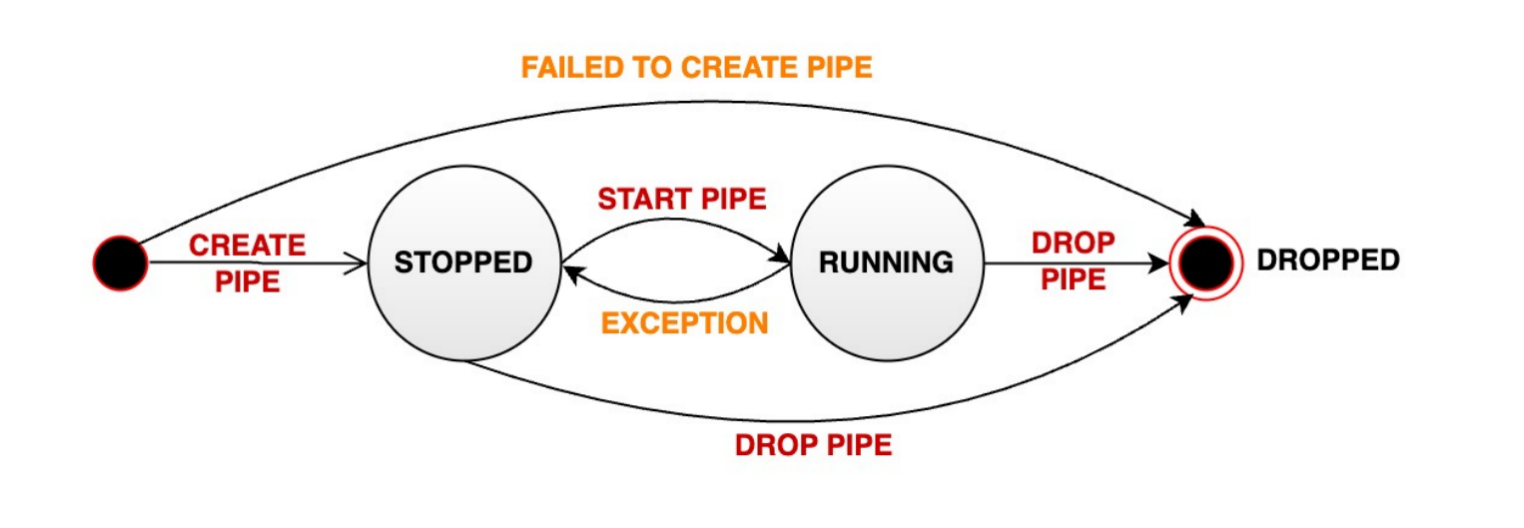
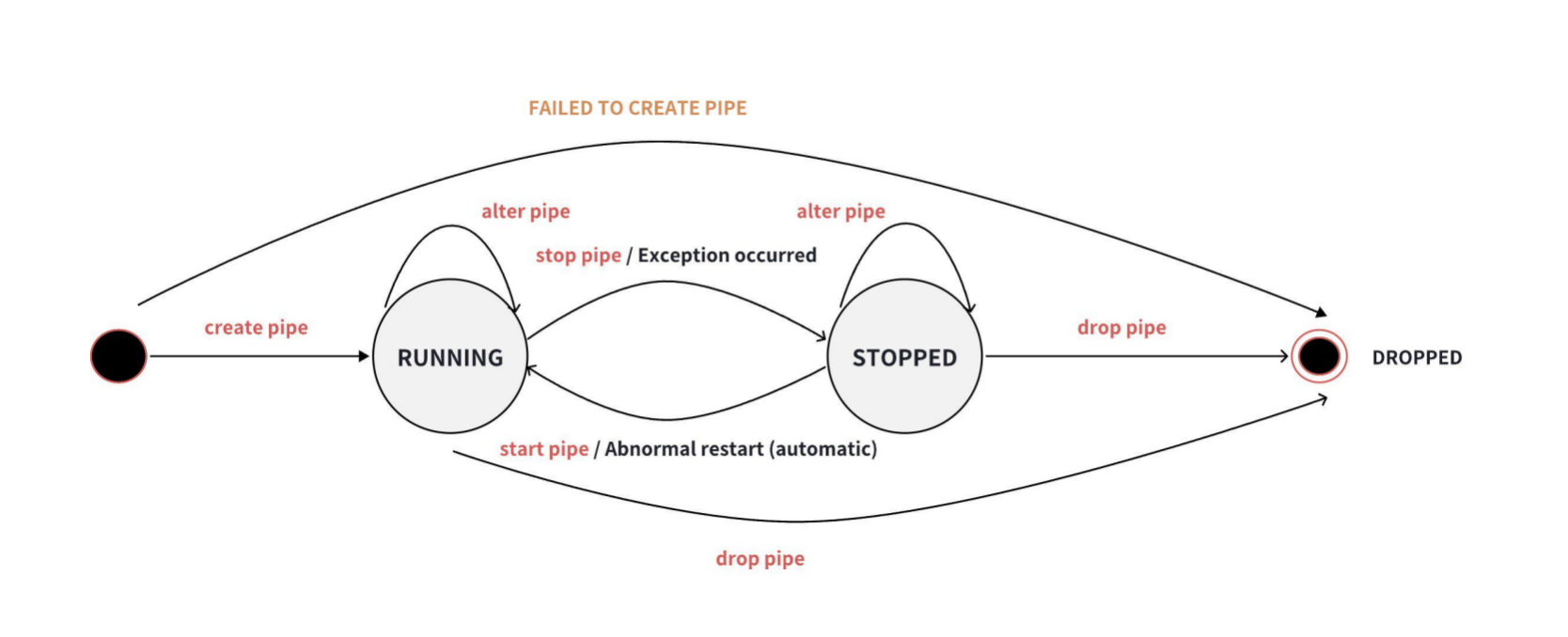
Data synchronization tasks have three states: RUNNING, STOPPED, and DROPPED.
The task state transitions are shown in the following diagram:
-
+
+
+After creation, the task will start directly, and when the task stops
abnormally, the system will automatically attempt to restart the task.
Provide the following SQL statements for state management of synchronization
tasks.
@@ -122,7 +124,7 @@ WITH SINK (
### Start Task
-After creation, the task will not be processed immediately and needs to be
started. Use the `START PIPE` statement to start the task and begin processing
data:
+Start processing data:
```SQL
START PIPE<PipeId>
diff --git a/src/UserGuide/Master/User-Manual/Data-Sync_timecho.md
b/src/UserGuide/Master/User-Manual/Data-Sync_timecho.md
index fb107734..0b6194be 100644
--- a/src/UserGuide/Master/User-Manual/Data-Sync_timecho.md
+++ b/src/UserGuide/Master/User-Manual/Data-Sync_timecho.md
@@ -94,7 +94,9 @@ The schema and auth synchronization functions have the
following limitations:
Data synchronization tasks have three states: RUNNING, STOPPED, and DROPPED.
The task state transitions are shown in the following diagram:
-
+
+
+After creation, the task will start directly, and when the task stops
abnormally, the system will automatically attempt to restart the task.
Provide the following SQL statements for state management of synchronization
tasks.
@@ -124,7 +126,7 @@ WITH SINK (
### Start Task
-After creation, the task will not be processed immediately and needs to be
started. Use the `START PIPE` statement to start the task and begin processing
data:
+Start processing data:
```SQL
START PIPE<PipeId>
diff --git a/src/UserGuide/V1.3.0-2/User-Manual/Data-Sync_apache.md
b/src/UserGuide/V1.3.0-2/User-Manual/Data-Sync_apache.md
index 7da2d03c..8bfd5e39 100644
--- a/src/UserGuide/V1.3.0-2/User-Manual/Data-Sync_apache.md
+++ b/src/UserGuide/V1.3.0-2/User-Manual/Data-Sync_apache.md
@@ -92,8 +92,18 @@ The schema and auth synchronization functions have the
following limitations:
Data synchronization tasks have three states: RUNNING, STOPPED, and DROPPED.
The task state transitions are shown in the following diagram:
+V1.3.0 and earlier versions:
+
+After creation, it will not start immediately and needs to execute the `START
PIPE` statement to start the task.
+

+V1.3.1 and later versions:
+
+After creation, the task will start directly, and when the task stops
abnormally, the system will automatically attempt to restart the task.
+
+
+
Provide the following SQL statements for state management of synchronization
tasks.
### Create Task
@@ -120,7 +130,8 @@ WITH SINK (
### Start Task
-After creation, the task will not be processed immediately and needs to be
started. Use the `START PIPE` statement to start the task and begin processing
data:
+Start processing data:
+
```SQL
START PIPE<PipeId>
diff --git a/src/UserGuide/V1.3.0-2/User-Manual/Data-Sync_timecho.md
b/src/UserGuide/V1.3.0-2/User-Manual/Data-Sync_timecho.md
index 739f6309..81c1aeac 100644
--- a/src/UserGuide/V1.3.0-2/User-Manual/Data-Sync_timecho.md
+++ b/src/UserGuide/V1.3.0-2/User-Manual/Data-Sync_timecho.md
@@ -94,8 +94,19 @@ The schema and auth synchronization functions have the
following limitations:
Data synchronization tasks have three states: RUNNING, STOPPED, and DROPPED.
The task state transitions are shown in the following diagram:
+
+V1.3.0 and earlier versions:
+
+After creation, it will not start immediately and needs to execute the `START
PIPE` statement to start the task.
+

+V1.3.1 and later versions:
+
+After creation, the task will start directly, and when the task stops
abnormally, the system will automatically attempt to restart the task.
+
+
+
Provide the following SQL statements for state management of synchronization
tasks.
### Create Task
@@ -122,7 +133,7 @@ WITH SINK (
### Start Task
-After creation, the task will not be processed immediately and needs to be
started. Use the `START PIPE` statement to start the task and begin processing
data:
+Start processing data:
```SQL
START PIPE<PipeId>
diff --git a/src/UserGuide/latest/User-Manual/Data-Sync_apache.md
b/src/UserGuide/latest/User-Manual/Data-Sync_apache.md
index 65eb6fbb..b6a42fc1 100644
--- a/src/UserGuide/latest/User-Manual/Data-Sync_apache.md
+++ b/src/UserGuide/latest/User-Manual/Data-Sync_apache.md
@@ -92,7 +92,9 @@ The schema and auth synchronization functions have the
following limitations:
Data synchronization tasks have three states: RUNNING, STOPPED, and DROPPED.
The task state transitions are shown in the following diagram:
-
+
+
+After creation, the task will start directly, and when the task stops
abnormally, the system will automatically attempt to restart the task.
Provide the following SQL statements for state management of synchronization
tasks.
@@ -122,7 +124,7 @@ WITH SINK (
### Start Task
-After creation, the task will not be processed immediately and needs to be
started. Use the `START PIPE` statement to start the task and begin processing
data:
+Start processing data:
```SQL
START PIPE<PipeId>
diff --git a/src/UserGuide/latest/User-Manual/Data-Sync_timecho.md
b/src/UserGuide/latest/User-Manual/Data-Sync_timecho.md
index fb107734..0b6194be 100644
--- a/src/UserGuide/latest/User-Manual/Data-Sync_timecho.md
+++ b/src/UserGuide/latest/User-Manual/Data-Sync_timecho.md
@@ -94,7 +94,9 @@ The schema and auth synchronization functions have the
following limitations:
Data synchronization tasks have three states: RUNNING, STOPPED, and DROPPED.
The task state transitions are shown in the following diagram:
-
+
+
+After creation, the task will start directly, and when the task stops
abnormally, the system will automatically attempt to restart the task.
Provide the following SQL statements for state management of synchronization
tasks.
@@ -124,7 +126,7 @@ WITH SINK (
### Start Task
-After creation, the task will not be processed immediately and needs to be
started. Use the `START PIPE` statement to start the task and begin processing
data:
+Start processing data:
```SQL
START PIPE<PipeId>
diff --git a/src/zh/UserGuide/Master/User-Manual/Data-Sync_apache.md
b/src/zh/UserGuide/Master/User-Manual/Data-Sync_apache.md
index d145609c..d88cff07 100644
--- a/src/zh/UserGuide/Master/User-Manual/Data-Sync_apache.md
+++ b/src/zh/UserGuide/Master/User-Manual/Data-Sync_apache.md
@@ -91,7 +91,9 @@
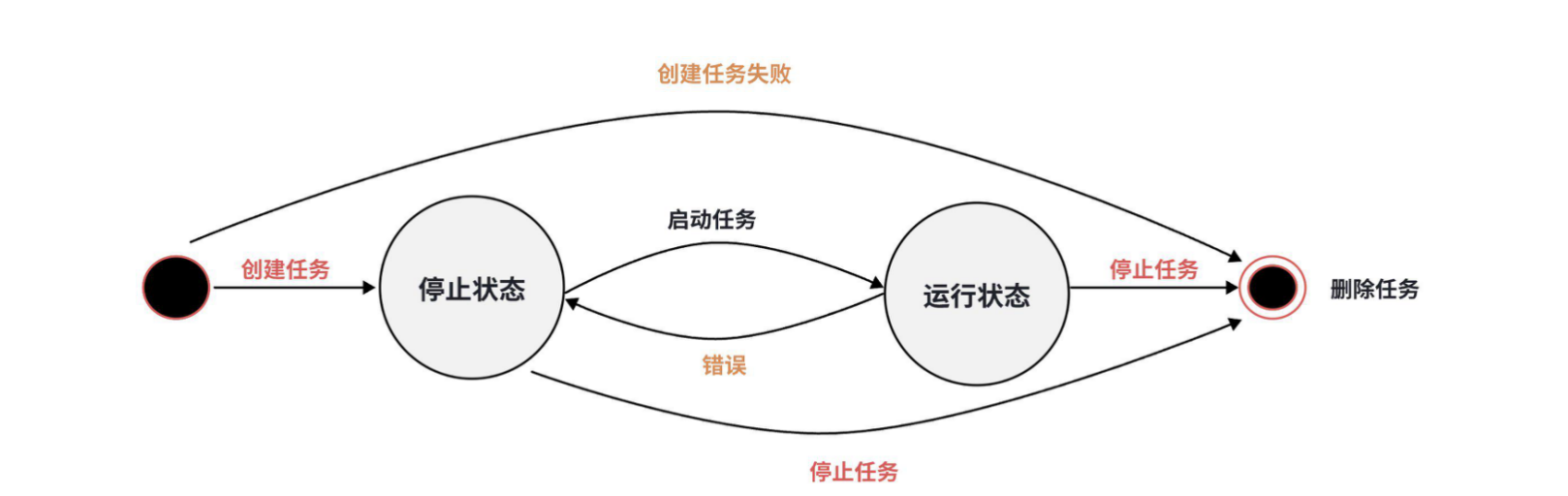
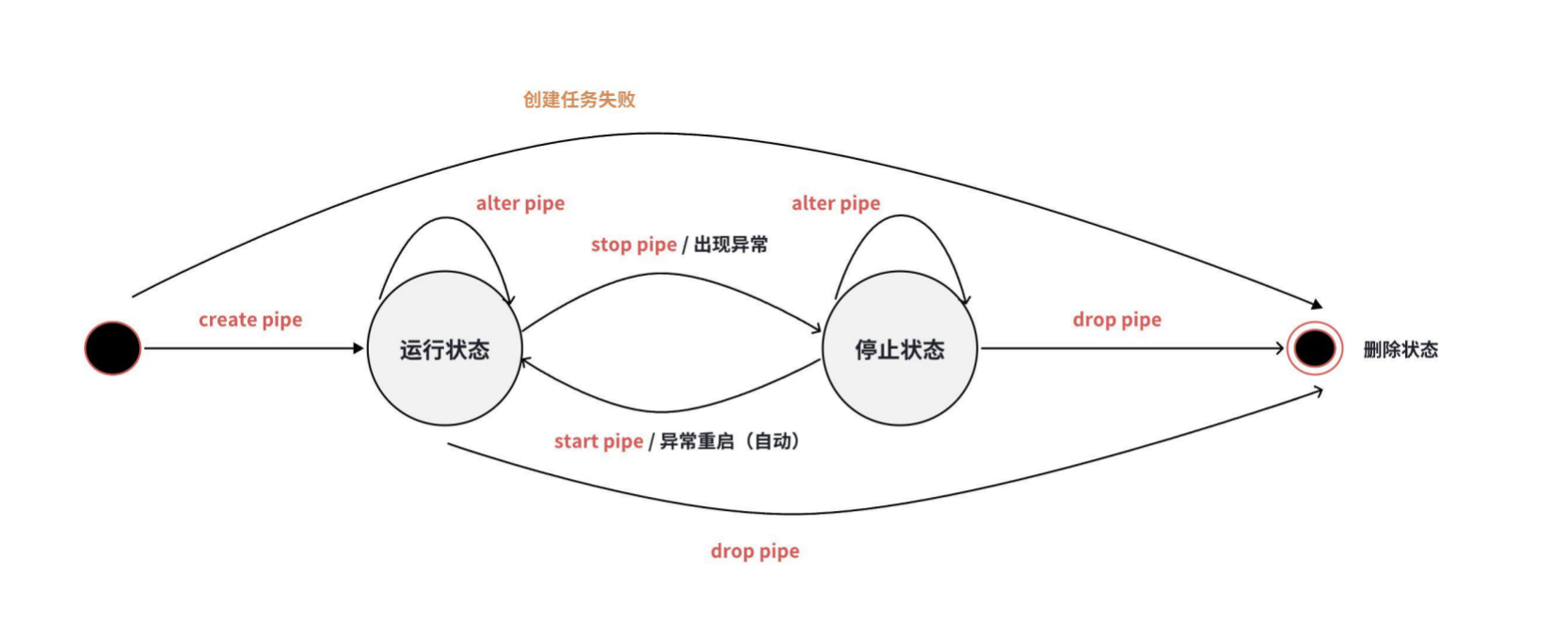
数据同步任务有三种状态:RUNNING、STOPPED 和 DROPPED。任务状态转换如下图所示:
-
+
+
+创建后任务会直接启动,同时当任务发生异常停止后,系统会自动尝试重启任务。
提供以下 SQL 语句对同步任务进行状态管理。
@@ -121,7 +123,7 @@ WITH SINK (
### 开始任务
-创建之后,任务不会立即被处理,需要启动任务。使用`START PIPE`语句来启动任务,从而开始处理数据:
+开始处理数据:
```SQL
START PIPE<PipeId>
diff --git a/src/zh/UserGuide/Master/User-Manual/Data-Sync_timecho.md
b/src/zh/UserGuide/Master/User-Manual/Data-Sync_timecho.md
index 02658280..2ce379cb 100644
--- a/src/zh/UserGuide/Master/User-Manual/Data-Sync_timecho.md
+++ b/src/zh/UserGuide/Master/User-Manual/Data-Sync_timecho.md
@@ -93,7 +93,9 @@
数据同步任务有三种状态:RUNNING、STOPPED 和 DROPPED。任务状态转换如下图所示:
-
+
+
+创建后任务会直接启动,同时当任务发生异常停止后,系统会自动尝试重启任务。
提供以下 SQL 语句对同步任务进行状态管理。
@@ -123,7 +125,7 @@ WITH SINK (
### 开始任务
-创建之后,任务不会立即被处理,需要启动任务。使用`START PIPE`语句来启动任务,从而开始处理数据:
+开始处理数据:
```SQL
START PIPE<PipeId>
diff --git a/src/zh/UserGuide/V1.3.0-2/User-Manual/Data-Sync_apache.md
b/src/zh/UserGuide/V1.3.0-2/User-Manual/Data-Sync_apache.md
index 452c5496..f2d1bf5f 100644
--- a/src/zh/UserGuide/V1.3.0-2/User-Manual/Data-Sync_apache.md
+++ b/src/zh/UserGuide/V1.3.0-2/User-Manual/Data-Sync_apache.md
@@ -91,8 +91,18 @@
数据同步任务有三种状态:RUNNING、STOPPED 和 DROPPED。任务状态转换如下图所示:
+V1.3.0及之前版本:
+
+在创建后不会立即启动,需要执行`START PIPE`语句启动任务。
+

+V1.3.1及之后版本:
+
+创建后任务会直接启动,同时当任务发生异常停止后,系统会自动尝试重启任务。
+
+
+
提供以下 SQL 语句对同步任务进行状态管理。
### 创建任务
@@ -119,7 +129,7 @@ WITH SINK (
### 开始任务
-创建之后,任务不会立即被处理,需要启动任务。使用`START PIPE`语句来启动任务,从而开始处理数据:
+开始处理数据:
```SQL
START PIPE<PipeId>
diff --git a/src/zh/UserGuide/V1.3.0-2/User-Manual/Data-Sync_timecho.md
b/src/zh/UserGuide/V1.3.0-2/User-Manual/Data-Sync_timecho.md
index ebba2dc1..b22db406 100644
--- a/src/zh/UserGuide/V1.3.0-2/User-Manual/Data-Sync_timecho.md
+++ b/src/zh/UserGuide/V1.3.0-2/User-Manual/Data-Sync_timecho.md
@@ -93,8 +93,18 @@
数据同步任务有三种状态:RUNNING、STOPPED 和 DROPPED。任务状态转换如下图所示:
+V1.3.0及之前版本:
+
+在创建后不会立即启动,需要执行`START PIPE`语句启动任务。
+

+V1.3.1及之后版本:
+
+创建后任务会直接启动,同时当任务发生异常停止后,系统会自动尝试重启任务。
+
+
+
提供以下 SQL 语句对同步任务进行状态管理。
### 创建任务
@@ -121,7 +131,7 @@ WITH SINK (
### 开始任务
-创建之后,任务不会立即被处理,需要启动任务。使用`START PIPE`语句来启动任务,从而开始处理数据:
+开始处理数据:
```SQL
START PIPE<PipeId>
diff --git a/src/zh/UserGuide/latest/User-Manual/Data-Sync_apache.md
b/src/zh/UserGuide/latest/User-Manual/Data-Sync_apache.md
index d145609c..d88cff07 100644
--- a/src/zh/UserGuide/latest/User-Manual/Data-Sync_apache.md
+++ b/src/zh/UserGuide/latest/User-Manual/Data-Sync_apache.md
@@ -91,7 +91,9 @@
数据同步任务有三种状态:RUNNING、STOPPED 和 DROPPED。任务状态转换如下图所示:
-
+
+
+创建后任务会直接启动,同时当任务发生异常停止后,系统会自动尝试重启任务。
提供以下 SQL 语句对同步任务进行状态管理。
@@ -121,7 +123,7 @@ WITH SINK (
### 开始任务
-创建之后,任务不会立即被处理,需要启动任务。使用`START PIPE`语句来启动任务,从而开始处理数据:
+开始处理数据:
```SQL
START PIPE<PipeId>
diff --git a/src/zh/UserGuide/latest/User-Manual/Data-Sync_timecho.md
b/src/zh/UserGuide/latest/User-Manual/Data-Sync_timecho.md
index 02658280..2ce379cb 100644
--- a/src/zh/UserGuide/latest/User-Manual/Data-Sync_timecho.md
+++ b/src/zh/UserGuide/latest/User-Manual/Data-Sync_timecho.md
@@ -93,7 +93,9 @@
数据同步任务有三种状态:RUNNING、STOPPED 和 DROPPED。任务状态转换如下图所示:
-
+
+
+创建后任务会直接启动,同时当任务发生异常停止后,系统会自动尝试重启任务。
提供以下 SQL 语句对同步任务进行状态管理。
@@ -123,7 +125,7 @@ WITH SINK (
### 开始任务
-创建之后,任务不会立即被处理,需要启动任务。使用`START PIPE`语句来启动任务,从而开始处理数据:
+开始处理数据:
```SQL
START PIPE<PipeId>




