This is an automated email from the ASF dual-hosted git repository.

critas pushed a commit to branch main
in repository https://gitbox.apache.org/repos/asf/iotdb-docs.git
The following commit(s) were added to refs/heads/main by this push:
new 8bfb95f8 docs: standardize latest background (#482)
8bfb95f8 is described below
commit 8bfb95f8c89ca6d0d30e795454f4868882a87744
Author: Mister-Hope <[email protected]>
AuthorDate: Tue Dec 17 18:18:42 2024 +0800
docs: standardize latest background (#482)
---
.../latest/Background-knowledge/Cluster-Concept.md | 62 ++++++------
.../latest/Background-knowledge/Data-Type.md | 106 ++++++++++-----------
2 files changed, 82 insertions(+), 86 deletions(-)
diff --git a/src/UserGuide/latest/Background-knowledge/Cluster-Concept.md
b/src/UserGuide/latest/Background-knowledge/Cluster-Concept.md
index d6f57bf2..6b6bb7c8 100644
--- a/src/UserGuide/latest/Background-knowledge/Cluster-Concept.md
+++ b/src/UserGuide/latest/Background-knowledge/Cluster-Concept.md
@@ -1,32 +1,32 @@
<!--
-
- Licensed to the Apache Software Foundation (ASF) under one
- or more contributor license agreements. See the NOTICE file
- distributed with this work for additional information
- regarding copyright ownership. The ASF licenses this file
- to you under the Apache License, Version 2.0 (the
- "License"); you may not use this file except in compliance
- with the License. You may obtain a copy of the License at
-
- http://www.apache.org/licenses/LICENSE-2.0
-
- Unless required by applicable law or agreed to in writing,
- software distributed under the License is distributed on an
- "AS IS" BASIS, WITHOUT WARRANTIES OR CONDITIONS OF ANY
- KIND, either express or implied. See the License for the
- specific language governing permissions and limitations
- under the License.
-
+* Licensed to the Apache Software Foundation (ASF) under one
+* or more contributor license agreements. See the NOTICE file
+* distributed with this work for additional information
+* regarding copyright ownership. The ASF licenses this file
+* to you under the Apache License, Version 2.0 (the
+* "License"); you may not use this file except in compliance
+* with the License. You may obtain a copy of the License at
+*
+* http://www.apache.org/licenses/LICENSE-2.0
+*
+* Unless required by applicable law or agreed to in writing, software
+* distributed under the License is distributed on an "AS IS" BASIS,
+* WITHOUT WARRANTIES OR CONDITIONS OF ANY KIND, either express or implied.
+* See the License for the specific language governing permissions and
+* limitations under the License.
-->
# Cluster-related Concepts
+
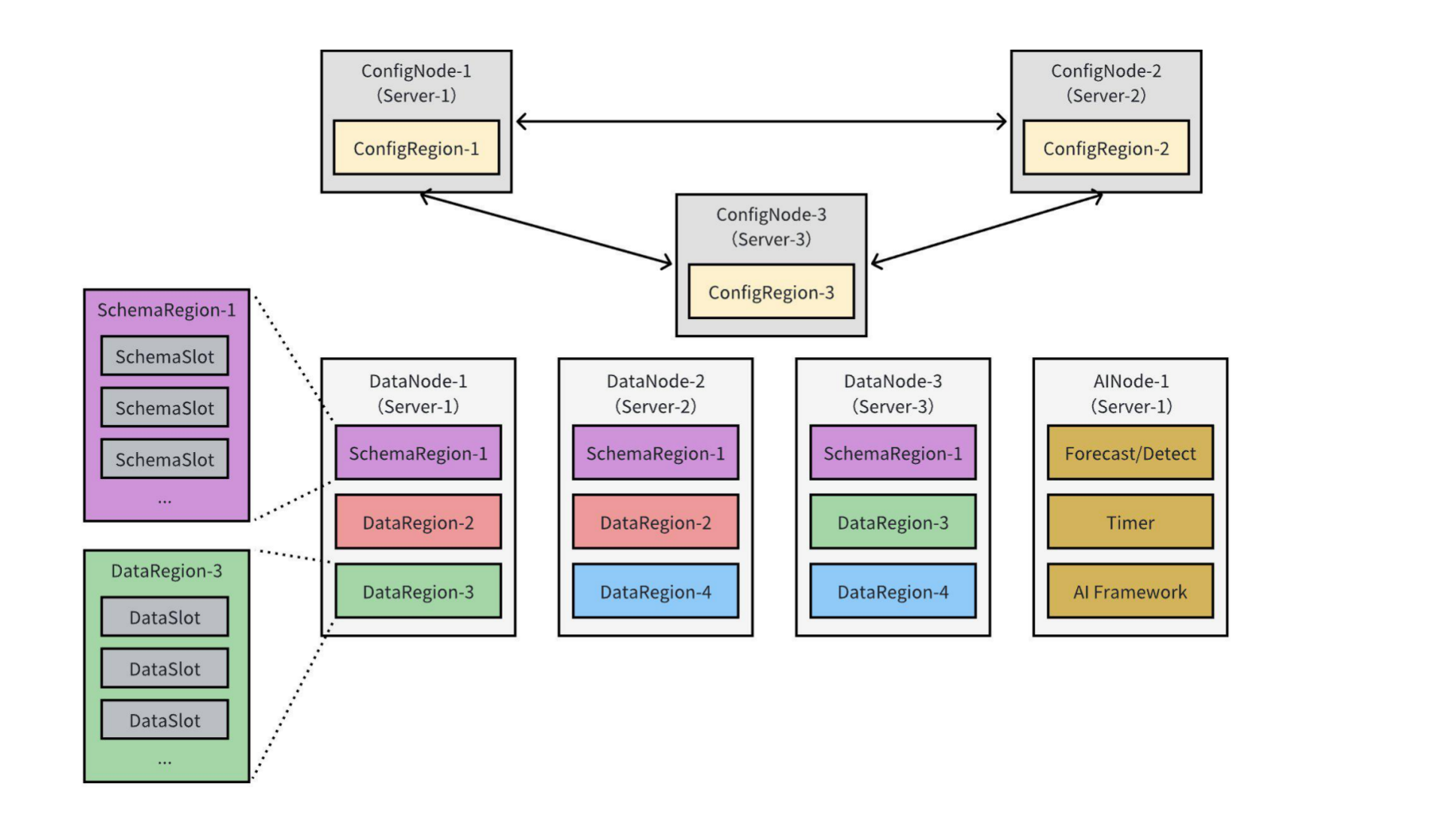
The figure below illustrates a typical IoTDB 3C3D1A cluster deployment mode,
comprising 3 ConfigNodes, 3 DataNodes, and 1 AINode:
-<img style="width:100%; max-width:800px; max-height:600px; margin-left:auto;
margin-right:auto; display:block;"
src="https://alioss.timecho.com/docs/img/Common-Concepts_02.png";>
-This deployment involves several key concepts that users commonly encounter
when working with IoTDB clusters, including:
-- **Nodes** (ConfigNode, DataNode, AINode);
-- **Slots** (SchemaSlot, DataSlot);
-- **Regions** (SchemaRegion, DataRegion);
+
+
+This deployment involves several key concepts that users commonly encounter
when working with IoTDB clusters, including:
+
+- **Nodes** (ConfigNode, DataNode, AINode);
+- **Slots** (SchemaSlot, DataSlot);
+- **Regions** (SchemaRegion, DataRegion);
- **Replica Groups**.
The following sections will provide a detailed introduction to these concepts.
@@ -34,6 +34,7 @@ The following sections will provide a detailed introduction
to these concepts.
## Nodes
An IoTDB cluster consists of three types of nodes (processes): **ConfigNode**
(the main node), **DataNode**, and **AINode**, as detailed below:
+
- **ConfigNode:** ConfigNodes store cluster configurations, database metadata,
the routing information of time series' schema and data. They also monitor
cluster nodes and conduct load balancing. All ConfigNodes maintain full mutual
backups, as shown in the figure with ConfigNode-1, ConfigNode-2, and
ConfigNode-3. ConfigNodes do not directly handle client read or write requests.
Instead, they guide the distribution of time series' schema and data within the
cluster using a series of [loa [...]
- **DataNode:** DataNodes are responsible for reading and writing time series'
schema and data. Each DataNode can accept client read and write requests and
provide corresponding services, as illustrated with DataNode-1, DataNode-2, and
DataNode-3 in the above figure. When a DataNode receives client requests, it
can process them directly or forward them if it has the relevant routing
information cached locally. Otherwise, it queries the ConfigNode for routing
details and caches the inform [...]
- **AINode:** AINodes interact with ConfigNodes and DataNodes to extend
IoTDB's capabilities for data intelligence analysis on time series data. They
support registering pre-trained machine learning models from external sources
and performing time series analysis tasks using simple SQL statements on
specified data. This process integrates model creation, management, and
inference within the database engine. Currently, the system provides built-in
algorithms or self-training models for co [...]
@@ -41,19 +42,22 @@ An IoTDB cluster consists of three types of nodes
(processes): **ConfigNode** (t
## Slots
IoTDB divides time series' schema and data into smaller, more manageable units
called **slots**. Slots are logical entities, and in an IoTDB cluster, the
**SchemaSlots** and **DataSlots** are defined as follows:
+
- **SchemaSlot:** A SchemaSlot represents a subset of the time series' schema
collection. The total number of SchemaSlots is fixed, with a default value of
1000. IoTDB uses a hashing algorithm to evenly distribute all devices across
these SchemaSlots.
- **DataSlot:** A DataSlot represents a subset of the time series' data
collection. Based on the SchemaSlots, the data for corresponding devices is
further divided into DataSlots by a fixed time interval. The default time
interval for a DataSlot is 7 days.
## Region
In IoTDB, time series' schema and data are replicated across DataNodes to
ensure high availability in the cluster. However, replicating data at the slot
level can increase management complexity and reduce write throughput. To
address this, IoTDB introduces the concept of **Region**, which groups
SchemaSlots and DataSlots into **SchemaRegions** and **DataRegions**
respectively. Replication is then performed at the Region level. The
definitions of SchemaRegion and DataRegion are as follows:
-- **SchemaRegion**: A SchemaRegion is the basic unit for storing and
replicating time series' schema. All SchemaSlots in a database are evenly
distributed across the database's SchemaRegions. SchemaRegions with the same
RegionID are replicas of each other. For example, in the figure above,
SchemaRegion-1 has three replicas located on DataNode-1, DataNode-2, and
DataNode-3.
-- **DataRegion**: A DataRegion is the basic unit for storing and replicating
time series' data. All DataSlots in a database are evenly distributed across
the database's DataRegions. DataRegions with the same RegionID are replicas of
each other. For instance, in the figure above, DataRegion-2 has two replicas
located on DataNode-1 and DataNode-2.
+
+- **SchemaRegion**: A SchemaRegion is the basic unit for storing and
replicating time series' schema. All SchemaSlots in a database are evenly
distributed across the database's SchemaRegions. SchemaRegions with the same
RegionID are replicas of each other. For example, in the figure above,
SchemaRegion-1 has three replicas located on DataNode-1, DataNode-2, and
DataNode-3.
+- **DataRegion**: A DataRegion is the basic unit for storing and replicating
time series' data. All DataSlots in a database are evenly distributed across
the database's DataRegions. DataRegions with the same RegionID are replicas of
each other. For instance, in the figure above, DataRegion-2 has two replicas
located on DataNode-1 and DataNode-2.
## Replica Groups
+
Region replicas are critical for the fault tolerance of the cluster. Each
Region's replicas are organized into **replica groups**, where the replicas are
assigned roles as either **leader** or **follower**, working together to
provide read and write services. Recommended replica group configurations under
different architectures are as follows:
-| Category | Parameter | Single-node Recommended Configuration |
Distributed Recommended Configuration |
-|:------------:|:-----------------------:|:------------------------------------:|:-------------------------------------:|
-| Schema | `schema_replication_factor` | 1
| 3 |
-| Data | `data_replication_factor` | 1
| 2 |
\ No newline at end of file
+| Category | Parameter | Single-node Recommended
Configuration | Distributed Recommended Configuration |
+| :------: | :-------------------------: |
:-----------------------------------: | :-----------------------------------: |
+| Schema | `schema_replication_factor` | 1
| 3 |
+| Data | `data_replication_factor` | 1
| 2 |
diff --git a/src/UserGuide/latest/Background-knowledge/Data-Type.md
b/src/UserGuide/latest/Background-knowledge/Data-Type.md
index 846e8067..e442c7b5 100644
--- a/src/UserGuide/latest/Background-knowledge/Data-Type.md
+++ b/src/UserGuide/latest/Background-knowledge/Data-Type.md
@@ -1,22 +1,19 @@
<!--
-
- Licensed to the Apache Software Foundation (ASF) under one
- or more contributor license agreements. See the NOTICE file
- distributed with this work for additional information
- regarding copyright ownership. The ASF licenses this file
- to you under the Apache License, Version 2.0 (the
- "License"); you may not use this file except in compliance
- with the License. You may obtain a copy of the License at
-
- http://www.apache.org/licenses/LICENSE-2.0
-
- Unless required by applicable law or agreed to in writing,
- software distributed under the License is distributed on an
- "AS IS" BASIS, WITHOUT WARRANTIES OR CONDITIONS OF ANY
- KIND, either express or implied. See the License for the
- specific language governing permissions and limitations
- under the License.
-
+* Licensed to the Apache Software Foundation (ASF) under one
+* or more contributor license agreements. See the NOTICE file
+* distributed with this work for additional information
+* regarding copyright ownership. The ASF licenses this file
+* to you under the Apache License, Version 2.0 (the
+* "License"); you may not use this file except in compliance
+* with the License. You may obtain a copy of the License at
+*
+* http://www.apache.org/licenses/LICENSE-2.0
+*
+* Unless required by applicable law or agreed to in writing, software
+* distributed under the License is distributed on an "AS IS" BASIS,
+* WITHOUT WARRANTIES OR CONDITIONS OF ANY KIND, either express or implied.
+* See the License for the specific language governing permissions and
+* limitations under the License.
-->
# Data Type
@@ -25,40 +22,41 @@
IoTDB supports the following data types:
-* BOOLEAN (Boolean)
-* INT32 (Integer)
-* INT64 (Long Integer)
-* FLOAT (Single Precision Floating Point)
-* DOUBLE (Double Precision Floating Point)
-* TEXT (Long String)
-* STRING(String)
-* BLOB(Large binary Object)
-* TIMESTAMP(Timestamp)
-* DATE(Date)
-
+- BOOLEAN (Boolean)
+- INT32 (Integer)
+- INT64 (Long Integer)
+- FLOAT (Single Precision Floating Point)
+- DOUBLE (Double Precision Floating Point)
+- TEXT (Long String)
+- STRING(String)
+- BLOB(Large binary Object)
+- TIMESTAMP(Timestamp)
+- DATE(Date)
+
The difference between STRING and TEXT types is that STRING type has more
statistical information and can be used to optimize value filtering queries,
while TEXT type is suitable for storing long strings.
### Float Precision
-The time series of **FLOAT** and **DOUBLE** type can specify
(MAX\_POINT\_NUMBER, see [this page](../SQL-Manual/SQL-Manual.md) for more
information on how to specify), which is the number of digits after the decimal
point of the floating point number, if the encoding method is
[RLE](Encoding-and-Compression.md) or [TS\_2DIFF](Encoding-and-Compression.md).
If MAX\_POINT\_NUMBER is not specified, the system will use
[float\_precision](../Reference/DataNode-Config-Manual.md) in the configur [...]
+The time series of **FLOAT** and **DOUBLE** type can specify
(MAX_POINT_NUMBER, see [this page](../SQL-Manual/SQL-Manual.md) for more
information on how to specify), which is the number of digits after the decimal
point of the floating point number, if the encoding method is
[RLE](Encoding-and-Compression.md) or [TS_2DIFF](Encoding-and-Compression.md).
If MAX_POINT_NUMBER is not specified, the system will use
[float_precision](../Reference/DataNode-Config-Manual.md) in the configuration
[...]
```sql
CREATE TIMESERIES root.vehicle.d0.s0 WITH DATATYPE=FLOAT, ENCODING=RLE,
'MAX_POINT_NUMBER'='2';
```
-* For Float data value, The data range is (-Integer.MAX_VALUE,
Integer.MAX_VALUE), rather than Float.MAX_VALUE, and the max_point_number is
19, caused by the limition of function Math.round(float) in Java.
-* For Double data value, The data range is (-Long.MAX_VALUE, Long.MAX_VALUE),
rather than Double.MAX_VALUE, and the max_point_number is 19, caused by the
limition of function Math.round(double) in Java (Long.MAX_VALUE=9.22E18).
+- For Float data value, The data range is (-Integer.MAX_VALUE,
Integer.MAX_VALUE), rather than Float.MAX_VALUE, and the max_point_number is
19, caused by the limitation of function Math.round(float) in Java.
+- For Double data value, The data range is (-Long.MAX_VALUE, Long.MAX_VALUE),
rather than Double.MAX_VALUE, and the max_point_number is 19, caused by the
limitation of function Math.round(double) in Java (Long.MAX_VALUE=9.22E18).
### Data Type Compatibility
When the written data type is inconsistent with the data type of time-series,
+
- If the data type of time-series is not compatible with the written data
type, the system will give an error message.
- If the data type of time-series is compatible with the written data type,
the system will automatically convert the data type.
The compatibility of each data type is shown in the following table:
| Series Data Type | Supported Written Data Types |
-|------------------|------------------------------|
+| ---------------- | ---------------------------- |
| BOOLEAN | BOOLEAN |
| INT32 | INT32 |
| INT64 | INT32 INT64 |
@@ -74,12 +72,10 @@ The timestamp is the time point at which data is produced.
It includes absolute
Absolute timestamps in IoTDB are divided into two types: LONG and DATETIME
(including DATETIME-INPUT and DATETIME-DISPLAY). When a user inputs a
timestamp, he can use a LONG type timestamp or a DATETIME-INPUT type timestamp,
and the supported formats of the DATETIME-INPUT type timestamp are shown in the
table below:
-<div style="text-align: center;">
+::: center
**Supported formats of DATETIME-INPUT type timestamp**
-
-
| Format |
| :--------------------------: |
| yyyy-MM-dd HH:mm:ss |
@@ -96,16 +92,14 @@ Absolute timestamps in IoTDB are divided into two types:
LONG and DATETIME (incl
| yyyy.MM.dd HH:mm:ss.SSSZZ |
| ISO8601 standard time format |
-</div>
-
+:::
IoTDB can support LONG types and DATETIME-DISPLAY types when displaying
timestamps. The DATETIME-DISPLAY type can support user-defined time formats.
The syntax of the custom time format is shown in the table below:
-<div style="text-align: center;">
+::: center
**The syntax of the custom time format**
-
| Symbol | Meaning | Presentation | Examples
|
| :----: | :-------------------------: | :----------: |
:--------------------------------: |
| G | era | era | era
|
@@ -138,25 +132,23 @@ IoTDB can support LONG types and DATETIME-DISPLAY types
when displaying timestam
| ' | escape for text | delimiter |
|
| '' | single quote | literal | '
|
-</div>
+:::
### Relative timestamp
-Relative time refers to the time relative to the server time ```now()``` and
```DATETIME``` time.
+Relative time refers to the time relative to the server time `now()` and
`DATETIME` time.
- Syntax:
+Syntax:
- ```
- Duration = (Digit+ ('Y'|'MO'|'W'|'D'|'H'|'M'|'S'|'MS'|'US'|'NS'))+
- RelativeTime = (now() | DATETIME) ((+|-) Duration)+
-
- ```
+```
+Duration = (Digit+ ('Y'|'MO'|'W'|'D'|'H'|'M'|'S'|'MS'|'US'|'NS'))+
+RelativeTime = (now() | DATETIME) ((+|-) Duration)+
+```
- <div style="text-align: center;">
+::: center
**The syntax of the duration unit**
-
| Symbol | Meaning | Presentation | Examples |
| :----: | :---------: | :----------------------: | :------: |
| y | year | 1y=365 days | 1y |
@@ -172,13 +164,13 @@ Relative time refers to the time relative to the server
time ```now()``` and ```
| us | microsecond | 1us=1000 nanoseconds | 1us |
| ns | nanosecond | 1ns=1 nanosecond | 1ns |
- </div>
+:::
- eg:
+eg:
- ```
- now() - 1d2h //1 day and 2 hours earlier than the current server time
- now() - 1w //1 week earlier than the current server time
- ```
+```
+now() - 1d2h //1 day and 2 hours earlier than the current server time
+now() - 1w //1 week earlier than the current server time
+```
- > Note:There must be spaces on the left and right of '+' and '-'.
+> Note:There must be spaces on the left and right of '+' and '-'.


