This is an automated email from the ASF dual-hosted git repository.

qiaojialin pushed a commit to branch main
in repository https://gitbox.apache.org/repos/asf/iotdb-docs.git
The following commit(s) were added to refs/heads/main by this push:
new e889251d Add Telegraf document (#526)
e889251d is described below
commit e889251d22e7cb6a5556af42fe24d7a403ae3d09
Author: majialin <[email protected]>
AuthorDate: Mon Jan 20 20:27:06 2025 +0800
Add Telegraf document (#526)
---
src/.vuepress/sidebar/V1.3.3/en.ts | 1 +
src/.vuepress/sidebar/V1.3.3/zh.ts | 1 +
src/.vuepress/sidebar_timecho/V1.3.3/en.ts | 1 +
src/.vuepress/sidebar_timecho/V1.3.3/zh.ts | 1 +
src/.vuepress/sidebar_timecho/V2.0.1/en.ts | 1 +
src/.vuepress/sidebar_timecho/V2.0.1/zh-Tree.ts | 1 +
.../Tree/Ecosystem-Integration/Telegraf-IoTDB.md | 110 ------------
.../Master/Tree/Ecosystem-Integration/Telegraf.md | 22 +++
.../Tree/Ecosystem-Integration/Telegraf-IoTDB.md | 110 ------------
.../V2.0.1/Tree/Ecosystem-Integration/Telegraf.md | 22 +++
.../latest/Ecosystem-Integration/Telegraf-IoTDB.md | 110 ------------
.../latest/Ecosystem-Integration/Telegraf.md | 191 +++++++++++++++++++++
.../Tree/Ecosystem-Integration/Telegraf-IoTDB.md | 110 ------------
.../Master/Tree/Ecosystem-Integration/Telegraf.md | 191 +++++++++++++++++++++
.../Tree/Ecosystem-Integration/Telegraf-IoTDB.md | 110 ------------
.../V2.0.1/Tree/Ecosystem-Integration/Telegraf.md | 191 +++++++++++++++++++++
.../latest/Ecosystem-Integration/Telegraf-IoTDB.md | 110 ------------
.../latest/Ecosystem-Integration/Telegraf.md | 191 +++++++++++++++++++++
18 files changed, 814 insertions(+), 660 deletions(-)
diff --git a/src/.vuepress/sidebar/V1.3.3/en.ts
b/src/.vuepress/sidebar/V1.3.3/en.ts
index cec4994e..874d1864 100644
--- a/src/.vuepress/sidebar/V1.3.3/en.ts
+++ b/src/.vuepress/sidebar/V1.3.3/en.ts
@@ -184,6 +184,7 @@ export const enSidebar = {
{ text: 'Grafana(IoTDB)', link: 'Grafana-Connector' },
{ text: 'Grafana Plugin', link: 'Grafana-Plugin' },
{ text: 'Kubernetes', link: 'Kubernetes_apache' },
+ { text: 'Telegraf Plugin', link: 'Telegraf' },
{ text: 'ThingsBoard', link: 'Thingsboard' },
],
},
diff --git a/src/.vuepress/sidebar/V1.3.3/zh.ts
b/src/.vuepress/sidebar/V1.3.3/zh.ts
index 88140461..97ee0567 100644
--- a/src/.vuepress/sidebar/V1.3.3/zh.ts
+++ b/src/.vuepress/sidebar/V1.3.3/zh.ts
@@ -171,6 +171,7 @@ export const zhSidebar = {
{ text: 'Grafana(IoTDB)', link: 'Grafana-Connector' },
{ text: 'Grafana插件', link: 'Grafana-Plugin' },
{ text: 'Kubernetes', link: 'Kubernetes_apache' },
+ { text: 'Telegraf插件', link: 'Telegraf' },
{ text: 'ThingsBoard', link: 'Thingsboard' },
],
},
diff --git a/src/.vuepress/sidebar_timecho/V1.3.3/en.ts
b/src/.vuepress/sidebar_timecho/V1.3.3/en.ts
index 86a614df..a539be0d 100644
--- a/src/.vuepress/sidebar_timecho/V1.3.3/en.ts
+++ b/src/.vuepress/sidebar_timecho/V1.3.3/en.ts
@@ -203,6 +203,7 @@ export const enSidebar = {
{ text: 'Grafana(IoTDB)', link: 'Grafana-Connector' },
{ text: 'Grafana Plugin', link: 'Grafana-Plugin' },
{ text: 'Kubernetes', link: 'Kubernetes_timecho' },
+ { text: 'Telegraf Plugin', link: 'Telegraf' },
{ text: 'ThingsBoard', link: 'Thingsboard' },
],
},
diff --git a/src/.vuepress/sidebar_timecho/V1.3.3/zh.ts
b/src/.vuepress/sidebar_timecho/V1.3.3/zh.ts
index 04a2c81e..acd81e02 100644
--- a/src/.vuepress/sidebar_timecho/V1.3.3/zh.ts
+++ b/src/.vuepress/sidebar_timecho/V1.3.3/zh.ts
@@ -186,6 +186,7 @@ export const zhSidebar = {
{ text: 'Grafana(IoTDB)', link: 'Grafana-Connector' },
{ text: 'Grafana插件', link: 'Grafana-Plugin' },
{ text: 'Kubernetes', link: 'Kubernetes_timecho' },
+ { text: 'Telegraf插件', link: 'Telegraf' },
{ text: 'ThingsBoard', link: 'Thingsboard' },
],
},
diff --git a/src/.vuepress/sidebar_timecho/V2.0.1/en.ts
b/src/.vuepress/sidebar_timecho/V2.0.1/en.ts
index f089ade8..44711c5f 100644
--- a/src/.vuepress/sidebar_timecho/V2.0.1/en.ts
+++ b/src/.vuepress/sidebar_timecho/V2.0.1/en.ts
@@ -194,6 +194,7 @@ export const enSidebar = {
{ text: 'Ignition', link: 'Ignition-IoTDB-plugin_timecho' },
{ text: 'Grafana(IoTDB)', link: 'Grafana-Connector' },
{ text: 'Grafana Plugin', link: 'Grafana-Plugin' },
+ { text: 'Telegraf Plugin', link: 'Telegraf' },
{ text: 'ThingsBoard', link: 'Thingsboard' },
],
},
diff --git a/src/.vuepress/sidebar_timecho/V2.0.1/zh-Tree.ts
b/src/.vuepress/sidebar_timecho/V2.0.1/zh-Tree.ts
index 49810f08..79e849f5 100644
--- a/src/.vuepress/sidebar_timecho/V2.0.1/zh-Tree.ts
+++ b/src/.vuepress/sidebar_timecho/V2.0.1/zh-Tree.ts
@@ -186,6 +186,7 @@ export const zhSidebar = {
{ text: 'Grafana(IoTDB)', link: 'Grafana-Connector' },
{ text: 'Grafana插件', link: 'Grafana-Plugin' },
{ text: 'Kubernetes', link: 'Kubernetes_timecho' },
+ { text: 'Telegraf插件', link: 'Telegraf' },
{ text: 'ThingsBoard', link: 'Thingsboard' },
],
},
diff --git a/src/UserGuide/Master/Tree/Ecosystem-Integration/Telegraf-IoTDB.md
b/src/UserGuide/Master/Tree/Ecosystem-Integration/Telegraf-IoTDB.md
deleted file mode 100644
index cdb7475a..00000000
--- a/src/UserGuide/Master/Tree/Ecosystem-Integration/Telegraf-IoTDB.md
+++ /dev/null
@@ -1,110 +0,0 @@
-<!--
-
- Licensed to the Apache Software Foundation (ASF) under one
- or more contributor license agreements. See the NOTICE file
- distributed with this work for additional information
- regarding copyright ownership. The ASF licenses this file
- to you under the Apache License, Version 2.0 (the
- "License"); you may not use this file except in compliance
- with the License. You may obtain a copy of the License at
-
- http://www.apache.org/licenses/LICENSE-2.0
-
- Unless required by applicable law or agreed to in writing,
- software distributed under the License is distributed on an
- "AS IS" BASIS, WITHOUT WARRANTIES OR CONDITIONS OF ANY
- KIND, either express or implied. See the License for the
- specific language governing permissions and limitations
- under the License.
-
--->
-
-# Telegraf
-Telegraf is an open-source agent that facilitates the collection, processing,
and transmission of metric data. Developed by InfluxData.
-Telegraf includes the following features:
-* Plugin Architecture: Telegraf's strength lies in its extensive plugin
ecosystem. It supports a wide range of input, output, and processor plugins,
allowing seamless integration with various data sources and destinations.
-* Data Collection: Telegraf excels in collecting metrics from diverse sources,
such as system metrics, logs, databases, and more. Its versatility makes it
suitable for monitoring applications, infrastructure, and IoT devices.
-* Output Destinations: Once collected, data can be sent to various output
destinations, including popular databases like InfluxDB. This flexibility makes
Telegraf adaptable to different monitoring and analytics setups.
-* Ease of Configuration: Telegraf's configuration is done using TOML files.
This simplicity allows users to define inputs, outputs, and processors with
ease, making customization straightforward.
-* Community and Support: Being open-source, Telegraf benefits from an active
community. Users can contribute plugins, report issues, and seek assistance
through forums and documentation.
-
-# Telegraf IoTDB Output Plugin
-This output plugin saves Telegraf metrics to an Apache IoTDB backend,
supporting session connection and data insertion.
-
-## Precautions
-1. Before using this plugin, please configure the IP address, port number,
username, password and other information of the database server, as well as
some data type conversion, time unit and other configurations.
-2. The path should follow the rule in Chapter 'Syntax Rule'
-3. See
https://github.com/influxdata/telegraf/tree/master/plugins/outputs/iotdb for
how to configure this plugin.
-
-## Example
-Here is an example that demonstrates how to collect cpu data from Telegraf
into IoTDB.
-1. generate the configuration file by telegraf
-```
-telegraf --sample-config --input-filter cpu --output-filter iotdb >
cpu_iotdb.conf
-```
-2. modify the default cpu inputs plugin configuration
-```
-# Read metrics about cpu usage
-[[inputs.cpu]]
- ## Whether to report per-cpu stats or not
- percpu = true
- ## Whether to report total system cpu stats or not
- totalcpu = true
- ## If true, collect raw CPU time metrics
- collect_cpu_time = false
- ## If true, compute and report the sum of all non-idle CPU states
- report_active = false
- ## If true and the info is available then add core_id and physical_id tags
- core_tags = false
- name_override = "root.demo.telgraf.cpu"
-```
-3. modify the IoTDB outputs plugin configuration
-```
-# Save metrics to an IoTDB Database
-[[outputs.iotdb]]
- ## Configuration of IoTDB server connection
- host = "127.0.0.1"
- # port = "6667"
-
- ## Configuration of authentication
- # user = "root"
- # password = "root"
-
- ## Timeout to open a new session.
- ## A value of zero means no timeout.
- # timeout = "5s"
-
- ## Configuration of type conversion for 64-bit unsigned int
- ## IoTDB currently DOES NOT support unsigned integers (version 13.x).
- ## 32-bit unsigned integers are safely converted into 64-bit signed integers
by the plugin,
- ## however, this is not true for 64-bit values in general as overflows may
occur.
- ## The following setting allows to specify the handling of 64-bit unsigned
integers.
- ## Available values are:
- ## - "int64" -- convert to 64-bit signed integers and accept
overflows
- ## - "int64_clip" -- convert to 64-bit signed integers and clip the
values on overflow to 9,223,372,036,854,775,807
- ## - "text" -- convert to the string representation of the value
- # uint64_conversion = "int64_clip"
-
- ## Configuration of TimeStamp
- ## TimeStamp is always saved in 64bits int. timestamp_precision specifies
the unit of timestamp.
- ## Available value:
- ## "second", "millisecond", "microsecond", "nanosecond"(default)
- timestamp_precision = "millisecond"
-
- ## Handling of tags
- ## Tags are not fully supported by IoTDB.
- ## A guide with suggestions on how to handle tags can be found here:
- ## https://iotdb.apache.org/UserGuide/Master/API/InfluxDB-Protocol.html
- ##
- ## Available values are:
- ## - "fields" -- convert tags to fields in the measurement
- ## - "device_id" -- attach tags to the device ID
- ##
- ## For Example, a metric named "root.sg.device" with the tags `tag1:
"private"` and `tag2: "working"` and
- ## fields `s1: 100` and `s2: "hello"` will result in the following
representations in IoTDB
- ## - "fields" -- root.sg.device, s1=100, s2="hello", tag1="private",
tag2="working"
- ## - "device_id" -- root.sg.device.private.working, s1=100, s2="hello"
- convert_tags_to = "fields"
-```
-4. run telegraf with this configuration file, after some time, the data can be
found in IoTDB
-
diff --git a/src/UserGuide/Master/Tree/Ecosystem-Integration/Telegraf.md
b/src/UserGuide/Master/Tree/Ecosystem-Integration/Telegraf.md
new file mode 100644
index 00000000..f09fb025
--- /dev/null
+++ b/src/UserGuide/Master/Tree/Ecosystem-Integration/Telegraf.md
@@ -0,0 +1,22 @@
+<!--
+
+ Licensed to the Apache Software Foundation (ASF) under one
+ or more contributor license agreements. See the NOTICE file
+ distributed with this work for additional information
+ regarding copyright ownership. The ASF licenses this file
+ to you under the Apache License, Version 2.0 (the
+ "License"); you may not use this file except in compliance
+ with the License. You may obtain a copy of the License at
+
+ http://www.apache.org/licenses/LICENSE-2.0
+
+ Unless required by applicable law or agreed to in writing,
+ software distributed under the License is distributed on an
+ "AS IS" BASIS, WITHOUT WARRANTIES OR CONDITIONS OF ANY
+ KIND, either express or implied. See the License for the
+ specific language governing permissions and limitations
+ under the License.
+
+-->
+
+Comming Soon
\ No newline at end of file
diff --git a/src/UserGuide/V2.0.1/Tree/Ecosystem-Integration/Telegraf-IoTDB.md
b/src/UserGuide/V2.0.1/Tree/Ecosystem-Integration/Telegraf-IoTDB.md
deleted file mode 100644
index cdb7475a..00000000
--- a/src/UserGuide/V2.0.1/Tree/Ecosystem-Integration/Telegraf-IoTDB.md
+++ /dev/null
@@ -1,110 +0,0 @@
-<!--
-
- Licensed to the Apache Software Foundation (ASF) under one
- or more contributor license agreements. See the NOTICE file
- distributed with this work for additional information
- regarding copyright ownership. The ASF licenses this file
- to you under the Apache License, Version 2.0 (the
- "License"); you may not use this file except in compliance
- with the License. You may obtain a copy of the License at
-
- http://www.apache.org/licenses/LICENSE-2.0
-
- Unless required by applicable law or agreed to in writing,
- software distributed under the License is distributed on an
- "AS IS" BASIS, WITHOUT WARRANTIES OR CONDITIONS OF ANY
- KIND, either express or implied. See the License for the
- specific language governing permissions and limitations
- under the License.
-
--->
-
-# Telegraf
-Telegraf is an open-source agent that facilitates the collection, processing,
and transmission of metric data. Developed by InfluxData.
-Telegraf includes the following features:
-* Plugin Architecture: Telegraf's strength lies in its extensive plugin
ecosystem. It supports a wide range of input, output, and processor plugins,
allowing seamless integration with various data sources and destinations.
-* Data Collection: Telegraf excels in collecting metrics from diverse sources,
such as system metrics, logs, databases, and more. Its versatility makes it
suitable for monitoring applications, infrastructure, and IoT devices.
-* Output Destinations: Once collected, data can be sent to various output
destinations, including popular databases like InfluxDB. This flexibility makes
Telegraf adaptable to different monitoring and analytics setups.
-* Ease of Configuration: Telegraf's configuration is done using TOML files.
This simplicity allows users to define inputs, outputs, and processors with
ease, making customization straightforward.
-* Community and Support: Being open-source, Telegraf benefits from an active
community. Users can contribute plugins, report issues, and seek assistance
through forums and documentation.
-
-# Telegraf IoTDB Output Plugin
-This output plugin saves Telegraf metrics to an Apache IoTDB backend,
supporting session connection and data insertion.
-
-## Precautions
-1. Before using this plugin, please configure the IP address, port number,
username, password and other information of the database server, as well as
some data type conversion, time unit and other configurations.
-2. The path should follow the rule in Chapter 'Syntax Rule'
-3. See
https://github.com/influxdata/telegraf/tree/master/plugins/outputs/iotdb for
how to configure this plugin.
-
-## Example
-Here is an example that demonstrates how to collect cpu data from Telegraf
into IoTDB.
-1. generate the configuration file by telegraf
-```
-telegraf --sample-config --input-filter cpu --output-filter iotdb >
cpu_iotdb.conf
-```
-2. modify the default cpu inputs plugin configuration
-```
-# Read metrics about cpu usage
-[[inputs.cpu]]
- ## Whether to report per-cpu stats or not
- percpu = true
- ## Whether to report total system cpu stats or not
- totalcpu = true
- ## If true, collect raw CPU time metrics
- collect_cpu_time = false
- ## If true, compute and report the sum of all non-idle CPU states
- report_active = false
- ## If true and the info is available then add core_id and physical_id tags
- core_tags = false
- name_override = "root.demo.telgraf.cpu"
-```
-3. modify the IoTDB outputs plugin configuration
-```
-# Save metrics to an IoTDB Database
-[[outputs.iotdb]]
- ## Configuration of IoTDB server connection
- host = "127.0.0.1"
- # port = "6667"
-
- ## Configuration of authentication
- # user = "root"
- # password = "root"
-
- ## Timeout to open a new session.
- ## A value of zero means no timeout.
- # timeout = "5s"
-
- ## Configuration of type conversion for 64-bit unsigned int
- ## IoTDB currently DOES NOT support unsigned integers (version 13.x).
- ## 32-bit unsigned integers are safely converted into 64-bit signed integers
by the plugin,
- ## however, this is not true for 64-bit values in general as overflows may
occur.
- ## The following setting allows to specify the handling of 64-bit unsigned
integers.
- ## Available values are:
- ## - "int64" -- convert to 64-bit signed integers and accept
overflows
- ## - "int64_clip" -- convert to 64-bit signed integers and clip the
values on overflow to 9,223,372,036,854,775,807
- ## - "text" -- convert to the string representation of the value
- # uint64_conversion = "int64_clip"
-
- ## Configuration of TimeStamp
- ## TimeStamp is always saved in 64bits int. timestamp_precision specifies
the unit of timestamp.
- ## Available value:
- ## "second", "millisecond", "microsecond", "nanosecond"(default)
- timestamp_precision = "millisecond"
-
- ## Handling of tags
- ## Tags are not fully supported by IoTDB.
- ## A guide with suggestions on how to handle tags can be found here:
- ## https://iotdb.apache.org/UserGuide/Master/API/InfluxDB-Protocol.html
- ##
- ## Available values are:
- ## - "fields" -- convert tags to fields in the measurement
- ## - "device_id" -- attach tags to the device ID
- ##
- ## For Example, a metric named "root.sg.device" with the tags `tag1:
"private"` and `tag2: "working"` and
- ## fields `s1: 100` and `s2: "hello"` will result in the following
representations in IoTDB
- ## - "fields" -- root.sg.device, s1=100, s2="hello", tag1="private",
tag2="working"
- ## - "device_id" -- root.sg.device.private.working, s1=100, s2="hello"
- convert_tags_to = "fields"
-```
-4. run telegraf with this configuration file, after some time, the data can be
found in IoTDB
-
diff --git a/src/UserGuide/V2.0.1/Tree/Ecosystem-Integration/Telegraf.md
b/src/UserGuide/V2.0.1/Tree/Ecosystem-Integration/Telegraf.md
new file mode 100644
index 00000000..f09fb025
--- /dev/null
+++ b/src/UserGuide/V2.0.1/Tree/Ecosystem-Integration/Telegraf.md
@@ -0,0 +1,22 @@
+<!--
+
+ Licensed to the Apache Software Foundation (ASF) under one
+ or more contributor license agreements. See the NOTICE file
+ distributed with this work for additional information
+ regarding copyright ownership. The ASF licenses this file
+ to you under the Apache License, Version 2.0 (the
+ "License"); you may not use this file except in compliance
+ with the License. You may obtain a copy of the License at
+
+ http://www.apache.org/licenses/LICENSE-2.0
+
+ Unless required by applicable law or agreed to in writing,
+ software distributed under the License is distributed on an
+ "AS IS" BASIS, WITHOUT WARRANTIES OR CONDITIONS OF ANY
+ KIND, either express or implied. See the License for the
+ specific language governing permissions and limitations
+ under the License.
+
+-->
+
+Comming Soon
\ No newline at end of file
diff --git a/src/UserGuide/latest/Ecosystem-Integration/Telegraf-IoTDB.md
b/src/UserGuide/latest/Ecosystem-Integration/Telegraf-IoTDB.md
deleted file mode 100644
index cdb7475a..00000000
--- a/src/UserGuide/latest/Ecosystem-Integration/Telegraf-IoTDB.md
+++ /dev/null
@@ -1,110 +0,0 @@
-<!--
-
- Licensed to the Apache Software Foundation (ASF) under one
- or more contributor license agreements. See the NOTICE file
- distributed with this work for additional information
- regarding copyright ownership. The ASF licenses this file
- to you under the Apache License, Version 2.0 (the
- "License"); you may not use this file except in compliance
- with the License. You may obtain a copy of the License at
-
- http://www.apache.org/licenses/LICENSE-2.0
-
- Unless required by applicable law or agreed to in writing,
- software distributed under the License is distributed on an
- "AS IS" BASIS, WITHOUT WARRANTIES OR CONDITIONS OF ANY
- KIND, either express or implied. See the License for the
- specific language governing permissions and limitations
- under the License.
-
--->
-
-# Telegraf
-Telegraf is an open-source agent that facilitates the collection, processing,
and transmission of metric data. Developed by InfluxData.
-Telegraf includes the following features:
-* Plugin Architecture: Telegraf's strength lies in its extensive plugin
ecosystem. It supports a wide range of input, output, and processor plugins,
allowing seamless integration with various data sources and destinations.
-* Data Collection: Telegraf excels in collecting metrics from diverse sources,
such as system metrics, logs, databases, and more. Its versatility makes it
suitable for monitoring applications, infrastructure, and IoT devices.
-* Output Destinations: Once collected, data can be sent to various output
destinations, including popular databases like InfluxDB. This flexibility makes
Telegraf adaptable to different monitoring and analytics setups.
-* Ease of Configuration: Telegraf's configuration is done using TOML files.
This simplicity allows users to define inputs, outputs, and processors with
ease, making customization straightforward.
-* Community and Support: Being open-source, Telegraf benefits from an active
community. Users can contribute plugins, report issues, and seek assistance
through forums and documentation.
-
-# Telegraf IoTDB Output Plugin
-This output plugin saves Telegraf metrics to an Apache IoTDB backend,
supporting session connection and data insertion.
-
-## Precautions
-1. Before using this plugin, please configure the IP address, port number,
username, password and other information of the database server, as well as
some data type conversion, time unit and other configurations.
-2. The path should follow the rule in Chapter 'Syntax Rule'
-3. See
https://github.com/influxdata/telegraf/tree/master/plugins/outputs/iotdb for
how to configure this plugin.
-
-## Example
-Here is an example that demonstrates how to collect cpu data from Telegraf
into IoTDB.
-1. generate the configuration file by telegraf
-```
-telegraf --sample-config --input-filter cpu --output-filter iotdb >
cpu_iotdb.conf
-```
-2. modify the default cpu inputs plugin configuration
-```
-# Read metrics about cpu usage
-[[inputs.cpu]]
- ## Whether to report per-cpu stats or not
- percpu = true
- ## Whether to report total system cpu stats or not
- totalcpu = true
- ## If true, collect raw CPU time metrics
- collect_cpu_time = false
- ## If true, compute and report the sum of all non-idle CPU states
- report_active = false
- ## If true and the info is available then add core_id and physical_id tags
- core_tags = false
- name_override = "root.demo.telgraf.cpu"
-```
-3. modify the IoTDB outputs plugin configuration
-```
-# Save metrics to an IoTDB Database
-[[outputs.iotdb]]
- ## Configuration of IoTDB server connection
- host = "127.0.0.1"
- # port = "6667"
-
- ## Configuration of authentication
- # user = "root"
- # password = "root"
-
- ## Timeout to open a new session.
- ## A value of zero means no timeout.
- # timeout = "5s"
-
- ## Configuration of type conversion for 64-bit unsigned int
- ## IoTDB currently DOES NOT support unsigned integers (version 13.x).
- ## 32-bit unsigned integers are safely converted into 64-bit signed integers
by the plugin,
- ## however, this is not true for 64-bit values in general as overflows may
occur.
- ## The following setting allows to specify the handling of 64-bit unsigned
integers.
- ## Available values are:
- ## - "int64" -- convert to 64-bit signed integers and accept
overflows
- ## - "int64_clip" -- convert to 64-bit signed integers and clip the
values on overflow to 9,223,372,036,854,775,807
- ## - "text" -- convert to the string representation of the value
- # uint64_conversion = "int64_clip"
-
- ## Configuration of TimeStamp
- ## TimeStamp is always saved in 64bits int. timestamp_precision specifies
the unit of timestamp.
- ## Available value:
- ## "second", "millisecond", "microsecond", "nanosecond"(default)
- timestamp_precision = "millisecond"
-
- ## Handling of tags
- ## Tags are not fully supported by IoTDB.
- ## A guide with suggestions on how to handle tags can be found here:
- ## https://iotdb.apache.org/UserGuide/Master/API/InfluxDB-Protocol.html
- ##
- ## Available values are:
- ## - "fields" -- convert tags to fields in the measurement
- ## - "device_id" -- attach tags to the device ID
- ##
- ## For Example, a metric named "root.sg.device" with the tags `tag1:
"private"` and `tag2: "working"` and
- ## fields `s1: 100` and `s2: "hello"` will result in the following
representations in IoTDB
- ## - "fields" -- root.sg.device, s1=100, s2="hello", tag1="private",
tag2="working"
- ## - "device_id" -- root.sg.device.private.working, s1=100, s2="hello"
- convert_tags_to = "fields"
-```
-4. run telegraf with this configuration file, after some time, the data can be
found in IoTDB
-
diff --git a/src/UserGuide/latest/Ecosystem-Integration/Telegraf.md
b/src/UserGuide/latest/Ecosystem-Integration/Telegraf.md
new file mode 100644
index 00000000..1c84d9be
--- /dev/null
+++ b/src/UserGuide/latest/Ecosystem-Integration/Telegraf.md
@@ -0,0 +1,191 @@
+<!--
+
+ Licensed to the Apache Software Foundation (ASF) under one
+ or more contributor license agreements. See the NOTICE file
+ distributed with this work for additional information
+ regarding copyright ownership. The ASF licenses this file
+ to you under the Apache License, Version 2.0 (the
+ "License"); you may not use this file except in compliance
+ with the License. You may obtain a copy of the License at
+
+ http://www.apache.org/licenses/LICENSE-2.0
+
+ Unless required by applicable law or agreed to in writing,
+ software distributed under the License is distributed on an
+ "AS IS" BASIS, WITHOUT WARRANTIES OR CONDITIONS OF ANY
+ KIND, either express or implied. See the License for the
+ specific language governing permissions and limitations
+ under the License.
+
+-->
+# Telegraf
+
+## 1、Product Overview
+
+### 1.1 Telegraf
+
+[Telegraf](https://www.influxdata.com/time-series-platform/telegraf/) is an
open-source proxy tool developed by InfluxData for collecting, processing, and
transmitting metric data.
+
+Telegraf has the following characteristics:
+
+- Plugin architecture: The strength of Telegraf lies in its extensive plugin
ecosystem. It supports multiple input, output, and processor plugins, and can
seamlessly integrate with various data sources and targets.
+ - Data collection: Telegraf excels at collecting metric data from various
sources, such as system metrics, logs, databases, etc. Its versatility makes it
suitable for monitoring applications, infrastructure, and IoT devices.
+ - Output target: Once data is collected, it can be sent to various output
targets, including popular databases such as InfluxDB. This flexibility allows
Telegraf to adapt to different monitoring and analysis settings.
+- Easy configuration: Telegraf is configured using TOML files. This simplicity
enables users to easily define inputs, outputs, and processors, making
customization simple and clear.
+- Community and Support: As an open-source project, Telegraf benefits from an
active community. Users can contribute plugins, report issues, and seek help
through forums and documents.
+
+### 1.2 Telegraf-IoTDB Plugin
+
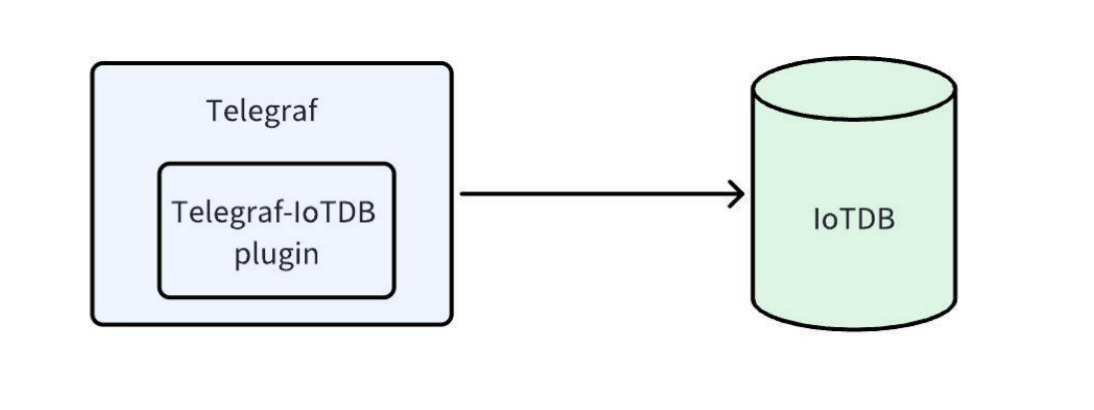
+The Telegraf IoTDB plugin can output and store monitoring information saved in
Telegraf to IoTDB. The output plugin uses IoTDB sessions for connection and
data writing.
+
+
+
+## 2、Installation Requirements
+
+Telegraf supports multiple operating systems, including Linux, Windows, and
macOS. It is recommended to use 'root' administrator privileges to successfully
install Telegraf. Please refer to the installation requirements for specific
[Installation Requirements](https://docs.influxdata.com/telegraf/v1/install/)
+
+## 3、Installation Steps
+
+Please refer to [Installation
Steps](https://docs.influxdata.com/telegraf/v1/install/) for specific
installation steps
+
+- Note: This plugin is a built-in plugin for Telegraf and does not require
secondary installation
+
+## 4、Instructions
+
+### 4.1 Set Input Source
+
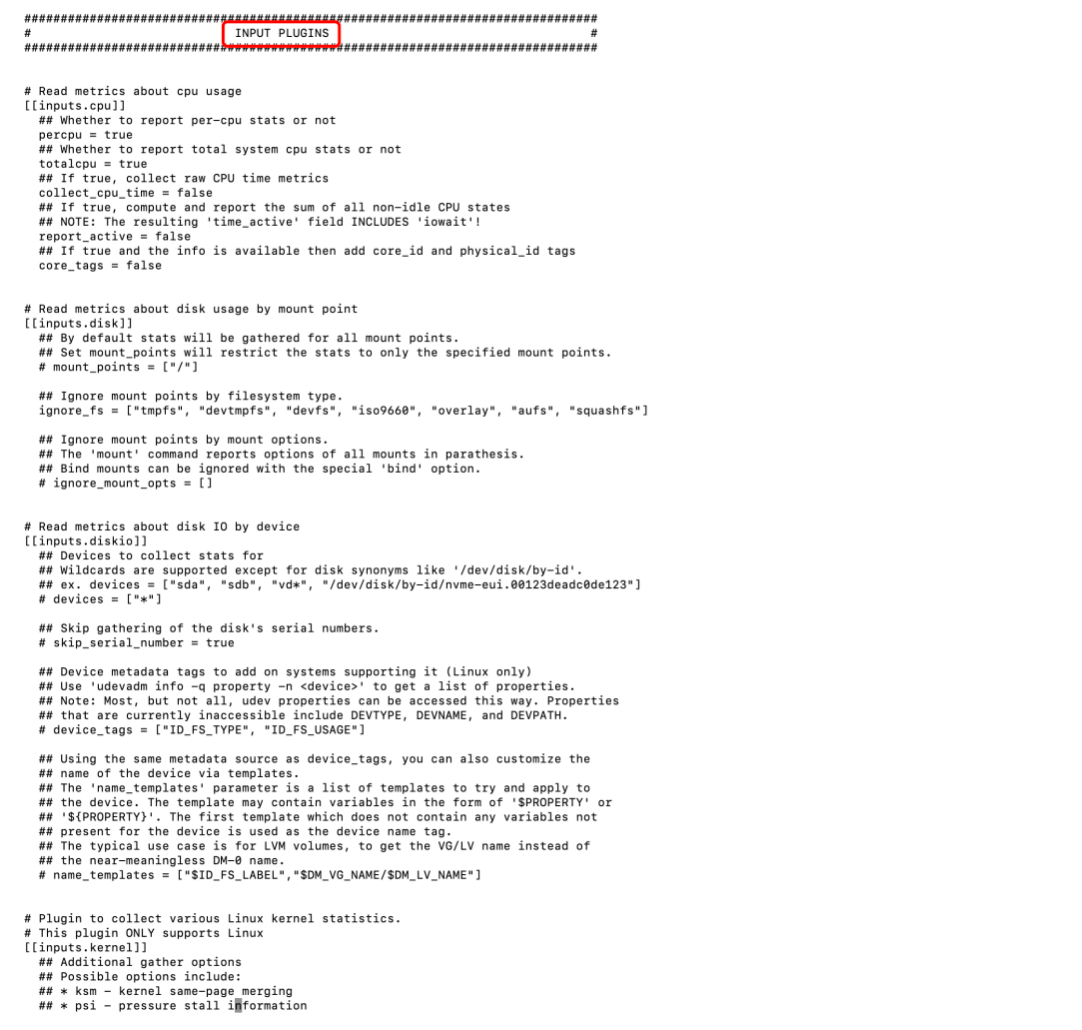
+Find 'INPUT PLUGINS' in the' telegraf. conf 'configuration file to configure
the input source. The specific configuration content is shown in the table below
+
+| Configuration | Description
| Notes
|
+| ----------------- |
------------------------------------------------------------ |
------------------------------------------------------------ |
+| alias | Example of named plugin
| |
+| interval |Collect the frequency of this indicator. Ordinary plugins
use a single global interval, but if the running frequency of a specific input
should be lower or higher, you can configure it here` Interval can be increased
to reduce data input rate limitations. |
|
+| precision | Overlay the settings of the 'precision' proxy. The
collected indicators are rounded to the specified precision interval. When this
value is set on the service input (e.g. `'statsd':`), the output database may
merge multiple events that occur at the same timestamp. |
|
+| collection_jitter | Overlay the settings of the 'collectic_jitter' proxy.
Collection jitter is used to perform random intervals` |
|
+| name_override | Custom time series path name used when outputting to
IoTDB | The output path name must meet the "[Syntax
Requirement](../Reference/Syntax-Rule.md)" requirement |
+| name_prefix | Specify the prefix attached to the measurement name
|
|
+| name_suffix | Specify the suffix attached to the measurement name
|
|
+
+
+
+### 4.2 Set Output Source
+
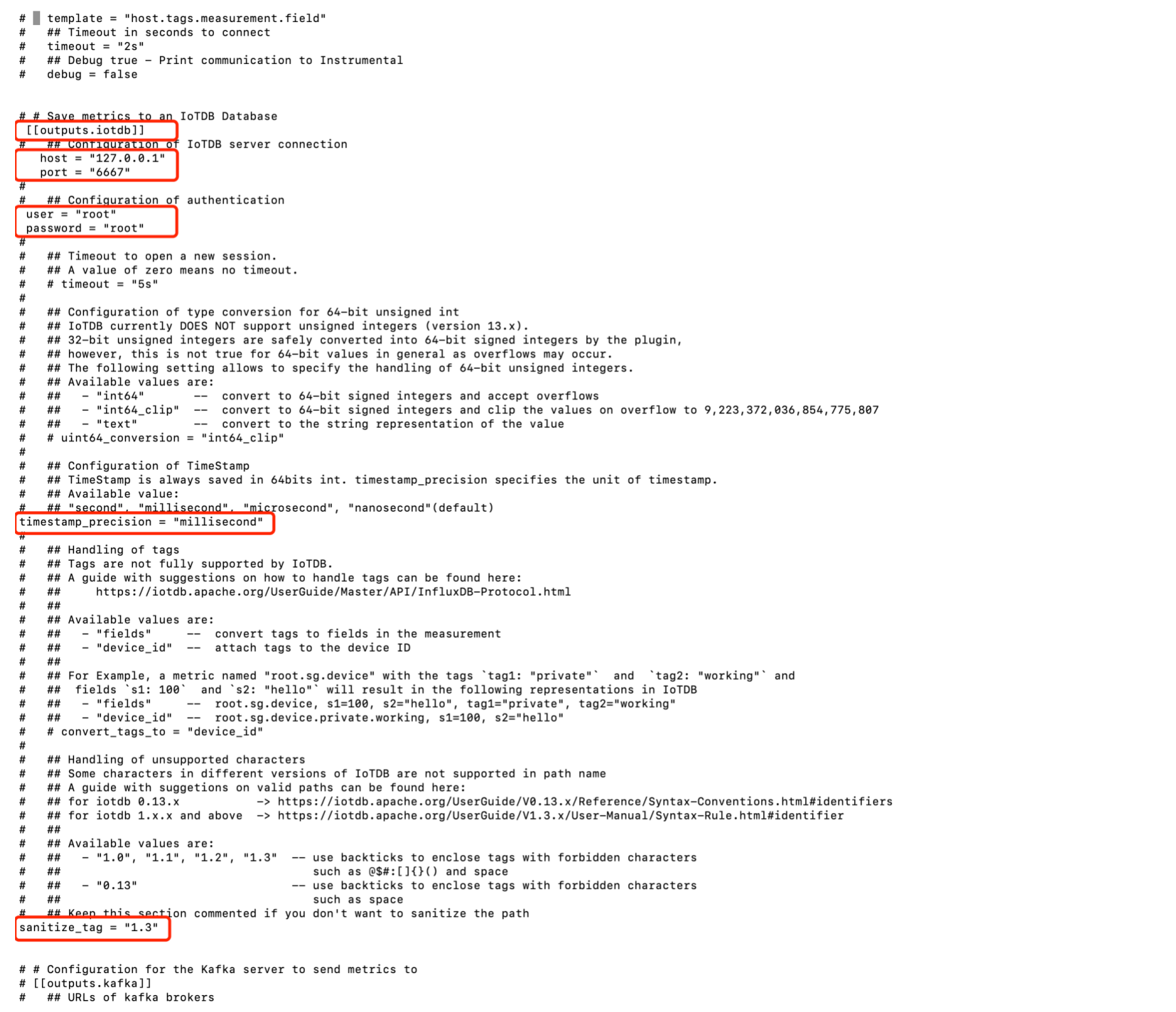
+Find "outputs. iotdb" in the "telegraf. conf" configuration file to configure
the output source. The specific configuration content is shown in the table
below. For specific input source examples, please refer to [Output Source
Example](https://docs.influxdata.com/telegraf/v1/configuration/#output-configuration-examples)
+
+| Configuration | Description | Before Modification
| After Modification
| Notes |
+| ------------------- | -------------- | ----------------------------------- |
------------------------------------------------- |
------------------------------------------------------------ |
+| host | Host of IoTDB | # host = "127.0.0.1" |
host = "Deploy IoTDB host" | Default is 127.0.0.1
|
+| port | The port number of IoTDB | # port = "6667"
| port = "Port number for deploying IoTDB" |
Default is 6667 |
+| user | Username for IoTDB | # user = "root"
| user = "Username for IoTDB" |Default as root
|
+| password | Password for IoTDB | # password = "root"
| password= "Password for IoTDB" | Default as root
|
+| timestamp_precision | Timestamp accuracy | timestamp_precision =
"millisecond" | timestamp_precision = "Same timestamp accuracy as IoTDB" | You
can check the 'timestamp-precision' field in 'iotdb system. properties' |
+| sanitize_tag | Database version | none
| sanitize_tag = "0.13/1.0/1.1/1.2/1.3" |
|
+
+
+
+### 4.3 Start Telegraf Service
+
+```Bash
+telegraf -config /path/to/telegraf.conf
+```
+
+## 5、Example Usage
+
+The following is an example of collecting CPU data using Telegraf and
outputting it to IoTDB using Telegraf IoTDB. Generate configuration files using
the telegraf command
+
+```Bash
+telegraf --sample-config --input-filter cpu --output-filter iotdb >
cpu_iotdb.conf
+```
+
+1. Modify the configuration of the input CPU plugin in cpu_iotdb. conf. Among
them, the "name_ooverride" field is the custom time-series path name used when
outputting to IoTDB
+
+```Bash
+# Read metrics about cpu usage
+[[inputs.cpu]]
+ ## Whether to report per-cpu stats or not
+ percpu = true
+ ## Whether to report total system cpu stats or not
+ totalcpu = true
+ ## If true, collect raw CPU time metrics
+ collect_cpu_time = false
+ ## If true, compute and report the sum of all non-idle CPU states
+ report_active = false
+ ## If true and the info is available then add core_id and physical_id tags
+ core_tags = false
+ name_override = "root.demo.telgraf.cpu"
+```
+
+2. Modify the configuration of the output iotdb plugin in cpu_iotdb. conf
+
+| Configuration | Description | Before Modification
| After Modification
| Notes |
+| ------------------- | -------------- | ----------------------------------- |
------------------------------------------------- |
------------------------------------------------------------ |
+| host | Host of IoTDB | # host = "127.0.0.1" |
host = "Deploy IoTDB host" | Default is 127.0.0.1
|
+| port | The port number of IoTDB | # port = "6667"
| port = "Port number for deploying IoTDB" |
Default is 6667 |
+| user | Username for IoTDB | # user = "root"
| user = "Username for IoTDB" |Default as root
|
+| password | Password for IoTDB | # password = "root"
| password= "Password for IoTDB" | Default as root
|
+| timestamp_precision | Timestamp accuracy | timestamp_precision =
"millisecond" | timestamp_precision = "Same timestamp accuracy as IoTDB" | You
can check the 'timestamp-precision' field in 'iotdb system. properties' |
+| sanitize_tag | Database version | none
| sanitize_tag = "0.13/1.0/1.1/1.2/1.3" |
|
+
+```Bash
+# Save metrics to an IoTDB Database
+[[outputs.iotdb]]
+ ## Configuration of IoTDB server connection
+ host = "127.0.0.1"
+ # port = "6667"
+
+ ## Configuration of authentication
+ # user = "root"
+ # password = "root"
+
+ ## Timeout to open a new session.
+ ## A value of zero means no timeout.
+ # timeout = "5s"
+
+ ## Configuration of type conversion for 64-bit unsigned int
+ ## IoTDB currently DOES NOT support unsigned integers (version 13.x).
+ ## 32-bit unsigned integers are safely converted into 64-bit signed integers
by the plugin,
+ ## however, this is not true for 64-bit values in general as overflows may
occur.
+ ## The following setting allows to specify the handling of 64-bit unsigned
integers.
+ ## Available values are:
+ ## - "int64" -- convert to 64-bit signed integers and accept
overflows
+ ## - "int64_clip" -- convert to 64-bit signed integers and clip the
values on overflow to 9,223,372,036,854,775,807
+ ## - "text" -- convert to the string representation of the value
+ # uint64_conversion = "int64_clip"
+
+ ## Configuration of TimeStamp
+ ## TimeStamp is always saved in 64bits int. timestamp_precision specifies
the unit of timestamp.
+ ## Available value:
+ ## "second", "millisecond", "microsecond", "nanosecond"(default)
+ timestamp_precision = "millisecond"
+
+ ## Handling of tags
+ ## Tags are not fully supported by IoTDB.
+ ## A guide with suggestions on how to handle tags can be found here:
+ ## https://iotdb.apache.org/UserGuide/Master/API/InfluxDB-Protocol.html
+ ##
+ ## Available values are:
+ ## - "fields" -- convert tags to fields in the measurement
+ ## - "device_id" -- attach tags to the device ID
+ ##
+ ## For Example, a metric named "root.sg.device" with the tags `tag1:
"private"` and `tag2: "working"` and
+ ## fields `s1: 100` and `s2: "hello"` will result in the following
representations in IoTDB
+ ## - "fields" -- root.sg.device, s1=100, s2="hello", tag1="private",
tag2="working"
+ ## - "device_id" -- root.sg.device.private.working, s1=100, s2="hello"
+ # convert_tags_to = "device_id"
+ ## Handling of unsupported characters
+ ## Some characters in different versions of IoTDB are not supported in path
name
+ ## A guide with suggetions on valid paths can be found here:
+ ## for iotdb 0.13.x ->
https://iotdb.apache.org/UserGuide/V0.13.x/Reference/Syntax-Conventions.html#identifiers
+ ## for iotdb 1.x.x and above ->
https://iotdb.apache.org/UserGuide/V1.3.x/User-Manual/Syntax-Rule.html#identifier
+ ##
+ ## Available values are:
+ ## - "1.0", "1.1", "1.2", "1.3" -- enclose in `` the world having
forbidden character
+ ## such as @ $ # : [ ] { } ( ) space
+ ## - "0.13" -- enclose in `` the world having
forbidden character
+ ## such as space
+ ##
+ ## Keep this section commented if you don't want to sanitize the path
+ sanitize_tag = "1.3"
+```
+
+3. Run Telegraf using the cpu_iotdb.exe configuration file: After running for
a period of time, the data collected and reported by Telegraf can be queried in
IoTDB
\ No newline at end of file
diff --git
a/src/zh/UserGuide/Master/Tree/Ecosystem-Integration/Telegraf-IoTDB.md
b/src/zh/UserGuide/Master/Tree/Ecosystem-Integration/Telegraf-IoTDB.md
deleted file mode 100644
index e6a80fba..00000000
--- a/src/zh/UserGuide/Master/Tree/Ecosystem-Integration/Telegraf-IoTDB.md
+++ /dev/null
@@ -1,110 +0,0 @@
-<!--
-
- Licensed to the Apache Software Foundation (ASF) under one
- or more contributor license agreements. See the NOTICE file
- distributed with this work for additional information
- regarding copyright ownership. The ASF licenses this file
- to you under the Apache License, Version 2.0 (the
- "License"); you may not use this file except in compliance
- with the License. You may obtain a copy of the License at
-
- http://www.apache.org/licenses/LICENSE-2.0
-
- Unless required by applicable law or agreed to in writing,
- software distributed under the License is distributed on an
- "AS IS" BASIS, WITHOUT WARRANTIES OR CONDITIONS OF ANY
- KIND, either express or implied. See the License for the
- specific language governing permissions and limitations
- under the License.
-
--->
-
-# Telegraf
-Telegraf 是一个开源代理工具,用于收集、处理和传输度量数据,由 InfluxData 开发。
-Telegraf 有以下这些特点:
-* 插件体系结构: Telegraf 的强大之处在于其广泛的插件生态系统。它支持多种输入、输出和处理器插件,可以与各种数据源和目标无缝集成。
-* 数据收集: Telegraf 擅长从不同来源收集度量数据,例如系统指标、日志、数据库等。其多功能性使其适用于监视应用程序、基础架构和物联网设备。
-* 输出目标: 一旦收集到数据,可以将其发送到各种输出目标,包括流行的数据库如 InfluxDB。这种灵活性使 Telegraf 适应不同的监视和分析设置。
-* 配置简易: Telegraf 的配置使用 TOML 文件进行。这种简单性使用户能够轻松定义输入、输出和处理器,使定制变得简单明了。
-* 社区与支持: 作为开源项目,Telegraf 受益于活跃的社区。用户可以通过论坛和文档贡献插件、报告问题并寻求帮助。
-
-# Telegraf IoTDB 输出插件
-这个输出插件保存 Telegraf 中的监控信息到 Apache IoTDB 的后端,支持 session 连接和数据写入。
-
-## 注意事项
-1. 在使用这个插件前,需要配置 IP 地址,端口号,用户名,密码以及其他数据库服务器的信息,另外还有数据转换,时间单位和其他配置。
-2. 输出到 IoTDB 的路径需要满足章节 ‘语法约定’ 中的要求
-3. 查看 https://github.com/influxdata/telegraf/tree/master/plugins/outputs/iotdb
了解如何配置 Telegraf IoTDB Output 插件.
-
-## 示例
-以下是一个使用 Telegraf 收集 CPU 数据输出到 IoTDB 的示例。
-1. 使用 telegraf 命令生成配置文件
-```
-telegraf --sample-config --input-filter cpu --output-filter iotdb >
cpu_iotdb.conf
-```
-2. 修改 input cpu 插件的配置
-```
-# Read metrics about cpu usage
-[[inputs.cpu]]
- ## Whether to report per-cpu stats or not
- percpu = true
- ## Whether to report total system cpu stats or not
- totalcpu = true
- ## If true, collect raw CPU time metrics
- collect_cpu_time = false
- ## If true, compute and report the sum of all non-idle CPU states
- report_active = false
- ## If true and the info is available then add core_id and physical_id tags
- core_tags = false
- name_override = "root.demo.telgraf.cpu"
-```
-3. 修改 output iotdb 插件的配置
-```
-# Save metrics to an IoTDB Database
-[[outputs.iotdb]]
- ## Configuration of IoTDB server connection
- host = "127.0.0.1"
- # port = "6667"
-
- ## Configuration of authentication
- # user = "root"
- # password = "root"
-
- ## Timeout to open a new session.
- ## A value of zero means no timeout.
- # timeout = "5s"
-
- ## Configuration of type conversion for 64-bit unsigned int
- ## IoTDB currently DOES NOT support unsigned integers (version 13.x).
- ## 32-bit unsigned integers are safely converted into 64-bit signed integers
by the plugin,
- ## however, this is not true for 64-bit values in general as overflows may
occur.
- ## The following setting allows to specify the handling of 64-bit unsigned
integers.
- ## Available values are:
- ## - "int64" -- convert to 64-bit signed integers and accept
overflows
- ## - "int64_clip" -- convert to 64-bit signed integers and clip the
values on overflow to 9,223,372,036,854,775,807
- ## - "text" -- convert to the string representation of the value
- # uint64_conversion = "int64_clip"
-
- ## Configuration of TimeStamp
- ## TimeStamp is always saved in 64bits int. timestamp_precision specifies
the unit of timestamp.
- ## Available value:
- ## "second", "millisecond", "microsecond", "nanosecond"(default)
- timestamp_precision = "millisecond"
-
- ## Handling of tags
- ## Tags are not fully supported by IoTDB.
- ## A guide with suggestions on how to handle tags can be found here:
- ## https://iotdb.apache.org/UserGuide/Master/API/InfluxDB-Protocol.html
- ##
- ## Available values are:
- ## - "fields" -- convert tags to fields in the measurement
- ## - "device_id" -- attach tags to the device ID
- ##
- ## For Example, a metric named "root.sg.device" with the tags `tag1:
"private"` and `tag2: "working"` and
- ## fields `s1: 100` and `s2: "hello"` will result in the following
representations in IoTDB
- ## - "fields" -- root.sg.device, s1=100, s2="hello", tag1="private",
tag2="working"
- ## - "device_id" -- root.sg.device.private.working, s1=100, s2="hello"
- convert_tags_to = "fields"
-```
-4. 使用这个配置文件运行 Telegraf,一段时间后,可以在 IoTDB 中查询到收集的这些数据
-
diff --git a/src/zh/UserGuide/Master/Tree/Ecosystem-Integration/Telegraf.md
b/src/zh/UserGuide/Master/Tree/Ecosystem-Integration/Telegraf.md
new file mode 100644
index 00000000..080b7048
--- /dev/null
+++ b/src/zh/UserGuide/Master/Tree/Ecosystem-Integration/Telegraf.md
@@ -0,0 +1,191 @@
+<!--
+
+ Licensed to the Apache Software Foundation (ASF) under one
+ or more contributor license agreements. See the NOTICE file
+ distributed with this work for additional information
+ regarding copyright ownership. The ASF licenses this file
+ to you under the Apache License, Version 2.0 (the
+ "License"); you may not use this file except in compliance
+ with the License. You may obtain a copy of the License at
+
+ http://www.apache.org/licenses/LICENSE-2.0
+
+ Unless required by applicable law or agreed to in writing,
+ software distributed under the License is distributed on an
+ "AS IS" BASIS, WITHOUT WARRANTIES OR CONDITIONS OF ANY
+ KIND, either express or implied. See the License for the
+ specific language governing permissions and limitations
+ under the License.
+
+-->
+# Telegraf
+
+## 1、产品概述
+
+### 1.1 Telegraf
+
+[Telegraf](https://www.influxdata.com/time-series-platform/telegraf/)
是一个开源代理工具,用于收集、处理和传输度量数据,由 InfluxData 开发。
+
+Telegraf 有以下这些特点:
+
+- 插件体系结构:Telegraf 的强大之处在于其广泛的插件生态系统。它支持多种输入、输出和处理器插件,可以与各种数据源和目标无缝集成。
+ - 数据收集:Telegraf 擅长从不同来源收集度量数据,例如系统指标、日志、数据库等。其多功能性使其适用于监视应用程序、基础架构和物联网设备。
+ - 输出目标:一旦收集到数据,可以将其发送到各种输出目标,包括流行的数据库如 InfluxDB。这种灵活性使 Telegraf 适应不同的监视和分析设置。
+- 配置简易:Telegraf 的配置使用 TOML 文件进行。这种简单性使用户能够轻松定义输入、输出和处理器,使定制变得简单明了。
+- 社区与支持:作为开源项目,Telegraf 受益于活跃的社区。用户可以通过论坛和文档贡献插件、报告问题并寻求帮助。
+
+### 1.2 Telegraf-IoTDB 插件
+
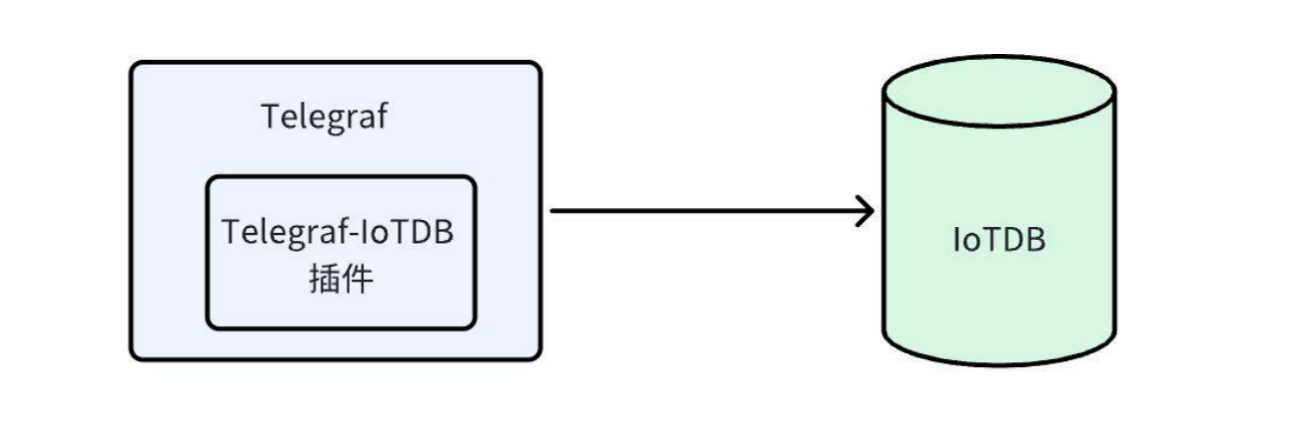
+Telegraf-IoTDB 插件可以将保存在 Telegraf 中的监控信息输出存储到 IoTDB,输出插件使用了 IoTDB session
进行连接和数据写入。
+
+
+
+## 2、安装要求
+
+Telegraf支持多种操作系统,包括Linux、Windows、macOS,Telegraf
的安装推荐使用`root`管理员权限才能成功完成,具体安装要求请查看
[安装要求](https://docs.influxdata.com/telegraf/v1/install/)
+
+## 3、安装步骤
+
+具体安装步骤请查看 [安装步骤](https://docs.influxdata.com/telegraf/v1/install/)
+
+- 注:此插件为Telegraf内置插件,无需进行二次安装
+
+## 4、使用说明
+
+### 4.1 设置输入源
+
+在“telegraf.conf”配置文件中找到“INPUT PLUGINS”来配置输入源,具体配置内容如下表所示
+
+| 配置项 | 说明
| 备注 |
+| ----------------- |
------------------------------------------------------------ |
------------------------------------------------------------ |
+| alias | 命名插件的实例 |
|
+| interval |
收集此指标的频率。普通插件使用单个全局间隔,但如果某个特定输入的运行频率应更低或更高,您可以在此处进行配置。`interval`可以增加间隔以减少数据输入速率限制。
| |
+| precision |
覆盖`precision`代理的设置。收集的指标四舍五入到指定的精度`interval`。当在服务输入上设置此值(例如`statsd`:)时,输出数据库可能会合并在同一时间戳发生的多个事件。
| |
+| collection_jitter | 覆盖`collection_jitter`代理的设置。Collection jitter
用于通过随机的`interval` |
|
+| name_override | 输出到 IoTDB 时使用的自定义时间序列路径名 |
输出的路径名称需满足“[语法要求](../Reference/Syntax-Rule.md)”要求 |
+| name_prefix | 指定附加到测量名称的前缀 |
|
+| name_suffix | 指定附加到测量名称的后缀 |
|
+
+
+
+### 4.2 设置输出源
+
+在“telegraf.conf”配置文件中找到“outputs.iotdb”来配置输出源,具体配置内容如下表所示,具体输入源示例可查看
[输出源示例](https://docs.influxdata.com/telegraf/v1/configuration/#output-configuration-examples)
+
+| 配置项 | 说明 | 修改前 | 修改后
| 备注
|
+| ------------------- | -------------- | ----------------------------------- |
------------------------------------------------- |
------------------------------------------------------------ |
+| host | IoTDB 的 host | # host = "127.0.0.1" |
host = "部署 IoTDB 的 host" | 默认为 127.0.0.1
|
+| port | IoTDB 的端口号 | # port = "6667" |
port = "部署 IoTDB 的端口号" | 默认为 6667
|
+| user | IoTDB 的用户名 | # user = "root" |
user = "IoTDB 的用户名" | 默认为 root
|
+| password | IoTDB 的密码 | # password = "root" |
password= "IoTDB 的密码" | 默认为 root
|
+| timestamp_precision | 时间戳精度 | timestamp_precision = "millisecond" |
timestamp_precision = "与 IoTDB 相同的时间戳精度" |
您可以通过查看"iotdb-system.properties"中"timestamp_precision"字段即可 |
+| sanitize_tag | 数据库版本 | 无 |
sanitize_tag = "0.13/1.0/1.1/1.2/1.3" |
|
+
+
+
+### 4.3 启动Telegraf服务
+
+```Bash
+telegraf -config /path/to/telegraf.conf
+```
+
+## 5、使用示例
+
+以下是一个使用 Telegraf 收集 CPU 数据并使用 Telegraf-IoTDB 输出到 IoTDB 的示例。使用 telegraf 命令生成配置文件
+
+```Bash
+telegraf --sample-config --input-filter cpu --output-filter iotdb >
cpu_iotdb.conf
+```
+
+1. 在 cpu_iotdb.conf 中修改 input cpu 插件的配置。其中,“name_override” 字段为输出到 IoTDB
时使用的自定义时间序列路径名
+
+```Bash
+# Read metrics about cpu usage
+[[inputs.cpu]]
+ ## Whether to report per-cpu stats or not
+ percpu = true
+ ## Whether to report total system cpu stats or not
+ totalcpu = true
+ ## If true, collect raw CPU time metrics
+ collect_cpu_time = false
+ ## If true, compute and report the sum of all non-idle CPU states
+ report_active = false
+ ## If true and the info is available then add core_id and physical_id tags
+ core_tags = false
+ name_override = "root.demo.telgraf.cpu"
+```
+
+2. 在 cpu_iotdb.conf 中修改 output iotdb 插件的配置
+
+| 配置项 | 说明 | 修改前 | 修改后
| 备注
|
+| ------------------- | -------------- | ----------------------------------- |
------------------------------------------------- |
------------------------------------------------------------ |
+| host | IoTDB 的 host | # host = "127.0.0.1" |
host = "部署 IoTDB 的 host" | 默认为 127.0.0.1
|
+| port | IoTDB 的端口号 | # port = "6667" |
port = "部署 IoTDB 的端口号" | 默认为 6667
|
+| user | IoTDB 的用户名 | # user = "root" |
user = "IoTDB 的用户名" | 默认为 root
|
+| password | IoTDB 的密码 | # password = "root" |
password= "IoTDB 的密码" | 默认为 root
|
+| timestamp_precision | 时间戳精度 | timestamp_precision = "millisecond" |
timestamp_precision = "与 IoTDB 相同的时间戳精度" |
您可以通过查看"iotdb-system.properties"中"timestamp_precision"字段即可 |
+| sanitize_tag | 数据库版本 | 无 |
sanitize_tag = "0.13/1.0/1.1/1.2/1.3" |
|
+
+```Bash
+# Save metrics to an IoTDB Database
+[[outputs.iotdb]]
+ ## Configuration of IoTDB server connection
+ host = "127.0.0.1"
+ # port = "6667"
+
+ ## Configuration of authentication
+ # user = "root"
+ # password = "root"
+
+ ## Timeout to open a new session.
+ ## A value of zero means no timeout.
+ # timeout = "5s"
+
+ ## Configuration of type conversion for 64-bit unsigned int
+ ## IoTDB currently DOES NOT support unsigned integers (version 13.x).
+ ## 32-bit unsigned integers are safely converted into 64-bit signed integers
by the plugin,
+ ## however, this is not true for 64-bit values in general as overflows may
occur.
+ ## The following setting allows to specify the handling of 64-bit unsigned
integers.
+ ## Available values are:
+ ## - "int64" -- convert to 64-bit signed integers and accept
overflows
+ ## - "int64_clip" -- convert to 64-bit signed integers and clip the
values on overflow to 9,223,372,036,854,775,807
+ ## - "text" -- convert to the string representation of the value
+ # uint64_conversion = "int64_clip"
+
+ ## Configuration of TimeStamp
+ ## TimeStamp is always saved in 64bits int. timestamp_precision specifies
the unit of timestamp.
+ ## Available value:
+ ## "second", "millisecond", "microsecond", "nanosecond"(default)
+ timestamp_precision = "millisecond"
+
+ ## Handling of tags
+ ## Tags are not fully supported by IoTDB.
+ ## A guide with suggestions on how to handle tags can be found here:
+ ## https://iotdb.apache.org/UserGuide/Master/API/InfluxDB-Protocol.html
+ ##
+ ## Available values are:
+ ## - "fields" -- convert tags to fields in the measurement
+ ## - "device_id" -- attach tags to the device ID
+ ##
+ ## For Example, a metric named "root.sg.device" with the tags `tag1:
"private"` and `tag2: "working"` and
+ ## fields `s1: 100` and `s2: "hello"` will result in the following
representations in IoTDB
+ ## - "fields" -- root.sg.device, s1=100, s2="hello", tag1="private",
tag2="working"
+ ## - "device_id" -- root.sg.device.private.working, s1=100, s2="hello"
+ # convert_tags_to = "device_id"
+ ## Handling of unsupported characters
+ ## Some characters in different versions of IoTDB are not supported in path
name
+ ## A guide with suggetions on valid paths can be found here:
+ ## for iotdb 0.13.x ->
https://iotdb.apache.org/UserGuide/V0.13.x/Reference/Syntax-Conventions.html#identifiers
+ ## for iotdb 1.x.x and above ->
https://iotdb.apache.org/UserGuide/V1.3.x/User-Manual/Syntax-Rule.html#identifier
+ ##
+ ## Available values are:
+ ## - "1.0", "1.1", "1.2", "1.3" -- enclose in `` the world having
forbidden character
+ ## such as @ $ # : [ ] { } ( ) space
+ ## - "0.13" -- enclose in `` the world having
forbidden character
+ ## such as space
+ ##
+ ## Keep this section commented if you don't want to sanitize the path
+ sanitize_tag = "1.3"
+```
+
+3. 使用 cpu_iotdb.conf 配置文件运行 Telegraf:运行一段时间后,可以在 IoTDB 中查询到 Telegraf 收集上报的数据
\ No newline at end of file
diff --git
a/src/zh/UserGuide/V2.0.1/Tree/Ecosystem-Integration/Telegraf-IoTDB.md
b/src/zh/UserGuide/V2.0.1/Tree/Ecosystem-Integration/Telegraf-IoTDB.md
deleted file mode 100644
index e6a80fba..00000000
--- a/src/zh/UserGuide/V2.0.1/Tree/Ecosystem-Integration/Telegraf-IoTDB.md
+++ /dev/null
@@ -1,110 +0,0 @@
-<!--
-
- Licensed to the Apache Software Foundation (ASF) under one
- or more contributor license agreements. See the NOTICE file
- distributed with this work for additional information
- regarding copyright ownership. The ASF licenses this file
- to you under the Apache License, Version 2.0 (the
- "License"); you may not use this file except in compliance
- with the License. You may obtain a copy of the License at
-
- http://www.apache.org/licenses/LICENSE-2.0
-
- Unless required by applicable law or agreed to in writing,
- software distributed under the License is distributed on an
- "AS IS" BASIS, WITHOUT WARRANTIES OR CONDITIONS OF ANY
- KIND, either express or implied. See the License for the
- specific language governing permissions and limitations
- under the License.
-
--->
-
-# Telegraf
-Telegraf 是一个开源代理工具,用于收集、处理和传输度量数据,由 InfluxData 开发。
-Telegraf 有以下这些特点:
-* 插件体系结构: Telegraf 的强大之处在于其广泛的插件生态系统。它支持多种输入、输出和处理器插件,可以与各种数据源和目标无缝集成。
-* 数据收集: Telegraf 擅长从不同来源收集度量数据,例如系统指标、日志、数据库等。其多功能性使其适用于监视应用程序、基础架构和物联网设备。
-* 输出目标: 一旦收集到数据,可以将其发送到各种输出目标,包括流行的数据库如 InfluxDB。这种灵活性使 Telegraf 适应不同的监视和分析设置。
-* 配置简易: Telegraf 的配置使用 TOML 文件进行。这种简单性使用户能够轻松定义输入、输出和处理器,使定制变得简单明了。
-* 社区与支持: 作为开源项目,Telegraf 受益于活跃的社区。用户可以通过论坛和文档贡献插件、报告问题并寻求帮助。
-
-# Telegraf IoTDB 输出插件
-这个输出插件保存 Telegraf 中的监控信息到 Apache IoTDB 的后端,支持 session 连接和数据写入。
-
-## 注意事项
-1. 在使用这个插件前,需要配置 IP 地址,端口号,用户名,密码以及其他数据库服务器的信息,另外还有数据转换,时间单位和其他配置。
-2. 输出到 IoTDB 的路径需要满足章节 ‘语法约定’ 中的要求
-3. 查看 https://github.com/influxdata/telegraf/tree/master/plugins/outputs/iotdb
了解如何配置 Telegraf IoTDB Output 插件.
-
-## 示例
-以下是一个使用 Telegraf 收集 CPU 数据输出到 IoTDB 的示例。
-1. 使用 telegraf 命令生成配置文件
-```
-telegraf --sample-config --input-filter cpu --output-filter iotdb >
cpu_iotdb.conf
-```
-2. 修改 input cpu 插件的配置
-```
-# Read metrics about cpu usage
-[[inputs.cpu]]
- ## Whether to report per-cpu stats or not
- percpu = true
- ## Whether to report total system cpu stats or not
- totalcpu = true
- ## If true, collect raw CPU time metrics
- collect_cpu_time = false
- ## If true, compute and report the sum of all non-idle CPU states
- report_active = false
- ## If true and the info is available then add core_id and physical_id tags
- core_tags = false
- name_override = "root.demo.telgraf.cpu"
-```
-3. 修改 output iotdb 插件的配置
-```
-# Save metrics to an IoTDB Database
-[[outputs.iotdb]]
- ## Configuration of IoTDB server connection
- host = "127.0.0.1"
- # port = "6667"
-
- ## Configuration of authentication
- # user = "root"
- # password = "root"
-
- ## Timeout to open a new session.
- ## A value of zero means no timeout.
- # timeout = "5s"
-
- ## Configuration of type conversion for 64-bit unsigned int
- ## IoTDB currently DOES NOT support unsigned integers (version 13.x).
- ## 32-bit unsigned integers are safely converted into 64-bit signed integers
by the plugin,
- ## however, this is not true for 64-bit values in general as overflows may
occur.
- ## The following setting allows to specify the handling of 64-bit unsigned
integers.
- ## Available values are:
- ## - "int64" -- convert to 64-bit signed integers and accept
overflows
- ## - "int64_clip" -- convert to 64-bit signed integers and clip the
values on overflow to 9,223,372,036,854,775,807
- ## - "text" -- convert to the string representation of the value
- # uint64_conversion = "int64_clip"
-
- ## Configuration of TimeStamp
- ## TimeStamp is always saved in 64bits int. timestamp_precision specifies
the unit of timestamp.
- ## Available value:
- ## "second", "millisecond", "microsecond", "nanosecond"(default)
- timestamp_precision = "millisecond"
-
- ## Handling of tags
- ## Tags are not fully supported by IoTDB.
- ## A guide with suggestions on how to handle tags can be found here:
- ## https://iotdb.apache.org/UserGuide/Master/API/InfluxDB-Protocol.html
- ##
- ## Available values are:
- ## - "fields" -- convert tags to fields in the measurement
- ## - "device_id" -- attach tags to the device ID
- ##
- ## For Example, a metric named "root.sg.device" with the tags `tag1:
"private"` and `tag2: "working"` and
- ## fields `s1: 100` and `s2: "hello"` will result in the following
representations in IoTDB
- ## - "fields" -- root.sg.device, s1=100, s2="hello", tag1="private",
tag2="working"
- ## - "device_id" -- root.sg.device.private.working, s1=100, s2="hello"
- convert_tags_to = "fields"
-```
-4. 使用这个配置文件运行 Telegraf,一段时间后,可以在 IoTDB 中查询到收集的这些数据
-
diff --git a/src/zh/UserGuide/V2.0.1/Tree/Ecosystem-Integration/Telegraf.md
b/src/zh/UserGuide/V2.0.1/Tree/Ecosystem-Integration/Telegraf.md
new file mode 100644
index 00000000..080b7048
--- /dev/null
+++ b/src/zh/UserGuide/V2.0.1/Tree/Ecosystem-Integration/Telegraf.md
@@ -0,0 +1,191 @@
+<!--
+
+ Licensed to the Apache Software Foundation (ASF) under one
+ or more contributor license agreements. See the NOTICE file
+ distributed with this work for additional information
+ regarding copyright ownership. The ASF licenses this file
+ to you under the Apache License, Version 2.0 (the
+ "License"); you may not use this file except in compliance
+ with the License. You may obtain a copy of the License at
+
+ http://www.apache.org/licenses/LICENSE-2.0
+
+ Unless required by applicable law or agreed to in writing,
+ software distributed under the License is distributed on an
+ "AS IS" BASIS, WITHOUT WARRANTIES OR CONDITIONS OF ANY
+ KIND, either express or implied. See the License for the
+ specific language governing permissions and limitations
+ under the License.
+
+-->
+# Telegraf
+
+## 1、产品概述
+
+### 1.1 Telegraf
+
+[Telegraf](https://www.influxdata.com/time-series-platform/telegraf/)
是一个开源代理工具,用于收集、处理和传输度量数据,由 InfluxData 开发。
+
+Telegraf 有以下这些特点:
+
+- 插件体系结构:Telegraf 的强大之处在于其广泛的插件生态系统。它支持多种输入、输出和处理器插件,可以与各种数据源和目标无缝集成。
+ - 数据收集:Telegraf 擅长从不同来源收集度量数据,例如系统指标、日志、数据库等。其多功能性使其适用于监视应用程序、基础架构和物联网设备。
+ - 输出目标:一旦收集到数据,可以将其发送到各种输出目标,包括流行的数据库如 InfluxDB。这种灵活性使 Telegraf 适应不同的监视和分析设置。
+- 配置简易:Telegraf 的配置使用 TOML 文件进行。这种简单性使用户能够轻松定义输入、输出和处理器,使定制变得简单明了。
+- 社区与支持:作为开源项目,Telegraf 受益于活跃的社区。用户可以通过论坛和文档贡献插件、报告问题并寻求帮助。
+
+### 1.2 Telegraf-IoTDB 插件
+
+Telegraf-IoTDB 插件可以将保存在 Telegraf 中的监控信息输出存储到 IoTDB,输出插件使用了 IoTDB session
进行连接和数据写入。
+
+
+
+## 2、安装要求
+
+Telegraf支持多种操作系统,包括Linux、Windows、macOS,Telegraf
的安装推荐使用`root`管理员权限才能成功完成,具体安装要求请查看
[安装要求](https://docs.influxdata.com/telegraf/v1/install/)
+
+## 3、安装步骤
+
+具体安装步骤请查看 [安装步骤](https://docs.influxdata.com/telegraf/v1/install/)
+
+- 注:此插件为Telegraf内置插件,无需进行二次安装
+
+## 4、使用说明
+
+### 4.1 设置输入源
+
+在“telegraf.conf”配置文件中找到“INPUT PLUGINS”来配置输入源,具体配置内容如下表所示
+
+| 配置项 | 说明
| 备注 |
+| ----------------- |
------------------------------------------------------------ |
------------------------------------------------------------ |
+| alias | 命名插件的实例 |
|
+| interval |
收集此指标的频率。普通插件使用单个全局间隔,但如果某个特定输入的运行频率应更低或更高,您可以在此处进行配置。`interval`可以增加间隔以减少数据输入速率限制。
| |
+| precision |
覆盖`precision`代理的设置。收集的指标四舍五入到指定的精度`interval`。当在服务输入上设置此值(例如`statsd`:)时,输出数据库可能会合并在同一时间戳发生的多个事件。
| |
+| collection_jitter | 覆盖`collection_jitter`代理的设置。Collection jitter
用于通过随机的`interval` |
|
+| name_override | 输出到 IoTDB 时使用的自定义时间序列路径名 |
输出的路径名称需满足“[语法要求](../Reference/Syntax-Rule.md)”要求 |
+| name_prefix | 指定附加到测量名称的前缀 |
|
+| name_suffix | 指定附加到测量名称的后缀 |
|
+
+
+
+### 4.2 设置输出源
+
+在“telegraf.conf”配置文件中找到“outputs.iotdb”来配置输出源,具体配置内容如下表所示,具体输入源示例可查看
[输出源示例](https://docs.influxdata.com/telegraf/v1/configuration/#output-configuration-examples)
+
+| 配置项 | 说明 | 修改前 | 修改后
| 备注
|
+| ------------------- | -------------- | ----------------------------------- |
------------------------------------------------- |
------------------------------------------------------------ |
+| host | IoTDB 的 host | # host = "127.0.0.1" |
host = "部署 IoTDB 的 host" | 默认为 127.0.0.1
|
+| port | IoTDB 的端口号 | # port = "6667" |
port = "部署 IoTDB 的端口号" | 默认为 6667
|
+| user | IoTDB 的用户名 | # user = "root" |
user = "IoTDB 的用户名" | 默认为 root
|
+| password | IoTDB 的密码 | # password = "root" |
password= "IoTDB 的密码" | 默认为 root
|
+| timestamp_precision | 时间戳精度 | timestamp_precision = "millisecond" |
timestamp_precision = "与 IoTDB 相同的时间戳精度" |
您可以通过查看"iotdb-system.properties"中"timestamp_precision"字段即可 |
+| sanitize_tag | 数据库版本 | 无 |
sanitize_tag = "0.13/1.0/1.1/1.2/1.3" |
|
+
+
+
+### 4.3 启动Telegraf服务
+
+```Bash
+telegraf -config /path/to/telegraf.conf
+```
+
+## 5、使用示例
+
+以下是一个使用 Telegraf 收集 CPU 数据并使用 Telegraf-IoTDB 输出到 IoTDB 的示例。使用 telegraf 命令生成配置文件
+
+```Bash
+telegraf --sample-config --input-filter cpu --output-filter iotdb >
cpu_iotdb.conf
+```
+
+1. 在 cpu_iotdb.conf 中修改 input cpu 插件的配置。其中,“name_override” 字段为输出到 IoTDB
时使用的自定义时间序列路径名
+
+```Bash
+# Read metrics about cpu usage
+[[inputs.cpu]]
+ ## Whether to report per-cpu stats or not
+ percpu = true
+ ## Whether to report total system cpu stats or not
+ totalcpu = true
+ ## If true, collect raw CPU time metrics
+ collect_cpu_time = false
+ ## If true, compute and report the sum of all non-idle CPU states
+ report_active = false
+ ## If true and the info is available then add core_id and physical_id tags
+ core_tags = false
+ name_override = "root.demo.telgraf.cpu"
+```
+
+2. 在 cpu_iotdb.conf 中修改 output iotdb 插件的配置
+
+| 配置项 | 说明 | 修改前 | 修改后
| 备注
|
+| ------------------- | -------------- | ----------------------------------- |
------------------------------------------------- |
------------------------------------------------------------ |
+| host | IoTDB 的 host | # host = "127.0.0.1" |
host = "部署 IoTDB 的 host" | 默认为 127.0.0.1
|
+| port | IoTDB 的端口号 | # port = "6667" |
port = "部署 IoTDB 的端口号" | 默认为 6667
|
+| user | IoTDB 的用户名 | # user = "root" |
user = "IoTDB 的用户名" | 默认为 root
|
+| password | IoTDB 的密码 | # password = "root" |
password= "IoTDB 的密码" | 默认为 root
|
+| timestamp_precision | 时间戳精度 | timestamp_precision = "millisecond" |
timestamp_precision = "与 IoTDB 相同的时间戳精度" |
您可以通过查看"iotdb-system.properties"中"timestamp_precision"字段即可 |
+| sanitize_tag | 数据库版本 | 无 |
sanitize_tag = "0.13/1.0/1.1/1.2/1.3" |
|
+
+```Bash
+# Save metrics to an IoTDB Database
+[[outputs.iotdb]]
+ ## Configuration of IoTDB server connection
+ host = "127.0.0.1"
+ # port = "6667"
+
+ ## Configuration of authentication
+ # user = "root"
+ # password = "root"
+
+ ## Timeout to open a new session.
+ ## A value of zero means no timeout.
+ # timeout = "5s"
+
+ ## Configuration of type conversion for 64-bit unsigned int
+ ## IoTDB currently DOES NOT support unsigned integers (version 13.x).
+ ## 32-bit unsigned integers are safely converted into 64-bit signed integers
by the plugin,
+ ## however, this is not true for 64-bit values in general as overflows may
occur.
+ ## The following setting allows to specify the handling of 64-bit unsigned
integers.
+ ## Available values are:
+ ## - "int64" -- convert to 64-bit signed integers and accept
overflows
+ ## - "int64_clip" -- convert to 64-bit signed integers and clip the
values on overflow to 9,223,372,036,854,775,807
+ ## - "text" -- convert to the string representation of the value
+ # uint64_conversion = "int64_clip"
+
+ ## Configuration of TimeStamp
+ ## TimeStamp is always saved in 64bits int. timestamp_precision specifies
the unit of timestamp.
+ ## Available value:
+ ## "second", "millisecond", "microsecond", "nanosecond"(default)
+ timestamp_precision = "millisecond"
+
+ ## Handling of tags
+ ## Tags are not fully supported by IoTDB.
+ ## A guide with suggestions on how to handle tags can be found here:
+ ## https://iotdb.apache.org/UserGuide/Master/API/InfluxDB-Protocol.html
+ ##
+ ## Available values are:
+ ## - "fields" -- convert tags to fields in the measurement
+ ## - "device_id" -- attach tags to the device ID
+ ##
+ ## For Example, a metric named "root.sg.device" with the tags `tag1:
"private"` and `tag2: "working"` and
+ ## fields `s1: 100` and `s2: "hello"` will result in the following
representations in IoTDB
+ ## - "fields" -- root.sg.device, s1=100, s2="hello", tag1="private",
tag2="working"
+ ## - "device_id" -- root.sg.device.private.working, s1=100, s2="hello"
+ # convert_tags_to = "device_id"
+ ## Handling of unsupported characters
+ ## Some characters in different versions of IoTDB are not supported in path
name
+ ## A guide with suggetions on valid paths can be found here:
+ ## for iotdb 0.13.x ->
https://iotdb.apache.org/UserGuide/V0.13.x/Reference/Syntax-Conventions.html#identifiers
+ ## for iotdb 1.x.x and above ->
https://iotdb.apache.org/UserGuide/V1.3.x/User-Manual/Syntax-Rule.html#identifier
+ ##
+ ## Available values are:
+ ## - "1.0", "1.1", "1.2", "1.3" -- enclose in `` the world having
forbidden character
+ ## such as @ $ # : [ ] { } ( ) space
+ ## - "0.13" -- enclose in `` the world having
forbidden character
+ ## such as space
+ ##
+ ## Keep this section commented if you don't want to sanitize the path
+ sanitize_tag = "1.3"
+```
+
+3. 使用 cpu_iotdb.conf 配置文件运行 Telegraf:运行一段时间后,可以在 IoTDB 中查询到 Telegraf 收集上报的数据
\ No newline at end of file
diff --git a/src/zh/UserGuide/latest/Ecosystem-Integration/Telegraf-IoTDB.md
b/src/zh/UserGuide/latest/Ecosystem-Integration/Telegraf-IoTDB.md
deleted file mode 100644
index e6a80fba..00000000
--- a/src/zh/UserGuide/latest/Ecosystem-Integration/Telegraf-IoTDB.md
+++ /dev/null
@@ -1,110 +0,0 @@
-<!--
-
- Licensed to the Apache Software Foundation (ASF) under one
- or more contributor license agreements. See the NOTICE file
- distributed with this work for additional information
- regarding copyright ownership. The ASF licenses this file
- to you under the Apache License, Version 2.0 (the
- "License"); you may not use this file except in compliance
- with the License. You may obtain a copy of the License at
-
- http://www.apache.org/licenses/LICENSE-2.0
-
- Unless required by applicable law or agreed to in writing,
- software distributed under the License is distributed on an
- "AS IS" BASIS, WITHOUT WARRANTIES OR CONDITIONS OF ANY
- KIND, either express or implied. See the License for the
- specific language governing permissions and limitations
- under the License.
-
--->
-
-# Telegraf
-Telegraf 是一个开源代理工具,用于收集、处理和传输度量数据,由 InfluxData 开发。
-Telegraf 有以下这些特点:
-* 插件体系结构: Telegraf 的强大之处在于其广泛的插件生态系统。它支持多种输入、输出和处理器插件,可以与各种数据源和目标无缝集成。
-* 数据收集: Telegraf 擅长从不同来源收集度量数据,例如系统指标、日志、数据库等。其多功能性使其适用于监视应用程序、基础架构和物联网设备。
-* 输出目标: 一旦收集到数据,可以将其发送到各种输出目标,包括流行的数据库如 InfluxDB。这种灵活性使 Telegraf 适应不同的监视和分析设置。
-* 配置简易: Telegraf 的配置使用 TOML 文件进行。这种简单性使用户能够轻松定义输入、输出和处理器,使定制变得简单明了。
-* 社区与支持: 作为开源项目,Telegraf 受益于活跃的社区。用户可以通过论坛和文档贡献插件、报告问题并寻求帮助。
-
-# Telegraf IoTDB 输出插件
-这个输出插件保存 Telegraf 中的监控信息到 Apache IoTDB 的后端,支持 session 连接和数据写入。
-
-## 注意事项
-1. 在使用这个插件前,需要配置 IP 地址,端口号,用户名,密码以及其他数据库服务器的信息,另外还有数据转换,时间单位和其他配置。
-2. 输出到 IoTDB 的路径需要满足章节 ‘语法约定’ 中的要求
-3. 查看 https://github.com/influxdata/telegraf/tree/master/plugins/outputs/iotdb
了解如何配置 Telegraf IoTDB Output 插件.
-
-## 示例
-以下是一个使用 Telegraf 收集 CPU 数据输出到 IoTDB 的示例。
-1. 使用 telegraf 命令生成配置文件
-```
-telegraf --sample-config --input-filter cpu --output-filter iotdb >
cpu_iotdb.conf
-```
-2. 修改 input cpu 插件的配置
-```
-# Read metrics about cpu usage
-[[inputs.cpu]]
- ## Whether to report per-cpu stats or not
- percpu = true
- ## Whether to report total system cpu stats or not
- totalcpu = true
- ## If true, collect raw CPU time metrics
- collect_cpu_time = false
- ## If true, compute and report the sum of all non-idle CPU states
- report_active = false
- ## If true and the info is available then add core_id and physical_id tags
- core_tags = false
- name_override = "root.demo.telgraf.cpu"
-```
-3. 修改 output iotdb 插件的配置
-```
-# Save metrics to an IoTDB Database
-[[outputs.iotdb]]
- ## Configuration of IoTDB server connection
- host = "127.0.0.1"
- # port = "6667"
-
- ## Configuration of authentication
- # user = "root"
- # password = "root"
-
- ## Timeout to open a new session.
- ## A value of zero means no timeout.
- # timeout = "5s"
-
- ## Configuration of type conversion for 64-bit unsigned int
- ## IoTDB currently DOES NOT support unsigned integers (version 13.x).
- ## 32-bit unsigned integers are safely converted into 64-bit signed integers
by the plugin,
- ## however, this is not true for 64-bit values in general as overflows may
occur.
- ## The following setting allows to specify the handling of 64-bit unsigned
integers.
- ## Available values are:
- ## - "int64" -- convert to 64-bit signed integers and accept
overflows
- ## - "int64_clip" -- convert to 64-bit signed integers and clip the
values on overflow to 9,223,372,036,854,775,807
- ## - "text" -- convert to the string representation of the value
- # uint64_conversion = "int64_clip"
-
- ## Configuration of TimeStamp
- ## TimeStamp is always saved in 64bits int. timestamp_precision specifies
the unit of timestamp.
- ## Available value:
- ## "second", "millisecond", "microsecond", "nanosecond"(default)
- timestamp_precision = "millisecond"
-
- ## Handling of tags
- ## Tags are not fully supported by IoTDB.
- ## A guide with suggestions on how to handle tags can be found here:
- ## https://iotdb.apache.org/UserGuide/Master/API/InfluxDB-Protocol.html
- ##
- ## Available values are:
- ## - "fields" -- convert tags to fields in the measurement
- ## - "device_id" -- attach tags to the device ID
- ##
- ## For Example, a metric named "root.sg.device" with the tags `tag1:
"private"` and `tag2: "working"` and
- ## fields `s1: 100` and `s2: "hello"` will result in the following
representations in IoTDB
- ## - "fields" -- root.sg.device, s1=100, s2="hello", tag1="private",
tag2="working"
- ## - "device_id" -- root.sg.device.private.working, s1=100, s2="hello"
- convert_tags_to = "fields"
-```
-4. 使用这个配置文件运行 Telegraf,一段时间后,可以在 IoTDB 中查询到收集的这些数据
-
diff --git a/src/zh/UserGuide/latest/Ecosystem-Integration/Telegraf.md
b/src/zh/UserGuide/latest/Ecosystem-Integration/Telegraf.md
new file mode 100644
index 00000000..080b7048
--- /dev/null
+++ b/src/zh/UserGuide/latest/Ecosystem-Integration/Telegraf.md
@@ -0,0 +1,191 @@
+<!--
+
+ Licensed to the Apache Software Foundation (ASF) under one
+ or more contributor license agreements. See the NOTICE file
+ distributed with this work for additional information
+ regarding copyright ownership. The ASF licenses this file
+ to you under the Apache License, Version 2.0 (the
+ "License"); you may not use this file except in compliance
+ with the License. You may obtain a copy of the License at
+
+ http://www.apache.org/licenses/LICENSE-2.0
+
+ Unless required by applicable law or agreed to in writing,
+ software distributed under the License is distributed on an
+ "AS IS" BASIS, WITHOUT WARRANTIES OR CONDITIONS OF ANY
+ KIND, either express or implied. See the License for the
+ specific language governing permissions and limitations
+ under the License.
+
+-->
+# Telegraf
+
+## 1、产品概述
+
+### 1.1 Telegraf
+
+[Telegraf](https://www.influxdata.com/time-series-platform/telegraf/)
是一个开源代理工具,用于收集、处理和传输度量数据,由 InfluxData 开发。
+
+Telegraf 有以下这些特点:
+
+- 插件体系结构:Telegraf 的强大之处在于其广泛的插件生态系统。它支持多种输入、输出和处理器插件,可以与各种数据源和目标无缝集成。
+ - 数据收集:Telegraf 擅长从不同来源收集度量数据,例如系统指标、日志、数据库等。其多功能性使其适用于监视应用程序、基础架构和物联网设备。
+ - 输出目标:一旦收集到数据,可以将其发送到各种输出目标,包括流行的数据库如 InfluxDB。这种灵活性使 Telegraf 适应不同的监视和分析设置。
+- 配置简易:Telegraf 的配置使用 TOML 文件进行。这种简单性使用户能够轻松定义输入、输出和处理器,使定制变得简单明了。
+- 社区与支持:作为开源项目,Telegraf 受益于活跃的社区。用户可以通过论坛和文档贡献插件、报告问题并寻求帮助。
+
+### 1.2 Telegraf-IoTDB 插件
+
+Telegraf-IoTDB 插件可以将保存在 Telegraf 中的监控信息输出存储到 IoTDB,输出插件使用了 IoTDB session
进行连接和数据写入。
+
+
+
+## 2、安装要求
+
+Telegraf支持多种操作系统,包括Linux、Windows、macOS,Telegraf
的安装推荐使用`root`管理员权限才能成功完成,具体安装要求请查看
[安装要求](https://docs.influxdata.com/telegraf/v1/install/)
+
+## 3、安装步骤
+
+具体安装步骤请查看 [安装步骤](https://docs.influxdata.com/telegraf/v1/install/)
+
+- 注:此插件为Telegraf内置插件,无需进行二次安装
+
+## 4、使用说明
+
+### 4.1 设置输入源
+
+在“telegraf.conf”配置文件中找到“INPUT PLUGINS”来配置输入源,具体配置内容如下表所示
+
+| 配置项 | 说明
| 备注 |
+| ----------------- |
------------------------------------------------------------ |
------------------------------------------------------------ |
+| alias | 命名插件的实例 |
|
+| interval |
收集此指标的频率。普通插件使用单个全局间隔,但如果某个特定输入的运行频率应更低或更高,您可以在此处进行配置。`interval`可以增加间隔以减少数据输入速率限制。
| |
+| precision |
覆盖`precision`代理的设置。收集的指标四舍五入到指定的精度`interval`。当在服务输入上设置此值(例如`statsd`:)时,输出数据库可能会合并在同一时间戳发生的多个事件。
| |
+| collection_jitter | 覆盖`collection_jitter`代理的设置。Collection jitter
用于通过随机的`interval` |
|
+| name_override | 输出到 IoTDB 时使用的自定义时间序列路径名 |
输出的路径名称需满足“[语法要求](../Reference/Syntax-Rule.md)”要求 |
+| name_prefix | 指定附加到测量名称的前缀 |
|
+| name_suffix | 指定附加到测量名称的后缀 |
|
+
+
+
+### 4.2 设置输出源
+
+在“telegraf.conf”配置文件中找到“outputs.iotdb”来配置输出源,具体配置内容如下表所示,具体输入源示例可查看
[输出源示例](https://docs.influxdata.com/telegraf/v1/configuration/#output-configuration-examples)
+
+| 配置项 | 说明 | 修改前 | 修改后
| 备注
|
+| ------------------- | -------------- | ----------------------------------- |
------------------------------------------------- |
------------------------------------------------------------ |
+| host | IoTDB 的 host | # host = "127.0.0.1" |
host = "部署 IoTDB 的 host" | 默认为 127.0.0.1
|
+| port | IoTDB 的端口号 | # port = "6667" |
port = "部署 IoTDB 的端口号" | 默认为 6667
|
+| user | IoTDB 的用户名 | # user = "root" |
user = "IoTDB 的用户名" | 默认为 root
|
+| password | IoTDB 的密码 | # password = "root" |
password= "IoTDB 的密码" | 默认为 root
|
+| timestamp_precision | 时间戳精度 | timestamp_precision = "millisecond" |
timestamp_precision = "与 IoTDB 相同的时间戳精度" |
您可以通过查看"iotdb-system.properties"中"timestamp_precision"字段即可 |
+| sanitize_tag | 数据库版本 | 无 |
sanitize_tag = "0.13/1.0/1.1/1.2/1.3" |
|
+
+
+
+### 4.3 启动Telegraf服务
+
+```Bash
+telegraf -config /path/to/telegraf.conf
+```
+
+## 5、使用示例
+
+以下是一个使用 Telegraf 收集 CPU 数据并使用 Telegraf-IoTDB 输出到 IoTDB 的示例。使用 telegraf 命令生成配置文件
+
+```Bash
+telegraf --sample-config --input-filter cpu --output-filter iotdb >
cpu_iotdb.conf
+```
+
+1. 在 cpu_iotdb.conf 中修改 input cpu 插件的配置。其中,“name_override” 字段为输出到 IoTDB
时使用的自定义时间序列路径名
+
+```Bash
+# Read metrics about cpu usage
+[[inputs.cpu]]
+ ## Whether to report per-cpu stats or not
+ percpu = true
+ ## Whether to report total system cpu stats or not
+ totalcpu = true
+ ## If true, collect raw CPU time metrics
+ collect_cpu_time = false
+ ## If true, compute and report the sum of all non-idle CPU states
+ report_active = false
+ ## If true and the info is available then add core_id and physical_id tags
+ core_tags = false
+ name_override = "root.demo.telgraf.cpu"
+```
+
+2. 在 cpu_iotdb.conf 中修改 output iotdb 插件的配置
+
+| 配置项 | 说明 | 修改前 | 修改后
| 备注
|
+| ------------------- | -------------- | ----------------------------------- |
------------------------------------------------- |
------------------------------------------------------------ |
+| host | IoTDB 的 host | # host = "127.0.0.1" |
host = "部署 IoTDB 的 host" | 默认为 127.0.0.1
|
+| port | IoTDB 的端口号 | # port = "6667" |
port = "部署 IoTDB 的端口号" | 默认为 6667
|
+| user | IoTDB 的用户名 | # user = "root" |
user = "IoTDB 的用户名" | 默认为 root
|
+| password | IoTDB 的密码 | # password = "root" |
password= "IoTDB 的密码" | 默认为 root
|
+| timestamp_precision | 时间戳精度 | timestamp_precision = "millisecond" |
timestamp_precision = "与 IoTDB 相同的时间戳精度" |
您可以通过查看"iotdb-system.properties"中"timestamp_precision"字段即可 |
+| sanitize_tag | 数据库版本 | 无 |
sanitize_tag = "0.13/1.0/1.1/1.2/1.3" |
|
+
+```Bash
+# Save metrics to an IoTDB Database
+[[outputs.iotdb]]
+ ## Configuration of IoTDB server connection
+ host = "127.0.0.1"
+ # port = "6667"
+
+ ## Configuration of authentication
+ # user = "root"
+ # password = "root"
+
+ ## Timeout to open a new session.
+ ## A value of zero means no timeout.
+ # timeout = "5s"
+
+ ## Configuration of type conversion for 64-bit unsigned int
+ ## IoTDB currently DOES NOT support unsigned integers (version 13.x).
+ ## 32-bit unsigned integers are safely converted into 64-bit signed integers
by the plugin,
+ ## however, this is not true for 64-bit values in general as overflows may
occur.
+ ## The following setting allows to specify the handling of 64-bit unsigned
integers.
+ ## Available values are:
+ ## - "int64" -- convert to 64-bit signed integers and accept
overflows
+ ## - "int64_clip" -- convert to 64-bit signed integers and clip the
values on overflow to 9,223,372,036,854,775,807
+ ## - "text" -- convert to the string representation of the value
+ # uint64_conversion = "int64_clip"
+
+ ## Configuration of TimeStamp
+ ## TimeStamp is always saved in 64bits int. timestamp_precision specifies
the unit of timestamp.
+ ## Available value:
+ ## "second", "millisecond", "microsecond", "nanosecond"(default)
+ timestamp_precision = "millisecond"
+
+ ## Handling of tags
+ ## Tags are not fully supported by IoTDB.
+ ## A guide with suggestions on how to handle tags can be found here:
+ ## https://iotdb.apache.org/UserGuide/Master/API/InfluxDB-Protocol.html
+ ##
+ ## Available values are:
+ ## - "fields" -- convert tags to fields in the measurement
+ ## - "device_id" -- attach tags to the device ID
+ ##
+ ## For Example, a metric named "root.sg.device" with the tags `tag1:
"private"` and `tag2: "working"` and
+ ## fields `s1: 100` and `s2: "hello"` will result in the following
representations in IoTDB
+ ## - "fields" -- root.sg.device, s1=100, s2="hello", tag1="private",
tag2="working"
+ ## - "device_id" -- root.sg.device.private.working, s1=100, s2="hello"
+ # convert_tags_to = "device_id"
+ ## Handling of unsupported characters
+ ## Some characters in different versions of IoTDB are not supported in path
name
+ ## A guide with suggetions on valid paths can be found here:
+ ## for iotdb 0.13.x ->
https://iotdb.apache.org/UserGuide/V0.13.x/Reference/Syntax-Conventions.html#identifiers
+ ## for iotdb 1.x.x and above ->
https://iotdb.apache.org/UserGuide/V1.3.x/User-Manual/Syntax-Rule.html#identifier
+ ##
+ ## Available values are:
+ ## - "1.0", "1.1", "1.2", "1.3" -- enclose in `` the world having
forbidden character
+ ## such as @ $ # : [ ] { } ( ) space
+ ## - "0.13" -- enclose in `` the world having
forbidden character
+ ## such as space
+ ##
+ ## Keep this section commented if you don't want to sanitize the path
+ sanitize_tag = "1.3"
+```
+
+3. 使用 cpu_iotdb.conf 配置文件运行 Telegraf:运行一段时间后,可以在 IoTDB 中查询到 Telegraf 收集上报的数据
\ No newline at end of file




