This is an automated email from the ASF dual-hosted git repository.

shaofengshi pushed a commit to branch document
in repository https://gitbox.apache.org/repos/asf/kylin.git
The following commit(s) were added to refs/heads/document by this push:
new 005be06 Add more detail about "how to setup dev env". Correct wrong
Chinese character.
005be06 is described below
commit 005be068f7dac426892481f1d9941e40a4406b10
Author: yuzhang <[email protected]>
AuthorDate: Fri Mar 29 00:07:35 2019 +0800
Add more detail about "how to setup dev env". Correct wrong Chinese
character.
---
website/_dev/dev_env.cn.md | 16 +++++++++++++---
website/_dev/dev_env.md | 20 +++++++++++++++-----
website/_docs/tutorial/create_cube.cn.md | 2 +-
3 files changed, 29 insertions(+), 9 deletions(-)
diff --git a/website/_dev/dev_env.cn.md b/website/_dev/dev_env.cn.md
index c53da27..2e66a96 100644
--- a/website/_dev/dev_env.cn.md
+++ b/website/_dev/dev_env.cn.md
@@ -12,17 +12,26 @@ permalink: /cn/development/dev_env.html
## Hadoop 客户端环境
Off-Hadoop-CLI 安装需要您有一个有 hadoop 客户端的机器(或一个 hadoop 沙箱)以及本地开发机器。为了简化操作,我们强烈建议您从
hadoop 沙箱上运行 Kylin 开始。在下面的教程中,我们将使用 Hortonworks®Sandbox2.4.0.0-169,您可以从
Hortonworks 下载页面下载它,展开“Hortonworks Sandbox Archive”链接,然后搜索“HDP® 2.4 on
Hortonworks Sandbox”进行下载。建议您为沙箱虚拟机提供足够的内存,首选 8G 或更多。
+**提示:**使用HDP-2.4.0.0.169沙箱并使用10GB或者更多内存进行部署会更好。一些新版本的HDP沙箱使用docker部署它们的集群服务并且封装在虚拟机里面。你需要上传你的项目到docker容器中来运行集成测试,这不太方便。更高的内存将减少虚拟机杀掉测试进程的可能性。
### 启动 Hadoop
+启动完成之后,你可以使用root账户登陆。
+
在 Hortonworks sandbox 中, ambari 会帮助您运行 hadoop:
{% highlight Groff markup %}
ambari-agent start
ambari-server start
{% endhighlight %}
-
-上述命令执行成功后您可以到 ambari 主页 <http://yoursandboxip:8080> 去检查所有组件的状态。默认情况下 ambari 使
HBase 失效,您需要手动启动 `HBase` 服务。
+
+然后重置ambari的admin用户密码为`admin`:
+
+{% highlight Groff markup %}
+ambari-admin-password-reset
+{% endhighlight %}
+
+上述命令执行成功后您可以以admin的身份登陆到 ambari 主页 <http://yoursandboxip:8080>
去检查所有组件的状态。默认情况下 ambari 使 HBase 失效,您需要手动启动 `HBase` 服务。
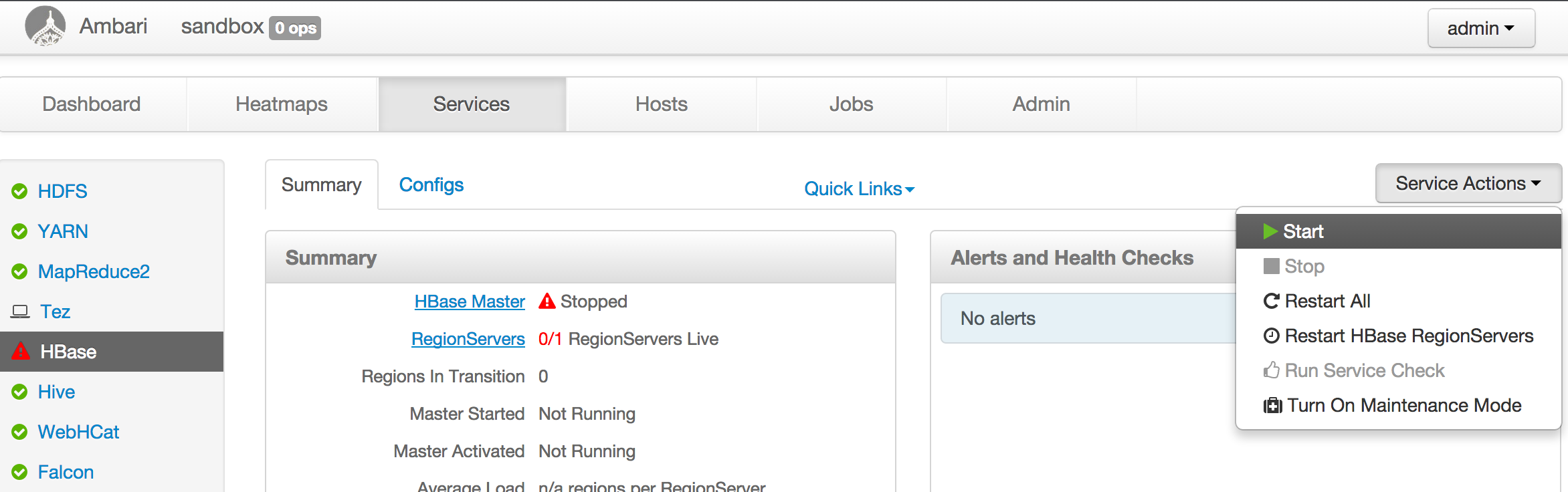
对于 hadoop 分布式,基本上启动 hadoop 集群,确保 HDFS,YARN,Hive,HBase 运行着即可。
@@ -30,7 +39,8 @@ ambari-server start
注意:
* 为YARN resource manager 分配 3-4GB 内存.
-* 升级 Sandbox 里的 Java 到 Java 8 (Kyin 2.5 需要 Java 8).
+* 升级 Sandbox 里的 Java 到 Java 8 (Kyin 2.5 需要 Java 8).
链接原本的JAVA_HOME指向新的将改变每一个用户的jdk版本。否则,你也许会遇到`UnsupportedClassVersionError`异常.
这里有一些邮件是关于这个问题的: [spark task error occurs when run IT in
sanbox](https://lists.apache.org/thread.html/46eb7e4083fd25a461f09573fc4225689e61c0d8150463a2c0eb65ef@%3Cdev.kylin.apache.org%3E)
+**Tips:** 这里有一些关于沙箱的教程会有帮助。 [Learning the Ropes of the HDP
Sandbox](https://hortonworks.com/tutorial/learning-the-ropes-of-the-hortonworks-sandbox)
## 开发机器的环境
diff --git a/website/_dev/dev_env.md b/website/_dev/dev_env.md
index bc89d9d..b486de6 100644
--- a/website/_dev/dev_env.md
+++ b/website/_dev/dev_env.md
@@ -11,18 +11,27 @@ By following this tutorial, you will be able to build Kylin
test cubes by runnin
## Environment on the Hadoop CLI
-Off-Hadoop-CLI installation requires you having a hadoop CLI machine (or a
hadoop sandbox) as well as your local develop machine. To make things easier we
strongly recommend you starting with running Kylin on a hadoop sandbox. In the
following tutorial we'll go with **Hortonworks® Sandbox 2.4.0.0-169**, you can
download it from [Hortonworks download
page](https://hortonworks.com/downloads/#sandbox), expand the "Hortonworks
Sandbox Archive" link, and then search "HDP® 2.4 on Hortonworks S [...]
-
+Off-Hadoop-CLI installation requires you having a hadoop CLI machine (or a
hadoop sandbox) as well as your local develop machine. To make things easier we
strongly recommend you starting with running Kylin on a hadoop sandbox. In the
following tutorial we'll go with **Hortonworks® Sandbox 2.4.0.0-169**, you can
download it from [Hortonworks download
page](https://hortonworks.com/downloads/#sandbox), expand the "Hortonworks
Sandbox Archive" link, and then search "HDP® 2.4 on Hortonworks S [...]
+**Tips:** Use HDP-2.4.0.0.169 sandbox and deploy it with 10GB memory or more
will be better. Some newer version HDP sandbox use docker deploy their cluster
service and wraped in virual machine. You need to upload you project into
docker container to run integration test, which doesn't convenient. Higher
memory will reduce the possibility that virtual machine kill the test process.
+
### Start Hadoop
+After start the virtual machine, you can login as root.
+
In Hortonworks sandbox, ambari helps to launch hadoop:
{% highlight Groff markup %}
ambari-agent start
ambari-server start
{% endhighlight %}
+
+And reset the password of ambari user admin to `admin`:
+
+{% highlight Groff markup %}
+ambari-admin-password-reset
+{% endhighlight %}
-With both command successfully run you can go to ambari home page at
<http://yoursandboxip:8080> to check everything's status. By default ambari
disables HBase, you need to manually start the `HBase` service.
+With both command successfully run you can login ambari home page as admin at
<http://yoursandboxip:8080> to check everything's status. By default ambari
disables HBase, you need to manually start the `HBase` service.

For other hadoop distribution, basically start the hadoop cluster, make sure
HDFS, YARN, Hive, HBase are running.
@@ -30,7 +39,8 @@ For other hadoop distribution, basically start the hadoop
cluster, make sure HDF
Note:
* You may need to adjust the YARN configuration, allocating 3-4GB memory to
YARN resource manager.
-* The JDK in the sandbox VM might be old, please manually upgrade to Java 8
(Kyin 2.5 requires Java 8).
+* The JDK in the sandbox VM might be old, please manually upgrade to Java 8
(Kyin 2.5 requires Java 8). Relink the orginal JAVA_HOME to an new one will
change the jdk version for every user. Otherwise, you may encounter
`UnsupportedClassVersionError` exception. Here are some mails about this
problem: [spark task error occurs when run IT in
sanbox](https://lists.apache.org/thread.html/46eb7e4083fd25a461f09573fc4225689e61c0d8150463a2c0eb65ef@%3Cdev.kylin.apache.org%3E)
+**Tips:** Here is a tutorial about sandbox will be helpful. [Learning the
Ropes of the HDP
Sandbox](https://hortonworks.com/tutorial/learning-the-ropes-of-the-hortonworks-sandbox)
## Environment on the dev machine
@@ -104,7 +114,7 @@ mvn test -fae -Dhdp.version=<hdp-version> -P sandbox
### Run integration tests
Before actually running integration tests, need to run some end-to-end cube
building jobs for test data population, in the meantime validating cubing
process. Then comes with the integration tests.
-It might take a while (maybe two hours), please keep patient.
+It might take a while (maybe two hours), please keep patient and smooth
network.
{% highlight Groff markup %}
mvn verify -fae -Dhdp.version=<hdp-version> -P sandbox
diff --git a/website/_docs/tutorial/create_cube.cn.md
b/website/_docs/tutorial/create_cube.cn.md
index 722aeab..43a62d3 100644
--- a/website/_docs/tutorial/create_cube.cn.md
+++ b/website/_docs/tutorial/create_cube.cn.md
@@ -156,7 +156,7 @@ cube 名字可以使用字母,数字和下划线(空格不允许)。`Notif

* EXTENDED_COLUMN
- Extended_Column 作为度量比作为维度更节省空间。一列和零一列可以生成新的列。
+ Extended_Column 作为度量比作为维度更节省空间。一列和另一列可以生成新的列。


