This is an automated email from the ASF dual-hosted git repository.

rclabo pushed a commit to branch master
in repository https://gitbox.apache.org/repos/asf/lucenenet.git
The following commit(s) were added to refs/heads/master by this push:
     new 95520cb  Fixed dotnet --info syntax error
95520cb is described below

commit 95520cb8addd960fb4f670cf971576fa45bc4e3d
Author: Ron Clabo <[email protected]>
AuthorDate: Wed Mar 23 17:02:08 2022 -0400

    Fixed dotnet --info syntax error
---
 websites/site/quick-start/tutorial.md | 4 ++--
 1 file changed, 2 insertions(+), 2 deletions(-)

diff --git a/websites/site/quick-start/tutorial.md
b/websites/site/quick-start/tutorial.md
index 06ba7e0..df45f6d 100644
--- a/websites/site/quick-start/tutorial.md
+++ b/websites/site/quick-start/tutorial.md
@@ -31,11 +31,11 @@ PowerShell is cross platform and runs everywhere .NET runs,
so we will be using
 ## Verify dotnet CLI Installed
 Let's use PowerShell now to verify that you have the .NET SDK with the .NET
CLI installed.  Launch PowerShell however you do that on your OS, for Windows
I'll search for it in the start menu and select it from there. Once you have
the PowerShell window open, execute the following command in PowerShell:

-`dotnet –info`
+`dotnet --info`

 This command will show the latest version of the .NET SDK installed and also
show a list of all versions installed. If the .NET SDK is not installed this
the command will return an error indicating the command was not found.

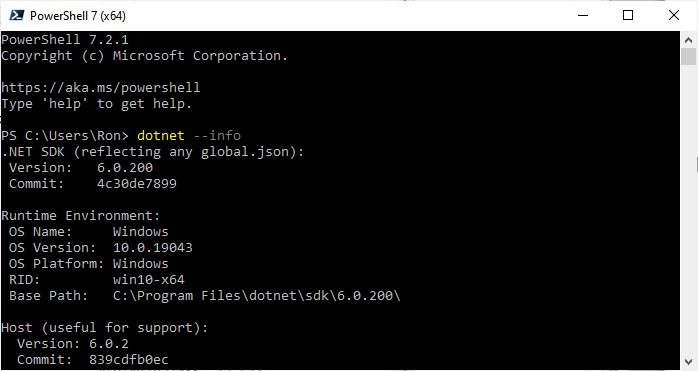
-Below I show the top of the results for the `dotnet -–info` command ran on my
machine. You can see I'm using .NET SDK 6.0.200 on windows for this demo. In my
case I had to scroll the screen up to see this info since I have many versions
of the .NET SDK installed and it shows info on each version which scrolled the
info about the latest version off the screen. Your latest version will likely
be different than mine and perhaps you may be running on Unix or Mac. That's
fine. But remember ** [...]
+Below I show the top of the results for the `dotnet --info` command ran on my
machine. You can see I'm using .NET SDK 6.0.200 on windows for this demo. In my
case I had to scroll the screen up to see this info since I have many versions
of the .NET SDK installed and it shows info on each version which scrolled the
info about the latest version off the screen. Your latest version will likely
be different than mine and perhaps you may be running on Unix or Mac. That's
fine. But remember ** [...]

 <img
src='https://lucenenet.apache.org/images/quick-start/tutorial/power-shell01.png'>