Justobe opened a new issue #17684: The output of the ReLU layer in MXNET is different from that in tensorflow and cntk URL: https://github.com/apache/incubator-mxnet/issues/17684 ## Description Hi, I encountered a problem when I used keras's MobileNetV1 for image classification task. The prediction result of backend MXNet is different from TensorFlow and CNTK. The input picture is sampled from the ImageNet DataSet.  The outputs ( Top-1 prediction) of three backends are shown below: **TensorFlow**: [('n04209239', 'shower_curtain', 0.5855479)] **CNTK**: [('n04209239', 'shower_curtain', 0.58554786)] **MXNet**: [('n04525038', 'velvet', 0.0072950013)] It seems that there is something wrong with MXNet. Then I put image into the model and recorded the ouputs of each layers to see how this happens. It seems that the outputs on CNTK and TensorFlow are very close, but for MXNet, the outputs of a ReLU layer and all the layers after this layer are very different from CNTK and TensorFlow . The results are attached below. TensorFlow vs CNTK 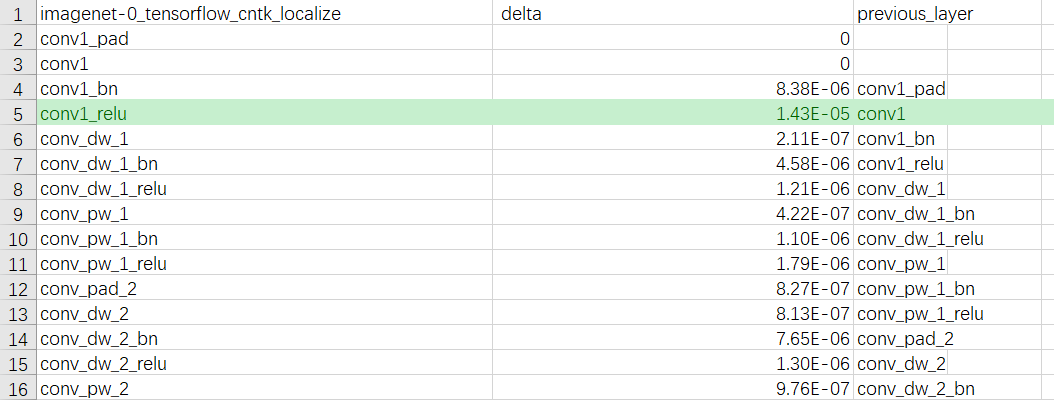 TensorFlow vs MXNet 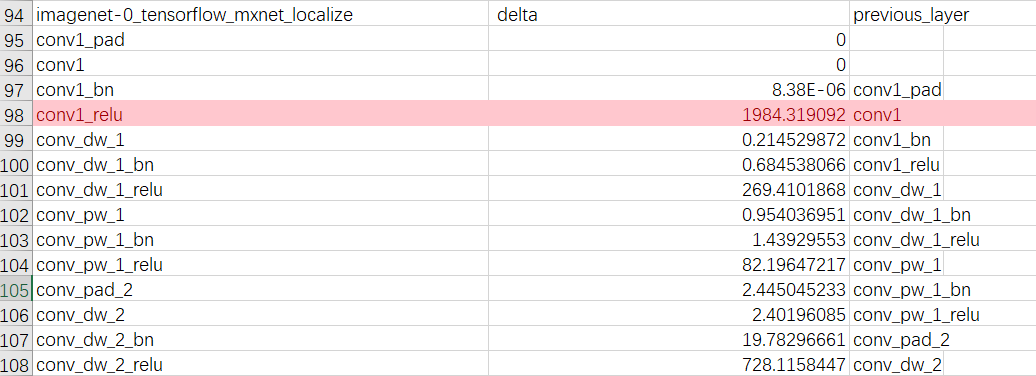 MXNet vs CNTK 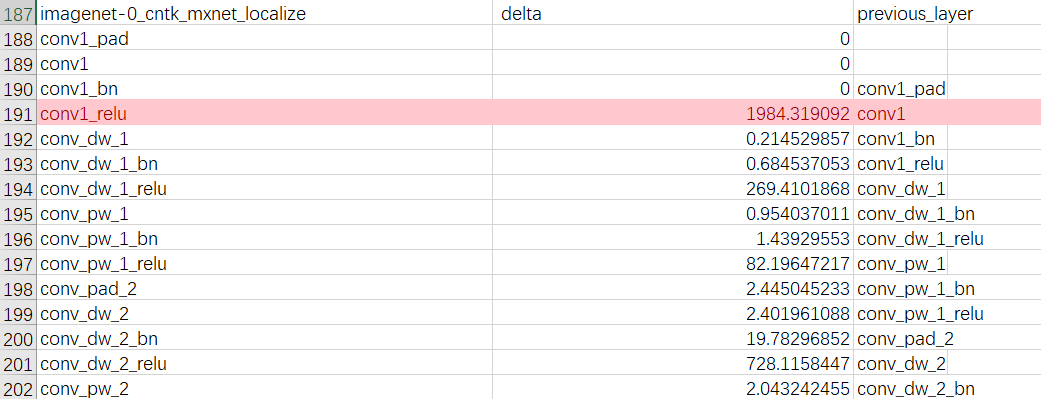 The delta column shows the discrepancy, which is calculated as: 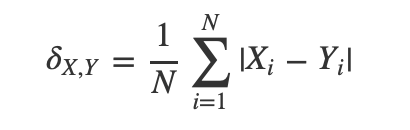 Based on the results, the deviation seems to be caused by conv1_relu of MXNet backend. ## To Reproduce The code of getting prediction result of each backend is really simple. get_prediction.py : ```python import os import sys import numpy as np from PIL import Image bk = sys.argv[1] os.environ['KERAS_BACKEND'] = bk os.environ["CUDA_DEVICE_ORDER"] = "PCI_BUS_ID" os.environ["CUDA_VISIBLE_DEVICES"] = "0" import keras from keras import backend as K from keras.applications.imagenet_utils import decode_predictions print("Using backend :{}".format(K.backend())) def image_resize(x, shape): x_return = [] for x_test in x: tmp = np.copy(x_test) img = Image.fromarray(tmp.astype('uint8')).convert('RGB') img = img.resize(shape, Image.ANTIALIAS) x_return.append(np.array(img)) return np.array(x_return) base_model = keras.applications.mobilenet.MobileNet(weights='imagenet', include_top=True, input_shape=(224,224,3)) # base_model.summary() # print("Done") adam = keras.optimizers.Adagrad(lr=0.01, epsilon=None, decay=0.0) base_model.compile(loss='categorical_crossentropy', optimizer=adam, metrics=['accuracy']) imagename = 'imagenet-0.png' img = Image.open(imagename) img = img.resize((224,224), Image.ANTIALIAS) x_test = np.array(img) select_data = np.expand_dims(x_test, axis=0) prediction = base_model.predict(select_data) res = decode_predictions(prediction)[0] print(f"Prediction of {bk}: {res}") ``` You can run the script like this (): > python get_prediction.py mxnet Change mxnet to 'tensorflow' and 'cntk' I provide scripts to get outputs of the middle layers and calculate the difference: [mxnet-relu.zip](https://github.com/apache/incubator-mxnet/files/4248815/mxnet-relu.zip) ## What have you tried to solve it? I encountered this problem on mxnet-cu101(Version 1.5.1.post0). When I upgraded mxnet to 1.6, the bug still exists. ## Environment - MXNet: mxnet-cu101==1.5.1.post0 - keras-mxnet: 2.2.4.2 - CUDA: 10.1 You can use the following command to configure the environment ```shell pip install keras-mxnet pip install mxnet-cu101 pip install tensorflow-gpu==1.14.0 pip install cntk-gpu==2.7 ```
----------------------------------------------------------------
This is an automated message from the Apache Git Service.
To respond to the message, please log on to GitHub and use the
URL above to go to the specific comment.

For queries about this service, please contact Infrastructure at:
[email protected]


With regards,
Apache Git Services





