This is an automated email from the ASF dual-hosted git repository.

thomasdelteil pushed a commit to branch master
in repository https://gitbox.apache.org/repos/asf/incubator-mxnet.git
The following commit(s) were added to refs/heads/master by this push:
new 8bbac82 Simplifications and some fun stuff for the MNIST Gluon
tutorial (#13094)
8bbac82 is described below
commit 8bbac827742c21607a863137792f03bd09847419
Author: Holger Kohr <[email protected]>
AuthorDate: Thu Dec 6 01:38:46 2018 +0100
Simplifications and some fun stuff for the MNIST Gluon tutorial (#13094)
* Simplify mnist Gluon tutorial and add mislabelled sample plotting
* Add mnist Gluon tutorial images
* Gluon MNIST tutorial: Use modern Gluon constructs, fix some wordings
* [Gluon] Move to data loaders and improve wording in MNIST tutorial
* Fix broken links
* Fix spelling of mislabeled
* Final rewordings and code simplifications
* Fix things according to review
- Apply hybrid blocks
- Move outputs outside of code blocks and mark for notebooks
to ignore
- Remove images, use external link
- Fix a few formulations
* Change activations to sigmoid in MNIST tutorial
* Remove superfluous last layer activations in MNIST tutorial
---
docs/tutorials/gluon/mnist.md | 554 +++++++++++++++++++++++++-----------------
1 file changed, 332 insertions(+), 222 deletions(-)
diff --git a/docs/tutorials/gluon/mnist.md b/docs/tutorials/gluon/mnist.md
index 5b8a98a..35fb405 100644
--- a/docs/tutorials/gluon/mnist.md
+++ b/docs/tutorials/gluon/mnist.md
@@ -1,24 +1,22 @@
-# Handwritten Digit Recognition
+# Hand-written Digit Recognition
-In this tutorial, we'll give you a step by step walk-through of how to build a
hand-written digit classifier using the
[MNIST](https://en.wikipedia.org/wiki/MNIST_database) dataset.
+In this tutorial, we'll give you a step-by-step walkthrough of building a
hand-written digit classifier using the
[MNIST](https://en.wikipedia.org/wiki/MNIST_database) dataset.
-MNIST is a widely used dataset for the hand-written digit classification task.
It consists of 70,000 labeled 28x28 pixel grayscale images of hand-written
digits. The dataset is split into 60,000 training images and 10,000 test
images. There are 10 classes (one for each of the 10 digits). The task at hand
is to train a model using the 60,000 training images and subsequently test its
classification accuracy on the 10,000 test images.
+MNIST is a widely used dataset for the hand-written digit classification task.
It consists of 70,000 labeled grayscale images of hand-written digits, each
28x28 pixels in size. The dataset is split into 60,000 training images and
10,000 test images. There are 10 classes (one for each of the 10 digits). The
task at hand is to train a model that can correctly classify the images into
the digits they represent. The 60,000 training images are used to fit the
model, and its performance in ter [...]

**Figure 1:** Sample images from the MNIST dataset.
-This tutorial uses MXNet's new high-level interface, gluon package to
implement MLP using
-imperative fashion.
-
-This is based on the Mnist tutorial with symbolic approach. You can find it
[here](http://mxnet.io/tutorials/python/mnist.html).
+This tutorial uses MXNet's high-level *Gluon* interface to implement neural
networks in an imperative fashion. It is based on [the corresponding tutorial
written with the symbolic
approach](https://mxnet.incubator.apache.org/tutorials/python/mnist.html).
## Prerequisites
-To complete this tutorial, we need:
-- MXNet. See the instructions for your operating system in [Setup and
Installation](http://mxnet.io/install/index.html).
+To complete this tutorial, you need:
-- [Python Requests](http://docs.python-requests.org/en/master/) and [Jupyter
Notebook](http://jupyter.org/index.html).
+- MXNet. See the instructions for your operating system in [Setup and
Installation](https://mxnet.incubator.apache.org/install/index.html).
+- The Python [`requests`](http://docs.python-requests.org/en/master/) library.
+- (Optional) The [Jupyter Notebook](https://jupyter.org/index.html) software
for interactively running the provided `.ipynb` file.
```
$ pip install requests jupyter
@@ -26,308 +24,420 @@ $ pip install requests jupyter
## Loading Data
-Before we define the model, let's first fetch the
[MNIST](http://yann.lecun.com/exdb/mnist/) dataset.
+The following code downloads the MNIST dataset to the default location
(`.mxnet/datasets/mnist/` in your home directory) and creates `Dataset` objects
`train_data` and `val_data` for training and validation, respectively.
+These objects can later be used to get one image or a batch of images at a
time, together with their corresponding labels.
-The following source code downloads and loads the images and the corresponding
labels into memory.
+We also immediately apply the `transform_first()` method and supply a function
that moves the channel axis of the images to the beginning (`(28, 28, 1) -> (1,
28, 28)`), casts them to `float32` and rescales them from `[0, 255]` to `[0,
1]`.
+The name `transform_first` reflects the fact that these datasets contain
images and labels, and that the transform should only be applied to the first
of each `(image, label)` pair.
```python
import mxnet as mx
-# Fixing the random seed
+# Select a fixed random seed for reproducibility
mx.random.seed(42)
-mnist = mx.test_utils.get_mnist()
+def data_xform(data):
+ """Move channel axis to the beginning, cast to float32, and normalize to
[0, 1]."""
+ return nd.moveaxis(data, 2, 0).astype('float32') / 255
+
+train_data = mx.gluon.data.vision.MNIST(train=True).transform_first(data_xform)
+val_data = mx.gluon.data.vision.MNIST(train=False).transform_first(data_xform)
```
-After running the above source code, the entire MNIST dataset should be fully
loaded into memory. Note that for large datasets it is not feasible to pre-load
the entire dataset first like we did here. What is needed is a mechanism by
which we can quickly and efficiently stream data directly from the source.
MXNet Data iterators come to the rescue here by providing exactly that. Data
iterator is the mechanism by which we feed input data into an MXNet training
algorithm and they are very s [...]
+Since the MNIST dataset is relatively small, the `MNIST` class loads it into
memory all at once, but for larger datasets like ImageNet, this would no longer
be possible.
+The Gluon `Dataset` class from which `MNIST` derives supports both cases.
+In general, `Dataset` and `DataLoader` (which we will encounter next) are the
machinery in MXNet that provides a stream of input data to be consumed by a
training algorithm, typically in batches of multiple data entities at once for
better efficiency.
+In this tutorial, we will configure the data loader to feed examples in
batches of 100.
+
+An image batch is commonly represented as a 4-D array with shape `(batch_size,
num_channels, height, width)`.
+This convention is denoted by "NCHW", and it is the default in MXNet.
+For the MNIST dataset, each image has a size of 28x28 pixels and one color
channel (grayscale), hence the shape of an input batch will be `(batch_size, 1,
28, 28)`.
-Image batches are commonly represented by a 4-D array with shape `(batch_size,
num_channels, width, height)`. For the MNIST dataset, since the images are
grayscale, there is only one color channel. Also, the images are 28x28 pixels,
and so each image has width and height equal to 28. Therefore, the shape of
input is `(batch_size, 1, 28, 28)`. Another important consideration is the
order of input samples. When feeding training examples, it is critical that we
don't feed samples with the s [...]
-Data iterators take care of this by randomly shuffling the inputs. Note that
we only need to shuffle the training data. The order does not matter for test
data.
+Another important consideration is the order of input samples.
+When feeding training examples, it is critical not feed samples with the same
label in succession since doing so can slow down training progress.
+Data iterators, i.e., instances of
[`DataLoader`](https://mxnet.incubator.apache.org/api/python/gluon/data.html#mxnet.gluon.data.DataLoader),
take care of this issue by randomly shuffling the inputs.
+Note that we only need to shuffle the training data -- for validation data,
the order does not matter.
-The following source code initializes the data iterators for the MNIST
dataset. Note that we initialize two iterators: one for train data and one for
test data.
+The following code initializes the data iterators for the MNIST dataset.
```python
batch_size = 100
-train_data = mx.io.NDArrayIter(mnist['train_data'], mnist['train_label'],
batch_size, shuffle=True)
-val_data = mx.io.NDArrayIter(mnist['test_data'], mnist['test_label'],
batch_size)
+train_loader = mx.gluon.data.DataLoader(train_data, shuffle=True,
batch_size=batch_size)
+val_loader = mx.gluon.data.DataLoader(val_data, shuffle=False,
batch_size=batch_size)
```
## Approaches
-We will cover a couple of approaches for performing the hand written digit
recognition task. The first approach makes use of a traditional deep neural
network architecture called Multilayer Perceptron (MLP). We'll discuss its
drawbacks and use that as a motivation to introduce a second more advanced
approach called Convolution Neural Network (CNN) that has proven to work very
well for image classification tasks.
+We will cover two approaches for performing the hand-written digit recognition
task.
+In our first attempt, we will make use of a traditional neural network
architecture called [Multilayer Perceptron
(MLP)](https://en.wikipedia.org/wiki/Multilayer_perceptron).
+Although this architecture lets us achieve over 95 % accuracy on the
validation set, we will recognize and discuss some of its drawbacks and use
them as a motivation for using a different network.
+In the subsequent second attempt, we introduce the more advanced and very
widely used [Convolutional Neural Network
(CNN)](https://en.wikipedia.org/wiki/Convolutional_neural_network) architecture
that has proven to work very well for image classification tasks.
-Now, let's import required nn modules
+As a first step, we run some convenience imports of frequently used modules.
```python
-from __future__ import print_function
+from __future__ import print_function # only relevant for Python 2
import mxnet as mx
-from mxnet import gluon
+from mxnet import nd, gluon, autograd
from mxnet.gluon import nn
-from mxnet import autograd as ag
```
-### Define a network: Multilayer Perceptron
+### Defining a network: Multilayer Perceptron (MLP)
-The first approach makes use of a [Multilayer
Perceptron](https://en.wikipedia.org/wiki/Multilayer_perceptron) to solve this
problem. We'll define the MLP using MXNet's imperative approach.
+MLPs consist of several fully connected layers.
+In a fully connected (short: FC) layer, each neuron is connected to every
neuron in its preceding layer.
+From a linear algebra perspective, an FC layer applies an [affine
transform](https://en.wikipedia.org/wiki/Affine_transformation) *Y = X W + b*
to an input matrix *X* of size (*n x m*) and outputs a matrix *Y* of size (*n x
k*).
+The number *k*, also referred to as *hidden size*, corresponds to the number
of neurons in the FC layer.
+An FC layer has two learnable parameters: the (*m x k*) weight matrix *W* and
the (*1 x k*) bias vector *b*.
-MLPs consist of several fully connected layers. A fully connected layer or FC
layer for short, is one where each neuron in the layer is connected to every
neuron in its preceding layer. From a linear algebra perspective, an FC layer
applies an [affine
transform](https://en.wikipedia.org/wiki/Affine_transformation) to the *n x m*
input matrix *X* and outputs a matrix *Y* of size *n x k*, where *k* is the
number of neurons in the FC layer. *k* is also referred to as the hidden size.
The ou [...]
+In an MLP, the outputs of FC layers are typically fed into an activation
function that applies an elementwise nonlinearity.
+This step is crucial since it gives neural networks the ability to classify
inputs that are not linearly separable.
+Common choices for activation functions are
[sigmoid](https://en.wikipedia.org/wiki/Sigmoid_function), [hyperbolic tangent
("tanh")](https://en.wikipedia.org/wiki/Hyperbolic_function#Definitions), and
[rectified linear unit
(ReLU)](https://en.wikipedia.org/wiki/Rectifier_(neural_networks)).
+In this example, we'll use the ReLU activation function since it has several
nice properties that make it a good default choice.
-In an MLP, the outputs of most FC layers are fed into an activation function,
which applies an element-wise non-linearity. This step is critical and it gives
neural networks the ability to classify inputs that are not linearly separable.
Common choices for activation functions are sigmoid, tanh, and [rectified
linear unit](https://en.wikipedia.org/wiki/Rectifier_%28neural_networks%29)
(ReLU). In this example, we'll use the ReLU activation function which has
several desirable properties a [...]
+The following code snippet declares three fully connected (or *dense*) layers
with 128, 64 and 10 neurons each, where the last number of neurons matches the
number of output classes in our dataset.
+Note that the last layer uses no activation function since the
[softmax](https://mxnet.incubator.apache.org/api/python/ndarray/ndarray.html#mxnet.ndarray.softmax)
activation will be implicitly applied by the loss function later on.
+To build the neural network, we use a
[`HybridSequential`](https://mxnet.incubator.apache.org/api/python/gluon/gluon.html#mxnet.gluon.nn.HybridSequential)
layer, which is a convenience class to build a linear stack of layers, often
called a *feed-forward neural net*.
-The following code declares three fully connected layers with 128, 64 and 10
neurons each.
-The last fully connected layer often has its hidden size equal to the number
of output classes in the dataset. Furthermore, these FC layers uses ReLU
activation for performing an element-wise ReLU transformation on the FC layer
output.
-
-To do this, we will use [Sequential
layer](http://mxnet.io/api/python/gluon/gluon.html#mxnet.gluon.nn.Sequential)
type. This is simply a linear stack of neural network layers. `nn.Dense` layers
are nothing but the fully connected layers we discussed above.
+The "Hybrid" part of name `HybridSequential` refers to the fact that such a
layer can be used with both the Gluon API and the Symbol API.
+Using hybrid blocks over dynamic-only blocks (e.g.
[`Sequential`](https://mxnet.incubator.apache.org/api/python/gluon/gluon.html#mxnet.gluon.nn.Sequential))
has several advantages apart from being compatible with a wider range of
existing code: for instance, the computation graph of the network can be
visualized with `mxnet.viz.plot_network()` and inspected for errors.
+Unless a network requires non-static runtime elements like loops, conditionals
or random layer selection in its forward pass, it is generally a good idea to
err on the side of hybrid blocks.
+For details on the differences, see the documentation on
[`Block`](https://mxnet.incubator.apache.org/api/python/gluon/gluon.html#mxnet.gluon.Block)
and
[`HybridBlock`](https://mxnet.incubator.apache.org/api/python/gluon/gluon.html#mxnet.gluon.HybridBlock).
```python
-# define network
-net = nn.Sequential()
+net = nn.HybridSequential(prefix='MLP_')
with net.name_scope():
- net.add(nn.Dense(128, activation='relu'))
- net.add(nn.Dense(64, activation='relu'))
- net.add(nn.Dense(10))
+ net.add(
+ nn.Flatten(),
+ nn.Dense(128, activation='relu'),
+ nn.Dense(64, activation='relu'),
+ nn.Dense(10, activation=None) # loss function includes softmax
already, see below
+ )
```
-#### Initialize parameters and optimizer
+**Note**: using the `name_scope()` context manager is optional.
+It is, however, good practice since it uses a common prefix for the names of
all layers generated in that scope, which can be very helpful during debugging.
-The following source code initializes all parameters received from parameter
dict using
[Xavier](http://mxnet.io/api/python/optimization/optimization.html#mxnet.initializer.Xavier)
initializer
-to train the MLP network we defined above.
+#### Initializing parameters and optimizer
-For our training, we will make use of the stochastic gradient descent (SGD)
optimizer. In particular, we'll be using mini-batch SGD. Standard SGD processes
train data one example at a time. In practice, this is very slow and one can
speed up the process by processing examples in small batches. In this case, our
batch size will be 100, which is a reasonable choice. Another parameter we
select here is the learning rate, which controls the step size the optimizer
takes in search of a soluti [...]
+Before the network can be used, its parameters (weights and biases) need to be
set to initial values that are sufficiently random while keeping the magnitude
of gradients limited.
+The
[Xavier](https://mxnet.incubator.apache.org/api/python/optimization/optimization.html#mxnet.initializer.Xavier)
initializer is usually a good default choice.
-We will use [Trainer](http://mxnet.io/api/python/gluon/gluon.html#trainer)
class to apply the
-[SGD
optimizer](http://mxnet.io/api/python/optimization/optimization.html#mxnet.optimizer.SGD)
on the
-initialized parameters.
+Since the `net.initialize()` method creates arrays for its parameters, it
needs to know where to store the values: in CPU or GPU memory.
+Like many other functions and classes that deal with memory management in one
way or another, the `initialize()` method takes an optional `ctx` (short for
*context*) argument, where the return value of either `mx.cpu()` or `mx.gpu()`
can be provided.
```python
-gpus = mx.test_utils.list_gpus()
-ctx = [mx.gpu()] if gpus else [mx.cpu(0), mx.cpu(1)]
-net.initialize(mx.init.Xavier(magnitude=2.24), ctx=ctx)
-trainer = gluon.Trainer(net.collect_params(), 'sgd', {'learning_rate': 0.02})
+ctx = mx.gpu(0) if mx.context.num_gpus() > 0 else mx.cpu(0)
+net.initialize(mx.init.Xavier(), ctx=ctx)
```
-#### Train the network
+To train the network parameters, we will make use of the [stochastic gradient
descent (SGD)](https://en.wikipedia.org/wiki/Stochastic_gradient_descent)
optimizer.
+More specifically, we use mini-batch SGD in contrast to the classical SGD that
processes one example at a time, which is very slow in practice.
+(Recall that we set the batch size to 100 in the ["Loading
Data"](#loading-data) part.)
+
+Besides the batch size, the SGD algorithm has one important *hyperparameter*:
the *learning rate*.
+It determines the size of steps that the algorithm takes in search of
parameters that allow the network to optimally fit the training data.
+Therefore, this value has great influence on both the course of the training
process and its final outcome.
+In general, hyperparameters refer to *non-learnable* values that need to be
chosen before training and that have a potential effect on the outcome.
+In this example, further hyperparameters are the number of layers in the
network, the number of neurons of the first two layers, the activation function
and (later) the loss function.
+
+The SGD optimization method can be accessed in MXNet Gluon through the
[`Trainer`](https://mxnet.incubator.apache.org/api/python/gluon/gluon.html#trainer)
class.
+Internally, it makes use of the
[`SGD`](https://mxnet.incubator.apache.org/api/python/optimization/optimization.html#mxnet.optimizer.SGD)
optimizer class.
-Typically, one runs the training until convergence, which means that we have
learned a good set of model parameters (weights + biases) from the train data.
For the purpose of this tutorial, we'll run training for 10 epochs and stop. An
epoch is one full pass over the entire train data.
+```python
+trainer = gluon.Trainer(
+ params=net.collect_params(),
+ optimizer='sgd',
+ optimizer_params={'learning_rate': 0.04},
+)
+```
+
+#### Training
-We will take following steps for training:
+Training the network requires a way to tell how well the network currently
fits the training data.
+Following common practice in optimization, this quality of fit is expressed
through a *loss value* (also referred to as badness-of-fit or data
discrepancy), which the algorithm then tries to minimize by adjusting the
weights of the model.
-- Define [Accuracy evaluation
metric](http://mxnet.io/api/python/metric/metric.html#mxnet.metric.Accuracy)
over training data.
-- Loop over inputs for every epoch.
-- Forward input through network to get output.
-- Compute loss with output and label inside record scope.
-- Backprop gradient inside record scope.
-- Update evaluation metric and parameters with gradient descent.
+Ideally, in a classification task, we would like to use the prediction
inaccuracy, i.e., the fraction of incorrectly classified samples, to guide the
training to a lower value.
+Unfortunately, inaccuracy is a poor choice for training since it contains
almost no information that can be used to update the network parameters (its
gradient is zero almost everywhere).
+As a better behaved proxy for inaccuracy, the [softmax cross-entropy
loss](https://mxnet.incubator.apache.org/api/python/gluon/loss.html#mxnet.gluon.loss.SoftmaxCrossEntropyLoss)
is a popular choice.
+It has the essential property of being minimal for the correct prediction, but
at the same time, it is everywhere differentiable with nonzero gradient.
+The
[accuracy](https://mxnet.incubator.apache.org/api/python/metric/metric.html#mxnet.metric.Accuracy)
metric is still useful for monitoring the training progress, since it is more
intuitively interpretable than a loss value.
-Loss function takes (output, label) pairs and computes a scalar loss for each
sample in the mini-batch. The scalars measure how far each output is from the
label.
-There are many predefined loss functions in gluon.loss. Here we use
-[softmax_cross_entropy_loss](http://mxnet.io/api/python/gluon/gluon.html#mxnet.gluon.loss.softmax_cross_entropy_loss)
for digit classification. We will compute loss and do backward propagation
inside
-training scope which is defined by `autograd.record()`.
+**Note:** `SoftmaxCrossEntropyLoss` combines the softmax activation and the
cross entropy loss function in one layer, therefore the last layer in our
network has no activation function.
```python
-%%time
-epoch = 10
-# Use Accuracy as the evaluation metric.
metric = mx.metric.Accuracy()
-softmax_cross_entropy_loss = gluon.loss.SoftmaxCrossEntropyLoss()
-for i in range(epoch):
- # Reset the train data iterator.
- train_data.reset()
- # Loop over the train data iterator.
- for batch in train_data:
- # Splits train data into multiple slices along batch_axis
- # and copy each slice into a context.
- data = gluon.utils.split_and_load(batch.data[0], ctx_list=ctx,
batch_axis=0)
- # Splits train labels into multiple slices along batch_axis
- # and copy each slice into a context.
- label = gluon.utils.split_and_load(batch.label[0], ctx_list=ctx,
batch_axis=0)
- outputs = []
- # Inside training scope
- with ag.record():
- for x, y in zip(data, label):
- z = net(x)
- # Computes softmax cross entropy loss.
- loss = softmax_cross_entropy_loss(z, y)
- # Backpropagate the error for one iteration.
- loss.backward()
- outputs.append(z)
- # Updates internal evaluation
- metric.update(label, outputs)
- # Make one step of parameter update. Trainer needs to know the
- # batch size of data to normalize the gradient by 1/batch_size.
- trainer.step(batch.data[0].shape[0])
- # Gets the evaluation result.
+loss_function = gluon.loss.SoftmaxCrossEntropyLoss()
+```
+
+Typically, the training is run until convergence, which means that further
iterations will no longer lead to improvements of the loss function, and that
the network has probably learned a good set of model parameters from the train
data.
+For the purpose of this tutorial, we only loop 10 times over the entire
dataset.
+One such pass over the data is usually called an *epoch*.
+
+The following steps are taken in each `epoch`:
+
+- Get a minibatch of `inputs` and `labels` from the `train_loader`.
+- Feed the `inputs` to the network, producing `outputs`.
+- Compute the minibatch `loss` value by comparing `outputs` to `labels`.
+- Use backpropagation to compute the gradients of the loss with respect to
each of the network parameters by calling `loss.backward()`.
+- Update the parameters of the network according to the optimizer rule with
`trainer.step(batch_size=inputs.shape[0])`.
+- Print the current accuracy over the training data, i.e., the fraction of
correctly classified training examples.
+
+```python
+num_epochs = 10
+
+for epoch in range(num_epochs):
+ for inputs, labels in train_loader:
+ # Possibly copy inputs and labels to the GPU
+ inputs = inputs.as_in_context(ctx)
+ labels = labels.as_in_context(ctx)
+
+ # The forward pass and the loss computation need to be wrapped
+ # in a `record()` scope to make sure the computational graph is
+ # recorded in order to automatically compute the gradients
+ # during the backward pass.
+ with autograd.record():
+ outputs = net(inputs)
+ loss = loss_function(outputs, labels)
+
+ # Compute gradients by backpropagation and update the evaluation
+ # metric
+ loss.backward()
+ metric.update(labels, outputs)
+
+ # Update the parameters by stepping the trainer; the batch size
+ # is required to normalize the gradients by `1 / batch_size`.
+ trainer.step(batch_size=inputs.shape[0])
+
+ # Print the evaluation metric and reset it for the next epoch
name, acc = metric.get()
- # Reset evaluation result to initial state.
+ print('After epoch {}: {} = {}'.format(epoch + 1, name, acc))
metric.reset()
- print('training acc at epoch %d: %s=%f'%(i, name, acc))
```
-#### Prediction
+#### Validation
+
+When the above training has completed, we can evaluate the trained model by
comparing predictions from the validation dataset with their respective correct
labels.
+It is important to notice that the validation data was not used during
training, i.e., the network has not seen the images and their true labels yet.
+Keeping a part of the data aside for validation is crucial for detecting
*overfitting* of a network: If a neural network has enough parameters, it can
simply memorize the training data and look up the true label for a given
training image.
+While this results in 100 % training accuracy, such an overfit model would
perform very poorly on new data.
+In other words, an overfit model does not generalize to a broader class of
inputs than the training set, and such an outcome is almost always undesirable.
+Therefore, having a subset of "unseen" data for validation is an important
part of good practice in machine learning.
-After the above training completes, we can evaluate the trained model by
running predictions on validation dataset. Since the dataset also has labels
for all test images, we can compute the accuracy metric over validation data as
follows:
+To validate our model on the validation data, we can run the following snippet
of code:
```python
-# Use Accuracy as the evaluation metric.
metric = mx.metric.Accuracy()
-# Reset the validation data iterator.
-val_data.reset()
-# Loop over the validation data iterator.
-for batch in val_data:
- # Splits validation data into multiple slices along batch_axis
- # and copy each slice into a context.
- data = gluon.utils.split_and_load(batch.data[0], ctx_list=ctx,
batch_axis=0)
- # Splits validation label into multiple slices along batch_axis
- # and copy each slice into a context.
- label = gluon.utils.split_and_load(batch.label[0], ctx_list=ctx,
batch_axis=0)
- outputs = []
- for x in data:
- outputs.append(net(x))
- # Updates internal evaluation
- metric.update(label, outputs)
-print('validation acc: %s=%f'%metric.get())
-assert metric.get()[1] > 0.94
+for inputs, labels in val_loader:
+ # Possibly copy inputs and labels to the GPU
+ inputs = inputs.as_in_context(ctx)
+ labels = labels.as_in_context(ctx)
+ metric.update(labels, net(inputs))
+print('Validaton: {} = {}'.format(*metric.get()))
+assert metric.get()[1] > 0.96
```
-If everything went well, we should see an accuracy value that is around 0.96,
which means that we are able to accurately predict the digit in 96% of test
images. This is a pretty good result. But as we will see in the next part of
this tutorial, we can do a lot better than that.
-
-### Convolutional Neural Network
+If everything went well, we should see an accuracy value that is around 0.968,
which means that we are able to accurately predict the digit in 97 % of test
images.
+This is a pretty good result, but as we will see in the next part of this
tutorial, we can do a lot better than that.
-Earlier, we briefly touched on a drawback of MLP when we said we need to
discard the input image's original shape and flatten it as a vector before we
can feed it as input to the MLP's first fully connected layer. Turns out this
is an important issue because we don't take advantage of the fact that pixels
in the image have natural spatial correlation along the horizontal and vertical
axes. A convolutional neural network (CNN) aims to address this problem by
using a more structured weight [...]
+That said, a single number only conveys very limited information on the
performance of our neural network.
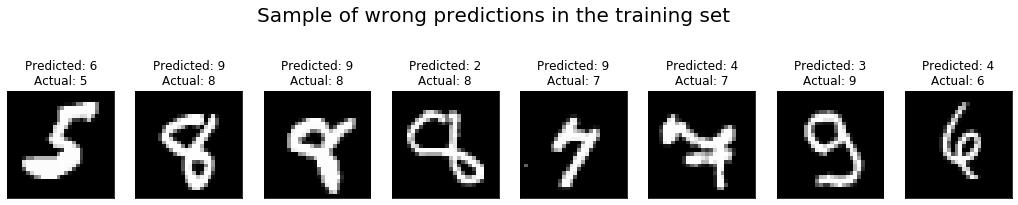
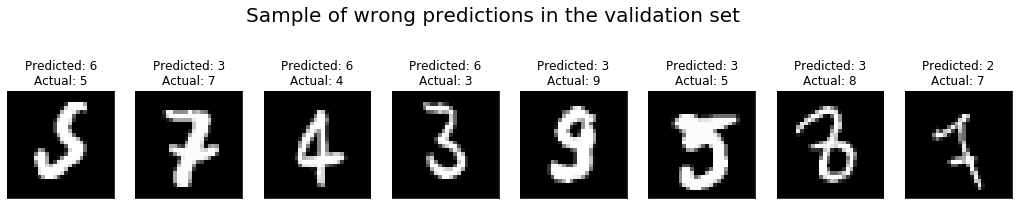
+It is always a good idea to actually look at the images on which the network
performed poorly, and check for clues on how to improve the performance.
+We do that with the help of a small function that produces a list of the
images which the network got wrong, together with the predicted and true labels.
-A single convolution layer consists of one or more filters that each play the
role of a feature detector. During training, a CNN learns appropriate
representations (parameters) for these filters. Similar to MLP, the output from
the convolutional layer is transformed by applying a non-linearity. Besides the
convolutional layer, another key aspect of a CNN is the pooling layer. A
pooling layer serves to make the CNN translation invariant: a digit remains the
same even when it is shifted le [...]
-
-The following source code defines a convolutional neural network architecture
called LeNet. LeNet is a popular network known to work well on digit
classification tasks. We will use a slightly different version from the
original LeNet implementation, replacing the sigmoid activations with tanh
activations for the neurons.
+```python
+def get_mislabeled(loader):
+ """Return list of ``(input, pred_lbl, true_lbl)`` for mislabeled
samples."""
+ mislabeled = []
+ for inputs, labels in loader:
+ inputs = inputs.as_in_context(ctx)
+ labels = labels.as_in_context(ctx)
+ outputs = net(inputs)
+ # Predicted label is the index is where the output is maximal
+ preds = nd.argmax(outputs, axis=1)
+ for i, p, l in zip(inputs, preds, labels):
+ p, l = int(p.asscalar()), int(l.asscalar())
+ if p != l:
+ mislabeled.append((i.asnumpy(), p, l))
+ return mislabeled
+```
-A typical way to write your network is creating a new class inherited from
`gluon.Block`
-class. We can define the network by composing and inheriting Block class as
follows:
+We can now get the mislabeled images in the training and validation sets and
plot a selection of them:
```python
-import mxnet.ndarray as F
-
-class Net(gluon.Block):
- def __init__(self, **kwargs):
- super(Net, self).__init__(**kwargs)
- with self.name_scope():
- # layers created in name_scope will inherit name space
- # from parent layer.
- self.conv1 = nn.Conv2D(20, kernel_size=(5,5))
- self.pool1 = nn.MaxPool2D(pool_size=(2,2), strides = (2,2))
- self.conv2 = nn.Conv2D(50, kernel_size=(5,5))
- self.pool2 = nn.MaxPool2D(pool_size=(2,2), strides = (2,2))
- self.fc1 = nn.Dense(500)
- self.fc2 = nn.Dense(10)
-
- def forward(self, x):
- x = self.pool1(F.tanh(self.conv1(x)))
- x = self.pool2(F.tanh(self.conv2(x)))
- # 0 means copy over size from corresponding dimension.
- # -1 means infer size from the rest of dimensions.
- x = x.reshape((0, -1))
- x = F.tanh(self.fc1(x))
- x = F.tanh(self.fc2(x))
- return x
+import numpy as np
+
+sample_size = 8
+wrong_train = get_mislabeled(train_loader)
+wrong_val = get_mislabeled(val_loader)
+wrong_train_sample = [wrong_train[i] for i in np.random.randint(0,
len(wrong_train), size=sample_size)]
+wrong_val_sample = [wrong_val[i] for i in np.random.randint(0, len(wrong_val),
size=sample_size)]
+
+import matplotlib.pyplot as plt
+
+fig, axs = plt.subplots(ncols=sample_size)
+for ax, (img, pred, lbl) in zip(axs, wrong_train_sample):
+ fig.set_size_inches(18, 4)
+ fig.suptitle("Sample of wrong predictions in the training set",
fontsize=20)
+ ax.imshow(img[0], cmap="gray")
+ ax.set_title("Predicted: {}\nActual: {}".format(pred, lbl))
+ ax.xaxis.set_visible(False)
+ ax.yaxis.set_visible(False)
+
+fig, axs = plt.subplots(ncols=sample_size)
+for ax, (img, pred, lbl) in zip(axs, wrong_val_sample):
+ fig.set_size_inches(18, 4)
+ fig.suptitle("Sample of wrong predictions in the validation set",
fontsize=20)
+ ax.imshow(img[0], cmap="gray")
+ ax.set_title("Predicted: {}\nActual: {}".format(pred, lbl))
+ ax.xaxis.set_visible(False)
+ ax.yaxis.set_visible(False)
```
+
<!--notebook-skip-line-->
+
<!--notebook-skip-line-->
+
+In this case, it is rather obvious that our MLP network is either too simple
or has not been trained long enough to perform really great on this dataset, as
can be seen from the fact that some of the mislabeled examples are rather
"easy" and should not be a challenge for our neural net.
+As it turns out, moving to the CNN architecture presented in the following
section will give a big performance boost.
+
+### Convolutional Neural Network (CNN)
-We just defined the forward function here, and the backward function to
compute gradients
-is automatically defined for you using autograd.
-We also imported `mxnet.ndarray` package to use activation functions from
`ndarray` API.
+A fundamental issue with the MLP network is that it requires the inputs to be
flattened (in the non-batch axes) before they can be processed by the dense
layers.
+This means in particular that the spatial structure of an image is largely
discarded, and that the values describing it are just treated as a long vector.
+The network then has to figure out the neighborhood relations of pixels from
scratch by adjusting its weights accordingly, which seems very wasteful.
-Now, We will create the network as follows:
+A CNN aims to address this problem by using a more structured weight
representation.
+Instead of connecting all inputs to all outputs, the characteristic
[convolution
layer](https://mxnet.incubator.apache.org/api/python/gluon/nn.html#mxnet.gluon.nn.Conv2D)
only considers a small neighborhood of a pixel to compute the value of the
corresponding output pixel.
+In particular, the spatial structure of the image is preserved, i.e., one can
speak of input and output pixels in the first place.
+Only the size of the image may change through convolutions.
+[This
article](http://deeplearning.net/software/theano/tutorial/conv_arithmetic.html)
gives a good and intuitive explanation of convolutions in the context of deep
learning.
+
+The size of the neighborhood that a convolution layer considers for each pixel
is usually referred to as *filter size* or *kernel size*.
+The array of weights -- which does not depend on the output pixel location,
only on the position within such a neighborhood -- is called *filter* or
*kernel*.
+Typical filter sizes range from *3 x 3* to *13 x 13*, which implies that a
convolution layer has *far* fewer parameters than a dense layer.
```python
-net = Net()
+conv_layer = nn.Conv2D(kernel_size=(3, 3), channels=32, in_channels=16,
activation='relu')
+print(conv_layer.params)
```
-
-
-**Figure 3:** First conv + pooling layer in LeNet.
+`Parameter conv0_weight (shape=(32, 16, 3, 3), dtype=<class 'numpy.float32'>)`
<!--notebook-skip-line-->
-Now we train LeNet with similar hyper-parameters as before. Note that, if a
GPU is available, we recommend using it. This greatly speeds up computation
given that LeNet is more complex and compute-intensive than the previous
multilayer perceptron. To do so, we only need to change `mx.cpu()` to
`mx.gpu()` and MXNet takes care of the rest. Just like before, we'll stop
training after 10 epochs.
+`Parameter conv0_bias (shape=(32,), dtype=<class 'numpy.float32'>)`
<!--notebook-skip-line-->
-Training and prediction can be done in the similar way as we did for MLP.
+Filters can be thought of as little feature detectors: in early layers, they
learn to detect small local structures like edges, whereas later layers become
sensitive to more and more global structures.
+Since images often contain a rich set of such features, it is customary to
have each convolution layer employ and learn many different filters in
parallel, so as to detect many different image features on their respective
scales.
+This stacking of filters, which directly translates to a stacking of output
images, is referred to as output *channels* of the convolution layer.
+Likewise, the input can already have multiple channels.
+In the above example, the convolution layer takes an input image with 16
channels and maps it to an image with 32 channels by convolving each of the
input channels with a different set of 32 filters and then summing over the 16
input channels.
+Therefore, the total number of filter parameters in the convolution layer is
`channels * in_channels * prod(kernel_size)`, which amounts to 4608 in the
above example.
-#### Initialize parameters and optimizer
+Another characteristic feature of CNNs is the usage of *pooling*, i.e.,
summarizing patches to a single number, to shrink the size of an image as it
travels through the layers.
+This step lowers the computational burden of training the network, but the
main motivation for pooling is the assumption that it makes the network less
sensitive to small translations, rotations or deformations of the image.
+Popular pooling strategies are max-pooling and average-pooling, and they are
usually performed after convolution.
-We will initialize the network parameters as follows:
+The following code defines a CNN architecture called *LeNet*.
+The LeNet architecture is a popular network known to work well on digit
classification tasks.
+We will use a version that differs slightly from the original in the usage of
`tanh` activations instead of `sigmoid`.
```python
-# set the context on GPU is available otherwise CPU
-ctx = [mx.gpu() if mx.test_utils.list_gpus() else mx.cpu()]
-net.initialize(mx.init.Xavier(magnitude=2.24), ctx=ctx)
-trainer = gluon.Trainer(net.collect_params(), 'sgd', {'learning_rate': 0.03})
+lenet = nn.HybridSequential(prefix='LeNet_')
+with lenet.name_scope():
+ lenet.add(
+ nn.Conv2D(channels=20, kernel_size=(5, 5), activation='tanh'),
+ nn.MaxPool2D(pool_size=(2, 2), strides=(2, 2)),
+ nn.Conv2D(channels=50, kernel_size=(5, 5), activation='tanh'),
+ nn.MaxPool2D(pool_size=(2, 2), strides=(2, 2)),
+ nn.Flatten(),
+ nn.Dense(500, activation='tanh'),
+ nn.Dense(10, activation=None),
+ )
```
-#### Training
+To get an overview of all intermediate sizes of arrays and the number of
parameters in each layer, the `summary()` method can be a great help.
+It requires the network parameters to be initialized, and an input array to
infer the sizes.
```python
-# Use Accuracy as the evaluation metric.
-metric = mx.metric.Accuracy()
-softmax_cross_entropy_loss = gluon.loss.SoftmaxCrossEntropyLoss()
-
-for i in range(epoch):
- # Reset the train data iterator.
- train_data.reset()
- # Loop over the train data iterator.
- for batch in train_data:
- # Splits train data into multiple slices along batch_axis
- # and copy each slice into a context.
- data = gluon.utils.split_and_load(batch.data[0], ctx_list=ctx,
batch_axis=0)
- # Splits train labels into multiple slices along batch_axis
- # and copy each slice into a context.
- label = gluon.utils.split_and_load(batch.label[0], ctx_list=ctx,
batch_axis=0)
- outputs = []
- # Inside training scope
- with ag.record():
- for x, y in zip(data, label):
- z = net(x)
- # Computes softmax cross entropy loss.
- loss = softmax_cross_entropy_loss(z, y)
- # Backpropogate the error for one iteration.
- loss.backward()
- outputs.append(z)
- # Updates internal evaluation
- metric.update(label, outputs)
- # Make one step of parameter update. Trainer needs to know the
- # batch size of data to normalize the gradient by 1/batch_size.
- trainer.step(batch.data[0].shape[0])
- # Gets the evaluation result.
- name, acc = metric.get()
- # Reset evaluation result to initial state.
- metric.reset()
- print('training acc at epoch %d: %s=%f'%(i, name, acc))
+lenet.initialize(mx.init.Xavier(), ctx=ctx)
+lenet.summary(nd.zeros((1, 1, 28, 28), ctx=ctx))
+```
+
+```
+Output:
+
+--------------------------------------------------------------------------------
+ Layer (type) Output Shape Param
#
+================================================================================
+ Input (1, 1, 28, 28) 0
+ Activation-1 <Symbol eNet_conv0_tanh_fwd> 0
+ Activation-2 (1, 20, 24, 24) 0
+ Conv2D-3 (1, 20, 24, 24)
520
+ MaxPool2D-4 (1, 20, 12, 12) 0
+ Activation-5 <Symbol eNet_conv1_tanh_fwd> 0
+ Activation-6 (1, 50, 8, 8) 0
+ Conv2D-7 (1, 50, 8, 8)
25050
+ MaxPool2D-8 (1, 50, 4, 4) 0
+ Flatten-9 (1, 800) 0
+ Activation-10 <Symbol eNet_dense0_tanh_fwd> 0
+ Activation-11 (1, 500) 0
+ Dense-12 (1, 500)
400500
+ Dense-13 (1, 10)
5010
+================================================================================
+Parameters in forward computation graph, duplicate included
+ Total params: 431080
+ Trainable params: 431080
+ Non-trainable params: 0
+Shared params in forward computation graph: 0
+Unique parameters in model: 431080
+--------------------------------------------------------------------------------
```
-#### Prediction
+
+
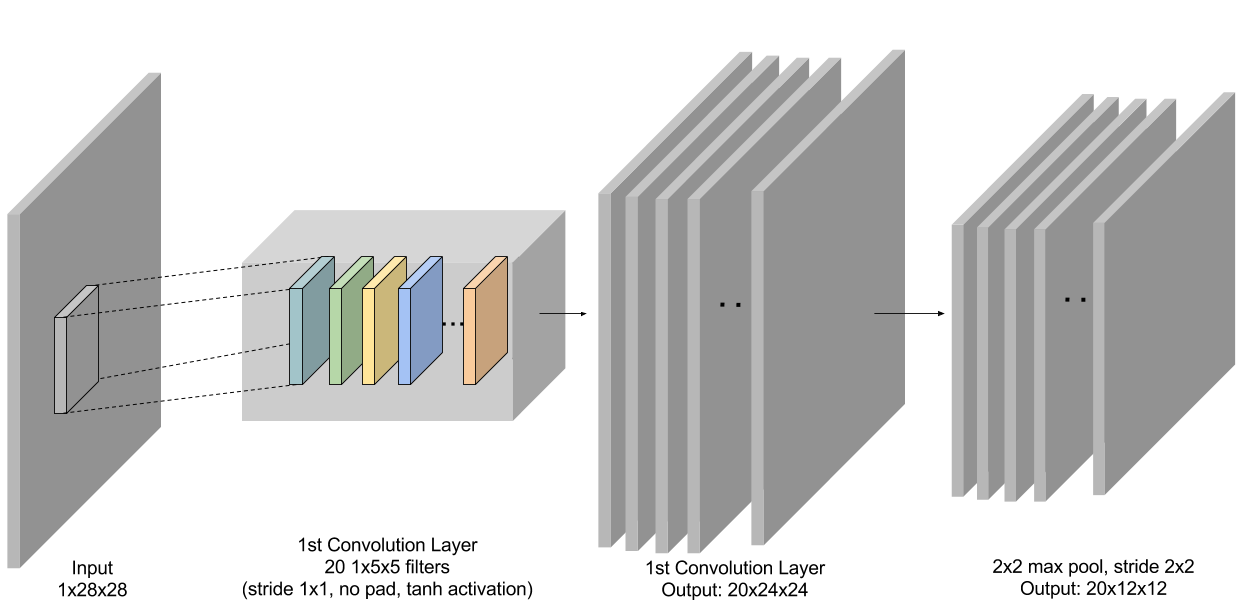
+**Figure 3:** First conv + pooling layer in LeNet.
-Finally, we'll use the trained LeNet model to generate predictions for the
test data.
+Now we train LeNet with similar hyperparameters and procedure as before.
+Note that it is advisable to use a GPU if possible, since this model is
significantly more computationally demanding to evaluate and train than the
previous MLP.
```python
-# Use Accuracy as the evaluation metric.
+trainer = gluon.Trainer(
+ params=lenet.collect_params(),
+ optimizer='sgd',
+ optimizer_params={'learning_rate': 0.04},
+)
metric = mx.metric.Accuracy()
-# Reset the validation data iterator.
-val_data.reset()
-# Loop over the validation data iterator.
-for batch in val_data:
- # Splits validation data into multiple slices along batch_axis
- # and copy each slice into a context.
- data = gluon.utils.split_and_load(batch.data[0], ctx_list=ctx,
batch_axis=0)
- # Splits validation label into multiple slices along batch_axis
- # and copy each slice into a context.
- label = gluon.utils.split_and_load(batch.label[0], ctx_list=ctx,
batch_axis=0)
- outputs = []
- for x in data:
- outputs.append(net(x))
- # Updates internal evaluation
- metric.update(label, outputs)
-print('validation acc: %s=%f'%metric.get())
-assert metric.get()[1] > 0.98
+num_epochs = 10
+
+for epoch in range(num_epochs):
+ for inputs, labels in train_loader:
+ inputs = inputs.as_in_context(ctx)
+ labels = labels.as_in_context(ctx)
+
+ with autograd.record():
+ outputs = lenet(inputs)
+ loss = loss_function(outputs, labels)
+
+ loss.backward()
+ metric.update(labels, outputs)
+
+ trainer.step(batch_size=inputs.shape[0])
+
+ name, acc = metric.get()
+ print('After epoch {}: {} = {}'.format(epoch + 1, name, acc))
+ metric.reset()
+
+for inputs, labels in val_loader:
+ inputs = inputs.as_in_context(ctx)
+ labels = labels.as_in_context(ctx)
+ metric.update(labels, lenet(inputs))
+print('Validaton: {} = {}'.format(*metric.get()))
+assert metric.get()[1] > 0.985
```
-If all went well, we should see a higher accuracy metric for predictions made
using LeNet. With CNN we should be able to correctly predict around 98% of all
test images.
+If all went well, we should see a higher accuracy metric for predictions made
using LeNet.
+With this CNN we should be able to correctly predict around 99% of all
validation images.
## Summary
-In this tutorial, we have learned how to use MXNet to solve a standard
computer vision problem: classifying images of hand written digits. You have
seen how to quickly and easily build, train and evaluate models such as MLP and
CNN with MXNet Gluon package.
+In this tutorial, we demonstrated how to use MXNet to solve a standard
computer vision problem: classifying images of hand-written digits.
+We showed how to quickly build, train and evaluate models such as MLPs and
CNNs with the MXNet Gluon package.
<!-- INSERT SOURCE DOWNLOAD BUTTONS -->




