anirudhacharya commented on a change in pull request #15158: [TUTORIAL] Add
multiple GPUs training tutorial
URL: https://github.com/apache/incubator-mxnet/pull/15158#discussion_r293601876
########## File path: docs/tutorials/gluon/multi_gpu.md ########## @@ -0,0 +1,193 @@ +<!--- Licensed to the Apache Software Foundation (ASF) under one --> +<!--- or more contributor license agreements. See the NOTICE file --> +<!--- distributed with this work for additional information --> +<!--- regarding copyright ownership. The ASF licenses this file --> +<!--- to you under the Apache License, Version 2.0 (the --> +<!--- "License"); you may not use this file except in compliance --> +<!--- with the License. You may obtain a copy of the License at --> + +<!--- http://www.apache.org/licenses/LICENSE-2.0 --> + +<!--- Unless required by applicable law or agreed to in writing, --> +<!--- software distributed under the License is distributed on an --> +<!--- "AS IS" BASIS, WITHOUT WARRANTIES OR CONDITIONS OF ANY --> +<!--- KIND, either express or implied. See the License for the --> +<!--- specific language governing permissions and limitations --> +<!--- under the License. --> + +# Multiple GPUs training with Gluon API + +In this tutorial we will walk through how one can train deep learning neural networks on multiple GPUs within a single machine. This tutorial focuses on data parallelism as opposed to model parallelism. Data parallelism approach assumes, that you can fit whole your model in a GPU and only training data needs to be partitioned. This is different from model parallelism, where the model is so big, that it doesn't fit into a single GPU, so it needs to be partitioned as well. Model parallelism is not supported by Apache MXNet out of the box, and one has to manually route the data among different devices to achieve model parallelism. Check out [model parallelism tutorial](https://mxnet.incubator.apache.org/versions/master/faq/model_parallel_lstm.html) to learn more about it. +Here we will focus on implementing data parallel training for a convolutional neural network called LeNet. + +## Prerequisites + +- Two or more GPUs +- CUDA 9 or higher +- cuDNN v7 or higher +- Knowledge of how to train a model using Gluon API + +## Storing data on GPU + +The basic primitive in Apache MXNet to specify a tensor is [NDArray](https://mxnet.incubator.apache.org/api/python/ndarray/sparse.html#module-mxnet.ndarray). When you create NDArray you have to provide the context - the device where this tensor is going to be stored. The context can be either CPU or GPU and both can be indexed: if your machine has multiple GPUs, you can provide an index to specify which GPU to use. By default, CPU context is used, and that means that the tensor will live in main RAM. Below is an example how to create two tensors where one is stored on the first GPU and the second is stored on the second GPU. Notice, that this example will work even when you have one or no GPUs at all. We use [mx.context.num_gpus](https://github.com/apache/incubator-mxnet/blob/master/python/mxnet/context.py#L262) to find the number of available GPUs. + +```python +import mxnet as mx + +n_gpu = mx.context.num_gpus() +context = [mx.gpu(0), mx.gpu(1)] if n_gpu >= 2 else \ + [mx.gpu(), mx.gpu()] if n_gpu == 1 else \ + [mx.cpu(), mx.cpu()] + +a = mx.nd.array([1, 2, 3], ctx=context[0]) +b = mx.nd.array([5, 6, 7], ctx=context[1]) +``` + +The next step would be to do operations on these 2 NDArrays. But, unfortunately, if we try to do any operation involved both these arrays, Apache MXNet will return an error: `Check failed: e == cudaSuccess CUDA: an illegal memory access was encountered`. This error is returned because we tried to use arrays that are stored on different contexts: Apache MXNet wants users to explicitly control memory allocation and doesn't automatically copy data between GPUs. If we want to do an operation on these arrays we have to have them in the same GPU. The result of the operation is going to be also stored on that GPU as well. + +We can manually copy data between GPUs using [as_in_context method](https://mxnet.incubator.apache.org/api/python/ndarray/ndarray.html?#mxnet.ndarray.NDArray.as_in_context). We can get the current context of an NDArray via [context property](https://mxnet.incubator.apache.org/api/python/ndarray/ndarray.html?#mxnet.ndarray.NDArray.context). + +```python +c = a + b.as_in_context(a.context) +``` + +Using this example, we have learnt that we can perform operations with NDArrays only if they are stored on the same GPU. So, how can we split the data between GPUs, but use the same model for training? We will answer this question in the next section. + +## Storing the network on multiple GPUs + +When you create a network using [Blocks](https://mxnet.incubator.apache.org/api/python/gluon/gluon.html#mxnet.gluon.Block) the parameters of blocks are also stored in NDArrays. When you initialize your network, you have to specify which context you are going to use for the underlying NDArrays. The feature of the [initialize method](https://mxnet.incubator.apache.org/api/python/gluon/gluon.html#mxnet.gluon.Block.initialize) is that it can accept the list of contexts, meaning that you can provide more than one context to store underlying parameters. In the example below, we create the LeNet network and initialize it to be stored on GPU(0) and GPU(1) simultaneously. Each GPU will receive its own copy of the parameters: + +```python +from mxnet import init +from mxnet.gluon import nn + +net = nn.Sequential() +net.add(nn.Conv2D(channels=6, kernel_size=5, activation='relu'), + nn.MaxPool2D(pool_size=2, strides=2), + nn.Conv2D(channels=16, kernel_size=3, activation='relu'), + nn.MaxPool2D(pool_size=2, strides=2), + nn.Flatten(), + nn.Dense(120, activation="relu"), + nn.Dense(84, activation="relu"), + nn.Dense(10)) + +net.initialize(init=init.Xavier(), ctx=context) +``` + +The actual initialization will happen once we do the first forward pass on the network, but at this stage Apache MXNet knows that we are expecting parameters of the network to be on both GPUs. + +## Multiple GPUs training schema + +At this moment, we have learnt how to define NDArrays in different contexts and that a network can be initialized on two GPUs at the same time. + +To do multiple GPU training with a given batch of the data, we divide the examples in the batch into number of portions equal to the number of GPUs we use and distribute one to each GPU. Then, each GPU will individually calculate the local gradient of the model parameters based on the batch subset it was assigned and the model parameters it maintains. Next, we sum together the local gradients on the GPUs to get the current batch stochastic gradient. After that, each GPU uses this batch stochastic gradient to update the complete set of model parameters that it maintains. Figure below depicts the batch stochastic gradient calculation using data parallelism and two GPUs. + +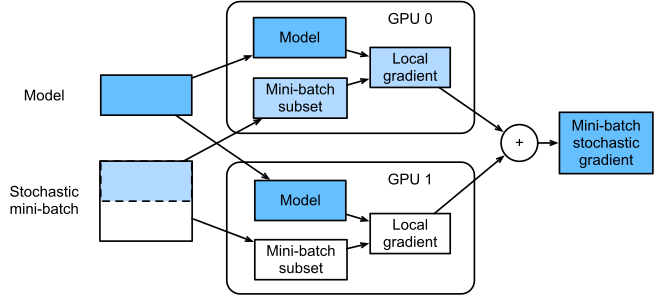 + +This approach allows us to avoid the limitation of doing operations on different GPUs - we move subsets of data to each GPU and the operations are happening inside each individual GPU only. After that we aggregate the resulting gradients and each GPU receives a copy of the gradients to do model parameters update. + +Using that approach, knowing a way to move data between contexts and how to initialize a model on multiple contexts, we already know everything that is needed to do multiple GPU training. But Apache MXNet also provides us a convenient method to distribute data between multiple GPUs, which we are going to cover in the section below. + +## Splitting data between GPUs + +Apache MXNet provides a utility method [gluon.utils.split_and_load](https://mxnet.incubator.apache.org/api/python/gluon/gluon.html#mxnet.gluon.utils.split_and_load) to split the data between multiple contexts. The result of the method's call is a list of NDArrays each of which is stored on a separate context provided in the `ctx_list` argument. The code below demonstrates how to use the method: + +```python +data = mx.random.uniform(shape=(100, 10)) +result = mx.gluon.utils.split_and_load(data, ctx_list=context) +``` + +If we explore the result, we will notice, that `split_and_load` method divided the data in two chunks of the same shape `(50, 10)`. If the number of elements is uneven, we have to specify `even_split=False` to instruct the method to do uneven split. + +At this point we are ready to assemble a complete multiple GPUs training example. + +## Multiple GPUs classification of MNIST images + +In the first step, we are going to load the MNIST images and use [ToTensor](https://mxnet.apache.org/api/python/gluon/data.html#mxnet.gluon.data.vision.transforms.ToTensor) to convert the format of the data from `height x width x channel` to `channel x height x width` and divide it by 255. + +```python +train_data = mx.gluon.data.vision.MNIST(train=True).transform_first(mx.gluon.data.vision.transforms.ToTensor()) +val_data = mx.gluon.data.vision.MNIST(train=False).transform_first(mx.gluon.data.vision.transforms.ToTensor()) +``` + +The next step is to create a [DataLoader](https://mxnet.incubator.apache.org/api/python/gluon/data.html#mxnet.gluon.data.DataLoader) which constructs batches from the dataset. We create one for the training and one for the validation datasets. + +```python +batch_size = 128 +train_loader = mx.gluon.data.DataLoader(train_data, shuffle=True, batch_size=batch_size) +val_loader = mx.gluon.data.DataLoader(val_data, shuffle=False, batch_size=batch_size) +``` + +After that we define the [Trainer](https://mxnet.incubator.apache.org/api/python/gluon/gluon.html#trainer) that defines the optimization algorithm to be used and hyperparameters as well as the [Loss](https://mxnet.incubator.apache.org/api/python/gluon/loss.html#mxnet.gluon.loss.SoftmaxCrossEntropyLoss) function and a [metric](https://mxnet.incubator.apache.org/api/python/metric/metric.html#mxnet.metric.Accuracy) to track: + +```python +trainer = mx.gluon.Trainer( + params=net.collect_params(), + optimizer='sgd', + optimizer_params={'learning_rate': 0.04}, +) + +metric = mx.metric.Accuracy() +loss_function = mx.gluon.loss.SoftmaxCrossEntropyLoss() +``` + +After these preparations we are ready to define the training loop. In the training loop we will split the data between GPUs, pass them all through the individual GPU, do the backward step on each loss to accumulate the gradients, and call [trainer.step](https://mxnet.incubator.apache.org/api/python/gluon/gluon.html#mxnet.gluon.Trainer.step) to actually update the parameters of the model: + +```python +num_epochs = 10 + +for epoch in range(num_epochs): + for inputs, labels in train_loader: + actual_batch_size = inputs.shape[0] + # Split data among GPUs. Since split_and_load is a deterministic function + # inputs and labels are going to be split in the same way between GPUs. + inputs = mx.gluon.utils.split_and_load(inputs, ctx_list=context, even_split=False) + labels = mx.gluon.utils.split_and_load(labels, ctx_list=context, even_split=False) + + # The forward pass and the loss computation need to be wrapped + # in a `record()` scope to make sure the computational graph is + # recorded in order to automatically compute the gradients + # during the backward pass. + with mx.autograd.record(): + outputs = [net(input_slice) for input_slice in inputs] + losses = [loss_function(o, l) for o, l in zip(outputs, labels)] + + # Iterate over losses to compute gradients for each input slice + for loss in losses: + loss.backward() + + # update metric for each output + for l, o in zip(labels, outputs): + metric.update(l, o) + + # Update the parameters by stepping the trainer; the batch size + # is required to normalize the gradients by `1 / batch_size`. + trainer.step(batch_size=actual_batch_size) + + # Print the evaluation metric and reset it for the next epoch + name, acc = metric.get() + print('After epoch {}: {} = {}'.format(epoch + 1, name, acc)) + metric.reset() +``` + +If you run this example and run `nvidia-smi` tool from NVIDIA, you will notice that both GPUs are used to perform calculations. + +## Advanced topic + +As we mentioned above, the gradients for each data split are calculated independently and then later summed together. We haven't mentioned yet where exactly this aggregation happens. + +Apache MXNet uses [KVStore](https://mxnet.incubator.apache.org/versions/master/api/scala/kvstore.html) - a virtual place for data sharing between different devices, including machines and GPUs. The KVStore is responsible for storing and, by default, aggregating the gradients of the model. The physical location of the KVStore is defined when we create a [Trainer](https://mxnet.incubator.apache.org/versions/master/api/python/gluon/gluon.html#mxnet.gluon.Trainer) and by default is set to `device`, which mean it will aggregate gradients and update weights on GPUs. The actual data is distributed in round-robin fashion among available GPUs per block. This statement means two things, which are important to know from practical perspective. + +The first thing is there is an additional memory allocation that happens on GPUs that is not directly related to your data and your model to store auxiliary information for GPUs sync-up. Depending on the complexity of your model, the amount of required memory can be significant, and you may even experience CUDA out of memory exceptions. If that is the case, and you cannot decrease batch size anymore, you may want to consider switching `KVStore` storage to RAM by setting `kvstore` argument to `local` during instantiation of the `Trainer`. Often this decreases the wall-clock performance time of your model, because the gradients and parameters would need to be copied to RAM and back. + +The second thing is that since the auxiliary information is distributed among GPUs in round-robin fashion on per block level, `KVStore` may use more memory on some GPUs and less on others. For example, if your model has a very big embedding layer, you may see that your first GPU uses 90% of your memory while others use only 50%. That affects how much data you actually can load in a single batch, because the data between devices is split evenly. If that is the case and you have to keep or increase your batch size, you may want to switch to the `local` mode. Review comment: just a question, here should we also mention about `dist_device_sync` mode of `kvstore` used for distributed training with updates on GPUs? ---------------------------------------------------------------- This is an automated message from the Apache Git Service. To respond to the message, please log on to GitHub and use the URL above to go to the specific comment. For queries about this service, please contact Infrastructure at: [email protected] With regards, Apache Git Services

