lupyuen opened a new pull request, #7977:
URL: https://github.com/apache/nuttx/pull/7977
   ## Summary

   This PR adds the driver for Xingbangda XBD599 LCD Panel (based on Sitronix
ST7703 LCD Controller) on PINE64 PinePhone. This PR also includes:

   - The driver for X-Powers AXP803 Power Mgmt IC, which calls our driver for
Allwinner A64's Reduced Serial Bus. The PMIC Driver is needed to power on the
MIPI DSI Interface for the LCD Panel.

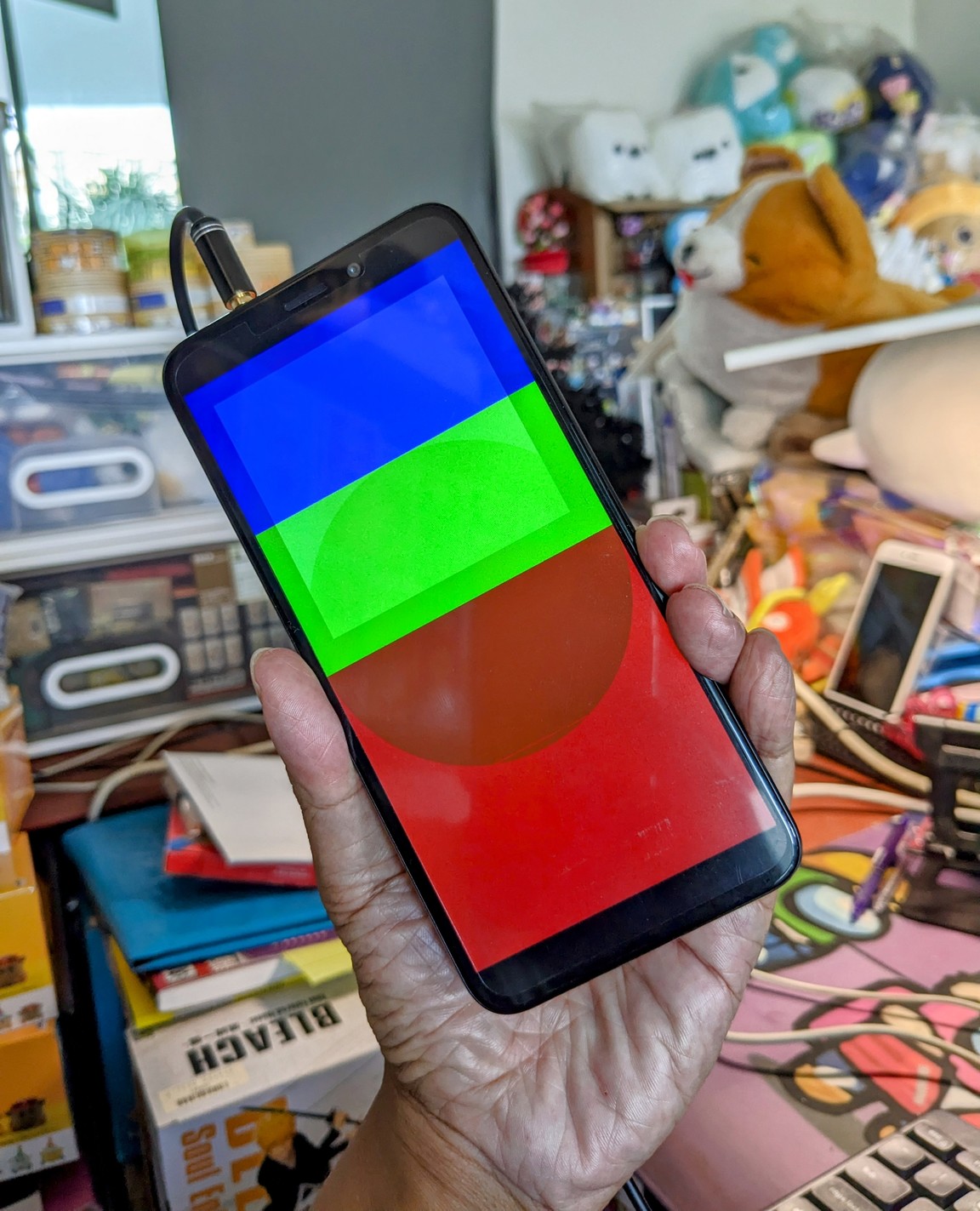
   - A simple Display Driver that renders a Test Pattern on the LCD Display at
startup. It calls our Allwinner A64 drivers for Display Engine, Timing
Controller TCON0 and MIPI Display Serial Interface.

   The NuttX Frame Buffer Driver will be implemented in the next PR.

   ### Modified Files

   `arch/arm64/src/a64/a64_de.c`, `a64_de.h`: Changed the Frame Buffer pointer
to `const` for Allwinner A64 Display Engine

   `arch/arm64/src/a64/hardware/a64_memorymap.h`: Added the Base Address for
PWM, for controlling the PWM Backlight

   `boards/arm64/a64/pinephone/src/pinephone_bringup.c`: Call `fb_register()`
to start the Display Driver at startup

   `boards/arm64/a64/pinephone/src/Makefile`: Added LCD Driver, PMIC Driver and
Display Driver to Makefile

   `boards/arm64/a64/pinephone/Kconfig`: Added the Kconfig option for "PINE64
PinePhone > LCD Display" (`CONFIG_PINEPHONE_LCD`) which enables the LCD Driver,
PMIC Driver and Display Driver

   ### New Files

   `boards/arm64/a64/pinephone/src/pinephone_lcd.c`, `pinephone_lcd.h`: Driver
for Xingbangda XBD599 LCD Panel

   `boards/arm64/a64/pinephone/src/pinephone_pmic.c`, `pinephone_pmic.h`:
Driver for X-Powers AXP803 Power Mgmt IC

   `boards/arm64/a64/pinephone/src/pinephone_display.c`: Simple Display Driver
that renders a Test Pattern in `up_fbinitialize()`

   `boards/arm64/a64/pinephone/configs/lcd/defconfig`: New PinePhone Board
Configuration `pinephone:lcd` that enables the LCD Driver
(`CONFIG_PINEPHONE_LCD`)

   ### Updated Documentation

   `platforms/arm/a64/boards/pinephone/index.rst`: Added PinePhone Board
Configuration `pinephone:lcd` that enables the LCD Driver

   ## Impact

   Our LCD Panel Driver is only enabled when we select the `pinephone:lcd`
config:

   ```bash
   tools/configure.sh pinephone:lcd
   ```

   When our LCD Panel Driver is enabled, PinePhone renders a [Test
Pattern](https://lupyuen.github.io/images/de3-title.jpg) at startup and
continues booting into `nsh` shell.

   The Driver Code is derived from my Reverse-Engineering of the PinePhone
Display Driver, based on the logs captured from the PinePhone p-boot Bootloader:

   -   ["Rendering PinePhone's Display (DE and
TCON0)"](https://lupyuen.github.io/articles/de)

   -   ["NuttX RTOS for PinePhone: Render Graphics in
Zig"](https://lupyuen.github.io/articles/de2)

   ## Testing

   We tested by building NuttX with our new `pinephone:lcd` config:

   ```bash
   tools/configure.sh pinephone:lcd
   ```

   PinePhone correctly renders a [Test
Pattern](https://lupyuen.github.io/images/de3-title.jpg) at startup and boots
successfully to `nsh` shell.

   -   [Demo Video](https://www.youtube.com/shorts/UzR7xLZCc0c)

   Here's the Test Log, with Debug Logging Enabled...

   -   [LCD Driver Test
Log](https://gist.github.com/lupyuen/34b4dbf9ad7b720b673ec0aaaa11e90d)

   We also tested with Debug Logging Disabled, to preempt any timing issues...

   -   [LCD Driver Test Log (Debug Logging
Disabled)](https://gist.github.com/lupyuen/20738d2ebc6a65dcf8a8c3bbc0c92514)

   Before `nsh` appears, the log shows:

   ```text
   up_fbgetvplane: up_fbgetvplane not implemented
   fb_register: ERROR: up_fbgetvplane() failed, vplane=0
   ```

   This will be fixed in the next PR when we implement the Frame Buffer Driver.


--
This is an automated message from the Apache Git Service.
To respond to the message, please log on to GitHub and use the
URL above to go to the specific comment.

To unsubscribe, e-mail: [email protected]

For queries about this service, please contact Infrastructure at:
[email protected]