Author: kschenk
Date: Sun Jul 21 22:33:19 2013
New Revision: 1505486

URL: http://svn.apache.org/r1505486
Log:
Checking in latest html copy of Release Notes for 4.0.0. Leaving all references
to confluence styles and attachments.
Modified:
openoffice/ooo-site/trunk/content/development/releases/4.0.0.html
Modified: openoffice/ooo-site/trunk/content/development/releases/4.0.0.html
URL:
http://svn.apache.org/viewvc/openoffice/ooo-site/trunk/content/development/releases/4.0.0.html?rev=1505486&r1=1505485&r2=1505486&view=diff
==============================================================================
--- openoffice/ooo-site/trunk/content/development/releases/4.0.0.html (original)
+++ openoffice/ooo-site/trunk/content/development/releases/4.0.0.html Sun Jul
21 22:33:19 2013
@@ -1,30 +1,708 @@
-<!DOCTYPE html PUBLIC "-//W3C//DTD XHTML 1.0 Strict//EN"
"http://www.w3.org/TR/xhtml1/DTD/xhtml1-strict.dtd";>
-<html xmlns="http://www.w3.org/1999/xhtml";>
-<head>
- <meta http-equiv="Content-Type" content="text/html; charset=utf-8">
- <title>AOO 3.4.1 Release Notes</title>
-</head>
+<html>
+ <head>
+ <!-- MS Word on Windows doesn't realise the encoding is UTF-8 unless
this meta tag is present -->
+ <meta http-equiv="Content-Type" content="text/html; charset=utf-8">
+ <base href="https://cwiki.apache.org/confluence"; />
+ <title>AOO 4.0 Release Notes</title>
+ <style>
+ body, p, td, table, tr, .bodytext, .stepfield {
+ font-family: Arial, Helvetica, FreeSans, sans-serif;
+ }
+ .panel {
+ margin: 10px;
+ padding: 10px;
+ border: 1px solid #999;
+ background-color: #f0f0f0;
+ }
+ .noteMacro { border-style: solid; border-width: 1px; border-color:
#F0C000; background-color: #FFFFCE; text-align:left;}
+ .warningMacro { border-style: solid; border-width: 1px;
border-color: #c00; background-color: #fcc; text-align:left;}
+ .infoMacro { border-style: solid; border-width: 1px; border-color:
#69c; background-color: #D8E4F1; text-align:left;}
+ .tipMacro { border-style: solid; border-width: 1px; border-color:
#090; background-color: #dfd; text-align:left;}
+ .informationMacroPadding { padding: 5px 0 0 5px; }
-<body>
+ table.infoMacro td, table.warningMacro td, table.tipMacro td,
table.noteMacro td, table.sectionMacro td {
+ border: none;
+ }
-<h1>AOO 4.0.0 (build XXXXXXX) Release Notes</h1>
+ .grid {
+ margin: 2px 0px 5px 0px;
+ border-collapse: collapse;
+ }
+ .grid th {
+ border: 1px solid #ccc;
+ padding: 2px 4px 2px 4px;
+ background: #f0f0f0;
+ text-align: center;
+ }
+ .grid td {
+ border: 1px solid #ccc;
+ padding: 3px 4px 3px 4px;
+ }
+ </style>
+ </head>
-<p> Temporary placeholder document </p>
+ <body style="background-color: white; padding: 10px;">
+ <h1>AOO 4.0 Release Notes</h1>
+ <div>
+<ul>
+ <li><a href='#AOO4.0ReleaseNotes-GeneralRemarks'>General Remarks</a></li>
+ <li><a href='#AOO4.0ReleaseNotes-CommunityOpenSource'>Community Open
Source</a></li>
+ <li><a href='#AOO4.0ReleaseNotes-NewFeaturesandEnhancements'>New Features
and Enhancements</a></li>
+ <li><a href='#AOO4.0ReleaseNotes-AdditionalLanguageSupport'>Additional
Language Support</a></li>
+ <li><a href='#AOO4.0ReleaseNotes-ImprovedQualityManagementTools'>Improved
Quality Management Tools</a></li>
+ <li><a
href='#AOO4.0ReleaseNotes-ChangesthatImpactBackwardsCompatibility'>Changes that
Impact Backwards Compatibility</a></li>
+ <li><a href='#AOO4.0ReleaseNotes-BugFixes'>Bug Fixes</a></li>
+ <li><a href='#AOO4.0ReleaseNotes-KnownIssues'>Known Issues</a></li>
+ <li><a href='#AOO4.0ReleaseNotes-StayinformedaboutApacheOpenOffice'>Stay
informed about Apache OpenOffice</a></li>
+</ul></div>
+<h2><a name="AOO4.0ReleaseNotes-GeneralRemarks"></a>General Remarks</h2>
+<p><span class="image-wrap" style=""><img
src="https://cwiki.apache.org/confluence/download/attachments/30746475/logo.png?version=1&modificationDate=1373921615427";
style="border: 1px solid black" /></span></p>
-<h2 id="AOO4.0.0ReleaseNotes-StayinformedaboutApacheOpenOffice">
-Stay informed about Apache OpenOffice</h2>
+<p>Apache OpenOffice 4.0 is now available for download from our <a
href="http://www.openoffice.org/download/";>official download page</a>.
Building upon the great success of the OpenOffice 3.4 release, which has seen
over 57 million downloads, this <b>major update</b> brings exciting new
features, enhancements and bug fixes. OpenOffice 4.0 features an
innovative new Sidebar user interface, additional language support for 22
languages (including 3 new languages), 500 bug fixes, improvements in Microsoft
Office interoperability, enhancements to drawing/graphics, performance
improvements, etc. You can read the details of these later in these
Release Notes.</p>
-<p>You are encouraged to subscribe to the Apache OpenOffice announcement
mailing list, to be
-receive important notifications such as product updates and security patches.
To subscribe
-you can send an email to:<a
href="mailto:[email protected]";>
[email protected]</a>.</p>
+<p>One other thing that you will notice immediately, on this page, our website
and in other places, is our new logo. The new logo is the result of many
design iterations, collaboration among talented designers and a contest where
40 logos were rated by over 50,000 users.</p>
-<p>You can also follow the project on <a
href="https://twitter.com/#!/apacheoo";>Twitter</a>,
-<a href="http://www.facebook.com/ApacheOO";>Facebook</a> and
-<a
href="https://plus.google.com/u/0/114598373874764163668/posts";>Google+</a>.</p>
+<p>We wish to give a special "hello" to our upgrading users. We hope you
like the new features, especially the Sidebar UI. This feature was based
on code contributed by IBM, from their Lotus Symphony product. We adapted
that code, and based on several rounds of feedback from users like you,
improved it and integrated it into OpenOffice.</p>
-</body>
-</html>
+<p>And for new users, welcome to the community! We hope you enjoy
using Apache OpenOffice, the leading free and open office productivity
suite.</p>
+<p>As always we welcome your feedback:</p>
+<ul>
+ <li>Support questions are best directed to our <a
href="http://forum.openoffice.org/";>community support forums</a>.</li>
+ <li>Bug reports (but not support questions) should go to to our <a
href="https://issues.apache.org/ooo/";>Bugzilla issue tracking system</a>.</li>
+ <li>General questions can also be sent to our public <a
href="http://openoffice.apache.org/mailing-lists.html#users-mailing-list-public";>users
mailing list</a>.</li>
+</ul>
+
+
+<p>You can also find us on <a
href="https://twitter.com/#%21/apacheoo";>Twitter</a>, <a
href="http://www.facebook.com/ApacheOO";>Facebook</a> and <a
href="https://plus.google.com/u/0/114598373874764163668/posts";>Google\+</a>.</p>
+
+<h2><a name="AOO4.0ReleaseNotes-CommunityOpenSource"></a>Community Open
Source</h2>
+
+<p>At Apache we work transparently as an open community of volunteers.
We develop open source software to benefit the public. We're not going to
beg you for monetary contributions. But if you are interested in
joining us, to help us make the next great version of OpenOffice, then we want
to hear from you. We're not only programmers, but are a community of
testers, UI designers, web designers, technical writers, accessibility experts,
translators, social media experts, etc. Volunteers in all
areas are welcome. More information can be found on our <a
href="http://openoffice.apache.org/get-involved.html";>Get Involved</a> page.</p>
+
+<h2><a name="AOO4.0ReleaseNotes-NewFeaturesandEnhancements"></a>New Features
and Enhancements</h2>
+
+<h3><a name="AOO4.0ReleaseNotes-NewSidebar"></a>New Sidebar</h3>
+
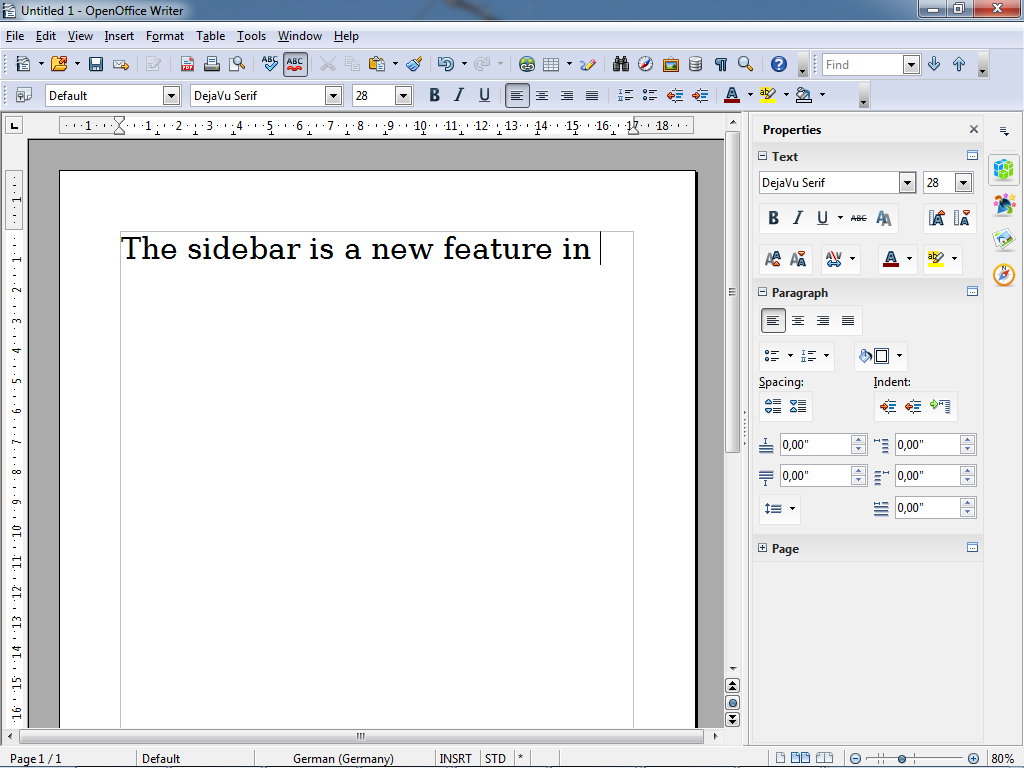
+<p>The Sidebar is a major new feature of the user interface in all of the
OpenOffice applications.</p>
+
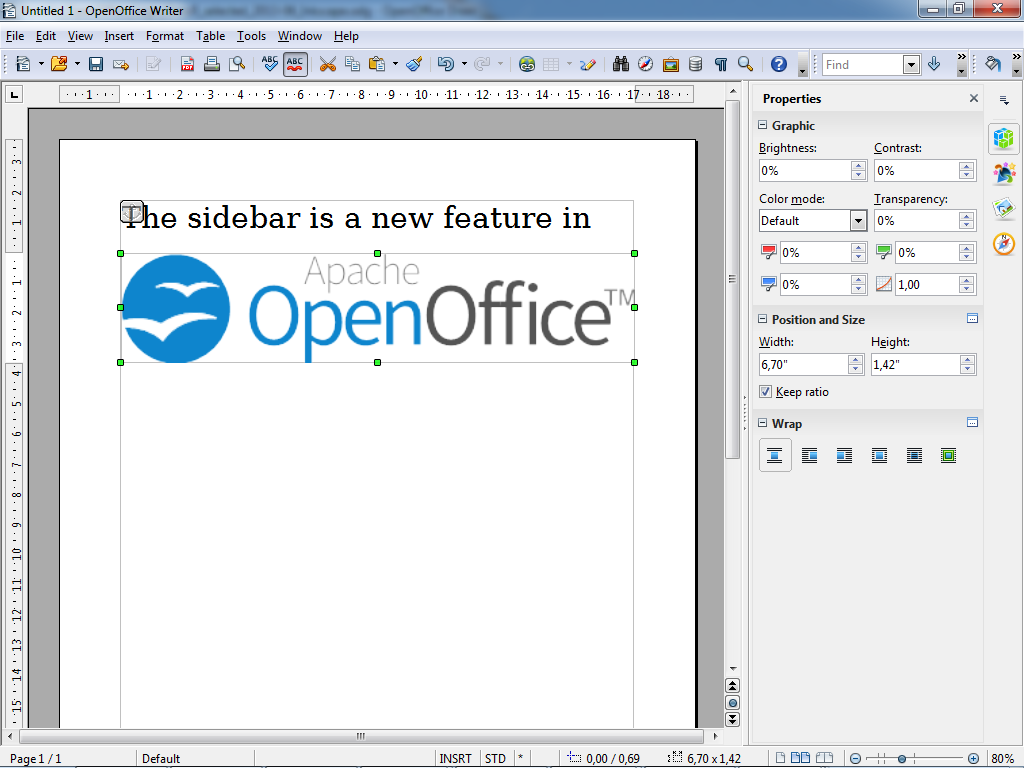
+<p>The Sidebar makes better use of today's widescreen displays than
traditional toolbars. The 'Properties' deck is context-sensitive and shows
panels with the document properties that are most frequently used for the
current editing task.</p>
+
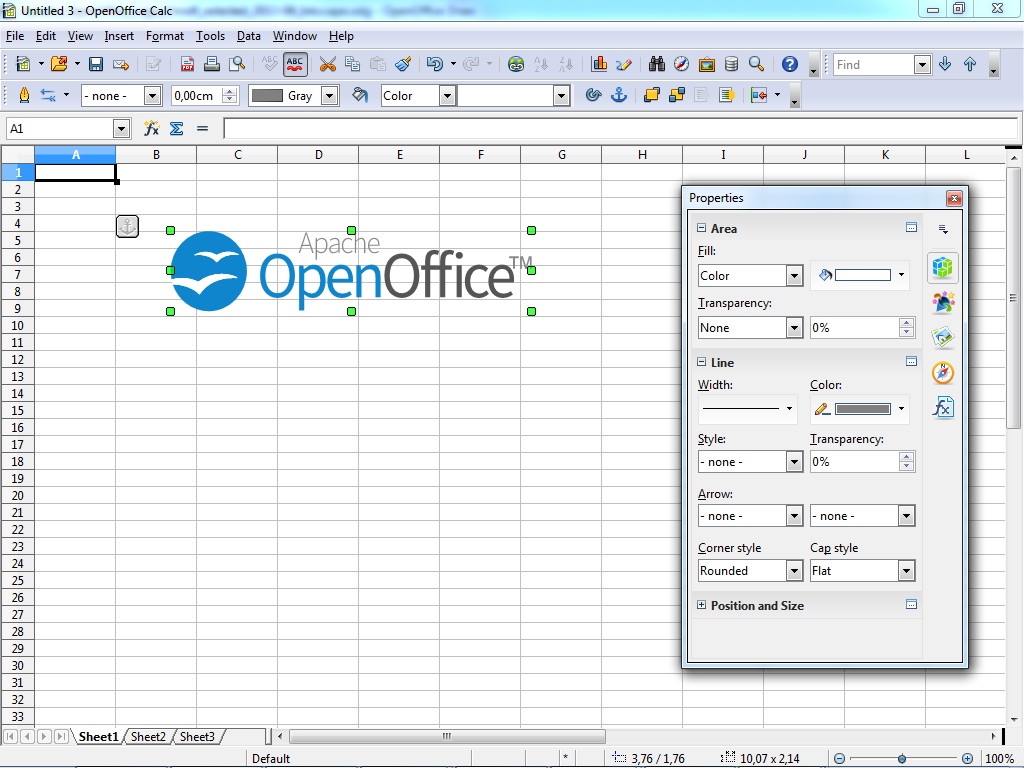
+<p>Click on these images for a more detailed view:</p>
+
+<p><span class="image-wrap" style=""><a class="confluence-thumbnail-link
1024x768"
href='https://cwiki.apache.org/confluence/download/attachments/30746475/screenshot-writer-context-text.png'><img
src="/confluence/download/thumbnails/30746475/screenshot-writer-context-text.png"
style="border: 0px solid black" /></a></span> <span class="image-wrap"
style=""><a class="confluence-thumbnail-link 1024x768"
href='https://cwiki.apache.org/confluence/download/attachments/30746475/screenshot-writer-context-bitmap.png'><img
src="/confluence/download/thumbnails/30746475/screenshot-writer-context-bitmap.png"
style="border: 0px solid black" /></a></span> <span class="image-wrap"
style=""><a class="confluence-thumbnail-link 1024x768"
href='https://cwiki.apache.org/confluence/download/attachments/30746475/screenshot-writer-context-shape.png'><img
src="/confluence/download/thumbnails/30746475/screenshot-writer-context-shape.png"
style="border: 0px solid black" /></a></span><br/>
+<em>Screenshots of Writer with contexts for text, bitmap, and shapes (from
left to right). The new OpenOffice logo has been pasted as bitmap (center) and
editable outlines (right).</em></p>
+
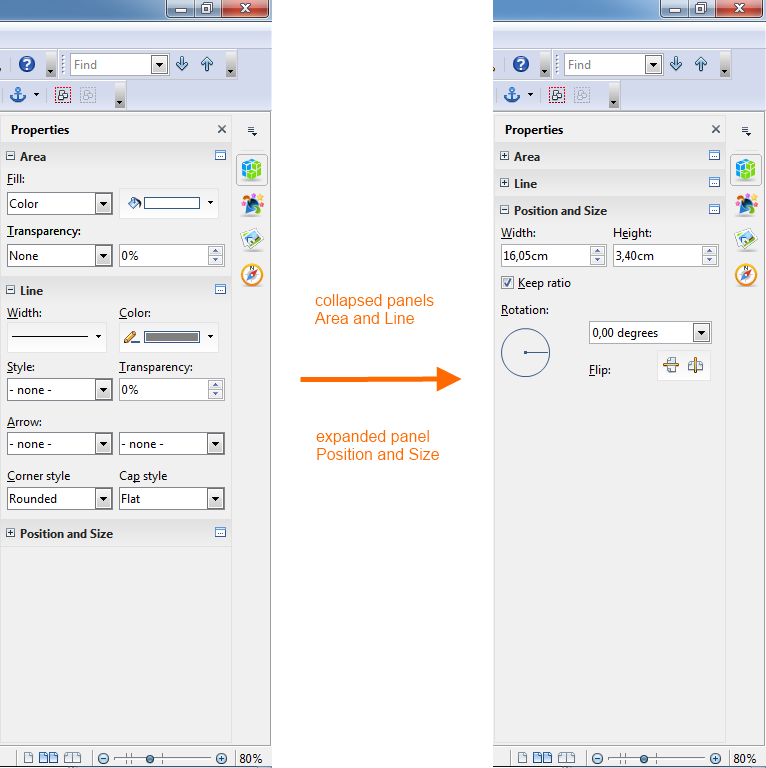
+<p>If you find that you don't use a particular panel very often, just click on
its title and it will collapse to a single line of text. A small + or - at the
left side of the panel title indicates whether the panels is collapsed or
expanded.</p>
+
+<p><span class="image-wrap" style=""><a class="confluence-thumbnail-link
766x768"
href='https://cwiki.apache.org/confluence/download/attachments/30746475/expand-and-collapse.png'><img
src="/confluence/download/thumbnails/30746475/expand-and-collapse.png"
style="border: 0px solid black" /></a></span><br/>
+<em>Different panels expanded or collapsed</em></p>
+
+<ul>
+ <li>Eleven property panels have been migrated from IBM Lotus Symphony:
Alignment, Area, Cell Appearance, Graphic, Line, Number Format, Page,
Paragraph, Position and Size, Text and Wrap.</li>
+ <li>Seven panels come from the old Impress tool panel: Available for
Use, Custom Animation, Layouts, Recently Used, Slide Transition, Table Design,
Used in This Presentation.</li>
+ <li>Four are non-modal (ie non locking) dialogs: Functions, Gallery,
Navigator, Syles and Formatting.</li>
+ <li>One is new: Insert.</li>
+</ul>
+
+
+<p><span class="image-wrap" style=""><a class="confluence-thumbnail-link
984x928"
href='https://cwiki.apache.org/confluence/download/attachments/30746475/sidebar-panels.png'><img
src="/confluence/download/thumbnails/30746475/sidebar-panels.png"
style="border: 0px solid black" /></a></span><br/>
+<em>Panels from Symphony, the old Impress task pane, OpenOffice dialogs (from
left to right).</em></p>
+
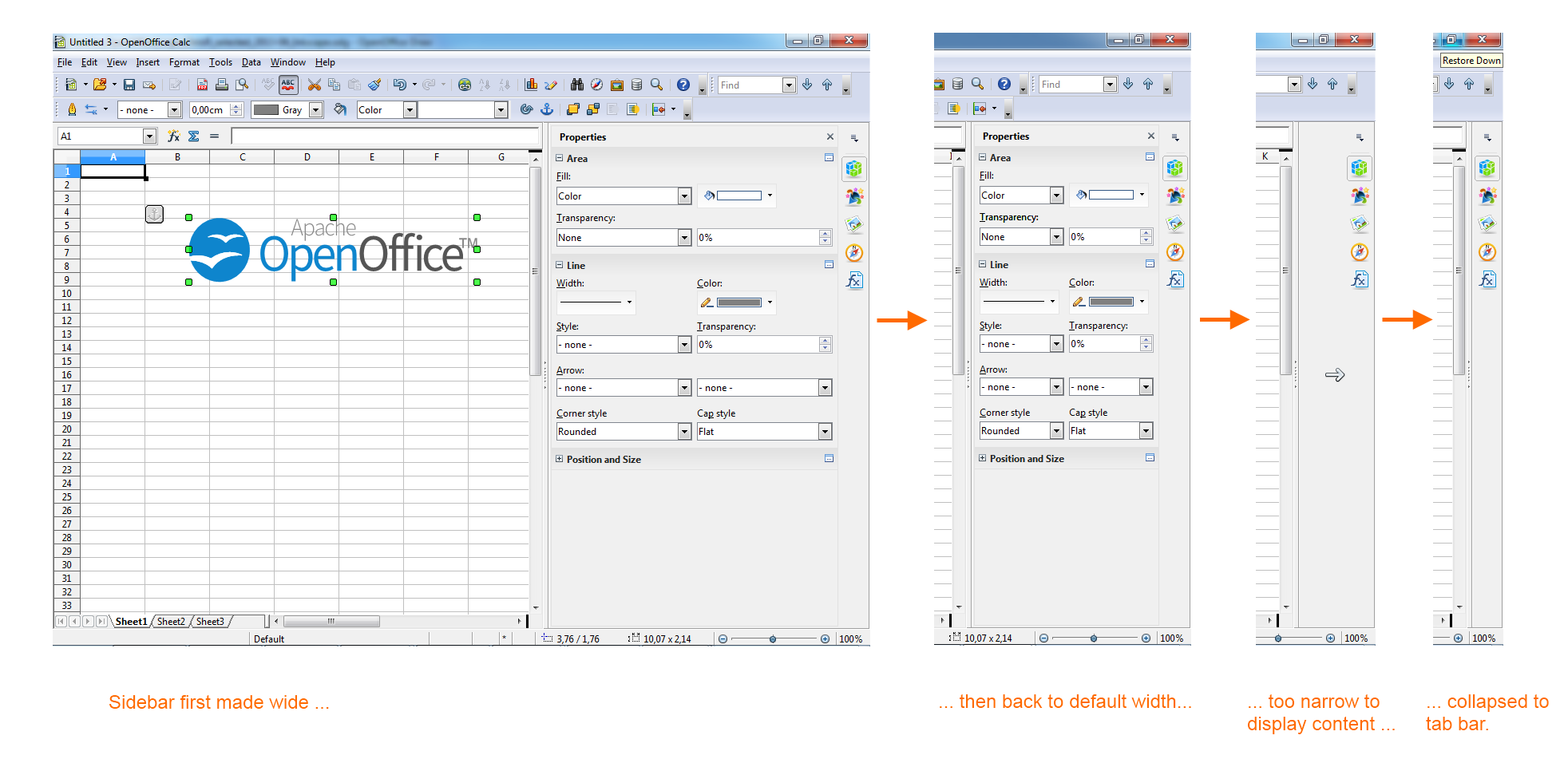
+<p>The width of the Sidebar can be adjusted. The controls adapt their size
accordingly. If you need more space then it can be undocked — and
possibly moved to a second display — or it can be reduced to a thin tab
bar. A single click on one of the icons and the sidebar is back.</p>
+
+<p><span class="image-wrap" style=""><a class="confluence-thumbnail-link
1964x951"
href='https://cwiki.apache.org/confluence/download/attachments/30746475/sidebar-different-widths.png'><img
src="/confluence/download/thumbnails/30746475/sidebar-different-widths.png"
style="border: 0px solid black" /></a></span><br/>
+<em>Different widths of the sidebar: maximum width, default width, too narrow
to display content, collapsed to tab bar (from left to right).</em></p>
+
+<p><span class="image-wrap" style=""><a class="confluence-thumbnail-link
1024x768"
href='https://cwiki.apache.org/confluence/download/attachments/30746475/screenshot-calc-floating.png'><img
src="/confluence/download/thumbnails/30746475/screenshot-calc-floating.png"
style="border: 0px solid black" /></a></span><br/>
+<em>Floating sidebar, can be moved to second screen</em></p>
+
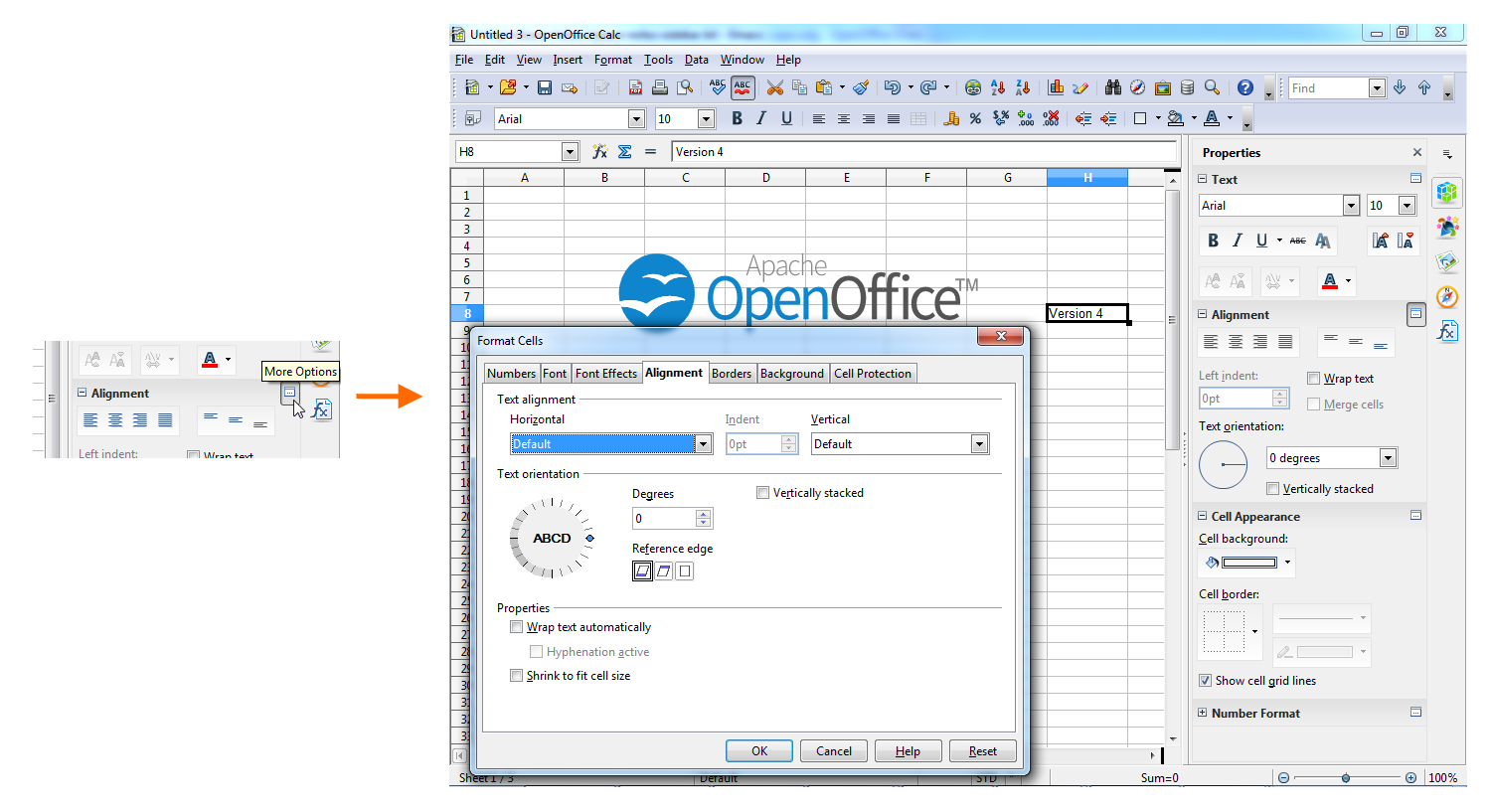
+<p>Of course, not all of OpenOffice's functionality can be represented by
controls in the Sidebar. If you need an advanced function then just click on
the "more options" button in the title bar of a panel to open a dialog with
many more options and properties.</p>
+
+<p><span class="image-wrap" style=""><a class="confluence-thumbnail-link
1500x817"
href='https://cwiki.apache.org/confluence/download/attachments/30746475/sidebar-more-options.png'><img
src="/confluence/download/thumbnails/30746475/sidebar-more-options.png"
style="border: 0px solid black" /></a></span><br/>
+<em>Click on 'more options' to get, well, more options.</em></p>
+
+<p>More information can be found in the <a
href="http://wiki.openoffice.org/wiki/Sidebar";>OpenOffice wiki</a>.</p>
+
+
+<h3><a
name="AOO4.0ReleaseNotes-InteroperabilityImprovements"></a>Interoperability
Improvements</h3>
+
+<p>Fidelity and interoperability improvement is an ongoing goal for Apache
OpenOffice. And there are many improvements going in to the new version. Here
an overview of some of the major fidelity improvements since the Apache
OpenOffice 3.4.1 release, including features, enhancements and defect fixes.</p>
+
+<h4><a name="AOO4.0ReleaseNotes-TextDocuments"></a>Text Documents</h4>
+
+<div class='table-wrap'>
+<table class='confluenceTable'><tbody>
+<tr>
+<th class='confluenceTh'> Description </th>
+<th class='confluenceTh'> Original </th>
+<th class='confluenceTh'> AOO 3.4.1 </th>
+<th class='confluenceTh'> AOO 4.0 </th>
+</tr>
+<tr>
+<td class='confluenceTd'> Support of Graphic Bullets in MS word 2003 </td>
+<td class='confluenceTd'> <span class="image-wrap" style=""><img
src="http://wiki.openoffice.org/w/images/8/81/120928_MS.jpg"; style="border: 0px
solid black" /></span> </td>
+<td class='confluenceTd'> <span class="image-wrap" style=""><img
src="http://wiki.openoffice.org/w/images/4/4b/120928_Aoo341.jpg"; style="border:
0px solid black" /></span> </td>
+<td class='confluenceTd'> <span class="image-wrap" style=""><img
src="http://wiki.openoffice.org/w/images/3/36/120928_Aoo40.jpg"; style="border:
0px solid black" /></span> </td>
+</tr>
+<tr>
+<td class='confluenceTd'> Table of Content fidelity improvement with MS Word
2003 (tabs, attributes & jump...) </td>
+<td class='confluenceTd'> <span class="image-wrap" style=""><img
src="http://wiki.openoffice.org/w/images/1/15/119963_MS.jpg"; style="border: 0px
solid black" /></span> </td>
+<td class='confluenceTd'> <span class="image-wrap" style=""><img
src="http://wiki.openoffice.org/w/images/f/ff/119963_Aoo341.jpg"; style="border:
0px solid black" /></span> </td>
+<td class='confluenceTd'> <span class="image-wrap" style=""><img
src="http://wiki.openoffice.org/w/images/5/52/119963_Aoo40.jpg"; style="border:
0px solid black" /></span> </td>
+</tr>
+<tr>
+<td class='confluenceTd'> Bookmark reference to normal numbering </td>
+<td class='confluenceTd'> <span class="image-wrap" style=""><img
src="http://wiki.openoffice.org/w/images/0/0b/120759_MS.jpg"; style="border: 0px
solid black" /></span> </td>
+<td class='confluenceTd'> <span class="image-wrap" style=""><img
src="http://wiki.openoffice.org/w/images/0/04/120759_Aoo3.4.1.jpg";
style="border: 0px solid black" /></span> </td>
+<td class='confluenceTd'> <span class="image-wrap" style=""><img
src="http://wiki.openoffice.org/w/images/d/d9/120759_Aoo40.jpg"; style="border:
0px solid black" /></span> </td>
+</tr>
+<tr>
+<td class='confluenceTd'> Numbering&bullets attributes determined by the
paragraph end mark in MS Word </td>
+<td class='confluenceTd'> <span class="image-wrap" style=""><img
src="http://wiki.openoffice.org/w/images/7/70/119405_MS.jpg"; style="border: 0px
solid black" /></span> </td>
+<td class='confluenceTd'> <span class="image-wrap" style=""><img
src="http://wiki.openoffice.org/w/images/e/ef/119405_Aoo341.jpg"; style="border:
0px solid black" /></span> </td>
+<td class='confluenceTd'> <span class="image-wrap" style=""><img
src="http://wiki.openoffice.org/w/images/0/0c/119405_Aoo40.jpg"; style="border:
0px solid black" /></span> </td>
+</tr>
+</tbody></table>
+</div>
+
+
+<h4><a name="AOO4.0ReleaseNotes-PresentationDocuments"></a>Presentation
Documents</h4>
+
+<div class='table-wrap'>
+<table class='confluenceTable'><tbody>
+<tr>
+<th class='confluenceTh'> Description </th>
+<th class='confluenceTh'> Original </th>
+<th class='confluenceTh'> AOO 3.4.1 </th>
+<th class='confluenceTh'> AOO 4.0 </th>
+</tr>
+<tr>
+<td class='confluenceTd'> Keep special numbering when saving or opening a ppt
file </td>
+<td class='confluenceTd'> <span class="image-wrap" style=""><img
src="http://wiki.openoffice.org/w/images/6/60/120773_MS.jpg"; style="border: 0px
solid black" /></span> </td>
+<td class='confluenceTd'> <span class="image-wrap" style=""><img
src="http://wiki.openoffice.org/w/images/a/a2/120773_AOO341.jpg"; style="border:
0px solid black" /></span> </td>
+<td class='confluenceTd'> <span class="image-wrap" style=""><img
src="http://wiki.openoffice.org/w/images/d/d0/120773_AOO40.jpg"; style="border:
0px solid black" /></span> </td>
+</tr>
+<tr>
+<td class='confluenceTd'> Support special tiled fill (picture size covers
master page) background to be exported into ppt file </td>
+<td class='confluenceTd'> <span class="image-wrap" style=""><img
src="http://wiki.openoffice.org/w/images/8/8d/120039_MS.jpg"; style="border: 0px
solid black" /></span> </td>
+<td class='confluenceTd'> <span class="image-wrap" style=""><img
src="http://wiki.openoffice.org/w/images/3/39/120039_AOO341.jpg"; style="border:
0px solid black" /></span> </td>
+<td class='confluenceTd'> <span class="image-wrap" style=""><img
src="http://wiki.openoffice.org/w/images/9/9f/120039_AOO40.jpg"; style="border:
0px solid black" /></span> </td>
+</tr>
+<tr>
+<td class='confluenceTd'> The fill attribute of graphic background in table
can be display correctly when loading ppt file </td>
+<td class='confluenceTd'> <span class="image-wrap" style=""><img
src="http://wiki.openoffice.org/w/images/a/ae/119877_MS.jpg"; style="border: 0px
solid black" /></span> </td>
+<td class='confluenceTd'> <span class="image-wrap" style=""><img
src="http://wiki.openoffice.org/w/images/0/03/119877_AOO341.jpg"; style="border:
0px solid black" /></span> </td>
+<td class='confluenceTd'> <span class="image-wrap" style=""><img
src="http://wiki.openoffice.org/w/images/8/88/119877_AOO40.jpg"; style="border:
0px solid black" /></span> </td>
+</tr>
+<tr>
+<td class='confluenceTd'> Support of a connector that is connected to PPT
table </td>
+<td class='confluenceTd'> <span class="image-wrap" style=""><img
src="http://wiki.openoffice.org/w/images/f/f0/119493_MS.jpg"; style="border: 0px
solid black" /></span> </td>
+<td class='confluenceTd'> crash in AOO 3.4.1 </td>
+<td class='confluenceTd'> <span class="image-wrap" style=""><img
src="http://wiki.openoffice.org/w/images/1/1e/119493_AOO40.jpg"; style="border:
0px solid black" /></span> </td>
+</tr>
+<tr>
+<td class='confluenceTd'> Right notched arrow with "Fit shape to text"
property can be imported correctly </td>
+<td class='confluenceTd'> <span class="image-wrap" style=""><img
src="http://wiki.openoffice.org/w/images/9/99/120848_MS.jpg"; style="border: 0px
solid black" /></span> </td>
+<td class='confluenceTd'> <span class="image-wrap" style=""><img
src="http://wiki.openoffice.org/w/images/6/68/120848_AOO341.jpg"; style="border:
0px solid black" /></span> </td>
+<td class='confluenceTd'> <span class="image-wrap" style=""><img
src="http://wiki.openoffice.org/w/images/6/61/120848_AOO40.jpg"; style="border:
0px solid black" /></span> </td>
+</tr>
+<tr>
+<td class='confluenceTd'> Keep 3D effects when import line </td>
+<td class='confluenceTd'> <span class="image-wrap" style=""><img
src="http://wiki.openoffice.org/w/images/c/ce/119443_MS.jpg"; style="border: 0px
solid black" /></span> </td>
+<td class='confluenceTd'> <span class="image-wrap" style=""><img
src="http://wiki.openoffice.org/w/images/7/74/119443_AOO341.jpg"; style="border:
0px solid black" /></span> </td>
+<td class='confluenceTd'> <span class="image-wrap" style=""><img
src="http://wiki.openoffice.org/w/images/1/1f/119443_AOO40.jpg"; style="border:
0px solid black" /></span> </td>
+</tr>
+</tbody></table>
+</div>
+
+
+<h4><a name="AOO4.0ReleaseNotes-SpreadhseetDocuments"></a>Spreadhseet
Documents</h4>
+
+<div class='table-wrap'>
+<table class='confluenceTable'><tbody>
+<tr>
+<th class='confluenceTh'> Description </th>
+<th class='confluenceTh'> Original </th>
+<th class='confluenceTh'> AOO 3.4.1 </th>
+<th class='confluenceTh'> AOO 4.0 </th>
+</tr>
+<tr>
+<td class='confluenceTd'> Keep Pie chart height when open Excel file </td>
+<td class='confluenceTd'> <span class="image-wrap" style=""><img
src="http://wiki.openoffice.org/w/images/8/89/119989_MS.jpg"; style="border: 0px
solid black" /></span> </td>
+<td class='confluenceTd'> <span class="image-wrap" style=""><img
src="http://wiki.openoffice.org/w/images/4/48/119989_AOO341.jpg"; style="border:
0px solid black" /></span> </td>
+<td class='confluenceTd'> <span class="image-wrap" style=""><img
src="http://wiki.openoffice.org/w/images/8/8a/119989_AOO40.jpg"; style="border:
0px solid black" /></span> </td>
+</tr>
+<tr>
+<td class='confluenceTd'> Support the range specified by a reference formula
or name range as chart data </td>
+<td class='confluenceTd'> <span class="image-wrap" style=""><img
src="http://wiki.openoffice.org/w/images/c/c0/120962_MS.jpg"; style="border: 0px
solid black" /></span> </td>
+<td class='confluenceTd'> <span class="image-wrap" style=""><img
src="http://wiki.openoffice.org/w/images/1/1b/120962_AOO341.jpg"; style="border:
0px solid black" /></span> </td>
+<td class='confluenceTd'> <span class="image-wrap" style=""><img
src="http://wiki.openoffice.org/w/images/1/1b/120962_AOO40.jpg"; style="border:
0px solid black" /></span> </td>
+</tr>
+<tr>
+<td class='confluenceTd'> Show chart name through VBA API by clicking a button
</td>
+<td class='confluenceTd'> <span class="image-wrap" style=""><img
src="http://wiki.openoffice.org/w/images/2/29/121178_MS.jpg"; style="border: 0px
solid black" /></span> </td>
+<td class='confluenceTd'> <span class="image-wrap" style=""><img
src="http://wiki.openoffice.org/w/images/2/2f/121178_AOO341.jpg"; style="border:
0px solid black" /></span> </td>
+<td class='confluenceTd'> <span class="image-wrap" style=""><img
src="http://wiki.openoffice.org/w/images/5/58/121178_AOO40.jpg"; style="border:
0px solid black" /></span> </td>
+</tr>
+<tr>
+<td class='confluenceTd'> Support data filter function on merged cells </td>
+<td class='confluenceTd'> <span class="image-wrap" style=""><img
src="http://wiki.openoffice.org/w/images/c/ce/120017_MS.jpg"; style="border: 0px
solid black" /></span> </td>
+<td class='confluenceTd'> <span class="image-wrap" style=""><img
src="http://wiki.openoffice.org/w/images/d/da/120017_AOO341.jpg"; style="border:
0px solid black" /></span> </td>
+<td class='confluenceTd'> <span class="image-wrap" style=""><img
src="http://wiki.openoffice.org/w/images/f/f0/120017_AOO40.jpg"; style="border:
0px solid black" /></span> </td>
+</tr>
+<tr>
+<td class='confluenceTd'> Support user-defined format code in xls when cell
value is TRUE or FALSE </td>
+<td class='confluenceTd'> <span class="image-wrap" style=""><img
src="http://wiki.openoffice.org/w/images/f/fa/121126_MS.jpg"; style="border: 0px
solid black" /></span> </td>
+<td class='confluenceTd'> <span class="image-wrap" style=""><img
src="http://wiki.openoffice.org/w/images/4/42/121126_AOO341.jpg"; style="border:
0px solid black" /></span> </td>
+<td class='confluenceTd'> <span class="image-wrap" style=""><img
src="http://wiki.openoffice.org/w/images/8/86/121126_AOO40.jpg"; style="border:
0px solid black" /></span> </td>
+</tr>
+<tr>
+<td class='confluenceTd'> Support GETPIVOTDATA in Excel </td>
+<td class='confluenceTd'> <span class="image-wrap" style=""><img
src="http://wiki.openoffice.org/w/images/b/b5/119972_MS.jpg"; style="border: 0px
solid black" /></span> </td>
+<td class='confluenceTd'> <span class="image-wrap" style=""><img
src="http://wiki.openoffice.org/w/images/0/05/119972_AOO341.jpg"; style="border:
0px solid black" /></span> </td>
+<td class='confluenceTd'> <span class="image-wrap" style=""><img
src="http://wiki.openoffice.org/w/images/3/3c/119972_AOO40.jpg"; style="border:
0px solid black" /></span> </td>
+</tr>
+<tr>
+<td class='confluenceTd'> Support format code "0_;.00" </td>
+<td class='confluenceTd'> <span class="image-wrap" style=""><img
src="http://wiki.openoffice.org/w/images/4/46/119943_MS.jpg"; style="border: 0px
solid black" /></span> </td>
+<td class='confluenceTd'> <span class="image-wrap" style=""><img
src="http://wiki.openoffice.org/w/images/3/3d/119943_AOO341.jpg"; style="border:
0px solid black" /></span> </td>
+<td class='confluenceTd'> <span class="image-wrap" style=""><img
src="http://wiki.openoffice.org/w/images/9/97/119943_AOO40.jpg"; style="border:
0px solid black" /></span> </td>
+</tr>
+</tbody></table>
+</div>
+
+
+<h4><a name="AOO4.0ReleaseNotes-OOXMLgeneral"></a>OOXML general</h4>
+
+<div class='table-wrap'>
+<table class='confluenceTable'><tbody>
+<tr>
+<th class='confluenceTh'> Description </th>
+<th class='confluenceTh'> Original </th>
+<th class='confluenceTh'> AOO 3.4.1 </th>
+<th class='confluenceTh'> AOO 4.0 </th>
+</tr>
+<tr>
+<td class='confluenceTd'> Support Docx outline level </td>
+<td class='confluenceTd'> <span class="image-wrap" style=""><img
src="http://wiki.openoffice.org/w/images/d/d1/119621_MS.jpg"; style="border: 0px
solid black" /></span> </td>
+<td class='confluenceTd'> <span class="image-wrap" style=""><img
src="http://wiki.openoffice.org/w/images/6/6e/119621_AOO341.jpg"; style="border:
0px solid black" /></span> </td>
+<td class='confluenceTd'> <span class="image-wrap" style=""><img
src="http://wiki.openoffice.org/w/images/f/fd/119621_AOO40.jpg"; style="border:
0px solid black" /></span> </td>
+</tr>
+<tr>
+<td class='confluenceTd'> Support table background color from table style in
docx file </td>
+<td class='confluenceTd'> <span class="image-wrap" style=""><img
src="http://wiki.openoffice.org/w/images/0/09/120576_MS.jpg"; style="border: 0px
solid black" /></span> </td>
+<td class='confluenceTd'> <span class="image-wrap" style=""><img
src="http://wiki.openoffice.org/w/images/d/dd/120576_AOO341.jpg"; style="border:
0px solid black" /></span> </td>
+<td class='confluenceTd'> <span class="image-wrap" style=""><img
src="http://wiki.openoffice.org/w/images/d/d6/120576_AOO40.jpg"; style="border:
0px solid black" /></span> </td>
+</tr>
+<tr>
+<td class='confluenceTd'> Support more Numbering&bullet types in docx </td>
+<td class='confluenceTd'> <span class="image-wrap" style=""><img
src="http://wiki.openoffice.org/w/images/b/b9/119658_MS.jpg"; style="border: 0px
solid black" /></span> </td>
+<td class='confluenceTd'> <span class="image-wrap" style=""><img
src="http://wiki.openoffice.org/w/images/f/fa/119658_AOO341.jpg"; style="border:
0px solid black" /></span> </td>
+<td class='confluenceTd'> <span class="image-wrap" style=""><img
src="http://wiki.openoffice.org/w/images/1/18/119658_AOO40.jpg"; style="border:
0px solid black" /></span> </td>
+</tr>
+<tr>
+<td class='confluenceTd'> Support font color in table in pptx </td>
+<td class='confluenceTd'> <span class="image-wrap" style=""><img
src="http://wiki.openoffice.org/w/images/c/c7/120051_MS.jpg"; style="border: 0px
solid black" /></span> </td>
+<td class='confluenceTd'> <span class="image-wrap" style=""><img
src="http://wiki.openoffice.org/w/images/9/90/120051_AOO341.jpg"; style="border:
0px solid black" /></span> </td>
+<td class='confluenceTd'> <span class="image-wrap" style=""><img
src="http://wiki.openoffice.org/w/images/2/23/120051_AOO40.jpg"; style="border:
0px solid black" /></span> </td>
+</tr>
+</tbody></table>
+</div>
+
+
+<h3><a
name="AOO4.0ReleaseNotes-DrawObjectImprovements%2FEnhancements"></a>DrawObject
Improvements/Enhancements</h3>
+
+<h4><a name="AOO4.0ReleaseNotes-NewColorPalette"></a>New Color Palette</h4>
+
+<p>The Color Palette is enhanced and extended with a selection of more useful
colors, arranged in a new scheme to make finding colors simpler.</p>
+
+<p>The new Palette is a mix of the Lotus Symphony Palette combined with the
most useful original colors.</p>
+
+<p><span class="image-wrap" style=""><img
src="https://cwiki.apache.org/confluence/download/attachments/30746475/NewPalette.png?version=1&modificationDate=1373893875128";
style="border: 0px solid black" /></span></p>
+
+<h4><a name="AOO4.0ReleaseNotes-NewGradients"></a>New Gradients</h4>
+
+<p>The Gradients are enhanced and extended with new, more useful ones, mainly
taken from Lotus Symphony. The old ones are kept, but moved to the end of the
list (not in the picture). These Gradients create much nicer fills for uses
such as Slide Backgrounds.</p>
+
+<p><span class="image-wrap" style=""><img
src="https://cwiki.apache.org/confluence/download/attachments/30746475/NewGradients.png?version=1&modificationDate=1373893817690";
style="border: 0px solid black" /></span></p>
+
+<h4><a
name="AOO4.0ReleaseNotes-NewGalleryThemesandGalleryenhancements"></a>New
Gallery Themes and Gallery enhancements</h4>
+
+<h5><a name="AOO4.0ReleaseNotes-GallerythemesaddedfromSymphony."></a>Gallery
themes added from Symphony.</h5>
+
+<ul>
+ <li>Arrows</li>
+ <li>Bullets (extended)</li>
+ <li>Computers</li>
+ <li>Diagrams</li>
+ <li>Environment</li>
+ <li>Finance</li>
+ <li>People</li>
+ <li>School & University</li>
+ <li>Symbols</li>
+ <li>Textshapes</li>
+ <li>Transport</li>
+</ul>
+
+
+<h5><a
name="AOO4.0ReleaseNotes-EnhancementstoexistingGallery"></a>Enhancements to
existing Gallery</h5>
+
+<ul>
+ <li>Old themes are kept and sometimes extended</li>
+ <li>Gallery is now able to store and use SVG graphics</li>
+ <li>Many new graphics are now in SVG format, which saves space on your
computer and gives the user the highest quality vector format</li>
+ <li>Ability to add your own SVG and Metafile format graphics</li>
+ <li>Can now be oriented horizontally or vertically and will adapt it's
layout automatically</li>
+ <li>Now also available anytime in the new Sidebar</li>
+</ul>
+
+
+<p><span class="image-wrap" style=""><img
src="https://cwiki.apache.org/confluence/download/attachments/30746475/NewGallery.png?version=1&modificationDate=1373893818353";
style="border: 0px solid black" /></span></p>
+
+<h4><a
name="AOO4.0ReleaseNotes-RefinedtheSelectionHandlesUserInterface"></a>Refined
the Selection Handles User Interface</h4>
+
+<ul>
+ <li>Selection Handles were reworked to be more distinguishable.</li>
+ <li>Transparency was added to give a slight 'clue' when the Handles
cover something, but only for the Handle's fill (not their outlines) to not
make them harder to view as necessary.</li>
+ <li>The design was slightly rounded.</li>
+ <li>Colors were tweaked a little bit for better identification (mainly
when Handles are selected).</li>
+ <li>When Keyboard-travelling over handles (CTRL-TAB) yellow handles
used for CustomShapes now blink as the other handles to visualize the active
handle correctly.</li>
+</ul>
+
+
+<p><span class="image-wrap" style=""><img
src="https://cwiki.apache.org/confluence/download/attachments/30746475/NewHandles.png?version=1&modificationDate=1373893874149";
style="border: 0px solid black" /></span></p>
+
+<h4><a name="AOO4.0ReleaseNotes-RefinedSelectionVisualization"></a>Refined
Selection Visualization</h4>
+
+<ul>
+ <li>For many occasions the selection of objects or multiple objects got
enhanced using the selection color from the system.</li>
+ <li>Usage and fetching of that system-wide SelectionColor was unified
to guarantee it for all selections on all Systems.</li>
+ <li>A slight blinking was added to identify objects where text can be
added by starting to type or pressing return.</li>
+</ul>
+
+
+<p>This is used in various places such as; Objects with TextEdit mode,
highlighting of objects as Drag&Drop target or object manipulation (dashed
black/white lines were used before).</p>
+
+<p><span class="image-wrap" style=""><img
src="https://cwiki.apache.org/confluence/download/attachments/30746475/NewTextEdit.png?version=1&modificationDate=1373893872932";
style="border: 0px solid black" /></span></p>
+
+<h4><a name="AOO4.0ReleaseNotes-BetterPrintPreview"></a>Better Print
Preview</h4>
+
+<p>The PrintPreview in the Print dialog is now fully AntiAlialised. The
previous version was not, thus thin lines could vanish or produce missing
parts.</p>
+
+<p><span class="image-wrap" style=""><img
src="https://cwiki.apache.org/confluence/download/attachments/30746475/NewPrintPreview.png?version=1&modificationDate=1373893873541";
style="border: 0px solid black" /></span></p>
+
+<h4><a
name="AOO4.0ReleaseNotes-EnhancedconversiontoBitmapGraphics"></a>Enhanced
conversion to Bitmap Graphics</h4>
+
+<p>The conversion to Bitmap graphics is greatly enhanced for all kinds of draw
objects, including chart OLEs and others. This is not only useful for
internally converting objects to bitmaps, but also used for exports where
bitmaps are needed, and the system clipboard. It works with single objects as
well as multiple selections. Transparencies of the object and AntiAliasing on
its edges are perfect now.</p>
+
+<p><span class="image-wrap" style=""><img
src="https://cwiki.apache.org/confluence/download/attachments/30746475/NewConversionToBitmap.png?version=1&modificationDate=1373893754985";
style="border: 0px solid black" /></span></p>
+
+<h4><a name="AOO4.0ReleaseNotes-EnhancedFillType%27Bitmap%27"></a>Enhanced
FillType 'Bitmap'</h4>
+
+<p>All DrawingObjects which can have a Bitmap filling can now profit from the
new, greatly enhanced Bitmap FillType:</p>
+<ul>
+ <li>The new Bitmap FillType preserves Transparency, the old version was
not capable of this and always added a white background.</li>
+ <li>It allows the use of vector graphics which stay vector graphic when
processed (especially useful in e.g. printing, PDF and other exports).</li>
+ <li>It supports SVG and Metafile as FillData, no longer restricted to
BitmapData.</li>
+ <li>Tiling, AutoFit, Size, Position and Offset settings are fully
supported (in Area dialog).</li>
+ <li>Animated GIF's are now allowed as FillTypes.</li>
+</ul>
+
+
+<p>Examples of this include:</p>
+<ol>
+ <li>Self-create a scaling-independent fill by drawing anything anytime
using DeawObjects
+ <ol>
+ <li>convert it to Metafile</li>
+ <li>create a FillStyle based on it</li>
+ </ol>
+ </li>
+ <li>Use a SVG or import a vector format (WMF) to define a new
FillStyle.</li>
+</ol>
+
+
+<p>Think about the possibilities for filling the Backgrounds of Pages, Chart
bars or other items. This will be used as vector data when printing or at PDF
export.</p>
+
+<p><span class="image-wrap" style=""><img
src="https://cwiki.apache.org/confluence/download/attachments/30746475/NewFillStyleBitmap.png?version=1&modificationDate=1373893820085";
style="border: 0px solid black" /></span></p>
+
+<h4><a name="AOO4.0ReleaseNotes-EnhancedCopy%2FPaste"></a>Enhanced
Copy/Paste</h4>
+
+<p>All applications now support transparent and anti-aliased versions of, for
example, DrawObjects in the selection to be exchanged with external
applications. This is a result of the enhanced conversion to Bitmap and adding
the PNG graphic format to the supported clipboard formats.</p>
+
+<p>Non-Graphic objects are converted on-demand, and graphic objects are copied
with full transparency and AntiAliasing support.</p>
+
+<p>It is now possible to Copy/Paste any object to an external PixelGraphic
application, modify it as needed, and copy it back to any OpenOffice
Application without quality loss. This allows everyone easy and complete image
manipulation outside the Office with the tool of his choice and the
capabilities he needs.</p>
+
+<p><span class="image-wrap" style=""><img
src="https://cwiki.apache.org/confluence/download/attachments/30746475/NewCopyPaste.png?version=1&modificationDate=1373893819046";
style="border: 0px solid black" /></span></p>
+
+<h4><a name="AOO4.0ReleaseNotes-EnhancedDrag%26Drop"></a>Enhanced
Drag&Drop</h4>
+
+<p>Drag&Drop has been enhanced by an 'internal' mode. It is now possible
to Drag&Drop anything 'onto' an existing DrawObject to change it's graphic
or fill style when holding CTRL+SHIFT (Ctrl+Cmd on Mac) during
Drag&Drop.</p>
+
+<p>As visual control, the target object for the Drag&Drop is visualized
using the new Selection Visualization and a unique MouseCursor.</p>
+<ul>
+ <li>Drag&Drop from external: change FillStyle to Bitmap (including
transparence), use e.g. SVG or metafile</li>
+ <li>Drag&Drop internal (klick on the source object(s), wait a
second until MousePointer changes, start dragging, hold CTRL+SHIFT)</li>
+</ul>
+
+
+<ul>
+ <li>when source is a DrawObject: Styles are copied (LineStyle,
FillStyle, etc.)</li>
+ <li>when source is a GraphicObject: FillStyle is adapted to source's
geometry content</li>
+</ul>
+
+
+<p>Here is an example:</p>
+
+<p>(a) Draw an object, e.g. a rounded rectangle with an outline, Draw an arrow
object, choose fill and line style for it.<br/>
+(b) If you Drag&Drop onto the target object, it copies FillStyle and
LineStyle.<br/>
+(c) If you convert the arrow to metafile (e.g. using context menu),
Drag&Drop onto the target object, it gets filled with the arrow's vector
data.</p>
+
+<p>This comes in very handy if you need to quickly define an object FillStyles
or want to copy the GraphicStyles of one object to others.</p>
+
+<p>Also very useful:</p>
+<ul>
+ <li>You can use the Gallery as in-betwen space for DrawObjects or
GraphicObjects used for that purpose.</li>
+ <li>You can directly Drag&Drop from there onto DrawObjects.</li>
+ <li>You can Drag&Drop from external sources onto DrawObjects.</li>
+</ul>
+
+
+<p><span class="image-wrap" style=""><img
src="https://cwiki.apache.org/confluence/download/attachments/30746475/NewDragDrop.png?version=1&modificationDate=1373893819693";
style="border: 0px solid black" /></span></p>
+
+<h4><a name="AOO4.0ReleaseNotes-AdaptLineStart%2FEndtoLineWidth"></a>Adapt
LineStart/End to LineWidth</h4>
+
+<p>It is practical when you change the LineWidth of an Object which has
ArrowHeads defined at its start/end when the ArrowHeads used get adapted to
your LineWidth change; else you have to adapt these by your own. This was
already done for Draw and Impress. This is now unified and centralized and
works in all OpenOffice applications.</p>
+
+<h4><a name="AOO4.0ReleaseNotes-SVGExportenhancements"></a>SVG Export
enhancements</h4>
+
+<p>Some enhancements for SVG export were added to avoid some quality
losses. More improvements are planned in this area for future
releases.</p>
+
+<h4><a
name="AOO4.0ReleaseNotes-SVG%2FMetafileBreakimprovements"></a>SVG/Metafile
Break improvements</h4>
+
+<p>If an imported SVG/metafile is manipulated, it needs to be broken up
into DrawObjects. This code was improved in this release.
More improvements are planned in this area for future releases.</p>
+
+<h4><a name="AOO4.0ReleaseNotes-SVGImportimprovements"></a>SVG Import
improvements</h4>
+
+<p>Enhancements and bug fixes were made in the SVG Import code . Thanks to all
Users who were reporting issues and providing test documents for
SVG. If you have a SVG file which looks different than it should, do not
hesitate to attach it to an issue in the <a
href="http://issues.apache.org/ooo/";>Apache OpenOffice Bugzilla</a>.</p>
+
+<h4><a name="AOO4.0ReleaseNotes-PictureCropmodeofferspreview"></a>Picture Crop
mode offers preview</h4>
+
+<p>When working on a GraphicObject it is allowed to set a Crop region for
it. When using the interactive mode for that, the new version shows the
non-visible part of the Graphic content (the croppped part) as transparent and
surrounds it with a light border. This way you no longer have to guess
where or how big the cropped data is.</p>
+
+<p>This example shows cropping in an SVG graphic:</p>
+
+<p><span class="image-wrap" style=""><img
src="https://cwiki.apache.org/confluence/download/attachments/30746475/NewInteractiveCrop.png?version=1&modificationDate=1373893874638";
style="border: 0px solid black" /></span></p>
+
+<h4><a
name="AOO4.0ReleaseNotes-UnifiedvisualizationofColorPalettepopups"></a>Unified
visualization of ColorPalette popups</h4>
+
+<p>All places where a ColorPalette popup is shown (the form where the colors
are organized in a raster) are overhauled and made to use the same sizes and
width. The width (12 columns) was adapted to the new designed
ColorPalette. For a picture see 'New Color Palette'</p>
+
+<h4><a
name="AOO4.0ReleaseNotes-Transparencysupportforpixelformats%28PNG%29"></a>Transparency
support for pixel formats (PNG)</h4>
+
+<p>When exporting selected drawing objects to formats that support
transparency, e.g., PNG, OpenOffice now uses a transparent background by
default. This allows to further use graphics created in other applications or
for further processing.</p>
+
+<h4><a name="AOO4.0ReleaseNotes-Connectorssupportrotation"></a>Connectors
support rotation</h4>
+
+<p>Connectors no longer disable rotation or shear tools when selected. While
this is a small benefit with single connectors, it is very useful when
selecting a number of graphic objects and wanting to rotate them. This was
requested in the <a href="http://forum.openoffice.org/en/forum";>OpenOffice
Community Forum</a>, where a user wanted to rotate a drawing made of many draw
objects and many connectors by 90 degrees. This is now possible without the
inconvenience of deselecting all of the connectors.</p>
+
+<h4><a
name="AOO4.0ReleaseNotes-CorrectedHatchfillstylevisualization"></a>Corrected
Hatch fill style visualization</h4>
+
+<p>When zooming out or in small visualizations (e.g. Page Previews) objects or
pages using a hatch fill style were poorly visualized since too many hatch
lines were shown in a small area. The Hatch Fill Style now uses a minimal line
distance to make it look good for visualizations in Edit Views. This was
already the case in older office versions, but was lost in the redesign of the
visualization.</p>
+
+<h4><a name="AOO4.0ReleaseNotes-Bettergradientsupportinmetafiles"></a>Better
gradient support in metafiles</h4>
+
+<p>Gradients in metafiles are rotated and sheared (slanted) together with the
metafile and so behave similar to bitmap graphics. Start color and end color
are included in those gradients now. This improvement becomes visible if you
use a small number of gradient steps. All gradients are now shown in
presentation mode the same as they are shown in edit mode.</p>
+
+<h3><a
name="AOO4.0ReleaseNotes-CalcandChartImprovements%2FEnhancements"></a>Calc and
Chart Improvements/Enhancements</h3>
+
+<h4><a name="AOO4.0ReleaseNotes-SupportrelativePieChartHeight%3A"></a>Support
relative Pie Chart Height:</h4>
+
+<p>For Pie charts imported from other formats, the Height attribute was not
supported. This is added now and makes Pie Charts look more like the
original.</p>
+
+<h4><a name="AOO4.0ReleaseNotes-NewFunctions"></a>New Functions</h4>
+
+<p>Calc now supports the spreadsheet functions: AVERAGEIFS, COUNTIFS,
and SUMIFS. These functions allow you to combine several conditions.</p>
+
+<p>Calc now supports the function XOR. The function completes the already
available set of Boolean functions.</p>
+
+<p>Calc now supports the functions LEFTB, RIGHTB, LENB, and MIDB. These
functions are special versions for DBCS (double byte character set)
languages.</p>
+
+<p>Calc's RAND function was reimplemented to use the Mersenne-Twister
algorithm.</p>
+
+<h3><a
name="AOO4.0ReleaseNotes-ExtensionsImprovements%2FEnhancements"></a>Extensions
Improvements/Enhancements</h3>
+
+<h4><a name="AOO4.0ReleaseNotes-NewToolbarmanagement"></a>New Toolbar
management</h4>
+
+<p>Extensions now use a new Toolbar management, see <a
href="https://issues.apache.org/ooo/show_bug.cgi?id=121577";>https://issues.apache.org/ooo/show_bug.cgi?id=121577</a>
; at the moment, Extensions for 3.x that are using the deprecated mechanism
will have to be updated to work with OpenOffice 4.0. Many popular extensions,
including dictionaries, are not affected by the change.</p>
+
+<h4><a name="AOO4.0ReleaseNotes-UnifiedmenuAPI"></a>Unified menu API</h4>
+
+<p>The Menu API has been unified, making it more clear and API-user-friendly.
The following interfaces have been deprecated and replaced:
css.awt.XMenuExtended, css.awt.XMenuExtended2, css.awt.XMenuBarExtended,
css.awt.XPopupMenuExtended. See <a
href="https://issues.apache.org/ooo/show_bug.cgi?id=121542#c2";>https://issues.apache.org/ooo/show_bug.cgi?id=121542#c2</a>
for details.</p>
+
+<p><b>Note</b>: extension authors who require more information on the above
changes are encouraged to post their questions to our <a
href="http://openoffice.apache.org/mailing-lists.html#api-mailing-list-public";>API
mailing list</a>.</p>
+
+<h3><a
name="AOO4.0ReleaseNotes-PerformanceImprovements%2FEnhancements"></a>Performance
Improvements/Enhancements</h3>
+
+<h4><a name="AOO4.0ReleaseNotes-Manyresourceleakswerefixed."></a>Many resource
leaks were fixed.</h4>
+
+<p>Many resource leaks were fixed, reducing memory requirements and improving
application stability.</p>
+
+<h4><a name="AOO4.0ReleaseNotes-SpeedupofGraphicRendering"></a>Speedup of
Graphic Rendering</h4>
+
+<p>More Rendering speedups are used (on systems supporting it,
system-dependent)</p>
+<ul>
+ <li>Bitmaps with transparency are painted directly</li>
+ <li>Bitmaps which are transformed (rotated/sheared/mirrored) are
painted directly</li>
+ <li>Lines with LineWidth and/or transparence are painted directly</li>
+ <li>Geometry and Pixel data is buffered in system-dependent formats</li>
+</ul>
+
+
+<p>For example, this allows even animated GIFs to be used as object fill style
for any object and to transform these in real time (when supported on the
system). It also greatly enhances visualization geometry during
editing (in the EditViews) when supported.</p>
+
+<h2><a name="AOO4.0ReleaseNotes-AdditionalLanguageSupport"></a>Additional
Language Support</h2>
+
+<p>New translations available in Apache OpenOffice 4.0 include:</p>
+<ul>
+ <li>Greek</li>
+ <li>Portuguese</li>
+ <li>Tamil</li>
+</ul>
+
+
+<p>Updated translations include:</p>
+<ul>
+ <li>Asturian</li>
+ <li>Czech</li>
+ <li>German</li>
+ <li>British English</li>
+ <li>Spanish</li>
+ <li>Finnish</li>
+ <li>French</li>
+ <li>Scottish Gaelic</li>
+ <li>Galician</li>
+ <li>Hungarian</li>
+ <li>Italian</li>
+ <li>Japanese</li>
+ <li>Korean</li>
+ <li>Dutch</li>
+ <li>Brazilian Portuguese</li>
+ <li>Russian</li>
+ <li>Slovak</li>
+ <li>Slovenian</li>
+ <li>Simplified Chinese</li>
+</ul>
+
+
+<p>For a complete list of available languages and language packs see this <a
href="http://www.openoffice.org/download/other.html";>detailed download
page</a>.</p>
+
+<p>Note: Several other language translations are in-progress and will be
released when available. If your language is not listed above, and you
want to help translate the user interface, <a
href="http://openoffice.apache.org/translate.html";>we welcome any and all
volunteers</a>. </p>
+
+<h2><a name="AOO4.0ReleaseNotes-ImprovedQualityManagementTools"></a>Improved
Quality Management Tools</h2>
+
+<h3><a name="AOO4.0ReleaseNotes-NewAutomatedTestingFramework"></a>New
Automated Testing Framework</h3>
+
+<p>Apache OpenOffice 4.0 has a new automated testing framework based on JUNIT
that tests in the areas</p>
+<ul>
+ <li>BVT (Basic Verification Tests)</li>
+ <li>FVT (Functional Verification Tests)</li>
+ <li>PVT (Performance Verification Tests)</li>
+ <li>SVT (System Verifcation Tests)</li>
+</ul>
+
+
+<h2><a
name="AOO4.0ReleaseNotes-ChangesthatImpactBackwardsCompatibility"></a>Changes
that Impact Backwards Compatibility</h2>
+
+<h3><a name="AOO4.0ReleaseNotes-Modulebinfilterremoved"></a>Module binfilter
removed</h3>
+
+<p>We no longer read or write the legacy StarOffice file formats (files with
extensions .sdw, .sdc, .sdd, etc.). Removal of this code makes the
OpenOffice codebase easier to maintain. The legacy formats have never
been the default format in any version of OpenOffice. Users with legacy
StarOffice documents are advised to re-save them into ODF format (<b>.odt,
*.ods, *.odp, etc.) *before upgrading</b> to Apache OpenOffice 4.0.
This can be done using File - Wizards - Document Converter in OpenOffice
3.x OpenOffice 1.x files (*.sxw, *.sxc, *.sxi) are still
supported.</p>
+
+<h3><a name="AOO4.0ReleaseNotes-Pythonsupportupdated"></a>Python support
updated</h3>
+
+<p>PyUNO is now compatible with the latest C-Python 3.x but in order to reduce
the impact for existing applications, support for C-Python 2.x has been
preserved and remains the default. The internal Python, used by default in the
Windows and MacOS-X ports, has now been upgraded with version 2.7.5 which fixes
hundreds of bugs and has important performance improvements but is still
compatible with previous versions. Existing scripts may require minor
adjustments but will normally just continue working as before.</p>
+
+
+<h3><a name="AOO4.0ReleaseNotes-SupportforsystemC%5CSTL"></a>Support for
system C++ STL</h3>
+
+<p>The stlport4 template library was obsoleted with the TR1 report of the
C++ standard and was deprecated and no longer maintained. Apache OpenOffice
4 switches to the system's native standard template library, so extensions
written in C++ need to be recompiled with the Apache OpenOffice 4 SDK.</p>
+
+<h2><a name="AOO4.0ReleaseNotes-BugFixes"></a>Bug Fixes</h2>
+
+<p>As of July 17th 2013 there were 498 verified issues that have been
resolved.</p>
+
+<p>This list can be found at: <a
href="http://s.apache.org/aoo400_verified";>VERIFIED or CLOSED</a></p>
+
+
+
+
+
+
+
+<p>(An <a href="https://issues.apache.org/ooo/";>OpenOffice Bugzilla</a> login
will enable you to search for any bugs that may interest you.)</p>
+
+<h3><a
name="AOO4.0ReleaseNotes-Importantbugfixeshavebeenmadeintheseareas%3A"></a>Important
bug fixes have been made in these areas:</h3>
+
+<p>Support for Java 7, and the Java Access Bridge v2.0.3 implemented in JRE
1.7u6 and later has been restored. Windows OS users requiring Accessibility
support for Assistive Technology tools can now use current Oracle releases of
the Java SE 7 Runtime Environment and the Java Accessibility API on Windows.</p>
+
+<h3><a
name="AOO4.0ReleaseNotes-TheQAteamhasbeentrackingadditionalfixesaswell.Seetheircompletereportsat%3A"></a>The
QA team has been tracking additional fixes as well. See their complete reports
at:</h3>
+
+<p><a
href="http://wiki.services.openoffice.org/wiki/QA/Report/WeeklyReport";>http://wiki.services.openoffice.org/wiki/QA/Report/WeeklyReport</a></p>
+
+
+
+
+
+
+
+<h2><a name="AOO4.0ReleaseNotes-KnownIssues"></a>Known Issues</h2>
+
+<ul>
+ <li>Apache OpenOffice 4.0.0 will be flagged by the new Gatekeeper
facility in Mac OS X Mountain Lion. This is a new feature to help guard against
malware on Mac systems. There is a procedure laid out at the following link to
allow applications not installed from the Mac App store to run. See the article
at Mac support at <a
href="http://support.apple.com/kb/HT5290";>http://support.apple.com/kb/HT5290</a>.</li>
+</ul>
+
+
+<ul>
+ <li>Apache OpenOffice 4.0.0 supports Java 7, which is the recommended
configuration; but (especially on 64-bit Windows) you might receive warnings
about the Java version being defective. In that case, download and install the
<a
href="http://download.microsoft.com/download/5/B/C/5BC5DBB3-652D-4DCE-B14A-475AB85EEF6E/vcredist_x86.exe";>Microsoft
Visual C+\+ 2010 Redistributable Package</a>. If you still have problems,
install <a href="http://www.java.com/java6download/";>the most current JRE 6
version</a>. Make sure you get the file "Windows x86 Offline (32-bit)". Then
configure OpenOffice to use it at "Tools - Options - OpenOffice - Java". See <a
href="http://forum.openoffice.org/en/forum/viewtopic.php?f=15&t=54974";>this
forum topic</a> for more information.</li>
+</ul>
+
+
+<ul>
+ <li>Apache OpenOffice 4.0.0. has got a new color palette. If you have
migrated your "personal data" from a previous version, the old color palette is
migrated too: you won't see the new palette and (if you are using a non-English
version) some of the color names will appear in English only. To get the new
palette close Apache OpenOffice and its quickstarter, search for the file
âstandard.socâ in your <a
href="http://forum.openoffice.org/en/forum/viewtopic.php?f=74&t=12426";>Apache
OpenOffice user folder</a> and rename the file, to âstandard_AOO341.socâ
for example. With the next start of Apache OpenOffice the new color palette is
transferred to your user folder and is available.</li>
+</ul>
+
+
+<h3><a
name="AOO4.0ReleaseNotes-Upgrading%2FInstallation"></a>Upgrading/Installation</h3>
+
+<p>When installing Apache OpenOffice 4.0.0 on a machine that already has
OpenOffice 3.4.1 or 3.4.0 installed on it, the user will be prompted on whether
they would like "personal data" from the previous version migrated over to the
new version. This includes information like custom spell checking words,
dictionaries, extensions, etc. By default this migration is enabled, but
the user can disable it via the checkbox.</p>
+
+<p>In some cases, when the user first launches Apache OpenOffice 4.0 after an
upgrade that included personal data migration, the user will see a dialog like
this: <span class="image-wrap" style=""><img
src="https://cwiki.apache.org/confluence/download/attachments/30746475/dictionary-upgrade.png?version=1&modificationDate=1373642485545";
style="border: 1px solid black" /></span><br/>
+It is safe to click OK on this dialog.</p>
+
+<p>After an upgrade is completed, there may be some files related to the older
version of OpenOffice still on your machine. These can be safely
deleted:</p>
+<ul>
+ <li>The empty directory: C:\Program Files\OpenOffice.org
3\share\uno_packages\cache\uno_packages</li>
+ <li>Install files directories from previous versions, often on your
Desktop, with names like:
+ <ul>
+ <li>OpenOffice.org 3.4.1 (en-US) Installation Files</li>
+ <li>OpenOffice.org 3.4 (en-US) Installation Files</li>
+ <li>OpenOffice.org 3.3 (en-US) Installation Files</li>
+ </ul>
+ </li>
+</ul>
+
+
+
+
+<p>For additional upgrade/installation information, please see the <a
href="http://www.openoffice.org/download/common/instructions.html";>Install
Guide</a>.</p>
+
+<h2><a name="AOO4.0ReleaseNotes-StayinformedaboutApacheOpenOffice"></a>Stay
informed about Apache OpenOffice</h2>
+
+<p>You are encouraged to subscribe to the Apache OpenOffice announcement
mailing list, to be receive important notifications such as product updates and
security patches. To subscribe you can send an email to: <a
href="mailto:[email protected]";>[email protected]</a>.</p>
+
+<p>You can also follow the project on <a
href="https://twitter.com/#!/apacheoo";>Twitter</a>, <a
href="http://www.facebook.com/ApacheOO";>Facebook</a> and <a
href="https://plus.google.com/u/0/114598373874764163668/posts";>Google\+</a>.</p>
+ </body>
+</html>
\ No newline at end of file