Author: buildbot
Date: Mon Jul 22 19:51:58 2013
New Revision: 870639

Log:
Staging update by buildbot for ooo-site
Modified:
websites/staging/ooo-site/trunk/cgi-bin/ (props changed)
websites/staging/ooo-site/trunk/content/ (props changed)
websites/staging/ooo-site/trunk/content/development/releases/4.0.0.html
Propchange: websites/staging/ooo-site/trunk/cgi-bin/
------------------------------------------------------------------------------
--- cms:source-revision (original)
+++ cms:source-revision Mon Jul 22 19:51:58 2013
@@ -1 +1 @@
-1505781
+1505782
Propchange: websites/staging/ooo-site/trunk/content/
------------------------------------------------------------------------------
--- cms:source-revision (original)
+++ cms:source-revision Mon Jul 22 19:51:58 2013
@@ -1 +1 @@
-1505781
+1505782
Modified:
websites/staging/ooo-site/trunk/content/development/releases/4.0.0.html
==============================================================================
--- websites/staging/ooo-site/trunk/content/development/releases/4.0.0.html
(original)
+++ websites/staging/ooo-site/trunk/content/development/releases/4.0.0.html Mon
Jul 22 19:51:58 2013
@@ -5,8 +5,11 @@
<!-- MS Word on Windows doesn't realise the encoding is UTF-8 unless
this meta tag is present -->
<meta http-equiv="Content-Type" content="text/html; charset=utf-8">
- <base href="https://cwiki.apache.org/confluence";>
+ <!-- <base href="https://cwiki.apache.org/confluence";> -->
<title>AOO 4.0 Release Notes</title>
+ <link type="text/css" rel="stylesheet"
href=""https://cwiki.apache.org/confluence/s/en/2176/1/4/_/download/superbatch/css/batch.css";
media="all">
+ <link type="text/css" rel="stylesheet"
href="="https://cwiki.apache.org/confluence/s/en/2176/1/4/_/download/superbatch/css/batch.css?media=print";
media="print">
+
<style>
body, p, td, table, tr, .bodytext, .stepfield {
font-family: Arial, Helvetica, FreeSans, sans-serif;
@@ -108,12 +111,12 @@
<p>Click on these images for a more detailed view:</p>
-<p><span class="image-wrap" style=""><a class="confluence-thumbnail-link
1024x768"
href='https://cwiki.apache.org/confluence/download/attachments/30746475/screenshot-writer-context-text.png'><img
src="/confluence/download/thumbnails/30746475/screenshot-writer-context-text.png"
style="border: 0px solid black" /></a></span> <span class="image-wrap"
style=""><a class="confluence-thumbnail-link 1024x768"
href='https://cwiki.apache.org/confluence/download/attachments/30746475/screenshot-writer-context-bitmap.png'><img
src="/confluence/download/thumbnails/30746475/screenshot-writer-context-bitmap.png"
style="border: 0px solid black" /></a></span> <span class="image-wrap"
style=""><a class="confluence-thumbnail-link 1024x768"
href='https://cwiki.apache.org/confluence/download/attachments/30746475/screenshot-writer-context-shape.png'><img
src="/confluence/download/thumbnails/30746475/screenshot-writer-context-shape.png"
style="border: 0px solid black" /></a></span><br/>
+<p><span class="image-wrap" style=""><a class="confluence-thumbnail-link
1024x768"
href='https://cwiki.apache.org/confluence/download/attachments/30746475/screenshot-writer-context-text.png'><img
src="https://cwiki.apache.org/confluence/download/thumbnails/30746475/screenshot-writer-context-text.png";
style="border: 0px solid black" /></a></span> <span class="image-wrap"
style=""><a class="confluence-thumbnail-link 1024x768"
href='https://cwiki.apache.org/confluence/download/attachments/30746475/screenshot-writer-context-bitmap.png'><img
src="https://cwiki.apache.org/confluence/download/thumbnails/30746475/screenshot-writer-context-bitmap.png";
style="border: 0px solid black" /></a></span> <span class="image-wrap"
style=""><a class="confluence-thumbnail-link 1024x768"
href='https://cwiki.apache.org/confluence/download/attachments/30746475/screenshot-writer-context-shape.png'><img
src="https://cwiki.apache.org/confluence/download/thumbnails/30746475/screenshot-writer-context-shape.png";
style="border: 0px solid black" /></a></span><br/>
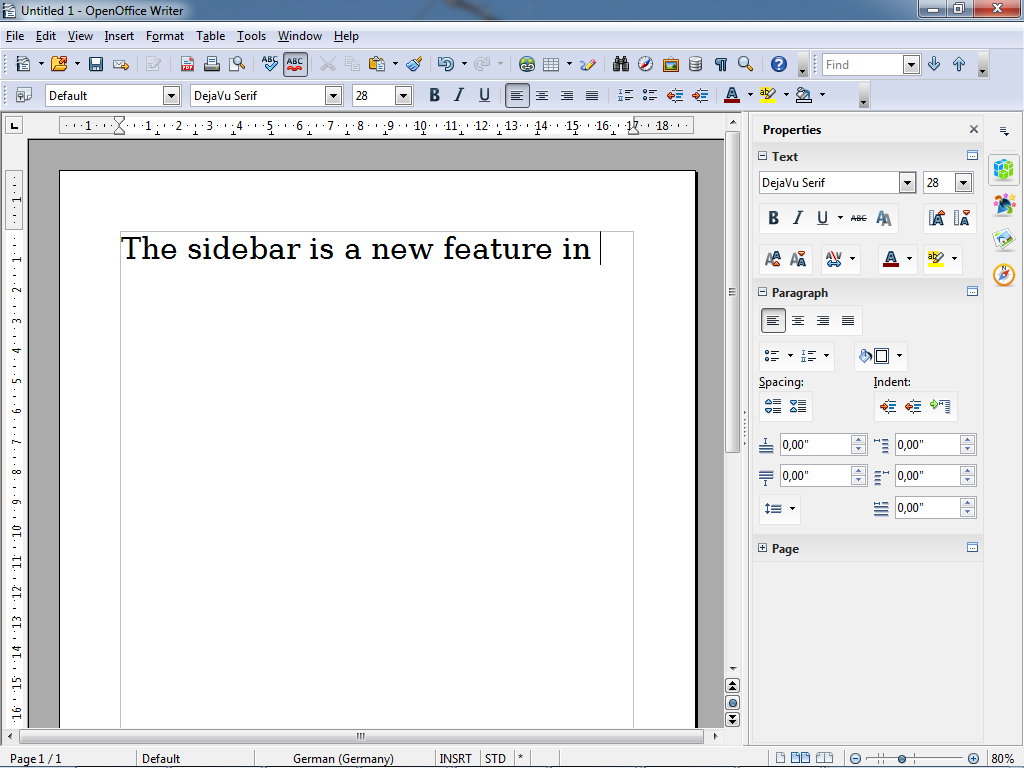
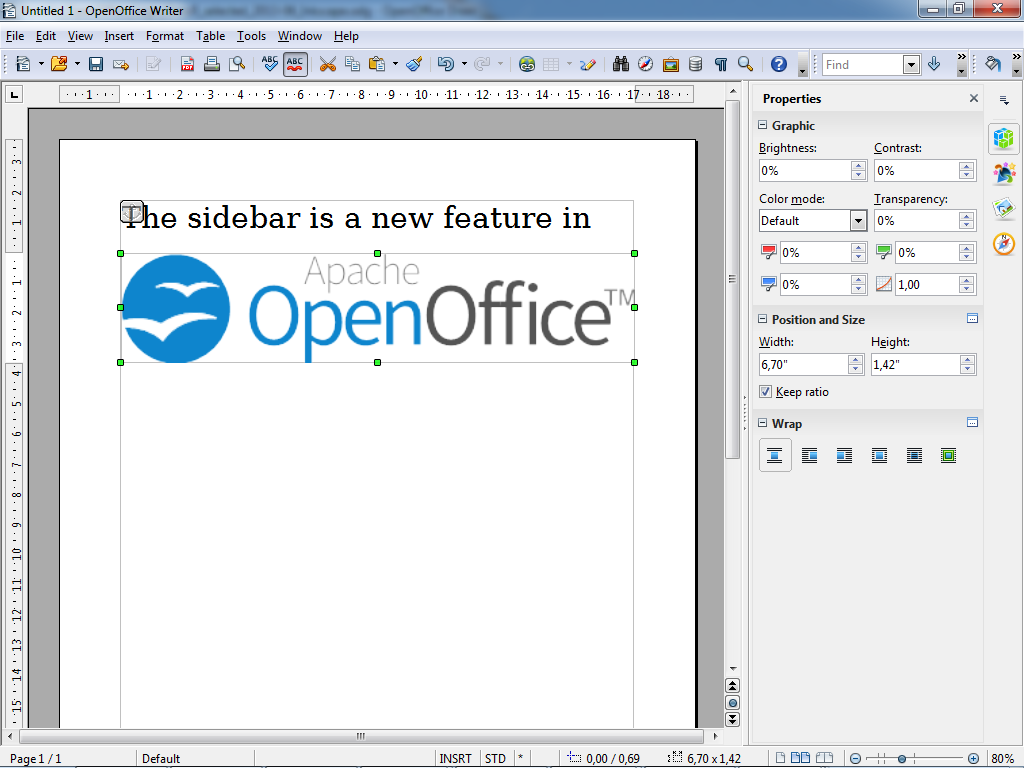
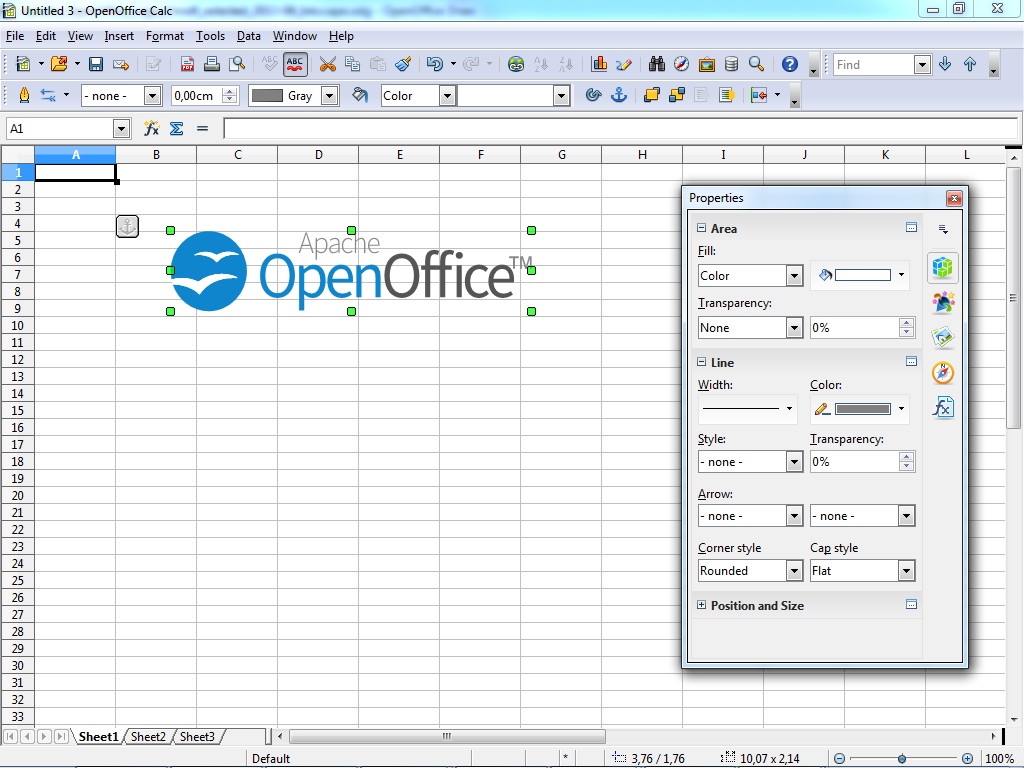
<em>Screenshots of Writer with contexts for text, bitmap, and shapes (from
left to right). The new OpenOffice logo has been pasted as bitmap (center) and
editable outlines (right).</em></p>
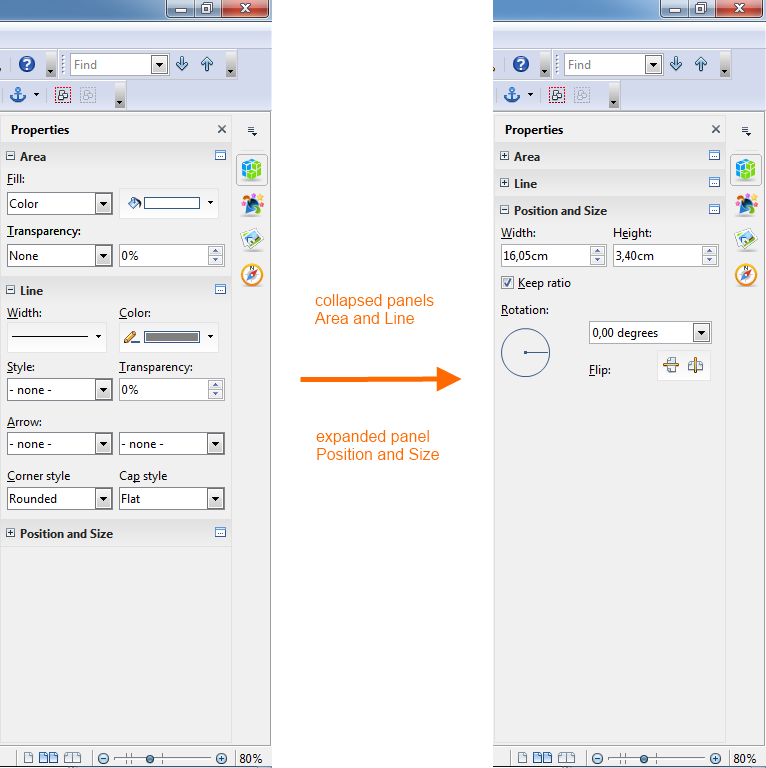
<p>If you find that you don't use a particular panel very often, just click on
its title and it will collapse to a single line of text. A small + or - at the
left side of the panel title indicates whether the panels is collapsed or
expanded.</p>
-<p><span class="image-wrap" style=""><a class="confluence-thumbnail-link
766x768"
href='https://cwiki.apache.org/confluence/download/attachments/30746475/expand-and-collapse.png'><img
src="/confluence/download/thumbnails/30746475/expand-and-collapse.png"
style="border: 0px solid black" /></a></span><br/>
+<p><span class="image-wrap" style=""><a class="confluence-thumbnail-link
766x768"
href='https://cwiki.apache.org/confluence/download/attachments/30746475/expand-and-collapse.png'><img
src="https://cwiki.apache.org/confluence/download/thumbnails/30746475/expand-and-collapse.png";
style="border: 0px solid black" /></a></span><br/>
<em>Different panels expanded or collapsed</em></p>
<ul>
@@ -124,20 +127,20 @@
</ul>
-<p><span class="image-wrap" style=""><a class="confluence-thumbnail-link
984x928"
href='https://cwiki.apache.org/confluence/download/attachments/30746475/sidebar-panels.png'><img
src="/confluence/download/thumbnails/30746475/sidebar-panels.png"
style="border: 0px solid black" /></a></span><br/>
+<p><span class="image-wrap" style=""><a class="confluence-thumbnail-link
984x928"
href='https://cwiki.apache.org/confluence/download/attachments/30746475/sidebar-panels.png'><img
src="https://cwiki.apache.org/confluence/download/thumbnails/30746475/sidebar-panels.png";
style="border: 0px solid black" /></a></span><br/>
<em>Panels from Symphony, the old Impress task pane, OpenOffice dialogs (from
left to right).</em></p>
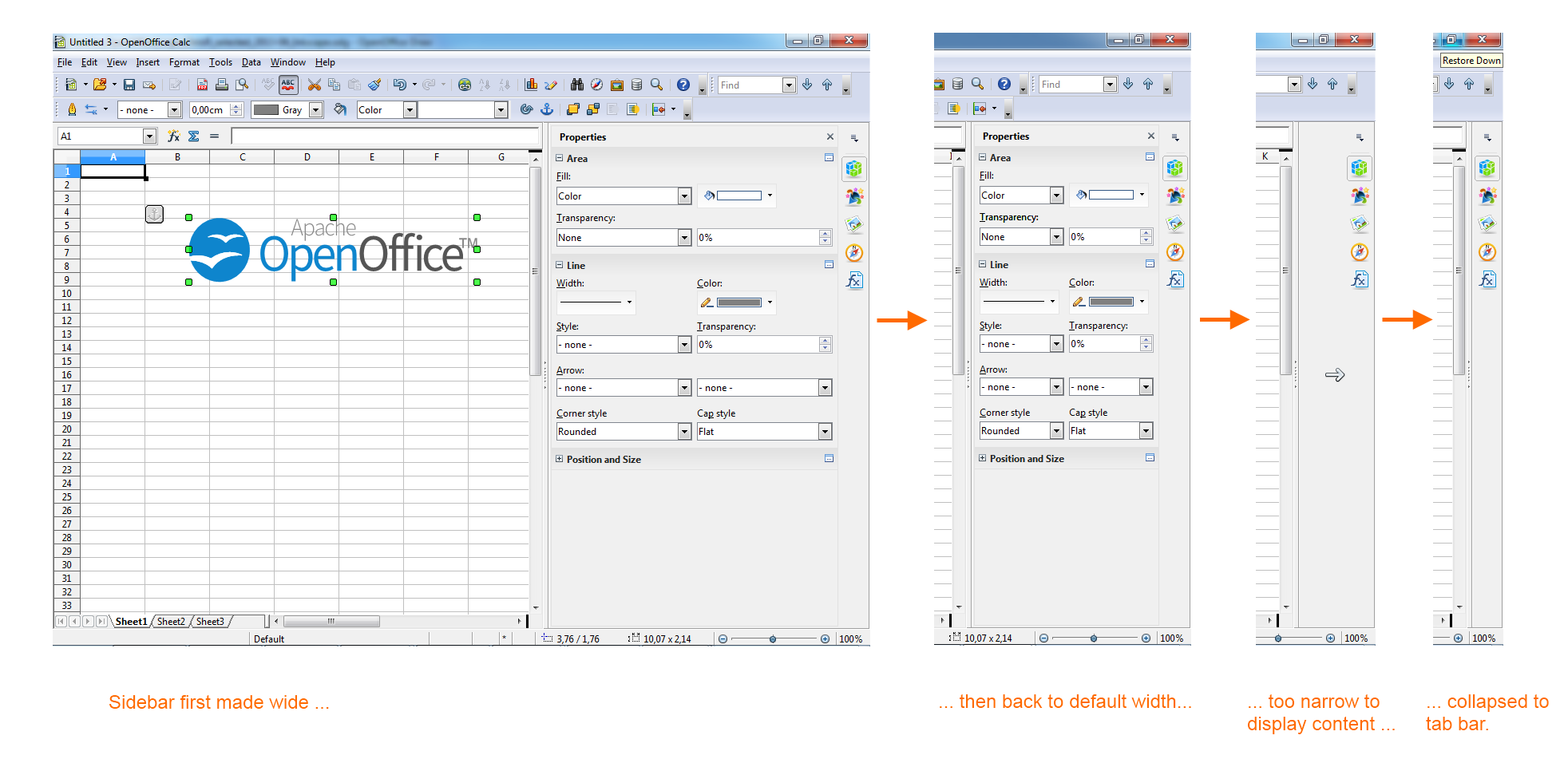
<p>The width of the Sidebar can be adjusted. The controls adapt their size
accordingly. If you need more space then it can be undocked — and
possibly moved to a second display — or it can be reduced to a thin tab
bar. A single click on one of the icons and the sidebar is back.</p>
-<p><span class="image-wrap" style=""><a class="confluence-thumbnail-link
1964x951"
href='https://cwiki.apache.org/confluence/download/attachments/30746475/sidebar-different-widths.png'><img
src="/confluence/download/thumbnails/30746475/sidebar-different-widths.png"
style="border: 0px solid black" /></a></span><br/>
+<p><span class="image-wrap" style=""><a class="confluence-thumbnail-link
1964x951"
href='https://cwiki.apache.org/confluence/download/attachments/30746475/sidebar-different-widths.png'><img
src="https://cwiki.apache.org/confluence/download/thumbnails/30746475/sidebar-different-widths.png";
style="border: 0px solid black" /></a></span><br/>
<em>Different widths of the sidebar: maximum width, default width, too narrow
to display content, collapsed to tab bar (from left to right).</em></p>
-<p><span class="image-wrap" style=""><a class="confluence-thumbnail-link
1024x768"
href='https://cwiki.apache.org/confluence/download/attachments/30746475/screenshot-calc-floating.png'><img
src="/confluence/download/thumbnails/30746475/screenshot-calc-floating.png"
style="border: 0px solid black" /></a></span><br/>
+<p><span class="image-wrap" style=""><a class="confluence-thumbnail-link
1024x768"
href='https://cwiki.apache.org/confluence/download/attachments/30746475/screenshot-calc-floating.png'><img
src="https://cwiki.apache.org/confluence/download/thumbnails/30746475/screenshot-calc-floating.png";
style="border: 0px solid black" /></a></span><br/>
<em>Floating sidebar, can be moved to second screen</em></p>
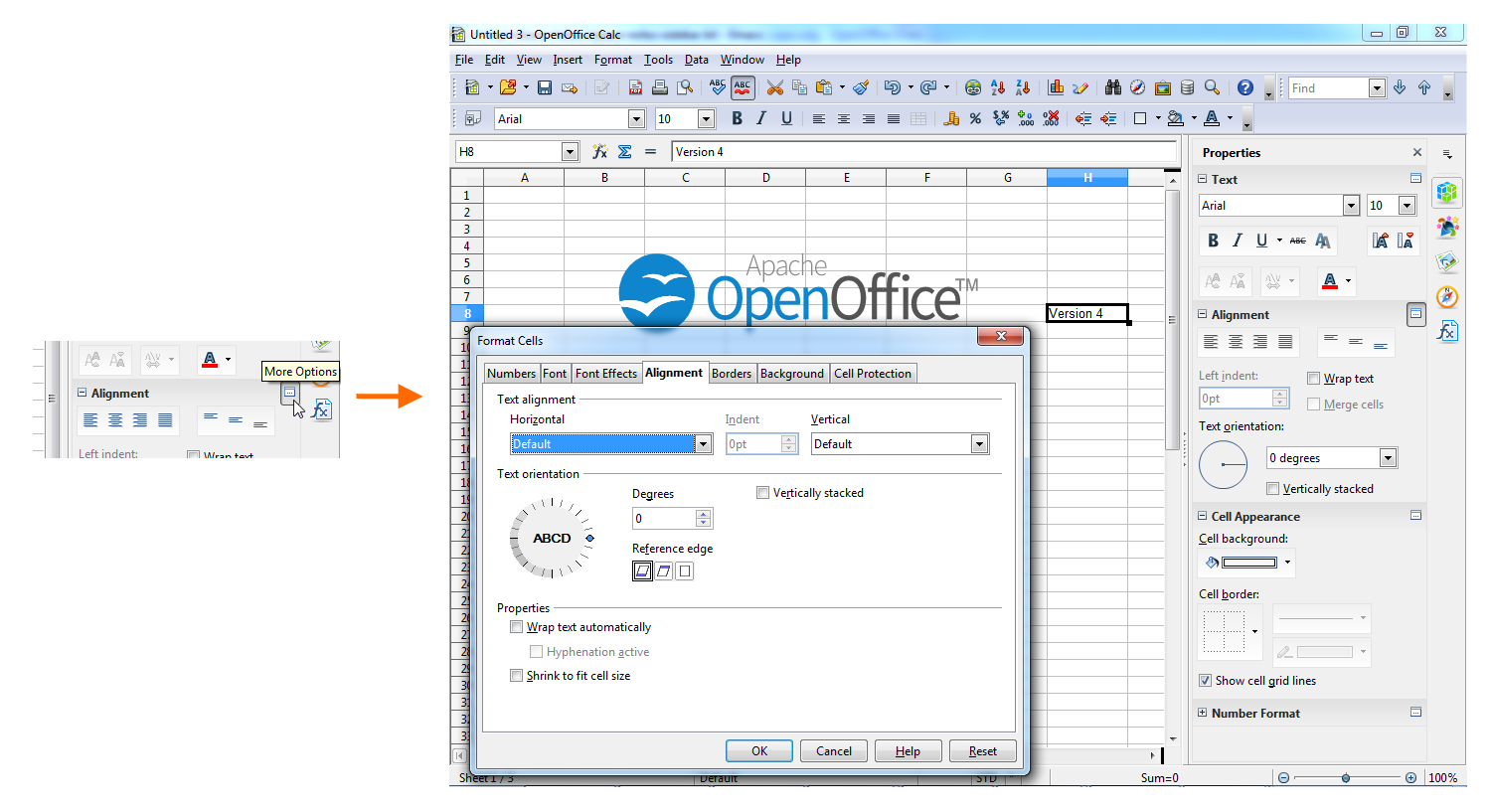
<p>Of course, not all of OpenOffice's functionality can be represented by
controls in the Sidebar. If you need an advanced function then just click on
the "more options" button in the title bar of a panel to open a dialog with
many more options and properties.</p>
-<p><span class="image-wrap" style=""><a class="confluence-thumbnail-link
1500x817"
href='https://cwiki.apache.org/confluence/download/attachments/30746475/sidebar-more-options.png'><img
src="/confluence/download/thumbnails/30746475/sidebar-more-options.png"
style="border: 0px solid black" /></a></span><br/>
+<p><span class="image-wrap" style=""><a class="confluence-thumbnail-link
1500x817"
href='https://cwiki.apache.org/confluence/download/attachments/30746475/sidebar-more-options.png'><img
src="https://cwiki.apache.org/confluence/download/thumbnails/30746475/sidebar-more-options.png";
style="border: 0px solid black" /></a></span><br/>
<em>Click on 'more options' to get, well, more options.</em></p>
<p>More information can be found in the <a
href="http://wiki.openoffice.org/wiki/Sidebar";>OpenOffice wiki</a>.</p>