This is an automated email from the ASF dual-hosted git repository.

xhsun pushed a commit to branch document_configuration
in repository https://gitbox.apache.org/repos/asf/incubator-pinot.git
commit 6b833b95d7bd6aea3b8ec0b3c6ed86e4a29c2d13
Author: Xiaohui Sun <[email protected]>
AuthorDate: Thu Jul 11 17:41:18 2019 -0700

    [TE] added ThirdEye configuration documents
---
 thirdeye/docs/configuration.rst | 195 ++++++++++++++++++++++++++++++++++++++++
 thirdeye/docs/index.rst         |   2 +-
 thirdeye/docs/production.rst    |  27 ------
 3 files changed, 196 insertions(+), 28 deletions(-)

diff --git a/thirdeye/docs/configuration.rst b/thirdeye/docs/configuration.rst
new file mode 100644
index 0000000..4a78969
--- /dev/null
+++ b/thirdeye/docs/configuration.rst
@@ -0,0 +1,195 @@
+..
+.. Licensed to the Apache Software Foundation (ASF) under one
+.. or more contributor license agreements.  See the NOTICE file
+.. distributed with this work for additional information
+.. regarding copyright ownership.  The ASF licenses this file
+.. to you under the Apache License, Version 2.0 (the
+.. "License"); you may not use this file except in compliance
+.. with the License.  You may obtain a copy of the License at
+..
+..   http://www.apache.org/licenses/LICENSE-2.0
+..
+.. Unless required by applicable law or agreed to in writing,
+.. software distributed under the License is distributed on an
+.. "AS IS" BASIS, WITHOUT WARRANTIES OR CONDITIONS OF ANY
+.. KIND, either express or implied.  See the License for the
+.. specific language governing permissions and limitations
+.. under the License.
+..
+
+Configuration Settings
+=======================
+
+Overview
+-------------
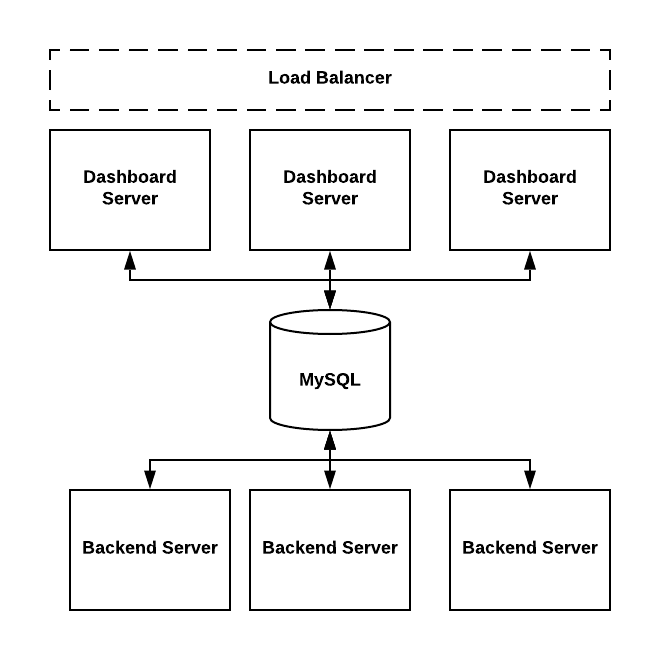
+ThirdEye could be deployed on single machine or deployed in clusters.
+
+- Dashboard servers are used to host web applications.
+The ``org.apache.pinot.thirdeye.dashboard.ThirdEyeDashboardApplication`` class
is the entry point.
+
+``dashboard.yml`` and ``rca.yml`` are used to configure dashboard servers.
+
+- Backend servers are used to schedule tasks or run the tasks.
+The ``org.apache.pinot.thirdeye.anomaly.ThirdEyeAnomalyApplication`` class is
the entry point.
+
+``detector.yml``, ``persistence.yml`` and ``data-sources-config.yml`` are used
to configure backend servers.
+
+.. image::
https://user-images.githubusercontent.com/44730481/61093367-fd684300-a3fe-11e9-943e-d20ba9651528.png
+
+
+detector.yml
+^^^^^^^^^^^^^^^
+
+ThirdEye uses this file to configure the backend server.
+
+You can deploy ThirdEye to multiple nodes with specific modules enabled in
each node.
+
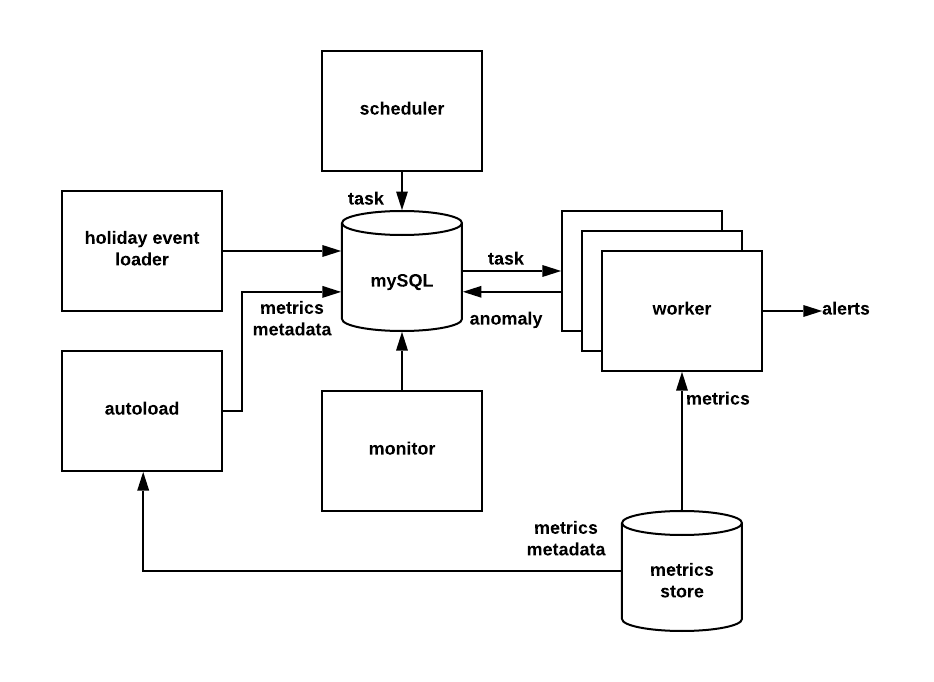
+Here are a list of modules you can configure in this file:
+
+- autoload: Load Pinot metrics metadata automatically.
+- holidayEventsLoader: Load holiday events from Google Calendar.
+- monitor: Used to do clean up tasks. By default ThirdEye will delete -
detection tasks that are older than 30 days and alert tasks that are older than
10 days.
+- worker: Handles the actual tasks to do anomaly detection or alerting. You
can deploy multiple workers to share the load.
+- detectionPipeline: Scheduler to generate detection tasks.
+- detectionAlert: Scheduler to generate alert tasks.
+
+.. image::
https://user-images.githubusercontent.com/44730481/61093449-6d76c900-a3ff-11e9-85e6-01201ea71eeb.png
+
+To enable one module, you can change the module's value to "true".
+
+For example, below configures a node with worker and scheduler enabled.
+
+.. code-block:: yaml
+
+       holidayEventsLoader: false
+       monitor: false
+       pinotProxy: false
+       worker: true
+       detectionPipeline: true
+       detectionAlert: true
+
+To have the minimum system running you need to enable "worker", "monitor",
"detectionPipeline" and "detectionAlert".
+
+Besides the module configuration you can configure the other followings in
this file:
+
+- SMTP configuration: Configure SMTP server which is used to send alert mail.
+- Log configuration: SLF4J configurations.
+- Server ports: Endpoint ports for backend servers.
+- Swagger configuration.
+- PhantomJSPath: PhantomJS is used to generate anomaly metrics screenshots
which are attached in alert mail.
+
+
+persistence.yml
+^^^^^^^^^^^^^^^^^^^
+
+ThirdEye uses MySQL to store all the metadata.  This file is used to configure
MySQL database instance.
+
+databaseConfiguration: url: user: password: driver: com.mysql.jdbc.Driver
+Here is an example:
+
+databaseConfiguration: url: jdbc:mysql:///thirdeye?autoReconnect=true user:
te_dev password: xxxxx driver: com.mysql.jdbc.Driver
+
+
+data-sources-config.yml
+^^^^^^^^^^^^^^^^^^^^^^^^
+
+ThirdEye doesn't store the actual metrics but will pull the metrics using data
source loaders. This file controls the metrics data sources.
+
+Here is an example used in ThirdEye production which connects to two data
sources: PinotThirdEyeDataSource and SqlThirdEyeDataSource.
+
+Please note ThirdEye support MySQL data source, and this configuration is
different with persistence.yml.
+
+.. code-block:: yaml
+
+       dataSourceConfigs:
+         - className:
org.apache.pinot.thirdeye.datasource.pinot.PinotThirdEyeDataSource
+           properties:
+               zookeeperUrl: '<zookeeperurl>'
+               clusterName: '<clustername>'
+               controllerConnectionScheme: 'https'
+               controllerHost: '<hostname>'
+               controllerPort: <port>
+               cacheLoaderClassName:
org.apache.pinot.thirdeye.datasource.pinot.PinotD2ResponseCacheLoader
+           metadataSourceConfigs:
+             - className:
org.apache.pinot.thirdeye.auto.onboard.AutoOnboardPinotMetadataSource
+         - className:
org.apache.pinot.thirdeye.datasource.sql.SqlThirdEyeDataSource
+           properties:
+               MySQL:
+                 - db:
+                     te: 'jdbc:mysql://<mysqlurl>/thirdeye?autoReconnect=true'
+                   user: 'thirdeye'
+                   password: '<password>'
+
+dashboard.yml
+^^^^^^^^^^^^^^
+
+Controls settings relate to web application servers. The followings are
configured here:
+
+- LDAP authentication. To enable LDAP authentication, change "authEnabled" to
"true".
+
+.. code-block:: yaml
+
+       authConfig:
+         authEnabled: true
+         authKey: <authentication_key>
+         ldapUrl: <ldap_url>
+         domainSuffix:
+           - linkedin.biz
+         cacheTTL: 3600
+         cookieTTL: 604800
+         adminUsers:
+         - user1
+         - user2
+
+- Root cause analysis (RCA) configuration: Control thread pool size for RCA
pipelines. Default is 5.
+- Dashboard host and endpoints configuration.
+- Swagger configuration.
+
+
+rca.yml
+^^^^^^^^
+This configures the RCA pipelines, which is used to either do metrics analysis
or loads events from different systems.
+
+These pipelines are called online and not pre-loaded.
+
+Each pipeline derives from org.apache.pinot.thirdeye.rootcause.Pipeline class,
and  has "inputNames", "outputName", "className" and "properties". One pipeline
can take another pipeline's output as input and it is a DAG.
+
+The "className" is used to create instances using reflection.
+
+
+FAQ
+^^^^
+
+How to add a new application?
+-------------------------------
+
+Application is a group of users. ThirdEye can show anomalies grouped by
applications.
+
+There are two ways to add a new application
+
+Send a post message
+---------------------
+
+curl -vX POST '.../thirdeye/entity?entityType=APPLICATION' -H "Content-Type:
application/json" -H 'Cookie: te_auth=[REPLACE_TOKEN_HERE]' --data-binary
@application.json
+
+Example payload could be:
+
+.. code-block:: json
+
+       {
+           "application": "replace-application-name",
+           "recipients": "[email protected]"
+       }
+
+From admin page
+----------------
+
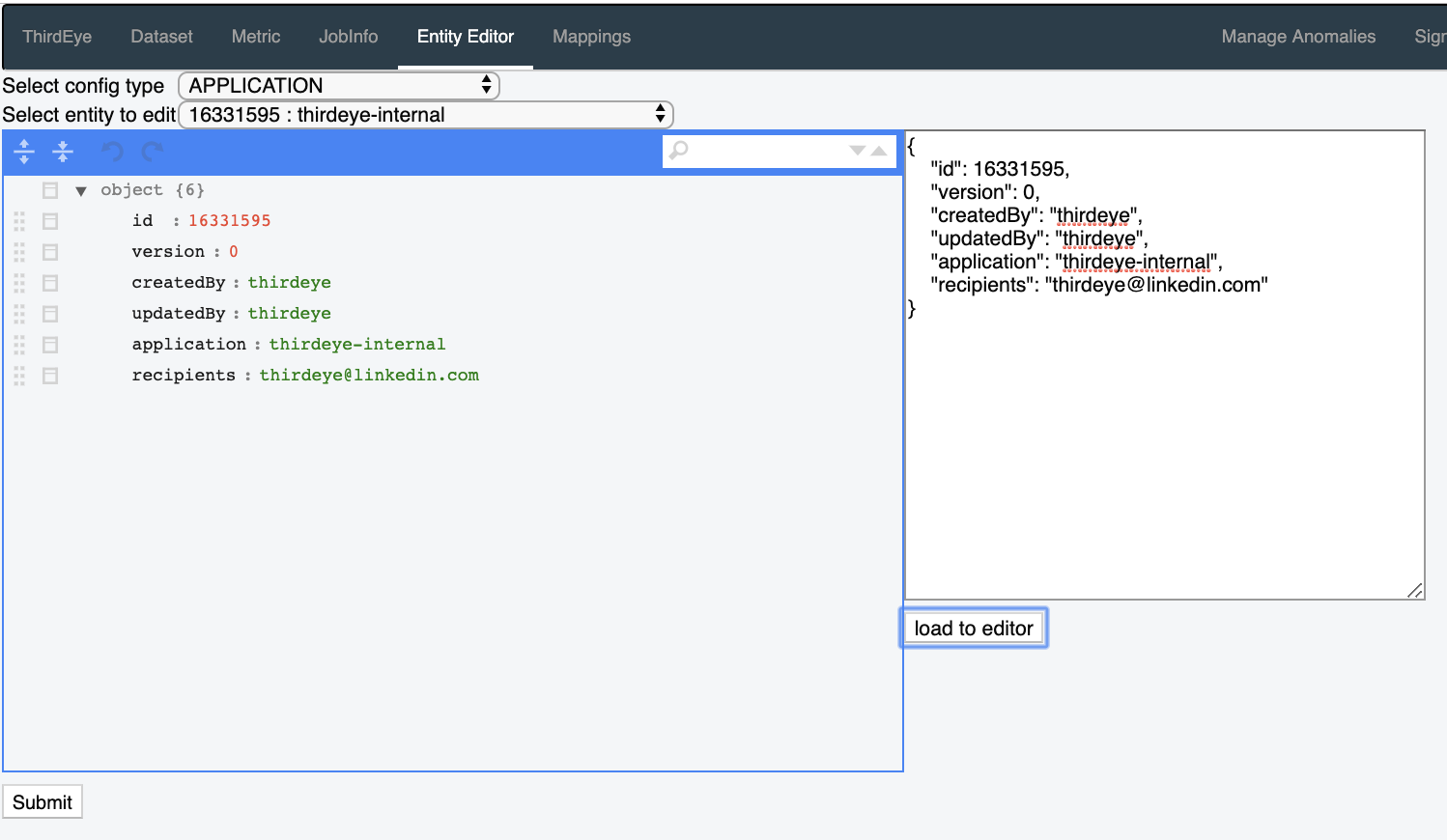
+1. Navigate to admin page: http://localhost:1426/thirdeye-admin
+2. Select an existing application from "Entity Editor".
+
+.. image::
https://user-images.githubusercontent.com/44730481/61093646-61d7d200-a400-11e9-8517-0b46bd33fe2a.png
+
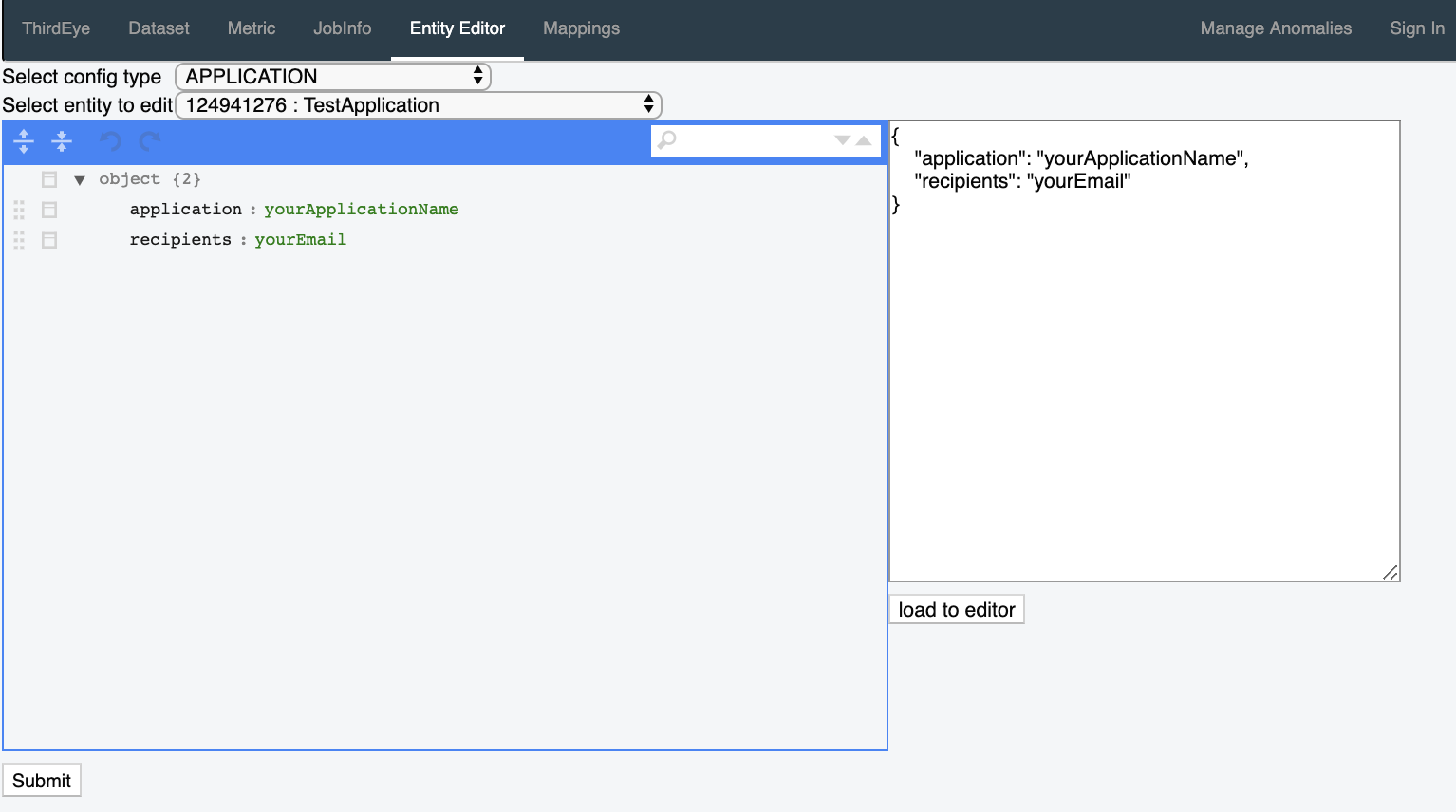
+3. Put the application and recipients in the editor, and leave id, version etc
unspecified.
+.. image::
https://user-images.githubusercontent.com/44730481/61093659-6c926700-a400-11e9-8690-6a1742671e5e.png
+
+4. Click "load to editor" then click "submit".
diff --git a/thirdeye/docs/index.rst b/thirdeye/docs/index.rst
index 313a6a3..0446113 100644
--- a/thirdeye/docs/index.rst
+++ b/thirdeye/docs/index.rst
@@ -25,6 +25,6 @@ ThirdEye
    :maxdepth: 2

    introduction
+   configuration
    datasources
-   production
    alert_setup
\ No newline at end of file
diff --git a/thirdeye/docs/production.rst b/thirdeye/docs/production.rst
deleted file mode 100644
index cecbb91..0000000
--- a/thirdeye/docs/production.rst
+++ /dev/null
@@ -1,27 +0,0 @@
-..
-.. Licensed to the Apache Software Foundation (ASF) under one
-.. or more contributor license agreements.  See the NOTICE file
-.. distributed with this work for additional information
-.. regarding copyright ownership.  The ASF licenses this file
-.. to you under the Apache License, Version 2.0 (the
-.. "License"); you may not use this file except in compliance
-.. with the License.  You may obtain a copy of the License at
-..
-..   http://www.apache.org/licenses/LICENSE-2.0
-..
-.. Unless required by applicable law or agreed to in writing,
-.. software distributed under the License is distributed on an
-.. "AS IS" BASIS, WITHOUT WARRANTIES OR CONDITIONS OF ANY
-.. KIND, either express or implied.  See the License for the
-.. specific language governing permissions and limitations
-.. under the License.
-..
-
-.. _production:
-
-Production Settings
-====================
-
-ThirdEye relies on a central meta data store to coordinate its workers and
frontend processes. The first step towards moving ThirdEye into production
should therefore be the setup of a dedicated (MySQL) database instance. You can
use the ``thirdeye-pinot/src/main/resources/schema/create-schema.sql`` script
to create your tables. Then, update the
``thirdeye-pinot/config/persistence.yml`` file with path and credentials. Once
you have a dedicated database instance, you can run backend and f [...]
-
-The next step could be the configuration of the holiday auto-loader. The
holiday auto loader connects to the Google Calendar API. Once you obtain an API
token, place it in ``thirdeye-pinot/config/holiday-loader-key.json`` and in
``thirdeye-pinot/config/detector.yml`` set holidayEventsLoader: true. Once the
backend worker is restarted, it will periodically update the local cache of
holiday events for ThirdEye's detection and Root-Cause Analysis components.


---------------------------------------------------------------------
To unsubscribe, e-mail: [email protected]
For additional commands, e-mail: [email protected]