This is an automated email from the ASF dual-hosted git repository.

xiangfu pushed a commit to branch dev
in repository https://gitbox.apache.org/repos/asf/pinot-site.git
The following commit(s) were added to refs/heads/dev by this push:
new 704112a5 apache pinot 1.0 blog and older blogs (#85)
704112a5 is described below
commit 704112a558afc54efb7010f3dc41deac296f5b19
Author: hubert <[email protected]>
AuthorDate: Tue Sep 19 13:11:40 2023 -0400
apache pinot 1.0 blog and older blogs (#85)
* apache pinot 1.0 blog and older blogs
* adding fixing links
* adding design doc link
* additional changes
* adding link to video as well
* authors
* adding empty string for URLs
* changd URLs to OS pinot site and pinot_team
---
...l-Function-For-Time-Series-Datasets-In-Pinot.md | 224 ++++++++++++
...2-11-08-Apache Pinot-How-do-I-see-my-indexes.md | 150 ++++++++
.../2022-11-17-Apache Pinot-Inserts-from-SQL.md | 146 ++++++++
.../2022-11-22-Apache-Pinot-Timestamp-Indexes.md | 328 +++++++++++++++++
...-28-Apache-Pinot-Pausing-Real-Time-Ingestion.md | 341 ++++++++++++++++++
...ache-Pinot-Deduplication-on-Real-Time-Tables.md | 387 +++++++++++++++++++++
...Apache-Pinot-0-12-Configurable-Time-Boundary.md | 123 +++++++
...-03-30-Apache-Pinot-0-12-Consumer-Record-Lag.md | 292 ++++++++++++++++
...23-05-11-Geospatial-Indexing-in-Apache-Pinot.md | 257 ++++++++++++++
.../blog/2023-09-19-Annoucing-Apache-Pinot-1-0.md | 289 +++++++++++++++
.../static/blogs/apache-pinot-1-0-name-cloud.png | Bin 0 -> 643783 bytes
11 files changed, 2537 insertions(+)
diff --git
a/website/blog/2022-08-02-GapFill-Function-For-Time-Series-Datasets-In-Pinot.md
b/website/blog/2022-08-02-GapFill-Function-For-Time-Series-Datasets-In-Pinot.md
new file mode 100644
index 00000000..c2c51bca
--- /dev/null
+++
b/website/blog/2022-08-02-GapFill-Function-For-Time-Series-Datasets-In-Pinot.md
@@ -0,0 +1,224 @@
+---
+title: GapFill Function For Time-Series Datasets In Pinot
+author: Weixiang Sun,Lakshmanan Velusamy
+author_title: Weixiang Sun,Lakshmanan Velusamy
+author_url: https://www.linkedin.com/in/lakshmanan-velusamy-a778a517/
+author_image_url:
https://www.datocms-assets.com/75153/1661479772-lakshmanan-portait.jpeg
+description:
+ Gapfilling functions in Pinot to provide the on-the-fly interpolation
(filling the missing data) functionality to better handle time-series data.
+
+keywords:
+ - Apache Pinot
+ - Apache Pinot 0.11.0
+ - Interpolation
+ - Gapfilling
+ - Time-series
+ - Timeseries
+tags: [Pinot, Data, Analytics, User-Facing Analytics, interpolation,
gapfilling]
+---
+Many real-world datasets are time-series in nature, tracking the value or
state changes of entities over time. The values may be polled and recorded at
constant time intervals or at random irregular intervals or only when the
value/state changes. There are many real-world use cases of time series data.
Here are some specific examples:
+
+* Telemetry from sensors monitoring the status of industrial equipment.
+
+* Real-time vehicle data such as speed, braking, and acceleration, to
produce the driver's risk score trend.
+
+* Server performance metrics such as CPU, I/O, memory, and network usage
over time.
+
+* An automated system tracking the status of a store or items in an online
marketplace.
+
+
+Let us use an IOT dataset tracking the occupancy status of the individual
parking slots in a parking garage using automated sensors in this post. The
granularity of recorded data points might be sparse or the events could be
missing due to network and other device issues in the IOT environment. The
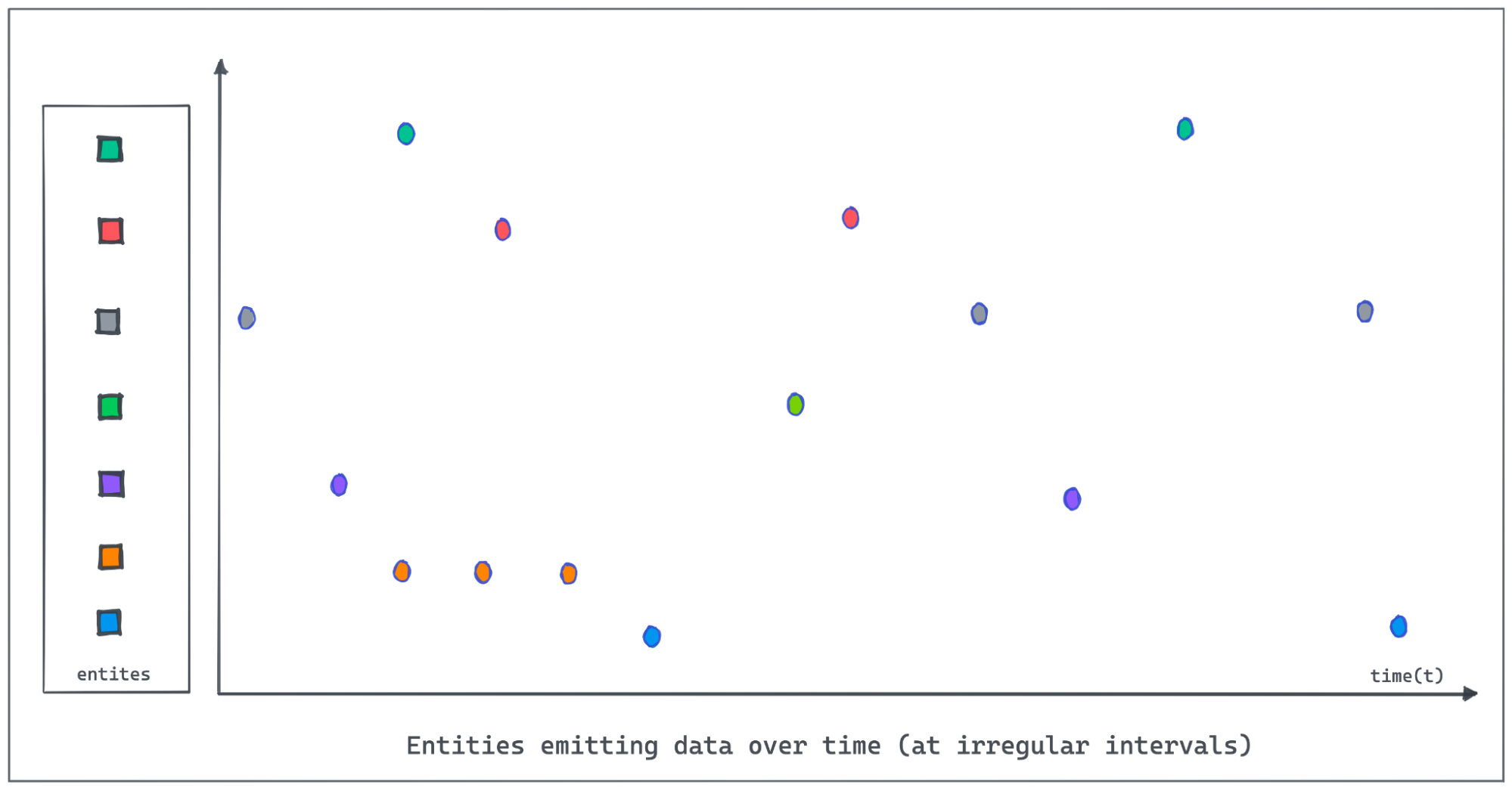
following figure demonstrates entities emitting values at irregular intervals
as the value changes. Polling and recording values of all entities regularly at
a lower granularity would consume [...]
+
+
+
+It is important for Pinot to provide the on-the-fly interpolation (filling the
missing data) functionality to better handle time-series data.
+
+Starting from the 0.11.0 release, we introduced the new query syntax,
gapfilling functions to interpolate data and perform powerful aggregations and
data processing over time series data.
+
+We will discuss the query syntax with an example and then the internal
architecture.
+
+Processing time series data in Pinot
+------------------------------------
+
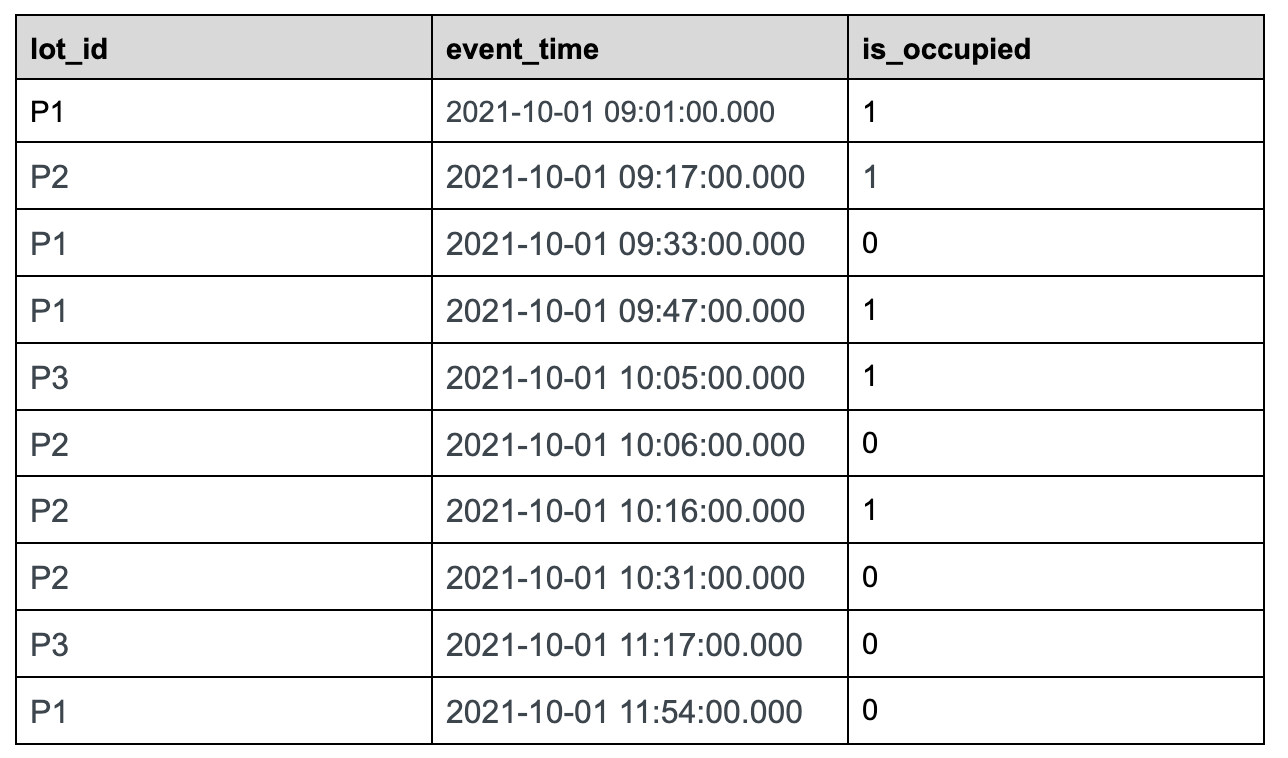
+Let us use the following sample data set tracking the status of parking lots
in the parking space to understand this feature in detail.
+
+### Sample Dataset:
+
+
+
+parking\_data table
+
+Use case: We want to find out the total number of parking lots that are
occupied over a period of time, which would be a common use case for a company
that manages parking spaces.
+
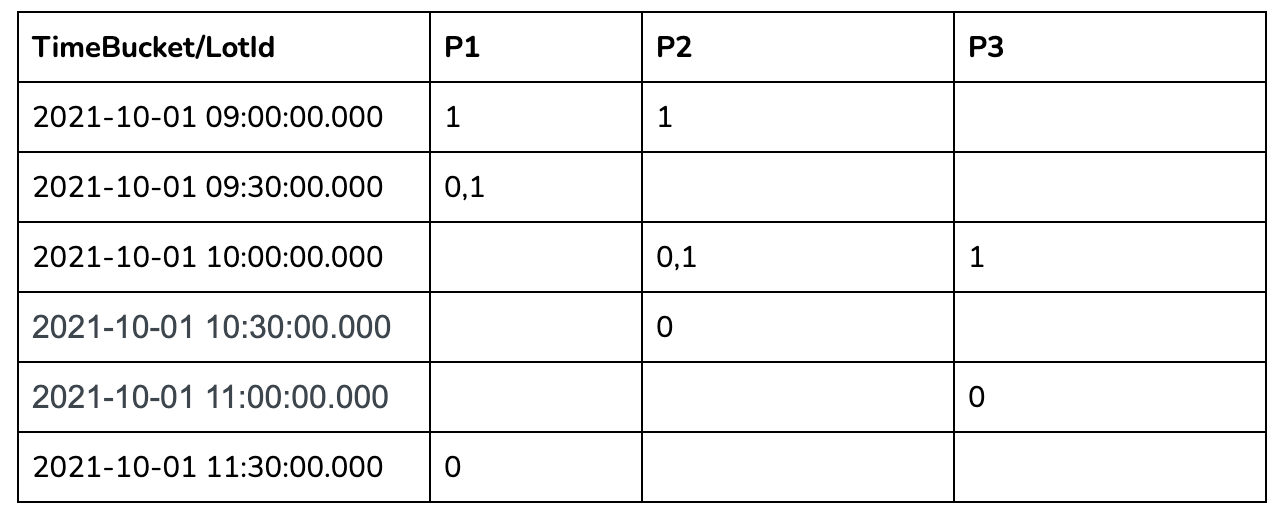
+Let us take 30 minutes time bucket as an example:
+
+
+
+In the 30 mins aggregation results table above, we can see a lot of missing
data as many lots didn't have anything recorded in those 30-minute windows. To
calculate the number of occupied parking lots per time bucket, we need to
gap-fill the missing data for each of these 30-minute windows.
+
+Interpolating missing data
+--------------------------
+
+There are multiple ways to infer and fill the missing values. In the current
version, we introduce the following methods, which are more common:
+
+* FILL\_PREVIOUS\_VALUE can be used to fill time buckets missing values for
entities with the last observed value. If no previous observed value can be
found, the default value is used as an alternative.
+
+* FILL\_DEFAULT\_VALUE can be used to fill time buckets missing values for
entities with the default value depending on the data type.
+
+
+More advanced gapfilling strategies such as using the next observed value, the
value from the previous day or past week, or the value computed using a
subquery shall be introduced in the future.
+
+Gapfill Query with a Use Case:
+------------------------------
+
+Let us write a query to _get_ _the total number of occupied parking lots every
30 minutes over time on the parking lot dataset_ discussed above.
+
+### Query Syntax:
+
+```sql
+SELECT time_col, SUM(status) AS occupied_slots_count
+FROM (
+ SELECT GAPFILL(time_col,'1:MILLISECONDS:SIMPLE_DATE_FORMAT:yyyy-MM-dd
HH:mm:ss.SSS','2021-10-01 09:00:00.000',
+ '2021-10-01 12:00:00.000','30:MINUTES', FILL(status,
'FILL_PREVIOUS_VALUE'),
+ TIMESERIESON(lot_id)), lot_id, status
+ FROM (
+ SELECT DATETIMECONVERT(event_time,'1:MILLISECONDS:EPOCH',
+ '1:MILLISECONDS:SIMPLE_DATE_FORMAT:yyyy-MM-dd
HH:mm:ss.SSS','30:MINUTES') AS time_col,
+ lot_id, lastWithTime(is_occupied, event_time, 'INT') AS status
+ FROM parking_data
+ WHERE event_time >= 1633078800000 AND event_time <= 1633089600000
+ GROUP BY 1, 2
+ ORDER BY 1
+ LIMIT 100)
+ LIMIT 100)
+GROUP BY 1
+LIMIT 100
+```
+
+
+
+This query suggests three main steps:
+
+1. The raw data will be aggregated;
+
+2. The aggregated data will be gapfilled;
+
+3. The gapfilled data will be aggregated.
+
+
+We make one assumption that the raw data is sorted by timestamp. The Gapfill
and Post-Gapfill Aggregation will not sort the data.
+
+### Query components:
+
+The following concepts were added to interpolate and handle time-series data.
+
+* LastWithTime(dataColumn, timeColumn, 'dataType') \- To get the last value
of dataColumn where the timeColumn is used to define the time of dataColumn.
This is useful to pick the latest value when there are multiple values found
within a time bucket. Please see
[https://docs.pinot.apache.org/users/user-guide-query/supported-aggregations](https://docs.pinot.apache.org/users/user-guide-query/supported-aggregations)
for more details.
+
+* Fill(colum, FILL\_TYPE) - To fill the missing data of the column with the
FILL\_TYPE.
+
+* TimeSeriesOn - To specify the columns to uniquely identify entities whose
data will be interpolated.
+
+* Gapfill - Specify the time range, the time bucket size, how to fill the
missing data, and entity definition.
+
+
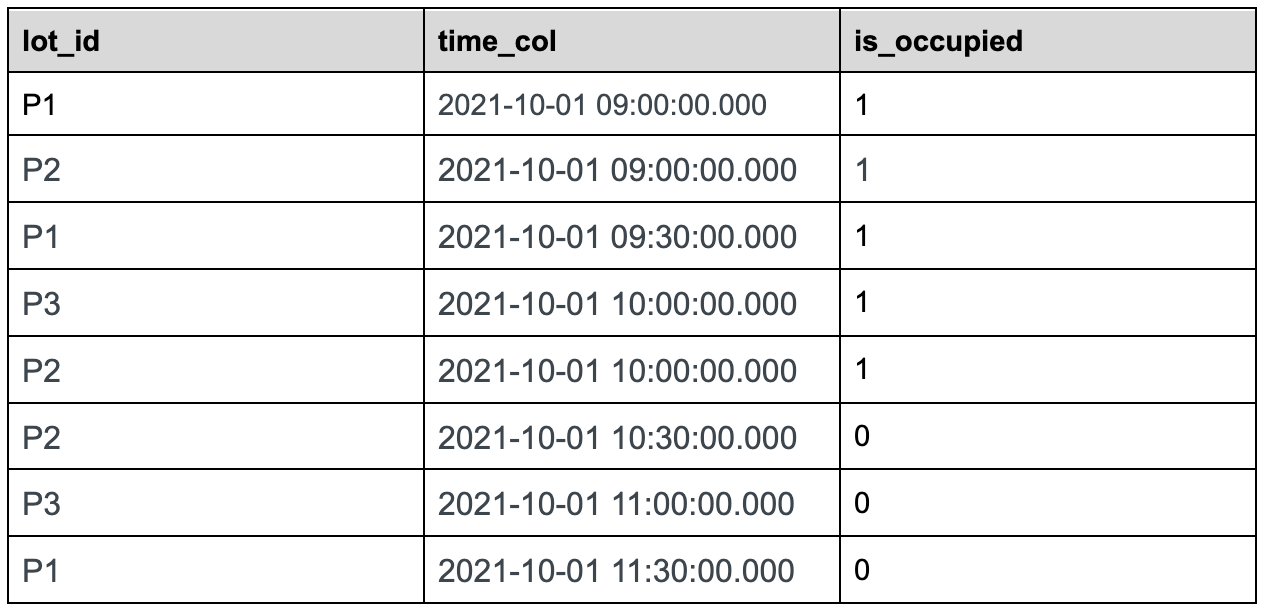
+### Query Workflow
+
+The innermost sql will convert the raw event table to the following table.
+
+
+
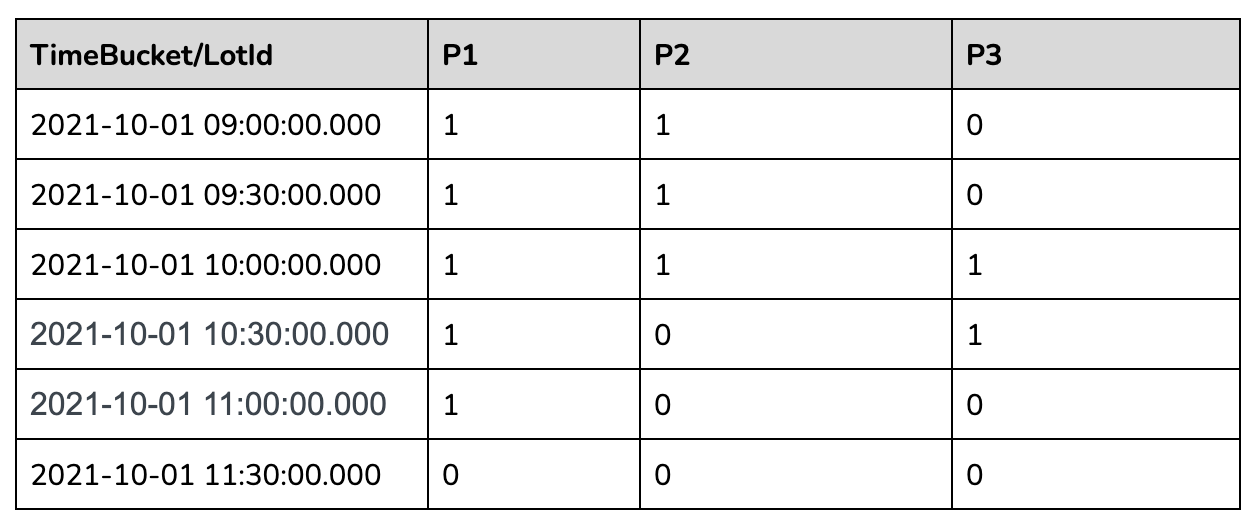
+The second most nested sql will gap fill the returned data as below:
+
+
+
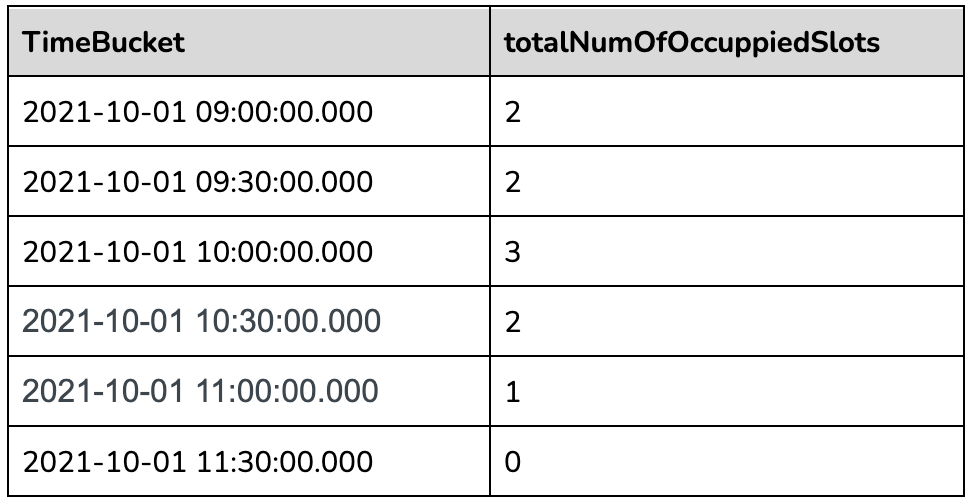
+The outermost query will aggregate the gapfilled data as follows:
+
+
+
+### Other Supported Query Scenarios:
+
+The above example demonstrates the support to aggregate before and post
gapfilling. Pre and/or post aggregations can be skipped if they are not needed.
The gapfilling query syntax is flexible to support the following use cases:
+
+* Select/Gapfill - Gapfill the missing data for the time bucket. Just the
raw events are fetched, gapfilled, and returned. No aggregation is needed.
+
+* Aggregate/Gapfill - If there are multiple entries within the time bucket
we can pick a representative value by applying an aggregate function. Then the
missing data for the time buckets will be gap filled.
+
+* Gapfill/Aggregate - Gapfill the data and perform some form of aggregation
on the interpolated data.
+
+
+For detailed query syntax and how it works, please refer to the documentation
here:
[https://docs.pinot.apache.org/users/user-guide-query/gap-fill-functions](https://docs.pinot.apache.org/users/user-guide-query/gap-fill-functions).
+
+How does it work?
+-----------------
+
+Let us use the sample query given above as an example to understand what's
going on behind the scenes and how Pinot executes the gapfill queries.
+
+### Request Flow
+
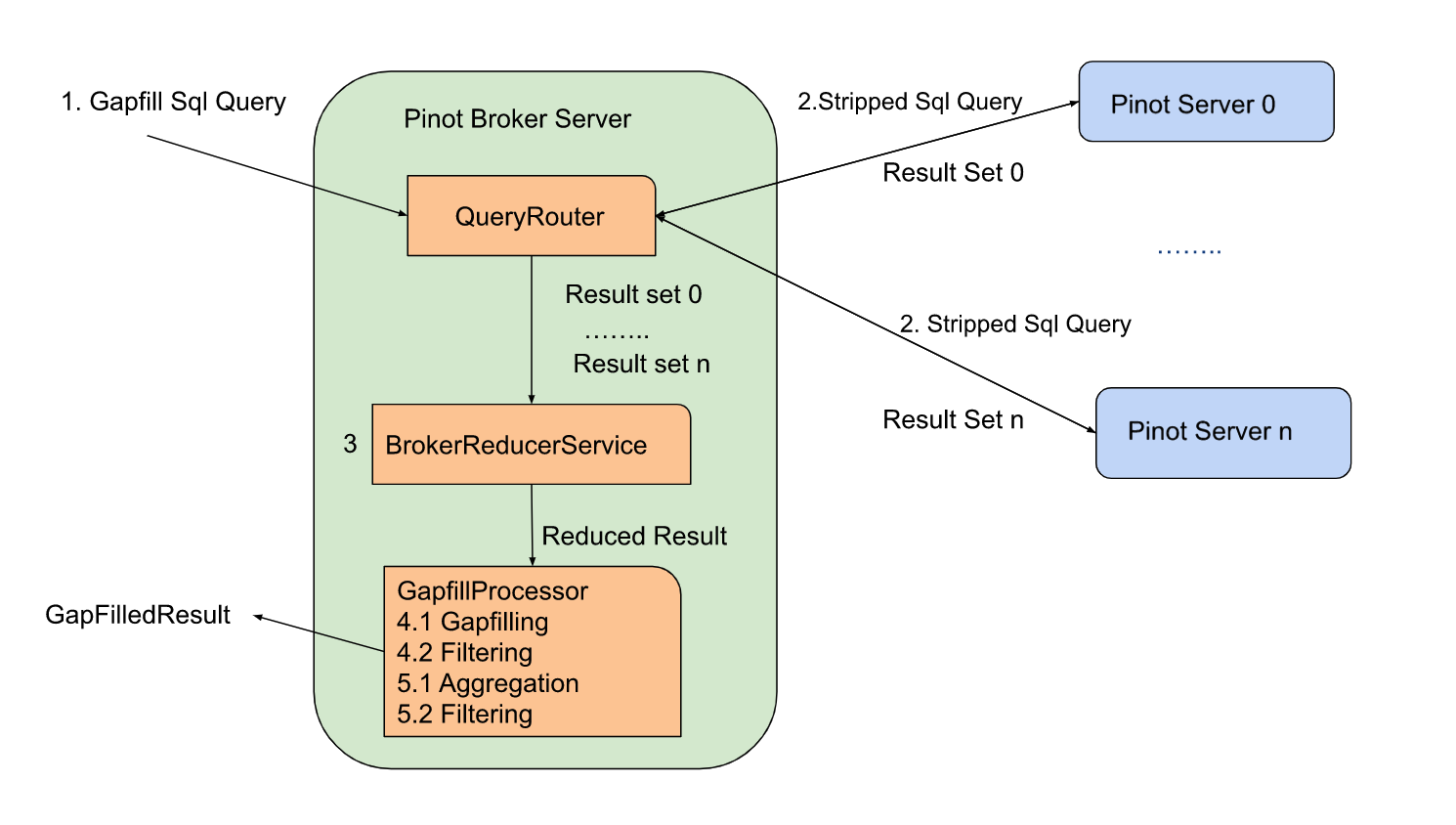
+Here is the list of steps in executing the query at a high level:
+
+1. Pinot Broker receives the gapfill query. It will strip off the gapfill
part and send out the stripped SQL query to the pinot server.
+
+2. The pinot server will process the query as a normal query and return the
result back to the pinot broker.
+
+3. The pinot broker will run the DataTableReducer to merge the results from
pinot servers. The result will be sent to GapfillProcessor.
+
+4. The GapfillProcessor will gapfill the received result and apply the filter
against the gap-filled result.
+
+5. Post-Gapfill aggregation and filtering will be applied to the result from
the last step.
+
+
+There are two gapfill-specific steps:
+
+1. When Pinot Broker Server receives the gapfill SQL query, it will strip out
gapfill related information and send out the stripped SQL query to the pinot
server
+
+2. GapfillProcessor will process the result from BrokerReducerService. The
gapfill logic will be applied to the reduced result.
+
+
+
+
+Here is the stripped version of the sql query sent to servers for the query
shared above:
+
+```sql
+SELECT DATETIMECONVERT(event_time,'1:MILLISECONDS:EPOCH',
+ '1:MILLISECONDS:SIMPLE_DATE_FORMAT:yyyy-MM-dd
HH:mm:ss.SSS','30:MINUTES') AS time_col,
+ lot_id, lastWithTime(is_occupied, event_time, 'INT') AS status
+ FROM parking_data
+ WHERE event_time >= 1633078800000 AND event_time <= 1633089600000
+ GROUP BY 1, 2
+ ORDER BY 1
+ LIMIT 100
+```
+
+
+
+### Execution Plan
+
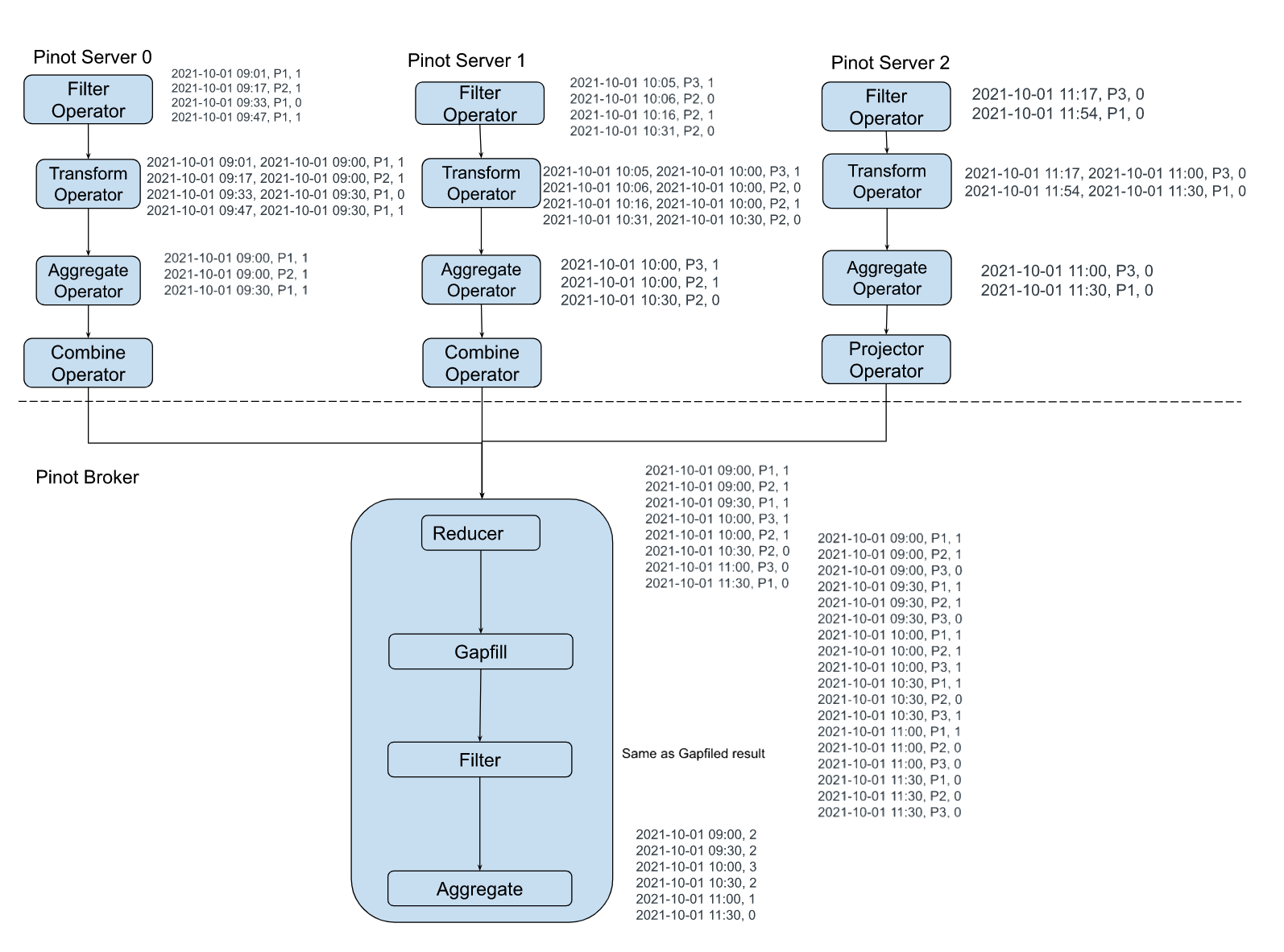
+The sample execution plan for this query is as shown in the figure below:
+
+
+
+### Time and Space complexity:
+
+Let us say there are M entities, R rows returned from servers, and N time
buckets. The data is gapfilled time bucket by time bucket to limit the broker
memory usage to O(M + N + R). When the data is gapfilled for a time bucket, it
will be aggregated and stored in the final result (which has N slots). The
previous values for each of the M entities are maintained in memory and carried
forward as the gapfilling is performed in sequence. The time complexity is O(M
\* N) where M is the number [...]
+
+### Challenges
+
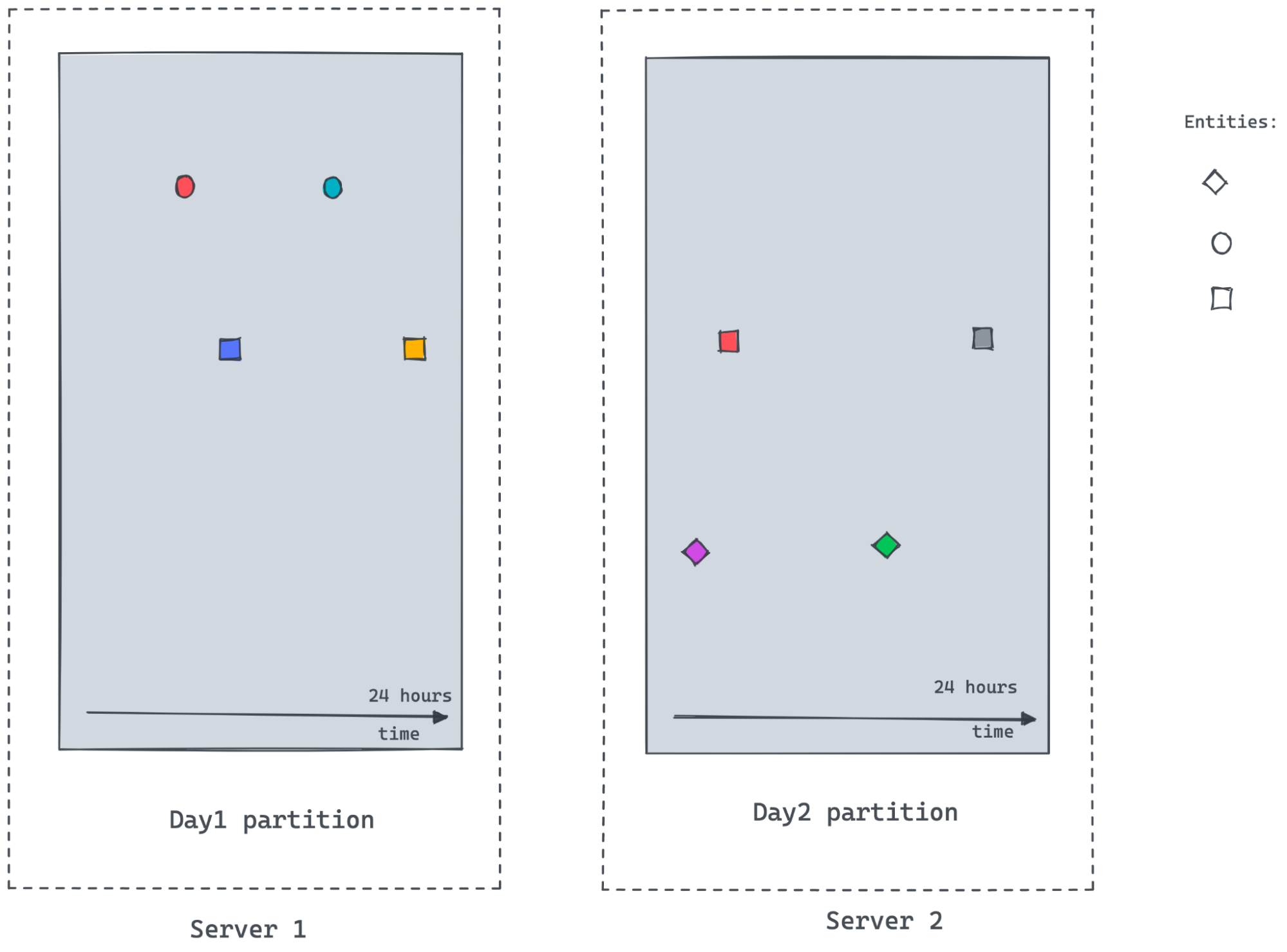
+
+
+As the time-series datasets are enormous and partitioned, it's hard to get
answers to the following questions:
+
+* How many different entities exist within the query time frame. In the
temporal partition scheme demonstrated above, a server/partition may not know
the answer.
+
+* What's the previously observed value for entities especially for the first
data points in a time bucket where previous time buckets don’t exist in the
same server.
+
+
+For the scenario shown in the figure above, server2 may not know about the
circle entity, as there are no events for the circle in Server2. It would also
not know the last observed value for the square entity frame beginning of the
time bucket till the first observed value timestamp within the partition.
+
+The Future Work
+---------------
+
+When doing the gapfill for one or a few entities, there might not be too much
data. But when we deal with a large dataset that has multiple entities queried
over a long date range without any filtering, this gets tricky. Since gapfill
happens at the pinot broker, it will become very slow and the broker will
become a bottleneck. The raw data transferred from servers to brokers would be
enormous. Data explodes when interpolated. Parallelism is limited as the single
broker instance is handl [...]
+
+The next step of the gapfill project is to remove the pinot broker as a
bottleneck. The gapfill logic will be pushed down to the servers and be running
where the data live. This will reduce the data transmission and increase the
parallelism and performance of gapfill.
+
diff --git a/website/blog/2022-11-08-Apache Pinot-How-do-I-see-my-indexes.md
b/website/blog/2022-11-08-Apache Pinot-How-do-I-see-my-indexes.md
new file mode 100644
index 00000000..ec2ec0b0
--- /dev/null
+++ b/website/blog/2022-11-08-Apache Pinot-How-do-I-see-my-indexes.md
@@ -0,0 +1,150 @@
+---
+title: Apache Pinot™ 0.11 - How do I see my indexes?
+author: Mark Needham
+author_title: Mark Needham
+author_url: https://www.linkedin.com/in/lakshmanan-velusamy-a778a517/
+author_image_url:
https://www.datocms-assets.com/75153/1661544338-mark-needham.png
+description:
+ How you can work out which indexes are currently defined on a Pinot table
+
+keywords:
+ - Apache Pinot
+ - Apache Pinot 0.11.0
+ - Indexes
+tags: [Pinot, Data, Analytics, User-Facing Analytics, Indexes]
+---
+We recently released [Pinot
0.11.0](https://medium.com/apache-pinot-developer-blog/apache-pinot-0-11-released-d564684df5d4)
, which has lots of goodies for you to play with. This is the first in a
series of blog posts showing off some of the new features in this release.
+
+A common question from the community is: how can you work out which indexes
are currently defined on a Pinot table? This information has always been
[available via the REST
API](https://docs.pinot.apache.org/users/api/pinot-rest-admin-interface), but
sometimes you simply want to see it on the UI and not have to parse your way
through a bunch of JSON. Let's see how it works!
+
+Spinning up Pinot
+-----------------
+
+We’re going to spin up the Batch
[QuickStart](https://docs.pinot.apache.org/basics/getting-started/quick-start)
in Docker using the following command:
+
+```bash
+docker run \
+ -p 8000:8000 \
+ -p 9000:9000 \
+ apachepinot/pinot:0.11.0 \
+ QuickStart -type BATCH
+```
+
+
+
+Or if you’re on a Mac M1, change the name of the image to have the arm-64
suffix, like this:
+
+```bash
+docker run \
+ -p 8000:8000 \
+ -p 9000:9000 \
+ apachepinot/pinot:0.11.0-arm64 \
+ QuickStart -type BATCH
+```
+
+
+
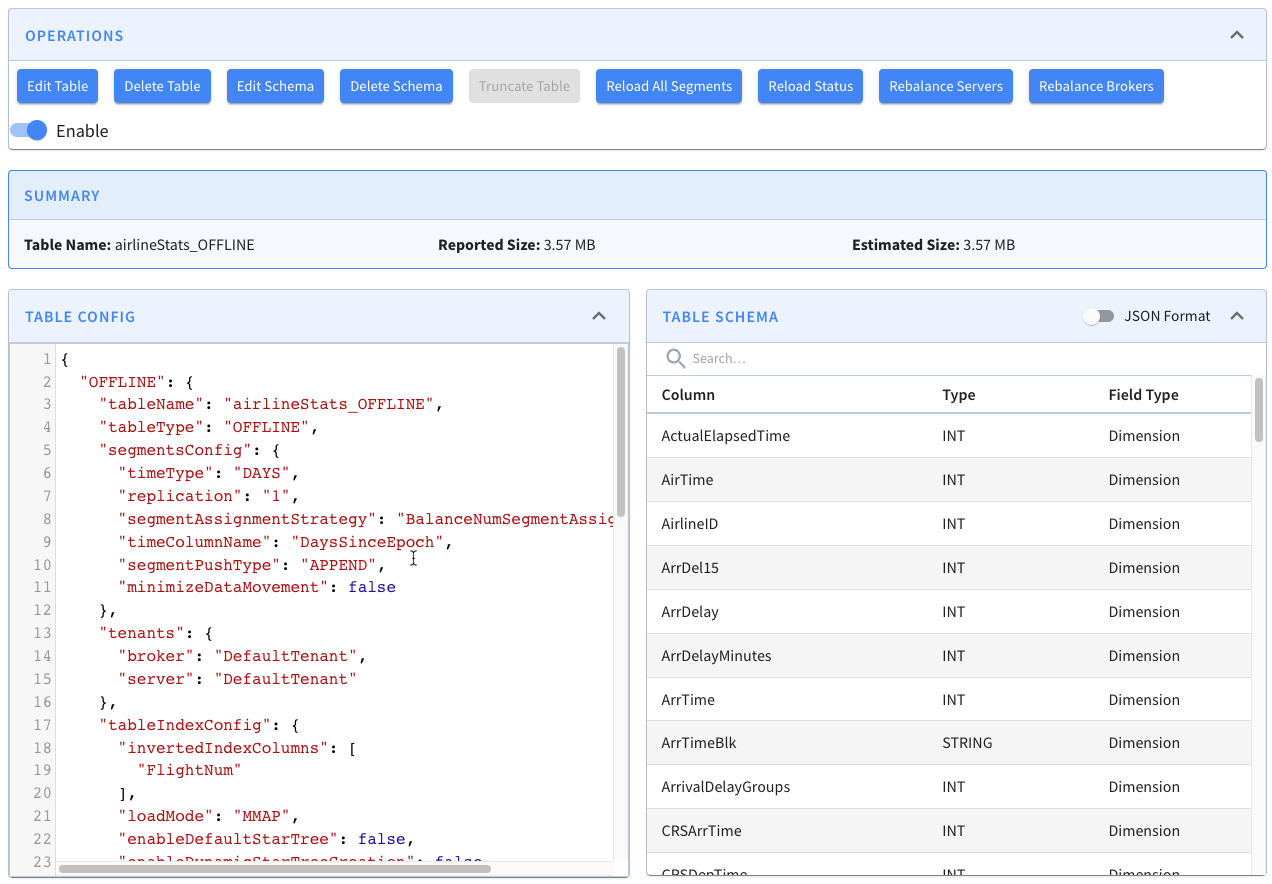
+Once that’s up and running, navigate to
[http://localhost:9000/#/](http://localhost:9000/#/) and click on Tables. Under
the tables section click on airlineStats\_OFFLINE. You should see a page that
looks like this:
+
+
+
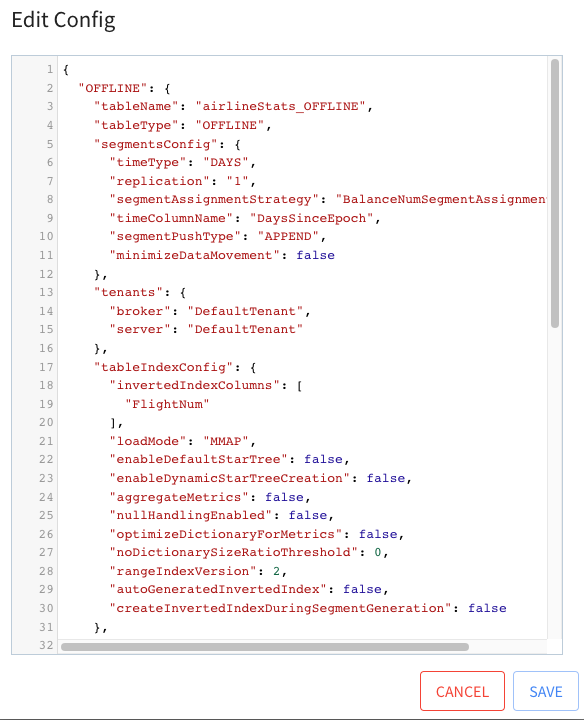
+Click on Edit Table. This will show a window with the config for this table.
+
+
+
+Indexing Config
+---------------
+
+We’re interested in the tableIndexConfig and fieldConfigList sections. These
sections are responsible for defining indexes, which are applied to a table on
a per segment basis.
+
+* tableIndexConfig is responsible for inverted, JSON, range, Geospatial, and
StarTree indexes.
+
+* fieldConfigList is responsible for timestamp and text indexes.
+
+
+tableIndexConfig is defined below:
+
+```json
+"tableIndexConfig": {
+ "rangeIndexVersion": 2,
+ "autoGeneratedInvertedIndex": false,
+ "createInvertedIndexDuringSegmentGeneration": false,
+ "loadMode": "MMAP",
+ "enableDefaultStarTree": false,
+ "enableDynamicStarTreeCreation": false,
+ "aggregateMetrics": false,
+ "nullHandlingEnabled": false,
+ "optimizeDictionaryForMetrics": false,
+ "noDictionarySizeRatioThreshold": 0
+},
+```
+
+
+
+From reading this config we learn that no indexes have been explicitly defined.
+
+Now for fieldConfigList, which is defined below:
+
+```json
+"fieldConfigList": [
+ {
+ "name": "ts",
+ "encodingType": "DICTIONARY",
+ "indexType": "TIMESTAMP",
+ "indexTypes": [
+ "TIMESTAMP"
+ ],
+ "timestampConfig": {
+ "granularities": [
+ "DAY",
+ "WEEK",
+ "MONTH"
+ ]
+ }
+ }
+],
+```
+
+
+
+From reading this config we learn that a timestamp index is being applied to
the _ts_ column. It is applied at DAY, WEEK, and MONTH granularities, which
means that the derived columns $ts$DAY, $ts$WEEK, and $ts$MONTH will be created
for the segments in this table.
+
+Viewing Indexes
+---------------
+
+Now, close the table config modal, and under the segments section, open
airlineStats\_OFFLINE\_16071\_16071\_0 and
airlineStats\_OFFLINE\_16073\_16073\_0 in new tabs.
+
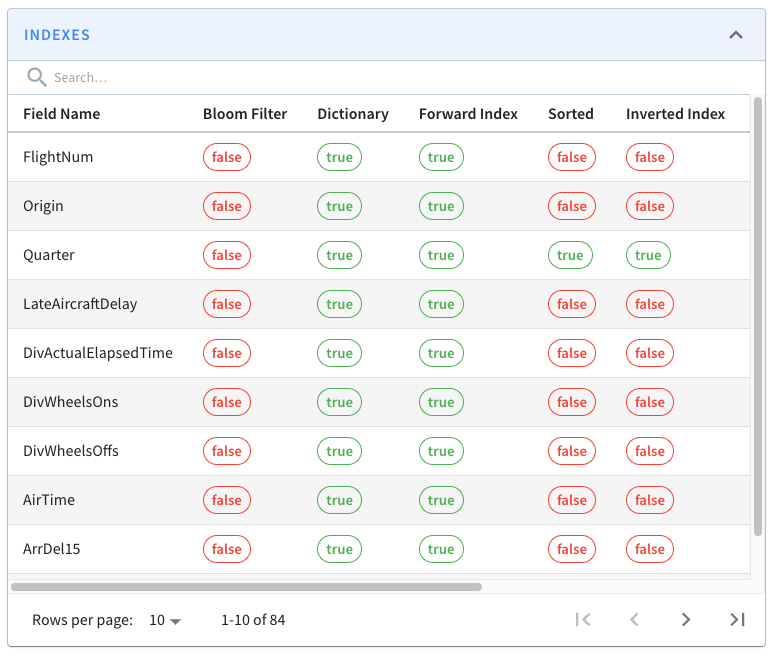
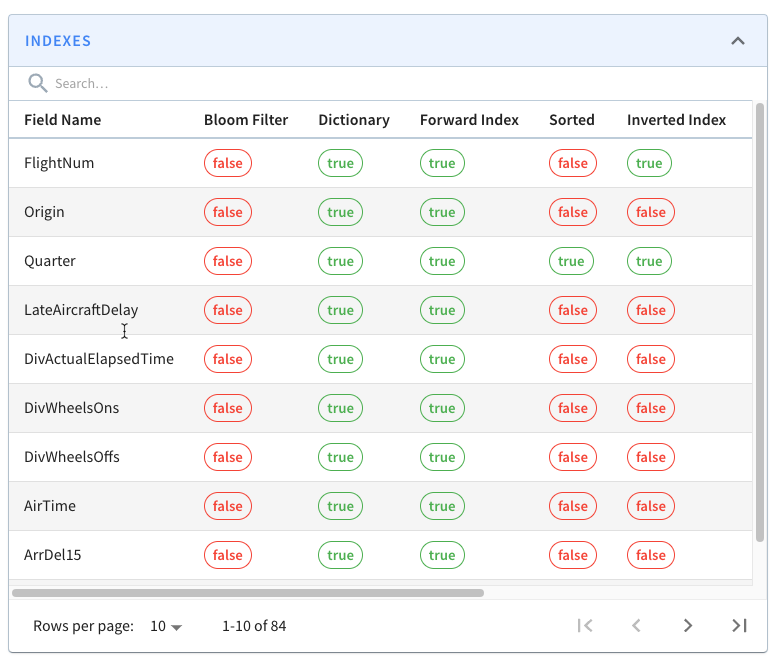
+If you look at one of those segments, you’ll see the following grid that lists
columns/field names against the indexes defined on those fields.
+
+
+
+All the fields on display are persisting their values using the
dictionary/forward [index
format](https://docs.pinot.apache.org/basics/indexing/forward-index) ). Still,
we can also see that the Quarter column is sorted and has an inverted index,
neither of which we explicitly defined.
+
+This is because Pinot will automatically create sorted and inverted indexes
for columns whose data is sorted when the segment is created.
+
+So the data for the Quarter column was sorted, and hence it has a sorted index.
+
+I’ve written a couple of blog posts explaining how sorted indexes work on
offline and real-time tables:
+
+Adding an Index
+---------------
+
+Next, let’s see what happens if we add an explicit index. We’re going to add
an inverted index to the FlightNum column. Go to Edit Table config again and
update tableIndexConfig to have the following value:
+
+
+
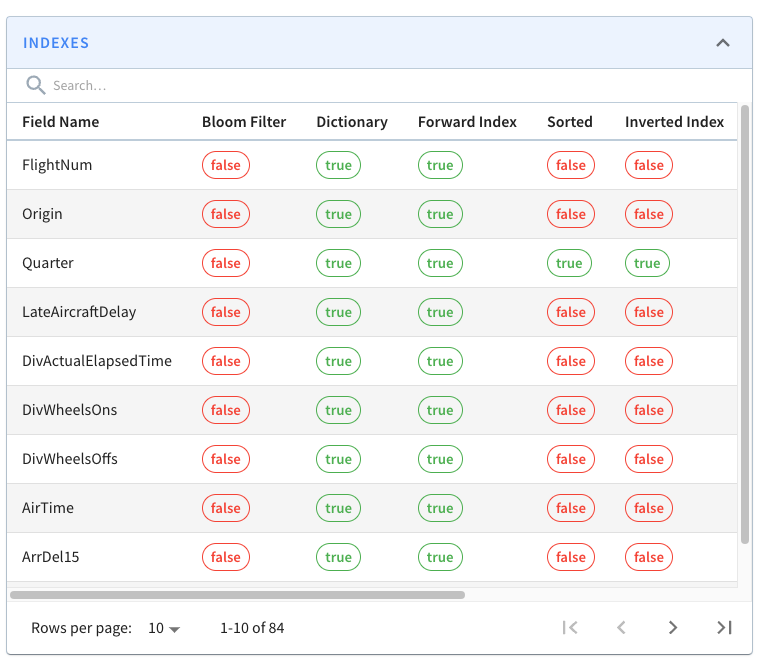
+If you go back to the page for segment airlineStats\_OFFLINE\_16073\_16073\_0,
notice that it does not have an inverted index for this field.
+
+
+
+This is because indexes are applied on a per segment basis. If we want the
inverted index on the FlightNum column in this segment, we can click _Reload
Segment_ on this page, or we can go back to the table page and click _Reload
All Segments_.
+
+If we do that, all the segments in the airlineStats\_OFFLINE table will
eventually have an inverted index on FlightNum.
+
+Summary
+-------
+
+As I mentioned in the introduction, information about the indexes on each
segment has always been available via the REST API, but this feature
democratizes that information.
+
+If you have any questions about this feature, feel free to join us on
[Slack](https://stree.ai/slack), where we’ll be happy to help you out.
+
diff --git a/website/blog/2022-11-17-Apache Pinot-Inserts-from-SQL.md
b/website/blog/2022-11-17-Apache Pinot-Inserts-from-SQL.md
new file mode 100644
index 00000000..29a37a01
--- /dev/null
+++ b/website/blog/2022-11-17-Apache Pinot-Inserts-from-SQL.md
@@ -0,0 +1,146 @@
+---
+title: Apache Pinot™ 0.11 - Inserts from SQL
+author: Mark Needham
+author_title: Mark Needham
+author_url: https://www.linkedin.com/in/lakshmanan-velusamy-a778a517/
+author_image_url:
https://www.datocms-assets.com/75153/1661544338-mark-needham.png
+description:
+ Explore the INSERT INTO clause, which makes ingesting batch data into Pinot
as easy as writing a SQL query.
+
+keywords:
+ - Apache Pinot
+ - Apache Pinot 0.11.0
+ - Insert Into
+tags: [Pinot, Data, Analytics, User-Facing Analytics, Insert]
+---
+
+The Apache Pinot community recently released version
[0.11.0](https://medium.com/apache-pinot-developer-blog/apache-pinot-0-11-released-d564684df5d4),
which has lots of goodies for you to play with. This is the second in a series
of blog posts showing off some of the new features in this release.
+
+In this post, we’re going to explore the [INSERT INTO
clause](https://docs.pinot.apache.org/basics/data-import/from-query-console),
which makes ingesting batch data into Pinot as easy as writing a SQL query.
+
+Batch importing: The Job Specification
+--------------------------------------
+
+The power of this new clause is only fully appreciated if we look at what we
had to do before it existed.
+
+In the [Batch Import JSON from Amazon S3 into Apache Pinot | StarTree
Recipes](https://www.youtube.com/watch?v=1EMBx1XeI9o) video (and [accompanying
developer
guide](https://dev.startree.ai/docs/pinot/recipes/ingest-csv-files-from-s3)),
we showed how to ingest data into Pinot from an S3 bucket.
+
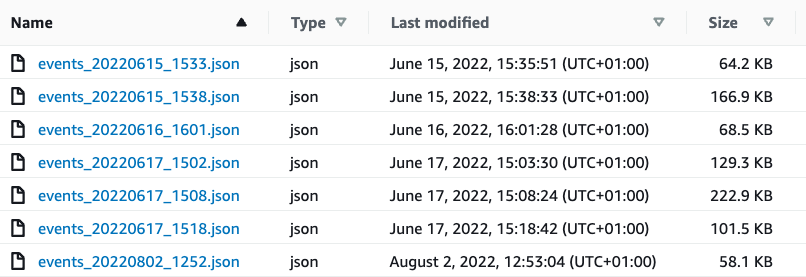
+The contents of that bucket are shown in the screenshot below:
+
+
+
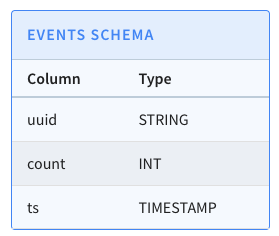
+Let’s quickly recap the steps that we had to do to import those files into
Pinot. We have a table called events, which has the following schema:
+
+
+
+We first created a job specification file, which contains a description of our
import job. The job file is shown below:
+
+```yaml
+executionFrameworkSpec:
+ name: 'standalone'
+ segmentGenerationJobRunnerClassName:
'org.apache.pinot.plugin.ingestion.batch.standalone.SegmentGenerationJobRunner'
+ segmentTarPushJobRunnerClassName:
'org.apache.pinot.plugin.ingestion.batch.standalone.SegmentTarPushJobRunner'
+ segmentUriPushJobRunnerClassName:
'org.apache.pinot.plugin.ingestion.batch.standalone.SegmentUriPushJobRunner'
+jobType: SegmentCreationAndTarPush
+inputDirURI: 's3://marks-st-cloud-bucket/events/'
+includeFileNamePattern: 'glob:**/*.json'
+outputDirURI: '/data'
+overwriteOutput: true
+pinotFSSpecs:
+ - scheme: s3
+ className: org.apache.pinot.plugin.filesystem.S3PinotFS
+ configs:
+ region: 'eu-west-2'
+ - scheme: file
+ className: org.apache.pinot.spi.filesystem.LocalPinotFS
+recordReaderSpec:
+ dataFormat: 'json'
+ className: 'org.apache.pinot.plugin.inputformat.json.JSONRecordReader'
+tableSpec:
+ tableName: 'events'
+pinotClusterSpecs:
+ - controllerURI: 'http://${PINOT_CONTROLLER}:9000'
+```
+
+
+
+At a high level, this file describes a batch import job that will ingest files
from the S3 bucket at s3://marks-st-cloud-bucket/events/ where the files match
the glob:\*\*/\*.json pattern.
+
+We can import the data by running the following command from the terminal:
+
+```bash
+docker run \
+ --network ingest-json-files-s3 \
+ -v $PWD/config:/config \
+ -e AWS_ACCESS_KEY_ID=AKIARCOCT6DWLUB7F77Z \
+ -e AWS_SECRET_ACCESS_KEY=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 \
+ apachepinot/pinot:0.11.0 LaunchDataIngestionJob \
+ -jobSpecFile /config/job-spec.yml \
+ -values PINOT_CONTROLLER=pinot-controller
+```
+
+
+
+And don’t worry, those credentials have already been deleted; I find it easier
to understand what values go where if we use real values.
+
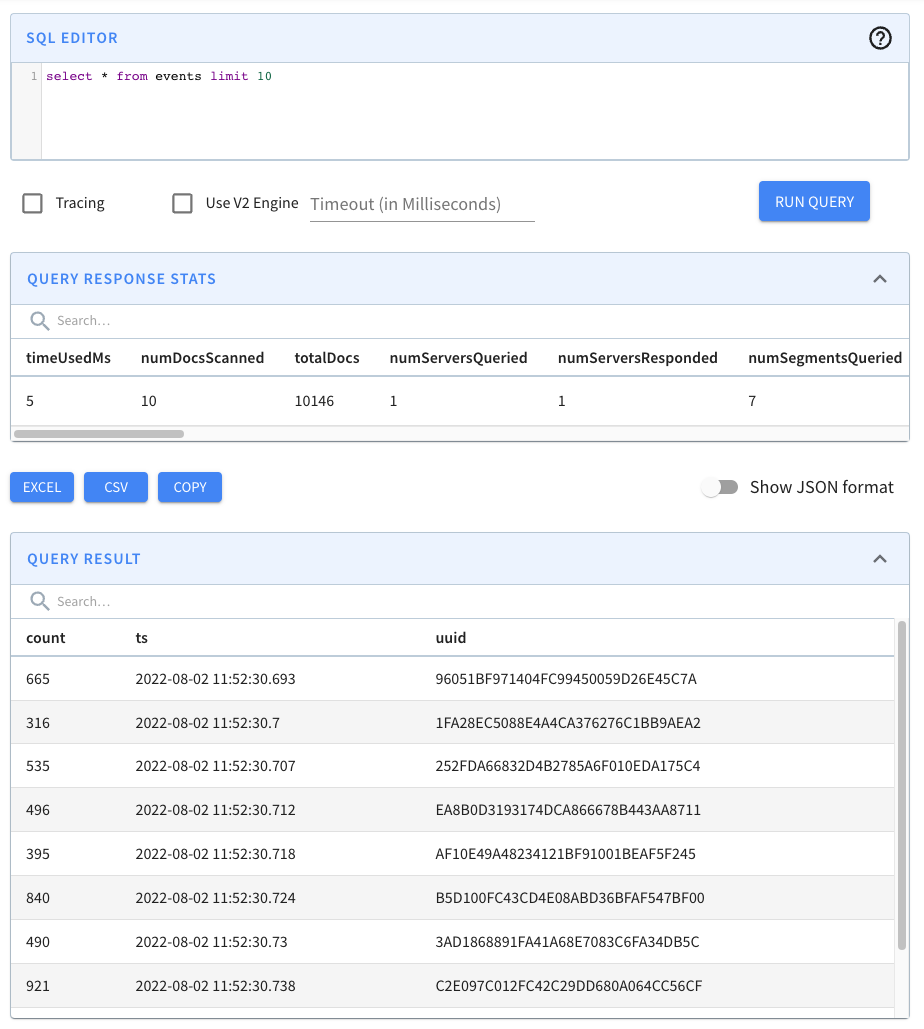
+Once we’ve run this command, if we go to the Pinot UI at
[http://localhost:9000](http://localhost:9000/) and click through to the events
table from the Query Console menu, we’ll see that the records have been
imported, as shown in the screenshot below:
+
+
+
+This approach works, and we may still prefer to use it when we need
fine-grained control over the ingestion parameters, but it is a bit heavyweight
for your everyday data import!
+
+Batch Importing with SQL
+------------------------
+
+Now let’s do the same thing in SQL.
+
+There are some prerequisites to using the SQL approach, so let’s go through
those now, so you don’t end up with a bunch of exceptions when you try this
out!
+
+First of all, you must have a
[Minion](https://docs.pinot.apache.org/basics/components/minion) in the Pinot
cluster, as this is the component that will do the data import.
+
+You’ll also need to include the following in your table config:
+
+```json
+"task": {
+ "taskTypeConfigsMap": { "SegmentGenerationAndPushTask": {} }
+}
+```
+
+
+
+As long as you’ve done those two things, we’re ready to write our import
query! A query that imports JSON files from my S3 bucket is shown below:
+
+```sql
+INSERT INTO events
+FROM FILE 's3://marks-st-cloud-bucket/events/'
+OPTION(
+ taskName=events-task,
+ includeFileNamePattern=glob:**/*.json,
+ input.fs.className=org.apache.pinot.plugin.filesystem.S3PinotFS,
+ input.fs.prop.accessKey=AKIARCOCT6DWLUB7F77Z,
+ input.fs.prop.secretKey=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,
+ input.fs.prop.region=eu-west-2
+);
+```
+
+
+
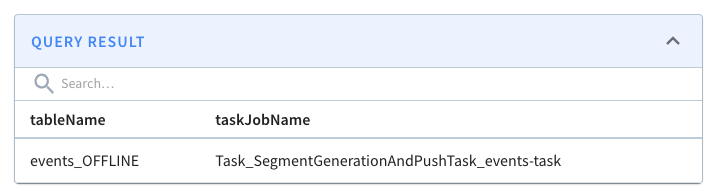
+If we run this query, we’ll see the following output:
+
+
+
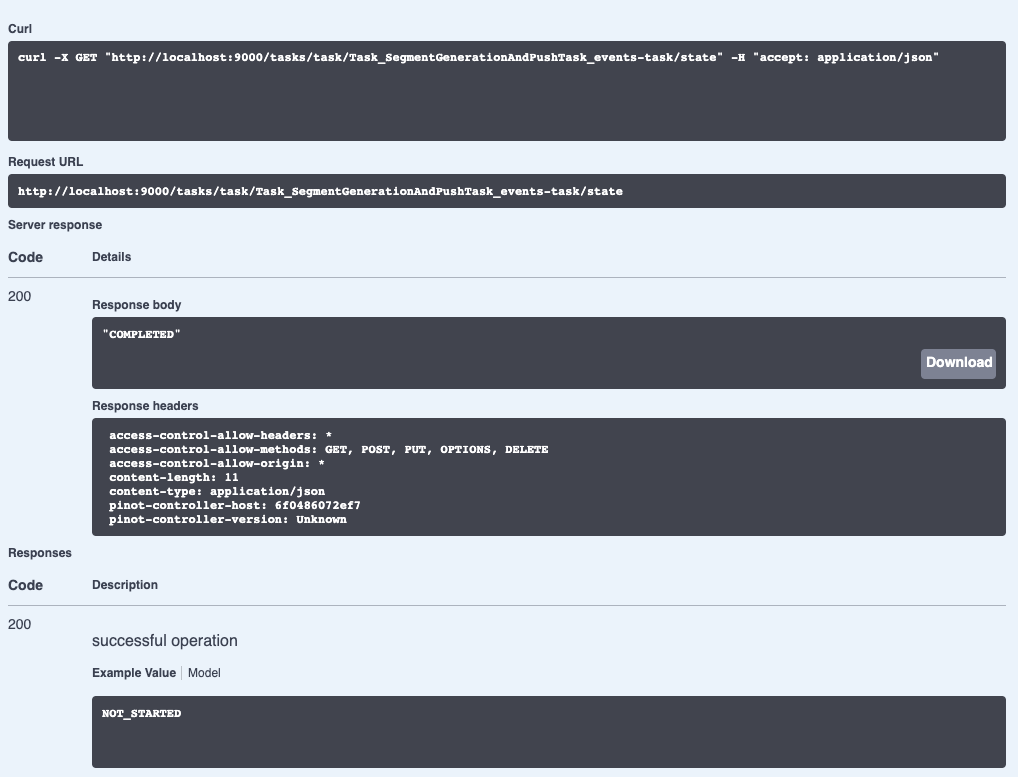
+We can check on the state of the ingestion job via the Swagger REST API. If we
navigate to
[http://localhost:9000/help#/Task/getTaskState](http://localhost:9000/help#/Task/getTaskState),
paste Task\_SegmentGenerationAndPushTask\_events-task as our task name, and
then click Execute, we’ll see the following:
+
+
+
+If we see the state COMPLETED, this means the data has been ingested, which we
can check by going back to the Query console and clicking on the events table.
+
+Summary
+-------
+
+I have to say that batch ingestion of data into Apache Pinot has always felt a
bit clunky, but with this new clause, it’s super easy, and it’s gonna save us
all a bunch of time.
+
+Also, anything that means I’m not writing YAML files has got to be a good
thing!
+
+So give it a try and let us know how you get on. If you have any questions
about this feature, feel free to join us on [Slack](https://stree.ai/slack),
where we’ll be happy to help you out.
+
diff --git a/website/blog/2022-11-22-Apache-Pinot-Timestamp-Indexes.md
b/website/blog/2022-11-22-Apache-Pinot-Timestamp-Indexes.md
new file mode 100644
index 00000000..f52f627b
--- /dev/null
+++ b/website/blog/2022-11-22-Apache-Pinot-Timestamp-Indexes.md
@@ -0,0 +1,328 @@
+---
+title: Apache Pinot™ 0.11 - Timestamp Indexes
+author: Mark Needham
+author_title: Mark Needham
+author_url: https://www.linkedin.com/in/lakshmanan-velusamy-a778a517/
+author_image_url:
https://www.datocms-assets.com/75153/1661544338-mark-needham.png
+description:
+ Users write queries that use the datetrunc function to filter at a coarser
grain of functionality. Unfortunately, this approach results in scanning data
and time value conversion work that takes a long time at large data volumes.
The timestamp index solves that problem!
+
+keywords:
+ - Apache Pinot
+ - Apache Pinot 0.11.0
+ - Timestamp Index
+ - datetrunc
+tags: [Pinot, Data, Analytics, User-Facing Analytics, Timestamp, datetrunc]
+---
+
+[](https://youtu.be/DetGpHZuzDU?si=f0ejecqPBbBK21z-)
+
+The recent Apache [Pinot™
0.11.0](https://medium.com/apache-pinot-developer-blog/apache-pinot-0-11-released-d564684df5d4)
release has lots of goodies for you to play with. This is the third in a
series of blog posts showing off some of the new features in this release.
+
+Pinot introduced the TIMESTAMP data type in the 0.8 release, which stores the
time in millisecond epoch long format internally. The community feedback has
been that the queries they’re running against timestamp columns don’t need this
low-level granularity.
+
+Instead, users write queries that use the datetrunc function to filter at a
coarser grain of functionality. Unfortunately, this approach results in
scanning data and time value conversion work that takes a long time at large
data volumes.
+
+The [timestamp
index](https://docs.pinot.apache.org/basics/indexing/timestamp-index) solves
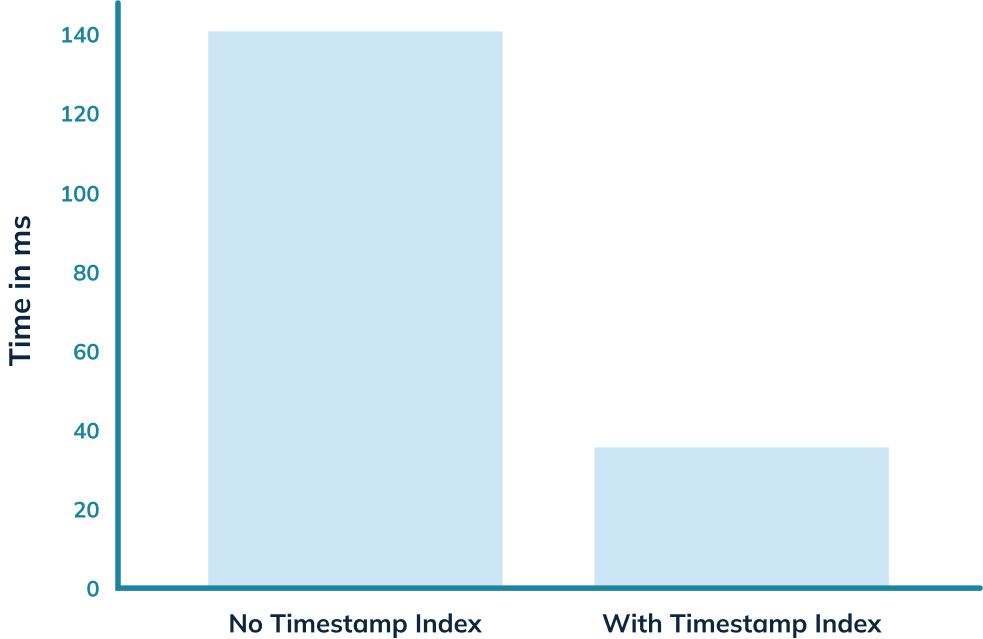
that problem! In this blog post, we’ll use it to get an almost 5x query speed
improvement on a relatively small dataset of only 7m rows.
+
+
+
+Spinning up Pinot
+-----------------
+
+We’re going to be using the Pinot Docker container, but first, we’re going to
create a network, as we’ll need that later on:
+
+docker network create timestamp\_blog
+
+We’re going to spin up the empty
[QuickStart](https://docs.pinot.apache.org/basics/getting-started/quick-start)
in a container named pinot-timestamp-blog:
+
+```bash
+docker run \
+ -p 8000:8000 \
+ -p 9000:9000 \
+ --name pinot-timestamp-blog \
+ --network timestamp_blog \
+ apachepinot/pinot:0.11.0 \
+ QuickStart -type EMPTY
+```
+
+
+
+Or if you’re on a Mac M1, change the name of the image to have the arm-64
suffix, like this:
+
+```bash
+docker run \
+ -p 8000:8000 \
+ -p 9000:9000 \
+ --network timestamp_blog \
+ --name pinot-timestamp-blog \
+ apachepinot/pinot:0.11.0-arm64 \
+ QuickStart -type EMPTY
+```
+
+
+
+Once that’s up and running, we’ll be able to access the Pinot Data Explorer at
[http://localhost:9000](http://localhost:9000/), but at the moment, we don’t
have any data to play with.
+
+Importing Chicago Crime Dataset
+-------------------------------
+
+The [Chicago Crime
dataset](https://startree.ai/blog/analyzing-chicago-crimes-with-apache-pinot-and-streamlit)
is a small to medium-sized dataset with 7 million records representing
reported crimes in the City of Chicago from 2001 until today.
+
+It contains details of the type of crime, where it was committed, whether an
arrest was recorded, which beat it occurred on, and more.
+
+Each of the crimes has an associated timestamp, which makes it a good dataset
to demonstrate timestamp indexes.
+
+You can find the code used in this blog post in the [Analyzing Chicago
Crimes](https://github.com/startreedata/pinot-recipes/tree/main/recipes/analyzing-chicago-crimes)
recipe section of [Pinot Recipes GitHub
repository](https://github.com/startreedata/pinot-recipes). From here on, I’m
assuming that you’ve downloaded this repository and are in the
recipes/analyzing-chicago-crimes directory.
+
+We’re going to create a schema and table named crimes by running the following
command:
+
+```bash
+docker run \
+ --network timestamp_blog \
+ -v $PWD/config:/config \
+ apachepinot/pinot:0.11.0-arm64 AddTable \
+ -schemaFile /config/schema.json \
+ -tableConfigFile /config/table.json \
+ -controllerHost pinot-timestamp-blog \
+ -exec
+
+```
+
+
+
+We should see the following output:
+
+2022/11/03 13:07:57.169 INFO \[AddTableCommand\] \[main\]
{"unrecognizedProperties":{},"status":"TableConfigs crimes successfully added"}
+
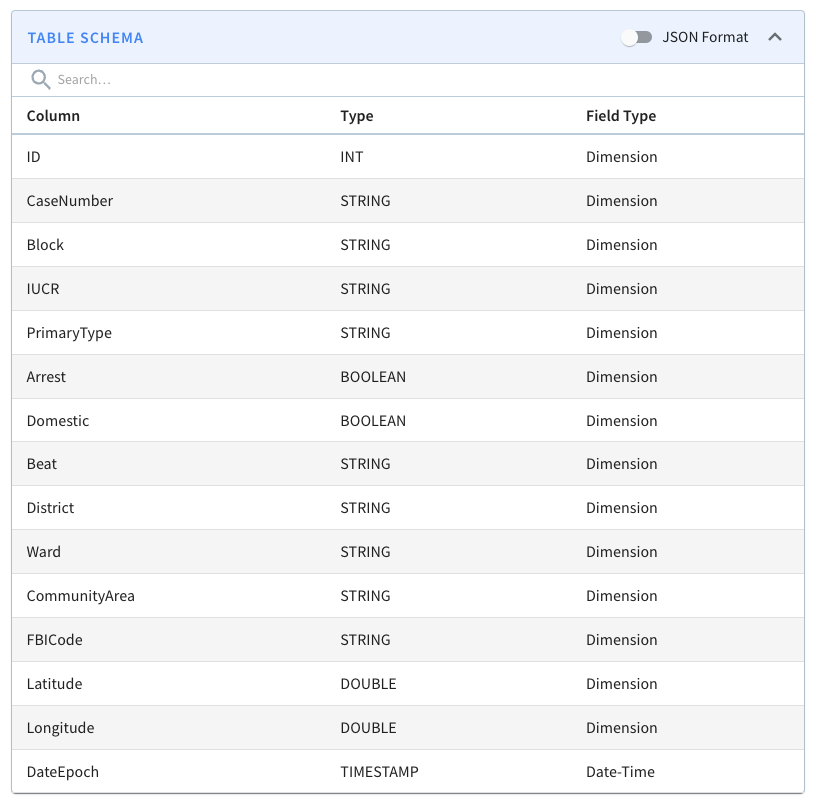
+A screenshot of the schema is shown below:
+
+
+
+We won’t go through the table config and schema files in this blog post
because we did that in the last post, but you can find them in the
[config](https://github.com/startreedata/pinot-recipes/tree/main/recipes/analyzing-chicago-crimes/config)
directory on GitHub.
+
+Now, let’s import the dataset.
+
+```bash
+docker run \
+ --network timestamp_blog \
+ -v $PWD/config:/config \
+ -v $PWD/data:/data \
+ apachepinot/pinot:0.11.0-arm64 LaunchDataIngestionJob \
+ -jobSpecFile /config/job-spec.yml \
+ -values controllerHost=pinot-timestamp-blog
+```
+
+
+
+It will take a few minutes to load, but once that command has finished, we’re
ready to query the crimes table.
+
+Querying crimes by date
+-----------------------
+
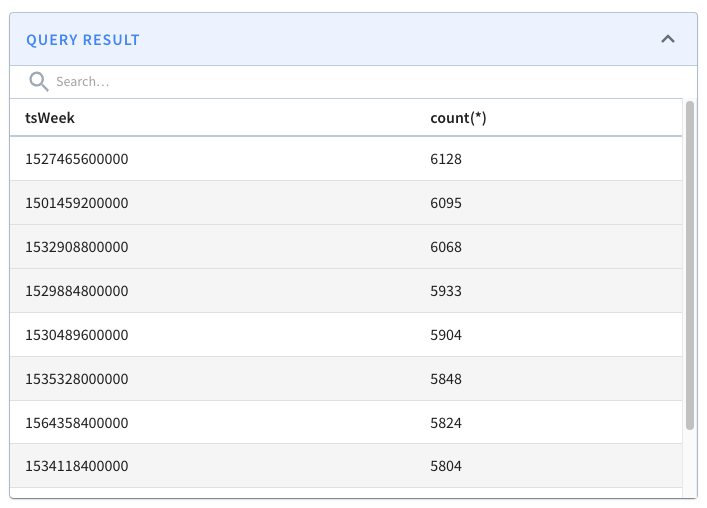
+The following query finds the number of crimes that happened after 16th
January 2017, grouped by week of the year, with the most crime-filled weeks
shown first:
+
+```sql
+select datetrunc('WEEK', DateEpoch) as tsWeek, count(*)
+from crimes
+WHERE tsWeek > fromDateTime('2017-01-16', 'yyyy-MM-dd')
+group by tsWeek
+order by count(*) DESC
+limit 10
+```
+
+
+
+If we run that query, we’ll see the following results:
+
+
+
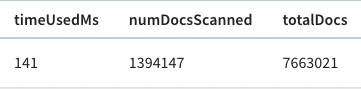
+And, if we look above the query result, there’s metadata about the query,
including the time that it took to run.
+
+
+
+The query took 141 ms to execute, so that’s our baseline.
+
+Adding the timestamp index
+--------------------------
+
+We could add a timestamp index directly to this table and then compare query
performance, but to make it easier to do comparisons, we’re going to create an
identical table with the timestamp index applied.
+
+The full table config is available in the
[config/table-index.json](https://github.com/startreedata/pinot-recipes/blob/main/recipes/analyzing-chicago-crimes/config/table-index.json)
file, and the main change is that we’ve added the following section to add a
timestamp index on the DateEpoch column:
+
+```json
+"fieldConfigList": [
+ {
+ "name": "DateEpoch",
+ "encodingType": "DICTIONARY",
+ "indexTypes": ["TIMESTAMP"],
+ "timestampConfig": {
+ "granularities": [
+ "DAY",
+ "WEEK",
+ "MONTH"
+ ]
+ }
+ }
+],
+```
+
+
+
+_encodingType_ will always be ‘DICTIONARY’ and _indexTypes_ must contain
‘TIMESTAMP’. We should specify granularities based on our query patterns.
+
+As a rule of thumb, work out which values you most commonly pass as the first
argument to the [datetrunc
function](https://docs.pinot.apache.org/configuration-reference/functions/datetrunc)
in your queries and include those values.
+
+The full list of valid granularities is: _millisecond_, _second_, _minute_,
_hour_, _day_, _week_, _month_, _quarter_, and _year_.
+
+Our new table is called crimes\_indexed, and we’re also going to create a new
schema with all the same columns called crimes\_indexed, as Pinot requires the
table and schema names to match.
+
+We can create the schema and table by running the following command:
+
+```bash
+docker run \
+ --network timestamp_blog \
+ -v $PWD/config:/config \
+ apachepinot/pinot:0.11.0-arm64 AddTable \
+ -schemaFile /config/schema-index.json \
+ -tableConfigFile /config/table-index.json \
+ -controllerHost pinot-timestamp-blog \
+ -exec
+```
+
+
+
+We’ll populate that table by copying the segment that we created earlier for
the crimes table.
+
+```bash
+docker run \
+ --network timestamp_blog \
+ -v $PWD/config:/config \
+ -v $PWD/data:/data \
+ apachepinot/pinot:0.11.0-arm64 LaunchDataIngestionJob \
+ -jobSpecFile /config/job-spec-download.yml \
+ -values controllerHost=pinot-timestamp-blog
+```
+
+
+
+If you’re curious how that job spec works, I [wrote a blog post explaining it
in a bit more
detail](https://www.markhneedham.com/blog/2021/12/06/apache-pinot-copy-segment-new-table/).
+
+Once the Pinot Server has downloaded this segment, it will apply the timestamp
index to the DateEpoch column.
+
+For the curious, we can see this happening in the log files by connecting to
the Pinot container and running the following grep command:
+
+```bash
+docker exec -iti pinot-timestamp-blog \
+ grep -rni -A10 "Successfully downloaded segment:.*crimes_indexed_OFFLINE.*"
\
+ logs/pinot-all.log
+```
+
+
+
+We’ll see something like the following (tidied up for brevity):
+
+```log
+[BaseTableDataManager] Successfully downloaded segment: crimes_OFFLINE_0 of
table: crimes_indexed_OFFLINE to index dir:
/tmp/1667490598253/quickstart/PinotServerDataDir0/crimes_indexed_OFFLINE/crimes_OFFLINE_0
+[V3DefaultColumnHandler] Starting default column action: ADD_DATE_TIME on
column: $DateEpoch$DAY
+[SegmentDictionaryCreator] Created dictionary for LONG column: $DateEpoch$DAY
with cardinality: 7969, range: 978307200000 to 1666742400000
+[V3DefaultColumnHandler] Starting default column action: ADD_DATE_TIME on
column: $DateEpoch$WEEK
+[SegmentDictionaryCreator] Created dictionary for LONG column:
$DateEpoch$WEEK with cardinality: 1139, range: 978307200000 to 1666569600000
+[V3DefaultColumnHandler] Starting default column action: ADD_DATE_TIME on
column: $DateEpoch$MONTH
+[SegmentDictionaryCreator] Created dictionary for LONG column:
$DateEpoch$MONTH with cardinality: 262, range: 978307200000 to 1664582400000
+[RangeIndexHandler] Creating new range index for segment: crimes_OFFLINE_0,
column: $DateEpoch$DAY
+[RangeIndexHandler] Created range index for segment: crimes_OFFLINE_0,
column: $DateEpoch$DAY
+[RangeIndexHandler] Creating new range index for segment: crimes_OFFLINE_0,
column: $DateEpoch$WEEK
+[RangeIndexHandler] Created range index for segment: crimes_OFFLINE_0,
column: $DateEpoch$WEEK
+
+```
+
+
+
+What does a timestamp index do?
+-------------------------------
+
+So, the timestamp index has now been created, but what does it actually do?
+
+When we add a timestamp index on a column, Pinot creates a derived column for
each granularity and adds a range index for each new column.
+
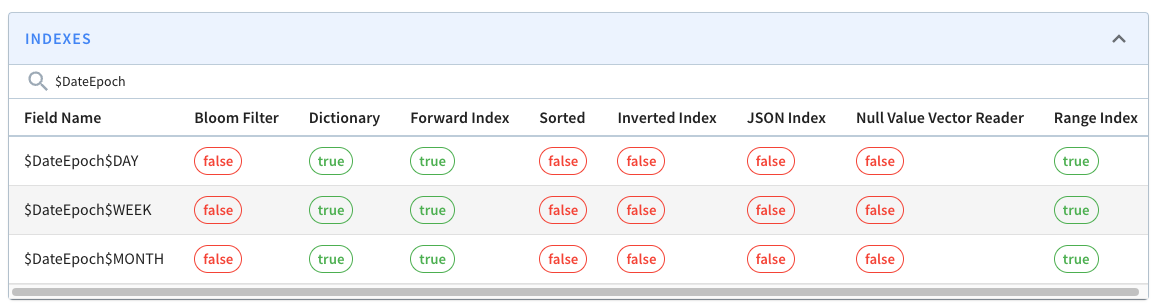
+In our case, that means we’ll have these extra columns: $DateEpoch$DAY,
$DateEpoch$WEEK, and $DateEpoch$MONTH.
+
+We can check if the extra columns and indexes have been added by navigating to
the [segment
page](http://localhost:9000/#/tenants/table/crimes_indexed_OFFLINE/crimes_OFFLINE_0)
and typing $Date$Epoch in the search box. You should see the following:
+
+
+
+These columns will be assigned the following values:
+
+* $DateEpoch$DAY = dateTrunc(‘DAY’, DateEpoch)
+
+* $DateEpoch$WEEK = dateTrunc(‘WEEK’, DateEpoch)
+
+* $DateEpoch$MONTH = dateTrunc(‘MONTH’, DateEpoch)
+
+
+Pinot will also rewrite any queries that use the dateTrunc function with DAY,
WEEK, or MONTH and the DateEpoch field to use those new columns.
+
+This means that this query:
+
+```sql
+select datetrunc('WEEK', DateEpoch) as tsWeek, count(*)
+from crimes_indexed
+GROUP BY tsWeek
+limit 10
+```
+
+
+
+Would be rewritten as:
+
+```sql
+select $DateEpoch$WEEK as tsWeek, count(*)
+from crimes_indexed
+GROUP BY tsWeek
+limit 10
+```
+
+
+
+And our query:
+
+```sql
+select datetrunc('WEEK', DateEpoch) as tsWeek, count(*)
+from crimes
+WHERE tsWeek > fromDateTime('2017-01-16', 'yyyy-MM-dd')
+group by tsWeek
+order by count(*) DESC
+limit 10
+```
+
+
+
+Would be rewritten as:
+
+```sql
+select $DateEpoch$WEEK as tsWeek, count(*)
+from crimes
+WHERE tsWeek > fromDateTime('2017-01-16', 'yyyy-MM-dd')
+group by tsWeek
+order by count(*) DESC
+limit 10
+```
+
+
+
+Re-running the query
+--------------------
+
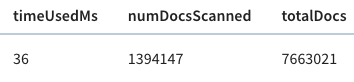
+Let’s now run our initial query against the _crimes\_indexed_ table. We’ll get
exactly the same results as before, but let’s take a look at the query stats:
+
+
+
+This time the query takes 36 milliseconds rather than 140 milliseconds. That’s
an almost 5x improvement, thanks to the timestamp index.
+
+Summary
+-------
+
+Hopefully, you’ll agree that timestamp indexes are pretty cool, and achieving
a 5x query improvement without much work is always welcome!
+
+If you’re using timestamps in your Pinot tables, be sure to try out this index
and let us know how it goes on the [StarTree Community
Slack](https://stree.ai/slack) . We’re always happy to help out with any
questions or problems you encounter.
diff --git
a/website/blog/2022-11-28-Apache-Pinot-Pausing-Real-Time-Ingestion.md
b/website/blog/2022-11-28-Apache-Pinot-Pausing-Real-Time-Ingestion.md
new file mode 100644
index 00000000..a972a737
--- /dev/null
+++ b/website/blog/2022-11-28-Apache-Pinot-Pausing-Real-Time-Ingestion.md
@@ -0,0 +1,341 @@
+---
+title: Apache Pinot™ 0.11 - Pausing Real-Time Ingestion
+author: Mark Needham
+author_title: Mark Needham
+author_url: https://www.linkedin.com/in/lakshmanan-velusamy-a778a517/
+author_image_url:
https://www.datocms-assets.com/75153/1661544338-mark-needham.png
+description:
+ Learn about a feature that lets you pause and resume real-time data ingestion
in Apache Pinot
+
+keywords:
+ - Apache Pinot
+ - Apache Pinot 0.11.0
+ - pause resume
+ - real-time ingestion
+tags: [Pinot, Data, Analytics, User-Facing Analytics, pause, resume, real-time
ingestion]
+---
+
+[](https://youtu.be/u9CwDpMZRog)
+
+The Apache Pinot community recently released version
[0.11.0](https://medium.com/apache-pinot-developer-blog/apache-pinot-0-11-released-d564684df5d4),
which has lots of goodies for you to play with.
+
+In this post, we will learn about a feature that lets you pause and resume
real-time data ingestion. Sajjad Moradi has [also written a blog post about
this
feature](https://medium.com/apache-pinot-developer-blog/pause-stream-consumption-on-apache-pinot-772a971ef403),
so you can treat this post as a complement to that one.
+
+How does real-time ingestion work?
+----------------------------------
+
+Before we get into this feature, let’s first recap how real-time ingestion
works.
+
+This only applies to tables that have the REALTIME type. These tables ingest
data that comes in from a streaming platform (e.g., Kafka).
+
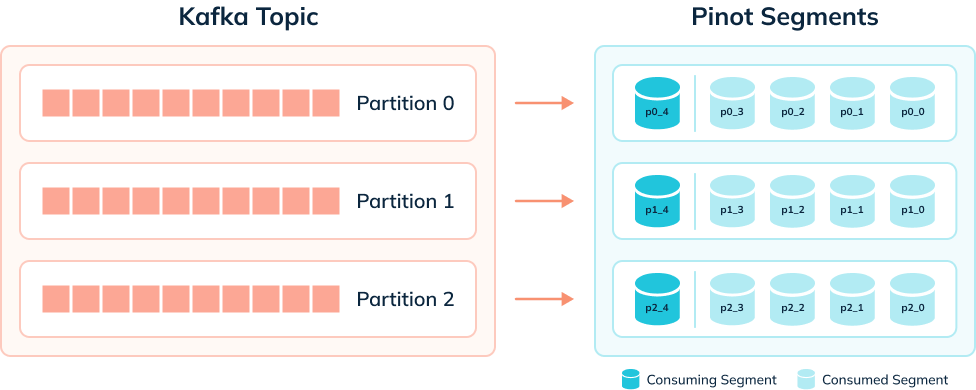
+Pinot servers ingest rows into consuming segments that reside in volatile
memory.
+
+Once a segment reaches the [segment
threshold,](https://dev.startree.ai/docs/pinot/recipes/configuring-segment-threshold)
it will be persisted to disk as a completed segment, and a new consuming
segment will be created. This new segment takes over the ingestion of new
events from the streaming platform.
+
+The diagram below shows what things might look like when we’re ingesting data
from a Kafka topic that has 3 partitions:
+
+
+
+A table has one consuming segment per partition but would have many completed
segments.
+
+Why do we need to pause and resume ingestion?
+---------------------------------------------
+
+There are many reasons why you might want to pause and resume ingestion of a
stream. Some of the common ones are described below:
+
+* There’s a problem with the underlying stream, and we need to restart the
server, reset offsets, or recreate a topic
+
+* We want to ingest data from different streams into the same table.
+
+* We made a mistake in our ingestion config in Pinot, and it’s now throwing
exceptions and isn’t able to ingest any more data.
+
+
+The 0.11 release adds the following REST API endpoints:
+
+* /tables/{tableName}/pauseCompletion
+
+* /tables/{tableName}/resumeCompletion
+
+
+As the names suggest, these endpoints can be used to pause and resume
streaming ingestion for a specific table. This release also adds the
/tables/{tableName}/pauseStatus endpoint, which returns the pause status for a
table.
+
+Let’s see how to use this functionality with help from a worked example.
+
+Data Generation
+---------------
+
+Let’s imagine that we want to ingest events generated by the following Python
script:
+
+```python
+import datetime
+import uuid
+import random
+import json
+
+while True:
+ ts = datetime.datetime.now().strftime("%Y-%m-%dT%H:%M:%S.%fZ")
+ id = str(uuid.uuid4())
+ count = random.randint(0, 1000)
+ print(
+ json.dumps({"tsString": ts, "uuid": id, "count": count})
+ )
+```
+
+We can view the data generated by this script by pasting the above code into a
file called datagen.py and then running the following command:
+
+python datagen.py 2>/dev/null | head -n3 | jq
+
+We’ll see the following output:
+
+```json
+{
+ "tsString": "2022-11-23T12:08:44.127481Z",
+ "uuid": "e1c58795-a009-4e21-ae76-cdd66e090797",
+ "count": 203
+}
+{
+ "tsString": "2022-11-23T12:08:44.127531Z",
+ "uuid": "4eedce04-d995-4e99-82ab-6f836b35c580",
+ "count": 216
+}
+{
+ "tsString": "2022-11-23T12:08:44.127550Z",
+ "uuid": "6d72411b-55f5-4f9f-84e4-7c8c5c4581ff",
+ "count": 721
+}
+```
+
+
+We’re going to pipe this data into a Kafka stream called ‘events’ like this:
+
+python datagen.py | kcat -P -b localhost:9092 -t events
+
+We’re not setting a key for these messages in Kafka for simplicity’s sake, but
Robin Moffat has an [excellent blog post that explains how to do
it](https://rmoff.net/2020/09/30/setting-key-value-when-piping-from-jq-to-kafkacat/).
+
+Pinot Schema/Table Config
+-------------------------
+
+We want to ingest this data into a Pinot table with the same name. Let’s first
define a schema:
+
+Schema:
+
+```json
+{
+ "schemaName": "events",
+ "dimensionFieldSpecs": [{"name": "uuid", "dataType": "STRING"}],
+ "metricFieldSpecs": [{"name": "count", "dataType": "INT"}],
+ "dateTimeFieldSpecs": [
+ {
+ "name": "ts",
+ "dataType": "TIMESTAMP",
+ "format": "1:MILLISECONDS:EPOCH",
+ "granularity": "1:MILLISECONDS"
+ }
+ ]
+}
+```
+
+Note that the timestamp field is called ts and not tsString, as it is in the
Kafka stream. We will transform the DateTime string value held in that field
into a proper timestamp using a transformation function.
+
+Our table config is described below:
+
+```json
+{
+ "tableName":"events",
+ "tableType":"REALTIME",
+ "segmentsConfig":{
+ "timeColumnName":"ts",
+ "schemaName":"events",
+ "replication":"1",
+ "replicasPerPartition":"1"
+ },
+ "tableIndexConfig":{
+ "loadMode":"MMAP",
+ "streamConfigs":{
+ "streamType":"kafka",
+ "stream.kafka.topic.name":"events",
+ "stream.kafka.broker.list":"kafka-pause-resume:9093",
+ "stream.kafka.consumer.type":"lowlevel",
+ "stream.kafka.consumer.prop.auto.offset.reset":"smallest",
+
"stream.kafka.consumer.factory.class.name":"org.apache.pinot.plugin.stream.kafka20.KafkaConsumerFactory",
+
"stream.kafka.decoder.class.name":"org.apache.pinot.plugin.stream.kafka.KafkaJSONMessageDecoder",
+ }
+ },
+ "ingestionConfig":{
+ "transformConfigs": [
+ {
+ "columnName": "ts",
+ "transformFunction": "FromDateTime(tsString,
'YYYY-MM-dd''T''HH:mm:ss.SS''Z''')"
+ }
+ ]
+ },
+ "tenants":{},
+ "metadata":{}
+ }
+```
+
+Our transformation has a subtle error. The second parameter passed to the
FromDateTime function describes the format of the DateTime string, which we
defined as:
+
+YYYY-MM-dd''T''HH:mm:ss.SS''Z''
+
+But tsString has values in the following format:
+
+2022-11-23T12:08:44.127550Z
+
+i.e., we don’t have enough S values - there should be 5 rather than 2.
+
+If we create the table using the following command:
+
+```bash
+docker run \
+ --network pause-resume \
+ -v $PWD/pinot/config:/config \
+ apachepinot/pinot:0.11.0-arm64 AddTable \
+ -schemaFile /config/schema.json \
+ -tableConfigFile /config/table.json \
+ -controllerHost pinot-controller-pause-resume \
+ -exec
+```
+
+
+Pinot will immediately start trying to ingest data from Kafka, and it will
throw a lot of exceptions that look like this:
+
+```log
+java.lang.RuntimeException: Caught exception while executing function:
fromDateTime(tsString,'YYYY-MM-dd'T'HH:mm:ss.SS'Z'')
+…
+Caused by: java.lang.IllegalStateException: Caught exception while invoking
method: public static long
org.apache.pinot.common.function.scalar.DateTimeFunctions.fromDateTime(java.lang.String,java.lang.String)
with arguments: [2022-11-23T11:12:34.682504Z, YYYY-MM-dd'T'HH:mm:ss.SS'Z']
+
+```
+
+
+At this point, we’d usually be stuck and would need to fix the transformation
function and then restart the Pinot server. With the pause/resume feature, we
can fix this problem without resorting to such drastic measures.
+
+The Pause/Resume Flow
+---------------------
+
+Instead, we can follow these steps:
+
+* Pause ingestion for the table
+
+* Fix the transformation function
+
+* Resume ingestion
+
+* Profit $$$
+
+
+We can pause ingestion by running the following command:
+
+```bash
+curl -X POST \
+ "http://localhost:9000/tables/events/pauseConsumption"; \
+ -H "accept: application/json"
+```
+
+The response should be something like this:
+
+```json
+{
+ "pauseFlag": true,
+ "consumingSegments": [
+ "events__0__0__20221123T1106Z"
+ ],
+ "description": "Pause flag is set. Consuming segments are being committed.
Use /pauseStatus endpoint in a few moments to check if all consuming segments
have been committed."
+}
+```
+
+
+Let’s follow the response’s advice and check the consuming segments status:
+
+```bash
+curl -X GET \
+ "http://localhost:9000/tables/events/pauseStatus"; \
+ -H "accept: application/json"
+```
+
+We’ll see the following response:
+
+```json
+{
+ "pauseFlag": true,
+ "consumingSegments": []
+}
+```
+
+So far, so good. Now we need to fix the table. We have a config,
table-fixed.json, that contains a working transformation config. These are the
lines of interest:
+
+```json
+{
+ "ingestionConfig":{
+ "transformConfigs": [
+ {
+ "columnName": "ts",
+ "transformFunction": "FromDateTime(tsString,
'YYYY-MM-dd''T''HH:mm:ss.SSSSSS''Z''')"
+ }
+ ]
+ }
+}
+```
+
+We now have five S values rather than two, which should sort out our ingestion.
+
+Update the table config:
+
+```bash
+curl -X PUT "http://localhost:9000/tables/events"; \
+ -H "accept: application/json" \
+ -H "Content-Type: application/json" \
+ -d @pinot/config/table-fixed.json
+```
+
+And then resume ingestion. You can pass in the query string parameter
consumeFrom, which takes a value of smallest or largest. We’ll pass in smallest
since no data has been consumed yet:
+
+```bash
+curl -X POST \
+ "http://localhost:9000/tables/events/resumeConsumption?consumeFrom=smallest";
\
+ -H "accept: application/json"
+```
+
+The response will be like this:
+
+```json
+{
+ "pauseFlag": false,
+ "consumingSegments": [],
+ "description": "Pause flag is cleared. Consuming segments are being created.
Use /pauseStatus endpoint in a few moments to double check."
+}
+```
+
+Again, let’s check the consuming segments status:
+
+```bash
+curl -X GET \
+ "http://localhost:9000/tables/events/pauseStatus"; \
+ -H "accept: application/json"
+```
+
+This time we will see some consuming segments:
+
+```json
+{
+ "pauseFlag": false,
+ "consumingSegments": [
+ "events__0__22__20221123T1124Z"
+ ]
+}
+```
+
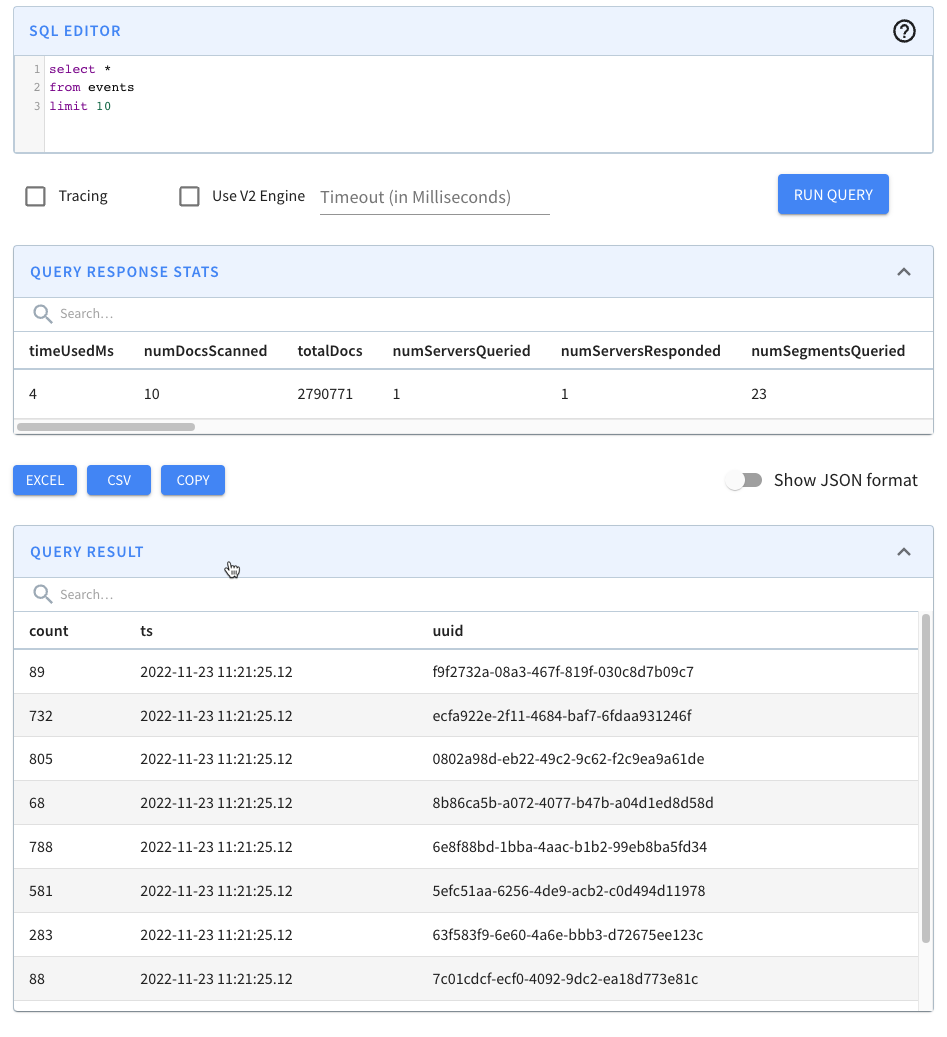
+Navigate to [http://localhost:9000/#/query](http://localhost:9000/#/query) and
click on the events table. You should see the following:
+
+
+
+We have records! We can also run our data generator again, and more events
will be ingested.
+
+Summary
+-------
+
+This feature makes real-time data ingestion a bit more forgiving when things
go wrong, which has got to be a good thing in my book.
+
+When you look at the name of this feature, it can seem a bit esoteric and
perhaps not something that you’d want to use, but I think you’ll find it to be
extremely useful.
+
+So give it a try and let us know how you get on. If you have any questions
about this feature, feel free to join us on [Slack](https://stree.ai/slack),
where we’ll be happy to help you out.
diff --git
a/website/blog/2023-01-29-Apache-Pinot-Deduplication-on-Real-Time-Tables.md
b/website/blog/2023-01-29-Apache-Pinot-Deduplication-on-Real-Time-Tables.md
new file mode 100644
index 00000000..dd9c0b79
--- /dev/null
+++ b/website/blog/2023-01-29-Apache-Pinot-Deduplication-on-Real-Time-Tables.md
@@ -0,0 +1,387 @@
+---
+title: Apache Pinot™ 0.11 - Deduplication on Real-Time Tables
+author: Mark Needham
+author_title: Mark Needham
+author_url: https://www.linkedin.com/in/lakshmanan-velusamy-a778a517/
+author_image_url:
https://www.datocms-assets.com/75153/1661544338-mark-needham.png
+description:
+ Learn about the deduplication for the real-time tables feature in Apache Pinot
+
+keywords:
+ - Apache Pinot
+ - Apache Pinot 0.11.0
+ - deduplication
+tags: [Pinot, Data, Analytics, User-Facing Analytics, deduplication]
+---
+
+Last fall, the Apache Pinot community released version
[0.11.0](https://medium.com/apache-pinot-developer-blog/apache-pinot-0-11-released-d564684df5d4),
which has lots of goodies for you to play with.
+
+In this post, we’re going to learn about the [deduplication for the real-time
tables feature](https://docs.pinot.apache.org/basics/data-import/dedup).
+
+Why do we need deduplication on real-time tables?
+-------------------------------------------------
+
+This feature was built to deal with duplicate data in the streaming platform.
+
+Users have previously used the upsert feature to de-duplicate data, but this
has the following limitations:
+
+* It forces us to keep redundant records that we don’t want to keep, which
increases overall storage costs.
+
+* We can’t yet use the StarTree index with upserts, so the speed benefits we
get from using that indexing technique are lost.
+
+
+How does dedup differ from upserts?
+-----------------------------------
+
+Both upserts and dedup keep track of multiple documents that have the same
primary key. They differ as follows:
+
+* Upserts are used when we want to get the latest copy of a document for a
given primary key. It’s likely that some or all of the other fields will be
different. Pinot stores all documents it receives, but when querying it will
only return the latest document for each primary key.
+
+* Dedup is used when we know that multiple documents with the same primary
key are identical. Only the first event received for a given primary key is
stored in Pinot—any future events with the same primary key are thrown away.
+
+
+Let’s see how to use this functionality with help from a worked example.
+
+Setting up Apache Kafka and Apache Pinot
+----------------------------------------
+
+We’re going to spin up Kafka and Pinot using the following Docker Compose
config:
+
+```yaml
+version: "3"
+services:
+ zookeeper:
+ image: zookeeper:3.8.0
+ hostname: zookeeper
+ container_name: zookeeper-dedup-blog
+ ports:
+ - "2181:2181"
+ environment:
+ ZOOKEEPER_CLIENT_PORT: 2181
+ ZOOKEEPER_TICK_TIME: 2000
+ networks:
+ - dedup_blog
+ kafka:
+ image: wurstmeister/kafka:latest
+ restart: unless-stopped
+ container_name: "kafka-dedup-blog"
+ ports:
+ - "9092:9092"
+ expose:
+ - "9093"
+ depends_on:
+ - zookeeper
+ environment:
+ KAFKA_ZOOKEEPER_CONNECT: zookeeper-dedup-blog:2181/kafka
+ KAFKA_BROKER_ID: 0
+ KAFKA_ADVERTISED_HOST_NAME: kafka-dedup-blog
+ KAFKA_ADVERTISED_LISTENERS:
PLAINTEXT://kafka-dedup-blog:9093,OUTSIDE://localhost:9092
+ KAFKA_LISTENERS: PLAINTEXT://0.0.0.0:9093,OUTSIDE://0.0.0.0:9092
+ KAFKA_LISTENER_SECURITY_PROTOCOL_MAP:
PLAINTEXT:PLAINTEXT,OUTSIDE:PLAINTEXT
+ networks:
+ - dedup_blog
+ pinot-controller:
+ image: apachepinot/pinot:0.11.0-arm64
+ command: "QuickStart -type EMPTY"
+ container_name: "pinot-controller-dedup-blog"
+ volumes:
+ - ./config:/config
+ restart: unless-stopped
+ ports:
+ - "9000:9000"
+ networks:
+ - dedup_blog
+networks:
+ dedup_blog:
+ name: dedup_blog
+
+```
+
+
+We can spin up our infrastructure using the following command:
+
+```bash
+docker-compose up
+```
+
+Data Generation
+---------------
+
+Let’s imagine that we want to ingest events generated by the following Python
script:
+
+```python
+import datetime
+import uuid
+import random
+import json
+
+while True:
+ ts = datetime.datetime.now().strftime("%Y-%m-%dT%H:%M:%S.%fZ")
+ id = str(uuid.uuid4())
+ count = random.randint(0, 1000)
+ print(
+ json.dumps({"tsString": ts, "uuid": id[:3], "count": count})
+ )
+```
+
+
+We can view the data generated by this script by pasting the above code into a
file called datagen.py and then running the following command:
+
+```bash
+python datagen.py 2>/dev/null | head -n3 | jq
+```
+
+We’ll see the following output:
+
+```json
+{
+ "tsString": "2023-01-03T10:59:17.355081Z",
+ "uuid": "f94",
+ "count": 541
+}
+{
+ "tsString": "2023-01-03T10:59:17.355125Z",
+ "uuid": "057",
+ "count": 96
+}
+{
+ "tsString": "2023-01-03T10:59:17.355141Z",
+ "uuid": "d7b",
+ "count": 288
+}
+```
+
+If we generate only 25,000 events, we’ll get some duplicates, which we can see
by running the following command:
+
+```bash
+python datagen.py 2>/dev/null |
+jq -r '.uuid' | head -n25000 | uniq -cd
+```
+
+The results of running that command are shown below:
+
+```text
+2 3a2
+2 a04
+2 433
+2 291
+2 d73
+```
+
+We’re going to pipe this data into a Kafka stream called events, like this:
+
+```bash
+python datagen.py 2>/dev/null |
+jq -cr --arg sep 😊 '[.uuid, tostring] | join($sep)' |
+kcat -P -b localhost:9092 -t events -K😊
+```
+
+The construction of the key/value structure comes from Robin Moffatt’s
[excellent blog
post](https://rmoff.net/2020/09/30/setting-key-value-when-piping-from-jq-to-kafkacat/).
Since that blog post was written, kcat has started supporting multi byte
separators, which is why we can use a smiley face to separate our key and value.
+
+Pinot Schema/Table Config
+-------------------------
+
+Next, we’re going to create a Pinot table and schema with the same name. Let’s
first define a schema:
+
+```json
+{
+ "schemaName": "events",
+ "dimensionFieldSpecs": [{"name": "uuid", "dataType": "STRING"}],
+ "metricFieldSpecs": [{"name": "count", "dataType": "INT"}],
+ "dateTimeFieldSpecs": [
+ {
+ "name": "ts",
+ "dataType": "TIMESTAMP",
+ "format": "1:MILLISECONDS:EPOCH",
+ "granularity": "1:MILLISECONDS"
+ }
+ ]
+}
+```
+
+Note that the timestamp field is called ts and not tsString, as it is in the
Kafka stream. We’re going to transform the DateTime string value held in that
field into a proper timestamp using a transformation function.
+
+Our table config is described below:
+
+```json
+{
+ "tableName": "events",
+ "tableType": "REALTIME",
+ "segmentsConfig": {
+ "timeColumnName": "ts",
+ "schemaName": "events",
+ "replication": "1",
+ "replicasPerPartition": "1"
+ },
+ "tableIndexConfig": {
+ "loadMode": "MMAP",
+ "streamConfigs": {
+ "streamType": "kafka",
+ "stream.kafka.topic.name": "events",
+ "stream.kafka.broker.list": "kafka-dedup-blog:9093",
+ "stream.kafka.consumer.type": "lowlevel",
+ "stream.kafka.consumer.prop.auto.offset.reset": "smallest",
+ "stream.kafka.consumer.factory.class.name":
"org.apache.pinot.plugin.stream.kafka20.KafkaConsumerFactory",
+ "stream.kafka.decoder.class.name":
"org.apache.pinot.plugin.stream.kafka.KafkaJSONMessageDecoder"
+ }
+ },
+ "ingestionConfig": {
+ "transformConfigs": [
+ {
+ "columnName": "ts",
+ "transformFunction": "FromDateTime(tsString,
'YYYY-MM-dd''T''HH:mm:ss.SSSSSS''Z''')"
+ }
+ ]
+ },
+ "tenants": {},
+ "metadata": {}
+}
+```
+
+Let’s create the table using the following command:
+
+```bash
+docker run \
+ --network dedup_blog \
+ -v $PWD/pinot/config:/config \
+ apachepinot/pinot:0.11.0-arm64 AddTable \
+ -schemaFile /config/schema.json \
+ -tableConfigFile /config/table.json \
+ -controllerHost "pinot-controller-dedup-blog" \
+ -exec
+```
+
+Now we can navigate to [http://localhost:9000](http://localhost:9000/) and run
a query that will return a count of the number of each uuid:
+
+```sql
+select uuid, count(*)
+from events
+group by uuid
+order by count(*)
+limit 10
+```
+
+The results of this query are shown below:
+
+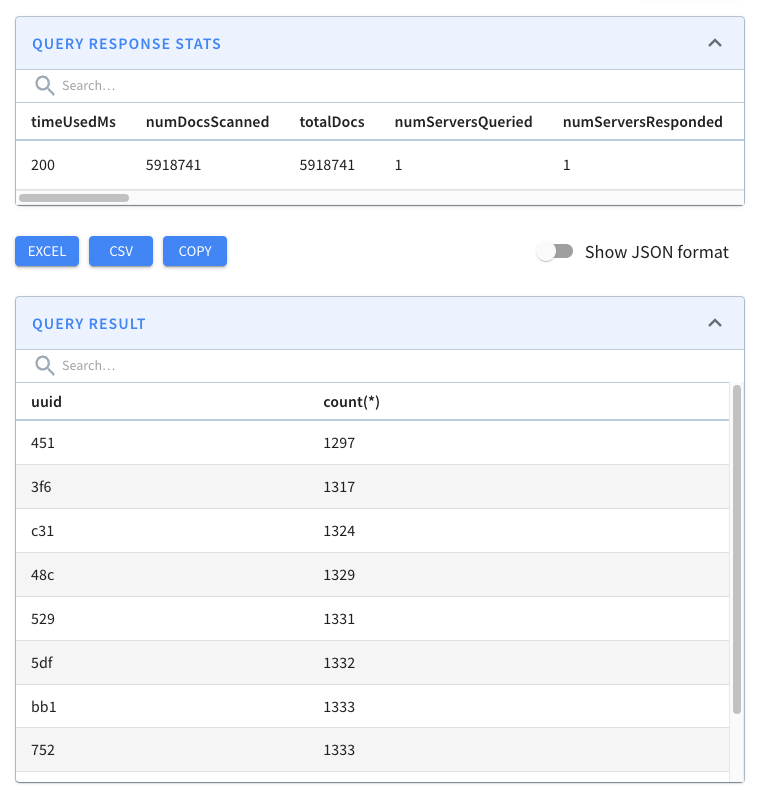
+
+We can see loads of duplicates!
+
+Now let’s add a table and schema that uses the de-duplicate feature, starting
with the schema:
+
+```json
+{
+ "schemaName": "events_dedup",
+ "primaryKeyColumns": ["uuid"],
+ "dimensionFieldSpecs": [{"name": "uuid", "dataType": "STRING"}],
+ "metricFieldSpecs": [{"name": "count", "dataType": "INT"}],
+ "dateTimeFieldSpecs": [
+ {
+ "name": "ts",
+ "dataType": "TIMESTAMP",
+ "format": "1:MILLISECONDS:EPOCH",
+ "granularity": "1:MILLISECONDS"
+ }
+ ]
+}
+```
+
+The main difference between this schema and the events schema is that we need
to specify a primary key. This key can be any number of fields, but in this
case, we’re only using the uuid field.
+
+Next, the table config:
+
+```json
+{
+ "tableName": "events_dedup",
+ "tableType": "REALTIME",
+ "segmentsConfig": {
+ "timeColumnName": "ts",
+ "schemaName": "events_dedup",
+ "replication": "1",
+ "replicasPerPartition": "1"
+ },
+ "tableIndexConfig": {
+ "loadMode": "MMAP",
+ "streamConfigs": {
+ "streamType": "kafka",
+ "stream.kafka.topic.name": "events",
+ "stream.kafka.broker.list": "kafka-dedup-blog:9093",
+ "stream.kafka.consumer.type": "lowlevel",
+ "stream.kafka.consumer.prop.auto.offset.reset": "smallest",
+ "stream.kafka.consumer.factory.class.name":
"org.apache.pinot.plugin.stream.kafka20.KafkaConsumerFactory",
+ "stream.kafka.decoder.class.name":
"org.apache.pinot.plugin.stream.kafka.KafkaJSONMessageDecoder"
+ }
+ },
+ "routing": {"instanceSelectorType": "strictReplicaGroup"},
+ "dedupConfig": {"dedupEnabled": true, "hashFunction": "NONE"},
+ "ingestionConfig": {
+ "transformConfigs": [
+ {
+ "columnName": "ts",
+ "transformFunction": "FromDateTime(tsString,
'YYYY-MM-dd''T''HH:mm:ss.SSSSSS''Z''')"
+ }
+ ]
+ },
+ "tenants": {},
+ "metadata": {}
+}
+```
+
+The changes to notice here are:
+
+* "dedupConfig": {"dedupEnabled": true, "hashFunction": "NONE"} - This
enables the feature and indicates that we won’t use a hash function on our
primary key.
+
+* "routing": {"instanceSelectorType": "strictReplicaGroup"} - This makes
sure that all segments of the same partition are served from the same server to
ensure data consistency across the segments.
+
+
+```bash
+docker run \
+ --network dedup_blog \
+ -v $PWD/pinot/config:/config \
+ apachepinot/pinot:0.11.0-arm64 AddTable \
+ -schemaFile /config/schema-dedup.json \
+ -tableConfigFile /config/table-dedup.json \
+ -controllerHost "pinot-controller-dedup-blog" \
+ -exec
+
+select uuid, count(*)
+from events_dedup
+group by uuid
+order by count(*)
+limit 10
+```
+
+
+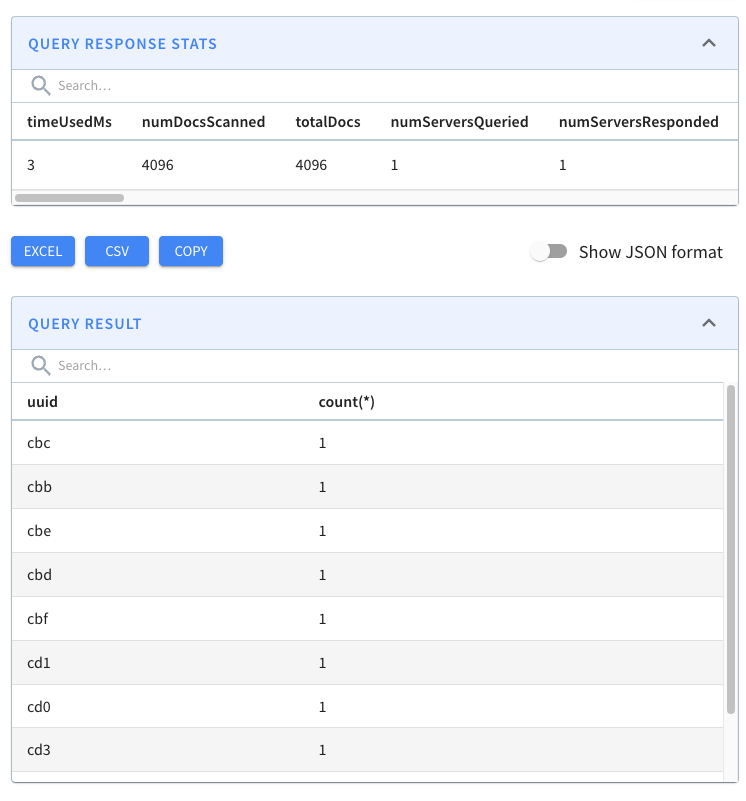
+
+We have every combination of hex values (16^3=4096) and no duplicates! Pinot’s
de-duplication feature has done its job.
+
+How does it work?
+------------------
+
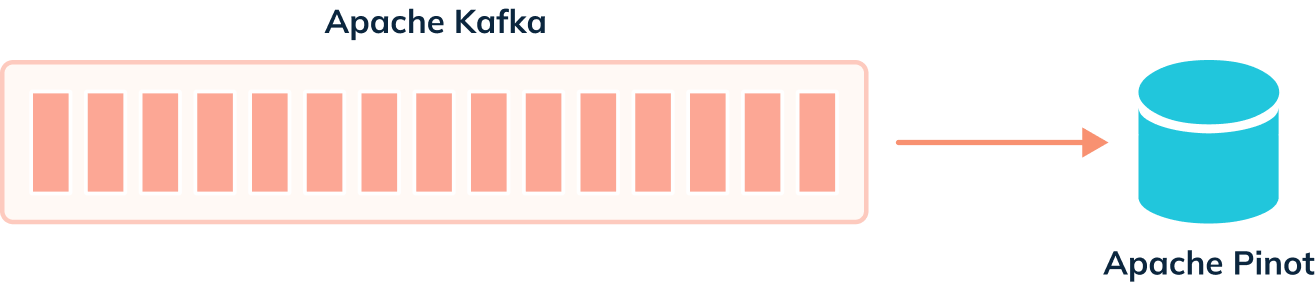
+When we’re not using the deduplication feature, events are ingested from our
streaming platform into Pinot, as shown in the diagram below:
+
+
+
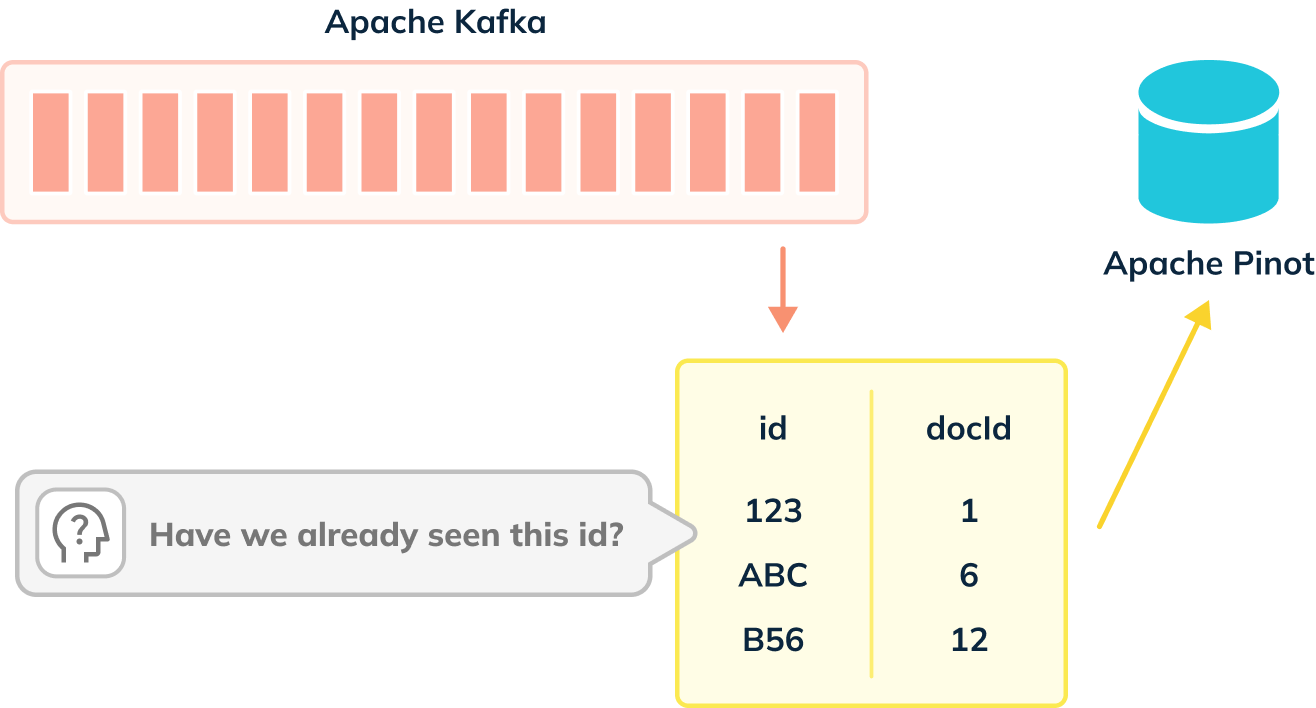
+When de-dup is enabled, we have to check whether records can be ingested, as
shown in the diagram below:
+
+
+
+De-dup works out whether a primary key has already been ingested by using an
in memory map of (primary key -> corresponding segment reference).
+
+We need to take that into account when using this feature, otherwise, we’ll
end up using all the available memory on the Pinot Server. Below are some tips
for using this feature:
+
+* Try to use a simple primary key type and avoid composite keys. If you
don’t have a simple primary key, consider using one of the available hash
functions to reduce the space taken up.
+
+* Create more partitions in the streaming platform than you might otherwise
create. The number of partitions determines the partition numbers of the Pinot
table. The more partitions you have in the streaming platform, the more Pinot
servers you can distribute the Pinot table to, and the more horizontally
scalable the table will be.
+
+
+Summary
+-------
+
+This feature makes it easier to ensure that we don’t end up with duplicate
data in our Apache Pinot estate.
+
+So give it a try and let us know how you get on. If you have any questions
about this feature, feel free to join us on [Slack](https://stree.ai/slack),
where we’ll be happy to help you out.
+
+And if you’re interested in how this feature was implemented, you can look at
the [pull request on GitHub](https://github.com/apache/pinot/pull/8708).
+
diff --git
a/website/blog/2023-02-21-Apache-Pinot-0-12-Configurable-Time-Boundary.md
b/website/blog/2023-02-21-Apache-Pinot-0-12-Configurable-Time-Boundary.md
new file mode 100644
index 00000000..7fe7d33e
--- /dev/null
+++ b/website/blog/2023-02-21-Apache-Pinot-0-12-Configurable-Time-Boundary.md
@@ -0,0 +1,123 @@
+---
+title: Apache Pinot™ 0.12 - Configurable Time Boundary
+author: Mark Needham
+author_title: Mark Needham
+author_url: https://www.linkedin.com/in/lakshmanan-velusamy-a778a517/
+author_image_url:
https://www.datocms-assets.com/75153/1661544338-mark-needham.png
+description:
+ This post will explore the ability to configure the time boundary when
working with hybrid tables.
+
+keywords:
+ - Apache Pinot
+ - Apache Pinot 0.11.0
+ - hybrid tables
+ - time boundary
+tags: [Pinot, Data, Analytics, User-Facing Analytics, hybrid tables, time
boundary]
+---
+
+
+[](https://youtu.be/lB3RaKJ0Hbs)
+
+
+The Apache Pinot community recently released version
[0.12.0](https://docs.pinot.apache.org/basics/releases/0.12.0), which has lots
of goodies for you to play with. This is the first in a series of blog posts
showing off some of the new features in this release.
+
+This post will explore the ability to configure the time boundary when working
with hybrid tables.
+
+What is a hybrid table?
+-----------------------
+
+A hybrid table is the term used to describe a situation where we have an
offline and real-time table with the same name. The offline table stores
historical data, while the real-time data continuously ingests data from a
streaming data platform.
+
+How do you query a hybrid table?
+--------------------------------
+
+When you write a query against a hybrid table, the Pinot query engine needs to
work out which records to read from the offline table and which to read from
the real-time table.
+
+It does this by computing the time boundary, determined by looking at the
maximum end time of segments in the offline table and the segment ingestion
frequency specified for the offline table.
+
+```
+timeBoundary = <Maximum end time of offline segments> - <Ingestion Frequency>
+```
+
+The ingestion frequency can either be 1 hour or 1 day, so one of these values
will be used.
+
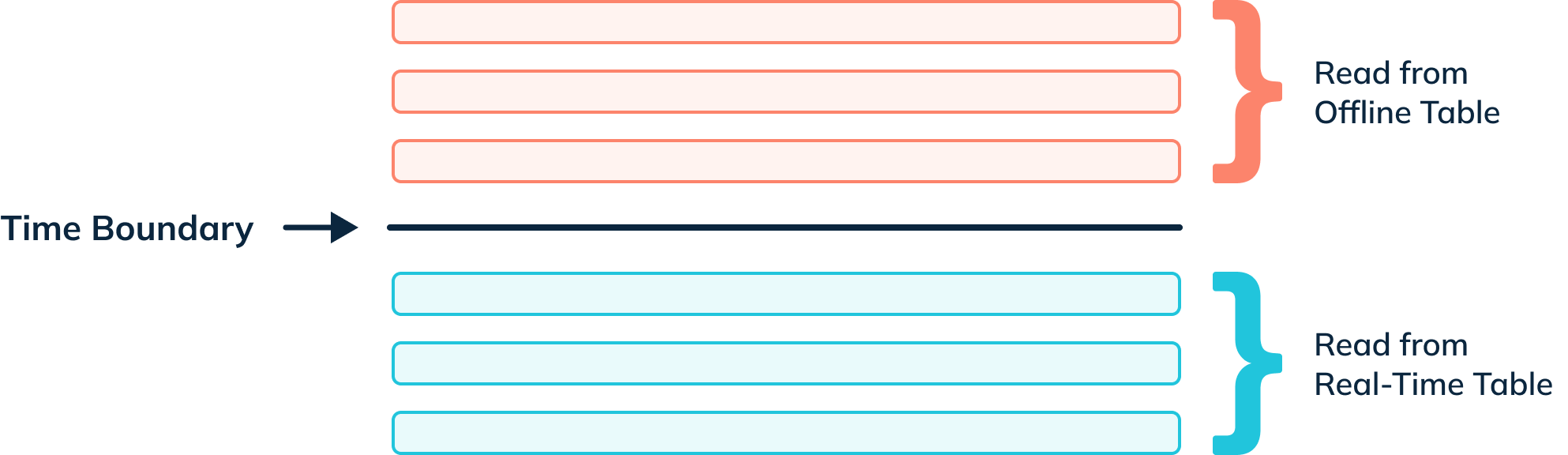
+When a query for a hybrid table is received by a Pinot Broker, the broker
sends a time boundary annotated version of the query to the offline and
real-time tables. Any records from or before the time boundary are read from
the offline table; anything greater than the boundary comes from the real-time
table.
+
+
+
+For example, if we executed the following query:
+
+```sql
+SELECT count(*)
+FROM events
+```
+
+
+The broker would send the following query to the offline table:
+
+```sql
+SELECT count(*)
+FROM events_OFFLINE
+WHERE timeColumn <= $timeBoundary
+```
+
+
+And the following query to the real-time table:
+
+```sql
+SELECT count(*)
+FROM events_REALTIME
+WHERE timeColumn > $timeBoundary
+```
+
+
+The results of the two queries are merged by the broker before being returned
to the client.
+
+So, what’s the problem?
+-----------------------
+
+If we have some overlap in the data in our offline and real-time tables, this
approach works well, but if we have no overlap, we will end up with unexpected
results.
+
+For example, let’s say that the most recent timestamp in the events offline
table is 2023-01-09T18:41:17, our ingestion frequency is 1 hour, and the
real-time table has data starting from 2023-01-09T18:41:18.
+
+This will result in a boundary time of 2023-01-09T17:41:17, which means that
any records with timestamps between 17:41 and 18:41 will be excluded from query
results.
+
+And the solution?
+-----------------
+
+The 0.12 release sees the addition of the tables/{tableName}/timeBoundary API,
which lets us set the time boundary to the maximum end time of all offline
segments.
+
+```bash
+curl -X POST \
+ "http://localhost:9000/tables/{tableName}/timeBoundary"; \
+ -H "accept: application/json"
+```
+
+
+In this case, that will result in a new boundary time of 2023-01-09T18:41:17,
which is exactly what we need.
+
+We’ll then be able to query the events table and have it read the offline
table to get all records on or before 2023-01-09T18:41:17 and the real-time
table for everything else.
+
+Neat, anything else I should know?
+----------------------------------
+
+Something to keep in mind when updating the time boundary is that it’s a
one-off operation. It won’t be automatically updated if you add a new, more
recent segment to the offline table.
+
+In this scenario, you need to call the tables/{tableName}/timeBoundary API
again.
+
+And if you want to revert to the previous behavior where the time boundary is
computed by subtracting the ingestion frequency from the latest end time, you
can do that too:
+
+```bash
+curl -X DELETE \
+ "http://localhost:9000/tables/{tableName}/timeBoundary"; \
+ -H "accept: application/json"
+```
+
+
+Summary
+-------
+
+I love this feature, and it solves a problem I’ve struggled with when using my
datasets. I hope you’ll find it just as useful.
+
+Give it a try, and let us know how you get on. If you have any questions about
this feature, feel free to join us on [Slack](https://stree.ai/slack), where
we’ll be happy to help you out.
+
diff --git a/website/blog/2023-03-30-Apache-Pinot-0-12-Consumer-Record-Lag.md
b/website/blog/2023-03-30-Apache-Pinot-0-12-Consumer-Record-Lag.md
new file mode 100644
index 00000000..6533fb0a
--- /dev/null
+++ b/website/blog/2023-03-30-Apache-Pinot-0-12-Consumer-Record-Lag.md
@@ -0,0 +1,292 @@
+---
+title: Apache Pinot™ 0.12 - Consumer Record Lag
+author: Mark Needham
+author_title: Mark Needham
+author_url: https://www.linkedin.com/in/lakshmanan-velusamy-a778a517/
+author_image_url:
https://www.datocms-assets.com/75153/1661544338-mark-needham.png
+description:
+ This post will explore a new API endpoint that lets you check how much Pinot
is lagging when ingesting from Apache Kafka.
+
+keywords:
+ - Apache Pinot
+ - Apache Pinot 0.11.0
+ - hybrid tables
+ - consumer record lag
+ - Kafka
+tags: [Pinot, Data, Analytics, User-Facing Analytics, consumer record lag,
kafka]
+---
+
+
+[](https://youtu.be/JJEh_kBfJts)
+
+The Apache Pinot community recently released version
[0.12.0](https://docs.pinot.apache.org/basics/releases/0.12.0), which has lots
of goodies for you to play with. I’ve been exploring and writing about those
features in a series of blog posts.
+
+This post will explore a new API endpoint that lets you check how much Pinot
is lagging when ingesting from Apache Kafka.
+
+Why do we need this?
+--------------------
+
+A common question in the Pinot community is how to work out the consumption
status of real-time tables.
+
+This was a tricky one to answer, but Pinot 0.12 sees the addition of a new API
that lets us see exactly what’s going on.
+
+Worked Example
+--------------
+
+Let’s have a look at how it works with help from a worked example.
+
+First, we’re going to create a Kafka topic with 5 partitions:
+
+```bash
+docker exec -it kafka-lag-blog kafka-topics.sh \
+--bootstrap-server localhost:9092 \
+--partitions 5 \
+--topic events \
+--create
+```
+
+
+We’re going to populate this topic with data from a data generator, which is
shown below:
+
+```python
+import datetime, uuid, random, json, click, time
+
[email protected]()
[email protected]('--sleep', default=0.0, help='Sleep between each message')
+def generate(sleep):
+ while True:
+ ts = datetime.datetime.now().strftime("%Y-%m-%dT%H:%M:%S.%fZ")
+ id = str(uuid.uuid4())
+ count = random.randint(0, 1000)
+ print(json.dumps({"tsString": ts, "uuid": id, "count": count}))
+ time.sleep(sleep)
+
+if __name__ == '__main__':
+ generate()
+```
+
+
+We can see an example of the messages generated by this script by running the
following:
+
+```bash
+python datagen.py --sleep 0.01 2>/dev/null | head -n3 | jq -c
+```
+
+You should see something like this:
+
+```json
+{"tsString":"2023-03-17T12:10:03.854680Z","uuid":"f3b7b5d3-b352-4cfb-a5e3-527f2c663143","count":690}
+{"tsString":"2023-03-17T12:10:03.864815Z","uuid":"eac57622-4b58-4456-bb38-96d1ef5a1ed5","count":522}
+{"tsString":"2023-03-17T12:10:03.875723Z","uuid":"65926a80-208a-408b-90d0-36cf74c8923a","count":154}
+```
+
+
+So far, so good. Let’s now ingest this data into Kafka:
+
+```bash
+python datagen.py --sleep 0.01 2>/dev/null |
+jq -cr --arg sep ø '[.uuid, tostring] | join($sep)' |
+kcat -P -b localhost:9092 -t events -K
+```
+
+
+Next we’re going to create a Pinot schema and table. First, the schema config:
+
+```json
+{
+ "schemaName": "events",
+ "dimensionFieldSpecs": [{"name": "uuid", "dataType": "STRING"}],
+ "metricFieldSpecs": [{"name": "count", "dataType": "INT"}],
+ "dateTimeFieldSpecs": [
+ {
+ "name": "ts",
+ "dataType": "TIMESTAMP",
+ "format": "1:MILLISECONDS:EPOCH",
+ "granularity": "1:MILLISECONDS"
+ }
+ ]
+ }
+```
+
+
+And now, the table config:
+
+```json
+{
+ "tableName": "events",
+ "tableType": "REALTIME",
+ "segmentsConfig": {
+ "timeColumnName": "ts",
+ "schemaName": "events",
+ "replication": "1",
+ "replicasPerPartition": "1"
+ },
+ "tableIndexConfig": {
+ "loadMode": "MMAP",
+ "streamConfigs": {
+ "streamType": "kafka",
+ "stream.kafka.topic.name": "events",
+ "stream.kafka.broker.list": "kafka-lag-blog:9093",
+ "stream.kafka.consumer.type": "lowlevel",
+ "stream.kafka.consumer.prop.auto.offset.reset": "smallest",
+ "stream.kafka.consumer.factory.class.name":
"org.apache.pinot.plugin.stream.kafka20.KafkaConsumerFactory",
+ "stream.kafka.decoder.class.name":
"org.apache.pinot.plugin.stream.kafka.KafkaJSONMessageDecoder",
+ "realtime.segment.flush.threshold.rows": "10000000"
+ }
+ },
+ "ingestionConfig": {
+ "transformConfigs": [
+ {
+ "columnName": "ts",
+ "transformFunction": "FromDateTime(tsString,
'YYYY-MM-dd''T''HH:mm:ss.SSSSSS''Z''')"
+ }
+ ]
+ },
+ "tenants": {},
+ "metadata": {}
+ }
+```
+
+
+We can create both the table and schema using the _AddTable_ command:
+
+```bash
+docker run \
+ --network lag_blog \
+ -v $PWD/config:/config \
+ apachepinot/pinot:0.12.0-arm64 AddTable \
+ -schemaFile /config/schema.json \
+ -tableConfigFile /config/table.json \
+ -controllerHost "pinot-controller-lag-blog" \
+ -exec
+```
+
+
+Now let’s call the /consumingSegmentsInfo endpoint to see what’s going on:
+
+`curl "http://localhost:9000/tables/events/consumingSegmentsInfo"; 2>/dev/null
| jq`
+
+The output of calling this end point is shown below:
+
+```json
+{
+ "_segmentToConsumingInfoMap": {
+ "events__0__0__20230317T1133Z": [
+ {
+ "serverName": "Server_172.29.0.4_8098",
+ "consumerState": "CONSUMING",
+ "lastConsumedTimestamp": 1679052823350,
+ "partitionToOffsetMap": {
+ "0": "969"
+ },
+ "partitionOffsetInfo": {
+ "currentOffsetsMap": {
+ "0": "969"
+ },
+ "latestUpstreamOffsetMap": {
+ "0": "969"
+ },
+ "recordsLagMap": {
+ "0": "0"
+ },
+ "availabilityLagMsMap": {
+ "0": "26"
+ }
+ }
+ }
+ ],
+…
+}
+```
+
+
+If we look under _partitionOffsetInfo_, we can see what’s going on:
+
+* currentOffsetsMap is Pinot’s current offset
+
+* latestUpstreamOffsetMap is Kafka’s offset
+
+* recordsLagMap is the record lag
+
+* availabilityLagMsMap is the time lag
+
+
+This output is a bit unwieldy, so let’s create a bash function to tidy up the
output into something that’s easier to consume:
+
+```python
+function consuming_info() {
+ curl "http://localhost:9000/tables/events/consumingSegmentsInfo"; 2>/dev/null
|
+ jq -rc '[._segmentToConsumingInfoMap | keys[] as $k | (.[$k] | .[] | {
+ segment: $k,
+ kafka: (.partitionOffsetInfo.currentOffsetsMap | keys[] as $k | (.[$k])),
+ pinot: (.partitionOffsetInfo.latestUpstreamOffsetMap | keys[] as $k |
(.[$k])),
+ recordLag: (.partitionOffsetInfo.recordsLagMap | keys[] as $k | (.[$k])),
+ timeLagMs: (.partitionOffsetInfo.availabilityLagMsMap | keys[] as $k |
(.[$k]))
+})] | (.[0] |keys_unsorted | @tsv), (.[] |map(.) |@tsv)' | column -t
+ printf "\n"
+
+}
+```
+
+
+Let’s call the function:
+
+`consuming\_info`
+
+We’ll see the following output:
+
+
+
+Now let’s put it in a script and call the watch command so that it will be
refreshed every couple of seconds:
+
+```python
+!#/bin/bash
+
+function consuming_info() {
+ curl "http://localhost:9000/tables/events/consumingSegmentsInfo"; 2>/dev/null
|
+ jq -rc '[._segmentToConsumingInfoMap | keys[] as $k | (.[$k] | .[] | {
+ segment: $k,
+ kafka: (.partitionOffsetInfo.currentOffsetsMap | keys[] as $k | (.[$k])),
+ pinot: (.partitionOffsetInfo.latestUpstreamOffsetMap | keys[] as $k |
(.[$k])),
+ recordLag: (.partitionOffsetInfo.recordsLagMap | keys[] as $k | (.[$k])),
+ timeLagMs: (.partitionOffsetInfo.availabilityLagMsMap | keys[] as $k |
(.[$k]))
+})] | (.[0] |keys_unsorted | @tsv), (.[] |map(.) |@tsv)' | column -t
+ printf "\n"
+}
+
+export -f consuming_info
+watch bash -c consuming_info
+
+```
+
+
+Give permissions to run it as a script:
+
+`chmod u+x watch\_consuming\_info.sh`
+
+And finally, run it:
+
+`./watch\_consuming\_info.sh`
+
+This will print out a new table every two seconds. Let’s now make things more
interesting by removing the sleep from our ingestion command:
+
+```bash
+python datagen.py 2>/dev/null |
+jq -cr --arg sep ø '[.uuid, tostring] | join($sep)' |
+kcat -P -b localhost:9092 -t events -Kø
+```
+
+
+And now if we look at the watch output:
+
+
+
+We get some transitory lag, but it generally goes away by the next time the
command is run.
+
+Summary
+-------
+
+I love this feature, and it solves a problem I’ve struggled with when using my
datasets. I hope you’ll find it just as useful.
+
+Give it a try, and let us know how you get on. If you have any questions about
this feature, feel free to join us on [Slack](https://stree.ai/slack), where
we’ll be happy to help you out.
+
diff --git a/website/blog/2023-05-11-Geospatial-Indexing-in-Apache-Pinot.md
b/website/blog/2023-05-11-Geospatial-Indexing-in-Apache-Pinot.md
new file mode 100644
index 00000000..c95dbc0f
--- /dev/null
+++ b/website/blog/2023-05-11-Geospatial-Indexing-in-Apache-Pinot.md
@@ -0,0 +1,257 @@
+---
+title: Geospatial Indexing in Apache Pinot
+author: Mark Needham
+author_title: Mark Needham
+author_url: https://www.linkedin.com/in/lakshmanan-velusamy-a778a517/
+author_image_url:
https://www.datocms-assets.com/75153/1661544338-mark-needham.png
+description:
+ This post will explore a new API endpoint that lets you check how much Pinot
is lagging when ingesting from Apache Kafka.
+
+keywords:
+ - Apache Pinot
+ - Apache Pinot 0.11.0
+ - geospatial index
+tags: [Pinot, Data, Analytics, User-Facing Analytics, geospatial indexing]
+---
+
+
+[](https://youtu.be/J-4iHPolZz0)
+
+
+It’s been over 18 months since [geospatial indexes were added to Apache
Pinot™](https://medium.com/apache-pinot-developer-blog/introduction-to-geospatial-queries-in-apache-pinot-b63e2362e2a9),
giving you the ability to retrieve data based on geographic location—a common
requirement in many analytics use cases. Using geospatial queries in
combination with time series queries in Pinot, you can perform complex
spatiotemporal analysis, such as analyzing changes in weather patterns over
time [...]
+
+In that time, more indexing functionality has been added, so I wanted to take
an opportunity to have a look at the current state of things.
+
+What is geospatial indexing?
+----------------------------
+
+Geospatial indexing is a technique used in database management systems to
store and retrieve spatial data based on its geographic location. It involves
creating an index that allows for efficient querying of location-based data,
such as latitude and longitude coordinates or geographical shapes.
+
+Geospatial indexing organizes spatial data in such a way that enables fast and
accurate retrieval of data based on its proximity to a specific location or
geographic region. This indexing can be used to answer queries such as "What
are the restaurants with a 30-minute delivery window to my current location?"
or "What are the boundaries of this specific city or state?"
+
+Geospatial indexing is commonly used in geographic information systems (GIS),
mapping applications, and location-based services such as ride-sharing apps,
social media platforms, and navigation tools. It plays a crucial role in
spatial data analysis, spatial data visualization, and decision-making
processes.
+
+How do geospatial indexes work in Apache Pinot?
+-----------------------------------------------
+
+We can index points using [H3](https://h3geo.org/), an open source library
that originated at Uber. This library provides hexagon-based hierarchical
gridding. Indexing a point means that the point is translated to a geoId, which
corresponds to a hexagon. Its neighbors in H3 can be approximated by a ring of
hexagons. Direct neighbors have a distance of 1, their neighbors are at a
distance of 2, and so on.
+
+For example, if the central hexagon covers the Westminster area of central
London, neighbors at distance 1 are colored blue, those at distance 2 are in
green, and those at distance 3 are in red.
+
+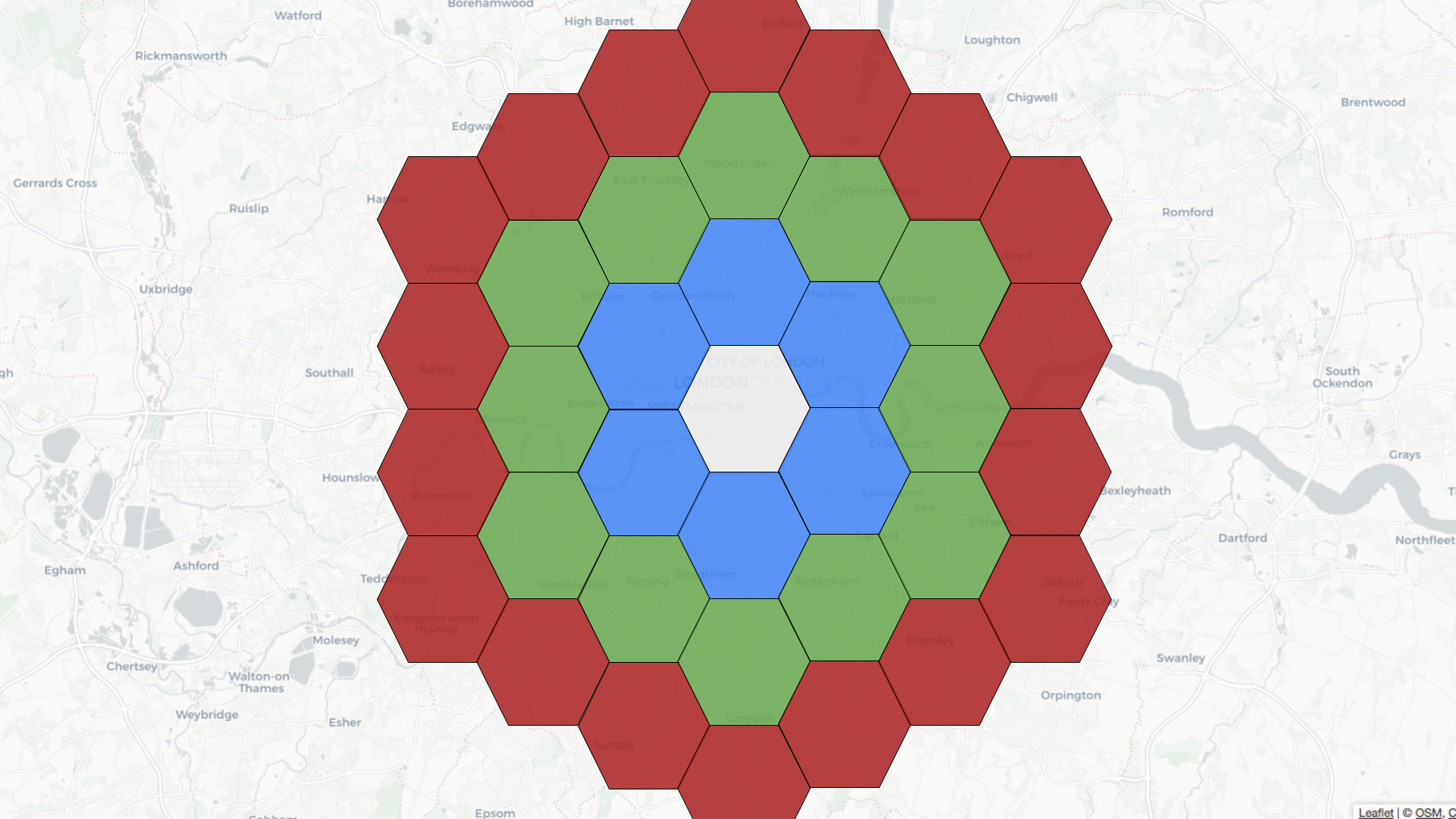
+
+Let’s learn how to use geospatial indexing with help from a dataset that
captures the latest location of trains moving around the UK. We’re streaming
this data into a `trains` topic in Apache Kafka®. Here’s one message from this
stream:
+
+
+```bash
+kcat -C -b localhost:9092 -t trains -c1| jq
+
+
+{
+ "trainCompany": "CrossCountry",
+ "atocCode": "XC",
+ "lat": 50.692726,
+ "lon": -3.5040767,
+ "ts": "2023-03-09 10:57:11.1678359431",
+ "trainId": "202303096771054"
+}
+```
+We’re going to ingest this data into Pinot, so let’s create a schema:
+
+
+```json
+{
+ "schemaName": "trains",
+ "dimensionFieldSpecs": [
+ {"name": "trainCompany", "dataType": "STRING"},
+ {"name": "trainId", "dataType": "STRING"},
+ {"name": "atocCode", "dataType": "STRING"},
+ {"name": "point", "dataType": "BYTES"}
+ ],
+ "dateTimeFieldSpecs": [
+ {
+ "name": "ts",
+ "dataType": "TIMESTAMP",
+ "format": "1:MILLISECONDS:EPOCH",
+ "granularity": "1:MILLISECONDS"
+ }
+ ]
+}
+
+```
+The point column will store a point object that represents the current
location of a train. We’ll see how that column gets populated from our table
config, as shown below:
+
+
+```json
+{
+ "tableName": "trains",
+ "tableType": "REALTIME",
+ "segmentsConfig": {
+ "timeColumnName": "ts",
+ "schemaName": "trains",
+ "replication": "1",
+ "replicasPerPartition": "1"
+ },
+ "fieldConfigList": [{
+ "name": "point",
+ "encodingType":"RAW",
+ "indexType":"H3",
+ "properties": {"resolutions": "7"}
+ }],
+ "tableIndexConfig": {
+ "loadMode": "MMAP",
+ "noDictionaryColumns": ["point"],
+ "streamConfigs": {
+ "streamType": "kafka",
+ "stream.kafka.topic.name": "trains",
+ "stream.kafka.broker.list": "kafka-geospatial:9093",
+ "stream.kafka.consumer.type": "lowlevel",
+ "stream.kafka.consumer.prop.auto.offset.reset": "smallest",
+ "stream.kafka.consumer.factory.class.name":
"org.apache.pinot.plugin.stream.kafka20.KafkaConsumerFactory",
+ "stream.kafka.decoder.class.name":
"org.apache.pinot.plugin.stream.kafka.KafkaJSONMessageDecoder"
+ }
+ },
+ "ingestionConfig": {
+ "transformConfigs": [
+ {
+ "columnName": "point",
+ "transformFunction": "STPoint(lon, lat, 1)"
+ }
+ ]
+ },
+ "tenants": {},
+ "metadata": {}
+}
+
+```
+The point column is populated by the following function under
`transformConfigs`:
+
+`STPoint(lon, lat, 1)`
+
+In earlier versions of Pinot, you’d need to ensure that the schema included
lat and lon columns, but that no longer applies.
+
+We define the geospatial index on the point column under `fieldConfigList`. We
can configure what H3 calls
[resolutions](https://h3geo.org/docs/core-library/restable), which defines the
size of a hexagon and their number. A resolution of 7 means that there will be
98,825,150 hexagons, each covering an area of 5.16 km². We also need to add the
geospatial column to `tableIndexConfig.noDictionaryColumns`.
+
+We can go ahead and create that table using the `AddTable` command and Pinot
will automatically start ingesting data from Kafka.
+
+When is the geospatial index used?
+----------------------------------
+
+The geospatial index is used when a WHERE clause in a query calls the
StDistance, StWithin, or StContains functions.
+
+`ST\_Distance`
+
+Let’s say we want to find all the trains within a 10 km radius of Westminster.
We could write a query to answer this question using the STDistance function.
The query might look like this:
+
+
+```sql
+select ts, trainId, atocCode, trainCompany, ST\_AsText(point),
+ STDistance(
+ point,
+ toSphericalGeography(ST_GeomFromText('POINT (-0.13624 51.499507)')))
+ AS distance
+from trains
+WHERE distance < 10000
+ORDER BY distance, ts DESC
+limit 10
+```
+
+
+These results from running the query would follow:
+
+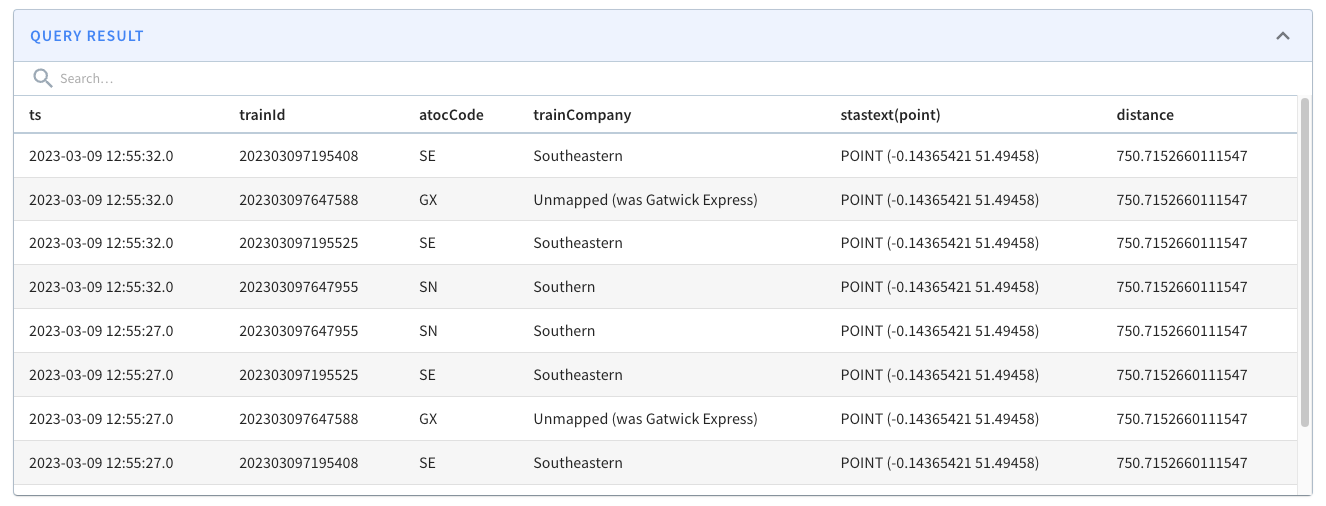
+
+Let’s now go into a bit more detail about what happens when we run the query.
+
+The 10 km radius covers the area inside the white circle on the diagram below:
+
+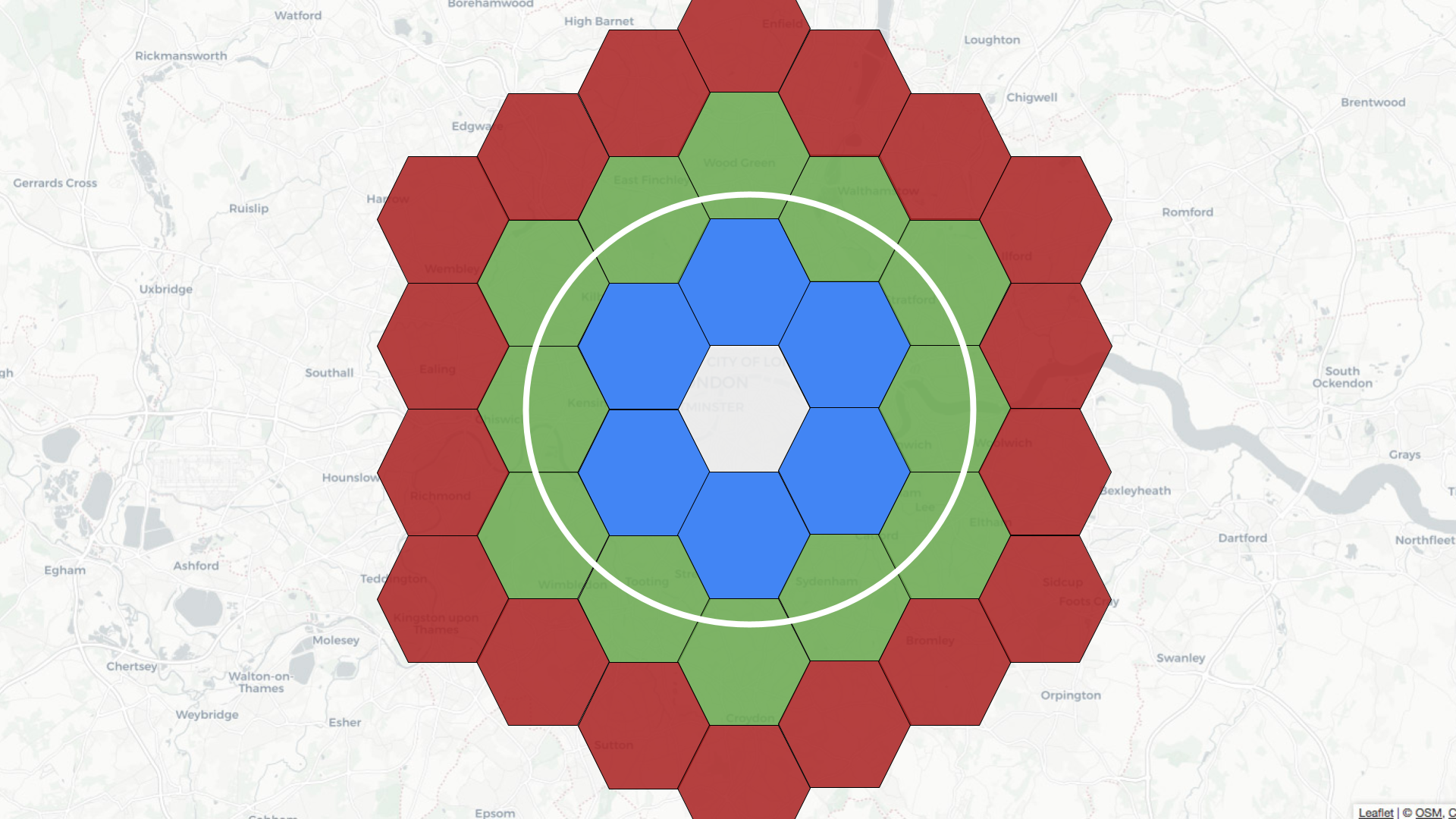
+
+Pinot’s query planner will first translate the distance of 10 km into a number
of rings, in this case, two. It will then find all the hexagons located two
rings away from the white one. Some of these hexagons will fit completely
inside the white circle, and some will overlap with the circle.
+
+If a hexagon fully fits, then we can get all the records inside this hexagon
and return them. For those that partially fit, we’ll need to apply the distance
predicate before working out which records to return.
+
+`ST\_Within/ST\_Contains`
+
+Let’s say that rather than specifying a distance, we instead want to draw a
polygon and find the trains that fit inside that polygon. We could use either
the `ST\_Within` or `ST\_Contains` functions to answer this question.
+
+The query might look like this:
+
+
+```sql
+select ts, trainId, atocCode, trainCompany, ST\_AsText(point)
+from trains
+WHERE StWithin(
+ point,
+ toSphericalGeography(ST_GeomFromText('POLYGON((
+ -0.1296371966600418 51.508053828550544,
+ -0.1538461446762085 51.497007194317064,
+ -0.13032652437686923 51.488276935884414,
+ -0.10458670556545259 51.497003019756846,
+ -0.10864421725273131 51.50817152245844,
+ -0.1296371966600418 51.508053828550544))'))) = 1
+ORDER BY ts DESC
+limit 10
+```
+The results from running the query are shown below:
+
+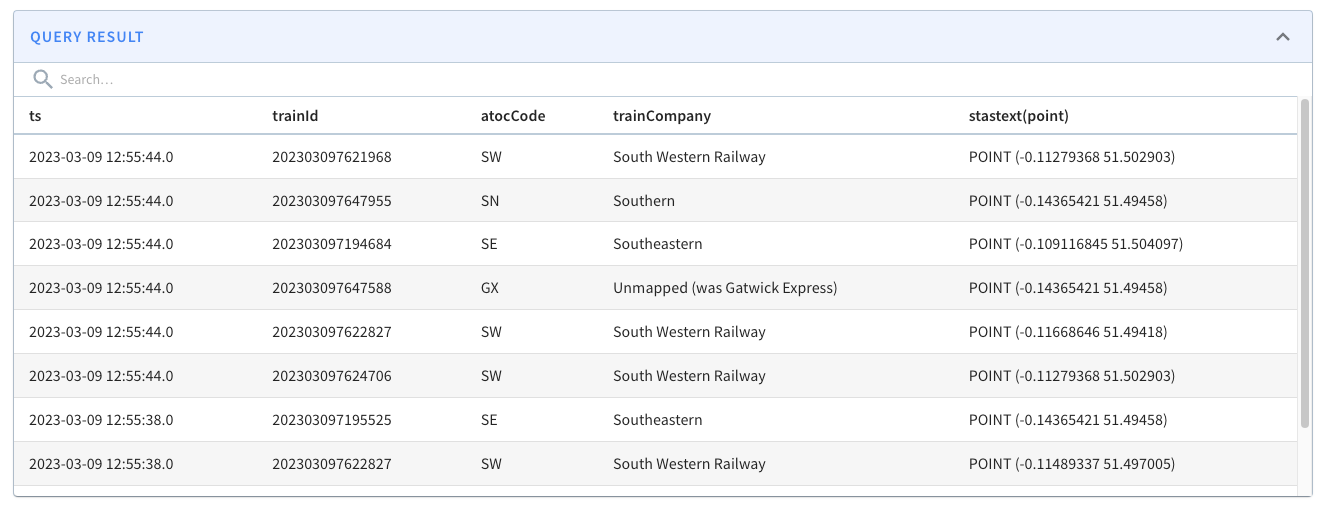
+
+If we change the query to show trains outside of a central London polygon,
we’d see the following results:
+
+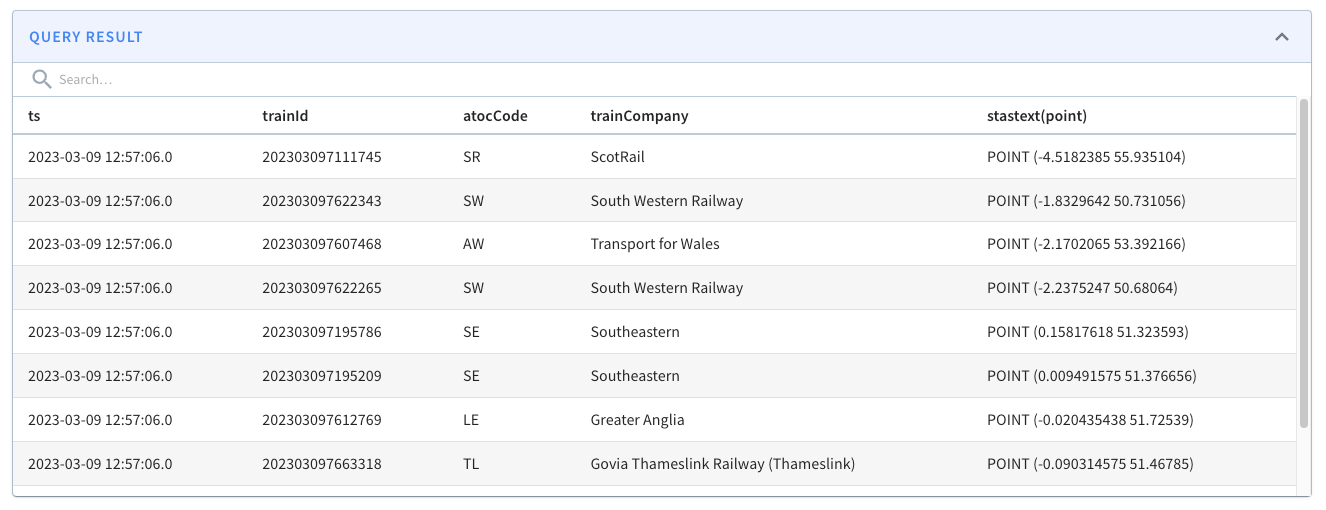
+
+So what’s actually happening when we run this query?
+
+The polygon covers the area inside the white shape as shown below:
+
+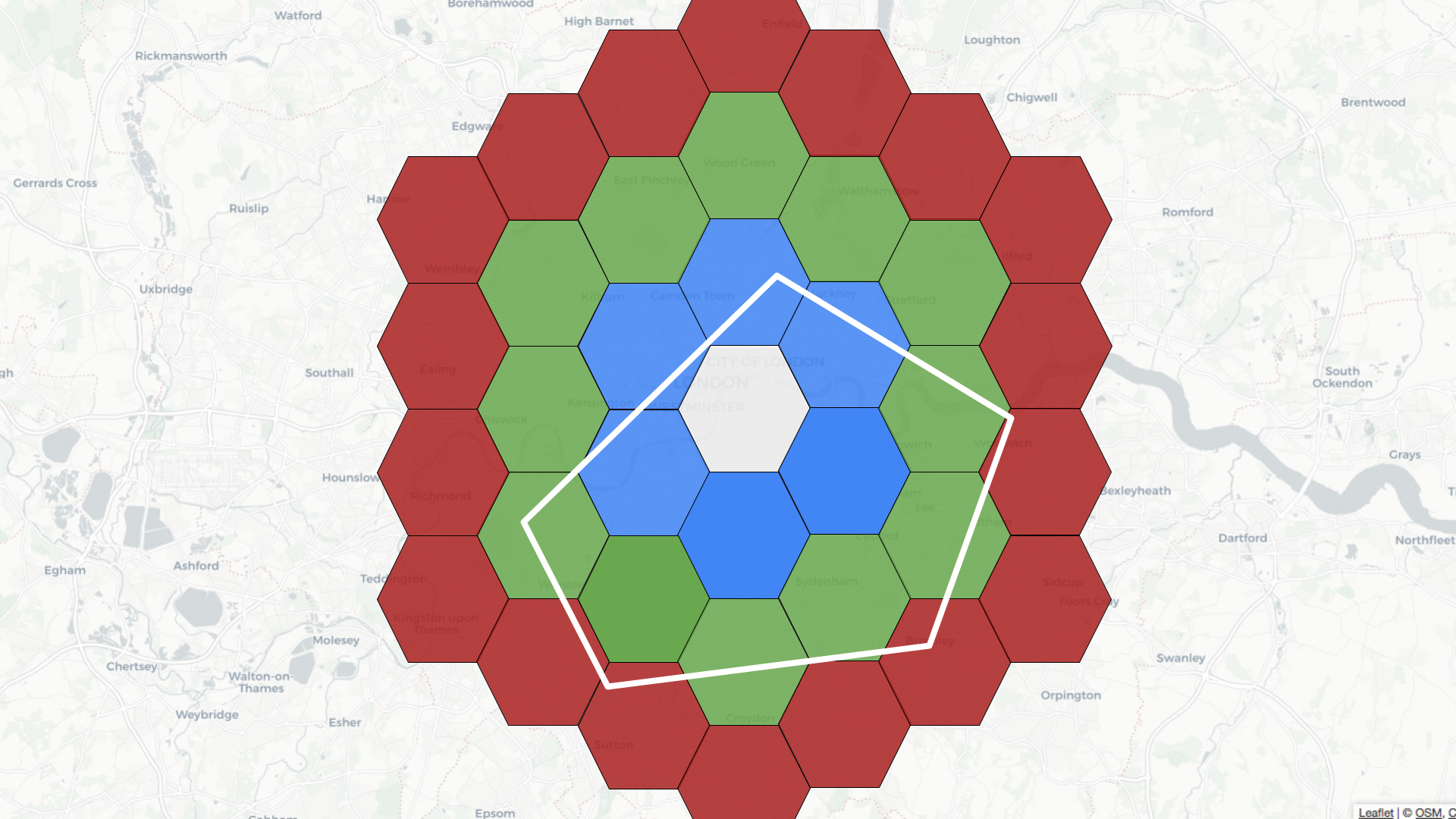
+
+Pinot’s query planner will first find all the coordinates on the exterior of
the polygon. It will then find the hexagons that fit within that geofence.
Those hexagons get added to the potential cells list.
+
+The query planner then takes each of those hexagons and checks whether they
fit completely inside the original polygon. If they do, then they get added to
the fully contained cells list. If we have any cells in both lists, we remove
them from the potential cells list.
+
+Next, we find the records for the fully contained cells list and those for the
potential cells list.
+
+If we are finding records that fit inside the polygon, we return those in the
fully contained list and apply the STWithin/StContains predicate to work out
which records to return from the potential list.
+
+If we are finding records outside the polygon, we will create a new fully
contained list, which will actually contain the records that are outside the
polygon. This list contains all of the records in the database except the ones
in the potential list and those in the initial fully contained list.
+
+This one was a bit tricky for me to get my head around, so let’s just quickly
go through an example. Imagine that we store 10 records in our database and our
potential and fully contained lists hold the following values:
+
+
+```python
+potential = [0,1,2,3]
+fullyContained = [4,5,6]
+```
+First, compute newFullyContained to find all the records not in potential:
+
+`newFullyContained = [4,5,6,7,8,9]`
+
+Then we can remove the values in fullyContained, which gives us:
+
+`newFullyContained = [7,8,9]`
+
+We will return all the records in `newFullyContained` and apply the `STWithin`
or `StContains` predicate to work out which records to return from the
potential list.
+
+How do you know the index usage?
+--------------------------------
+
+We can write queries that use `STDistance`, `STWithin`, and `STContains`
without using a geospatial index, but if we’ve got one defined, we’ll want to
get the peace of mind of its actual use.
+
+You can check by prefixing a query with `EXPLAIN PLAN FOR`, which will return
a list of the operators in the query plan.
+
+If our query uses `STDistance`, we should expect to see the
`FILTER\_H3\_INDEX` operator. If it uses STWithin or STContains, we should
expect to see the INCLUSION\_FILTER\_H3\_INDEX operator.
+
+See this example query plan:
+
+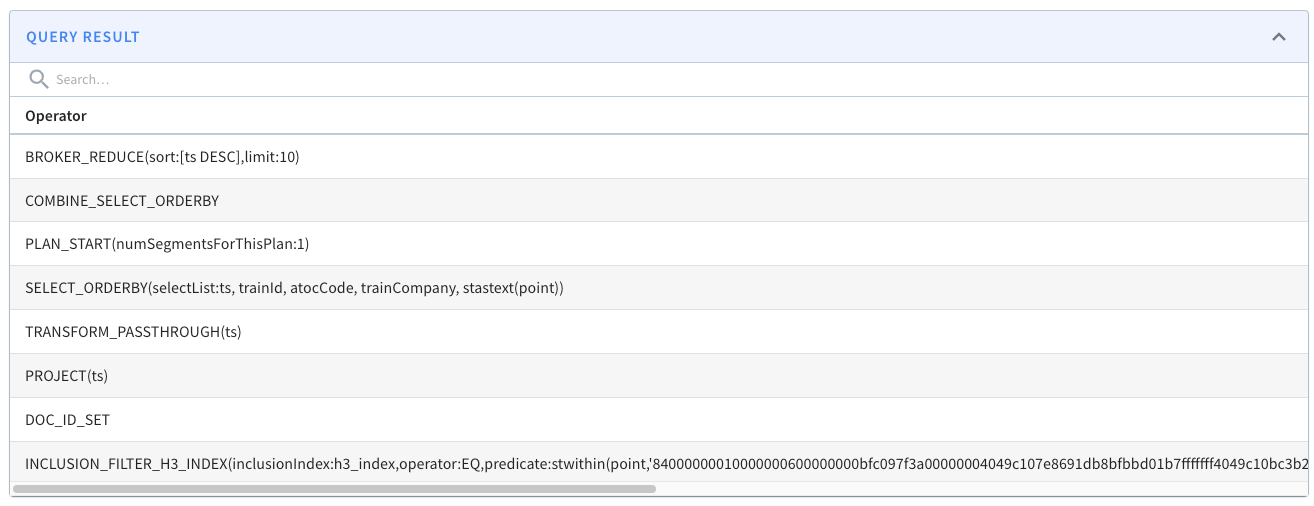
+
+The [StarTree Developer Hub](https://dev.startree.ai/) contains a [geospatial
indexing
guide](https://dev.startree.ai/docs/pinot/recipes/geospatial-indexing#how-do-i-check-that-the-geospatial-index-is-being-used)
that goes through this in more detail.
+
+Summary
+-------
+
+I hope you found this blog post useful and now understand how geospatial
indexes work and when to use them in Apache Pinot.
+
+Give them a try, and let us know how you get on! If you want to use, or are
already using geospatial queries in Apache Pinot, we’d love to hear how — feel
free to [contact us](/contact-us) and tell us more! To help get you started,
[sign up for a free trial of fully managed Apache Pinot](/saas-signup). And if
you run into any technical questions, feel free to find me on the [StarTree
Community Slack](https://stree.ai/slack).
diff --git a/website/blog/2023-09-19-Annoucing-Apache-Pinot-1-0.md
b/website/blog/2023-09-19-Annoucing-Apache-Pinot-1-0.md
new file mode 100644
index 00000000..09b48809
--- /dev/null
+++ b/website/blog/2023-09-19-Annoucing-Apache-Pinot-1-0.md
@@ -0,0 +1,289 @@
+---
+title: Announcing Apache Pinot 1.0™
+author: Hubert Dulay
+author_title: Hubert Dulay, Mayank Shrivastava, Neha Pawar
+author_url: https://pinot.apache.org/
+author_image_url: https://pinot.apache.org/authors/pinot_team.jpg
+description:
+ Introducing Apache Pinot 1.0 Release
+
+keywords:
+ - Apache Pinot
+ - Apache Pinot 1.0
+ - joins
+ - upsert
+ - clp compression
+ - null support
+ - pluggable index
+ - spark integration
+tags: [Pinot, Data, Analytics, User-Facing Analytics, joins, compression, null
support, pluggable index, spark integration]
+---
+
+# Announcing Apache Pinot 1.0™
+By: Hubert Dulay, Mayank Shrivastava, Neha Pawar
+
+## What Makes a “1.0 Release?”
+Apache Pinot has continuously evolved since the project’s inception within
LinkedIn in 2013. Back then it was developed at a single company with a single
use case in mind: to power “who viewed my profile?” Over the ensuing decade the
Apache Pinot community expanded to be embraced by many other organizations, and
those organizations have expanded its capabilities to address new use cases.
Apache Pinot in 2023 is continuously evolving to address emerging needs in the
real-time analytics co [...]
+
+- Upserts — data-in-motion tends to stay in motion, and one of the cornerstone
capabilities of Apache Pinot is upsert support to handle upsert mutations in
real-time.
+- Query-time Native JOINs — it was important to get this right, so that they
were performant and scalable, allowing high QPS. This we will discuss in more
detail below.
+- Pluggable architecture — a broad user base requires the ability to extend
the database with new customizable index types, routing strategies and storage
options
+- Handling Semi-Structured/Unstructured Data — Pinot can easily index JSON and
text data types at scale.
+- Improving ANSI SQL Compliance — to that end, we’ve added better NULL
handling, window functions, and as stated above, the capability for native
JOINs.
+
+With all of these features and capabilities, Apache Pinot moves farther and
farther from mere database status, and becomes more of a complete platform that
can tackle entire new classes of use cases that were beyond its capabilities in
earlier days.
+
+First let’s look at what Apache Pinot 1.0 itself is delivering. The first
foundational pillar of what makes something worthy of a “1.0” release is
software quality. Over the past year, since September 2022, engineers across
the Apache Pinot community have closed over 300 issues to provide new features,
optimize performance, expand test coverage, and squash bugs.
+
+Features are also a key thing that makes a new release worthy of “1.0” status.
The most critical part of the 1.0 release is undoubtedly the [Multi-Stage Query
Engine](https://docs.pinot.apache.org/developers/advanced/v2-multi-stage-query-engine),
which permits Apache Pinot users to do [performant and scalable query-time
JOINs](https://startree.ai/blog/apache-pinot-native-join-support).
+
+The original engine works very well for simpler filter-and-aggregate queries,
but the broker could become a bottleneck for more complex queries. The new
engine also resolves this by introducing intermediary compute stages on the
query servers, and brings Apache Pinot closer to full ANSI SQL semantics. While
this query engine has been available within Apache Pinot already (since release
0.11.0), with the release of Apache Pinot 1.0 this feature is functionally
complete.
+
+(While you can read more below, check out the accompanying blog by Apache
Pinot PMC Neha Pawar about using query-time JOINs
[here](https://startree.ai/blog/query-time-joins-in-apache-pinot-1-0)).
+
+This post is a summary of the high points, but you can find a full list of
everything included in the release notes. And if you’d like a [video treatment
of many of the main features in
1.0](https://youtu.be/2cwRHM4J7kI?si=hEtl6W2eNlMkWqag), including some helpful
animations, watch here:
+
+[](https://www.youtube.com/watch?v=2cwRHM4J7kI&ab_channel=StarTree)
+
+<!-- <iframe width="560" height="315"
src="https://www.youtube.com/embed/2cwRHM4J7kI?si=BMVZanJIuXv9o0du";
title="YouTube video player" frameborder="0" allow="accelerometer; autoplay;
clipboard-write; encrypted-media; gyroscope; picture-in-picture; web-share"
allowfullscreen></iframe> -->
+
+Otherwise, let’s have a look at some of the highlighted changes:
+
+- Join Support - Part of the Multi-Stage Query Engine
+- Improved Upserts - Deletion and Compaction Support
+- Encode User-Specified Compressed Log Processor (CLP) During Ingestion
+- NULL Support
+- Pluggable Index Types [Index Service Provider Interface (SPI)]
+- Improved Pinot-Spark Integration - Spark3 Compatibility
+
+
+## Join Support
+Apache Pinot 1.0 introduces native query-time JOIN support equipping Pinot to
handle a broad spectrum of JOIN scenarios providing full coverage from
user-facing analytics all the way up to ad hoc analytics. Underpinning this
innovation is the multi-stage query engine, introduced a year ago, which
efficiently manages complex analytical queries, including JOIN operations. This
engine alleviates computational burdens by offloading tasks from brokers to a
dedicated intermediate compute stage [...]
+
+JOIN optimization strategies play a pivotal role in Apache Pinot 1.0. These
include predicate push-down to individual tables and using indexing and pruning
to reduce scanning which speeds up query processing, smart data layout
considerations to minimize data shuffling, and query hints for fine-tuning JOIN
operations. With support for all JOIN types and three JOIN algorithms,
including broadcast join, shuffle distributed hash join, and lookup join,
Apache Pinot delivers versatility and sc [...]
+
+For more detailed information on JOINs, please visit this blog
[post](https://startree.ai/blog/query-time-joins-in-apache-pinot-1-0).
+
+Discover How Uber is using Joins in Apache Pinot
+For a real-world use case, Uber is already using the new join capabilities of
Apache Pinot at scale in production. You can watch this video to learn more.
+
+[](https://www.youtube.com/embed/z4Chhref1BM?si=eCOfxuw8Y_ZP8ZHN)
+
+<!-- <iframe width="560" height="315"
src="https://www.youtube.com/embed/z4Chhref1BM?si=eCOfxuw8Y_ZP8ZHN";
title="YouTube video player" frameborder="0" allow="accelerometer; autoplay;
clipboard-write; encrypted-media; gyroscope; picture-in-picture; web-share"
allowfullscreen></iframe> -->
+
+## Upsert Improvements
+Support for upserts is one of the key capabilities Apache Pinot offers that
differentiates it from other real-time analytics databases. It is a vital
feature when real-time streaming data is prone to frequent updates. While
upserts have been available in Apache Pinot since 0.6.0, with 1.0 they include
two major new enhancements: segment compaction and delete support for upsert
tables.
+
+### Segment Compaction for Upsert Tables
+Pinot’s Upsert tables store all versions of a record ingested into immutable
segments on disk. Older records unnecessarily consume valuable storage space
when they’re no longer used in query results. Pinot’s Segment Compaction
reclaims this valuable storage space by introducing a periodic process that
replaces completed segments with compacted segments which only contain the
latest version of the records.
+
+```json
+"task": {
+ "taskTypeConfigsMap": {
+ "UpsertCompactionTask": {
+ "schedule": "0 */5 * ? * *",
+ "bufferTimePeriod": "7d",
+ "invalidRecordsThresholdPercent": "30",
+ "invalidRecordsThresholdCount": "100000"
+ }
+ }
+}
+```
+
+The example above, bufferTimePeriod is set to “7d” which means that any
segment that was completed over 7 days ago may be eligible for compaction.
However, if you want to ensure that segments are compacted without any
additional delay this config can be set to “0d”.
+
+invalidRecordsThresholdPercent is an optional limit to the amount of older
records allowed in the completed segment represented as a percentage of the
total number of records in the segment (i.e. old records / total records). In
the example, this property is set to “30” which means that if more than 30% of
the records in the completed segment are old, then the segment may be selected
for compaction.
+
+invalidRecordsThresholdCount is also a limit similar to the previous property,
but allows you to express the threshold as a record count. In the example
above, this property is set to “100000” which means that if the segment
contains more than 100K records then it may be selected for compaction.
+
+[Read
more](https://robert-zych.medium.com/segment-compaction-for-upsert-enabled-tables-in-apache-pinot-3f30657aa077)
about the design of this feature.
+
+### DELETE Support for Upsert Tables
+Apache Pinot upsert tables now support deleting records. Supporting delete
with upsert avoids the need for the user to explicitly filter out invalid
records in the query. SELECT * FROM table WHERE deleted_column != true becomes
as simple as SELECT * FROM table. Pinot will only return the latest non-deleted
records from the table. This feature opens up the support to ingest Change Data
Capture (CDC) data like Debezium where the changes from a source (typically,
mutable) will contain DELET [...]
+
+Deletes itself is implemented as a soft-delete in Apache Pinot with a
dedicated boolean column that serves as a delete marker for the record. Pinot
automatically filters out records that are marked in this column. For more
details, please see the
[documentation](https://docs.pinot.apache.org/basics/data-import/upsert#delete-column).
+
+
+## NULL Value Support
+This feature enables Postgres compatible NULL semantics in Apache Pinot
queries. The NULL semantics are important for usability for full SQL
compatibility which many BI applications like Tableau rely upon when invoking
queries to render dashboards. Previously in Pinot, we could not represent NULL.
The workaround was to use special values like Integer.MIN_VALUE to represent
NULL. Now Pinot 1.0 has full support to represent NULL values. By adding NULL
support, Pinot 1.0 has increased the T [...]
+
+Here are some examples of how NULLs will work in Pinot 1.0.
+
+### Aggregations
+Given the following table below, aggregating columns with NULL values will
have this behavior.
+
+| col1 | col2 |
+| --|--|
+|1|NULL|
+|2|NULL|
+|3|1|
+
+
+Since col1 does not contain NULL values, all the values are included in the
aggregation.
+
+
+```sql
+select sum(col1) -- returns 6
+select count(col1) -- returns 3
+```
+
+In the select statement below, the NULL values in col2 are not included in the
aggregation.
+
+
+```sql
+select sum(col2) -- returns 1
+select count(col2) -- returns 1
+```
+
+### Group By
+Pinot now supports grouping by NULL. In the example below, we are grouping by
col1 which contains a NULL value. Given the table below, grouping by columns
with NULL value will have this behavior.
+
+|col1|
+|---|
+|a|
+|NULL|
+|b|
+|a|
+
+The following select statement will output the following result.
+
+select col1, count(*) from table group by col1
+
+|col1|count()|
+|---|---|
+|a|2|
+|b|1|
+|NULL|1|
+
+### Sorting
+Pinot now allows you to specify the location of NULL values when sorting
records. The default is to act as though NULLs are larger than non-NULLs.
+
+Given this list of values, sorting them will result in the following.
+
+`values: 1, 2, 3, NULL`
+
+Example 1:
+
+NULL values sort BEFORE all non-NULL values.
+
+SQL:
+```sql
+select col from table order by col NULLS FIRST
+```
+
+`RESULT: NULL, 1, 2, 3 `
+
+Example 2:
+
+NULL values sort AFTER all non-NULL values.
+
+SQL:
+```sql
+select col from table order by col ASC NULLS LAST
+``````
+
+`RESULT: 1, 2, 3, NULL`
+
+Example 3:
+
+Default behavior is NULL LAST.
+
+SQL:
+```sql
+select col from table order by col
+```
+
+`RESULT: 1, 2, 3, NULL`
+
+
+## Index Pluggability
+Today, Pinot supports multiple index types, like forward index, bloom filter,
and range index. Before Pinot 1.0, index types were all statically defined,
which means that in order to create a new index type, you’d need to rebuild
Pinot from source. Ideally that shouldn’t be the case.
+
+To increase speed of development, [Index Service Provider Interface
(SPI)](https://github.com/apache/pinot/issues/10183), or index-spi, reduces
friction by adding the ability to include new index types at runtime in Pinot.
This opens the ability of adding third party indexes by including an external
jar in the classpath and adding some configuration. This opens up Pinot
indexing to lower-friction innovation from the community.
+
+For now, SPI-accessible indexes are limited to single field index types.
Features like the star-tree index or other multi-column approaches are not yet
supported.
+
+
+## Apache Pinot Spark 3 Connector and Passing Pinot Options
+Apache Spark users can now take advantage of Pinot’s ability to provide high
scalability, low latency, and high concurrency within the context of a Spark 3
cluster using the [Apache Pinot Spark 3
Connector](https://github.com/apache/pinot/blob/master/pinot-connectors/pinot-spark-3-connector/README.md).
+
+This connector supports Apache Spark (2.x and 3.x) as a processor to create
and push segment files to the database and can read realtime, offline, and
hybrid tables from Pinot.
+
+Now you can merge your streaming and batch datasets together in Spark to
provide a full view of real-time and historical data for your machine learning
algorithms and feature stores.
+
+Performance Features
+- Distributed, parallel scan
+- Streaming reads using gRPC (optional)
+- Column and filter push down to optimize performance
+- Support for Pinot’s Query Options that include: maxExecutionThreads,
enableNullHandling, skipUpsert, etc.
+
+Usability Features
+- SQL support instead of PQL
+- Overlap between realtime and offline segments is queried exactly once for
hybrid tables
+- Schema discovery - If schema is not specified, the [connector reads the
table
schema](https://github.com/apache/pinot/blob/master/pinot-connectors/pinot-spark-3-connector/documentation/read_model.md)
from the Pinot controller, and then converts to the Spark schema.
+
+Here is an example that reads a Pinot table, by setting the format to “pinot”
spark will automatically load the Pinot connector and read the “airlinesStats”
table. The queryOptions property allows you to provide [Pinot Query
Options](https://docs.pinot.apache.org/users/user-guide-query/query-options).
+
+```scala
+val data = spark.read
+ .format("pinot")
+ .option("table", "airlineStats")
+ .option("tableType", "offline")
+ .option("queryOptions", "enableNullHandling=true,maxExecutionThreads=1")
+ .load()
+ .sql("SELECT * FROM airlineStats WHERE DEST = ‘SFO’")
+
+data.show(100)
+```
+
+## Petabyte-Scale Log Storage and Search in Pinot with CLP
+Compressed Log Processor (CLP) is a tool capable of losslessly compressing
text logs and searching them in their compressed state. It achieves a better
compression ratio than general purpose compressors alone, while retaining the
ability to search the compressed log events without incurring the performance
penalty of fully decompressing them. Part of CLP’s algorithm was deployed
within
[Uber](https://www.uber.com/blog/reducing-logging-cost-by-two-orders-of-magnitude-using-clp/)
to compre [...]
+
+Log events generated as JSON objects with user-defined schemas, meaning each
event may have different keys. Such user-defined schemas make these events
challenging to store in a table with a set schema. With Log Storage and Search
in Pinot with CLP, users would be able to:
+- Store their log events losslessly (without dropping fields)
+- Store their logs with some amount of compression
+- Query their logs efficiently
+
+The CLP ingestion pipeline can be used on log events from a stream, such as
JSON log events ingested from Kafka. The plugin takes two inputs: a JSON record
and a list of fields to encode with CLP.
+
+The fields to encode can be configured as shown:
+
+```json
+{
+ ...
+ "tableIndexConfig": {
+ ...
+ "streamConfigs": {
+ ...
+ "stream.kafka.decoder.class.name":
"org.apache.pinot.plugin.inputformat.clplog.CLPLogMessageDecoder",
+ "stream.kafka.decoder.prop.fieldsForClpEncoding":
"<field-name-1>,<field-name-2>"
+ }
+ }
+}
+```
+
+`<field-names-1 and 2>` are a comma-separated list of fields you wish to
encode with CLP.
+
+You can read the design
[document](https://docs.google.com/document/d/1nHZb37re4mUwEA258x3a2pgX13EWLWMJ0uLEDk1dUyU/edit)
for more details into why and how this feature was implemented.
+
+
+## Summary
+Apache Pinot’s evolution is expressly due to the humans behind the code, and
in reaching 1.0 release status it is proper and fitting to give credit to the
open source project’s key committers. Since its early days, over [three hundred
contributors](https://github.com/apache/pinot/graphs/contributors) have
produced more than 1.3 million source lines of code (SLOC).
+
+
+
+The introduction of Apache Pinot 1.0 represents an exceptional stride forward
in real-time online analytical processing (OLAP) capabilities, marking a
watershed moment in the evolution of real-time analytics systems. This release
redefines the limits of what can be achieved in the realm of instant data
analysis, presenting a game-changing solution for organizations seeking high
throughput and low latency in their OLAP queries. If you would like to get
started with Apache Pinot 1.0, you c [...]
+
+
+## Resources
+If you want to try out Apache Pinot, the following resources will help you get
started:
+
+Download page: https://pinot.apache.org/download/
+
+Getting started: https://docs.pinot.apache.org/getting-started
+
+Join our Slack channel:
https://communityinviter.com/apps/apache-pinot/apache-pinot
+
+See our upcoming events: https://www.meetup.com/apache-pinot
+
+Follow us on social media: https://twitter.com/ApachePinot
diff --git a/website/static/blogs/apache-pinot-1-0-name-cloud.png
b/website/static/blogs/apache-pinot-1-0-name-cloud.png
new file mode 100644
index 00000000..60e98dcf
Binary files /dev/null and
b/website/static/blogs/apache-pinot-1-0-name-cloud.png differ
---------------------------------------------------------------------
To unsubscribe, e-mail: [email protected]
For additional commands, e-mail: [email protected]