WrathLi opened a new issue #13083:
URL: https://github.com/apache/pulsar/issues/13083
In my project, I run pulsar with kop plugin,and change the port 2181 to 12181. Pulsar Version:2.8.1 Kop Version:2.8.1.23 This is my standalone.conf file. `# # Licensed to the Apache Software Foundation (ASF) under one # or more contributor license agreements. See the NOTICE file # distributed with this work for additional information # regarding copyright ownership. The ASF licenses this file # to you under the Apache License, Version 2.0 (the # "License"); you may not use this file except in compliance # with the License. You may obtain a copy of the License at # # http://www.apache.org/licenses/LICENSE-2.0 # # Unless required by applicable law or agreed to in writing, # software distributed under the License is distributed on an # "AS IS" BASIS, WITHOUT WARRANTIES OR CONDITIONS OF ANY # KIND, either express or implied. See the License for the # specific language governing permissions and limitations # under the License. # ### --- General broker settings --- ### # Zookeeper quorum connection string zookeeperServers=localhost:12181 # Configuration Store connection string configurationStoreServers=localhost:12181 brokerServicePort=6650 # Port to use to server HTTP request webServicePort=9080 # Hostname or IP address the service binds on, default is 0.0.0.0. bindAddress=0.0.0.0 # Hostname or IP address the service advertises to the outside world. If not set, the value of InetAddress.getLocalHost().getHostName() is used. advertisedAddress= # Enable or disable the HAProxy protocol. haProxyProtocolEnabled=false # Number of threads to use for Netty IO. Default is set to 2 * Runtime.getRuntime().availableProcessors() numIOThreads= # Number of threads to use for ordered executor. The ordered executor is used to operate with zookeeper, # such as init zookeeper client, get namespace policies from zookeeper etc. It also used to split bundle. Default is 8 numOrderedExecutorThreads=8 # Number of threads to use for HTTP requests processing. Default is set to 2 * Runtime.getRuntime().availableProcessors() numHttpServerThreads= # Number of thread pool size to use for pulsar broker service. # The executor in thread pool will do basic broker operation like load/unload bundle, update managedLedgerConfig, # update topic/subscription/replicator message dispatch rate, do leader election etc. # Default is Runtime.getRuntime().availableProcessors() numExecutorThreadPoolSize= # Number of thread pool size to use for pulsar zookeeper callback service # The cache executor thread pool is used for restarting global zookeeper session. # Default is 10 numCacheExecutorThreadPoolSize=10 # Max concurrent web requests maxConcurrentHttpRequests=1024 # Name of the cluster to which this broker belongs to clusterName=standalone # Enable cluster's failure-domain which can distribute brokers into logical region failureDomainsEnabled=false # Zookeeper session timeout in milliseconds zooKeeperSessionTimeoutMillis=30000 # ZooKeeper operation timeout in seconds zooKeeperOperationTimeoutSeconds=30 # ZooKeeper cache expiry time in seconds zooKeeperCacheExpirySeconds=300 # Time to wait for broker graceful shutdown. After this time elapses, the process will be killed brokerShutdownTimeoutMs=60000 # Flag to skip broker shutdown when broker handles Out of memory error skipBrokerShutdownOnOOM=false # Enable backlog quota check. Enforces action on topic when the quota is reached backlogQuotaCheckEnabled=true # How often to check for topics that have reached the quota backlogQuotaCheckIntervalInSeconds=60 # Default per-topic backlog quota limit backlogQuotaDefaultLimitGB=10 # Default per-topic backlog quota time limit in second, less than 0 means no limitation. default is -1. backlogQuotaDefaultLimitSecond=-1 # Default ttl for namespaces if ttl is not already configured at namespace policies. (disable default-ttl with value 0) ttlDurationDefaultInSeconds=0 # Enable the deletion of inactive topics brokerDeleteInactiveTopicsEnabled=true # How often to check for inactive topics brokerDeleteInactiveTopicsFrequencySeconds=60 # Allow you to delete a tenant forcefully. forceDeleteTenantAllowed=false # Allow you to delete a namespace forcefully. forceDeleteNamespaceAllowed=false # Max pending publish requests per connection to avoid keeping large number of pending # requests in memory. Default: 1000 maxPendingPublishRequestsPerConnection=1000 # How frequently to proactively check and purge expired messages messageExpiryCheckIntervalInMinutes=5 # How long to delay rewinding cursor and dispatching messages when active consumer is changed activeConsumerFailoverDelayTimeMillis=1000 # How long to delete inactive subscriptions from last consuming # When it is 0, inactive subscriptions are not deleted automatically subscriptionExpirationTimeMinutes=0 # Enable subscription message redelivery tracker to send redelivery count to consumer (default is enabled) subscriptionRedeliveryTrackerEnabled=true # On KeyShared subscriptions, with default AUTO_SPLIT mode, use splitting ranges or # consistent hashing to reassign keys to new consumers subscriptionKeySharedUseConsistentHashing=false # On KeyShared subscriptions, number of points in the consistent-hashing ring. # The higher the number, the more equal the assignment of keys to consumers subscriptionKeySharedConsistentHashingReplicaPoints=100 # How frequently to proactively check and purge expired subscription subscriptionExpiryCheckIntervalInMinutes=5 # Set the default behavior for message deduplication in the broker # This can be overridden per-namespace. If enabled, broker will reject # messages that were already stored in the topic brokerDeduplicationEnabled=false # Maximum number of producer information that it's going to be # persisted for deduplication purposes brokerDeduplicationMaxNumberOfProducers=10000 # Number of entries after which a dedup info snapshot is taken. # A bigger interval will lead to less snapshots being taken though it would # increase the topic recovery time, when the entries published after the # snapshot need to be replayed brokerDeduplicationEntriesInterval=1000 # Time of inactivity after which the broker will discard the deduplication information # relative to a disconnected producer. Default is 6 hours. brokerDeduplicationProducerInactivityTimeoutMinutes=360 # When a namespace is created without specifying the number of bundle, this # value will be used as the default defaultNumberOfNamespaceBundles=4 # Max number of topics allowed to be created in the namespace. When the topics reach the max topics of the namespace, # the broker should reject the new topic request(include topic auto-created by the producer or consumer) # until the number of connected consumers decrease. # Using a value of 0, is disabling maxTopicsPerNamespace-limit check. maxTopicsPerNamespace=0 # Enable check for minimum allowed client library version clientLibraryVersionCheckEnabled=false # Path for the file used to determine the rotation status for the broker when responding # to service discovery health checks statusFilePath=/usr/local/apache/htdocs # Max number of unacknowledged messages allowed to receive messages by a consumer on a shared subscription. Broker will stop sending # messages to consumer once, this limit reaches until consumer starts acknowledging messages back # Using a value of 0, is disabling unackeMessage limit check and consumer can receive messages without any restriction maxUnackedMessagesPerConsumer=50000 # Max number of unacknowledged messages allowed per shared subscription. Broker will stop dispatching messages to # all consumers of the subscription once this limit reaches until consumer starts acknowledging messages back and # unack count reaches to limit/2. Using a value of 0, is disabling unackedMessage-limit # check and dispatcher can dispatch messages without any restriction maxUnackedMessagesPerSubscription=200000 # Max number of unacknowledged messages allowed per broker. Once this limit reaches, broker will stop dispatching # messages to all shared subscription which has higher number of unack messages until subscriptions start # acknowledging messages back and unack count reaches to limit/2. Using a value of 0, is disabling # unackedMessage-limit check and broker doesn't block dispatchers maxUnackedMessagesPerBroker=0 # Once broker reaches maxUnackedMessagesPerBroker limit, it blocks subscriptions which has higher unacked messages # than this percentage limit and subscription will not receive any new messages until that subscription acks back # limit/2 messages maxUnackedMessagesPerSubscriptionOnBrokerBlocked=0.16 # Tick time to schedule task that checks topic publish rate limiting across all topics # Reducing to lower value can give more accuracy while throttling publish but # it uses more CPU to perform frequent check. (Disable publish throttling with value 0) topicPublisherThrottlingTickTimeMillis=2 # Enable precise rate limit for topic publish preciseTopicPublishRateLimiterEnable=false # Tick time to schedule task that checks broker publish rate limiting across all topics # Reducing to lower value can give more accuracy while throttling publish but # it uses more CPU to perform frequent check. (Disable publish throttling with value 0) brokerPublisherThrottlingTickTimeMillis=50 # Max Rate(in 1 seconds) of Message allowed to publish for a broker if broker publish rate limiting enabled # (Disable message rate limit with value 0) brokerPublisherThrottlingMaxMessageRate=0 # Max Rate(in 1 seconds) of Byte allowed to publish for a broker if broker publish rate limiting enabled # (Disable byte rate limit with value 0) brokerPublisherThrottlingMaxByteRate=0 # Default messages per second dispatch throttling-limit for every topic. Using a value of 0, is disabling default # message dispatch-throttling dispatchThrottlingRatePerTopicInMsg=0 # Default bytes per second dispatch throttling-limit for every topic. Using a value of 0, is disabling # default message-byte dispatch-throttling dispatchThrottlingRatePerTopicInByte=0 # Dispatch rate-limiting relative to publish rate. # (Enabling flag will make broker to dynamically update dispatch-rate relatively to publish-rate: # throttle-dispatch-rate = (publish-rate + configured dispatch-rate). dispatchThrottlingRateRelativeToPublishRate=false # By default we enable dispatch-throttling for both caught up consumers as well as consumers who have # backlog. dispatchThrottlingOnNonBacklogConsumerEnabled=true # Precise dispathcer flow control according to history message number of each entry preciseDispatcherFlowControl=false # Max number of concurrent lookup request broker allows to throttle heavy incoming lookup traffic maxConcurrentLookupRequest=50000 # Max number of concurrent topic loading request broker allows to control number of zk-operations maxConcurrentTopicLoadRequest=5000 # Max concurrent non-persistent message can be processed per connection maxConcurrentNonPersistentMessagePerConnection=1000 # Number of worker threads to serve non-persistent topic numWorkerThreadsForNonPersistentTopic=8 # Enable broker to load persistent topics enablePersistentTopics=true # Enable broker to load non-persistent topics enableNonPersistentTopics=true # Max number of producers allowed to connect to topic. Once this limit reaches, Broker will reject new producers # until the number of connected producers decrease. # Using a value of 0, is disabling maxProducersPerTopic-limit check. maxProducersPerTopic=0 # Max number of producers with the same IP address allowed to connect to topic. # Once this limit reaches, Broker will reject new producers until the number of # connected producers with the same IP address decrease. # Using a value of 0, is disabling maxSameAddressProducersPerTopic-limit check. maxSameAddressProducersPerTopic=0 # Enforce producer to publish encrypted messages.(default disable). encryptionRequireOnProducer=false # Max number of consumers allowed to connect to topic. Once this limit reaches, Broker will reject new consumers # until the number of connected consumers decrease. # Using a value of 0, is disabling maxConsumersPerTopic-limit check. maxConsumersPerTopic=0 # Max number of consumers with the same IP address allowed to connect to topic. # Once this limit reaches, Broker will reject new consumers until the number of # connected consumers with the same IP address decrease. # Using a value of 0, is disabling maxSameAddressConsumersPerTopic-limit check. maxSameAddressConsumersPerTopic=0 # Max number of subscriptions allowed to subscribe to topic. Once this limit reaches, broker will reject # new subscription until the number of subscribed subscriptions decrease. # Using a value of 0, is disabling maxSubscriptionsPerTopic limit check. maxSubscriptionsPerTopic=0 # Max number of consumers allowed to connect to subscription. Once this limit reaches, Broker will reject new consumers # until the number of connected consumers decrease. # Using a value of 0, is disabling maxConsumersPerSubscription-limit check. maxConsumersPerSubscription=0 # Max number of partitions per partitioned topic # Use 0 or negative number to disable the check maxNumPartitionsPerPartitionedTopic=0 ### --- TLS --- ### # Deprecated - Use webServicePortTls and brokerServicePortTls instead tlsEnabled=false # Tls cert refresh duration in seconds (set 0 to check on every new connection) tlsCertRefreshCheckDurationSec=300 # Path for the TLS certificate file tlsCertificateFilePath= # Path for the TLS private key file tlsKeyFilePath= # Path for the trusted TLS certificate file. # This cert is used to verify that any certs presented by connecting clients # are signed by a certificate authority. If this verification # fails, then the certs are untrusted and the connections are dropped. tlsTrustCertsFilePath= # Accept untrusted TLS certificate from client. # If true, a client with a cert which cannot be verified with the # 'tlsTrustCertsFilePath' cert will allowed to connect to the server, # though the cert will not be used for client authentication. tlsAllowInsecureConnection=false # Specify the tls protocols the broker will use to negotiate during TLS handshake # (a comma-separated list of protocol names). # Examples:- [TLSv1.3, TLSv1.2] tlsProtocols= # Specify the tls cipher the broker will use to negotiate during TLS Handshake # (a comma-separated list of ciphers). # Examples:- [TLS_ECDHE_RSA_WITH_AES_128_GCM_SHA256] tlsCiphers= # Trusted client certificates are required for to connect TLS # Reject the Connection if the Client Certificate is not trusted. # In effect, this requires that all connecting clients perform TLS client # authentication. tlsRequireTrustedClientCertOnConnect=false ### --- KeyStore TLS config variables --- ### # Enable TLS with KeyStore type configuration in broker. tlsEnabledWithKeyStore=false # TLS Provider for KeyStore type tlsProvider= # TLS KeyStore type configuration in broker: JKS, PKCS12 tlsKeyStoreType=JKS # TLS KeyStore path in broker tlsKeyStore= # TLS KeyStore password for broker tlsKeyStorePassword= # TLS TrustStore type configuration in broker: JKS, PKCS12 tlsTrustStoreType=JKS # TLS TrustStore path in broker tlsTrustStore= # TLS TrustStore password for broker tlsTrustStorePassword= # Whether internal client use KeyStore type to authenticate with Pulsar brokers brokerClientTlsEnabledWithKeyStore=false # The TLS Provider used by internal client to authenticate with other Pulsar brokers brokerClientSslProvider= # TLS TrustStore type configuration for internal client: JKS, PKCS12 # used by the internal client to authenticate with Pulsar brokers brokerClientTlsTrustStoreType=JKS # TLS TrustStore path for internal client # used by the internal client to authenticate with Pulsar brokers brokerClientTlsTrustStore= # TLS TrustStore password for internal client, # used by the internal client to authenticate with Pulsar brokers brokerClientTlsTrustStorePassword= # Specify the tls cipher the internal client will use to negotiate during TLS Handshake # (a comma-separated list of ciphers) # e.g. [TLS_ECDHE_RSA_WITH_AES_128_GCM_SHA256]. # used by the internal client to authenticate with Pulsar brokers brokerClientTlsCiphers= # Specify the tls protocols the broker will use to negotiate during TLS handshake # (a comma-separated list of protocol names). # e.g. [TLSv1.3, TLSv1.2] # used by the internal client to authenticate with Pulsar brokers brokerClientTlsProtocols= # Enable or disable system topic systemTopicEnabled=false # Enable or disable topic level policies, topic level policies depends on the system topic # Please enable the system topic first. topicLevelPoliciesEnabled=false # If a topic remains fenced for this number of seconds, it will be closed forcefully. # If it is set to 0 or a negative number, the fenced topic will not be closed. topicFencingTimeoutSeconds=0 ### --- Authentication --- ### # Role names that are treated as "proxy roles". If the broker sees a request with #role as proxyRoles - it will demand to see a valid original principal. proxyRoles= # If this flag is set then the broker authenticates the original Auth data # else it just accepts the originalPrincipal and authorizes it (if required). authenticateOriginalAuthData=false # Enable authentication authenticationEnabled=false # Authentication provider name list, which is comma separated list of class names authenticationProviders= # Enforce authorization authorizationEnabled=false # Authorization provider fully qualified class-name authorizationProvider=org.apache.pulsar.broker.authorization.PulsarAuthorizationProvider # Allow wildcard matching in authorization # (wildcard matching only applicable if wildcard-char: # * presents at first or last position eg: *.pulsar.service, pulsar.service.*) authorizationAllowWildcardsMatching=false # Role names that are treated as "super-user", meaning they will be able to do all admin # operations and publish/consume from all topics superUserRoles= # Authentication settings of the broker itself. Used when the broker connects to other brokers, # either in same or other clusters brokerClientAuthenticationPlugin= brokerClientAuthenticationParameters= # Supported Athenz provider domain names(comma separated) for authentication athenzDomainNames= # When this parameter is not empty, unauthenticated users perform as anonymousUserRole anonymousUserRole= ### --- Token Authentication Provider --- ### ## Symmetric key # Configure the secret key to be used to validate auth tokens # The key can be specified like: # tokenSecretKey=data:;base64,xxxxxxxxx # tokenSecretKey=file:///my/secret.key ( Note: key file must be DER-encoded ) tokenSecretKey= ## Asymmetric public/private key pair # Configure the public key to be used to validate auth tokens # The key can be specified like: # tokenPublicKey=data:;base64,xxxxxxxxx # tokenPublicKey=file:///my/public.key ( Note: key file must be DER-encoded ) tokenPublicKey= # The token "claim" that will be interpreted as the authentication "role" or "principal" by AuthenticationProviderToken (defaults to "sub" if blank) tokenAuthClaim= # The token audience "claim" name, e.g. "aud", that will be used to get the audience from token. # If not set, audience will not be verified. tokenAudienceClaim= # The token audience stands for this broker. The field `tokenAudienceClaim` of a valid token, need contains this. tokenAudience= ### --- BookKeeper Client --- ### # Authentication plugin to use when connecting to bookies bookkeeperClientAuthenticationPlugin= # BookKeeper auth plugin implementatation specifics parameters name and values bookkeeperClientAuthenticationParametersName= bookkeeperClientAuthenticationParameters= # Timeout for BK add / read operations bookkeeperClientTimeoutInSeconds=30 # Number of BookKeeper client worker threads # Default is Runtime.getRuntime().availableProcessors() bookkeeperClientNumWorkerThreads= # Speculative reads are initiated if a read request doesn't complete within a certain time # Using a value of 0, is disabling the speculative reads bookkeeperClientSpeculativeReadTimeoutInMillis=0 # Number of channels per bookie bookkeeperNumberOfChannelsPerBookie=16 # Enable bookies health check. Bookies that have more than the configured number of failure within # the interval will be quarantined for some time. During this period, new ledgers won't be created # on these bookies bookkeeperClientHealthCheckEnabled=true bookkeeperClientHealthCheckIntervalSeconds=60 bookkeeperClientHealthCheckErrorThresholdPerInterval=5 bookkeeperClientHealthCheckQuarantineTimeInSeconds=1800 #bookie quarantine ratio to avoid all clients quarantine the high pressure bookie servers at the same time bookkeeperClientQuarantineRatio=1.0 # Enable rack-aware bookie selection policy. BK will chose bookies from different racks when # forming a new bookie ensemble # This parameter related to ensemblePlacementPolicy in conf/bookkeeper.conf, if enabled, ensemblePlacementPolicy # should be set to org.apache.bookkeeper.client.RackawareEnsemblePlacementPolicy bookkeeperClientRackawarePolicyEnabled=true # Enable region-aware bookie selection policy. BK will chose bookies from # different regions and racks when forming a new bookie ensemble. # If enabled, the value of bookkeeperClientRackawarePolicyEnabled is ignored # This parameter related to ensemblePlacementPolicy in conf/bookkeeper.conf, if enabled, ensemblePlacementPolicy # should be set to org.apache.bookkeeper.client.RegionAwareEnsemblePlacementPolicy bookkeeperClientRegionawarePolicyEnabled=false # Minimum number of racks per write quorum. BK rack-aware bookie selection policy will try to # get bookies from at least 'bookkeeperClientMinNumRacksPerWriteQuorum' racks for a write quorum. bookkeeperClientMinNumRacksPerWriteQuorum=1 # Enforces rack-aware bookie selection policy to pick bookies from 'bookkeeperClientMinNumRacksPerWriteQuorum' # racks for a writeQuorum. # If BK can't find bookie then it would throw BKNotEnoughBookiesException instead of picking random one. bookkeeperClientEnforceMinNumRacksPerWriteQuorum=false # Enable/disable reordering read sequence on reading entries. bookkeeperClientReorderReadSequenceEnabled=false # Enable bookie isolation by specifying a list of bookie groups to choose from. Any bookie # outside the specified groups will not be used by the broker bookkeeperClientIsolationGroups= # Enable bookie secondary-isolation group if bookkeeperClientIsolationGroups doesn't # have enough bookie available. bookkeeperClientSecondaryIsolationGroups= # Minimum bookies that should be available as part of bookkeeperClientIsolationGroups # else broker will include bookkeeperClientSecondaryIsolationGroups bookies in isolated list. bookkeeperClientMinAvailableBookiesInIsolationGroups= # Set the client security provider factory class name. # Default: org.apache.bookkeeper.tls.TLSContextFactory bookkeeperTLSProviderFactoryClass=org.apache.bookkeeper.tls.TLSContextFactory # Enable tls authentication with bookie bookkeeperTLSClientAuthentication=false # Supported type: PEM, JKS, PKCS12. Default value: PEM bookkeeperTLSKeyFileType=PEM #Supported type: PEM, JKS, PKCS12. Default value: PEM bookkeeperTLSTrustCertTypes=PEM # Path to file containing keystore password, if the client keystore is password protected. bookkeeperTLSKeyStorePasswordPath= # Path to file containing truststore password, if the client truststore is password protected. bookkeeperTLSTrustStorePasswordPath= # Path for the TLS private key file bookkeeperTLSKeyFilePath= # Path for the TLS certificate file bookkeeperTLSCertificateFilePath= # Path for the trusted TLS certificate file bookkeeperTLSTrustCertsFilePath= # Enable/disable disk weight based placement. Default is false bookkeeperDiskWeightBasedPlacementEnabled=false # Set the interval to check the need for sending an explicit LAC # A value of '0' disables sending any explicit LACs. Default is 0. bookkeeperExplicitLacIntervalInMills=0 # Use older Bookkeeper wire protocol with bookie bookkeeperUseV2WireProtocol=true # Expose bookkeeper client managed ledger stats to prometheus. default is false # bookkeeperClientExposeStatsToPrometheus=false ### --- Managed Ledger --- ### # Number of bookies to use when creating a ledger managedLedgerDefaultEnsembleSize=1 # Number of copies to store for each message managedLedgerDefaultWriteQuorum=1 # Number of guaranteed copies (acks to wait before write is complete) managedLedgerDefaultAckQuorum=1 # How frequently to flush the cursor positions that were accumulated due to rate limiting. (seconds). # Default is 60 seconds managedLedgerCursorPositionFlushSeconds = 60 # Default type of checksum to use when writing to BookKeeper. Default is "CRC32C" # Other possible options are "CRC32", "MAC" or "DUMMY" (no checksum). managedLedgerDigestType=CRC32C # Number of threads to be used for managed ledger tasks dispatching managedLedgerNumWorkerThreads=4 # Number of threads to be used for managed ledger scheduled tasks managedLedgerNumSchedulerThreads=4 # Amount of memory to use for caching data payload in managed ledger. This memory # is allocated from JVM direct memory and it's shared across all the topics # running in the same broker. By default, uses 1/5th of available direct memory managedLedgerCacheSizeMB= # Whether we should make a copy of the entry payloads when inserting in cache managedLedgerCacheCopyEntries=false # Threshold to which bring down the cache level when eviction is triggered managedLedgerCacheEvictionWatermark=0.9 # Configure the cache eviction frequency for the managed ledger cache (evictions/sec) managedLedgerCacheEvictionFrequency=100.0 # All entries that have stayed in cache for more than the configured time, will be evicted managedLedgerCacheEvictionTimeThresholdMillis=1000 # Configure the threshold (in number of entries) from where a cursor should be considered 'backlogged' # and thus should be set as inactive. managedLedgerCursorBackloggedThreshold=1000 # Rate limit the amount of writes generated by consumer acking the messages managedLedgerDefaultMarkDeleteRateLimit=0.1 # Max number of entries to append to a ledger before triggering a rollover # A ledger rollover is triggered on these conditions # * Either the max rollover time has been reached # * or max entries have been written to the ledger and at least min-time # has passed managedLedgerMaxEntriesPerLedger=50000 # Minimum time between ledger rollover for a topic managedLedgerMinLedgerRolloverTimeMinutes=10 # Maximum time before forcing a ledger rollover for a topic managedLedgerMaxLedgerRolloverTimeMinutes=240 # Max number of entries to append to a cursor ledger managedLedgerCursorMaxEntriesPerLedger=50000 # Max time before triggering a rollover on a cursor ledger managedLedgerCursorRolloverTimeInSeconds=14400 # Maximum ledger size before triggering a rollover for a topic (MB) managedLedgerMaxSizePerLedgerMbytes=2048 # Max number of "acknowledgment holes" that are going to be persistently stored. # When acknowledging out of order, a consumer will leave holes that are supposed # to be quickly filled by acking all the messages. The information of which # messages are acknowledged is persisted by compressing in "ranges" of messages # that were acknowledged. After the max number of ranges is reached, the information # will only be tracked in memory and messages will be redelivered in case of # crashes. managedLedgerMaxUnackedRangesToPersist=10000 # Max number of "acknowledgment holes" that can be stored in Zookeeper. If number of unack message range is higher # than this limit then broker will persist unacked ranges into bookkeeper to avoid additional data overhead into # zookeeper. managedLedgerMaxUnackedRangesToPersistInZooKeeper=1000 # Skip reading non-recoverable/unreadable data-ledger under managed-ledger's list. It helps when data-ledgers gets # corrupted at bookkeeper and managed-cursor is stuck at that ledger. autoSkipNonRecoverableData=false # operation timeout while updating managed-ledger metadata. managedLedgerMetadataOperationsTimeoutSeconds=60 # Read entries timeout when broker tries to read messages from bookkeeper. managedLedgerReadEntryTimeoutSeconds=0 # Add entry timeout when broker tries to publish message to bookkeeper (0 to disable it). managedLedgerAddEntryTimeoutSeconds=0 # New entries check delay for the cursor under the managed ledger. # If no new messages in the topic, the cursor will try to check again after the delay time. # For consumption latency sensitive scenario, can set to a smaller value or set to 0. # Of course, use a smaller value may degrade consumption throughput. Default is 10ms. managedLedgerNewEntriesCheckDelayInMillis=10 # Use Open Range-Set to cache unacked messages managedLedgerUnackedRangesOpenCacheSetEnabled=true # Managed ledger prometheus stats latency rollover seconds (default: 60s) managedLedgerPrometheusStatsLatencyRolloverSeconds=60 # Whether trace managed ledger task execution time managedLedgerTraceTaskExecution=true # If you want to custom bookie ID or use a dynamic network address for the bookie, # you can set this option. # Bookie advertises itself using bookieId rather than # BookieSocketAddress (hostname:port or IP:port). # bookieId is a non empty string that can contain ASCII digits and letters ([a-zA-Z9-0]), # colons, dashes, and dots. # For more information about bookieId, see http://bookkeeper.apache.org/bps/BP-41-bookieid/. # bookieId= ### --- Load balancer --- ### loadManagerClassName=org.apache.pulsar.broker.loadbalance.NoopLoadManager # Enable load balancer loadBalancerEnabled=false # Percentage of change to trigger load report update loadBalancerReportUpdateThresholdPercentage=10 # maximum interval to update load report loadBalancerReportUpdateMaxIntervalMinutes=15 # Frequency of report to collect loadBalancerHostUsageCheckIntervalMinutes=1 # Load shedding interval. Broker periodically checks whether some traffic should be offload from # some over-loaded broker to other under-loaded brokers loadBalancerSheddingIntervalMinutes=1 # Prevent the same topics to be shed and moved to other broker more that once within this timeframe loadBalancerSheddingGracePeriodMinutes=30 # Usage threshold to allocate max number of topics to broker loadBalancerBrokerMaxTopics=50000 # Interval to flush dynamic resource quota to ZooKeeper loadBalancerResourceQuotaUpdateIntervalMinutes=15 # enable/disable namespace bundle auto split loadBalancerAutoBundleSplitEnabled=true # enable/disable automatic unloading of split bundles loadBalancerAutoUnloadSplitBundlesEnabled=true # maximum topics in a bundle, otherwise bundle split will be triggered loadBalancerNamespaceBundleMaxTopics=1000 # maximum sessions (producers + consumers) in a bundle, otherwise bundle split will be triggered loadBalancerNamespaceBundleMaxSessions=1000 # maximum msgRate (in + out) in a bundle, otherwise bundle split will be triggered loadBalancerNamespaceBundleMaxMsgRate=30000 # maximum bandwidth (in + out) in a bundle, otherwise bundle split will be triggered loadBalancerNamespaceBundleMaxBandwidthMbytes=100 # maximum number of bundles in a namespace loadBalancerNamespaceMaximumBundles=128 # The broker resource usage threshold. # When the broker resource usage is greater than the pulsar cluster average resource usage, # the threshold shedder will be triggered to offload bundles from the broker. # It only takes effect in the ThresholdShedder strategy. loadBalancerBrokerThresholdShedderPercentage=10 # When calculating new resource usage, the history usage accounts for. # It only takes effect in the ThresholdShedder strategy. loadBalancerHistoryResourcePercentage=0.9 # The BandWithIn usage weight when calculating new resource usage. # It only takes effect in the ThresholdShedder strategy. loadBalancerBandwithInResourceWeight=1.0 # The BandWithOut usage weight when calculating new resource usage. # It only takes effect in the ThresholdShedder strategy. loadBalancerBandwithOutResourceWeight=1.0 # The CPU usage weight when calculating new resource usage. # It only takes effect in the ThresholdShedder strategy. loadBalancerCPUResourceWeight=1.0 # The heap memory usage weight when calculating new resource usage. # It only takes effect in the ThresholdShedder strategy. loadBalancerMemoryResourceWeight=1.0 # The direct memory usage weight when calculating new resource usage. # It only takes effect in the ThresholdShedder strategy. loadBalancerDirectMemoryResourceWeight=1.0 # Bundle unload minimum throughput threshold (MB), avoiding bundle unload frequently. # It only takes effect in the ThresholdShedder strategy. loadBalancerBundleUnloadMinThroughputThreshold=10 ### --- Replication --- ### # Enable replication metrics replicationMetricsEnabled=true # Max number of connections to open for each broker in a remote cluster # More connections host-to-host lead to better throughput over high-latency # links. replicationConnectionsPerBroker=16 # Replicator producer queue size replicationProducerQueueSize=1000 # Duration to check replication policy to avoid replicator inconsistency # due to missing ZooKeeper watch (disable with value 0) replicationPolicyCheckDurationSeconds=600 # Default message retention time defaultRetentionTimeInMinutes=0 # Default retention size defaultRetentionSizeInMB=0 # How often to check whether the connections are still alive keepAliveIntervalSeconds=30 ### --- WebSocket --- ### # Enable the WebSocket API service in broker webSocketServiceEnabled=true # Number of IO threads in Pulsar Client used in WebSocket proxy webSocketNumIoThreads=8 # Number of connections per Broker in Pulsar Client used in WebSocket proxy webSocketConnectionsPerBroker=8 # Time in milliseconds that idle WebSocket session times out webSocketSessionIdleTimeoutMillis=300000 # The maximum size of a text message during parsing in WebSocket proxy webSocketMaxTextFrameSize=1048576 ### --- Metrics --- ### # Enable topic level metrics exposeTopicLevelMetricsInPrometheus=true # Time in milliseconds that metrics endpoint would time out. Default is 30s. # Increase it if there are a lot of topics to expose topic-level metrics. # Set it to 0 to disable timeout. metricsServletTimeoutMs=30000 # Classname of Pluggable JVM GC metrics logger that can log GC specific metrics # jvmGCMetricsLoggerClassName= ### --- Broker Web Stats --- ### # Enable topic level metrics exposePublisherStats=true # Enable expose the precise backlog stats. # Set false to use published counter and consumed counter to calculate, this would be more efficient but may be inaccurate. # Default is false. exposePreciseBacklogInPrometheus=false ### --- Deprecated config variables --- ### # Deprecated. Use configurationStoreServers globalZookeeperServers= # Deprecated. Use brokerDeleteInactiveTopicsFrequencySeconds brokerServicePurgeInactiveFrequencyInSeconds=60 ### --- BookKeeper Configuration --- ##### ledgerStorageClass=org.apache.bookkeeper.bookie.storage.ldb.DbLedgerStorage # The maximum netty frame size in bytes. Any message received larger than this will be rejected. The default value is 5MB. nettyMaxFrameSizeBytes=5253120 # Size of Write Cache. Memory is allocated from JVM direct memory. # Write cache is used to buffer entries before flushing into the entry log # For good performance, it should be big enough to hold a substantial amount # of entries in the flush interval # By default it will be allocated to 1/4th of the available direct memory dbStorage_writeCacheMaxSizeMb= # Size of Read cache. Memory is allocated from JVM direct memory. # This read cache is pre-filled doing read-ahead whenever a cache miss happens # By default it will be allocated to 1/4th of the available direct memory dbStorage_readAheadCacheMaxSizeMb= # How many entries to pre-fill in cache after a read cache miss dbStorage_readAheadCacheBatchSize=1000 flushInterval=60000 ## RocksDB specific configurations ## DbLedgerStorage uses RocksDB to store the indexes from ## (ledgerId, entryId) -> (entryLog, offset) # Size of RocksDB block-cache. For best performance, this cache # should be big enough to hold a significant portion of the index # database which can reach ~2GB in some cases # Default is to use 10% of the direct memory size dbStorage_rocksDB_blockCacheSize= # Other RocksDB specific tunables dbStorage_rocksDB_writeBufferSizeMB=4 dbStorage_rocksDB_sstSizeInMB=4 dbStorage_rocksDB_blockSize=4096 dbStorage_rocksDB_bloomFilterBitsPerKey=10 dbStorage_rocksDB_numLevels=-1 dbStorage_rocksDB_numFilesInLevel0=4 dbStorage_rocksDB_maxSizeInLevel1MB=256 # Maximum latency to impose on a journal write to achieve grouping journalMaxGroupWaitMSec=1 # Should the data be fsynced on journal before acknowledgment. journalSyncData=false # For each ledger dir, maximum disk space which can be used. # Default is 0.95f. i.e. 95% of disk can be used at most after which nothing will # be written to that partition. If all ledger dir partions are full, then bookie # will turn to readonly mode if 'readOnlyModeEnabled=true' is set, else it will # shutdown. # Valid values should be in between 0 and 1 (exclusive). diskUsageThreshold=0.99 # The disk free space low water mark threshold. # Disk is considered full when usage threshold is exceeded. # Disk returns back to non-full state when usage is below low water mark threshold. # This prevents it from going back and forth between these states frequently # when concurrent writes and compaction are happening. This also prevent bookie from # switching frequently between read-only and read-writes states in the same cases. diskUsageWarnThreshold=0.99 # Whether the bookie allowed to use a loopback interface as its primary # interface(i.e. the interface it uses to establish its identity)? # By default, loopback interfaces are not allowed as the primary # interface. # Using a loopback interface as the primary interface usually indicates # a configuration error. For example, its fairly common in some VPS setups # to not configure a hostname, or to have the hostname resolve to # 127.0.0.1. If this is the case, then all bookies in the cluster will # establish their identities as 127.0.0.1:3181, and only one will be able # to join the cluster. For VPSs configured like this, you should explicitly # set the listening interface. allowLoopback=true # How long the interval to trigger next garbage collection, in milliseconds # Since garbage collection is running in background, too frequent gc # will heart performance. It is better to give a higher number of gc # interval if there is enough disk capacity. gcWaitTime=300000 # Enable topic auto creation if new producer or consumer connected (disable auto creation with value false) allowAutoTopicCreation=true # The type of topic that is allowed to be automatically created.(partitioned/non-partitioned) allowAutoTopicCreationType=non-partitioned # Enable subscription auto creation if new consumer connected (disable auto creation with value false) allowAutoSubscriptionCreation=true # The number of partitioned topics that is allowed to be automatically created if allowAutoTopicCreationType is partitioned. defaultNumPartitions=1 ### --- Transaction config variables --- ### # Enable transaction coordinator in broker transactionCoordinatorEnabled=false transactionMetadataStoreProviderClassName=org.apache.pulsar.transaction.coordinator.impl.MLTransactionMetadataStoreProvider # Transaction buffer take snapshot transaction count transactionBufferSnapshotMaxTransactionCount=1000 # Transaction buffer take snapshot interval time # Unit : millisecond transactionBufferSnapshotMinTimeInMillis=5000 ### --- Packages management service configuration variables (begin) --- ### # Enable the packages management service or not enablePackagesManagement=false # The packages management service storage service provide packagesManagementStorageProvider=org.apache.pulsar.packages.management.storage.bookkeeper.BookKeeperPackagesStorageProvider # When the packages storage provider is bookkeeper, you can use this configuration to # control the number of replicas for storing the package packagesReplicas=1 maxMessageSize=10485760 # The bookkeeper ledger root path packagesManagementLedgerRootPath=/ledgers messagingProtocols=kafka,mqtt protocolHandlerDirectory=./protocols allowAutoTopicCreationType=partitioned kafkaListeners=PLAINTEXT://0.0.0.0:19092 kafkaAdvertisedListeners=PLAINTEXT://127.0.0.1:19092 brokerEntryMetadataInterceptors=org.apache.pulsar.common.intercept.AppendIndexMetadataInterceptor brokerDeleteInactiveTopicsEnabled=false mqttListeners=mqtt://127.0.0.1:1883 advertisedAddress=127.0.0.1 bookkeeperMetadataServiceUri=zk+hierarchical://localhost:12181/ledgers zkServers=localhost:12181 clientPort=12181 ### --- Packages management service configuration variables (end) --- ### ` when I run the script `./bin/pulsar standalone` pulsar start failed. pulsar create a zookeeper client with port 2181 to connect to zookeeper,but the zookeeper has change port 2181 to 12181,so it failed. here is the log file. 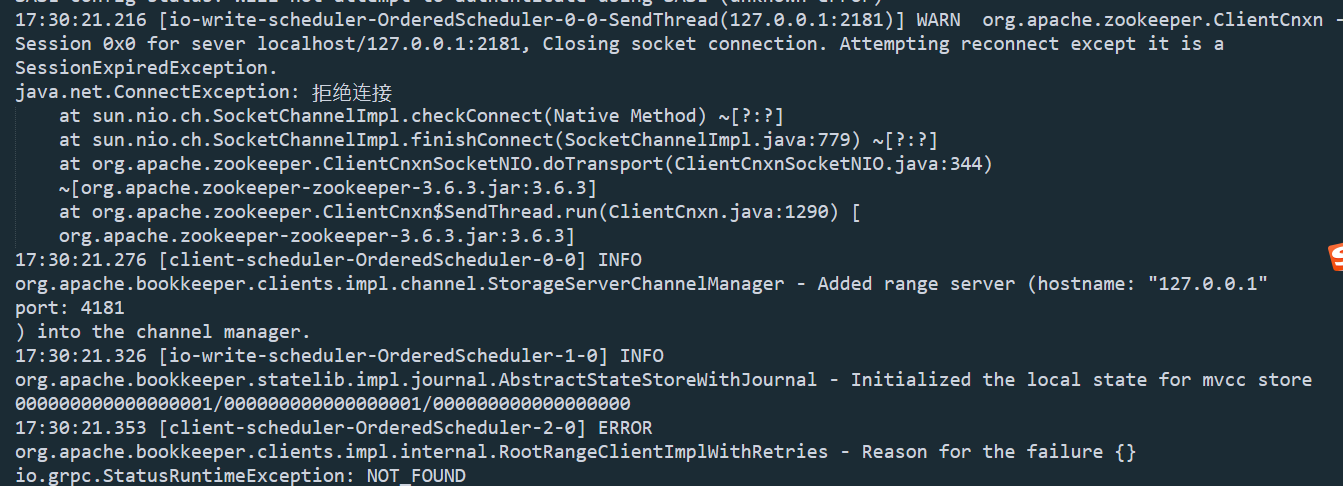  finally,I located where the bug is. In the method distributedlog-core -> BKNamespaceDriver -> initializeBookKeeperClients() 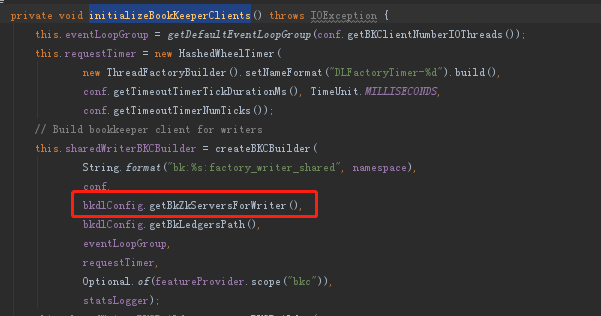 bkdlConfig.getBkZkServersForWriter() always return the port 2181. I replace "bkdlConfig.getBkZkServersForWriter()" with "getZKServersFromDLUri(namespace)" , and build a new distributedlog-core.jar replace the original lib. Then the pulsar finally work. I hope Pulsar can fix this bug in the later version. -- This is an automated message from the Apache Git Service. To respond to the message, please log on to GitHub and use the URL above to go to the specific comment. To unsubscribe, e-mail: [email protected] For queries about this service, please contact Infrastructure at: [email protected]



