SapnaGirdhani1 opened a new issue #13151:
URL: https://github.com/apache/pulsar/issues/13151
**Describe the bug** I am using Docker to create pulsar_postgres_jdbc_sink but it is not running. Status shows running as false. **To Reproduce** I followed this document : **https://pulsar.apache.org/docs/en/io-quickstart/#create-a-jdbc-sink** to create jdbc sink I used below command to create a sink : $ bin/pulsar-admin sinks create \ --archive ./connectors/pulsar-io-jdbc-postgres-2.8.1.nar \ --inputs my-topic \ --name jdbc-postgres-sink \ --sink-config-file ./connectors/pulsar-postgres-jdbc-sink.yaml \ --parallelism 1 This is my yaml (pulsar-postgres-jdbc-sink.yaml) file content : tenant: "public" namespace: "default" name: "jdbc-postgres-sink" topicName: "persistent://public/default/my-topic" sinkType: "jdbc-postgres" configs: userName: "postgres" password: "password" jdbcUrl: "jdbc:postgresql://localhost:5432/pulsar_postgres_jdbc_sink" tableName: "pulsar_postgres_jdbc_sink" After creation of sink , I didn't see any data inside PostgreSQL database and the sink running status is "false" (screenshot attached) **Expected behavior** pulsar_postgres_jdbc_sink should be running **Screenshots** 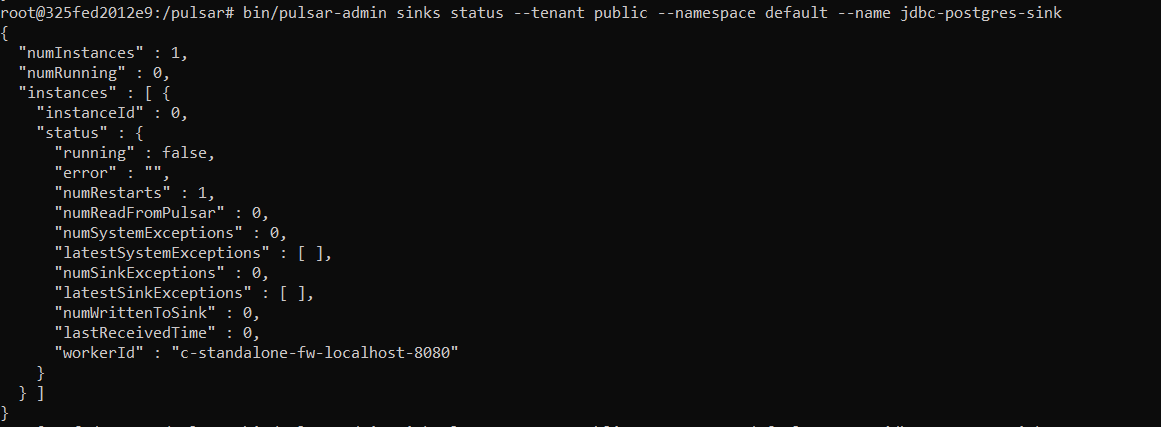 **Desktop (please complete the following information):** - OS: Windows 10 - RAM: 8 gb **Additional context** I've discussed this issue on pulsar slack channel and got to know that others are also facing same challenge, even on Macbook too. It is observed that one can not run postgresql and pulsar and docker and chrome without running out of memory. Please help on the same. Thanks! -- This is an automated message from the Apache Git Service. To respond to the message, please log on to GitHub and use the URL above to go to the specific comment. To unsubscribe, e-mail: [email protected] For queries about this service, please contact Infrastructure at: [email protected]

