mxsm opened a new issue, #5588:
URL: https://github.com/apache/rocketmq/issues/5588
## 1. Background & Motivation RocketMQ5.0 has implemented Controller model that support broker master/slave switching. Achieve the purpose of high availability. 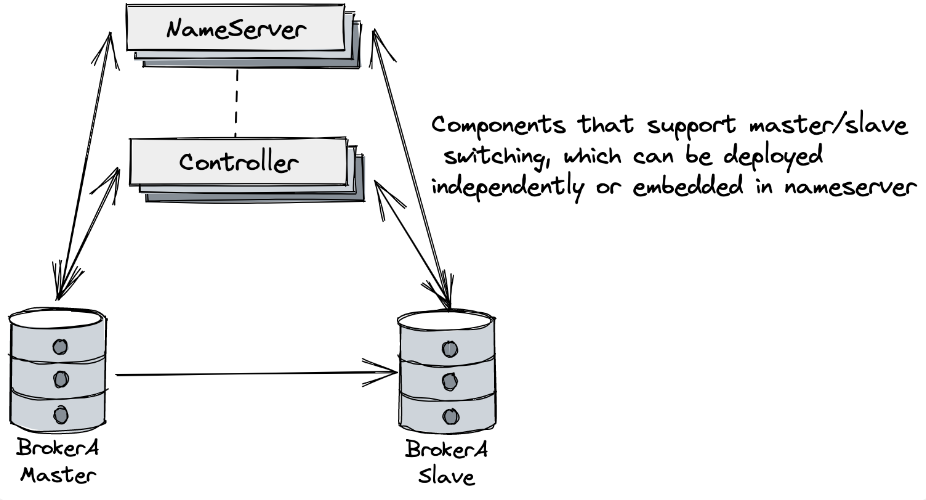 When the broker master off-line or shutdown, the cluster will elect master again in controller model, However, we cannot specify a Broker as the next one to be selected as master, the election is a random process. So **`Preferred Master`** is used to solve this problem ## 2. Goals ### 2.1 What is Preferred Master? It is preferred to select a Broker node as the Master to solve the Broker data alignment and control the load between the computer rooms. ### 2.2 Expected actions Consider Broker cluster Custer-A with three brokers: A, B, C,Broker name is mxsm. By specifying A particular Broker as Preferred Master, the following automatic actions are expected: - The Broker registers to Controller and the Broker marked as Preferred Master is elected as Master. - The Broker Master is down, and the cluster needs to re-elect the master. Choose a Broker from the remaining slaves as the Master. - When the Preferred Master goes offline and comes back online, the waterline of the CommitLog of the Preferred Master may be lower than that of the Broker Master in the current cluster. It is necessary to wait for the Preferred Master to equalize the waterline of the current Broker Master. Then the current Broker Master needs to try to give up the Master role to the node that specifies the Preferred Master Broker. ## 3. Concept Design There are three main operations that are needed to achieve this goal: - **Assign Master** - **Elect Master** - **Transfer Master** ### 3.1 Assign Master Assign Master refers to the Broker of a certain name in the Broker cluster designating a node Broker as the Preferred Master. Trigger the execution of the specified Master operation: - Broker adds configuration to manually specify the Preferred Master in the same Broker name. - Update the Broker configuration through the **`admin`** command to dynamically specify the Preferred Master. ### 3.2 Elect Master Elect Master means that the Broker Master in the current cluster goes offline, and the cluster elects a new Broker Master again. The situation that triggers the operation of selecting a Master: - Broker Master down. - Broker Master heartbeat failure. - The Preferred Master is back online, and the waterline of the re-launched Preferred Master CommitLog is equal to the waterline of the current cluster Broker Master. The current cluster Broker Master triggers the election of the Master, and the object of the election is the designated Preferred Master. ### 3.3 Transfer Master Transfer Master means that the offline Preferred Master is back online, and the current Broker Master transfers the Master to the re-online Preferred Master. Trigger execution of Transfer Master operation: - The offline Preferred Master Broker goes online again, and the current Broker Master in the cluster transfers the Master to the re-online Preferred Master Broker that meets the conditions. ## 4. Detailed Design ### 4.1 Assign Master 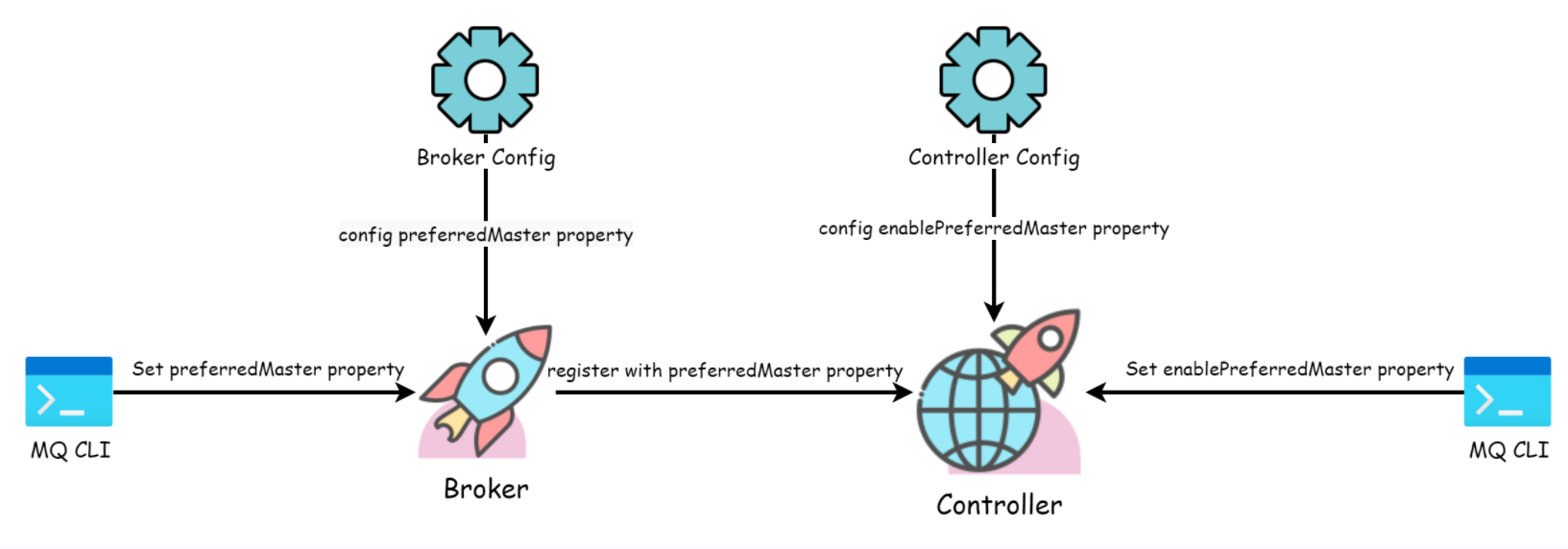 **Broker config(BrokerConfig):** ```properties brokerElectionPriority=0 ``` **`brokerElectionPriority=0`** means that the Broker is called as Preferred Master, and the **`brokerElectionPriority`** attribute is brought when the Broker is registered to the Controller. **Controller config (ControllerConfig):** ```properties enablePreferredMaster=false/true #default value false ``` enablePreferredMaster: false means that the Preferred Master is not enabled, and true means that it is enabled. The default value is false. Controller main processing flow: 1. Broker startup sends the increased **`brokerElectionPriority`** attribute to the Controller along with the registration request. 2. The Controller judges whether **`enablePreferredMaster`** is true, and if it is false, executes the existing logic. Execute Preferred Master logic for true. 3. The first Broker registered to the Controller is set as the Master 4. If the subsequent Broker registered with the Controller contains the property of **`brokerElectionPriority=0`**, try to trigger the Transfer Master. ### 4.2 Elect Master Existing function ### 4.3 Transfer Master  1. The Preferred Master goes offline, triggers the Elect Master, and elects the Master from the remaining Slaves. 2. The Preferred Master goes online again and registers with the Controller. The Preferred Master Broker role is set to Slave. 3. The re-online Preferred Master is connected to the Borker Master in the current cluster to synchronize the **`CommitLog`** data. 4. When the CommitLog of the Preferred Master catches up with the current Broker Master, the current Broker Master reports the SyncStateSet data to the Controller. 5. The Controller re-triggers the Master election, and the elected Master is the designated Preferred Master. > The Transfer Master operation is initiated by the Controller to trigger the election of the Elect Master of the designated Broker. If the Transfer Master Broker status is unhealthy, the transfer of the Master fails. [中文文档](https://www.yuque.com/ljbmxsm/ivyw2t/ahm3syd6h4la1377) ## Steps - [ ] Assign Master implementation - [ ] Transfer master implementation - [ ] Add test case for Broker Preferred Master -- This is an automated message from the Apache Git Service. To respond to the message, please log on to GitHub and use the URL above to go to the specific comment. To unsubscribe, e-mail: [email protected] For queries about this service, please contact Infrastructure at: [email protected]



