update README.md to add s2graphql and s2jobs.
Project: http://git-wip-us.apache.org/repos/asf/incubator-s2graph/repo Commit: http://git-wip-us.apache.org/repos/asf/incubator-s2graph/commit/35d9a438 Tree: http://git-wip-us.apache.org/repos/asf/incubator-s2graph/tree/35d9a438 Diff: http://git-wip-us.apache.org/repos/asf/incubator-s2graph/diff/35d9a438 Branch: refs/heads/master Commit: 35d9a438f27f080f426fceac819f3f45108a9223 Parents: 233a17f Author: DO YUNG YOON <[email protected]> Authored: Mon Apr 23 14:35:46 2018 +0900 Committer: DO YUNG YOON <[email protected]> Committed: Mon Apr 23 14:36:05 2018 +0900 ---------------------------------------------------------------------- README.md | 1049 +++++++++++++++++++++++++------------------------------- 1 file changed, 462 insertions(+), 587 deletions(-) ---------------------------------------------------------------------- http://git-wip-us.apache.org/repos/asf/incubator-s2graph/blob/35d9a438/README.md ---------------------------------------------------------------------- diff --git a/README.md b/README.md index bac5ac9..ba7e81c 100644 --- a/README.md +++ b/README.md @@ -1,588 +1,463 @@ -<!--- -/* - * Licensed to the Apache Software Foundation (ASF) under one - * or more contributor license agreements. See the NOTICE file - * distributed with this work for additional information - * regarding copyright ownership. The ASF licenses this file - * to you under the Apache License, Version 2.0 (the - * "License"); you may not use this file except in compliance - * with the License. You may obtain a copy of the License at - * - * http://www.apache.org/licenses/LICENSE-2.0 - * - * Unless required by applicable law or agreed to in writing, - * software distributed under the License is distributed on an - * "AS IS" BASIS, WITHOUT WARRANTIES OR CONDITIONS OF ANY - * KIND, either express or implied. See the License for the - * specific language governing permissions and limitations - * under the License. - */ ----> -S2Graph [](https://travis-ci.org/apache/incubator-s2graph) -======= - -[**S2Graph**](http://s2graph.apache.org/) is a **graph database** designed to handle transactional graph processing at scale. Its REST API allows you to store, manage and query relational information using **edge** and **vertex** representations in a **fully asynchronous** and **non-blocking** manner. - -S2Graph is a implementation of [**Apache TinkerPop**](https://tinkerpop.apache.org/) on [**Apache HBASE**](https://hbase.apache.org/). - -This document covers some basic concepts and terms of S2Graph as well as help you get a feel for the S2Graph API. - -Building from the source -======================== - -To build S2Graph from the source, install the JDK 8 and [SBT](http://www.scala-sbt.org/), and run the following command in the project root: - - sbt package - -This will create a distribution of S2Graph that is ready to be deployed. - -One can find distribution on `target/apache-s2graph-$version-incubating-bin`. - -Quick Start -=========== - -Once extracted the downloaded binary release of S2Graph or built from the source as described above, the following files and directories should be found in the directory. - -``` -DISCLAIMER -LICENCE # the Apache License 2.0 -NOTICE -bin # scripts to manage the lifecycle of S2Graph -conf # configuration files -lib # contains the binary -logs # application logs -var # application data -``` - -This directory layout contains all binary and scripts required to launch S2Graph. The directories `logs` and `var` may not be present initially, and are created once S2Graph is launched. - -The following will launch S2Graph, using [HBase](https://hbase.apache.org/) in the standalone mode for data storage and [H2](http://www.h2database.com/html/main.html) as the metadata storage. - - sh bin/start-s2graph.sh - -To connect to a remote HBase cluster or use MySQL as the metastore, refer to the instructions in [`conf/application.conf`](conf/application.conf). -S2Graph is tested on HBase versions 0.98, 1.0, 1.1, and 1.2 (https://hub.docker.com/r/harisekhon/hbase/tags/). - -Project Layout -============== - -Here is what you can find in each subproject. - -1. `s2core`: The core library, containing the data abstractions for graph entities, storage adapters and utilities. -2. `s2rest_play`: The REST server built with [Play framework](https://www.playframework.com/), providing the write and query API. -3. `s2rest_netty`: The REST server built directly using Netty, implementing only the query API. -4. `loader`: A collection of Spark jobs for bulk loading streaming data into S2Graph. -5. `spark`: Spark utilities for `loader` and `s2counter_loader`. -6. `s2counter_core`: The core library providing data structures and logics for `s2counter_loader`. -7. `s2counter_loader`: Spark streaming jobs that consume Kafka WAL logs and calculate various top-*K* results on-the-fly. -8. `s2graph_gremlin`: Gremlin plugin for tinkerpop users. - -The first three projects are for OLTP-style workloads, currently the main target of S2Graph. The other four projects could be helpful for OLAP-style or streaming workloads, especially for integrating S2Graph with [Apache Spark](https://spark.apache.org/) and/or [Kafka](https://kafka.apache.org/). Note that, the latter four projects are currently out-of-date, which we are planning to update and provide documentations in the upcoming releases. - -Your First Graph -================ - -Once the S2Graph server has been set up, you can now start to send HTTP queries to the server to create a graph and pour some data in it. This tutorial goes over a simple toy problem to get a sense of how S2Graph's API looks like. [`bin/example.sh`](bin/example.sh) contains the example code below. - -The toy problem is to create a timeline feature for a simple social media, like a simplified version of Facebook's timeline:stuck_out_tongue_winking_eye:. Using simple S2Graph queries it is possible to keep track of each user's friends and their posts. - -1. First, we need a name for the new service. - - The following POST query will create a service named "KakaoFavorites". - - ``` - curl -XPOST localhost:9000/graphs/createService -H 'Content-Type: Application/json' -d ' - {"serviceName": "KakaoFavorites", "compressionAlgorithm" : "gz"} - ' - ``` - - To make sure the service is created correctly, check out the following. - - ``` - curl -XGET localhost:9000/graphs/getService/KakaoFavorites - ``` - -2. Next, we will need some friends. - - In S2Graph, relationships are organized as labels. Create a label called `friends` using the following `createLabel` API call: - - ``` - curl -XPOST localhost:9000/graphs/createLabel -H 'Content-Type: Application/json' -d ' - { - "label": "friends", - "srcServiceName": "KakaoFavorites", - "srcColumnName": "userName", - "srcColumnType": "string", - "tgtServiceName": "KakaoFavorites", - "tgtColumnName": "userName", - "tgtColumnType": "string", - "isDirected": "false", - "indices": [], - "props": [], - "consistencyLevel": "strong" - } - ' - ``` - - Check if the label has been created correctly:+ - - ``` - curl -XGET localhost:9000/graphs/getLabel/friends - ``` - - Now that the label `friends` is ready, we can store the friendship data. Entries of a label are called edges, and you can add edges with `edges/insert` API: - - ``` - curl -XPOST localhost:9000/graphs/edges/insert -H 'Content-Type: Application/json' -d ' - [ - {"from":"Elmo","to":"Big Bird","label":"friends","props":{},"timestamp":1444360152477}, - {"from":"Elmo","to":"Ernie","label":"friends","props":{},"timestamp":1444360152478}, - {"from":"Elmo","to":"Bert","label":"friends","props":{},"timestamp":1444360152479}, - {"from":"Cookie Monster","to":"Grover","label":"friends","props":{},"timestamp":1444360152480}, - {"from":"Cookie Monster","to":"Kermit","label":"friends","props":{},"timestamp":1444360152481}, - {"from":"Cookie Monster","to":"Oscar","label":"friends","props":{},"timestamp":1444360152482} - ] - ' - ``` - - Query friends of Elmo with `getEdges` API: - - ``` - curl -XPOST localhost:9000/graphs/getEdges -H 'Content-Type: Application/json' -d ' - { - "srcVertices": [{"serviceName": "KakaoFavorites", "columnName": "userName", "id":"Elmo"}], - "steps": [ - {"step": [{"label": "friends", "direction": "out", "offset": 0, "limit": 10}]} - ] - } - ' - ``` - - Now query friends of Cookie Monster: - - ``` - curl -XPOST localhost:9000/graphs/getEdges -H 'Content-Type: Application/json' -d ' - { - "srcVertices": [{"serviceName": "KakaoFavorites", "columnName": "userName", "id":"Cookie Monster"}], - "steps": [ - {"step": [{"label": "friends", "direction": "out", "offset": 0, "limit": 10}]} - ] - } - ' - ``` - -3. Users of Kakao Favorites will be able to post URLs of their favorite websites. - - We will need a new label ```post``` for this data: - ``` - curl -XPOST localhost:9000/graphs/createLabel -H 'Content-Type: Application/json' -d ' - { - "label": "post", - "srcServiceName": "KakaoFavorites", - "srcColumnName": "userName", - "srcColumnType": "string", - "tgtServiceName": "KakaoFavorites", - "tgtColumnName": "url", - "tgtColumnType": "string", - "isDirected": "true", - "indices": [], - "props": [], - "consistencyLevel": "strong" - } - ' - ``` - - Now, insert some posts of the users: - - - ``` - curl -XPOST localhost:9000/graphs/edges/insert -H 'Content-Type: Application/json' -d ' - [ - {"from":"Big Bird","to":"www.kakaocorp.com/en/main","label":"post","props":{},"timestamp":1444360152477}, - {"from":"Big Bird","to":"github.com/kakao/s2graph","label":"post","props":{},"timestamp":1444360152478}, - {"from":"Ernie","to":"groups.google.com/forum/#!forum/s2graph","label":"post","props":{},"timestamp":1444360152479}, - {"from":"Grover","to":"hbase.apache.org/forum/#!forum/s2graph","label":"post","props":{},"timestamp":1444360152480}, - {"from":"Kermit","to":"www.playframework.com","label":"post","props":{},"timestamp":1444360152481}, - {"from":"Oscar","to":"www.scala-lang.org","label":"post","props":{},"timestamp":1444360152482} - ] - ' - ``` - - Query posts of Big Bird: - - ``` - curl -XPOST localhost:9000/graphs/getEdges -H 'Content-Type: Application/json' -d ' - { - "srcVertices": [{"serviceName": "KakaoFavorites", "columnName": "userName", "id":"Big Bird"}], - "steps": [ - {"step": [{"label": "post", "direction": "out", "offset": 0, "limit": 10}]} - ] - } - ' - ``` - -4. So far, we have designed a label schema for the labels `friends` and `post`, and stored some edges to them.+ - - This should be enough for creating the timeline feature! The following two-step query will return the URLs for Elmo's timeline, which are the posts of Elmo's friends: - - ``` - curl -XPOST localhost:9000/graphs/getEdges -H 'Content-Type: Application/json' -d ' - { - "srcVertices": [{"serviceName": "KakaoFavorites", "columnName": "userName", "id":"Elmo"}], - "steps": [ - {"step": [{"label": "friends", "direction": "out", "offset": 0, "limit": 10}]}, - {"step": [{"label": "post", "direction": "out", "offset": 0, "limit": 10}]} - ] - } - ' - ``` - - Also try Cookie Monster's timeline: - ``` - curl -XPOST localhost:9000/graphs/getEdges -H 'Content-Type: Application/json' -d ' - { - "srcVertices": [{"serviceName": "KakaoFavorites", "columnName": "userName", "id":"Cookie Monster"}], - "steps": [ - {"step": [{"label": "friends", "direction": "out", "offset": 0, "limit": 10}]}, - {"step": [{"label": "post", "direction": "out", "offset": 0, "limit": 10}]} - ] - } - ' - ``` - -The example above is by no means a full blown social network timeline, but it gives you an idea of how to represent, store and query graph data with S2Graph.+ - -TinkerPop Support -================ - -Since version 0.2.0-incubating, S2Graph integrate natively with `Apache TinkerPop 3.2.5`. -S2Graph passes `Apache TinkerPop`'s `StructureStandardSuite` and `ProcessStandardSuite` test suites. - -### Graph Features **not** implemented. -- Computer -- Transactions -- ThreadedTransactions - -### Vertex Features **not** implemented. -- MultiProperties -- MetaProperties -- UuidIds -- AnyIds -- NumericIds -- StringIds - -### Edge Features **not** implemented. -- UuidIds -- AnyIds -- NumericIds -- StringIds - -### Vertex property features **not** implemented. -- UuidIds -- AnyIds -- NumericIds -- StringIds -- MapValues -- MixedListValues -- BooleanArrayValues -- ByteArrayValues -- DoubleArrayValues -- FloatArrayValues -- IntegerArrayValues -- StringArrayValues -- LongArrayValues -- SerializableValues -- UniformListValues - -### Edge property feature **not** implemented. -- MapValues -- MixedListValues -- BooleanArrayValues -- ByteArrayValues -- DoubleArrayValues -- FloatArrayValues -- IntegerArrayValues -- StringArrayValues -- LongArrayValues -- SerializableValues -- UniformListValues - ->NOTE: This is an ongoing task. - -## Getting Started - -### Maven coordinates - -``` -<dependency> -Â Â Â Â <groupId>org.apache.s2graph</groupId> -Â Â Â Â <artifactId>s2core_2.11</artifactId> -Â Â Â Â <version>0.2.0</version> -</dependency> -``` - -### Start - -S2Graph is a singleton that can be shared among multiple threads. You instantiate S2Graph using the standard TinkerPop static constructors. - -- Graph g = S2Graph.open(final Configuration configuration) - -Some important properties for configuration. - -#### HBase for data storage. -``` -hbase.zookeeper.quorum=localhost:2181 -``` - -#### RDBMS for meta storage. -``` -db.default.driver=org.h2.Driver -db.default.url=jdbc:h2:file:./var/metastore;MODE=MYSQL" -db.default.password=graph -db.default.user=graph -``` - -### Gremlin Console - -#### 1. install plugin -On gremlin console, it is possible to install s2graph as follow. - -``` -:install org.apache.s2graph s2graph-gremlin 0.2.0 -:plugin use tinkerpop.s2graph -``` - -Example run. - -``` -shonui-MacBook-Pro:apache-tinkerpop-gremlin-console-3.2.5 shon$ bin/gremlin.sh - - \,,,/ - (o o) ------oOOo-(3)-oOOo----- -plugin activated: tinkerpop.server -plugin activated: tinkerpop.utilities -plugin activated: tinkerpop.tinkergraph -gremlin> :install org.apache.s2graph s2graph-gremlin 0.2.0 -==>Loaded: [org.apache.s2graph, s2graph-gremlin, 0.2.0] - restart the console to use [tinkerpop.s2graph] -gremlin> :plugin use tinkerpop.s2graph -==>tinkerpop.s2graph activated -gremlin> :plugin list -==>tinkerpop.server[active] -==>tinkerpop.gephi -==>tinkerpop.utilities[active] -==>tinkerpop.sugar -==>tinkerpop.credentials -==>tinkerpop.tinkergraph[active] -==>tinkerpop.s2graph[active] -gremlin> -``` - -Once `s2graph-gremlin` plugin is acvive, then following example will generate tinkerpop's modern graph in s2graph. - -Taken from [TinkerPop](http://tinkerpop.apache.org/docs/current/reference/#intro) - -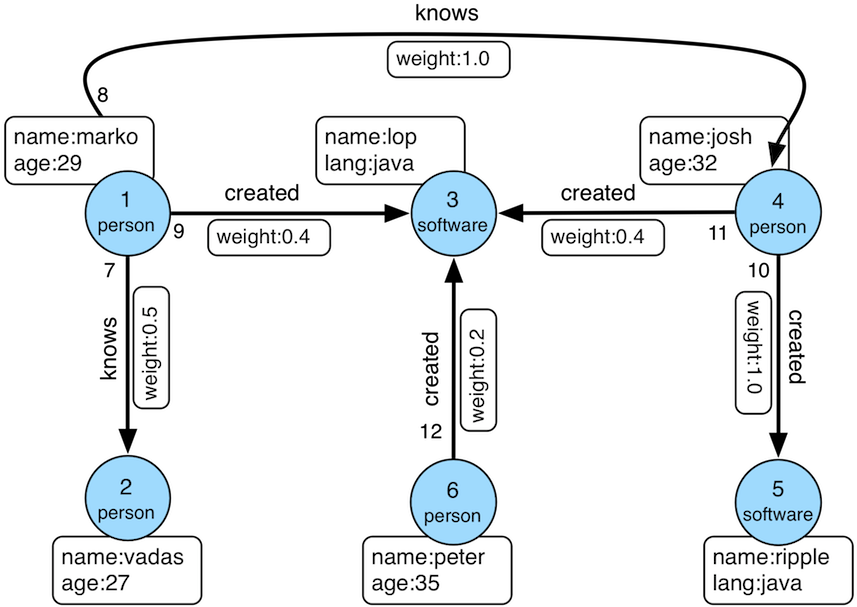 - - -### tp3 modern graph(simple). - -``` -conf = new BaseConfiguration() -graph = S2Graph.open(conf) - -// init system default schema -S2GraphFactory.initDefaultSchema(graph) - -// init extra schema for tp3 modern graph. -S2GraphFactory.initModernSchema(graph) - -// load modern graph into current graph instance. -S2GraphFactory.generateModern(graph) - -// traversal -t = graph.traversal() - -// show all vertices in this graph. -t.V() - -// show all edges in this graph. -t.E() - -// add two vertices. -shon = graph.addVertex(T.id, 10, T.label, "person", "name", "shon", "age", 35) -s2graph = graph.addVertex(T.id, 11, T.label, "software", "name", "s2graph", "lang", "scala") - -// add one edge between two vertices. -created = shon.addEdge("created", s2graph, "_timestamp", 10, "weight", 0.1) - -// check if new edge is available through traversal -t.V().has("name", "shon").out() - -// shutdown -graph.close() -``` - -Note that simple version used default schema for `Service`, `Column`, `Label` for compatibility. -Please checkout advanced example below to understand what data model is available on S2Graph. - -### tp3 modern graph(advanced). - -It is possible to separate multiple namespaces into logical spaces. -S2Graph achieve this by following data model. details can be found on https://steamshon.gitbooks.io/s2graph-book/content/the_data_model.html. - -1. Service: the top level abstraction - -A convenient logical grouping of related entities -Similar to the database abstraction that most relational databases support. - -2. Column: belongs to a service. - -A set of homogeneous vertices such as users, news articles or tags. -Every vertex has a user-provided unique ID that allows the efficient lookup. -A service typically contains multiple columns. - -3. Label: schema for edge - -A set of homogeneous edges such as friendships, views, or clicks. -Relation between two columns as well as a recursive association within one column. -The two columns connected with a label may not necessarily be in the same service, allowing us to store and query data that spans over multiple services. - -Instead of convert user provided Id into internal unique numeric Id, S2Graph simply composite service and column metadata with user provided Id to guarantee global unique Id. - -Following is simple example to exploit these data model in s2graph. -``` -// init graph -graph = S2Graph.open(new BaseConfiguration()) - -// 0. import necessary methods for schema management. -import static org.apache.s2graph.core.Management.* - -// 1. initialize dbsession for management which store schema into RDBMS. -session = graph.dbSession() - -// 2. properties for new service "s2graph". - -serviceName = "s2graph" -cluster = "localhost" -hTableName = "s2graph" -preSplitSize = 0 -hTableTTL = -1 -compressionAlgorithm = "gz" - -// 3. actual creation of s2graph service. -// details can be found on https://steamshon.gitbooks.io/s2graph-book/content/create_a_service.html - -service = graph.management.createService(serviceName, cluster, hTableName, preSplitSize, hTableTTL, compressionAlgorithm) - -// 4. properties for user vertex schema belongs to s2graph service. - -columnName = "user" -columnType = "integer" - -// each property consist of (name: String, defaultValue: String, dataType: String) -// defailts can be found on https://steamshon.gitbooks.io/s2graph-book/content/create_a_servicecolumn.html -props = [newProp("name", "-", "string"), newProp("age", "-1", "integer")] - - -schemaVersion = "v3" -user = graph.management.createServiceColumn(serviceName, columnName, columnType, props, schemaVersion) - -// 2.1 (optional) global vertex index. -graph.management.buildGlobalVertexIndex("global_vertex_index", ["name", "age"]) - -// 3. create VertexId -// create S2Graph's VertexId class. -v1Id = graph.newVertexId(serviceName, columnName, 20) -v2Id = graph.newVertexId(serviceName, columnName, 30) - -shon = graph.addVertex(T.id, v1Id, "name", "shon", "age", 35) -dun = graph.addVertex(T.id, v2Id, "name", "dun", "age", 36) - -// 4. friends label -labelName = "friend_" -srcColumn = user -tgtColumn = user -isDirected = true -indices = [] -props = [newProp("since", "-", "string")] -consistencyLevel = "strong" -hTableName = "s2graph" -hTableTTL = -1 -options = null - -friend = graph.management.createLabel(labelName, srcColumn, tgtColumn, - isDirected, serviceName, indices, props, consistencyLevel, - hTableName, hTableTTL, schemaVersion, compressionAlgorithm, options) - -shon.addEdge(labelName, dun, "since", "2017-01-01") - -t = graph.traversal() - - -println "All Edges" -println t.E().toList() - -println "All Vertices" -println t.V().toList() - -println "Specific Edge" -println t.V().has("name", "shon").out().toList() -``` - -## Architecture - -physical data storage is closed related to data model(https://steamshon.gitbooks.io/s2graph-book/content/the_data_model.html). - -in HBase storage, Vertex is stored in `v` column family, and Edge is stored in `e` column family. - -each `Service`/`Label` can have it's own dedicated HBase Table. - -How Edge/Vertex is actually stored in `KeyValue` in HBase is described in [details](https://steamshon.gitbooks.io/s2graph-book/content/the_low-level_data_formats.html). - -## Indexes -will be updated. - -## Cache -will be updated. - -## Gremlin -S2Graph has full support for gremlin. However gremlinâs fine grained graphy nature results in very high latency - -Provider suppose to provide `ProviderOptimization` to improve latency of traversal, and followings are currently available optimizations. - ->NOTE: This is an ongoing task - -#### 1. `S2GraphStep` - -1. translate multiple `has` step into lucene query and find out vertexId/edgeId can be found from index provider, lucene. -2. if vertexId/edgeId can be found, then change full scan into point lookup using list of vertexId/edgeId. - -for examples, following traversal need full scan on storage if there is no index provider. - -``` -g.V().has("name", "steamshon").out() -g.V().has("name", "steamshon").has("age", P.eq(30).or(P.between(20, 30))) -``` - -once following global vertex index is created, then `S2GraphStep` translate above traversal into lucene query, then get list of vertexId/edgeId which switch full scan to points lookup. -``` -graph.management.buildGlobalVertexIndex("global_vertex_index", ["name", "age"]) -``` - - -#### [The Official Website](https://s2graph.apache.org/) - -#### [S2Graph API document](https://steamshon.gitbooks.io/s2graph-book/content/) - -#### Mailing Lists - -* [[email protected]](mailto:[email protected]) is for usage questions and announcements. -[(subscribe)](mailto:[email protected]?subject=send this email to subscribe) -[(unsubscribe)](mailto:[email protected]?subject=send this email to unsubscribe) -[(archives)](http://markmail.org/search/?q=list%3Aorg.apache.s2graph.users) -* [[email protected]](mailto:[email protected]) is for people who want to contribute to S2Graph. -[(subscribe)](mailto:[email protected]?subject=send this email to subscribe) -[(unsubscribe)](mailto:[email protected]?subject=send this email to unsubscribe) -[(archives)](http://markmail.org/search/?q=list%3Aorg.apache.s2graph.dev) +<!--- +/* + * Licensed to the Apache Software Foundation (ASF) under one + * or more contributor license agreements. See the NOTICE file + * distributed with this work for additional information + * regarding copyright ownership. The ASF licenses this file + * to you under the Apache License, Version 2.0 (the + * "License"); you may not use this file except in compliance + * with the License. You may obtain a copy of the License at + * + * http://www.apache.org/licenses/LICENSE-2.0 + * + * Unless required by applicable law or agreed to in writing, + * software distributed under the License is distributed on an + * "AS IS" BASIS, WITHOUT WARRANTIES OR CONDITIONS OF ANY + * KIND, either express or implied. See the License for the + * specific language governing permissions and limitations + * under the License. + */ +---> + +S2Graph [](https://travis-ci.org/apache/incubator-s2graph) +======= + +[**S2Graph**](http://s2graph.apache.org/) is a **graph database** designed to handle transactional graph processing at scale. Its REST API allows you to store, manage and query relational information using **edge** and **vertex** representations in a **fully asynchronous** and **non-blocking** manner. + +S2Graph is a implementation of [**Apache TinkerPop**](https://tinkerpop.apache.org/) on [**Apache HBASE**](https://hbase.apache.org/). + +This document covers some basic concepts and terms of S2Graph as well as help you get a feel for the S2Graph API. + +Building from the source +======================== + +To build S2Graph from the source, install the JDK 8 and [SBT](http://www.scala-sbt.org/), and run the following command in the project root: + + sbt package +This will create a distribution of S2Graph that is ready to be deployed. + +One can find distribution on `target/apache-s2graph-$version-incubating-bin`. + +Quick Start +=========== + +Once extracted the downloaded binary release of S2Graph or built from the source as described above, the following files and directories should be found in the directory. + +``` +DISCLAIMER +LICENCE # the Apache License 2.0 +NOTICE +bin # scripts to manage the lifecycle of S2Graph +conf # configuration files +lib # contains the binary +logs # application logs +var # application data +``` + +This directory layout contains all binary and scripts required to launch S2Graph. The directories `logs` and `var` may not be present initially, and are created once S2Graph is launched. + +The following will launch S2Graph, using [HBase](https://hbase.apache.org/) in the standalone mode for data storage and [H2](http://www.h2database.com/html/main.html) as the metadata storage. + + sh bin/start-s2graph.sh +To connect to a remote HBase cluster or use MySQL as the metastore, refer to the instructions in [`conf/application.conf`](conf/application.conf). +S2Graph is tested on HBase versions 0.98, 1.0, 1.1, and 1.2 (https://hub.docker.com/r/harisekhon/hbase/tags/). + +Project Layout +============== + +Here is what you can find in each subproject. + +1. `s2core`: The core library, containing the data abstractions for graph entities, storage adapters and utilities. +2. `s2rest_play`: The REST server built with [Play framework](https://www.playframework.com/), providing the write and query API. +3. `s2rest_netty`: The REST server built directly using Netty, implementing only the query API. +4. [`s2graphql`](s2graphhql/README.md): The GraphQL server, providing standard web interface for S2Graph. +~~4. `loader`: A collection of Spark jobs for bulk loading streaming data into S2Graph.~~ +~~5. `spark`: Spark utilities for `loader` and `s2counter_loader`.~~ +5. [`s2jobs`](s2jobs/README.md): A collection of Spark jobs to support OLAP on S2Graph. +6. `s2counter_core`: The core library providing data structures and logics for `s2counter_loader`. +7. `s2counter_loader`: Spark streaming jobs that consume Kafka WAL logs and calculate various top-*K* results on-the-fly. +8. `s2graph_gremlin`: Gremlin plugin for tinkerpop users. + +The first four projects are for OLTP-style workloads, currently the main target of S2Graph. +The remaining projects are for OLAP-style workloads, especially for integrating S2Graph with other projects, such as [Apache Spark](https://spark.apache.org/) and [Kafka](https://kafka.apache.org/). +The ~~`loader` and `spark`~~ projects are deprecated by [`s2jobs`](s2jobs/README.md) since version 0.2.0. + +Note that, the OLAP-style workloads are under development and we are planning to provide documentations in the upcoming releases. + +Your First Graph +================ + +Once the S2Graph server has been set up, you can now start to send HTTP queries to the server to create a graph and pour some data in it. This tutorial goes over a simple toy problem to get a sense of how S2Graph's API looks like. [`bin/example.sh`](bin/example.sh) contains the example code below. + +The toy problem is to create a timeline feature for a simple social media, like a simplified version of Facebook's timeline:stuck_out_tongue_winking_eye:. Using simple S2Graph queries it is possible to keep track of each user's friends and their posts. + +1. First, we need a name for the new service. + + The following POST query will create a service named "KakaoFavorites". + + ``` curl -XPOST localhost:9000/graphs/createService -H 'Content-Type: Application/json' -d ' {"serviceName": "KakaoFavorites", "compressionAlgorithm" : "gz"} ' ``` + To make sure the service is created correctly, check out the following. + + ``` curl -XGET localhost:9000/graphs/getService/KakaoFavorites ``` +2. Next, we will need some friends. + + In S2Graph, relationships are organized as labels. Create a label called `friends` using the following `createLabel` API call: + + ``` curl -XPOST localhost:9000/graphs/createLabel -H 'Content-Type: Application/json' -d ' { "label": "friends", "srcServiceName": "KakaoFavorites", "srcColumnName": "userName", "srcColumnType": "string", "tgtServiceName": "KakaoFavorites", "tgtColumnName": "userName", "tgtColumnType": "string", "isDirected": "false", "indices": [], "props": [], "consistencyLevel": "strong" } ' ``` + Check if the label has been created correctly:+ + + ``` curl -XGET localhost:9000/graphs/getLabel/friends ``` + Now that the label `friends` is ready, we can store the friendship data. Entries of a label are called edges, and you can add edges with `edges/insert` API: + + ``` curl -XPOST localhost:9000/graphs/edges/insert -H 'Content-Type: Application/json' -d ' [ {"from":"Elmo","to":"Big Bird","label":"friends","props":{},"timestamp":1444360152477}, {"from":"Elmo","to":"Ernie","label":"friends","props":{},"timestamp":1444360152478}, {"from":"Elmo","to":"Bert","label":"friends","props":{},"timestamp":1444360152479}, {"from":"Cookie Monster","to":"Grover","label":"friends","props":{},"timestamp":1444360152480}, {"from":"Cookie Monster","to":"Kermit","label":"friends","props":{},"timestamp":1444360152481}, {"from":"Cookie Monster","to":"Oscar","label":"friends","props":{},"timestamp":1444360152482} ] ' ``` + Query friends of Elmo with `getEdges` API: + + ``` curl -XPOST localhost:9000/graphs/getEdges -H 'Content-Type: Application/json' -d ' { "srcVertices": [{"serviceName": "KakaoFavorites", "columnName": "userName", "id":"Elmo"}], "steps": [ {"step": [{"label": "friends", "direction": "out", "offset": 0, "limit": 10}]} ] } ' ``` + Now query friends of Cookie Monster: + + ``` curl -XPOST localhost:9000/graphs/getEdges -H 'Content-Type: Application/json' -d ' { "srcVertices": [{"serviceName": "KakaoFavorites", "columnName": "userName", "id":"Cookie Monster"}], "steps": [ {"step": [{"label": "friends", "direction": "out", "offset": 0, "limit": 10}]} ] } ' ``` +3. Users of Kakao Favorites will be able to post URLs of their favorite websites. + + We will need a new label ```post``` for this data: + ``` curl -XPOST localhost:9000/graphs/createLabel -H 'Content-Type: Application/json' -d ' { "label": "post", "srcServiceName": "KakaoFavorites", "srcColumnName": "userName", "srcColumnType": "string", "tgtServiceName": "KakaoFavorites", "tgtColumnName": "url", "tgtColumnType": "string", "isDirected": "true", "indices": [], "props": [], "consistencyLevel": "strong" } ' ``` + Now, insert some posts of the users: + + + ``` curl -XPOST localhost:9000/graphs/edges/insert -H 'Content-Type: Application/json' -d ' [ {"from":"Big Bird","to":"www.kakaocorp.com/en/main","label":"post","props":{},"timestamp":1444360152477}, {"from":"Big Bird","to":"github.com/kakao/s2graph","label":"post","props":{},"timestamp":1444360152478}, {"from":"Ernie","to":"groups.google.com/forum/#!forum/s2graph","label":"post","props":{},"timestamp":1444360152479}, {"from":"Grover","to":"hbase.apache.org/forum/#!forum/s2graph","label":"post","props":{},"timestamp":1444360152480}, {"from":"Kermit","to":"www.playframework.com","label":"post","props":{},"timestamp":1444360152481}, {"from":"Oscar","to":"www.scala-lang.org","label":"post","props":{},"timestamp":1444360152482} ] ' ``` + Query posts of Big Bird: + + ``` curl -XPOST localhost:9000/graphs/getEdges -H 'Content-Type: Application/json' -d ' { "srcVertices": [{"serviceName": "KakaoFavorites", "columnName": "userName", "id":"Big Bird"}], "steps": [ {"step": [{"label": "post", "direction": "out", "offset": 0, "limit": 10}]} ] } ' ``` +4. So far, we have designed a label schema for the labels `friends` and `post`, and stored some edges to them.+ + + This should be enough for creating the timeline feature! The following two-step query will return the URLs for Elmo's timeline, which are the posts of Elmo's friends: + + ``` curl -XPOST localhost:9000/graphs/getEdges -H 'Content-Type: Application/json' -d ' { "srcVertices": [{"serviceName": "KakaoFavorites", "columnName": "userName", "id":"Elmo"}], "steps": [ {"step": [{"label": "friends", "direction": "out", "offset": 0, "limit": 10}]}, {"step": [{"label": "post", "direction": "out", "offset": 0, "limit": 10}]} ] } ' ``` + Also try Cookie Monster's timeline: + ``` curl -XPOST localhost:9000/graphs/getEdges -H 'Content-Type: Application/json' -d ' { "srcVertices": [{"serviceName": "KakaoFavorites", "columnName": "userName", "id":"Cookie Monster"}], "steps": [ {"step": [{"label": "friends", "direction": "out", "offset": 0, "limit": 10}]}, {"step": [{"label": "post", "direction": "out", "offset": 0, "limit": 10}]} ] } ' ``` +The example above is by no means a full blown social network timeline, but it gives you an idea of how to represent, store and query graph data with S2Graph.+ + +TinkerPop Support +================ + +Since version 0.2.0-incubating, S2Graph integrate natively with `Apache TinkerPop 3.2.5`. +S2Graph passes `Apache TinkerPop`'s `StructureStandardSuite` and `ProcessStandardSuite` test suites. + +### Graph Features **not** implemented. +- Computer +- Transactions +- ThreadedTransactions + +### Vertex Features **not** implemented. +- MultiProperties +- MetaProperties +- UuidIds +- AnyIds +- NumericIds +- StringIds + +### Edge Features **not** implemented. +- UuidIds +- AnyIds +- NumericIds +- StringIds + +### Vertex property features **not** implemented. +- UuidIds +- AnyIds +- NumericIds +- StringIds +- MapValues +- MixedListValues +- BooleanArrayValues +- ByteArrayValues +- DoubleArrayValues +- FloatArrayValues +- IntegerArrayValues +- StringArrayValues +- LongArrayValues +- SerializableValues +- UniformListValues + +### Edge property feature **not** implemented. +- MapValues +- MixedListValues +- BooleanArrayValues +- ByteArrayValues +- DoubleArrayValues +- FloatArrayValues +- IntegerArrayValues +- StringArrayValues +- LongArrayValues +- SerializableValues +- UniformListValues + +>NOTE: This is an ongoing task. + +## Getting Started + +### Maven coordinates + +``` +<dependency> + <groupId>org.apache.s2graph</groupId> <artifactId>s2core_2.11</artifactId> <version>0.2.0</version></dependency> +``` + +### Start + +S2Graph is a singleton that can be shared among multiple threads. You instantiate S2Graph using the standard TinkerPop static constructors. + +- Graph g = S2Graph.open(final Configuration configuration) + +Some important properties for configuration. + +#### HBase for data storage. ``` +hbase.zookeeper.quorum=localhost:2181 +``` + +#### RDBMS for meta storage. +``` +db.default.driver=org.h2.Driver +db.default.url=jdbc:h2:file:./var/metastore;MODE=MYSQL" +db.default.password=graph +db.default.user=graph +``` + +### Gremlin Console + +#### 1. install plugin +On gremlin console, it is possible to install s2graph as follow. + +``` +:install org.apache.s2graph s2graph-gremlin 0.2.0 +:plugin use tinkerpop.s2graph +``` + +Example run. + +``` +shonui-MacBook-Pro:apache-tinkerpop-gremlin-console-3.2.5 shon$ bin/gremlin.sh + + \,,,/ (o o)-----oOOo-(3)-oOOo----- +plugin activated: tinkerpop.server +plugin activated: tinkerpop.utilities +plugin activated: tinkerpop.tinkergraph +gremlin> :install org.apache.s2graph s2graph-gremlin 0.2.0 +==>Loaded: [org.apache.s2graph, s2graph-gremlin, 0.2.0] - restart the console to use [tinkerpop.s2graph] +gremlin> :plugin use tinkerpop.s2graph +==>tinkerpop.s2graph activated +gremlin> :plugin list +==>tinkerpop.server[active] +==>tinkerpop.gephi +==>tinkerpop.utilities[active] +==>tinkerpop.sugar +==>tinkerpop.credentials +==>tinkerpop.tinkergraph[active] +==>tinkerpop.s2graph[active] +gremlin> +``` + +Once `s2graph-gremlin` plugin is acvive, then following example will generate tinkerpop's modern graph in s2graph. + +Taken from [TinkerPop](http://tinkerpop.apache.org/docs/current/reference/#intro) + + + + +### tp3 modern graph(simple). + +``` +conf = new BaseConfiguration() +graph = S2Graph.open(conf) + +// init system default schema +S2GraphFactory.initDefaultSchema(graph) + +// init extra schema for tp3 modern graph. +S2GraphFactory.initModernSchema(graph) + +// load modern graph into current graph instance. +S2GraphFactory.generateModern(graph) + +// traversal +t = graph.traversal() + +// show all vertices in this graph. +t.V() + +// show all edges in this graph. +t.E() + +// add two vertices. +shon = graph.addVertex(T.id, 10, T.label, "person", "name", "shon", "age", 35) +s2graph = graph.addVertex(T.id, 11, T.label, "software", "name", "s2graph", "lang", "scala") + +// add one edge between two vertices. +created = shon.addEdge("created", s2graph, "_timestamp", 10, "weight", 0.1) + +// check if new edge is available through traversal +t.V().has("name", "shon").out() + +// shutdown +graph.close() +``` + +Note that simple version used default schema for `Service`, `Column`, `Label` for compatibility. +Please checkout advanced example below to understand what data model is available on S2Graph. + +### tp3 modern graph(advanced). + +It is possible to separate multiple namespaces into logical spaces. +S2Graph achieve this by following data model. details can be found on https://steamshon.gitbooks.io/s2graph-book/content/the_data_model.html. + +1. Service: the top level abstraction + +A convenient logical grouping of related entities +Similar to the database abstraction that most relational databases support. + +2. Column: belongs to a service. + +A set of homogeneous vertices such as users, news articles or tags. +Every vertex has a user-provided unique ID that allows the efficient lookup. +A service typically contains multiple columns. + +3. Label: schema for edge + +A set of homogeneous edges such as friendships, views, or clicks. +Relation between two columns as well as a recursive association within one column. +The two columns connected with a label may not necessarily be in the same service, allowing us to store and query data that spans over multiple services. + +Instead of convert user provided Id into internal unique numeric Id, S2Graph simply composite service and column metadata with user provided Id to guarantee global unique Id. + +Following is simple example to exploit these data model in s2graph. +``` +// init graph +graph = S2Graph.open(new BaseConfiguration()) + +// 0. import necessary methods for schema management. +import static org.apache.s2graph.core.Management.* + +// 1. initialize dbsession for management which store schema into RDBMS. +session = graph.dbSession() + +// 2. properties for new service "s2graph". + +serviceName = "s2graph" +cluster = "localhost" +hTableName = "s2graph" +preSplitSize = 0 +hTableTTL = -1 +compressionAlgorithm = "gz" + +// 3. actual creation of s2graph service. +// details can be found on https://steamshon.gitbooks.io/s2graph-book/content/create_a_service.html + +service = graph.management.createService(serviceName, cluster, hTableName, preSplitSize, hTableTTL, compressionAlgorithm) + +// 4. properties for user vertex schema belongs to s2graph service. + +columnName = "user" +columnType = "integer" + +// each property consist of (name: String, defaultValue: String, dataType: String) +// defailts can be found on https://steamshon.gitbooks.io/s2graph-book/content/create_a_servicecolumn.html +props = [newProp("name", "-", "string"), newProp("age", "-1", "integer")] + + +schemaVersion = "v3" +user = graph.management.createServiceColumn(serviceName, columnName, columnType, props, schemaVersion) + +// 2.1 (optional) global vertex index. +graph.management.buildGlobalVertexIndex("global_vertex_index", ["name", "age"]) + +// 3. create VertexId +// create S2Graph's VertexId class. +v1Id = graph.newVertexId(serviceName, columnName, 20) +v2Id = graph.newVertexId(serviceName, columnName, 30) + +shon = graph.addVertex(T.id, v1Id, "name", "shon", "age", 35) +dun = graph.addVertex(T.id, v2Id, "name", "dun", "age", 36) + +// 4. friends label +labelName = "friend_" +srcColumn = user +tgtColumn = user +isDirected = true +indices = [] +props = [newProp("since", "-", "string")] +consistencyLevel = "strong" +hTableName = "s2graph" +hTableTTL = -1 +options = null + +friend = graph.management.createLabel(labelName, srcColumn, tgtColumn, + isDirected, serviceName, indices, props, consistencyLevel, hTableName, hTableTTL, schemaVersion, compressionAlgorithm, options) +shon.addEdge(labelName, dun, "since", "2017-01-01") + +t = graph.traversal() + + +println "All Edges" +println t.E().toList() + +println "All Vertices" +println t.V().toList() + +println "Specific Edge" +println t.V().has("name", "shon").out().toList() +``` + +## Architecture + +physical data storage is closed related to data model(https://steamshon.gitbooks.io/s2graph-book/content/the_data_model.html). + +in HBase storage, Vertex is stored in `v` column family, and Edge is stored in `e` column family. + +each `Service`/`Label` can have it's own dedicated HBase Table. + +How Edge/Vertex is actually stored in `KeyValue` in HBase is described in [details](https://steamshon.gitbooks.io/s2graph-book/content/the_low-level_data_formats.html). + +## Indexes +will be updated. + +## Cache +will be updated. + +## Gremlin S2Graph has full support for gremlin. However gremlinâs fine grained graphy nature results in very high latency + +Provider suppose to provide `ProviderOptimization` to improve latency of traversal, and followings are currently available optimizations. + +>NOTE: This is an ongoing task + +#### 1. `S2GraphStep` + +1. translate multiple `has` step into lucene query and find out vertexId/edgeId can be found from index provider, lucene. +2. if vertexId/edgeId can be found, then change full scan into point lookup using list of vertexId/edgeId. + +for examples, following traversal need full scan on storage if there is no index provider. + +``` +g.V().has("name", "steamshon").out() +g.V().has("name", "steamshon").has("age", P.eq(30).or(P.between(20, 30))) +``` + +once following global vertex index is created, then `S2GraphStep` translate above traversal into lucene query, then get list of vertexId/edgeId which switch full scan to points lookup. +``` +graph.management.buildGlobalVertexIndex("global_vertex_index", ["name", "age"]) +``` + + +#### [The Official Website](https://s2graph.apache.org/) + +#### [S2Graph API document](https://steamshon.gitbooks.io/s2graph-book/content/) + +#### Mailing Lists + +* [[email protected]](mailto:[email protected]) is for usage questions and announcements. +[(subscribe)](mailto:[email protected]?subject=send this email to subscribe) +[(unsubscribe)](mailto:[email protected]?subject=send this email to unsubscribe) +[(archives)](http://markmail.org/search/?q=list%3Aorg.apache.s2graph.users) +* [[email protected]](mailto:[email protected]) is for people who want to contribute to S2Graph. +[(subscribe)](mailto:[email protected]?subject=send this email to subscribe) +[(unsubscribe)](mailto:[email protected]?subject=send this email to unsubscribe) +[(archives)](http://markmail.org/search/?q=list%3Aorg.apache.s2graph.dev) \ No newline at end of file


