This is an automated email from the ASF dual-hosted git repository.

fanjia pushed a commit to branch main
in repository https://gitbox.apache.org/repos/asf/seatunnel-website.git
The following commit(s) were added to refs/heads/main by this push:
new e8dddf677da [Doc] Add seatunnel web doc 1.0.1 (#314)
e8dddf677da is described below
commit e8dddf677dae0b09aab97b010a37668656b0f44b
Author: Jia Fan <[email protected]>
AuthorDate: Wed Jun 19 11:31:15 2024 +0800
[Doc] Add seatunnel web doc 1.0.1 (#314)
* [Doc] Add seatunnel web doc 1.0.1
* [Doc] Add seatunnel web doc 1.0.1
---
.../version-1.0.1/about.md | 3 +
.../version-1.0.1/datasources/jdbc-mysql.md | 1 +
.../version-1.0.1/deploy.md | 90 ++++++++++++++++++++++
.../version-1.0.1/download_datasource.sh | 62 +++++++++++++++
.../version-1.0.1/how_to_use.md | 1 +
.../version-1.0.1/sinknodes/jdbc-mysql.md | 1 +
.../version-1.0.1/sourcenodes/jdbc-mysql.md | 1 +
src/pages/download/st_web_data.json | 14 ++++
8 files changed, 173 insertions(+)
diff --git a/seatunnel_web_versioned_docs/version-1.0.1/about.md
b/seatunnel_web_versioned_docs/version-1.0.1/about.md
new file mode 100644
index 00000000000..4493a14a6f2
--- /dev/null
+++ b/seatunnel_web_versioned_docs/version-1.0.1/about.md
@@ -0,0 +1,3 @@
+# About SeaTunnel Web
+
+SeaTunnel Web is a web project that provides visual management of jobs,
scheduling, running and monitoring capabilities. It is developed based on the
SeaTunnel Connector API and the SeaTunnel Zeta Engine. It is a web project that
can be deployed independently. It is also a sub-project of SeaTunnel. For more
information, please refer to SeaTunnel Web.
\ No newline at end of file
diff --git
a/seatunnel_web_versioned_docs/version-1.0.1/datasources/jdbc-mysql.md
b/seatunnel_web_versioned_docs/version-1.0.1/datasources/jdbc-mysql.md
new file mode 100644
index 00000000000..44af6ef60eb
--- /dev/null
+++ b/seatunnel_web_versioned_docs/version-1.0.1/datasources/jdbc-mysql.md
@@ -0,0 +1 @@
+# JDBC-MySQL DataSource
diff --git a/seatunnel_web_versioned_docs/version-1.0.1/deploy.md
b/seatunnel_web_versioned_docs/version-1.0.1/deploy.md
new file mode 100644
index 00000000000..291d8d35617
--- /dev/null
+++ b/seatunnel_web_versioned_docs/version-1.0.1/deploy.md
@@ -0,0 +1,90 @@
+# Deployment of Apache SeaTunnel Web
+
+Apache SeaTunnel offers two methods for submitting tasks:
+
+1. **SeaTunnel Web:** This is a visual method to create and submit seatunnel
tasks.
+2. **Command Line:** SeaTunnel also provides a command line method for task
submission.
+
+## Deployment of Apache SeaTunnel Server
+Since SeaTunnel Web uses SeaTunnel Java client to submit tasks, a SeaTunnel
server is required to run these tasks. Therefore, the first step is to deploy a
SeaTunnel server. If you haven't yet started the SeaTunnel server, you can
refer to the following steps for deployment and service start-up.
+
+Download and deploy the SeaTunnel installation package to start the Zeta
service. Obtain the SeaTunnel server package (version 2.3.3 or higher, as
SeaTunnel Web supports only 2.3.3 and above versions of the SeaTunnel Zeta
engine) from
[https://seatunnel.apache.org/download](https://seatunnel.apache.org/download).
+
+- **Download Connector Plugins:** This process also involves automatic
download and installation of third-party dependencies, such as
`seatunnel-hadoop3-3.1.4-uber-2.3.3-optional.jar`. Follow the instructions on
[https://seatunnel.apache.org/docs/2.3.3/start-v2/locally/deployment](https://seatunnel.apache.org/docs/2.3.3/start-v2/locally/deployment)
to download the connector plugins.
+- **Repackaging:** After downloading the connector plugins, run `tar -zcvf
apache-seatunnel-2.3.3.tar.gz apache-seatunnel-2.3.3` to repackage, creating a
complete installation package `apache-seatunnel-2.3.3.tar.gz` for deploying the
SeaTunnel Zeta engine server.
+- **Cluster Deployment:** Copy `apache-seatunnel-2.3.3.tar.gz` to other server
nodes for SeaTunnel Zeta cluster deployment. For details on deployment and
starting the Zeta service, refer to
[https://seatunnel.apache.org/docs/seatunnel-engine/deployment](https://seatunnel.apache.org/docs/seatunnel-engine/deployment).
To start the Zeta service, use: `$SEATUNNEL_HOME/bin/seatunnel-cluster.sh -d`
+
+
+## 2. Download and Unzip SeaTunnel Web
+
+1. Download installation package `apache-seatunnel-web-1.0.1-bin.tar.gz` from
[SeaTunnel Download Page](https://seatunnel.apache.org/download) or directly
from
[https://www.apache.org/dyn/closer.lua/seatunnel/seatunnel-web/1.0.1/apache-seatunnel-web-1.0.1-bin.tar.gz](https://www.apache.org/dyn/closer.lua/seatunnel/seatunnel-web/1.0.1/apache-seatunnel-web-1.0.1-bin.tar.gz).
+2. unzip `tar -zxvf apache-seatunnel-web-1.0.1-bin.tar.gz` to get a directory
named `apache-seatunnel-web-1.0.1-bin`.
+
+## 3. Deploy SeaTunnel Zeta Client on SeaTunnel Web
+
+If you're using SeaTunnel Web, you need to deploy a SeaTunnel Zeta client on
the SeaTunnel Web node. (This step can be skipped if you're running both
SeaTunnel Zeta service and SeaTunnel Web on the same node.)
+- Copy `apache-seatunnel-2.3.3.tar.gz` to the SeaTunnel Web node and unzip it
in the same path as the SeaTunnel Zeta server node.
+- **Set Environment Variables:** On the SeaTunnel Web node, set
`SEATUNNEL_HOME` as an environment variable, similar to the SeaTunnel Zeta
server node.
+ ```
+ export SEATUNNEL_HOME=${seatunnel install path}
+ export PATH=$PATH:$SEATUNNEL_HOME/bin
+ ```
+- Run `$SEATUNNEL_HOME/bin/seatunnel.sh --config
$SEATUNNEL_HOME/config/v2.batch.config.template`. Successful completion of this
job indicates that the Zeta client is deployed successfully.
+
+
+## 4. Initialize Database for SeaTunnel Web Service
+1. Modify `apache-seatunnel-web-1.0.1-bin/script/seatunnel_server_env.sh` to
set the database address, port, username, and password. Example:
+ ```
+ export HOSTNAME="localhost"
+ export PORT="3306"
+ export USERNAME="root"
+ export PASSWORD="123456"
+ ```
+2. **Install MySQL Client:** On the current node, install `mysql-client` using
`sudo apt install mysql-client`.
+3. Execute `sh apache-seatunnel-web-1.0.1-bin/script/init_sql.sh`. A
successful run without errors indicates successful initialization.
(Alternatively, manually copy `/script/seatunnel_server_mysql.sql` to the
database and execute the script.)
+
+
+## 5. Download DataSource Plugins
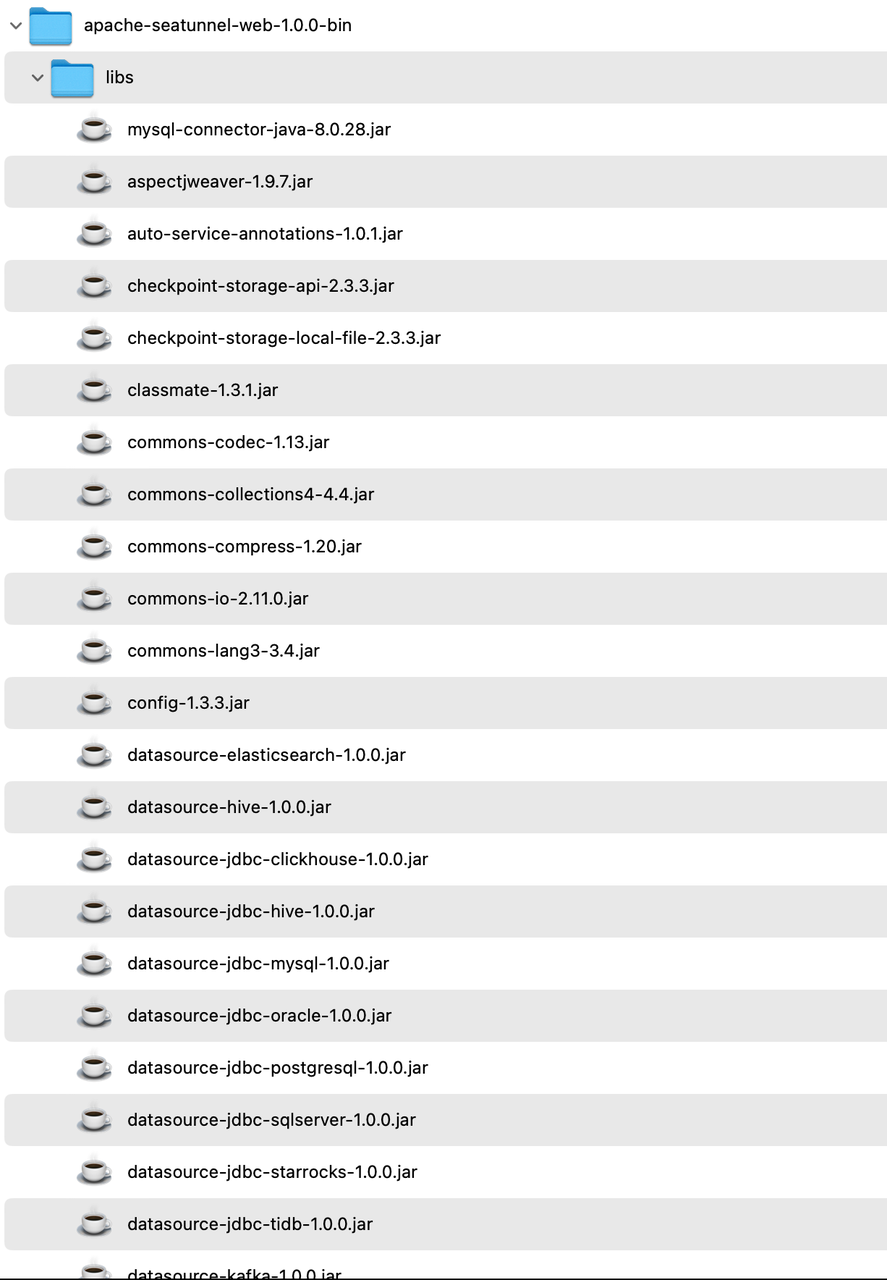
+1. Download the **[`download_datasource.sh`](./download_datasource.sh)**
script and place it in the `apache-seatunnel-web-1.0.1-bin/bin` directory. Run
the command `sh download_datasource.sh`. This will automatically download the
necessary JAR packages for various data source connections required for web
operation to the `libs` directory.
+
+ 
+
+2. After downloading, ensure that the MySQL driver is included in the `libs`
directory. If not, manually download the MySQL driver to this directory, as
SeaTunnel Web cannot start without it.
+
+
+## 6. Configure the Application and Start SeaTunnel Web Backend Service
+
+- Modify `apache-seatunnel-web-1.0.1-bin/conf/application.yml` with SeaTunnel
database connection information (same as in `script/seatunnel_server_env.sh`).
+ ```yaml
+ url:
jdbc:mysql://localhost:3306/seatunnel?useSSL=false&useUnicode=true&characterEncoding=utf-8&allowMultiQueries=true&allowPublicKeyRetrieval=true
+ username: xxx
+ password: xxx
+ ```
+- Edit `apache-seatunnel-web-1.0.1-bin/conf/application.yml`, add
`jwt.secretKey` value. Eg: SeaTunnel.
+- Copy `hazelcast-client.yaml` from `apache-seatunnel-2.3.3/config` to
`apache-seatunnel-web-1.0.1-bin/conf/` and configure it, especially the cluster
members' IP and port. Refer to [SeaTunnel Engine Client
Configuration](https://seatunnel.apache.org/docs/seatunnel-engine/deployment#6-config-seatunnel-engine-client).
+ ```yaml
+ hazelcast-client:
+ cluster-name: seatunnel
+ properties:
+ hazelcast.logging.type: log4j2
+ network:
+ cluster-members:
+ - ip:5801
+ ```
+- Move `plugin-mapping.properties` from `apache-seatunnel-2.3.3/connectors` to
the `apache-seatunnel-web-1.0.1-bin/conf/` directory.
+
+
+## 7. Start SeaTunnel Web
+
+1. Go to the `apache-seatunnel-web-1.0.1-bin` directory:
+ ```
+ cd apache-seatunnel-web-1.0.1-bin
+ ```
+2. Start the SeaTunnel Web backend service:
+ ```
+ sh bin/seatunnel-backend-daemon.sh start
+ ```
+3. Visit UI [http://127.0.0.1:8801/ui/](http://127.0.0.1:8801/ui/) and log in
with the default credentials (username: admin, password: admin). A successful
login screen indicates successful deployment.
+ ```
+ 
+ ```
diff --git a/seatunnel_web_versioned_docs/version-1.0.1/download_datasource.sh
b/seatunnel_web_versioned_docs/version-1.0.1/download_datasource.sh
new file mode 100644
index 00000000000..8ae4971dedc
--- /dev/null
+++ b/seatunnel_web_versioned_docs/version-1.0.1/download_datasource.sh
@@ -0,0 +1,62 @@
+#!/bin/bash
+#
+# Licensed to the Apache Software Foundation (ASF) under one or more
+# contributor license agreements. See the NOTICE file distributed with
+# this work for additional information regarding copyright ownership.
+# The ASF licenses this file to You under the Apache License, Version 2.0
+# (the "License"); you may not use this file except in compliance with
+# the License. You may obtain a copy of the License at
+#
+# http://www.apache.org/licenses/LICENSE-2.0
+#
+# Unless required by applicable law or agreed to in writing, software
+# distributed under the License is distributed on an "AS IS" BASIS,
+# WITHOUT WARRANTIES OR CONDITIONS OF ANY KIND, either express or implied.
+# See the License for the specific language governing permissions and
+# limitations under the License.
+#
+
+#This script is used to download the connector plug-ins required during the
running process.
+#All are downloaded by default. You can also choose what you need.
+#You only need to configure the plug-in name in config/plugin_config.
+
+# get seatunnel web home
+SEATUNNEL_WEB_HOME=$(cd $(dirname $0);pwd)
+
+DATASOURCE_LIB_DIR=${SEATUNNEL_WEB_HOME}/../libs
+
+# the datasource default version is 1.0.1, you can also choose a custom
version. eg: 1.1.2: sh install-datasource.sh 2.1.2
+version=1.0.1
+
+if [ -n "$1" ]; then
+ version="$1"
+fi
+
+# If you don’t want to download a certain data source, you can delete the
element below
+datasource_list=(
+ "datasource-plugins-api"
+ "datasource-elasticsearch"
+ "datasource-hive"
+ "datasource-jdbc-clickhouse"
+ "datasource-jdbc-hive"
+ "datasource-jdbc-mysql"
+ "datasource-jdbc-oracle"
+ "datasource-jdbc-postgresql"
+ "datasource-jdbc-redshift"
+ "datasource-jdbc-sqlserver"
+ "datasource-jdbc-starrocks"
+ "datasource-jdbc-tidb"
+ "datasource-kafka"
+ "datasource-mysql-cdc"
+ "datasource-s3"
+ "datasource-sqlserver-cdc"
+ "datasource-starrocks"
+)
+
+echo "Downloading SeaTunnel Web Datasource lib, usage version is ${version}"
+
+for datasource in "${datasource_list[@]}"
+do
+ echo "Downloading datasource: ${datasource}"
+ wget
https://repo.maven.apache.org/maven2/org/apache/seatunnel/${datasource}/${version}/${datasource}-${version}.jar
-P $DATASOURCE_LIB_DIR
+done
diff --git a/seatunnel_web_versioned_docs/version-1.0.1/how_to_use.md
b/seatunnel_web_versioned_docs/version-1.0.1/how_to_use.md
new file mode 100644
index 00000000000..851ca6d43d0
--- /dev/null
+++ b/seatunnel_web_versioned_docs/version-1.0.1/how_to_use.md
@@ -0,0 +1 @@
+# Define And Run SeaTunnel Job
\ No newline at end of file
diff --git a/seatunnel_web_versioned_docs/version-1.0.1/sinknodes/jdbc-mysql.md
b/seatunnel_web_versioned_docs/version-1.0.1/sinknodes/jdbc-mysql.md
new file mode 100644
index 00000000000..362102f9880
--- /dev/null
+++ b/seatunnel_web_versioned_docs/version-1.0.1/sinknodes/jdbc-mysql.md
@@ -0,0 +1 @@
+# JDBC-MySQL Sink Node
diff --git
a/seatunnel_web_versioned_docs/version-1.0.1/sourcenodes/jdbc-mysql.md
b/seatunnel_web_versioned_docs/version-1.0.1/sourcenodes/jdbc-mysql.md
new file mode 100644
index 00000000000..7b56905888c
--- /dev/null
+++ b/seatunnel_web_versioned_docs/version-1.0.1/sourcenodes/jdbc-mysql.md
@@ -0,0 +1 @@
+# JDBC-MySQL Source Node
diff --git a/src/pages/download/st_web_data.json
b/src/pages/download/st_web_data.json
index 7f35bf205cf..e431a981488 100644
--- a/src/pages/download/st_web_data.json
+++ b/src/pages/download/st_web_data.json
@@ -12,5 +12,19 @@
"asc":
"https://downloads.apache.org/seatunnel/seatunnel-web/1.0.0/apache-seatunnel-web-1.0.0-bin.tar.gz.asc";,
"sha512":
"https://downloads.apache.org/seatunnel/seatunnel-web/1.0.0/apache-seatunnel-web-1.0.0-bin.tar.gz.sha512";
}
+ },
+ {
+ "date": "2024-06-19",
+ "version": "v1.0.1",
+ "sourceCode": {
+ "src":
"https://downloads.apache.org/seatunnel/seatunnel-web/1.0.1/apache-seatunnel-web-1.0.1-src.tar.gz";,
+ "asc":
"https://downloads.apache.org/seatunnel/seatunnel-web/1.0.1/apache-seatunnel-web-1.0.1-src.tar.gz.asc";,
+ "sha512":
"https://downloads.apache.org/seatunnel/seatunnel-web/1.0.1/apache-seatunnel-web-1.0.1-src.tar.gz.sha512";
+ },
+ "binaryDistribution": {
+ "bin":
"https://www.apache.org/dyn/closer.lua/seatunnel/seatunnel-web/1.0.1/apache-seatunnel-web-1.0.1-bin.tar.gz";,
+ "asc":
"https://downloads.apache.org/seatunnel/seatunnel-web/1.0.1/apache-seatunnel-web-1.0.1-bin.tar.gz.asc";,
+ "sha512":
"https://downloads.apache.org/seatunnel/seatunnel-web/1.0.1/apache-seatunnel-web-1.0.1-bin.tar.gz.sha512";
+ }
}
]
