This is an automated email from the ASF dual-hosted git repository.

shenghang pushed a commit to branch main
in repository https://gitbox.apache.org/repos/asf/seatunnel-website.git
The following commit(s) were added to refs/heads/main by this push:
new 55f145532841 feat: Add blog post about migrating data to Amazon Aurora
DSQL (#416)
55f145532841 is described below
commit 55f145532841dd1784311f98a0cd25ba008266b8
Author: David Zollo <[email protected]>
AuthorDate: Tue Jan 13 21:44:56 2026 +0800
feat: Add blog post about migrating data to Amazon Aurora DSQL (#416)
---
...025-11-25-migrate-data-to-amazon-aurora-dsql.md | 111 ++++++++++++++++++++
...025-11-25-migrate-data-to-amazon-aurora-dsql.md | 113 +++++++++++++++++++++
2 files changed, 224 insertions(+)
diff --git a/blog/2025-11-25-migrate-data-to-amazon-aurora-dsql.md
b/blog/2025-11-25-migrate-data-to-amazon-aurora-dsql.md
new file mode 100644
index 000000000000..19b525faa5f8
--- /dev/null
+++ b/blog/2025-11-25-migrate-data-to-amazon-aurora-dsql.md
@@ -0,0 +1,111 @@
+---
+slug: migrate-data-to-amazon-aurora-dsql
+title: Share from AWS Architect - Migrating Data to Amazon Aurora DSQL Based
on SeaTunnel
+---
+
+# Share from AWS Architect: Migrating Data to Amazon Aurora DSQL Based on
SeaTunnel
+
+Amazon Aurora DSQL is a distributed SQL database launched by Amazon Web
Services in December 2024. It is designed for building applications with
infinite scalability, high availability, and no infrastructure management,
featuring high availability, serverless architecture, strong compatibility,
fault tolerance, and high security levels.
+
+Since Aurora DSQL's authentication mechanism is integrated with IAM, accessing
the Aurora DSQL database requires generating a token via an IAM identity. This
token is valid for only 15 minutes by default; therefore, some mainstream data
synchronization tools currently do not support migrating data from other
databases to Aurora DSQL.
+
+In view of this situation, the author **developed a Sink Connector
specifically for Aurora DSQL based on the data synchronization tool Apache
SeaTunnel**, to meet the demand for migrating data from other databases to
Aurora DSQL.
+
+## Introduction to SeaTunnel
+SeaTunnel is a very easy-to-use, multi-modal, ultra-high-performance
distributed data integration platform suited for data integration and data
synchronization, mainly aiming to solve common problems in the field of data
integration.
+
+### SeaTunnel Features
+* **Rich and Extensible Connectors**: Currently, SeaTunnel supports over 190
Connectors, and the number is increasing. Connectors for mainstream databases
like MySQL, Oracle, SQLServer, and PostgreSQL are already supported. The
plugin-based design allows users to easily develop their own Connectors and
integrate them into the SeaTunnel project.
+* **Batch-Stream Integration**: Connectors developed based on the SeaTunnel
Connector API are perfectly compatible with scenarios such as offline
synchronization, real-time synchronization, full synchronization, and
incremental synchronization. They greatly reduce the difficulty of managing
data integration tasks.
+* **Distributed Snapshot**: Supports distributed snapshot algorithms to
ensure data consistency.
+* **Multi-Engine Support**: SeaTunnel uses the SeaTunnel engine (Zeta) for
data synchronization by default. SeaTunnel also supports using Flink or Spark
as the execution engine for Connectors to adapt to existing enterprise
technical components. SeaTunnel supports multiple versions of Spark and Flink.
+* **JDBC Reuse & Multi-table Database Log Parsing**: SeaTunnel supports
multi-table or whole-database synchronization, solving the problem of excessive
JDBC connections; it supports multi-table or whole-database log reading and
parsing, solving the problem of repeated log reading and parsing in CDC
multi-table synchronization scenarios.
+* **High Throughput, Low Latency**: SeaTunnel supports parallel reading and
writing, providing stable, reliable, high-throughput, and low-latency data
synchronization capabilities.
+* **Comprehensive Real-time Monitoring**: SeaTunnel supports detailed
monitoring information for every step of the data synchronization process,
allowing users to easily understand information such as the amount of data read
and written, data size, and QPS of the synchronization task.
+
+### SeaTunnel Workflow
+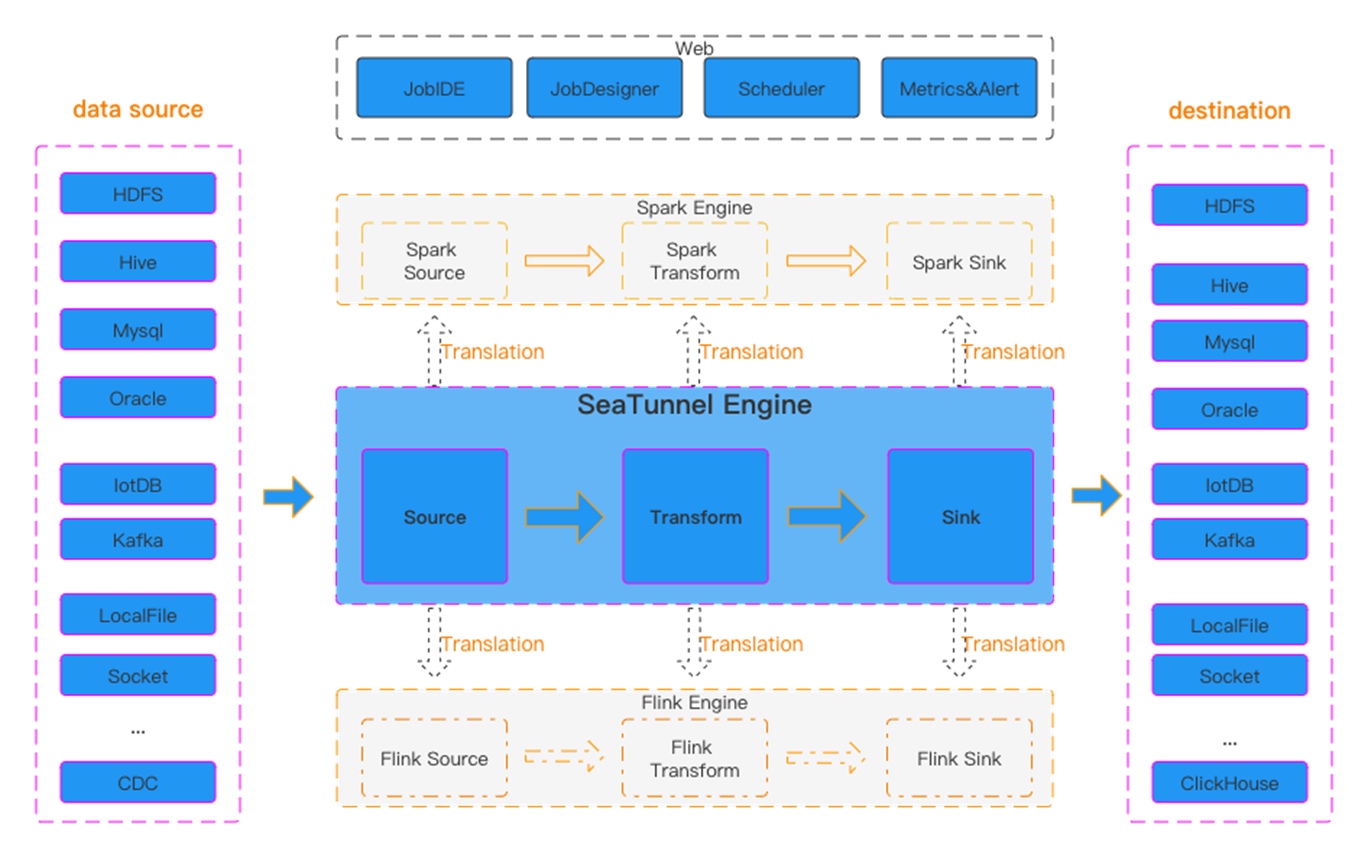
+Figure 1 SeaTunnel Workflow
+
+SeaTunnel's workflow is shown in the figure above. The user configures job
information and selects the execution engine to submit the job. The Source
Connector is responsible for reading source data in parallel and sending the
data to the downstream Transform or directly to the Sink, and the Sink writes
the data to the destination.
+
+## Build SeaTunnel from Source
+
+```bash
+git clone https://github.com/apache/seatunnel.git
+cd seatunnel
+sh ./mvnw clean install -DskipTests -Dskip.spotless=true
+cp seatunnel-dist/target/apache-seatunnel-${version}-bin.tar.gz
/The-Path-You-Want-To-Copy
+cd /The-Path-You-Want-To-Copy
+tar -xzvf "apache-seatunnel-${version}-bin.tar.gz"
+```
+After successfully building from source, all Connector plugins and some
necessary dependencies (e.g., mysql driver) are included in the binary package.
You can use the Connector plugins directly without installing them separately.
+
+## Configuration Example for Synchronizing MySQL Data to Aurora DSQL using
SeaTunnel
+```hocon
+env {
+ parallelism = 1
+ job.mode = "STREAMING"
+ checkpoint.interval = 6000
+ checkpoint.timeout = 1200000
+}
+source {
+ MySQL-CDC {
+ username = "user name"
+ password = "password"
+ table-names = ["db.table1"]
+ url =
"jdbc:mysql://dbhost:3306/db?useSSL=false&allowPublicKeyRetrieval=true&serverTimezone=UTC&connectTimeout=120000&socketTimeout=120000&autoReconnect=true&failOverReadOnly=false&maxReconnects=10"
+ table-names-config = [
+ {
+ table = "db.table1"
+ primaryKeys = ["id"]
+ }
+ ]
+ }
+}
+transform {
+
+}
+sink {
+ Jdbc {
+ url="jdbc:postgresql://<dsql_endpoint>:5432/postgres"
+ dialect="dsql"
+ driver = "org.postgresql.Driver"
+ username = "admin"
+ access_key_id = "ACCESSKEYIDEXAMPLE"
+ secret_access_key = "SECRETACCESSKEYEXAMPLE"
+ region = "us-east-1"
+ database = "postgres"
+ generate_sink_sql = true
+ primary_keys = ["id"]
+ max_retries="3"
+ batch_size =1000
+ }
+}
+```
+
+## Run Data Synchronization Task
+Save the above configuration as a `mysql-to-dsql.conf` file (please note that
the values in the example need to be replaced with real parameters), store it
in the `config` directory of `apache-seatunnel-${version}`, and execute the
following command:
+```bash
+cd "apache-seatunnel-${version}"
+./bin/seatunnel.sh --config ./config/mysql-to-dsql.conf -m local
+```
+
+Figure 2 Data Synchronization Log Information
+
+After the command is successfully executed, you can observe the task execution
status through the newly generated logs. If an error occurs, you can also
pinpoint it based on the exception information, such as database connection
timeout or table not existing. Under normal circumstances, data will be
successfully written to the target Aurora DSQL, as shown in the figure above.
+
+## Summary
+Aurora DSQL is a highly secure, easily scalable, serverless infrastructure
distributed database. Its authentication method combines with IAM identity, so
currently, there is a lack of suitable tools to synchronize data to Aurora
DSQL, especially in terms of real-time data synchronization. SeaTunnel is an
excellent data integration and data synchronization tool. It currently supports
data synchronization from a variety of data sources, and based on SeaTunnel,
custom data synchronization r [...]
+
+## References
+* SeaTunnel Deployment:
https://seatunnel.apache.org/docs/start-v2/locally/deployment
+* Developing a new SeaTunnel Connector:
https://github.com/apache/seatunnel/blob/dev/seatunnel-connectors-v2/README.md
+* Generating authentication tokens in Aurora DSQL:
https://docs.aws.amazon.com/aurora-dsql/latest/userguide/SECTION_authentication-token.html
+
+*The aforementioned specific Amazon Web Services Generative AI-related
services are currently available in Amazon Web Services overseas regions. Cloud
services related to Amazon Web Services China Regions are operated by Sinnet
and NWCD. Please refer to the official website of China Regions for specific
information.*
+
+## About the Author
+
+
+**Tan Zhiqiang, AWS Migration Solution Architect**, is mainly responsible for
enterprise customers' cloud migration or cross-cloud migration. He has more
than ten years of experience in IT professional services and has served as a
programmer, project manager, technical consultant, and solution architect.
diff --git
a/i18n/zh-CN/docusaurus-plugin-content-blog/2025-11-25-migrate-data-to-amazon-aurora-dsql.md
b/i18n/zh-CN/docusaurus-plugin-content-blog/2025-11-25-migrate-data-to-amazon-aurora-dsql.md
new file mode 100644
index 000000000000..0c918ee01af6
--- /dev/null
+++
b/i18n/zh-CN/docusaurus-plugin-content-blog/2025-11-25-migrate-data-to-amazon-aurora-dsql.md
@@ -0,0 +1,113 @@
+---
+slug: migrate-data-to-amazon-aurora-dsql
+title: 亚马逊云科技架构师的分享:基于SeaTunnel迁移数据到Amazon Aurora DSQL
+---
+
+# 亚马逊云科技架构师的分享:基于SeaTunnel迁移数据到Amazon Aurora DSQL
+
+Amazon Aurora
DSQL是亚马逊云科技于2024年12月推出的分布式SQL数据库,专为构建扩展性无限、高可用且免基础设施管理的应用程序设计,具有可用性高、无服务器模式架构、兼容性强、容错能力和安全级别高等特点。
+
+由于Aurora DSQL的认证机制与IAM集成, 访问Aurora DSQL数据库需要通过IAM的身份来生成token 进行访问,而token
默认只有15分钟有效期,因此目前一些主流的数据同步工具暂不支持将其他数据库的数据迁移到Aurora DSQL。
+
+基于这种情况,本文作者**基于数据同步工具Apache SeaTunnel开发了一个专门针对Aurora DSQL的sink
Connector**,以满足从其他数据库迁移数据到Aurora DSQL需求。
+
+## SeaTunnel 介绍
+SeaTunnel是一个非常易用、多模态、超高性能的分布式数据集成平台,专注于数据集成和数据同步,主要旨在解决数据集成领域的常见问题。
+
+### SeaTunnel 相关特性
+* 丰富且可扩展的Connector: 目前,SeaTunnel 支持超过 190 个Connector且数量还在增加,像主流数据库MySQL
、Oracle、SQLServer、PostgreSQL等都已经提供了Connector支持。插件式设计让用户可以轻松开发自己的Connector并将其集成到SeaTunnel项目中。
+* 批流集成:基于SeaTunnel Connector API开发的Connector完美兼容离线同步、实时同步、全量同步、增量同步等场景。
它们大大降低了管理数据集成任务的难度。
+* 分布式快照:支持分布式快照算法,保证数据一致性。
+* 多引擎支持:SeaTunnel默认使用SeaTunnel引擎(Zeta)进行数据同步。
SeaTunnel还支持使用Flink或Spark作为Connector的执行引擎,以适应企业现有的技术组件。 SeaTunnel 支持 Spark 和
Flink 的多个版本。
+* JDBC复用、数据库日志多表解析:SeaTunnel支持多表或全库同步,解决了过度JDBC连接的问题;
支持多表或全库日志读取解析,解决了CDC多表同步场景下需要处理日志重复读取解析的问题。
+* 高吞吐量、低延迟:SeaTunnel支持并行读写,提供稳定可靠、高吞吐量、低延迟的数据同步能力。
+* 完善的实时监控:SeaTunnel支持数据同步过程中每一步的详细监控信息,让用户轻松了解同步任务读写的数据数量、数据大小、QPS等信息。
+### SeaTunnel 工作流程
+
+图一 Seatunnel工作流图
+
+SeaTunnel的工作流程如上图所示,用户配置作业信息并选择提交作业的执行引擎。Source
Connector负责并行读取源端数据并将数据发送到下游Transform或直接发送到Sink,Sink将数据写入目的地。
+
+## 从源码构建SeaTunnel
+
+```
+git clone https://github.com/apache/seatunnel.git
+cd seatunnel
+sh ./mvnw clean install -DskipTests -Dskip.spotless=true
+cp seatunnel-dist/target/apache-seatunnel-${version}-bin.tar.gz
/The-Path-You-Want-To-Copy
+cd /The-Path-You-Want-To-Copy
+tar -xzvf "apache-seatunnel-${version}-bin.tar.gz"
+```
+从源码构建成功后,所有的Connector插件和一些必要的依赖(例如:mysql驱动)都包含在二进制包中。您可以直接使用Connector插件,而无需单独安装它们。
+
+## 使用Seatunnel同步MySQL数据到Aurora DSQL 配置示例
+```
+env {
+ parallelism = 1
+ job.mode = "STREAMING"
+ checkpoint.interval = 6000
+ checkpoint.timeout = 1200000
+}
+source {
+ MySQL-CDC {
+ username = "user name"
+ password = "password"
+ table-names = ["db.table1"]
+ url =
"jdbc:mysql://dbhost:3306/db?useSSL=false&allowPublicKeyRetrieval=true&serverTimezone=UTC&connectTimeout=120000&socketTimeout=120000&autoReconnect=true&failOverReadOnly=false&maxReconnects=10"
+ table-names-config = [
+ {
+ table = "db.table1"
+ primaryKeys = ["id"]
+ }
+ ]
+ }
+}
+transform {
+
+}
+sink {
+ Jdbc {
+ url="jdbc:postgresql://<dsql_endpoint>:5432/postgres"
+ dialect="dsql"
+ driver = "org.postgresql.Driver"
+ username = "admin"
+ access_key_id = "ACCESSKEYIDEXAMPLE"
+ secret_access_key = "SECRETACCESSKEYEXAMPLE"
+ region = "us-east-1"
+ database = "postgres"
+ generate_sink_sql = true
+ primary_keys = ["id"]
+ max_retries="3"
+ batch_size =1000
+ }
+}
+```
+## 运行数据同步任务
+将上面的配置保存为mysql-to-dsql.conf
文件(请注意需要将示例中的值替换为真实的参数),存放在apache-seatunnel-${version} 的config 目录下,执行以下命令:
+```
+cd "apache-seatunnel-${version}"
+./bin/seatunnel.sh --config ./config/mysql-to-dsql.conf -m local
+```
+
+图二 数据同步日志信息
+
+命令执行成功后,您可以通过新产生的日志观察任务执行情况,如果出现错误,也可以根据异常信息进行定位,比如数据库连接超时、表不存在情况。而正常情况下,数据会成功写入目标
Aurora DSQL,如上图所示。
+
+## 总结
+Aurora
DSQL是一款高度安全、易扩展、无服务器基础设施的分布式数据库,它的认证方式与IAM身份结合,因此目前缺少合适的工具可以将数据同步到Aurora
DSQL中,尤其是在实时数据同步方面。SeaTunnel 是一款非常优秀数据集成和数据同步工具,目前支持多种数据源的数据同步,并且基于SeaTunnel
也可以非常灵活地实现自定义的数据同步需求,比如全量同步/增量实时同步。基于这种灵活性,本文作者开发了一种专门针对于Aurora DSQL 的Sink
Connector, 以满足对于Aurora DSQL 数据同步需求。
+
+## 参考文档
+* SeaTunnel
部署:https://seatunnel.apache.org/zh-CN/docs/start-v2/locally/deployment
+
+* 开发新的SeaTunnel Connector:
+
+*
https://github.com/apache/seatunnel/blob/dev/seatunnel-connectors-v2/README.zh.md
+
+* 在Aurora DSQL
中生成身份验证令牌:https://docs.aws.amazon.com/aurora-dsql/latest/userguide/SECTION_authentication-token.html
+
+*前述特定亚马逊云科技生成式人工智能相关的服务目前在亚马逊云科技海外区域可用。亚马逊云科技中国区域相关云服务由西云数据和光环新网运营,具体信息以中国区域官网为准。
+
+## 本篇作者
+
+
+**谭志强,亚马逊云科技迁移解决方案架构师**,主要负责企业级客户的上云或跨云迁移工作,具有十几年 IT
专业服务经验,历任程序设计师、项目经理、技术顾问、解决方案架构师。



