This is an automated email from the ASF dual-hosted git repository.

rombert pushed a commit to annotated tag org.apache.sling.datasource-1.0.2
in repository
https://gitbox.apache.org/repos/asf/sling-org-apache-sling-datasource.git
commit f7d1ae05a7fd610ea65520a6c6f1e2c794b89038 Author: Chetan Mehrotra <[email protected]> AuthorDate: Fri Jan 16 10:13:39 2015 +0000 Documentation moved to Apache site git-svn-id: https://svn.apache.org/repos/asf/sling/trunk/contrib/extensions/datasource@1652376 13f79535-47bb-0310-9956-ffa450edef68 --- README.md | 105 ++------------------------------------------------------------ 1 file changed, 2 insertions(+), 103 deletions(-) diff --git a/README.md b/README.md index 0da8c3e..5a8a4b3 100644 --- a/README.md +++ b/README.md @@ -1,106 +1,5 @@ # Apache Sling DataSource Provider -DataSource provider bundle supports two type of DataSource +Refer to [DataSource Provider][1] -1. Pooled Connection DataSource -2. JNDI DataSource - -## Pooled Connection DataSource Provider - -This bundle enables creating and configuring JDBC DataSource in OSGi environment based on -OSGi configuration. It uses [Tomcat JDBC Pool][1] as the JDBC Connection Pool provider. - -1. Supports configuring the DataSource based on OSGi config with rich metatype -2. Supports deploying of JDBC Driver as independent bundles and not as fragment -3. Exposes the DataSource stats as JMX MBean -4. Supports updating of DataSource connection pool properties at runtime without restart - -### Driver Loading - -Loading of JDBC driver is tricky on OSGi env. Mostly one has to attach the Driver bundle as a -fragment bundle to the code which creates the JDBC Connection. - -With JDBC 4 onwards the Driver class can be loaded via Java SE Service Provider mechanism (SPM) -JDBC 4.0 drivers must include the file META-INF/services/java.sql.Driver. This file contains -the name of the JDBC driver's implementation of java.sql.Driver. For example, to load the JDBC -driver to connect to a Apache Derby database, the META-INF/services/java.sql.Driver file would -contain the following entry: - - org.apache.derby.jdbc.EmbeddedDriver - -Sling DataSource Provider bundles maintains a `DriverRegistry` which contains mapping of Driver -bundle to Driver class supported by it. With this feature there is no need to wrap the Driver -bundle as fragment to DataSource provider bundle - - -### Configuration - -1. Install the current bundle -2. Install the JDBC Driver bundle -3. Configure the DataSource from OSGi config for PID `org.apache.sling.datasource.DataSourceFactory` - -If Felix WebConsole is used then you can configure it via Configuration UI at -http://localhost:8080/system/console/configMgr/org.apache.sling.datasource.DataSourceFactory - -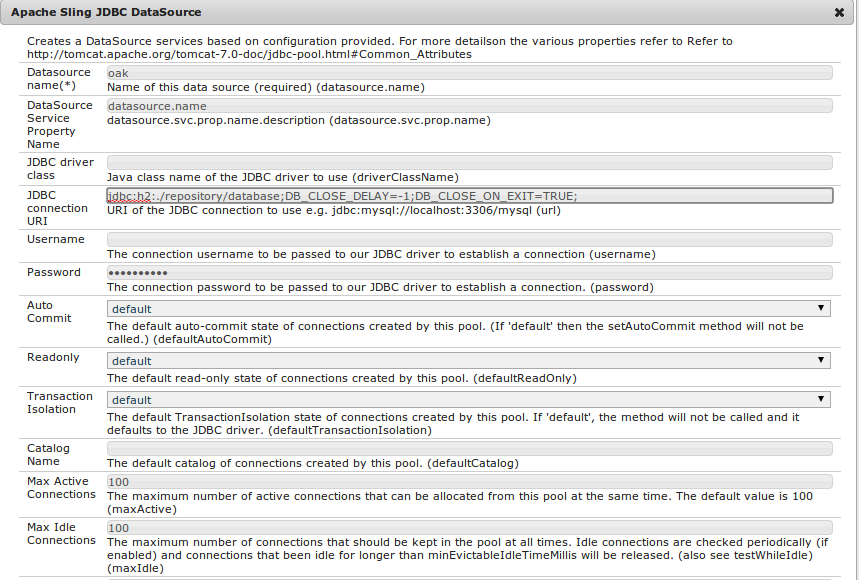 - -Using the config ui above one can directly configure most of the properties as explained in [Tomcat Docs][1] - -### Convert Driver jars to Bundle - -Most of the JDBC driver jars have the required OSGi headers and can be directly deployed to OSGi container -as bundles. However some of the drivers e.g. Postgres are not having such headers and hence need to be -converted to OSGi bundles. For them we can use the [Bnd Wrap][2] command. - -For example to convert the Postgres driver jar follow the steps below - - $ wget https://github.com/bndtools/bnd/releases/download/2.3.0.REL/biz.aQute.bnd-2.3.0.jar -O bnd.jar - $ wget http://jdbc.postgresql.org/download/postgresql-9.3-1101.jdbc41.jar - $ cat > bnd.bnd <<EOT - Bundle-Version: 9.3.1101 - Bundle-SymbolicName: org.postgresql - Export-Package: org.postgresql - Include-Resource: @postgresql-9.3-1101.jdbc41.jar - EOT - $ java -jar bnd.jar bnd.bnd - -In the steps above we - -1. Download the bnd jar and postgres driver jar -2. Create a bnd file with required instructions. -3. Execute the bnd command -4. Resulting bundle is present in `org.postgresql-9.3.1101.jar` - -## JNDI DataSource - -While running in Application Server the DataSource instance might be managed by app server and registered with -JNDI. To enable lookup of DataSource instance from JNDI you can configure `JNDIDataSourceFactory` - -1. Configure the DataSource from OSGi config for PID `org.apache.sling.datasource.JNDIDataSourceFactory` -2. Provide the JNDI name to lookup from and other details - -If Felix WebConsole is used then you can configure it via Configuration UI at -http://localhost:8080/system/console/configMgr/org.apache.sling.datasource.JNDIDataSourceFactory - -Once configured `JNDIDataSourceFactory` would lookup the DataSource instance and register it with OSGi -ServiceRegistry - -## Usage - -Once the required configuration is done the `DataSource` would be registered as part of the OSGi Service Registry -The service is registered with service property `datasource.name` whose value is the name of datasource provided in -OSGi config. - -Following snippet demonstrates accessing the DataSource named `foo` via DS annotation - - import javax.sql.DataSource; - import org.apache.felix.scr.annotations.Reference; - - public class DSExample { - - @Reference(target = "(&(objectclass=javax.sql.DataSource)(datasource.name=foo))") - private DataSource dataSource; - } - -[1]: http://tomcat.apache.org/tomcat-7.0-doc/jdbc-pool.html -[2]: http://www.aqute.biz/Bnd/Wrapping \ No newline at end of file +[1]: http://sling.apache.org/documentation/bundles/datasource-providers.html \ No newline at end of file -- To stop receiving notification emails like this one, please contact "[email protected]" <[email protected]>.

