This is an automated email from the ASF dual-hosted git repository.

benjobs pushed a commit to branch dev
in repository
https://gitbox.apache.org/repos/asf/incubator-streampark-website.git
The following commit(s) were added to refs/heads/dev by this push:
new 41ba1930 [Improve] Localization How to release (#257)
41ba1930 is described below
commit 41ba1930a1dd6884615808f239e608ee1670a3bd
Author: VampireAchao <[email protected]>
AuthorDate: Sun Sep 24 20:23:08 2023 +0800
[Improve] Localization How to release (#257)
---
community/release/How-to-release.md | 8 +-
.../current.json | 12 ++
.../current}/release/How-to-release.md | 202 +++++++++++----------
3 files changed, 118 insertions(+), 104 deletions(-)
diff --git a/community/release/How-to-release.md
b/community/release/How-to-release.md
index ed5ec160..adb6f144 100644
--- a/community/release/How-to-release.md
+++ b/community/release/How-to-release.md
@@ -137,8 +137,8 @@ If the query results are as follows, it means that the key
is successfully creat
#### 2.4 Add the gpg public key to the KEYS file of the Apache SVN project
warehouse
-- Apache StreamPark Dev分支
https://dist.apache.org/repos/dist/dev/incubator/streampark
-- Apache StreamPark Release分支
https://dist.apache.org/repos/dist/release/incubator/streampark/
+- Apache StreamPark Branch Dev
https://dist.apache.org/repos/dist/dev/incubator/streampark
+- Apache StreamPark Branch Release
https://dist.apache.org/repos/dist/release/incubator/streampark/
##### 2.4.1 Add public key to KEYS in dev branch
@@ -410,8 +410,6 @@ svn co
https://dist.apache.org/repos/dist/dev/incubator/streampark dist/streampa
svn co --depth empty
https://dist.apache.org/repos/dist/dev/incubator/streampark
```
-#### 3.7 Publish the dev directory of the Apache SVN warehouse of the material
package
-
Create a version number directory and name it in the form of
${release_version}-${RC_version}. RC_version starts from 1, that is, the
candidate version starts from RC1. During the release process, there is a
problem that causes the vote to fail. If it needs to be corrected, it needs to
iterate the RC version , the RC version number needs to be +1. For example:
Vote for version 2.1.0-RC1. If the vote passes without any problems, the RC1
version material will be released as the final versi [...]
```shell
@@ -436,7 +434,7 @@ svn status
svn commit -m "release for StreamPark 2.1.0"
```
-#### 3.8 Check Apache SVN Commit Results
+#### 3.7 Check Apache SVN Commit Results
> Visit the address
> https://dist.apache.org/repos/dist/dev/incubator/streampark/2.1.0-RC1/ in
> the browser
diff --git a/i18n/zh-CN/docusaurus-plugin-content-docs-community/current.json
b/i18n/zh-CN/docusaurus-plugin-content-docs-community/current.json
index 4f0e2a21..60eb96a1 100644
--- a/i18n/zh-CN/docusaurus-plugin-content-docs-community/current.json
+++ b/i18n/zh-CN/docusaurus-plugin-content-docs-community/current.json
@@ -6,5 +6,17 @@
"sidebar.tutorialSidebar.category.Development Specification": {
"message": "开发规范",
"description": "The label for category Development Specification in
sidebar tutorialSidebar"
+ },
+ "sidebar.tutorialSidebar.category.Contribution Guide": {
+ "message": "贡献指引",
+ "description": "The label for category Contribution Guide in sidebar
tutorialSidebar"
+ },
+ "sidebar.tutorialSidebar.category.Submit Guide": {
+ "message": "代码提交",
+ "description": "The label for category Submit Guide in sidebar
tutorialSidebar"
+ },
+ "sidebar.tutorialSidebar.category.Release": {
+ "message": "版本发布",
+ "description": "The label for category Release in sidebar tutorialSidebar"
}
}
\ No newline at end of file
diff --git a/community/release/How-to-release.md
b/i18n/zh-CN/docusaurus-plugin-content-docs-community/current/release/How-to-release.md
similarity index 71%
copy from community/release/How-to-release.md
copy to
i18n/zh-CN/docusaurus-plugin-content-docs-community/current/release/How-to-release.md
index ed5ec160..a3f1d28e 100644
--- a/community/release/How-to-release.md
+++
b/i18n/zh-CN/docusaurus-plugin-content-docs-community/current/release/How-to-release.md
@@ -1,33 +1,33 @@
---
id: 'how_to_release'
-title: How to Release
+title: 如何进行版本发布
sidebar_position: 4
---
-This tutorial describes in detail how to release Apache StreamPark, take the
release of version 2.1.0 as an example.
+本教程详细描述了如何发布Apache StreamPark,并以2.1.0版本的发布为例。
-## 1. Environmental requirements
+## 1. 环境要求
-This release process is operated in the Ubuntu OS, and the following tools are
required:
+此发布过程在Ubuntu OS中进行操作,并需要以下环境:
- JDK 1.8+
-- Apache Maven 3.x (this process uses 3.8.7)
+- Apache Maven 3.x (此处使用 3.8.7)
- GnuPG 2.x
- Git
-- SVN (apache uses svn to host project releases)
+- SVN (Apache使用svn来托管项目发布)
-> Pay attention to setting environment variables `export GPG_TTY=$(tty)`
+> 注意需要设置环境变量 `export GPG_TTY=$(tty)`
-## 2. Preparing for release
+## 2. 准备发布
-> First summarize the account information to better understand the operation
process, will be used many times later.
-- apache id: `muchunjin (APACHE LDAP UserName)`
-- apache passphrase: `APACHE LDAP Passphrase`
+> 首先整理帐户信息以更好地了解操作过程,稍后会多次使用。
+- apache id: `muchunjin (APACHE LDAP 用户名)`
+- apache passphrase: `APACHE LDAP 密钥`
- apache email: `[email protected]`
-- gpg real name: `muchunjin (Any name can be used, here I set it to the same
name as the apache id)`
-- gpg key passphrase: `The password set when creating the gpg key, you need to
remember this password`
+- gpg real name: `muchunjin (任何名称均可用, 在这里我将其设置为与apache id相同的名称)`
+- gpg key passphrase: `创建gpg密钥时设置的密码,你需要记住此密码`
-### 2.1 Key generation
+### 2.1 生成密钥
```shell
$ gpg --full-gen-key
@@ -98,9 +98,9 @@ uid muchunjin (for apache StreamPark
release create at 2023
sub rsa4096 2023-05-01 [E]
```
-Keys can be viewed through the `gpg --list-signatures` command
+密钥可以通过`gpg --list-signatures`命令查看
-### 2.2 Upload the generated key to the public server
+### 2.2 将生成的密钥上传到公共服务器
```shell
$ gpg --keyid-format SHORT --list-keys
@@ -116,9 +116,9 @@ $ gpg --keyserver keyserver.ubuntu.com --send-key 584EE68E
# Among them, keyserver.ubuntu.com is the selected keyserver, it is
recommended to use this, because the Apache Nexus verification uses this
keyserver
```
-#### 2.3 Check if the key is created successfully
+#### 2.3 检查密钥是否创建成功
-Verify whether it is synchronized to the public network, it will take about a
minute to find out the answer, if not successful, you can upload and retry
multiple times.
+验证是否已经同步到公共网络,需要一分钟左右才能知道答案,如果不成功,您可以多次上传并重试。
```shell
$ gpg --keyserver keyserver.ubuntu.com --recv-keys 05016886 # If the
following content appears, it means success
@@ -127,20 +127,20 @@ gpg: Total number processed: 1
gpg: unchanged: 1
```
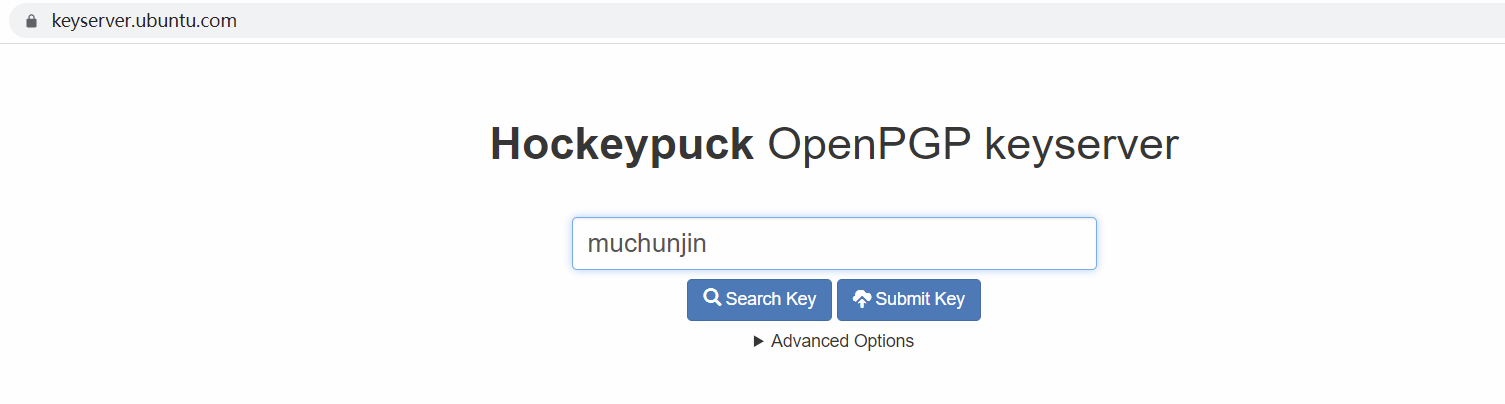
-Or enter https://keyserver.ubuntu.com/ address in the browser, enter the name
of the key and click 'Search key'
+或者进入 https://keyserver.ubuntu.com/ 网址,输入密钥的名称,然后点击'Search key'
-If the query results are as follows, it means that the key is successfully
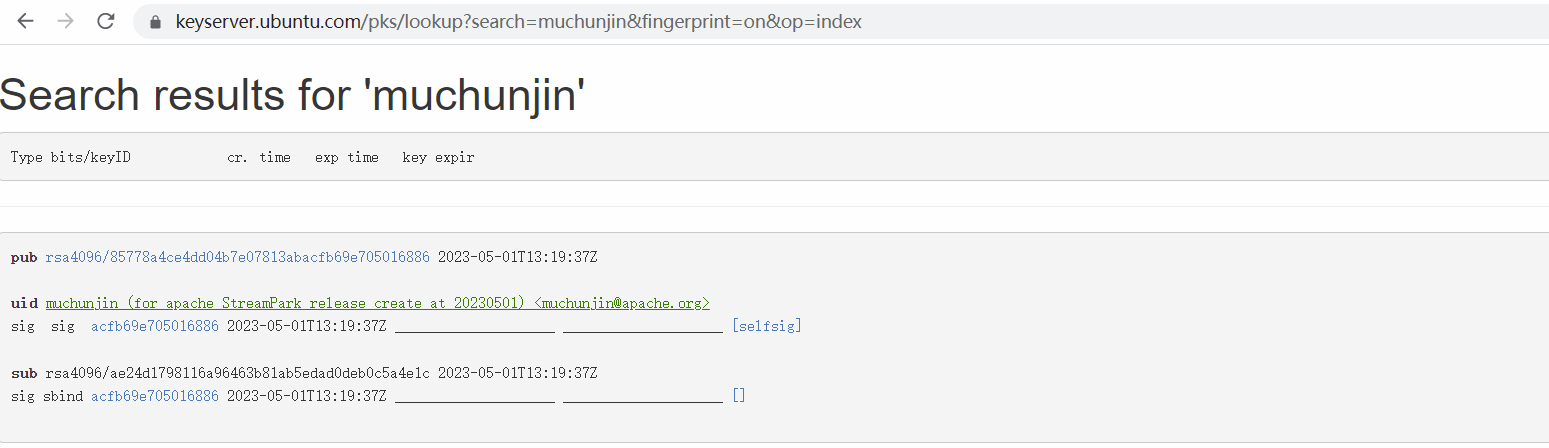
created.
+如果查询结果如下,表示密钥创建成功。
-#### 2.4 Add the gpg public key to the KEYS file of the Apache SVN project
warehouse
+#### 2.4 将 gpg 公钥添加到 Apache SVN 项目仓库的 KEYS 文件中
- Apache StreamPark Dev分支
https://dist.apache.org/repos/dist/dev/incubator/streampark
- Apache StreamPark Release分支
https://dist.apache.org/repos/dist/release/incubator/streampark/
-##### 2.4.1 Add public key to KEYS in dev branch
+##### 2.4.1 将公钥添加到dev分支的KEYS
```shell
$ mkdir -p streampark_svn/dev
@@ -149,13 +149,13 @@ $ cd streampark_svn/dev
$ svn co https://dist.apache.org/repos/dist/dev/incubator/streampark
$ cd streampark_svn/dev/streampark
-# Append the KEY you generated to the file KEYS, and check if it is added
correctly
+# 将生成的KEY追加到KEYS文件中,检查是否添加正确
$ (gpg --list-sigs [email protected] && gpg --export --armor
[email protected]) >> KEYS
$ svn ci -m "add gpg key for muchunjin"
```
-##### 2.4.2 Add public key to KEYS in release branch
+##### 2.4.2 将公钥添加到release分支的KEYS
```shell
$ mkdir -p streampark_svn/release
@@ -164,21 +164,21 @@ $ cd streampark_svn/release
$ svn co https://dist.apache.org/repos/dist/release/incubator/streampark/
$ cd streampark_svn/release/streampark
-# Append the KEY you generated to the file KEYS, and check if it is added
correctly
+# 将生成的KEY追加到KEYS文件中,检查是否添加正确
$ (gpg --list-sigs [email protected] && gpg --export --armor
[email protected]) >> KEYS
$ svn ci -m "add gpg key for muchunjin"
```
-#### 2.5 Configure apache maven address and user password settings
+#### 2.5 配置 apache maven 路径和用户密码设置
-- Generate master password
+- 生成主密码
```shell
$ mvn --encrypt-master-password <apache password>
{EM+4/TYVDXYHRbkwjjAS3mE1RhRJXJUSG8aIO5RSxuHU26rKCjuS2vG+/wMjz9te}
```
-- Create the file ${user.home}/.m2/settings-security.xml and configure the
password created in the previous step
+- 创建文件 ${user.home}/.m2/settings-security.xml 并配置上一步创建的密码
```shell
<settingsSecurity>
@@ -186,14 +186,14 @@ $ mvn --encrypt-master-password <apache password>
</settingsSecurity>
```
-- Generate the final encrypted password and add it to the ~/.m2/settings.xml
file
+- 生成最终的加密密码并将其添加到 ~/.m2/settings.xml 文件
```shell
$ mvn --encrypt-password <apache passphrase>
{/ZLaH78TWboH5IRqNv9pgU4uamuqm9fCIbw0gRWT01c=}
```
-> In the maven configuration file ~/.m2/settings.xml, add the following
`server` item
+> 在maven配置文件~/.m2/settings.xml中,添加以下服务端项
```
<settings xmlns="http://maven.apache.org/SETTINGS/1.0.0";
@@ -207,14 +207,14 @@ $ mvn --encrypt-password <apache passphrase>
<id>apache.snapshots.https</id>
<!-- APACHE LDAP UserName -->
<username>muchunjin</username>
- <!-- APACHE LDAP password (Fill in the password you just created with
the command `mvn --encrypt-password <apache passphrase>`) -->
+ <!-- APACHE LDAP password (填写刚刚使用命令 `mvn --encrypt-password <apache
passphrase>` 创建的密码) -->
<password>{/ZLaH78TWboH5IRqNv9pgU4uamuqm9fCIbw0gRWT01c=}</password>
</server>
<server>
<id>apache.releases.https</id>
<!-- APACHE LDAP UserName -->
<username>muchunjin</username>
- <!-- APACHE LDAP password (Fill in the password you just created with
the command `mvn --encrypt-password <apache passphrase>`) -->
+ <!-- APACHE LDAP password (填写刚刚使用命令 `mvn --encrypt-password <apache
passphrase>` 创建的密码) -->
<password>{/ZLaH78TWboH5IRqNv9pgU4uamuqm9fCIbw0gRWT01c=}</password>
</server>
</servers>
@@ -232,21 +232,21 @@ $ mvn --encrypt-password <apache passphrase>
</profiles>
```
-## 3. Prepare material package & release Apache Nexus
+## 3. 准备物料 & 发布到Apache Nexus
-#### 3.1 Based on the dev branch, create a release-${release_version}-rcx
branch, such as release-2.1.0-rc1, And create a tag named v2.1.0-rc1 based on
the release-2.1.0-rc1 branch, and set this tag as pre-release.
+#### 3.1
基于dev分支,创建一个名为release-${release_version}-rcx的分支,例如release-2.1.0-rc1。并基于release-2.1.0-rc1分支创建一个名为v2.1.0-rc1的标签,并将此标签设置为预发布。

-#### 3.2 clone release branch to local
+#### 3.2 克隆发布分支到本地
```shell
git clone -b release-2.1.0-rc1 -c core.autocrlf=false
[email protected]:apache/incubator-streampark.git
```
-#### 3.3 Publish the relevant JARs to Apache Nexus
+#### 3.3 发布相关JAR到Apache Nexus
-##### 3.3.1 Release scala 2.11 to the Apache Nexus repository
+##### 3.3.1 发布scala 2.11到Apache Nexus仓库
```shell
mvn clean install \
@@ -267,7 +267,7 @@ mvn deploy \
-DretryFailedDeploymentCount=3
```
-##### 3.3.2 Release scala 2.12 to the Apache Nexus repository
+##### 3.3.2 发布scala 2.12到Apache Nexus仓库
```shell
mvn clean install \
@@ -288,7 +288,7 @@ mvn deploy \
-DretryFailedDeploymentCount=3
```
-##### 3.3.3 Release shaded to the Apache Nexus repository
+##### 3.3.3 发布shaded到Apache Nexus仓库
```shell
mvn clean install \
@@ -305,27 +305,27 @@ mvn deploy \
-DretryFailedDeploymentCount=3
```
-##### 3.3.4 Check for successful publishing to the Apache Nexus repository
+##### 3.3.4 检查是否成功发布到Apache Nexus仓库
-> Visit https://repository.apache.org/ and log in, if there are scala 2.11,
scala 2.12, shaded packages, it means success.
+> 访问 https://repository.apache.org/ 并登录,如果有scala 2.11、scala
2.12、shaded包,说明发布成功。

-#### 3.4 Compile the binary package
+#### 3.4 编译二进制包
-> Scala 2.11 compilation and packaging
+> Scala 2.11 编译打包
```shell
mvn -Pscala-2.11,shaded,webapp,dist -DskipTests clean install
```
-> Scala 2.12 compilation and packaging
+> Scala 2.12 编译打包
```shell
mvn -Pscala-2.12,shaded,webapp,dist -DskipTests clean install
```
-> Package the project source code
+> 打包项目源码
```shell
git archive \
@@ -335,7 +335,7 @@ git archive \
release-2.1.0-rc1
```
-> The following 3 files will be generated
+> 会生成以下3个文件
```
apache-streampark-2.1.0-incubating-src.tar.gz
@@ -343,7 +343,7 @@ apache-streampark_2.11-2.1.0-incubating-bin.tar.gz
apache-streampark_2.12-2.1.0-incubating-bin.tar.gz
```
-#### 3.4 Sign binary and source packages
+#### 3.4 对二进制和源码包进行签名
```shell
cd dist
@@ -355,7 +355,7 @@ for i in *.tar.gz; do echo $i; gpg --armor --output $i.asc
--detach-sig $i ; don
for i in *.tar.gz; do echo $i; sha512sum $i > $i.sha512 ; done
```
-> The final file list is as follows
+> 最终文件列表如下
```
apache-streampark-2.1.0-incubating-src.tar.gz
@@ -369,12 +369,12 @@ apache-streampark_2.12-2.1.0-incubating-bin.tar.gz.asc
apache-streampark_2.12-2.1.0-incubating-bin.tar.gz.sha512
```
-#### 3.5 Verify signature
+#### 3.5 验证签名
```shell
$ cd dist
-# Verify signature
+# 验证签名
$ for i in *.tar.gz; do echo $i; gpg --verify $i.asc $i ; done
apache-streampark-2.1.0-incubating-src.tar.gz
@@ -390,7 +390,7 @@ gpg: Signature made Tue May 2 12:16:37 2023 CST
gpg: using RSA key 85778A4CE4DD04B7E07813ABACFB69E705016886
gpg: BAD signature from "muchunjin (for apache StreamPark release create at
20230501) <[email protected]>" [ultimate]
-# Verify SHA512
+# 验证 SHA512
$ for i in *.tar.gz; do echo $i; sha512sum --check $i.sha512; done
apache-streampark-2.1.0-incubating-src.tar.gz
@@ -401,52 +401,50 @@ apache-streampark_2.12-2.1.0-incubating-bin.tar.gz
apache-streampark_2.12-2.1.0-incubating-bin.tar.gz: OK
```
-#### 3.6 Publish the dev directory of the Apache SVN warehouse of the material
package
+#### 3.6 发布Apache SVN仓库中dev目录的物料包
```shell
-# Check out the dev directory of the Apache SVN warehouse to the
streampark_svn_dev directory under dist in the root directory of the Apache
StreamPark project
+# 检出Apache SVN仓库中的dev目录到Apache StreamPark项目根目录下的dist/streampark_svn_dev目录下
svn co https://dist.apache.org/repos/dist/dev/incubator/streampark
dist/streampark_svn_dev
svn co --depth empty
https://dist.apache.org/repos/dist/dev/incubator/streampark
```
-#### 3.7 Publish the dev directory of the Apache SVN warehouse of the material
package
-
-Create a version number directory and name it in the form of
${release_version}-${RC_version}. RC_version starts from 1, that is, the
candidate version starts from RC1. During the release process, there is a
problem that causes the vote to fail. If it needs to be corrected, it needs to
iterate the RC version , the RC version number needs to be +1. For example:
Vote for version 2.1.0-RC1. If the vote passes without any problems, the RC1
version material will be released as the final versi [...]
+创建一个版本号目录,并以${release_version}-${RC_version}的形式命名。RC_version从1开始,即候选版本从RC1开始。在发布过程中,如果出现导致投票失败的问题,需要进行修正,那么RC版本需要迭代,RC版本号需要+1。例如:为版本2.1.0-RC1投票。如果投票顺利通过,那么RC1版本的资料将作为最终版本的资料发布。如果出现问题(当streampark/incubator社区进行投票时,投票者会严格检查各种发布要求和合规问题)并需要纠正,那么修正后重新启动投票,下一次的候选版本为2.1.0-RC2。
```shell
mkdir -p dist/streampark_svn_dev/2.1.0-RC1
cp -f dist/* dist/streampark_svn_dev/2.1.0-RC1
```
-Commit to SVN
+提交到SVN
```shell
cd dist/streampark_svn_dev/
-# 1.check svn status
+# 1. 检查svn状态
svn status
-# 2. add to svn
+# 2. 添加到svn
svn add 2.0.0-RC1
svn status
-# 3. Submit to svn remote server
+# 3. 提交到svn远端服务器
svn commit -m "release for StreamPark 2.1.0"
```
-#### 3.8 Check Apache SVN Commit Results
+#### 3.7 检查Apache SVN提交结果
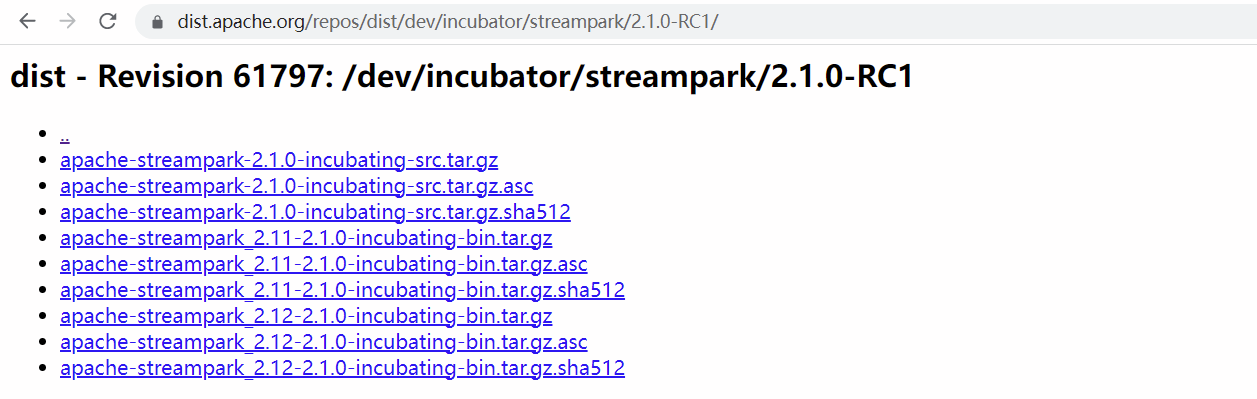
-> Visit the address
https://dist.apache.org/repos/dist/dev/incubator/streampark/2.1.0-RC1/ in the
browser
+> 在浏览器中访问
https://dist.apache.org/repos/dist/dev/incubator/streampark/2.1.0-RC1/
-## 3. Enter the community voting stage
+## 3. 进入社区投票阶段
-#### 3.1 Send a Community Vote Email
+#### 3.1 发送社区投票邮件
-Send a voting email in the community requires at least three `+1` and no `-1`.
+发送社区投票邮件需要至少三个`+1`,且无`-1`。
> `Send to`: [email protected] <br />
> `Title`: [VOTE] Release Apache StreamPark (Incubating) 2.1.0 rc1 <br />
@@ -507,7 +505,7 @@ How to Build:
Thanks!
```
-After 72 hours, the voting results will be counted, and the voting result
email will be sent, as follows.
+在72小时后,将统计投票结果,并发送投票结果邮件,如下所示。
> `Send to`: [email protected] <br />
> `Title`: [RESULT][VOTE] Release Apache StreamPark (Incubating) 2.1.0-rc1 <br
> />
@@ -545,16 +543,18 @@ Best,
ChunJin Mu
```
-One item of the email content is `Vote thread`, and the link is obtained as
follows: <br />
-Visit this address
https://lists.apache.org/[email protected], and find the
mail title and click to display the voting content
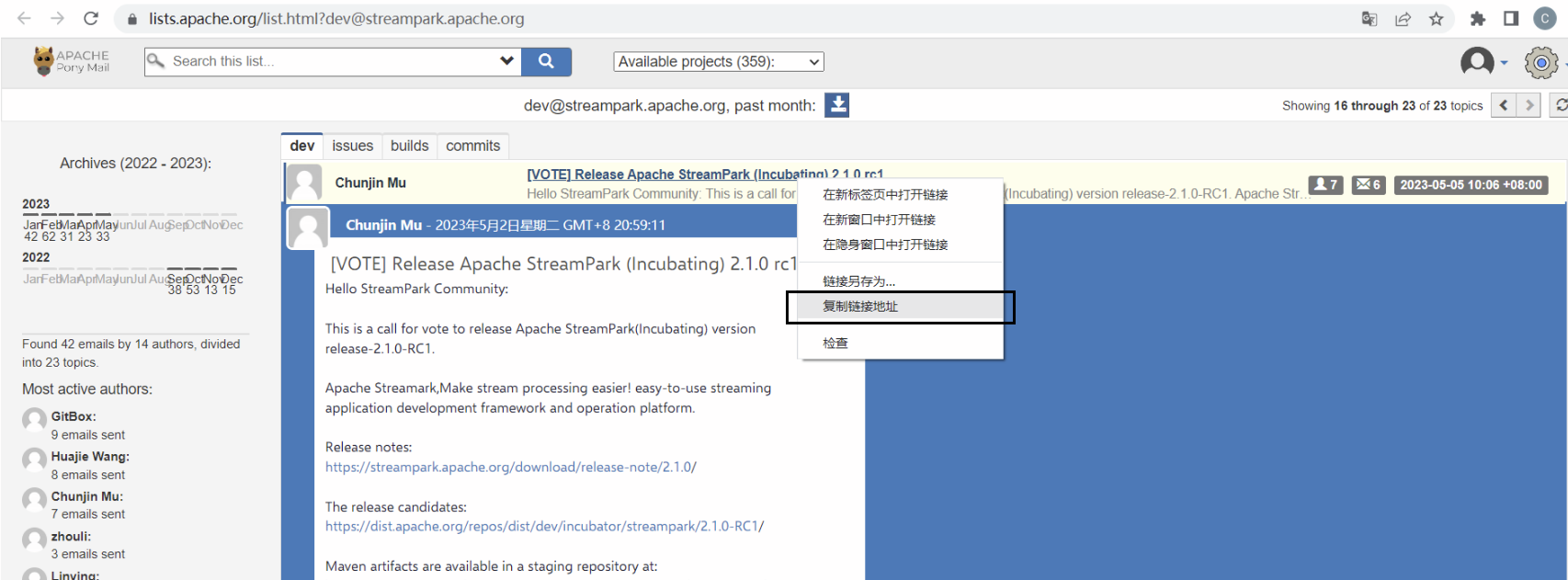
+邮件内容中的一项是`Vote thread`,链接获取方式如下:<br />
+访问此地址 https://lists.apache.org/[email protected] ,
找到邮件标题并点击显示投票内容
+
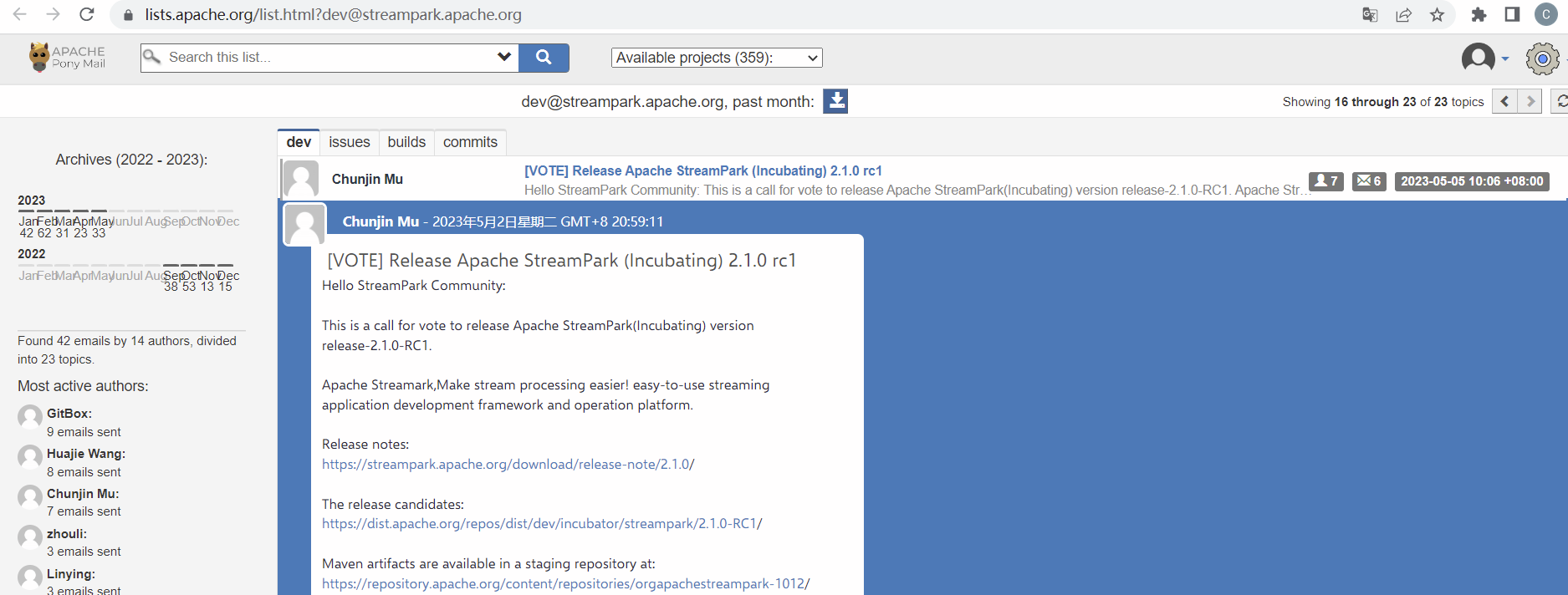
-Right-click the title and click Copy Link Address to get the link
+右键点击标题,点击复制链接地址获取链接
+
-#### 3.2 Send Incubator Community voting mail
+#### 3.2 发送孵化社区投票邮件
-Send a voting email in the incubator community requires at least three `+1`
and no `-1`.
+发送孵化社区投票邮件需要至少三个`+1`,且无`-1`。
> `Send to`: [email protected] <br />
> `cc`: [email protected]、[email protected]、[email protected] <br
> />
@@ -620,7 +620,7 @@ Best,
ChunJin Mu
```
-If there is no -1 after 72 hours, reply to the email as follows
+如果72小时后没有-1,回复邮件如下
> `Send to`: [email protected] <br />
> `cc`: [email protected] <br />
@@ -633,7 +633,7 @@ Best,
Chunjin Mu
```
-Then the voting results will be counted, and the voting result email will be
sent, as follows.
+然后将统计投票结果,并发送投票结果邮件,如下所示。
> `Send to`: [email protected] <br />
> `cc`: [email protected]、[email protected]、[email protected] <br
> />
@@ -666,32 +666,34 @@ Best,
ChunJin Mu
```
-One item of the email content is `Vote thread`, and the link is obtained as
follows: <br />
-Visit this address
https://lists.apache.org/[email protected], and find the
mail title and click to display the voting content
+邮件内容中的一项是`Vote thread`,链接获取方式如下:<br />
+访问此地址 https://lists.apache.org/[email protected] ,
找到邮件标题并点击显示投票内容
+
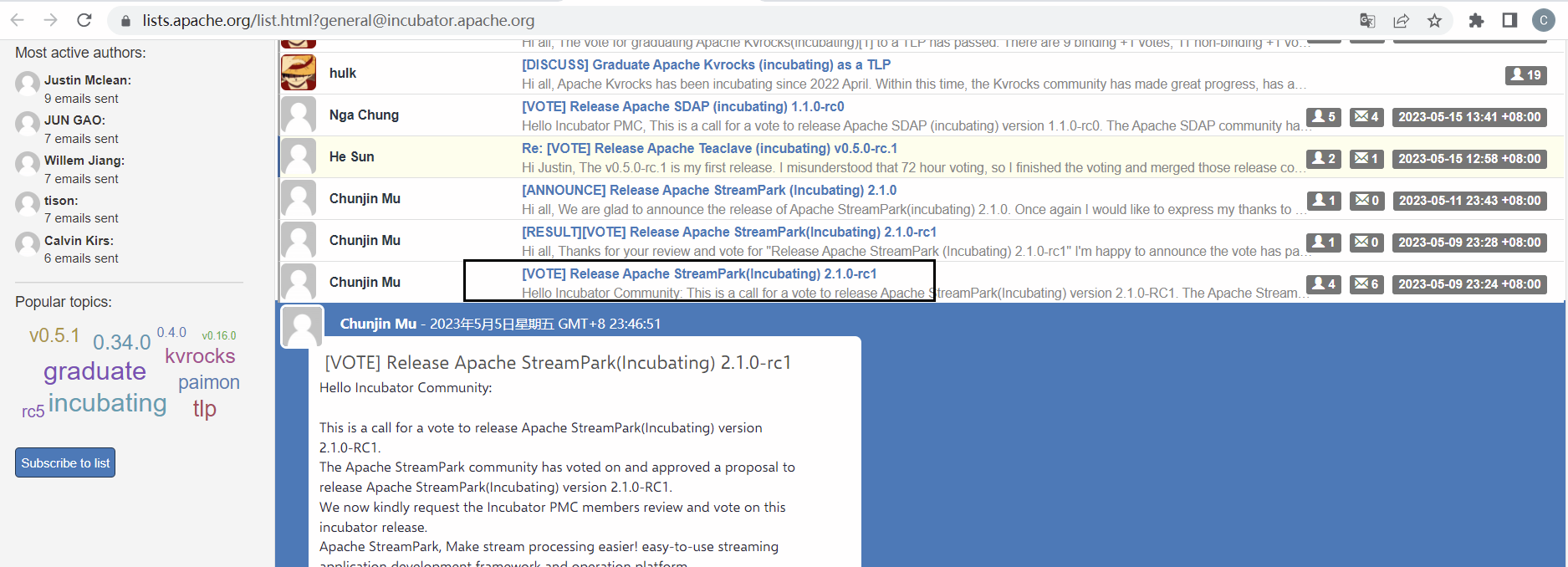
-Then right-click the title and click Copy Link Address to get the link.
-Wait a day to see if the tutor has any other comments, if not, send the
following announcement email
+右键点击标题,点击复制链接地址获取链接
-## 4. Complete the final publishing steps
+等待一天,查看看导师是否有其他意见,如果没有,发送以下公告邮件
-#### 4.1 Migrating source and binary packages
+## 4. 完成最终发布步骤
+
+#### 4.1 迁移源代码和二进制包
```shell
svn mv https://dist.apache.org/repos/dist/dev/incubator/streampark/2.1.0-RC1
https://dist.apache.org/repos/dist/release/incubator/streampark/2.1.0 -m
"transfer packages for 2.1.0-RC1"
```
-#### 4.2 Publish releases in the Apache Staging repository
+#### 4.2 发布版本到Apache Staging仓库
-- Log in to http://repository.apache.org , log in with your Apache account
-- Click Staging repositories on the left
-- Select your most recently uploaded warehouse, the warehouse specified in the
voting email
-- Click the Release button above, this process will perform a series of checks
-> It usually takes 24 hours for the warehouse to synchronize to other data
sources
+- 登录 http://repository.apache.org ,使用你的Apache账号登录
+- 点击左侧的 Staging repositories
+- 选择你最近上传的仓库,投票邮件中指定的仓库
+- 点击上方的Release按钮,这个过程会进行一系列的检查
+> 仓库同步到其他数据源通常需要24小时左右
-#### 4.3 Add the new version download address to the official website
+#### 4.3 添加新版本下载地址到官网
-Add the following to the src/pages/download/data.json file on the official
website
+添加以下内容到官网的src/pages/download/data.json文件中
```
{
@@ -700,7 +702,7 @@ Add the following to the src/pages/download/data.json file
on the official websi
}
```
-The final file content is as follows
+最终文件内容如下
```
[
@@ -715,21 +717,23 @@ The final file content is as follows
]
```
-Open the official website address https://streampark.apache.org/download/ to
see if there is a new version of the download
-> It should be noted that the download link may take effect after an hour, so
please pay attention to it.
+打开官网地址 https://streampark.apache.org/download/ 查看是否有新版本的下载
+
+> 需要注意的是,下载链接可能需要一个小时后才会生效,请注意。

-#### 4.4 Generate a release on github
+#### 4.4 在github上生成release
+
+基于release-2.1.0-rc1分支创建一个名为v2.1.0的标签,并将此标签设置为latest release。
-Create a tag named v2.1.0 based on the release-2.1.0-rc1 branch, and set this
tag to latest release.
+然后输入发版标题和描述
-Then enter Release Title and Describe
-- Release Title:
+- 发版标题:
```
v2.1.0-incubating
```
-- Describe:
+- 描述:
```
Release-2.1.0-incubating
release note: https://streampark.apache.org/download/release-note/2.1.0
@@ -737,11 +741,11 @@ release note:
https://streampark.apache.org/download/release-note/2.1.0
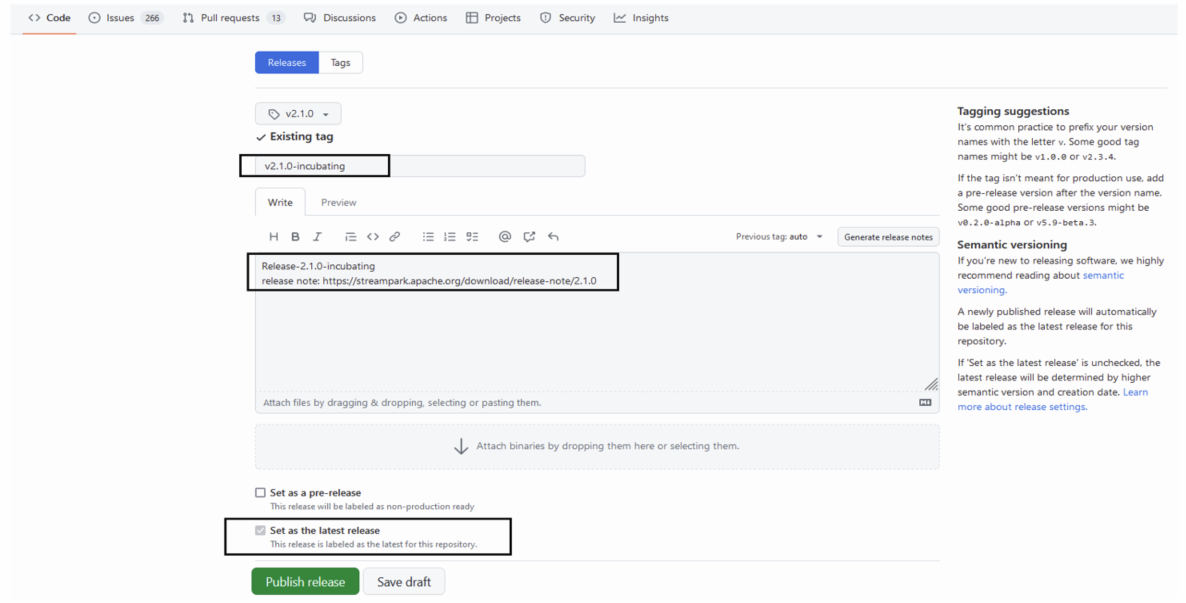
-Then click the `Publish release` button.
+然后点击`Publish release`按钮。
-The rename the release-2.1.0-rc1 branch to release-2.1.0.
+然后将release-2.1.0-rc1分支重命名为release-2.1.0。
-#### 4.5 Send new version announcement email
+#### 4.5 发送新版本公告邮件
> `Send to`: [email protected] <br />
> `cc`: [email protected] <br />
@@ -769,4 +773,4 @@ Best,
ChunJin Mu
```
-This version release is over.
\ No newline at end of file
+该版本的发布顺利结束。
\ No newline at end of file


