This is an automated email from the ASF dual-hosted git repository.

kriszu pushed a commit to branch dev
in repository
https://gitbox.apache.org/repos/asf/incubator-streampark-website.git
The following commit(s) were added to refs/heads/dev by this push:
new b8c21a9 How to Release Version 2.1.x (#411)
b8c21a9 is described below
commit b8c21a9e6b11ea82f44df2d69291249c1be50a00
Author: muchunjin <[email protected]>
AuthorDate: Sun Sep 1 22:04:17 2024 +0800
How to Release Version 2.1.x (#411)
---
...-release.md => How-to-release-version-2.1.x.md} | 284 ++++++++++-----------
docusaurus.config.js | 4 +-
2 files changed, 144 insertions(+), 144 deletions(-)
diff --git a/community/release/How-to-release.md
b/community/release/How-to-release-version-2.1.x.md
similarity index 94%
rename from community/release/How-to-release.md
rename to community/release/How-to-release-version-2.1.x.md
index bcc6753..c6f29d9 100644
--- a/community/release/How-to-release.md
+++ b/community/release/How-to-release-version-2.1.x.md
@@ -1,6 +1,6 @@
---
-id: 'how_to_release'
-title: How to Release
+id: 'how_to_release_version_2.1.x'
+title: How to Release Version 2.1.x
sidebar_position: 4
---
@@ -112,7 +112,7 @@ uid [ultimate] muchunjin (for apache StreamPark
release create at 202305
sub rsa4096/0C5A4E1C 2023-05-01 [E]
# Send public key to keyserver via key id
-$ gpg --keyserver keyserver.ubuntu.com --send-key 584EE68E
+$ gpg --keyserver keyserver.ubuntu.com --send-key 05016886
# Among them, keyserver.ubuntu.com is the selected keyserver, it is
recommended to use this, because the Apache Nexus verification uses this
keyserver
```
@@ -124,7 +124,7 @@ echo "standard-resolver" > ~/.gnupg/dirmngr.conf
sudo pkill dirmngr
```
-#### 2.3 Check if the key is created successfully
+### 2.3 Check if the key is created successfully
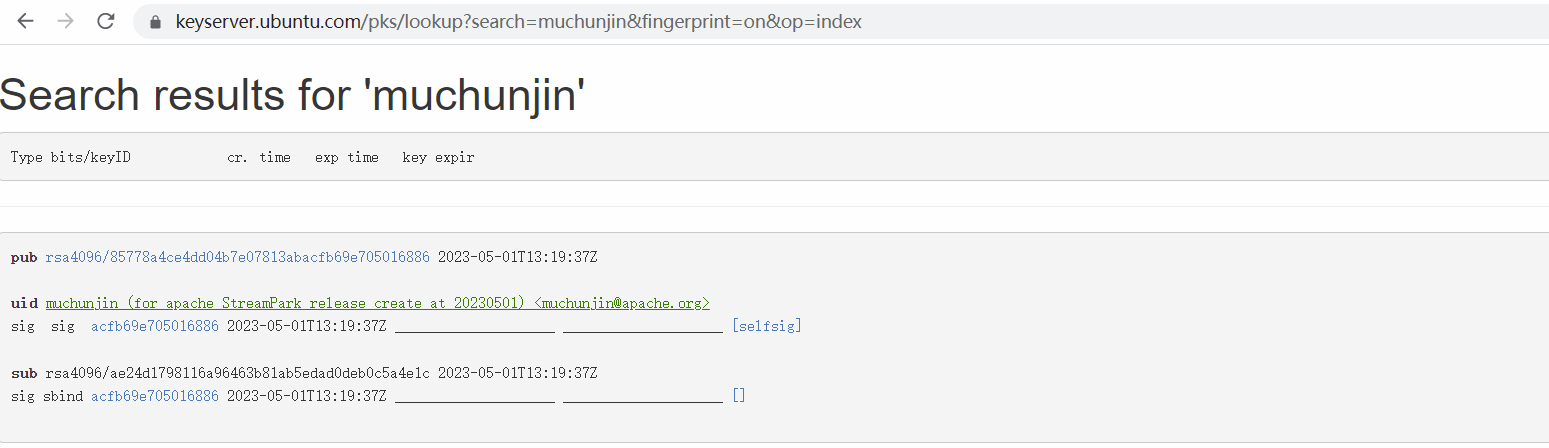
Verify whether it is synchronized to the public network, it will take about a
minute to find out the answer, if not successful, you can upload and retry
multiple times.
@@ -143,7 +143,7 @@ If the query results are as follows, it means that the key
is successfully creat
-#### 2.4 Add the gpg public key to the KEYS file of the Apache SVN project
warehouse
+### 2.4 Add the gpg public key to the KEYS file of the Apache SVN project
warehouse
- Apache StreamPark Branch Dev
https://dist.apache.org/repos/dist/dev/incubator/streampark
- Apache StreamPark Branch Release
https://dist.apache.org/repos/dist/release/incubator/streampark/
@@ -178,139 +178,19 @@ $ (gpg --list-sigs [email protected] && gpg --export
--armor muchunjin@apache
$ svn ci -m "add gpg key for muchunjin"
```
-#### 2.5 Configure apache maven address and user password settings
+## 3. Prepare material package
-- Generate master password
-```shell
-$ mvn --encrypt-master-password <apache password>
-{EM+4/TYVDXYHRbkwjjAS3mE1RhRJXJUSG8aIO5RSxuHU26rKCjuS2vG+/wMjz9te}
-```
-
-- Create the file `${user.home}/.m2/settings-security.xml` and configure the
password created in the previous step
-
-```xml
-<settingsSecurity>
-
<master>{EM+4/TYVDXYHRbkwjjAS3mE1RhRJXJUSG8aIO5RSxuHU26rKCjuS2vG+/wMjz9te}</master>
-</settingsSecurity>
-```
-
-- Generate the final encrypted password and add it to the ~/.m2/settings.xml
file
-
-```shell
-$ mvn --encrypt-password <apache passphrase>
-{/ZLaH78TWboH5IRqNv9pgU4uamuqm9fCIbw0gRWT01c=}
-```
-
-> In the maven configuration file ~/.m2/settings.xml, add the following
`server` item
-
-```
-<settings xmlns="http://maven.apache.org/SETTINGS/1.0.0";
- xmlns:xsi="http://www.w3.org/2001/XMLSchema-instance";
- xsi:schemaLocation="http://maven.apache.org/SETTINGS/1.0.0
http://maven.apache.org/xsd/settings-1.0.0.xsd";>
-
- <localRepository>/path/to/local/repo</localRepository>
-
- <servers>
- <server>
- <id>apache.snapshots.https</id>
- <!-- APACHE LDAP UserName -->
- <username>muchunjin</username>
- <!-- APACHE LDAP password (Fill in the password you just created with
the command `mvn --encrypt-password <apache passphrase>`) -->
- <password>{/ZLaH78TWboH5IRqNv9pgU4uamuqm9fCIbw0gRWT01c=}</password>
- </server>
- <server>
- <id>apache.releases.https</id>
- <!-- APACHE LDAP UserName -->
- <username>muchunjin</username>
- <!-- APACHE LDAP password (Fill in the password you just created with
the command `mvn --encrypt-password <apache passphrase>`) -->
- <password>{/ZLaH78TWboH5IRqNv9pgU4uamuqm9fCIbw0gRWT01c=}</password>
- </server>
- </servers>
-
- <profiles>
- <profile>
- <id>apache-release</id>
- <properties>
- <gpg.keyname>05016886</gpg.keyname>
- <!-- Use an agent: Prevents being asked for the password during
the build -->
- <gpg.useagent>true</gpg.useagent>
- <gpg.passphrase>passphrase for your gpg key</gpg.passphrase>
- </properties>
- </profile>
- </profiles>
-```
-
-## 3. Prepare material package & release Apache Nexus
-
-#### 3.1 Based on the dev branch, create a `release-${release_version}-rcx`
branch, such as release-2.1.0-rc1, And create a tag named v2.1.0-rc1 based on
the release-2.1.0-rc1 branch, and set this tag as pre-release.
+### 3.1 Based on dev or dev-2.1. x branch depending on the situation, create a
`release-${release_version}-rcx` branch, such as release-2.1.0-rc1, And create
a tag named v2.1.0-rc1 based on the release-2.1.0-rc1 branch, and set this tag
as pre-release.

-#### 3.2 clone release branch to local
+### 3.2 clone release branch to local
```shell
git clone -b release-2.1.0-rc1 -c core.autocrlf=false
[email protected]:apache/incubator-streampark.git
```
-#### 3.3 Publish the relevant JARs to Apache Nexus
-
-##### 3.3.1 Release scala 2.11 to the Apache Nexus repository
-
-```shell
-mvn clean install \
--Pscala-2.11 \
--DskipTests \
--Dcheckstyle.skip=true \
--Dmaven.javadoc.skip=true \
--pl 'streampark-common,streampark-flink' \
--pl '!streampark-console/streampark-console-service' \
--amd
-```
-
-```shell
-mvn deploy \
--Pscala-2.11,apache-release \
--DskipTests \
--Dmaven.javadoc.skip=true \
--DretryFailedDeploymentCount=3
-```
-
-##### 3.3.2 Release scala 2.12 to the Apache Nexus repository
-
-```shell
-mvn clean install \
--Pscala-2.12 \
--DskipTests \
--Dcheckstyle.skip=true \
--Dmaven.javadoc.skip=true \
--pl 'streampark-common,streampark-flink' \
--pl '!streampark-console/streampark-console-service' \
--amd
-```
-
-```shell
-mvn deploy \
--Pscala-2.12,apache-release \
--DskipTests \
--Dmaven.javadoc.skip=true \
--DretryFailedDeploymentCount=3
-```
-
-```shell
-mvn deploy \
--Papache-release \
--DskipTests \
--Dmaven.javadoc.skip=true \
--DretryFailedDeploymentCount=3
-```
-
-##### 3.3.3 Check for successful publishing to the Apache Nexus repository
-
-> Visit https://repository.apache.org/ and log in, if there are scala 2.11,
scala 2.12, it means success.
-
-
-
-#### 3.4 Compile the binary package
+### 3.3 Compile the binary package
> Scala 2.11 compilation and packaging
@@ -342,7 +222,7 @@ apache-streampark_2.11-2.1.0-incubating-bin.tar.gz
apache-streampark_2.12-2.1.0-incubating-bin.tar.gz
```
-#### 3.4 Sign binary and source packages
+### 3.4 Sign binary and source packages
```shell
cd dist
@@ -368,7 +248,7 @@ apache-streampark_2.12-2.1.0-incubating-bin.tar.gz.asc
apache-streampark_2.12-2.1.0-incubating-bin.tar.gz.sha512
```
-#### 3.5 Verify signature
+### 3.5 Verify signature
```shell
$ cd dist
@@ -400,7 +280,7 @@ apache-streampark_2.12-2.1.0-incubating-bin.tar.gz
apache-streampark_2.12-2.1.0-incubating-bin.tar.gz: OK
```
-#### 3.6 Publish the dev directory of the Apache SVN warehouse of the material
package
+### 3.6 Publish the dev directory of the Apache SVN warehouse of the material
package
```shell
# Check out the dev directory of the Apache SVN warehouse to the
streampark_svn_dev directory under dist in the root directory of the Apache
StreamPark project
@@ -433,15 +313,135 @@ svn status
svn commit -m "release for StreamPark 2.1.0"
```
-#### 3.7 Check Apache SVN Commit Results
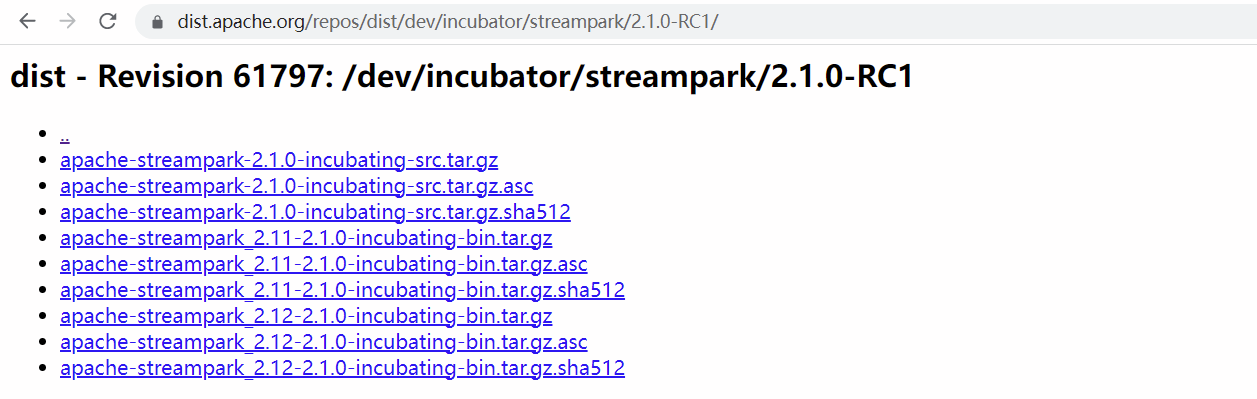
+### 3.7 Check Apache SVN Commit Results
> Visit the address
> https://dist.apache.org/repos/dist/dev/incubator/streampark/2.1.0-RC1/ in
> the browser
-## 3. Enter the community voting stage
+## 4. Release Apache Nexus
+
+### 4.1 Configure apache maven address and user password settings
+
+- Generate master password
+```shell
+$ mvn --encrypt-master-password <apache password>
+{EM+4/TYVDXYHRbkwjjAS3mE1RhRJXJUSG8aIO5RSxuHU26rKCjuS2vG+/wMjz9te}
+```
+
+- Create the file `${user.home}/.m2/settings-security.xml` and configure the
password created in the previous step
+
+```xml
+<settingsSecurity>
+
<master>{EM+4/TYVDXYHRbkwjjAS3mE1RhRJXJUSG8aIO5RSxuHU26rKCjuS2vG+/wMjz9te}</master>
+</settingsSecurity>
+```
+
+- Generate the final encrypted password and add it to the ~/.m2/settings.xml
file
+
+```shell
+$ mvn --encrypt-password <apache passphrase>
+{/ZLaH78TWboH5IRqNv9pgU4uamuqm9fCIbw0gRWT01c=}
+```
+
+> In the maven configuration file ~/.m2/settings.xml, add the following
`server` item
+
+```
+<settings xmlns="http://maven.apache.org/SETTINGS/1.0.0";
+ xmlns:xsi="http://www.w3.org/2001/XMLSchema-instance";
+ xsi:schemaLocation="http://maven.apache.org/SETTINGS/1.0.0
http://maven.apache.org/xsd/settings-1.0.0.xsd";>
+
+ <localRepository>/path/to/local/repo</localRepository>
+
+ <servers>
+ <server>
+ <id>apache.snapshots.https</id>
+ <!-- APACHE LDAP UserName -->
+ <username>muchunjin</username>
+ <!-- APACHE LDAP password (Fill in the password you just created with
the command `mvn --encrypt-password <apache passphrase>`) -->
+ <password>{/ZLaH78TWboH5IRqNv9pgU4uamuqm9fCIbw0gRWT01c=}</password>
+ </server>
+ <server>
+ <id>apache.releases.https</id>
+ <!-- APACHE LDAP UserName -->
+ <username>muchunjin</username>
+ <!-- APACHE LDAP password (Fill in the password you just created with
the command `mvn --encrypt-password <apache passphrase>`) -->
+ <password>{/ZLaH78TWboH5IRqNv9pgU4uamuqm9fCIbw0gRWT01c=}</password>
+ </server>
+ </servers>
+
+ <profiles>
+ <profile>
+ <id>apache-release</id>
+ <properties>
+ <gpg.keyname>05016886</gpg.keyname>
+ <!-- Use an agent: Prevents being asked for the password during
the build -->
+ <gpg.useagent>true</gpg.useagent>
+ <gpg.passphrase>passphrase for your gpg key</gpg.passphrase>
+ </properties>
+ </profile>
+ </profiles>
+```
+
+### 4.2 Release scala 2.11 to the Apache Nexus repository
+
+```shell
+mvn clean install \
+-Pscala-2.11 \
+-DskipTests \
+-Dcheckstyle.skip=true \
+-Dmaven.javadoc.skip=true \
+-pl 'streampark-common,streampark-flink' \
+-pl '!streampark-console/streampark-console-service' \
+-amd
+```
+
+```shell
+mvn deploy \
+-Pscala-2.11,apache-release \
+-DskipTests \
+-Dmaven.javadoc.skip=true \
+-DretryFailedDeploymentCount=3
+```
+
+### 4.3 Release scala 2.12 to the Apache Nexus repository
+
+```shell
+mvn clean install \
+-Pscala-2.12 \
+-DskipTests \
+-Dcheckstyle.skip=true \
+-Dmaven.javadoc.skip=true \
+-pl 'streampark-common,streampark-flink' \
+-pl '!streampark-console/streampark-console-service' \
+-amd
+```
+
+```shell
+mvn deploy \
+-Pscala-2.12,apache-release \
+-DskipTests \
+-Dmaven.javadoc.skip=true \
+-DretryFailedDeploymentCount=3
+```
+
+```shell
+mvn deploy \
+-Papache-release \
+-DskipTests \
+-Dmaven.javadoc.skip=true \
+-DretryFailedDeploymentCount=3
+```
+
+### 4.4 Check for successful publishing to the Apache Nexus repository
+
+> Visit https://repository.apache.org/ and log in, if there are scala 2.11,
scala 2.12, it means success.
+
+
+
+## 5. Enter the community voting stage
-#### 3.1 Send a Community Vote Email
+### 5.1 Send a Community Vote Email
Send a voting email in the community requires at least three `+1` and no `-1`.
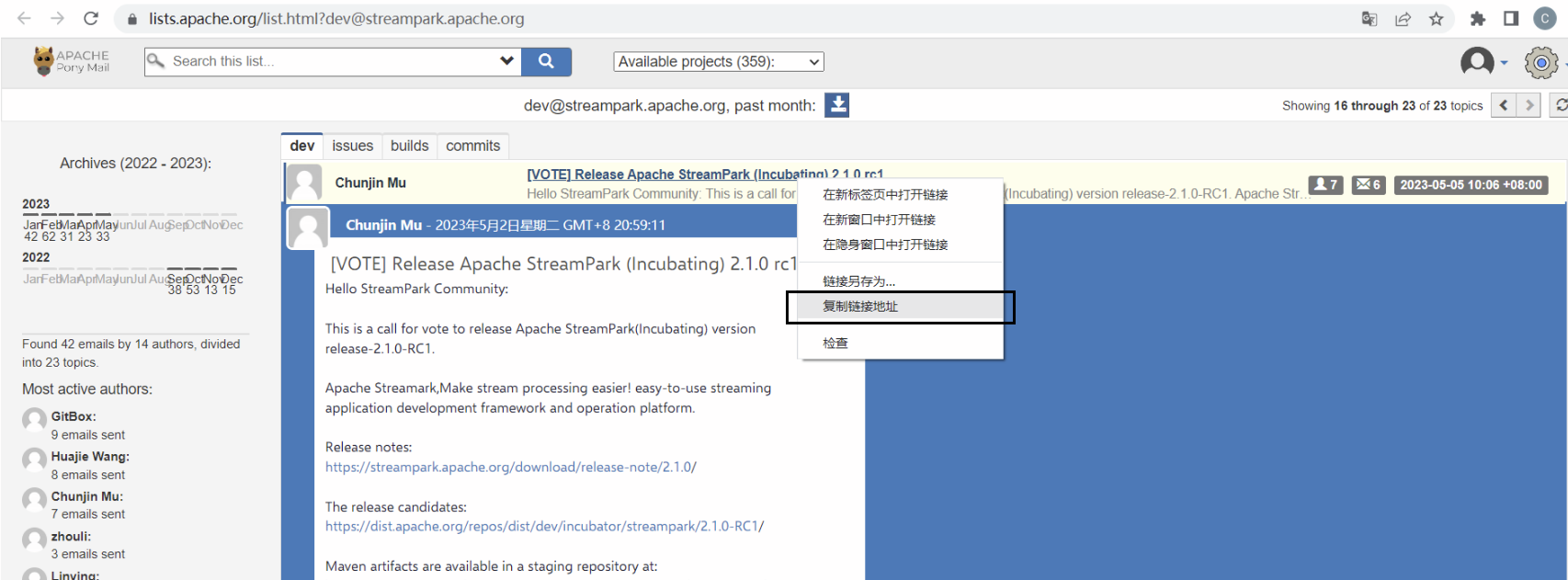
@@ -549,7 +549,7 @@ Visit this address
https://lists.apache.org/[email protected],
Right-click the title and click Copy Link Address to get the link
-#### 3.2 Send Incubator Community voting mail
+### 5.2 Send Incubator Community voting mail
Send a voting email in the incubator community requires at least three `+1`
and no `-1`.
@@ -670,15 +670,15 @@ Then right-click the title and click Copy Link Address to
get the link.
Wait a day to see if the tutor has any other comments, if not, send the
following announcement email
-## 4. Complete the final publishing steps
+## 6. Complete the final publishing steps
-#### 4.1 Migrating source and binary packages
+### 6.1 Migrating source and binary packages
```shell
svn mv https://dist.apache.org/repos/dist/dev/incubator/streampark/2.1.0-RC1
https://dist.apache.org/repos/dist/release/incubator/streampark/2.1.0 -m
"transfer packages for 2.1.0-RC1"
```
-#### 4.2 Publish releases in the Apache Staging repository
+### 6.2 Publish releases in the Apache Staging repository
- Log in to http://repository.apache.org , log in with your Apache account
- Click Staging repositories on the left
@@ -686,7 +686,7 @@ svn mv
https://dist.apache.org/repos/dist/dev/incubator/streampark/2.1.0-RC1 htt
- Click the Release button above, this process will perform a series of checks
> It usually takes 24 hours for the warehouse to synchronize to other data
> sources
-#### 4.3 Add the new version download address to the official website
+### 6.3 Add the new version download address to the official website
Add the following to the src/pages/download/data.json file on the official
website
@@ -717,7 +717,7 @@ Open the official website address
https://streampark.apache.org/download/ to see

-#### 4.4 Generate a release on github
+### 6.4 Generate a release on github
Create a tag named v2.1.0 based on the release-2.1.0-rc1 branch, and set this
tag to latest release.
@@ -738,7 +738,7 @@ Then click the `Publish release` button.
The rename the release-2.1.0-rc1 branch to release-2.1.0.
-#### 4.5 Send new version announcement email
+### 6.5 Send new version announcement email
> `Send to`: [email protected] <br />
> `cc`: [email protected] <br />
diff --git a/docusaurus.config.js b/docusaurus.config.js
index 391cf3e..3a36dd5 100644
--- a/docusaurus.config.js
+++ b/docusaurus.config.js
@@ -168,8 +168,8 @@ const config = {
to: "/community/submit_guide/documentation_style_guide",
},
{
- label: "How to release",
- to: "/community/release/how_to_release",
+ label: "How to release version 2.1.x",
+ to: "/community/release/how_to_release_version_2.1.x",
},
{
label: "How to Verify Release",


