This is an automated email from the ASF dual-hosted git repository.

bossenti pushed a commit to branch dev
in repository https://gitbox.apache.org/repos/asf/streampipes.git
The following commit(s) were added to refs/heads/dev by this push:
new c9f407809f docs: add python tutorial about ML with ONNX (#2687)
c9f407809f is described below
commit c9f407809f4401dee23afcbe160d9aa10719c86b
Author: Tim <[email protected]>
AuthorDate: Wed Apr 3 09:17:12 2024 +0200
docs: add python tutorial about ML with ONNX (#2687)
* docs: add ONNX tutorial to StreamPipes Python docs
* docs: correct typo
* docs: remove redundant import
* docs: remove token
* docs: update img path
---
.../docs/img/tutorial-prediction-data-stream.png | Bin 0 -> 221844 bytes
streampipes-client-python/docs/index.md | 9 -
...ine-learning-on-a-streampipes-data-stream.ipynb | 25 +-
...roperable-machine-learning-in-streampipes.ipynb | 509 +++++++++++++++++++++
streampipes-client-python/mkdocs.yml | 3 +-
5 files changed, 532 insertions(+), 14 deletions(-)
diff --git
a/streampipes-client-python/docs/img/tutorial-prediction-data-stream.png
b/streampipes-client-python/docs/img/tutorial-prediction-data-stream.png
new file mode 100644
index 0000000000..071a5f2add
Binary files /dev/null and
b/streampipes-client-python/docs/img/tutorial-prediction-data-stream.png differ
diff --git a/streampipes-client-python/docs/index.md
b/streampipes-client-python/docs/index.md
index 6e45f5d496..2e3062886d 100644
--- a/streampipes-client-python/docs/index.md
+++ b/streampipes-client-python/docs/index.md
@@ -29,15 +29,6 @@ and the amazing universe of data analytics libraries in
Python. </p>
---
-<br>
-
-!!! warning "StreamPipes Python is in beta"
-
- The current version of this Python library is still a beta version.<br>
- This means that it is still heavily under development, which may result in
frequent and extensive API changes, unstable behavior, etc.
-
----
-
## ⚡️ Quickstart
As a quick example, we demonstrate how to set up and configure a StreamPipes
client.
diff --git
a/streampipes-client-python/docs/tutorials/4-using-online-machine-learning-on-a-streampipes-data-stream.ipynb
b/streampipes-client-python/docs/tutorials/4-using-online-machine-learning-on-a-streampipes-data-stream.ipynb
index a797f041b9..adcc24363e 100644
---
a/streampipes-client-python/docs/tutorials/4-using-online-machine-learning-on-a-streampipes-data-stream.ipynb
+++
b/streampipes-client-python/docs/tutorials/4-using-online-machine-learning-on-a-streampipes-data-stream.ipynb
@@ -28,7 +28,7 @@
},
"outputs": [],
"source": [
- "# you can install all required dependecies for this tutorial by executing
the following command\n",
+ "# you can install all required dependencies for this tutorial by
executing the following command\n",
"%pip install river streampipes"
]
},
@@ -452,15 +452,32 @@
]
},
{
- "attachments": {},
"cell_type": "markdown",
- "metadata": {},
+ "source": [
+ "That's already it! Isn't it truly easy to apply Online ML with
StreamPipes and River? Please go ahead and apply it to your own use cases. We
would be happy to hear about them!"
+ ],
+ "metadata": {
+ "collapsed": false
+ }
+ },
+ {
+ "cell_type": "markdown",
+ "source": [
+ "Want to see more exciting use cases you can achieve with StreamPipes
functions in Python? Then don’t hesitate and jump to our [next
tutorial](../5-applying-interoperable-machine-learning-in-streampipes) on using
interoperable machine learning algorithm models with StreamPipes Python and
[ONNX](https://onnx.ai/)."
+ ],
+ "metadata": {
+ "collapsed": false
+ }
+ },
+ {
+ "cell_type": "markdown",
"source": [
"How do you like this tutorial?\n",
"We hope you like it and would love to receive some feedback from you.\n",
"Just go to our [GitHub discussion
page](https://github.com/apache/streampipes/discussions) and let us know your
impression.\n",
"We'll read and react to them all, we promise!"
- ]
+ ],
+ "metadata": {}
},
{
"cell_type": "markdown",
diff --git
a/streampipes-client-python/docs/tutorials/5-applying-interoperable-machine-learning-in-streampipes.ipynb
b/streampipes-client-python/docs/tutorials/5-applying-interoperable-machine-learning-in-streampipes.ipynb
new file mode 100644
index 0000000000..f1b055aed4
--- /dev/null
+++
b/streampipes-client-python/docs/tutorials/5-applying-interoperable-machine-learning-in-streampipes.ipynb
@@ -0,0 +1,509 @@
+{
+ "cells": [
+ {
+ "cell_type": "markdown",
+ "source": [
+ "# Applying Interoperable Machine Learning in StreamPipes\n",
+ "\n",
+ "The last tutorial ([Using Online Machine Learning on a StreamPipes data
stream](../4-using-online-machine-learning-on-a-streampipes-data-stream))
demonstrated how patterns in streaming data can be learned online. In contrast,
this tutorial demonstrates how one can apply a pre-trained machine learning
(ML) model to a StreamPipes data stream making use of [ONNX](https://onnx.ai/).
We will show how StreamPipes can be used for both: extracting historical data
for training purposes and u [...]
+ ],
+ "metadata": {
+ "collapsed": false
+ },
+ "id": "7b5d1600cbd639f4"
+ },
+ {
+ "cell_type": "markdown",
+ "source": [
+ "## Preparation\n",
+ "\n",
+ "The following lines configure the client and establish a connection to
the StreamPipes instance. If you're not familiar with it or anything is
unclear, please have a look at our [first
tutorial](../1-introduction-to-streampipes-python-client)."
+ ],
+ "metadata": {
+ "collapsed": false
+ },
+ "id": "8e7886c9f47869b7"
+ },
+ {
+ "cell_type": "code",
+ "outputs": [],
+ "source": [
+ "%pip install
git+https://github.com/apache/streampipes.git#subdirectory=streampipes-client-python\n";,
+ "%pip install scikit-learn==1.4.0 skl2onnx==1.16.0 onnxruntime==1.17.1
matplotlib==3.8.3"
+ ],
+ "metadata": {
+ "collapsed": false
+ },
+ "id": "90863de38bbbd7cb",
+ "execution_count": null
+ },
+ {
+ "cell_type": "code",
+ "outputs": [
+ {
+ "name": "stdout",
+ "output_type": "stream",
+ "text": [
+ "2024-03-26 10:21:38,538 - streampipes.client.client - [INFO] -
[client.py:198] [_set_up_logging] - Logging successfully initialized with
logging level INFO.\n",
+ "2024-03-26 10:21:38,632 - streampipes.endpoint.endpoint - [INFO] -
[endpoint.py:164] [_make_request] - Successfully retrieved all resources.\n",
+ "2024-03-26 10:21:38,634 - streampipes.client.client - [INFO] -
[client.py:171] [_get_server_version] - The StreamPipes version was
successfully retrieved from the backend: 0.95.0. By means of that,
authentication via the provided credentials is also tested successfully.\n"
+ ]
+ }
+ ],
+ "source": [
+ "import os\n",
+ "from streampipes.client import StreamPipesClient\n",
+ "from streampipes.client.config import StreamPipesClientConfig\n",
+ "from streampipes.client.credential_provider import
StreamPipesApiKeyCredentials\n",
+ "\n",
+ "os.environ[\"BROKER-HOST\"] = \"localhost\"\n",
+ "os.environ[\"KAFKA-PORT\"] = \"9094\" # When using Kafka as message
broker\n",
+ "\n",
+ "config = StreamPipesClientConfig(\n",
+ " credential_provider=StreamPipesApiKeyCredentials(\n",
+ " username=\"[email protected]\",\n",
+ " api_key=\"TOKEN\",\n",
+ " ),\n",
+ " host_address=\"localhost\",\n",
+ " https_disabled=True,\n",
+ " port=80\n",
+ ")\n",
+ "\n",
+ "client = StreamPipesClient(client_config=config)"
+ ],
+ "metadata": {
+ "collapsed": false,
+ "ExecuteTime": {
+ "end_time": "2024-03-26T09:21:38.636384Z",
+ "start_time": "2024-03-26T09:21:38.524284Z"
+ }
+ },
+ "id": "f6914b8d5f32b4b2",
+ "execution_count": 8
+ },
+ {
+ "cell_type": "markdown",
+ "source": [
+ "The main objective of this tutorial is to demonstrate how to make
predictions with an existing and pre-trained ML model using a StreamPipes
function and ONNX. Therefore, you can skip the following sections on use case
and model training if you already have an existing ONNX model and are only
interested in applying it using StreamPipes."
+ ],
+ "metadata": {
+ "collapsed": false
+ },
+ "id": "bf224dcb823c0252"
+ },
+ {
+ "cell_type": "markdown",
+ "source": [
+ "## Machine Learning Use Case \n",
+ "\n",
+ "In this tutorial, we will use data generated by the [Machine Data
Simulator](https://streampipes.apache.org/docs/pe/org.apache.streampipes.connect.iiot.adapters.simulator.machine/)
adapter. More specifically, we will focus on the `flowrate` data, which
consists of various sensor values coming from a water pipe system. Our goal is
keep an eye on the parameter `volume_flow`, which represents the current volume
flow in cubic meters/second. For this parameter, we want to detect anomalie
[...]
+ "\n",
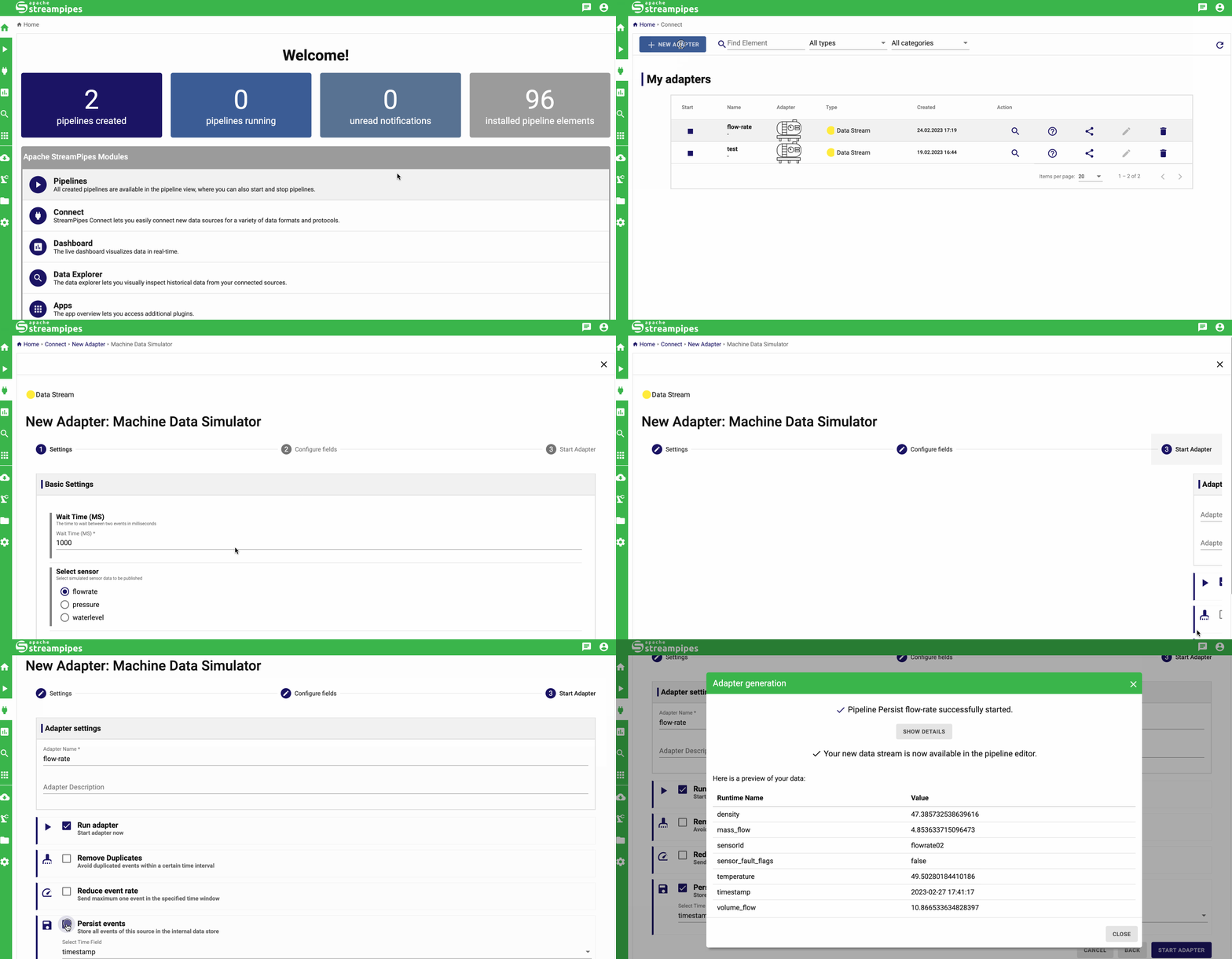
+ "To get the concerned data, we simply need to create an instance of the
machine data simulator and persist the data in the data lake:\n",
+ "\n",
+ "</br>\n",
+ "\n",
+
"\n",
+ "\n",
+ "</br>\n",
+ "\n",
+ "If you choose to perform the model training step yourself, you will need
to wait approximately 15 minutes for enough data to be available for model
training. If you want to speed this up, you can configure a lower wait time
when creating the adapter. Please be aware that this also influences the
inference scenario."
+ ],
+ "metadata": {
+ "collapsed": false
+ },
+ "id": "a08412c577712afa"
+ },
+ {
+ "cell_type": "markdown",
+ "source": [
+ "## Model Training with Historic Data\n",
+ "\n",
+ "As said above, the aim of our model is to detect anomalies of the
`volume_flow` parameter. For this task, we will use [Isolation
Forests](https://en.wikipedia.org/wiki/Isolation_forest).\n",
+ "Please note that the focus of the tutorial is not on training the model,
so please be patient even though the training is very simplified and lacks
important preparation steps such as standardization.\n",
+ "\n",
+ "As a first step, lets query the `flowrate` data from the StreamPipes data
lake and extract the values of `volume_flow` as a feature:"
+ ],
+ "metadata": {
+ "collapsed": false
+ },
+ "id": "5a46240838b5b86a"
+ },
+ {
+ "cell_type": "code",
+ "outputs": [
+ {
+ "name": "stdout",
+ "output_type": "stream",
+ "text": [
+ "2024-03-26 10:21:48,582 - streampipes.endpoint.endpoint - [INFO] -
[endpoint.py:164] [_make_request] - Successfully retrieved all resources.\n"
+ ]
+ }
+ ],
+ "source": [
+ "flowrate_df = client.dataLakeMeasureApi.get(\"flow-rate\").to_pandas()\n",
+ "X = flowrate_df[\"volume_flow\"].values.reshape(-1,
1).astype(\"float32\")"
+ ],
+ "metadata": {
+ "collapsed": false,
+ "ExecuteTime": {
+ "end_time": "2024-03-26T09:21:48.637328Z",
+ "start_time": "2024-03-26T09:21:48.367842Z"
+ }
+ },
+ "id": "2ebb7a210fc2d9d8",
+ "execution_count": 9
+ },
+ {
+ "cell_type": "markdown",
+ "source": [
+ "Let's fit the model to the data:"
+ ],
+ "metadata": {
+ "collapsed": false
+ },
+ "id": "af336a5796303eac"
+ },
+ {
+ "cell_type": "code",
+ "outputs": [
+ {
+ "data": {
+ "text/plain": "IsolationForest(contamination=0.01)",
+ "text/html": "<style>#sk-container-id-3 {\n /* Definition of color
scheme common for light and dark mode */\n --sklearn-color-text: black;\n
--sklearn-color-line: gray;\n /* Definition of color scheme for unfitted
estimators */\n --sklearn-color-unfitted-level-0: #fff5e6;\n
--sklearn-color-unfitted-level-1: #f6e4d2;\n --sklearn-color-unfitted-level-2:
#ffe0b3;\n --sklearn-color-unfitted-level-3: chocolate;\n /* Definition of
color scheme for fitted estimators */\n --sklea [...]
+ },
+ "execution_count": 14,
+ "metadata": {},
+ "output_type": "execute_result"
+ }
+ ],
+ "source": [
+ "from sklearn.ensemble import IsolationForest\n",
+ "\n",
+ "model = IsolationForest(contamination=0.01)\n",
+ "model.fit(X)"
+ ],
+ "metadata": {
+ "collapsed": false,
+ "ExecuteTime": {
+ "end_time": "2024-03-26T09:22:39.109568Z",
+ "start_time": "2024-03-26T09:22:39.016690Z"
+ }
+ },
+ "id": "993655af84aea201",
+ "execution_count": 14
+ },
+ {
+ "cell_type": "markdown",
+ "source": [
+ "The `contamination` parameter models the proportion of outliers in the
data. See the [scikit-learn
documentation](https://scikit-learn.org/stable/modules/generated/sklearn.ensemble.IsolationForest.html)
for more information."
+ ],
+ "metadata": {
+ "collapsed": false
+ },
+ "id": "c7e9ab3695506bc6"
+ },
+ {
+ "cell_type": "markdown",
+ "source": [
+ "Before we convert the model to an ONNX representation, let's do a quick
visual analysis of the model results:"
+ ],
+ "metadata": {
+ "collapsed": false
+ },
+ "id": "3a2a95861654a640"
+ },
+ {
+ "cell_type": "code",
+ "outputs": [
+ {
+ "data": {
+ "text/plain": "<Figure size 1000x600 with 1 Axes>",
+ "image/png":
"iVBORw0KGgoAAAANSUhEUgAAAzYAAAH5CAYAAABTbqsJAAAAOXRFWHRTb2Z0d2FyZQBNYXRwbG90bGliIHZlcnNpb24zLjguMywgaHR0cHM6Ly9tYXRwbG90bGliLm9yZy/H5lhTAAAACXBIWXMAAA9hAAAPYQGoP6dpAAEAAElEQVR4nOx9d7hmRZF+fffeSQzMECSMgIooqwQRDChBQcCICQMqsCquERBQUeAn6gKCGBDdxbirICIiKqvCIlFEBEQkCAioZIY0pMnx3u/3x2xf6qtbVV3dp/uc83233+eZZ+53Qnefc/p019tvVZ1Ot9vtQkFBQUFBQUFBQUFBQR9jqOkGFBQUFBQUFBQUFBQUVEUhNgUFBQUFBQUFBQUFfY9CbAoKCgoKCgoKCgoK+h6F2BQUFBQUFBQUFBQU9D0KsSkoKCgoKCgoKCgo6HsUYlNQUFBQUFBQUFBQ0PcoxKag
[...]
+ },
+ "metadata": {},
+ "output_type": "display_data"
+ }
+ ],
+ "source": [
+ "import matplotlib.pyplot as plt\n",
+ "\n",
+ "flowrate_df[\"anomaly\"] = model.predict(X)\n",
+ "\n",
+ "fig, ax = plt.subplots(figsize=(10, 6))\n",
+ "anomalies = flowrate_df.loc[flowrate_df[\"anomaly\"] == -1,
[\"volume_flow\"]]\n",
+ "ax.plot(flowrate_df.index, flowrate_df['volume_flow'], color='black',
label='volume_flow')\n",
+ "ax.scatter(anomalies.index, anomalies['volume_flow'], color='red',
label='Anomaly')\n",
+ "plt.legend()\n",
+ "plt.show()"
+ ],
+ "metadata": {
+ "collapsed": false,
+ "ExecuteTime": {
+ "end_time": "2024-03-26T09:22:40.358760Z",
+ "start_time": "2024-03-26T09:22:40.224423Z"
+ }
+ },
+ "id": "ec63685dad8b685e",
+ "execution_count": 15
+ },
+ {
+ "cell_type": "markdown",
+ "source": [
+ "Okay, that looks quite reasonable so lets covert the model to an ONNX
representation so that we can make use of it later."
+ ],
+ "metadata": {
+ "collapsed": false
+ },
+ "id": "9a63a058b00101d7"
+ },
+ {
+ "cell_type": "code",
+ "outputs": [],
+ "source": [
+ "from onnxconverter_common import FloatTensorType\n",
+ "from skl2onnx import to_onnx\n",
+ "\n",
+ "model_onnx = to_onnx(\n",
+ " model,\n",
+ " initial_types=[('input', FloatTensorType([None, X.shape[1]]))],\n",
+ " target_opset={'ai.onnx.ml': 3, 'ai.onnx': 15, '': 15}\n",
+ ")\n",
+ "\n",
+ "with open(\"isolation_forest.onnx\", \"wb\") as f:\n",
+ " f.write(model_onnx.SerializeToString())"
+ ],
+ "metadata": {
+ "collapsed": false,
+ "ExecuteTime": {
+ "end_time": "2024-03-26T09:25:42.244773Z",
+ "start_time": "2024-03-26T09:25:36.648160Z"
+ }
+ },
+ "id": "5a4b088b556e3950",
+ "execution_count": 16
+ },
+ {
+ "cell_type": "markdown",
+ "source": [
+ "## Model Inference with Live Data\n",
+ "\n",
+ "Utilizing a pre-trained model within StreamPipes becomes seamless with
the ONNX interoperability standard, enabling effortless application of your
existing model on live data streams.\n",
+ "\n",
+ "Interacting with live data from StreamPipes is facilitated through
StreamPipes functions. Below, we'll create a Python StreamPipes function that
leverages an ONNX model to generate predictions for each incoming event, making
the results accessible as a data stream within StreamPipes for subsequent
steps.\n",
+ "\n",
+ "So let's create an `ONNXFunction` that is capable of applying a model in
ONNX representation to a StreamPipes data stream. If you'd like to read more
details about how functions are defined, refer to [our third
tutorial](../3-getting-live-data-from-the-streampipes-data-stream)."
+ ],
+ "metadata": {
+ "collapsed": false
+ },
+ "id": "e280a9751ba0438e"
+ },
+ {
+ "cell_type": "code",
+ "outputs": [],
+ "source": [
+ "import numpy as np\n",
+ "import onnxruntime as rt\n",
+ "\n",
+ "from streampipes.functions.broker.broker_handler import
get_broker_description\n",
+ "from streampipes.functions.streampipes_function import
StreamPipesFunction\n",
+ "from streampipes.functions.utils.data_stream_generator import
create_data_stream, RuntimeType\n",
+ "from streampipes.functions.utils.function_context import
FunctionContext\n",
+ "from streampipes.model.resource import FunctionDefinition, DataStream\n",
+ "\n",
+ "from typing import Dict, Any, List\n",
+ "\n",
+ "\n",
+ "class ONNXFunction(StreamPipesFunction):\n",
+ "\n",
+ " def __init__(self, feature_names: list[str], input_stream:
DataStream):\n",
+ " output_stream = create_data_stream(\n",
+ " name=\"flowrate-prediction\",\n",
+ " attributes={\n",
+ " \"is_anomaly\": RuntimeType.BOOLEAN.value\n",
+ " },\n",
+ " broker=get_broker_description(input_stream)\n",
+ " )\n",
+ "\n",
+ " function_definition = FunctionDefinition(\n",
+ " consumed_streams=[input_stream.element_id]\n",
+ " ).add_output_data_stream(output_stream)\n",
+ "\n",
+ " self.feature_names = feature_names\n",
+ " self.input_name = None\n",
+ " self.output_name = None\n",
+ " self.session = None\n",
+ "\n",
+ " super().__init__(function_definition=function_definition)\n",
+ "\n",
+ " def onServiceStarted(self, context: FunctionContext) -> None:\n",
+ " self.session = rt.InferenceSession(\n",
+ " path_or_bytes=\"isolation_forest.onnx\",\n",
+ " providers=rt.get_available_providers(),\n",
+ " )\n",
+ " self.input_name = self.session.get_inputs()[0].name\n",
+ " self.output_name = self.session.get_outputs()[0].name\n",
+ "\n",
+ " def onEvent(self, event: Dict[str, Any], streamId: str) -> None:\n",
+ " feature_vector = []\n",
+ " for feature in self.feature_names:\n",
+ " feature_vector.append(event[feature])\n",
+ "\n",
+ " prediction = self.session.run(\n",
+ " [self.output_name],\n",
+ " {self.input_name: np.expand_dims(np.array(feature_vector),
axis=0).astype(\"float32\")}\n",
+ " )[0]\n",
+ "\n",
+ " output = {\n",
+ " \"is_anomaly\": int(prediction[0]) == -1\n",
+ " }\n",
+ "\n",
+ " self.add_output(\n",
+ "
stream_id=self.function_definition.get_output_stream_ids()[0],\n",
+ " event=output\n",
+ " )\n",
+ "\n",
+ " def onServiceStopped(self) -> None:\n",
+ " pass"
+ ],
+ "metadata": {
+ "collapsed": false,
+ "ExecuteTime": {
+ "end_time": "2024-03-26T11:38:38.601489Z",
+ "start_time": "2024-03-26T11:38:38.575652Z"
+ }
+ },
+ "id": "248725a8e04c5adb",
+ "execution_count": 23
+ },
+ {
+ "cell_type": "markdown",
+ "source": [
+ "Let's dive a little deeper into the different parts of the function\n",
+ "\n",
+ "- **`__init__`**: First, we need to take care about the data stream that
is required to send the predictions from our function to StreamPipes. Thus, we
create a dedicated output data stream which we need to provide with the
attributes our event will consist of (a timestamp attribute is always added
automatically). This output data stream needs to be registered at the function
definition which is to be passed to the parent class. Lastly, we need to define
some instance variables that [...]
+ "\n",
+ "- **`onServiceStarted`**: Here we prepare the ONNX runtime session by
creating an `InferenceSession` and retrieving the corresponding configuration
parameters.\n",
+ "\n",
+ "- **`onEvent`**: Following the parameter names specified by
`self.feature_names`, we extract all feature values from the current event.
Subsequently, the corresponding feature vector is transmitted to the ONNX
runtime session. The resulting prediction is then converted into our output
event, where a value of `-1` signifies an anomaly. Finally, the generated
output event is forwarded to StreamPipes.\n",
+ "\n",
+ "\n",
+ "Having the function code in place, we can start the function with the
following:"
+ ],
+ "metadata": {
+ "collapsed": false
+ },
+ "id": "b160f88e67eddde2"
+ },
+ {
+ "cell_type": "code",
+ "outputs": [
+ {
+ "name": "stdout",
+ "output_type": "stream",
+ "text": [
+ "2024-03-26 12:39:50,443 - streampipes.endpoint.endpoint - [INFO] -
[endpoint.py:164] [_make_request] - Successfully retrieved all resources.\n",
+ "2024-03-26 12:39:50,502 - streampipes.functions.function_handler -
[INFO] - [function_handler.py:76] [initializeFunctions] - The data stream could
not be created.\n",
+ "2024-03-26 12:39:50,503 - streampipes.functions.function_handler -
[INFO] - [function_handler.py:78] [initializeFunctions] - This is due to the
fact that this data stream already exists. Continuing with the existing data
stream.\n",
+ "2024-03-26 12:39:50,503 - streampipes.functions.function_handler -
[INFO] - [function_handler.py:84] [initializeFunctions] - Using output data
stream 'sp:spdatastream:flowrate-prediction' for function
'7c06fa31-9534-4f91-9c50-b7a3607ec3dc'\n",
+ "2024-03-26 12:39:50,548 - streampipes.endpoint.endpoint - [INFO] -
[endpoint.py:164] [_make_request] - Successfully retrieved all resources.\n",
+ "2024-03-26 12:39:50,549 - streampipes.functions.function_handler -
[INFO] - [function_handler.py:100] [initializeFunctions] - Using KafkaConsumer
for ONNXFunction\n"
+ ]
+ }
+ ],
+ "source": [
+ "from streampipes.functions.registration import Registration\n",
+ "from streampipes.functions.function_handler import FunctionHandler\n",
+ "\n",
+ "stream = [\n",
+ " stream\n",
+ " for stream\n",
+ " in client.dataStreamApi.all()\n",
+ " if stream.name == \"flow-rate\"\n",
+ "][0]\n",
+ "\n",
+ "function = ONNXFunction(\n",
+ " feature_names=[\"volume_flow\"],\n",
+ " input_stream=stream\n",
+ ")\n",
+ "\n",
+ "registration = Registration()\n",
+ "registration.register(function)\n",
+ "function_handler = FunctionHandler(registration, client)\n",
+ "function_handler.initializeFunctions()"
+ ],
+ "metadata": {
+ "collapsed": false,
+ "ExecuteTime": {
+ "end_time": "2024-03-26T11:39:50.550688Z",
+ "start_time": "2024-03-26T11:39:50.347386Z"
+ }
+ },
+ "id": "2705486ed1c8cf75",
+ "execution_count": 25
+ },
+ {
+ "cell_type": "markdown",
+ "source": [
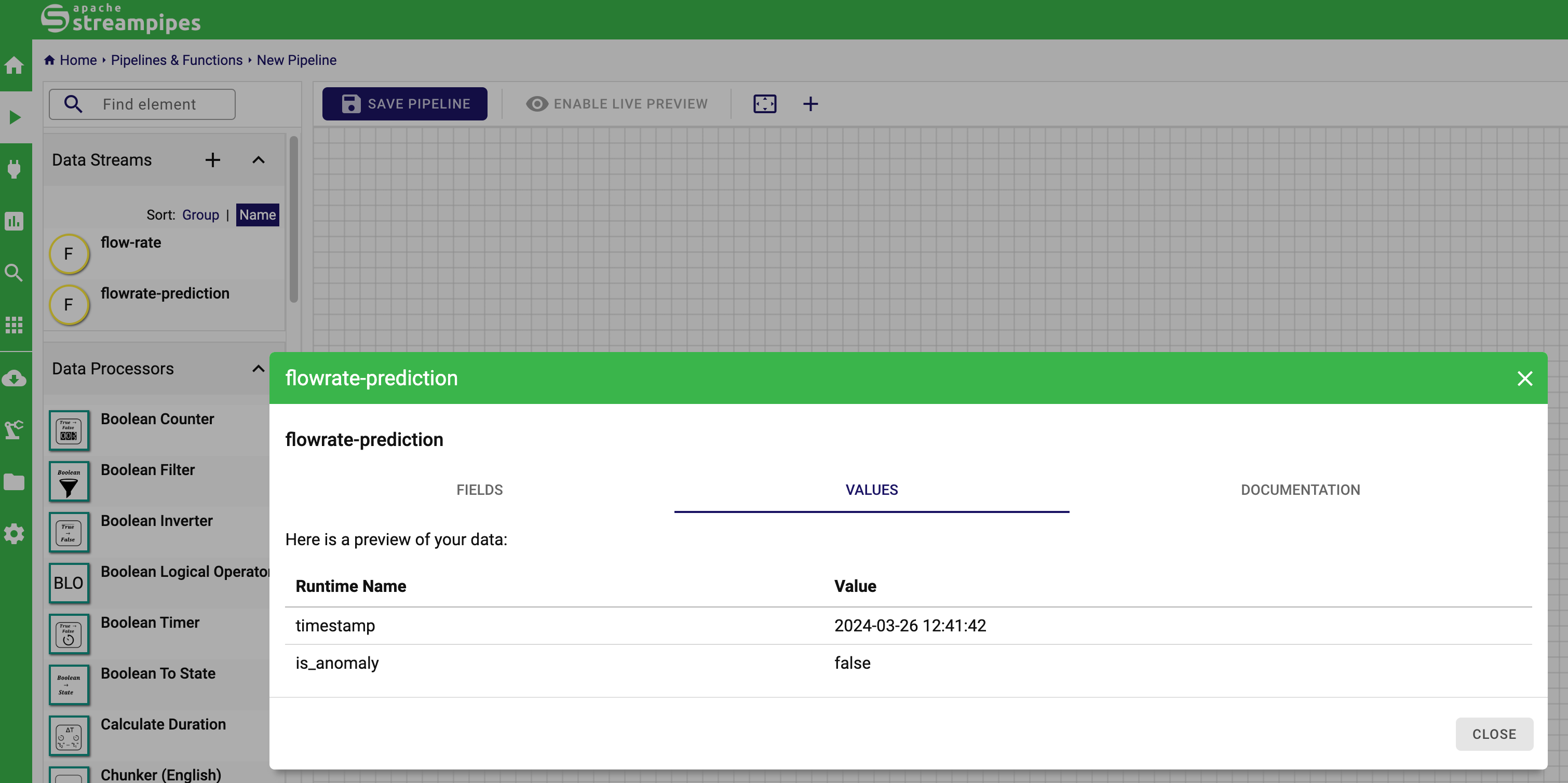
+ "We can now access the live values of the prediction in the StreamPipes
UI, e.g., in the pipeline editor.\n",
+ "\n",
+ "</br>\n",
+ "\n",
+
""
+ ],
+ "metadata": {
+ "collapsed": false
+ },
+ "id": "ee7405a4fdc2ef7e"
+ },
+ {
+ "cell_type": "markdown",
+ "source": [
+ "That's already it. We hope this tutorial serves as an illustration how ML
models can be utilized in StreamPipes with the help of ONNX."
+ ],
+ "metadata": {
+ "collapsed": false
+ },
+ "id": "257874d0b9f060e7"
+ },
+ {
+ "cell_type": "markdown",
+ "source": [
+ "How do you like this tutorial? We hope you like it and would love to
receive some feedback from you. Just go to our GitHub discussion page and let
us know your impression. We'll read and react to them all, we promise!"
+ ],
+ "metadata": {
+ "collapsed": false
+ },
+ "id": "44d17b02f414d985"
+ },
+ {
+ "cell_type": "markdown",
+ "source": [],
+ "metadata": {
+ "collapsed": false
+ },
+ "id": "26082bf76c48f857"
+ }
+ ],
+ "metadata": {
+ "kernelspec": {
+ "display_name": "Python 3",
+ "language": "python",
+ "name": "python3"
+ },
+ "language_info": {
+ "codemirror_mode": {
+ "name": "ipython",
+ "version": 2
+ },
+ "file_extension": ".py",
+ "mimetype": "text/x-python",
+ "name": "python",
+ "nbconvert_exporter": "python",
+ "pygments_lexer": "ipython2",
+ "version": "2.7.6"
+ }
+ },
+ "nbformat": 4,
+ "nbformat_minor": 5
+}
diff --git a/streampipes-client-python/mkdocs.yml
b/streampipes-client-python/mkdocs.yml
index d97676d1c3..763ef120ec 100644
--- a/streampipes-client-python/mkdocs.yml
+++ b/streampipes-client-python/mkdocs.yml
@@ -117,5 +117,6 @@ nav:
- Introduction to the StreamPipes Python Client:
tutorials/1-introduction-to-streampipes-python-client.ipynb
- Extracting Data from the StreamPipes Data Lake:
tutorials/2-extracting-data-from-the-streampipes-data-lake.ipynb
- Exploring Live Data from a StreamPipes Data Stream:
tutorials/3-getting-live-data-from-the-streampipes-data-stream.ipynb
- - Applying Online Machine Learning on a StreamPipes Data Stream:
tutorials/4-using-online-machine-learning-on-a-streampipes-data-stream.ipynb
+ - Using Online Machine Learning on a StreamPipes Data Stream:
tutorials/4-using-online-machine-learning-on-a-streampipes-data-stream.ipynb
+ - Applying Interoperable Machine Learning in StreamPipes:
tutorials/5-applying-interoperable-machine-learning-in-streampipes.ipynb
- 📚 Reference: reference/*


