This is an automated email from the ASF dual-hosted git repository.

srini pushed a commit to branch master
in repository https://gitbox.apache.org/repos/asf/superset.git
The following commit(s) were added to refs/heads/master by this push:
new ca6a1ec chore(doc): Update BigQuery Connection database connection UI
into doc (#17191)
ca6a1ec is described below
commit ca6a1ecc9e9593eb1b987d9ca7e4da6c767156d5
Author: Rosemarie Chiu <[email protected]>
AuthorDate: Fri Oct 29 21:14:47 2021 +0800
chore(doc): Update BigQuery Connection database connection UI into doc
(#17191)
* Update google-bigquery.mdx
Update BigQuery Connection database connection UI
* fix grammar
Co-authored-by: Geido <[email protected]>
* fix grammar
Co-authored-by: Geido <[email protected]>
* pre-commit prettier
Co-authored-by: Geido <[email protected]>
---
.../Connecting to Databases/google-bigquery.mdx | 62 ++++++++++++++++------
1 file changed, 45 insertions(+), 17 deletions(-)
diff --git a/docs/src/pages/docs/Connecting to Databases/google-bigquery.mdx
b/docs/src/pages/docs/Connecting to Databases/google-bigquery.mdx
index c6a8aa5..3e3fefc 100644
--- a/docs/src/pages/docs/Connecting to Databases/google-bigquery.mdx
+++ b/docs/src/pages/docs/Connecting to Databases/google-bigquery.mdx
@@ -11,31 +11,55 @@ version: 1
The recommended connector library for BigQuery is
[pybigquery](https://github.com/mxmzdlv/pybigquery).
-The connection string for BigQuery looks like:
-
+### Install BigQuery Driver
+Follow the steps [here](/docs/databases/dockeradddrivers) about how to
+install new database drivers when setting up Superset locally via
docker-compose.
```
-bigquery://{project_id}
+echo "pybigquery" >> ./docker/requirements-local.txt
```
-
-When adding a new BigQuery connection in Superset, you'll also need to add the
GCP Service Account
+### Connecting to BigQuery
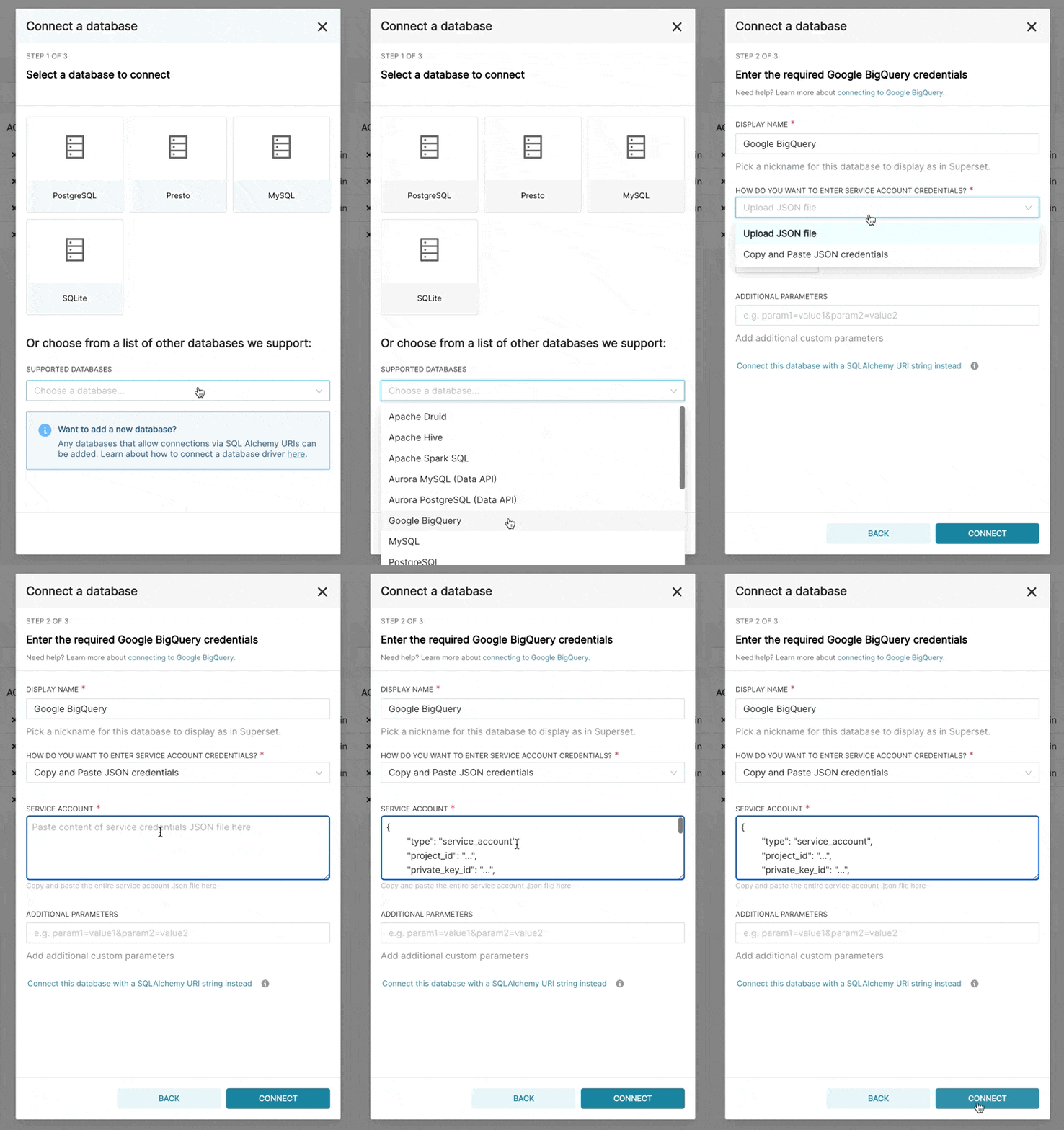
+When adding a new BigQuery connection in Superset, you'll need to add the GCP
Service Account
credentials file (as a JSON).
1. Create your Service Account via the Google Cloud Platform control panel,
provide it access to the
appropriate BigQuery datasets, and download the JSON configuration file for
the service account.
-
-2. n Superset, Add a JSON blob to the **Secure Extra** field in the database
configuration form with
- the following format:
-
+2. In Superset, you can either upload that JSON or add the JSON blob in the
following format (this should be the content of your credential JSON file):
```
{
- "credentials_info": <contents of credentials JSON file>
-}
-```
+ "type": "service_account",
+ "project_id": "...",
+ "private_key_id": "...",
+ "private_key": "...",
+ "client_email": "...",
+ "client_id": "...",
+ "auth_uri": "...",
+ "token_uri": "...",
+ "auth_provider_x509_cert_url": "...",
+ "client_x509_cert_url": "..."
+ }
+ ```
-The resulting file should have this structure:
+
-```
-{
+
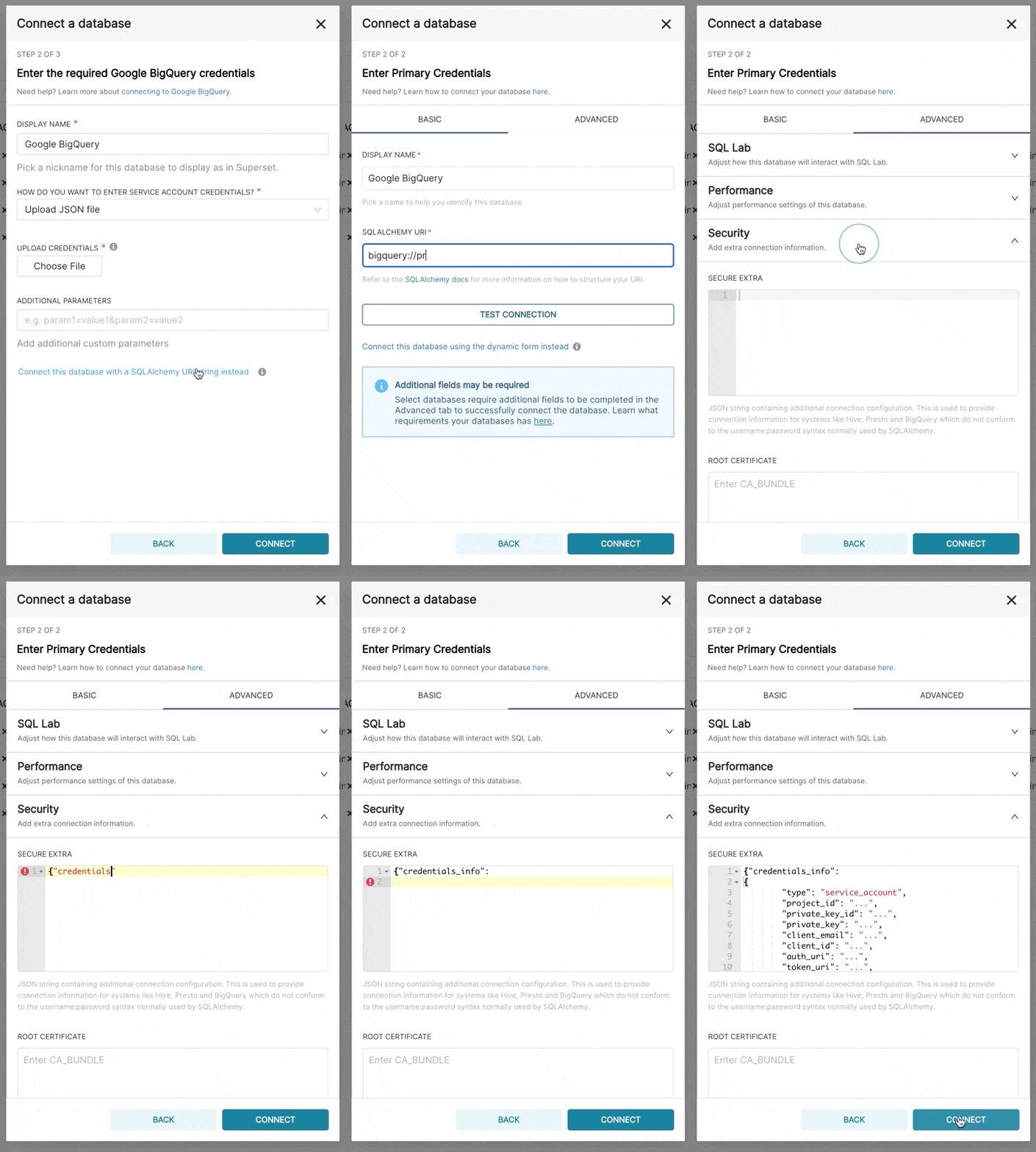
+3. Additionally, can connect via SQLAlchemy URI instead
+
+ The connection string for BigQuery looks like:
+
+ ```
+ bigquery://{project_id}
+ ```
+ Go to the **Advanced** tab, Add a JSON blob to the **Secure Extra** field
in the database configuration form with
+ the following format:
+ ```
+ {
+ "credentials_info": <contents of credentials JSON file>
+ }
+ ```
+
+ The resulting file should have this structure:
+ ```
+ {
"credentials_info": {
"type": "service_account",
"project_id": "...",
@@ -47,11 +71,15 @@ The resulting file should have this structure:
"token_uri": "...",
"auth_provider_x509_cert_url": "...",
"client_x509_cert_url": "..."
+ }
}
-}
-```
+ ```
You should then be able to connect to your BigQuery datasets.
+
+
+
+
To be able to upload CSV or Excel files to BigQuery in Superset, you'll need
to also add the
[pandas_gbq](https://github.com/pydata/pandas-gbq) library.


