This is an automated email from the ASF dual-hosted git repository.

tqchen pushed a commit to branch main
in repository https://gitbox.apache.org/repos/asf/tvm.git
The following commit(s) were added to refs/heads/main by this push:
     new 06a466c  allow libbacktrace to be used when cross compiling the
runtime (#7917)
06a466c is described below

commit 06a466c829eaa6251787fc9e1fee9033d2ef3aa3
Author: Mher Kazandjian <[email protected]>
AuthorDate: Tue Jun 1 03:01:30 2021 +0200

    allow libbacktrace to be used when cross compiling the runtime (#7917)
---
 cmake/libs/Libbacktrace.cmake |  27 +++++++++-
 docs/deploy/index.rst         | 115 ++++++++++++++++++++++++++++++++++++++++--
 docs/install/from_source.rst  |  28 +++++-----
 3 files changed, 152 insertions(+), 18 deletions(-)

diff --git a/cmake/libs/Libbacktrace.cmake b/cmake/libs/Libbacktrace.cmake
index 7428553..58eb4e0 100644
--- a/cmake/libs/Libbacktrace.cmake
+++ b/cmake/libs/Libbacktrace.cmake
@@ -14,14 +14,39 @@
 # KIND, either express or implied.  See the License for the
 # specific language governing permissions and limitations
 # under the License.
+
+# On MacOS, the default C compiler (/usr/bin/cc) is actually a small script
that dispatches to a
+# compiler the default SDK (usually
/Library/Developer/CommandLineTools/usr/bin/ or
+#
/Applications/Xcode.app/Contents/Developer/Toolchains/XcodeDefault.xctoolchain/usr/bin/).
 CMake
+# automatically detects what is being dispatched and uses it instead along
with all the flags it
+# needs. CMake makes this second compiler avaliable through the
CMAKE_C_COMPILER variable, but it
+# does not make the necessary flags available. This leads to configuration
errors in libbacktrace
+# because it can't find system libraries. Our solution is to detect if
CMAKE_C_COMPILER lives in
+# /Library or /Applications and switch to the default compiler instead.
 include(ExternalProject)

+
+if(CMAKE_SYSTEM_NAME MATCHES "Darwin" AND (CMAKE_C_COMPILER MATCHES "^/Library"
+  OR CMAKE_C_COMPILER MATCHES "^/Applications"))
+    set(c_compiler "/usr/bin/cc")
+  else()
+    set(c_compiler "${CMAKE_C_COMPILER}")
+endif()
+
 ExternalProject_Add(project_libbacktrace
   PREFIX libbacktrace
   SOURCE_DIR ${CMAKE_CURRENT_LIST_DIR}/../../3rdparty/libbacktrace
   BINARY_DIR ${CMAKE_CURRENT_BINARY_DIR}/libbacktrace
   CONFIGURE_COMMAND
"${CMAKE_CURRENT_LIST_DIR}/../../3rdparty/libbacktrace/configure"
-                    "--prefix=${CMAKE_CURRENT_BINARY_DIR}/libbacktrace"
--with-pic
+                    "--prefix=${CMAKE_CURRENT_BINARY_DIR}/libbacktrace"
+                    --with-pic
+                    "CC=${c_compiler}"
+                    "CFLAGS=${CMAKE_C_FLAGS}"
+                    "LDFLAGS=${CMAKE_EXE_LINKER_FLAGS}"
+                    "CPP=${c_compiler} -E"
+                    "NM=${CMAKE_NM}"
+                    "STRIP=${CMAKE_STRIP}"
+                    "--host=${MACHINE_NAME}"
   INSTALL_DIR "${CMAKE_CURRENT_BINARY_DIR}/libbacktrace"
   BUILD_COMMAND make
   INSTALL_COMMAND make install
diff --git a/docs/deploy/index.rst b/docs/deploy/index.rst
index 3cbbb10..b127de9 100644
--- a/docs/deploy/index.rst
+++ b/docs/deploy/index.rst
@@ -25,12 +25,20 @@ as well as how to integrate it with your project.

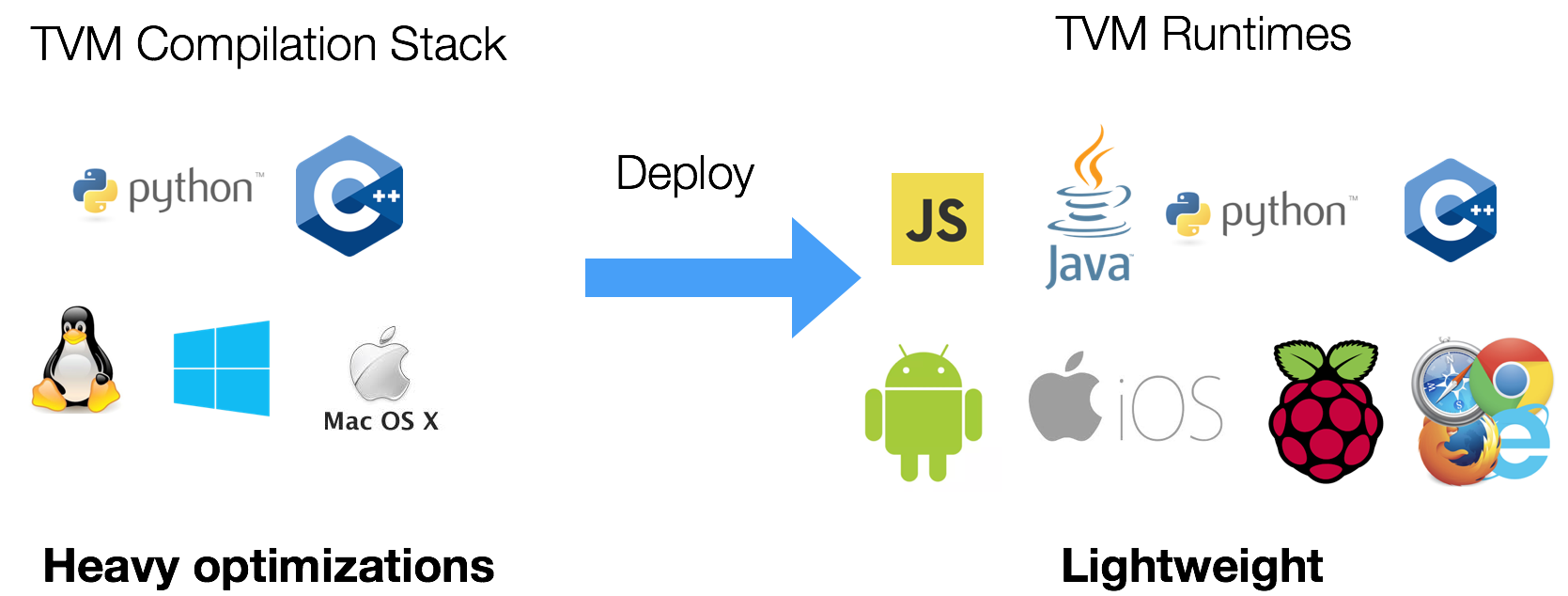
 .. image::  https://tvm.apache.org/images/release/tvm_flexible.png

+Build the TVM runtime library
+-----------------------------
+
+.. _build-tvm-runtime-on-target-device:
+
 Unlike traditional deep learning frameworks. TVM stack is divided into two
major components:

-- TVM compiler, which does all the compilation and optimizations
+- TVM compiler, which does all the compilation and optimizations of the model
 - TVM runtime, which runs on the target devices.

-In order to integrate the compiled module, we **do not** need to build entire
TVM on the target device. You only need to build the TVM compiler stack on your
desktop and use that to cross-compile modules that are deployed on the target
device.
+In order to integrate the compiled module, we **do not** need to build entire
+TVM on the target device. You only need to build the TVM compiler stack on
your
+desktop and use that to cross-compile modules that are deployed on the target
device.
+
 We only need to use a light-weight runtime API that can be integrated into
various platforms.

 For example, you can run the following commands to build the runtime API
@@ -46,11 +54,103 @@ on a Linux based embedded system such as Raspberry Pi:
     cmake ..
     make runtime

-Note that we type `make runtime` to only build the runtime library.
+Note that we type ``make runtime`` to only build the runtime library.
+
+It is also possible to cross compile the runtime. Cross compiling
+the runtime library should not be confused with cross compiling models
+for embedded devices.
+
 If you want to include additional runtime such as OpenCL,
-you can modify `config.cmake` to enable these options.
+you can modify ``config.cmake`` to enable these options.
 After you get the TVM runtime library, you can link the compiled library

+.. figure::
https://raw.githubusercontent.com/tlc-pack/web-data/main/images/dev/tvm_deploy_crosscompile.svg
+   :align: center
+   :width: 85%
+
+A model (optimized or not by TVM) can be cross compiled by TVM for
+different architectures such as ``aarch64`` on a ``x64_64`` host. Once the
model
+is cross compiled it is neccessary to have a runtime compatible with the target
+architecture to be able to run the cross compiled model.
+
+
+Cross compile the TVM runtime for other architectures
+-----------------------------------------------------
+
+In the example :ref:`above <build-tvm-runtime-on-target-device>` the runtime
library was
+compiled on a Raspberry Pi. Producing the runtime library can be done much
faster on
+hosts that have high performace processors with ample resources (such as
laptops, workstation)
+compared to a target devices such as a Raspberry Pi. In-order to cross compile
the runtime the toolchain
+for the target device must be installed. After installing the correct
toolchain,
+the main difference compared to compiling natively is to pass some additional
command
+line argument to cmake that specify a toolchain to be used. For reference
+building the TVM runtime library on a modern laptop (using 8 threads) for
``aarch64``
+takes around 20 seconds vs ~10 min to build the runtime on a Raspberry Pi 4.
+
+cross-compile for aarch64
+"""""""""""""""""""""""""
+
+.. code-block:: bash
+
+   sudo apt-get update
+   sudo apt-get install gcc-aarch64-linux-gnu g++-aarch64-linux-gnu
+
+.. code-block:: bash
+
+    cmake .. \
+        -DCMAKE_SYSTEM_NAME=Linux \
+        -DCMAKE_SYSTEM_VERSION=1 \
+        -DCMAKE_C_COMPILER=/usr/bin/aarch64-linux-gnu-gcc \
+        -DCMAKE_CXX_COMPILER=/usr/bin/aarch64-linux-gnu-g++ \
+        -DCMAKE_FIND_ROOT_PATH=/usr/aarch64-linux-gnu \
+        -DCMAKE_FIND_ROOT_PATH_MODE_PROGRAM=NEVER \
+        -DCMAKE_FIND_ROOT_PATH_MODE_LIBRARY=ONLY \
+        -DMACHINE_NAME=aarch64-linux-gnu
+
+    make -j$(nproc) runtime
+
+For bare metal ARM devices the following toolchain is quite handy to install
instead of gcc-aarch64-linux-*
+
+.. code-block:: bash
+
+   sudo apt-get install gcc-multilib-arm-linux-gnueabihf
g++-multilib-arm-linux-gnueabihf
+
+
+cross-compile for RISC-V
+"""""""""""""""""""""""""
+
+.. code-block:: bash
+
+   sudo apt-get update
+   sudo apt-get install gcc-riscv64-linux-gnu g++-riscv64-linux-gnu
+
+
+.. code-block:: bash
+
+    cmake .. \
+        -DCMAKE_SYSTEM_NAME=Linux \
+        -DCMAKE_SYSTEM_VERSION=1 \
+        -DCMAKE_C_COMPILER=/usr/bin/riscv64-linux-gnu-gcc \
+        -DCMAKE_CXX_COMPILER=/usr/bin/riscv64-linux-gnu-g++ \
+        -DCMAKE_FIND_ROOT_PATH=/usr/riscv64-linux-gnu \
+        -DCMAKE_FIND_ROOT_PATH_MODE_PROGRAM=NEVER \
+        -DCMAKE_FIND_ROOT_PATH_MODE_LIBRARY=ONLY \
+        -DMACHINE_NAME=riscv64-linux-gnu
+
+    make -j$(nproc) runtime
+
+The ``file`` command can be used to query the architecture of the produced
runtime.
+
+
+.. code-block:: bash
+
+   file libtvm_runtime.so
+   libtvm_runtime.so: ELF 64-bit LSB shared object, UCB RISC-V, version 1
(GNU/Linux), dynamically linked,
BuildID[sha1]=e9ak845b3d7f2c126dab53632aea8e012d89477e, not stripped
+
+
+Optimize and tune models for target devices
+-------------------------------------------
+
 The easiest and recommended way to test, tune and benchmark TVM kernels on
 embedded devices is through TVM's RPC API.
 Here are the links to the related tutorials.
@@ -58,8 +158,11 @@ Here are the links to the related tutorials.
 - :ref:`tutorial-cross-compilation-and-rpc`
 - :ref:`tutorial-deploy-model-on-rasp`

+Deploy optimized model on target devices
+----------------------------------------
+
 After you finished tuning and benchmarking, you might need to deploy the model
on the
-target device without relying on RPC. see the following resources on how to do
so.
+target device without relying on RPC. See the following resources on how to do
so.

 .. toctree::
    :maxdepth: 2
@@ -72,3 +175,5 @@ target device without relying on RPC. see the following
resources on how to do s
    tensorrt
    vitis_ai
    bnns
+
+
diff --git a/docs/install/from_source.rst b/docs/install/from_source.rst
index bc6cdb9..5d723d1 100644
--- a/docs/install/from_source.rst
+++ b/docs/install/from_source.rst
@@ -51,27 +51,31 @@ Build the Shared Library

 Our goal is to build the shared libraries:

-- On Linux the target library are `libtvm.so`
-- On macOS the target library are `libtvm.dylib`
-- On Windows the target library are `libtvm.dll`
+   - On Linux the target library are `libtvm.so` and `libtvm_runtime.so`
+   - On macOS the target library are `libtvm.dylib` and `libtvm_runtime.dylib`
+   - On Windows the target library are `libtvm.dll` and `libtvm_runtime.dll`

+It is also possible to :ref:`build the runtime <deploy-and-integration>`
library only.
+
+The minimal building requirements for the ``TVM`` libraries are:
+
+   - A recent c++ compiler supporting C++ 14 (g++-5 or higher)
+   - CMake 3.5 or higher
+   - We highly recommend to build with LLVM to enable all the features.
+   - If you want to use CUDA, CUDA toolkit version >= 8.0 is required. If you
are upgrading from an older version, make sure you purge the older version and
reboot after installation.
+   - On macOS, you may want to install `Homebrew <https://brew.sh>` to easily
install and manage dependencies.
+
+To install the these minimal pre-requisites on Ubuntu/Debian like
+linux operating systems, execute (in a terminal):

 .. code:: bash

     sudo apt-get update
     sudo apt-get install -y python3 python3-dev python3-setuptools gcc
libtinfo-dev zlib1g-dev build-essential cmake libedit-dev libxml2-dev

-The minimal building requirements are
-
-- A recent c++ compiler supporting C++ 14 (g++-5 or higher)
-- CMake 3.5 or higher
-- We highly recommend to build with LLVM to enable all the features.
-- If you want to use CUDA, CUDA toolkit version >= 8.0 is required. If you are
upgrading from an older version, make sure you purge the older version and
reboot after installation.
-- On macOS, you may want to install `Homebrew <https://brew.sh>` to easily
install and manage dependencies.
-

 We use cmake to build the library.
-The configuration of TVM can be modified by `config.cmake`.
+The configuration of TVM can be modified by editing `config.cmake` and/or by
passing cmake flags to the command line:


 - First, check the cmake in your system. If you do not have cmake,