This is an automated email from the ASF dual-hosted git repository.

syfeng pushed a commit to branch main
in repository https://gitbox.apache.org/repos/asf/tvm.git
The following commit(s) were added to refs/heads/main by this push:
     new 8e4148d8d9 [DOC] Add RPC System Setup Document (#15126)
8e4148d8d9 is described below

commit 8e4148d8d9c51d5b1703bf7ec21633ff9e401f9e
Author: Qiang Zhang <[email protected]>
AuthorDate: Mon Jun 26 10:20:17 2023 +0800

    [DOC] Add RPC System Setup Document (#15126)

    * [DOC] Add RPC System Setup Document

    * [Doc] Fix Lint Error "trailing spaces"
---
 docs/dev/how_to/how_to.rst           |   1 +
 docs/dev/how_to/setup_rpc_system.rst | 245 +++++++++++++++++++++++++++++++++++
 2 files changed, 246 insertions(+)

diff --git a/docs/dev/how_to/how_to.rst b/docs/dev/how_to/how_to.rst
index 67bb94b007..1e1d1236bd 100644
--- a/docs/dev/how_to/how_to.rst
+++ b/docs/dev/how_to/how_to.rst
@@ -30,3 +30,4 @@ various areas of the TVM stack.
    relay_add_pass
    relay_bring_your_own_codegen
    pytest_target_parametrization
+   setup_rpc_system
diff --git a/docs/dev/how_to/setup_rpc_system.rst
b/docs/dev/how_to/setup_rpc_system.rst
new file mode 100644
index 0000000000..061aa5b07b
--- /dev/null
+++ b/docs/dev/how_to/setup_rpc_system.rst
@@ -0,0 +1,245 @@
+..  Licensed to the Apache Software Foundation (ASF) under one
+    or more contributor license agreements.  See the NOTICE file
+    distributed with this work for additional information
+    regarding copyright ownership.  The ASF licenses this file
+    to you under the Apache License, Version 2.0 (the
+    "License"); you may not use this file except in compliance
+    with the License.  You may obtain a copy of the License at
+
+..    http://www.apache.org/licenses/LICENSE-2.0
+
+..  Unless required by applicable law or agreed to in writing,
+    software distributed under the License is distributed on an
+    "AS IS" BASIS, WITHOUT WARRANTIES OR CONDITIONS OF ANY
+    KIND, either express or implied.  See the License for the
+    specific language governing permissions and limitations
+    under the License.
+
+Setup RPC System
+================
+
+Remote procedure call (RPC) is a very important and useful feature of Apache
TVM, it allows us to run compiled Neural Network (NN) models on the real
hardware without need to touch the remote device, the output result will be
passed back automatically through network.
+
+By eliminating the manual work like, dumping input data to file, copying the
exported NN model to remote device, setuping the device user environment,
copying the output result to host development environment, RPC improve the
development efficiency extremely.
+
+In addition, because only the execution part of the compiled NN model is run
on the remote device, all other parts are run on host development environment,
so any Python packages can be used to do the preprocess and postprocess works.
+
+RPC is very helpful in below 2 situations
+
+- **Hardware resources are limited**
+
+  RPC’s queue and resource management mechanism can make the hardware devices
serve many developers and test jobs to run the compiled NN models correctly.
+
+- **Early-stage end to end evaluation**
+
+  Except the compiled NN model, all other parts are executed on the host
development environment, so the complex preprocess or postprocess can be
implemented easily.
+
+
+Suggested Architecture
+----------------------
+
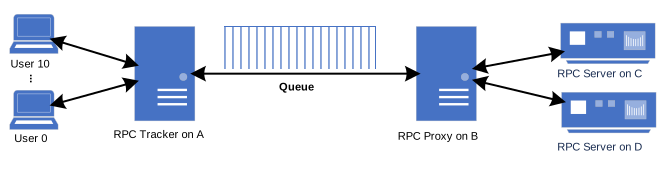
+Apache TVM RPC contains 3 tools, RPC tracker, RPC proxy, and PRC server. The
RPC server is the necessary one, an RPC system can work correctly without RPC
proxy and RPC tracker. RPC proxy is needed when you can’t access the RPC server
directly. RPC tracker is strongly suggested to be added in your RPC system,
because it provides many useful features, e.g., queue capability, multiple RPC
servers management, manage RPC server through key instead of IP address.
+
+.. figure::
https://raw.githubusercontent.com/tlc-pack/web-data/main/images/dev/how-to/rpc_system_suggested_arch.svg
+   :align: center
+   :width: 85%
+
+As above figure shown, because there aren’t physical connection channels
between machine A and machine C, D, so we set up a RPC proxy on machine B. The
RPC tracker manage a request queue per RPC key, each user can request an RPC
server from RPC tracker by a RPC key at anytime, if there is a idle RPC server
with the same RPC key, then RPC tracker assign the RPC server to the user, if
there isn’t a idle RPC server for the moment, the request will be put into the
request queue of that RPC k [...]
+
+
+Setup RPC Tracker and RPC Proxy
+-------------------------------
+
+In general, RPC tracker and RPC proxy only need to be run on host machine,
e.g., development server or PC, they needn't depend on any enironment of device
machine, so the only work need to do for setting up them is executing below
commands on the corresponding machine after installing Apache TVM according to
the official document `<https://tvm.apache.org/docs/install/index.html>`_.
+
+- RPC Tracker
+
+  .. code-block:: shell
+
+      $ python3 -m tvm.exec.rpc_tracker --host RPC_TRACKER_IP --port 9190
--port-end 9191
+
+
+- RPC Proxy
+
+  .. code-block:: shell
+
+      $ python3 -m tvm.exec.rpc_proxy --host RPC_PROXY_IP --port 9090
--port-end 9091 --tracker RPC_TRACKER_IP:RPC_TRACKER_PORT
+
+
+Please modify the *RPC_TRACKER_IP*, *RPC_TRACKER_PORT*, *RPC_PROXY_IP*, and
the port numbers in above commands according to your concrete environment, the
option ``port-end`` can be used to avoid the service start with an unexpected
port number, which may cause other service can't be connected correctly, this
is important especially for auto testing system.
+
+
+Setup RPC Server
+----------------
+
+In our community, there is multiple RPC server implementations, e.g.,
``apps/android_rpc``, ``apps/cpp_rpc``, ``apps/ios_rpc``, below content only
focus on the Python version RPC server which is implemented by
``python/tvm/exec/rpc_server.py``, for the setup instruction of other version
RPC server please refer to the document of its corresponding directory.
+
+RPC server need to be run on device machine, and it usually will depend on xPU
driver, the enhanced TVM runtime with xPU support, and other libraries, so
please setup the dependent components first, e.g., install the KMD driver,
ensure the required dynamic libraries can be found from environment variable
``LD_LIBRARY_PATH``.
+
+If the required compilation environment can be setup on your device machine,
i.e., you needn't to do the cross compilation, then just follow the instruction
of `<https://tvm.apache.org/docs/install/from_source.html>`_ to compile the TVM
runtime and directly jump to the step :ref:`luanch-rpc-server`.
+
+1. Cross Compile TVM Runtime
+^^^^^^^^^^^^^^^^^^^^^^^^^^^^
+
+We use CMake to manage the compile process, for cross compilation, CMake need
a toolchain file to get the required information, so you need to prepare this
file according to your device platform, below is a example for the device
machine which CPU is 64bit ARM architecture and the operating system is Linux.
+
+.. code-block:: cmake
+
+  set(CMAKE_SYSTEM_NAME Linux)
+  set(root_dir "/XXX/gcc-linaro-7.5.0-2019.12-x86_64_aarch64-linux-gnu")
+
+  set(CMAKE_C_COMPILER "${root_dir}/bin/aarch64-linux-gnu-gcc")
+  set(CMAKE_CXX_COMPILER "${root_dir}/bin/aarch64-linux-gnu-g++")
+  set(CMAKE_SYSROOT "${root_dir}/aarch64-linux-gnu/libc")
+
+  set(CMAKE_FIND_ROOT_PATH_MODE_PROGRAM NEVER)
+  set(CMAKE_FIND_ROOT_PATH_MODE_LIBRARY ONLY)
+  set(CMAKE_FIND_ROOT_PATH_MODE_INCLUDE ONLY)
+  set(CMAKE_FIND_ROOT_PATH_MODE_PACKAGE ONLY)
+
+After executing commands like something below under the root directory of TVM
repository, the runtime will be cross compiled successfully, please enable
other needed options in file ``config.cmake`` according to your concrete
requirement.
+
+.. code-block:: shell
+
+  $ mkdir cross_build
+  $ cd cross_build
+  $ cp ../cmake/config.cmake ./
+
+  # You maybe need to enable other options, e.g., USE_OPENCL, USE_xPU.
+  $ sed -i "s|USE_LLVM.*)|USE_LLVM OFF)|" config.cmake
+  $ sed -i "s|USE_LIBBACKTRACE.*)|USE_LIBBACKTRACE OFF)|" config.cmake
+  $ sed -i "s|USE_MICRO.*)|USE_MICRO OFF)|" config.cmake
+
+  $ cmake -DCMAKE_TOOLCHAIN_FILE=/YYY/aarch64-linux-gnu.cmake
-DCMAKE_BUILD_TYPE=Release ..
+  $ cmake --build . -j -- runtime
+  $ cd ..
+
+
+2. Pack and Deploy to Device Machine
+^^^^^^^^^^^^^^^^^^^^^^^^^^^^^^^^^^^^
+
+Pack the Python version RPC server through the commands like something below.
+
+.. code-block:: shell
+
+  $ git clean -dxf python
+  $ cp cross_build/libtvm_runtime.so python/tvm/
+  $ tar -czf tvm_runtime.tar.gz python
+
+Then copy the compress package ``tvm_runtime.tar.gz`` to your concrete device
machine, and setting the environment variable ``PYTHONPATH`` correctly through
the commands like something below on your device machine.
+
+.. code-block:: shell
+
+  $ tar -xzf tvm_runtime.tar.gz
+  $ export PYTHONPATH=`pwd`/python:${PYTHONPATH}
+
+
+.. _luanch-rpc-server:
+
+3. Luanch RPC Server
+^^^^^^^^^^^^^^^^^^^^
+
+The RPC server can be launched on your device machine through the commands
like something below, please modify the *RPC_TRACKER_IP*, *RPC_TRACKER_PORT*,
*RPC_PROXY_IP*, *RPC_PROXY_PORT*, and *RPC_KEY* according to your concrete
environment.
+
+.. code-block:: shell
+
+  # Use this if you use RPC proxy.
+  $ python3 -m tvm.exec.rpc_server --host RPC_PROXY_IP --port RPC_PROXY_PORT
--through-proxy --key RPC_KEY
+  # Use this if you needn't use RPC proxy.
+  $ python3 -m tvm.exec.rpc_server --tracker RPC_TRACKER_IP:RPC_TRACKER_PORT
--key RPC_KEY
+
+
+Validate RPC System
+-------------------
+
+.. code-block:: shell
+
+  $ python3 -m tvm.exec.query_rpc_tracker --host RPC_TRACKER_IP --port
RPC_TRACKER_PORT
+
+Through the above command, we can query all available RPC servers and the
queue status, if you have 3 RPC servers that connected to the RPC tracker
through RPC proxy, the output should be something like below.
+
+.. code-block:: shell
+
+  Tracker address RPC_TRACKER_IP:RPC_TRACKER_PORT
+
+  Server List
+  ----------------------------
+  server-address  key
+  ----------------------------
+  RPC_PROXY_IP:RPC_PROXY_PORT       server:proxy[RPC_KEY0,RPC_KEY1,RPC_KEY2]
+  ----------------------------
+
+  Queue Status
+  ---------------------------------------
+  key               total  free  pending
+  ---------------------------------------
+  RPC_KEY0          0      0     3
+  ---------------------------------------
+
+
+Troubleshooting
+---------------
+
+1. The lack of ``numpy`` on device machine caused the RPC server can't be
launched.
+^^^^^^^^^^^^^^^^^^^^^^^^^^^^^^^^^^^^^^^^^^^^^^^^^^^^^^^^^^^^^^^^^^^^^^^^^^^^^^^^^^^
+
+The package ``numpy`` is imported in some Python files which RPC server
dependent on, and eliminating the import relationship is difficult, for some
devices cross compiling ``numpy`` is very hard to do too.
+
+But acturally the TVM runtime doesn't really dependent on ``numpy``, so a very
simple workaround is create a dummy ``numpy``, just need to copy the below
content into a file named ``numpy.py`` and place it into directory like
``/usr/local/lib/python3.8/site-packages``.
+
+.. code-block:: python
+
+  class bool_:
+    pass
+  class int8:
+      pass
+  class int16:
+      pass
+  class int32:
+      pass
+  class int64:
+      pass
+  class uint8:
+      pass
+  class uint16:
+      pass
+  class uint32:
+      pass
+  class uint64:
+      pass
+  class float16:
+      pass
+  class float32:
+      pass
+  class float64:
+      pass
+  class float_:
+      pass
+
+  class dtype:
+      def __init__(self, *args, **kwargs):
+          pass
+
+  class ndarray:
+      pass
+
+  def sqrt(*args, **kwargs):
+      pass
+
+  def log(*args, **kwargs):
+      pass
+
+  def tanh(*args, **kwargs):
+      pass
+
+  def power(*args, **kwargs):
+      pass
+
+  def exp(*args, **kwargs):
+      pass
+
+
+2. The lack of ``cloudpickle`` on device machine caused the RPC server can't
be launched.
+^^^^^^^^^^^^^^^^^^^^^^^^^^^^^^^^^^^^^^^^^^^^^^^^^^^^^^^^^^^^^^^^^^^^^^^^^^^^^^^^^^^^^^^^^
+
+Because ``cloudpickle`` package is a pure Python package, so just copying it
from other machine to the directory like
``/usr/local/lib/python3.8/site-packages`` of the device machine will resolve
the problem.