* [doc] add integrate to your app documentation
Project: http://git-wip-us.apache.org/repos/asf/incubator-weex-site/repo Commit: http://git-wip-us.apache.org/repos/asf/incubator-weex-site/commit/85e67204 Tree: http://git-wip-us.apache.org/repos/asf/incubator-weex-site/tree/85e67204 Diff: http://git-wip-us.apache.org/repos/asf/incubator-weex-site/diff/85e67204 Branch: refs/heads/master Commit: 85e67204ea296c1093ee34c2262ff4ab854d5d90 Parents: 1a6d8ce Author: zifan.zx <[email protected]> Authored: Thu Jan 18 13:56:52 2018 +0800 Committer: zifan.zx <[email protected]> Committed: Thu Jan 18 13:56:52 2018 +0800 ---------------------------------------------------------------------- source/cn/guide/integrate-to-your-app.md | 90 +++++++++++++++---------- source/guide/integrate-to-your-app.md | 97 ++++++++++++++++----------- 2 files changed, 112 insertions(+), 75 deletions(-) ---------------------------------------------------------------------- http://git-wip-us.apache.org/repos/asf/incubator-weex-site/blob/85e67204/source/cn/guide/integrate-to-your-app.md ---------------------------------------------------------------------- diff --git a/source/cn/guide/integrate-to-your-app.md b/source/cn/guide/integrate-to-your-app.md index 8cc3b4a..5c37bac 100644 --- a/source/cn/guide/integrate-to-your-app.md +++ b/source/cn/guide/integrate-to-your-app.md @@ -208,46 +208,40 @@ WXSampleå°å ## éæå° iOS -### éè¿cocoaPods éæ Weex iOS SDKå°ä½ çé¡¹ç® +### éè¿ [CocoaPods](https://cocoapods.org/) æè [Carthage](https://github.com/Carthage/Carthage) éæ Weex iOS SDKå°ä½ çé¡¹ç® -é¦å åè®¾ä½ å·²ç»å®æäºå®è£ [iOS å¼åç¯å¢](https://developer.apple.com/library/ios/documentation/IDEs/Conceptual/AppStoreDistributionTutorial/Setup/Setup.html) å [CocoaPods](https://guides.cocoapods.org/using/getting-started.html) +é¦å åè®¾ä½ å·²ç»å®æäºå®è£ [iOS å¼åç¯å¢](https://developer.apple.com/library/ios/documentation/IDEs/Conceptual/AppStoreDistributionTutorial/Setup/Setup.html) å [CocoaPods](https://guides.cocoapods.org/using/getting-started.html)(æè [Carthage](https://github.com/Carthage/Carthage#installing-carthage)) #### 第ä¸æ¥ï¼æ·»å ä¾èµ -å¯¼å ¥ Weex iOS SDK å°ä½ å·²æç项ç®, å¦æ没æï¼å¯ä»¥[åè](https://developer.apple.com/library/ios/documentation/IDEs/Conceptual/AppStoreDistributionTutorial/Setup/Setup.html)æ°å»ºé¡¹ç® -å¨ç»§ç»ä¸é¢å 容ä¹åï¼ç¡®ä¿ä½ å·²æç项ç®ç®å½æå称为 `Podfile` æ件ï¼å¦æ没æï¼å建ä¸ä¸ªï¼ç¨ææ¬ç¼è¾å¨æå¼ +å¯¼å ¥ Weex iOS SDK å°ä½ å·²æç项ç®, å¦æ没æï¼å¯ä»¥[åè](https://developer.apple.com/library/ios/documentation/IDEs/Conceptual/AppStoreDistributionTutorial/Setup/Setup.html)æ°å»ºé¡¹ç®ã +å¨ç»§ç»ä¸é¢å 容ä¹åï¼ç¡®ä¿ä½ å·²æç项ç®ç®å½æå称为 `Podfile` æ件ï¼å¦æ没æï¼å建ä¸ä¸ªï¼ç¨ææ¬ç¼è¾å¨æå¼(å¦æä½¿ç¨ Carthage ï¼è¯·ç¡®ä¿å·²æ项ç®ç®å½ä¸åå¨ [`Cartfile`](https://github.com/Carthage/Carthage/blob/master/Documentation/Artifacts.md#cartfile))ãéæ©å ¶ä¸ä¸ä¸ªéææ¹æ³å°±å¯ä»¥ã -- éæ framework +- æ·»å ä¾èµ - WeexSDK å¨ cocoaPods ä¸ææ°çæ¬ å¯ä»¥å¨[è¿](https://cocoapods.org/pods/WeexSDK)è·å + - 使ç¨[CocoaPods](https://cocoapods.org/) + WeexSDK å¨ cocoaPods ä¸ææ°çæ¬ å¯ä»¥å¨[è¿](https://cocoapods.org/pods/WeexSDK)è·å å¨ `Podfile` æ件ä¸æ·»å å¦ä¸å 容 - - ``` - source '[email protected]:CocoaPods/Specs.git' - target 'YourTarget' do - platform :ios, '7.0' - pod 'WeexSDK', '0.9.5' ## 建议使ç¨WeexSDKæ°çæ¬ - end - ``` - -- æºç éæ - - é¦å æ·è´ `ios/sdk` ç®å½å°ä½ å·²æ项ç®ç®å½ (æ¤å¤ä»¥æ·è´å°ä½ å·²æ项ç®çæ ¹ç®å½ä¸ºä¾å)ï¼ç¶åå¨ `Podfile` æ件ä¸æ·»å - - ````object-c - source '[email protected]:CocoaPods/Specs.git' - target 'YourTarget' do - platform :ios, '7.0' - pod 'WeexSDK', :path=>'./sdk/' - end - ```` - -#### 第äºæ¥ï¼å®è£ ä¾èµ - -æå¼å½ä»¤è¡ï¼åæ¢å°ä½ å·²æé¡¹ç® `Podfile` è¿ä¸ªæ件åå¨çç®å½ï¼æ§è¡ `pod install`ï¼æ²¡æåºç°ä»»ä½é误表示已ç»å®æç¯å¢é ç½®ã - -#### 第ä¸æ¥ï¼åå§å Weex ç¯å¢ + + ``` + source '[email protected]:CocoaPods/Specs.git' + target 'YourTarget' do + platform :ios, '7.0' + pod 'WeexSDK', '0.17.0' ## 建议使ç¨WeexSDKæ°çæ¬ + end + ``` + æå¼å½ä»¤è¡ï¼åæ¢å°ä½ å·²æé¡¹ç® `Podfile` è¿ä¸ªæ件åå¨çç®å½ï¼æ§è¡ `pod install`ï¼æ²¡æåºç°ä»»ä½é误表示已ç»å®æç¯å¢é ç½®ã + + - ä½¿ç¨ [Carthage](https://github.com/Carthage/Carthage) + + å¯ä»¥å¨[è¿](https://github.com/apache/incubator-weex/tags)æ¥è¯¢å°å½åææ°ççæ¬ã + å¨ [`Cartfile`](https://github.com/Carthage/Carthage/blob/master/Documentation/Artifacts.md#cartfile) ä¸æ·»å å¦ä¸å 容 + `github "apache/incubator-weex"` + å¨å å« `Cartfile` æ件ç®å½çç»ç«¯ä¸æ§è¡ `carthage update`ã + [æ·»å framework å°ä½ çå·¥ç¨](https://github.com/Carthage/Carthage#adding-frameworks-to-an-application) + +#### 第äºæ¥ï¼åå§å Weex ç¯å¢ å¨ `AppDelegate.m` æ件ä¸ååå§åæä½ï¼ä¸è¬ä¼å¨ `didFinishLaunchingWithOptions` æ¹æ³ä¸å¦ä¸æ·»å ã @@ -271,7 +265,7 @@ WXSampleå°å [WXLog setLogLevel: WXLogLevelAll]; ``` -#### 第åæ¥ï¼æ¸²æ weex Instance +#### 第ä¸æ¥ï¼æ¸²æ weex Instance Weex æ¯ææ´ä½é¡µé¢æ¸²æåé¨å渲æ两ç§æ¨¡å¼ï¼ä½ éè¦åçäºæ æ¯ç¨æå®ç URL 渲æ Weex ç viewï¼ç¶åæ·»å å°å®çç¶å®¹å¨ä¸ï¼ç¶å®¹å¨ä¸è¬é½æ¯ viewControllerã @@ -306,7 +300,7 @@ Weex æ¯ææ´ä½é¡µé¢æ¸²æåé¨å渲æ两ç§æ¨¡å¼ï¼ä½ éè¦åçäºæ WXSDKInstance æ¯å¾éè¦çä¸ä¸ªç±»ï¼æä¾äºåºç¡çæ¹æ³åä¸äºåè°ï¼å¦ `renderWithURL`, `onCreate`, `onFailed` çï¼å¯ä»¥åè§ `WXSDKInstance.h` ç声æã -#### 第äºæ¥ï¼éæ¯ Weex Instance +#### 第åæ¥ï¼éæ¯ Weex Instance å¨ viewController ç dealloc é¶æ®µ éæ¯æ Weex instanceï¼éæ¾å åï¼é¿å é æå åæ³é²ã @@ -320,5 +314,29 @@ WXSDKInstance æ¯å¾éè¦çä¸ä¸ªç±»ï¼æä¾äºåºç¡çæ¹æ³åä¸äºåè° ### å¯¼å ¥ Weex SDK framework å°å·¥ç¨ å¯ä»¥éè¿æºç ç¼è¯åº Weex SDKï¼å¯ä»¥å¨æ°ç feature æè bugfix åæ¯ï¼å°è¯ææ°ç featureã - - åè[æ¤å¤](https://open.taobao.com/doc2/detail?spm=a219a.7629140.0.0.tFddsV&&docType=1&articleId=104829)ç´æ¥å¯¼å ¥ weexSDKã + - ä½¿ç¨ git clone [Weex](https://github.com/apache/incubator-weex.git) + SSH + ``` + git clone [email protected]:apache/incubator-weex.git + ``` + æè https + ``` + git clone https://github.com/apache/incubator-weex.git + ``` + +- æå¼ WeexSDK.xcodeproj in `weex/ios/sdk` + åæ¢å°å¦ä¸å¾æ示 target +  + +- ç¼è¯å½åtargetï¼å¯ä»¥ç´æ¥ç¨å¿«æ·é® `â + b` + +- æåæ¾å°äº§ç©å¨ `weex/ios/sdk/Products` ç®å½ +  + +- å¯¼å ¥ framework å°èªå·±å·¥ç¨ + - éè¦æ·»å å¦ä¸å¾ç³»ç»ä¾èµ + 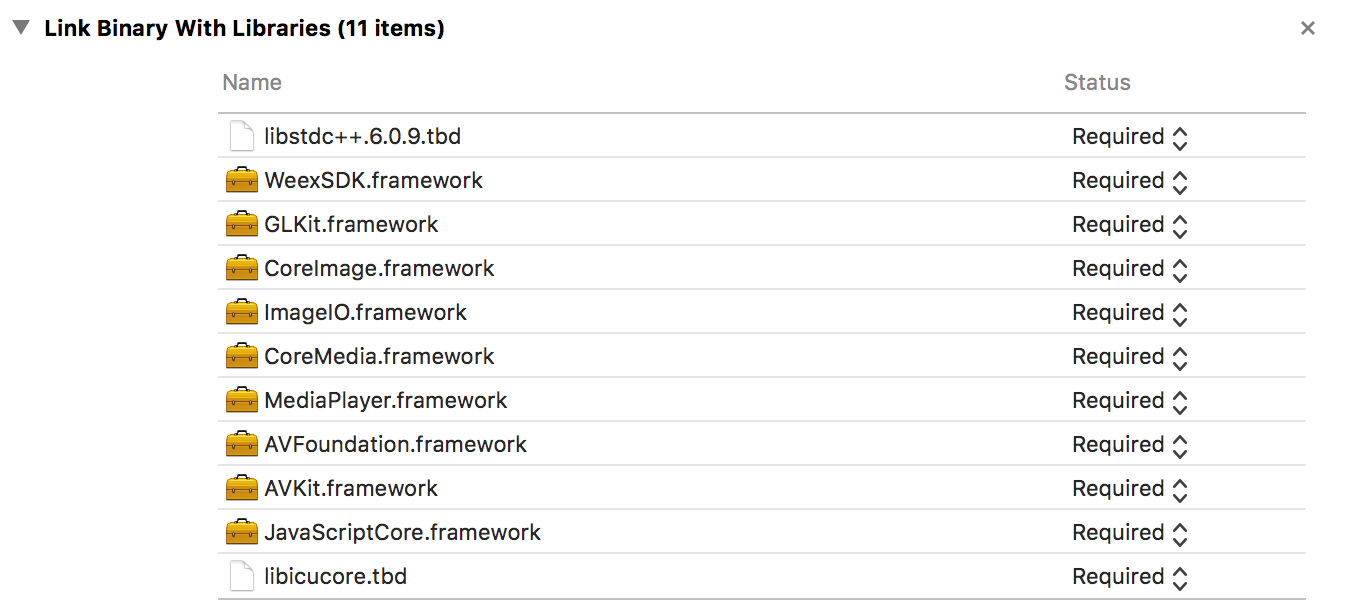 + - æ·»å `-ObjC` å°å·¥ç¨è®¾ç½®ä¸ +  + - æ·»å `js-framework` å°èªå·±ç main bundle, `js-framework` çä½ç½®å¨ WeexSDK.framework ä¸ï¼æ件å称为 `native-bundle-main.js` +  http://git-wip-us.apache.org/repos/asf/incubator-weex-site/blob/85e67204/source/guide/integrate-to-your-app.md ---------------------------------------------------------------------- diff --git a/source/guide/integrate-to-your-app.md b/source/guide/integrate-to-your-app.md index 970a95d..453ca20 100644 --- a/source/guide/integrate-to-your-app.md +++ b/source/guide/integrate-to-your-app.md @@ -119,43 +119,33 @@ Tip: Click QRCode Image in Demo Source Page, your will see compiled bundle js. ## Integrated to iOS -Through the cocoaPods integrated Weex iOS SDK to the project. -First assume that you have finished installing the [iOS development environment](https://developer.apple.com/library/ios/documentation/IDEs/Conceptual/AppStoreDistributionTutorial/Setup/Setup.html) and [CocoaPods](https://guides.cocoapods.org/using/getting-started.html). +Through the [CocoaPods](https://cocoapods.org/) or [Carthage](https://github.com/Carthage/Carthage) integrated Weex iOS SDK to your project. +First assume that you have finished installing the [iOS development environment](https://developer.apple.com/library/ios/documentation/IDEs/Conceptual/AppStoreDistributionTutorial/Setup/Setup.html) and [CocoaPods](https://guides.cocoapods.org/using/getting-started.html)(or [Carthage](https://github.com/Carthage/Carthage#installing-carthage)). ### Step 1: Add Dependencies -Import Weex iOS SDK to your existing project, if not, you can create a new project. -Before proceeding, make sure that the Podfile file is under the project file. If not, create one and open with text editor. - -+ Integration framework - -WeexSDK The latest version on cocoaPods can be obtained [here](https://cocoapods.org/pods/WeexSDK) . -Add the following to the Podfile file: - -```object-c -source '[email protected]:CocoaPods/Specs.git' -target 'YourTarget' do - platform :ios, '7.0' - pod 'WeexSDK', '0.9.5' ## Suggest using latest Weex SDK -end -``` - -+ Integrate with source code - -First copy the ios / sdk directory to your existing project directory (here to copy the root directory of your existing project as an example), and then add the Podfile file. - -```object-c -source '[email protected]:CocoaPods/Specs.git' -target 'YourTarget' do - platform :ios, '7.0' - pod 'WeexSDK', :path=>'./sdk/' -end -``` - -### Step 2: Install Dependencies - -Open the command line, switch to the directory of the Podfile file, and run the pod install command. If there are no errors, it means that the environment has been configured. - -### Step 3: Initialize the Weex environment +Import Weex iOS SDK to your existing project, if not, you can create a new project according to the [tutorial](https://developer.apple.com/library/ios/documentation/IDEs/Conceptual/AppStoreDistributionTutorial/Setup/Setup.html)). +Before proceeding, make sure that the Podfile file is under the project file. If not, create one and open with text editor(if Carthage, please ensure the [`Cartfile`](https://github.com/Carthage/Carthage/blob/master/Documentation/Artifacts.md#cartfile) in your project directory). You can choose one of Integration method. + +- using [CocoaPods](https://cocoapods.org/) + WeexSDK The latest version on cocoaPods can be obtained [here](https://cocoapods.org/pods/WeexSDK) . + Add the following to the Podfile file: + + ```object-c + source '[email protected]:CocoaPods/Specs.git' + target 'YourTarget' do + platform :ios, '7.0' + pod 'WeexSDK', '0.17.0' ## latest Weex SDK recommended + end + ``` + Open the command line, switch to the directory of the Podfile file, and run the pod install command. If there are no errors, it means that the environment has been configured. +- using [Carthage](https://github.com/Carthage/Carthage) + [here](https://github.com/apache/incubator-weex/tags) you can get the latest version of WeexSDK. + Add `github "apache/incubator-weex"` to [`Cartfile`](https://github.com/Carthage/Carthage/blob/master/Documentation/Artifacts.md#cartfile) + Open the command line, switch to the directory of the Cartfile, and run `carthage update`. + [Add Carthage build framework to your project](https://github.com/Carthage/Carthage#adding-frameworks-to-an-application) + + +### Step 2: Initialize the Weex environment In the AppDelegate.m file to do the initialization operation, usually in the didFinishLaunchingWithOptions method as follows to add. ```object-c @@ -174,7 +164,7 @@ In the AppDelegate.m file to do the initialization operation, usually in the did [WXLog setLogLevel: WXLogLevelAll]; ``` -### Step 4: Render weex Instance +### Step 3: Render weex Instance Weex supports both full page rendering and partial rendering. What you need to do is render Weex's view with the specified URL and add it to its parent container. The parent container is generally a viewController. @@ -205,7 +195,7 @@ Weex supports both full page rendering and partial rendering. What you need to d WXSDKInstance is a very important class that provides a basic method and some callbacks, such as renderWithURL, onCreate, onFailed, etc., can be found in WXSDKInstance.h. -### Step 5: Destroy Weex Instance +### Step 4: Destroy Weex Instance In the dealloc phase of the viewController destroyed Weex instance, can play a role in avoiding memory leaks. ```object-c @@ -215,6 +205,35 @@ In the dealloc phase of the viewController destroyed Weex instance, can play a r } ``` -#### Import the Weex SDK framework to the project. +#### Build your own WeexSDK.framework and Import to your project. The Weex SDK can be compiled from the source code. You can try the latest feature in the new feature or bugfix branch. -Refer to [here](https://open.taobao.com/doc2/detail?spm=a219a.7629140.0.0.tFddsV&&docType=1&articleId=104829) for direct import of weexSDK. + +- clone [Weex](https://github.com/apache/incubator-weex.git) project + you can use SSH + + ``` + git clone [email protected]:apache/incubator-weex.git + ``` + or use https + + ``` + git clone https://github.com/apache/incubator-weex.git + ``` + +- open WeexSDK.xcodeproj in `weex/ios/sdk` + switch target just below +  + +- Build this project or just use the xcode default hot key `â + b` + +- Finally you can find `Products` directory in `weex/ios/sdk`, `WeexSDK.framework` was here +  + +- Add `js-framework`(which is in the `WeexSDK.framework` and renamed to `native-bundle-main.js`) to your main bundle +  +- Import the framework you get above and import system framework +  +- add `-ObjC` to your project settings,just like this + + +

