Fix absolute URL to local relative path
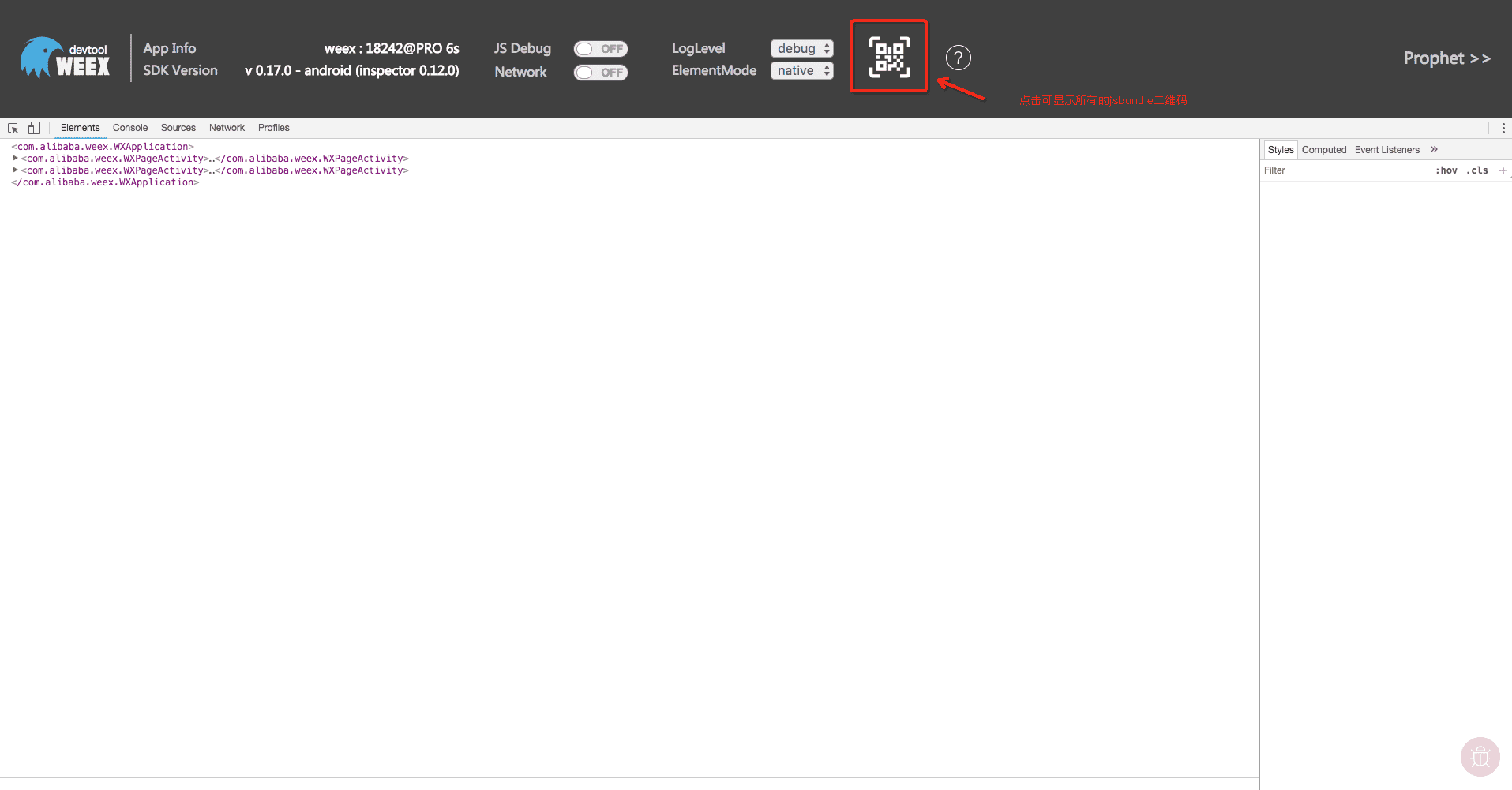
Project: http://git-wip-us.apache.org/repos/asf/incubator-weex-site/repo Commit: http://git-wip-us.apache.org/repos/asf/incubator-weex-site/commit/15a0788b Tree: http://git-wip-us.apache.org/repos/asf/incubator-weex-site/tree/15a0788b Diff: http://git-wip-us.apache.org/repos/asf/incubator-weex-site/diff/15a0788b Branch: refs/heads/master Commit: 15a0788b016886651bdf466c88c257442a5e82cd Parents: 0bee04f Author: Zhenfei You <[email protected]> Authored: Thu Mar 22 17:22:44 2018 +0800 Committer: Zhenfei You <[email protected]> Committed: Thu Mar 22 18:03:00 2018 +0800 ---------------------------------------------------------------------- source/cn/guide/index.md | 6 +++--- source/cn/tools/toolkit.md | 16 ++++++++-------- source/guide/index.md | 4 ++-- source/tools/toolkit.md | 12 ++++++------ 4 files changed, 19 insertions(+), 19 deletions(-) ---------------------------------------------------------------------- http://git-wip-us.apache.org/repos/asf/incubator-weex-site/blob/15a0788b/source/cn/guide/index.md ---------------------------------------------------------------------- diff --git a/source/cn/guide/index.md b/source/cn/guide/index.md index f6f257e..28c987b 100644 --- a/source/cn/guide/index.md +++ b/source/cn/guide/index.md @@ -26,7 +26,7 @@ Weex çå¦ä¸ä¸ªä¸»è¦ç®æ æ¯è·è¿å½ä»£å è¿ç Web å¼åååçå¼å  -è¿ä¸ªä¾åå¨å±å¹æ£ä¸é´æ¸²æäºä¸ä¸ªåè¯ âYoâã å¦æä½ æ³å¨ç§»å¨è®¾å¤ä¸é¢è§æ¸²æç»æï¼ä½ åªéè¦å®è£ [Weex playground app](https://weex-project.io/playground.html) æå° Weex SDK éæå°æ¨èªå·±çåºç¨ç¨åºä¸ï¼ç¶å使ç¨æ«æç½é¡µå³ä¾§çäºç»´ç ã +è¿ä¸ªä¾åå¨å±å¹æ£ä¸é´æ¸²æäºä¸ä¸ªåè¯ âYoâã å¦æä½ æ³å¨ç§»å¨è®¾å¤ä¸é¢è§æ¸²æç»æï¼ä½ åªéè¦å®è£ [Weex playground app](/cn/tools/playground.html) æå° Weex SDK éæå°æ¨èªå·±çåºç¨ç¨åºä¸ï¼ç¶å使ç¨æ«æç½é¡µå³ä¾§çäºç»´ç ã å¨æºä»£ç ç `<template>` ä¸ï¼`<div>` ä½ åºè¯¥å¾çæäºï¼å®å¨ Weex å¹³å°ä¸ä¹æ¯ä¸ä¸ªéç¨å®¹å¨ãä½æ¯ `<text>` ç»ä»¶æ¯ç± Weex ç¹æçï¼å®æ¯ä¸ä¸ªå级çææ¬å®¹å¨ï¼å¯ä»¥ç¨æ¥æ¸²ææåã @@ -89,7 +89,7 @@ Weex å¯ä»¥åªç¼åä¸ä»½ä»£ç ï¼å¼ååºä¸ç«¯é½å¯ç¨ç页é¢ã > 以ä¸æ¥éª¤å设æ¨å·²ç»äºè§£äº Node.js å npm > çåºæ¬ç¥è¯ãå¦æ对å®ä»¬ä¸çæï¼å¯ä»¥è®¿é® > [https://docs.npmjs.com/](https://docs.npmjs.com/) æ¥äºè§£æ´å¤å ³äº npm > çç¨æ³ã -Weex æä¾äºä¸ä¸ªå½ä»¤è¡å·¥å · [weex-toolkit](http://weex-project.io/tools/toolkit.html) æ¥å¸®å©å¼åè ä½¿ç¨ Weexãå®å¯ä»¥ç¨æ¥å¿«éå建ä¸ä¸ªç©ºé¡¹ç®ãåå§å iOS å Android å¼åç¯å¢ãè°è¯ãå®è£ æ件çæä½ã +Weex æä¾äºä¸ä¸ªå½ä»¤è¡å·¥å · [weex-toolkit](/cn/tools/toolkit.html) æ¥å¸®å©å¼åè ä½¿ç¨ Weexãå®å¯ä»¥ç¨æ¥å¿«éå建ä¸ä¸ªç©ºé¡¹ç®ãåå§å iOS å Android å¼åç¯å¢ãè°è¯ãå®è£ æ件çæä½ã ç®å `weex-toolkit` åªæ¯æå建 Vue.js ç项ç®ãå建 Rax ç项ç®å¯ä»¥ä½¿ç¨ `rax-cli`ï¼åè [Rax çå®æ¹ç½ç«](https://alibaba.github.io/rax/) äºè§£å ¶ç¨æ³ã @@ -123,7 +123,7 @@ npm start  -é¤æ¤ä¹å¤ï¼ä½ è¿å¯ä»¥æå¼ `http://localhost:8081/preview.html` å¼å¯ä¸ä¸ªé¢è§é¡µé¢ï¼å®ä¼æ web 端ç页é¢æ¾å¨ä¸ä¸ª iframe ä¸æ¸²æï¼èä¸å¨å³ä¾§çæä¸ä¸ªäºç»´ç ãç¨ [Weex playground app](http://weex-project.io/playground.html) æ«æè¿ä¸ªäºç»´ç å¯ä»¥çå°é¡µé¢å¨ææºä¸æ¸²æççå®ææã +é¤æ¤ä¹å¤ï¼ä½ è¿å¯ä»¥æå¼ `http://localhost:8081/preview.html` å¼å¯ä¸ä¸ªé¢è§é¡µé¢ï¼å®ä¼æ web 端ç页é¢æ¾å¨ä¸ä¸ª iframe ä¸æ¸²æï¼èä¸å¨å³ä¾§çæä¸ä¸ªäºç»´ç ãç¨ [Weex playground app](/cn/tools/playground.html) æ«æè¿ä¸ªäºç»´ç å¯ä»¥çå°é¡µé¢å¨ææºä¸æ¸²æççå®ææã ### ç¼è¯åè¿è¡ http://git-wip-us.apache.org/repos/asf/incubator-weex-site/blob/15a0788b/source/cn/tools/toolkit.md ---------------------------------------------------------------------- diff --git a/source/cn/tools/toolkit.md b/source/cn/tools/toolkit.md index 0c66756..fb8043e 100644 --- a/source/cn/tools/toolkit.md +++ b/source/cn/tools/toolkit.md @@ -50,7 +50,7 @@ weex-toolkitå·¥å ·æ¯æå¯¹ä½ çWeexæ件ï¼`.we`æ`.vue`)å¨çå¬æ¨¡å¼ä¸ $ weex preview src/foo.vue ``` -æµè§å¨ä¼èªå¨å¾æå¼é¢è§é¡µé¢å¹¶ä¸ä½ å¯ä»¥çå°ä½ çweex页é¢çå¸å±åææãå¦æä½ å¨ä½ ç设å¤ä¸å®è£ äº[Playground](https://weex.apache.org/cn/playground.html)ï¼ä½ è¿å¯ä»¥éè¿æ«æ页é¢ä¸çäºç»´ç æ¥æ¥ç页é¢ã +æµè§å¨ä¼èªå¨å¾æå¼é¢è§é¡µé¢å¹¶ä¸ä½ å¯ä»¥çå°ä½ çweex页é¢çå¸å±åææãå¦æä½ å¨ä½ ç设å¤ä¸å®è£ äº[Playground](/cn/tools/playground.html)ï¼ä½ è¿å¯ä»¥éè¿æ«æ页é¢ä¸çäºç»´ç æ¥æ¥ç页é¢ã 使ç¨ä¸é¢çå½ä»¤ï¼ä½ å°å¯ä»¥é¢è§æ´ä¸ªæ件夹ä¸ç`.vue`æ件 @@ -70,7 +70,7 @@ $ weex compile [source] [dist] [options] #### åæ° -| Option | Description | +| Option | Description | | -------- | :----- | |`-w, --watch` | å¼å¯watch模å¼ï¼åæ¥æ件æ¹å¨å¹¶è¿è¡ç¼è¯| |`-d,--devtool [devtool]`|设置devtoolé项| @@ -106,7 +106,7 @@ $ weex run web ### debug -** [Weex devtools](https://github.com/weexteam/weex-devtool) ** æ¯å®ç°[Chromeè°è¯åè®®](https://developer.chrome.com/devtools/docs/debugger-protocol)çWeexèªå®ä¹å¼åå·¥å ·, +** [Weex devtools](https://github.com/weexteam/weex-devtool) ** æ¯å®ç°[Chromeè°è¯åè®®](https://developer.chrome.com/devtools/docs/debugger-protocol)çWeexèªå®ä¹å¼åå·¥å ·, 主è¦ç¨äºå¸®å©ä½ å¿«éæ£æ¥æ¨çåºç¨ç¨åºï¼å¹¶å¨Chromeç½é¡µä¸è°è¯æ¨çJS bundleæºä»£ç ï¼æ¯æAndroidåiOSå¹³å°ãæä»¥ä½ å¯ä»¥éè¿`weex-toolkit`使ç¨ç`weex-devtool`åè½ã #### ç¨æ³ @@ -117,7 +117,7 @@ weex debug [we_file|bundles_dir] [options] #### åæ° -| Option | Description | +| Option | Description | | -------- | :----- | |`-v, --version`| æ¾ç¤ºweex-debuggerçæ¬ä¿¡æ¯| |`-h, --help`| å±ç¤ºå¸®å©ä¿¡æ¯ | @@ -147,7 +147,7 @@ $ weex debugx ##### é¾æ¥è®¾å¤ -请使ç¨[weex playground app](http://weex.apache.org/tools/playground.html)æ«ç æ使ç¨éæäºweex-devtoolçappè¿è¡æ«ç ï¼éææ¹æ³è§[éædevtoolå·¥å ·](#éædevtoolå·¥å ·)ãæios模æå¨ç¯å¢çç¨æ·ä¹å¯ä»¥éè¿ç¹å»äºç»´ç çæ¹å¼è¿è¡æ¨¡æå¨è°è¯ï¼ä» émacç¨æ·ä½¿ç¨ï¼ã +请使ç¨[weex playground app](/tools/playground.html)æ«ç æ使ç¨éæäºweex-devtoolçappè¿è¡æ«ç ï¼éææ¹æ³è§[éædevtoolå·¥å ·](#éædevtoolå·¥å ·)ãæios模æå¨ç¯å¢çç¨æ·ä¹å¯ä»¥éè¿ç¹å»äºç»´ç çæ¹å¼è¿è¡æ¨¡æå¨è°è¯ï¼ä» émacç¨æ·ä½¿ç¨ï¼ã  @@ -184,15 +184,15 @@ $ weex debug your_weex.vue ##### LogLevelåElementModeåè½ > LogLevelåElementModeåè½ç¨äºè°æ´è°è¯å·¥å ·çè¾åºé ç½®ã -LogLevelåå«æ debug/info/warn/log/erroräºä¸ªlogç级ï¼åæ¢å¯è¾åºä¸åç级çlogä¿¡æ¯ -ElementModeå¯ä»¥åæ¢Elementæ ç¾ä¸Domtreeæ¾ç¤ºæ¨¡å¼ï¼ä¸å¾ä¸ºvdomæ¾ç¤ºçé¢ï¼å¯ä»æ ç¾ä¸çå°è¯¦ç»çæ°æ®ç»æï¼ +LogLevelåå«æ debug/info/warn/log/erroräºä¸ªlogç级ï¼åæ¢å¯è¾åºä¸åç级çlogä¿¡æ¯ +ElementModeå¯ä»¥åæ¢Elementæ ç¾ä¸Domtreeæ¾ç¤ºæ¨¡å¼ï¼ä¸å¾ä¸ºvdomæ¾ç¤ºçé¢ï¼å¯ä»æ ç¾ä¸çå°è¯¦ç»çæ°æ®ç»æï¼  ##### Prophetåè½ï¼å è½½æ¶åºå¾ï¼ > Prophetåè½ç¨äºæ¥çweexçå è½½æ¶åºå¾å页é¢æ§è½ææ ã -ç¹å»å³ä¸è§Prophetå³å¯æ¥çæ¶åºå¾(iOSæä¸æ¯æï¼æ§è½æ°æ®å¯å¨logçperformanceä¸æ¥ç)ï¼å¦ä¸ï¼ +ç¹å»å³ä¸è§Prophetå³å¯æ¥çæ¶åºå¾(iOSæä¸æ¯æï¼æ§è½æ°æ®å¯å¨logçperformanceä¸æ¥ç)ï¼å¦ä¸ï¼ 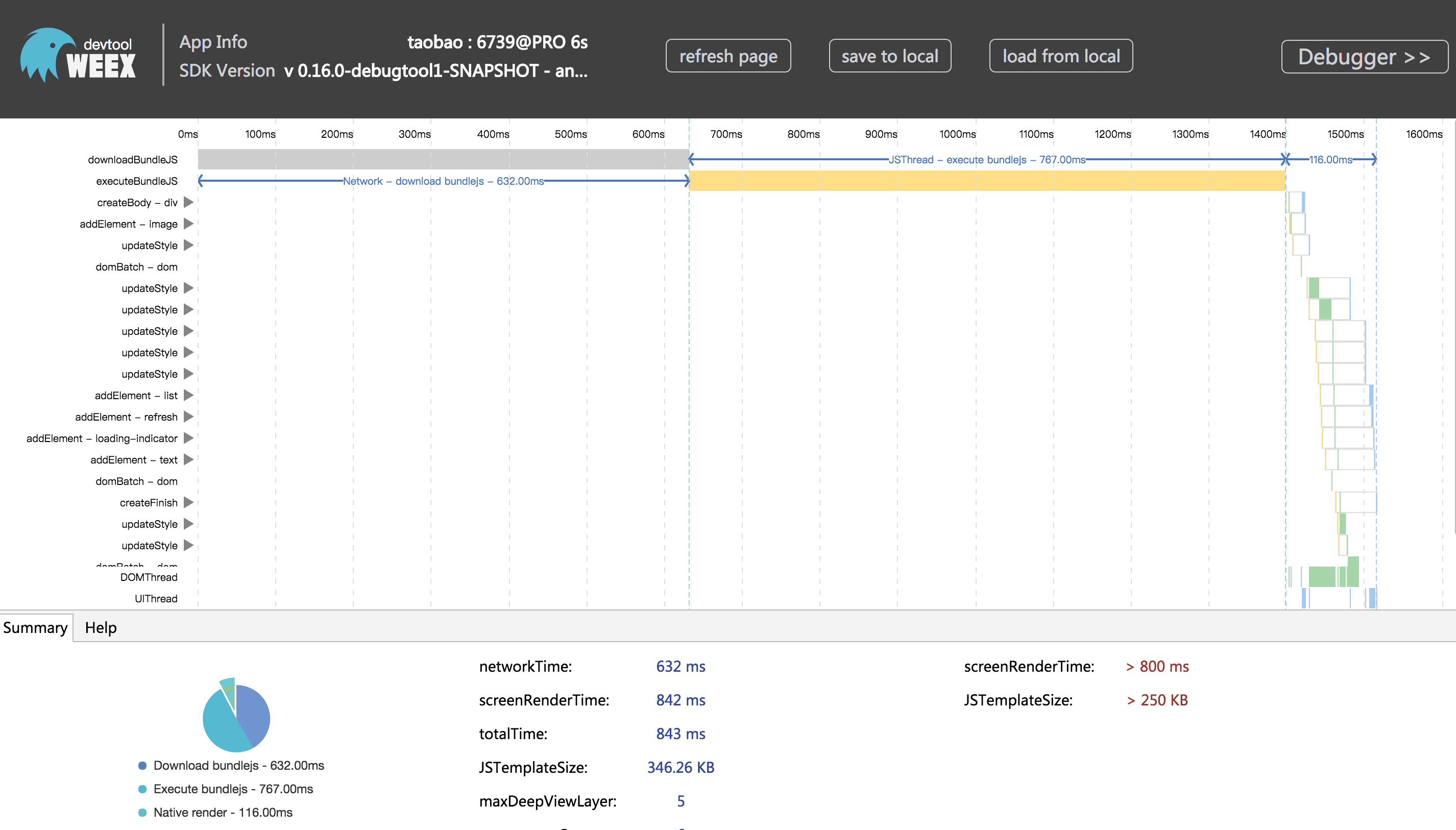 http://git-wip-us.apache.org/repos/asf/incubator-weex-site/blob/15a0788b/source/guide/index.md ---------------------------------------------------------------------- diff --git a/source/guide/index.md b/source/guide/index.md index 30520e6..8d69876 100644 --- a/source/guide/index.md +++ b/source/guide/index.md @@ -26,7 +26,7 @@ Here is an [example](http://dotwe.org/vue/8da01827631b21150a12dd54d7114380) writ  -This example renders a word "Yo" in the center of the screen. If you want to preview the rendered result on mobile devices, you need to install the [Weex playground app](https://weex-project.io/playground.html) or integrate Weex SDK into your own app. Then scan your page's QR code with your playground app or your own app (with the QR scan feature to load scanned URL with Weex SDK), and you will see the rendered result on your device. +This example renders a word "Yo" in the center of the screen. If you want to preview the rendered result on mobile devices, you need to install the [Weex playground app](/tools/playground.html) or integrate Weex SDK into your own app. Then scan your page's QR code with your playground app or your own app (with the QR scan feature to load scanned URL with Weex SDK), and you will see the rendered result on your device. Within the `<template>` of the source code, You must be familiar with the `<div>` which is widely used on the web, and it's also the generic container on Weex. But the `<text>` component is provided by Weex, it's a block-level text container. @@ -93,7 +93,7 @@ You can read *[Front-End Frameworks](./front-end-frameworks.html)* to learn more > The following steps assume you have already known the foundational knowledge > of Node.js and npm. If you are not familiar with them, you can visit > [https://docs.npmjs.com/](https://docs.npmjs.com/) to learn more about npm. -Weex provide a command line tool, the [weex-toolkit](http://weex-project.io/tools/toolkit.html), to help developers to get start easily. It can help you to create a starter project, setup iOS and Android development environments, debug, install plugins and so on. +Weex provide a command line tool, the [weex-toolkit](/tools/toolkit.html), to help developers to get start easily. It can help you to create a starter project, setup iOS and Android development environments, debug, install plugins and so on. Currently, the `weex-toolkit` only supports the creation of Vue.js project. The `rax-cli` maybe helpful if you want to use Rax. Please visit [Rax's official website](https://alibaba.github.io/rax/) for more details. http://git-wip-us.apache.org/repos/asf/incubator-weex-site/blob/15a0788b/source/tools/toolkit.md ---------------------------------------------------------------------- diff --git a/source/tools/toolkit.md b/source/tools/toolkit.md index e2cf62b..93d5ffe 100644 --- a/source/tools/toolkit.md +++ b/source/tools/toolkit.md @@ -17,7 +17,7 @@ $ npm install -g weex-toolkit You can use the `weex -v` command to confirm that the installation is successful. -> If you have never installed node.js, you should go [node.js.org]( https://nodejs.org/en/) to download and install it. The node version needs to be upper 6.0. You can try [n](https://github.com/tj/n) to manage your node versions. +> If you have never installed node.js, you should go [node.js.org]( https://nodejs.org/en/) to download and install it. The node version needs to be upper 6.0. You can try [n](https://github.com/tj/n) to manage your node versions. If you meet some errors when installing, please go [weex-toolkit issues](https://github.com/weexteam/weex-toolkit/issues) or [weex-toolkit faq](https://github.com/weexteam/weex-toolkit#faq) to find some solution or have a discuss with us. @@ -42,7 +42,7 @@ weex-toolkit supports previewing your Weex file(`.vue`) in a watch mode. You onl $ weex preview src/foo.vue ``` -The browser automatically opens the preview page and you can see the layout and effects of your weex page. If you have a [Playground App](https://weex.apache.org/cn/playground.html) in your mobile devices, you can scan the QR code at the opened page. +The browser automatically opens the preview page and you can see the layout and effects of your weex page. If you have a [Playground App](/tools/playground.html) in your mobile devices, you can scan the QR code at the opened page. Try the command below, youâll preview the whole directory files. @@ -62,7 +62,7 @@ $ weex compile [source] [dist] [options] #### options -| Option | Description | +| Option | Description | | -------- | :----- | |`-w, --watch` | watch we file changes auto build them and refresh debugger page! [default `true`]| |`-d,--devtool [devtool]` |set webpack devtool mode| @@ -119,7 +119,7 @@ $ weex run web weex debug [we_file|bundles_dir] [options] ``` -| Option | Description | +| Option | Description | | -------- | :----- | |`-V, --verbose` | display logs of debugger server| |`-v, --version` | display version| @@ -141,7 +141,7 @@ $ weex debug ``` This command will start debug server and launch a chrome opening `DeviceList` page. -this page will display a QR code, you can use [Playground](https://weex.apache.org/cn/playground.html) scan it for starting debug or integrate [Weex devtools](#Integrate devtool) into your application. +this page will display a QR code, you can use [Playground](/tools/playground.html) scan it for starting debug or integrate [Weex devtools](#Integrate devtool) into your application.  @@ -150,7 +150,7 @@ this page will display a QR code, you can use [Playground](https://weex.apache.o ``` $ weex debug your_weex.vue ``` -Click the button you can use your app or [weex playground app](http://weex.apache.org/tools/playground.html) to preview your pages. +Click the button you can use your app or [weex playground app](/tools/playground.html) to preview your pages.