[doc] update documentation for extend ios
Project: http://git-wip-us.apache.org/repos/asf/incubator-weex-site/repo Commit: http://git-wip-us.apache.org/repos/asf/incubator-weex-site/commit/78182898 Tree: http://git-wip-us.apache.org/repos/asf/incubator-weex-site/tree/78182898 Diff: http://git-wip-us.apache.org/repos/asf/incubator-weex-site/diff/78182898 Branch: refs/heads/master Commit: 781828980352f37f1381d56857e5892422532f47 Parents: 7500fee Author: acton393 <[email protected]> Authored: Mon Mar 19 18:34:09 2018 +0800 Committer: acton393 <[email protected]> Committed: Mon Mar 19 18:34:09 2018 +0800 ---------------------------------------------------------------------- source/cn/guide/extend-ios.md | 8 +- source/cn/guide/extend-module-using-swift.md | 9 +- source/guide/extend-ios.md | 464 ++++++++++------------ source/guide/extend-module-using-swift.md | 114 ++++++ source/wiki/component-introduction.md | 28 ++ source/wiki/handler-introduction.md | 55 +++ source/wiki/module-introduction.md | 34 ++ 7 files changed, 454 insertions(+), 258 deletions(-) ---------------------------------------------------------------------- http://git-wip-us.apache.org/repos/asf/incubator-weex-site/blob/78182898/source/cn/guide/extend-ios.md ---------------------------------------------------------------------- diff --git a/source/cn/guide/extend-ios.md b/source/cn/guide/extend-ios.md index b525910..c947e67 100644 --- a/source/cn/guide/extend-ios.md +++ b/source/cn/guide/extend-ios.md @@ -63,7 +63,7 @@ Weex SDK åªæä¾æ¸²æï¼æä¾äºä¸äºé»è®¤çç»ä»¶åè½åï¼å¦æä½ - è¦ç `WXComponent` ä¸ççå½å¨ææ¹æ³ - `loadView` - ä¸ä¸ª component é»è®¤å¯¹åºäºä¸ä¸ª view ï¼ å¦ææªè¦ç `loadView` æä¾èªå®ä¹ `view`, ä¼ä½¿ç¨ `WXComponent` åºç±»ä¸ç `WXView`, `WXView` æ¯ç»§æ¿èª UIView çä¸ä¸ªæ´¾ç viewã + ä¸ä¸ª component é»è®¤å¯¹åºäºä¸ä¸ª viewï¼å¦ææªè¦ç `loadView` æä¾èªå®ä¹ `view`, ä¼ä½¿ç¨ `WXComponent` åºç±»ä¸ç `WXView`, `WXView` æ¯ç»§æ¿èª UIView çä¸ä¸ªæ´¾ç viewã è¦å®ç°å°å¾åè½ï¼æ们éè¦å¯¹åºçå°å¾ view, æ¯å¦ç³»ç»ç `MKMapView` ``` @@ -115,7 +115,7 @@ Weex SDK åªæä¾æ¸²æï¼æä¾äºä¸äºé»è®¤çç»ä»¶åè½åï¼å¦æä½ } </script> ``` - ç»å½åç»ä»¶æ·»å `BOOL` æå mapLoaded,è®°å½å½åäºä»¶æ¯å¦è¢«æ·»å + ç»å½åç»ä»¶æ·»å `BOOL` æå mapLoaded,è®°å½å½åäºä»¶æ¯å¦è¢«æ·»å ï¼å½å°å¾å è½½å®ææ¶åï¼æ们å¯ä»¥æ ¹æ®è¿ä¸ªå¤ææ¯å¦åºè¯¥åéäºä»¶ã - è¦çç»ä»¶çå½å¨ææ¹æ³æ·»å å移é¤äºä»¶ @@ -137,7 +137,8 @@ Weex SDK åªæä¾æ¸²æï¼æä¾äºä¸äºé»è®¤çç»ä»¶åè½åï¼å¦æä½ ``` - å¨éå®çæ¶é´åäºä»¶éç¥ - å¨ MKMapView å è½½å®æç delegate æ¹æ³ä¸ï¼åäºä»¶éç¥èªå®ä¹äºä»¶ + å¨ MKMapView å è½½å®æç delegate æ¹æ³ä¸ï¼åäºä»¶éç¥èªå®ä¹äºä»¶ + > ä¸è¦å¿è®°è®¾ç½® MKMapView ç delegate. ```object-c - (void)mapViewDidFinishLoadingMap:(MKMapView *)mapView { @@ -268,6 +269,7 @@ WeexSDK 0.9.5 ä¹åæ¯æäºå¨ js ä¸ç´æ¥è°ç¨ component çæ¹æ³ï¼èªå® å¼åè ä¹å¯ä»¥å®ä¹èªå·±ç `protocol` å对åºçå®ç°æ¥ä½¿ç¨ `handler` æºå¶ - æ°å»ºåºç±»ä¸º NSObject ç class å®ç° `WXImgLoaderProtocol` åè®®ï¼ å®ç° `WXImgLoaderProtocol` çæ¹æ³ +> ä¸é¢å è½½å¾ççé»è¾éè¦ä¾èµ SDWebImageï¼ä½ ä¹å¯ä»¥ä¸ä¾èµ SDWebimage 使ç¨èªå·±çæ¹å¼å è½½å¯¹åº URL å¾çã ```object-c @implementation WXImgLoaderDefaultImpl http://git-wip-us.apache.org/repos/asf/incubator-weex-site/blob/78182898/source/cn/guide/extend-module-using-swift.md ---------------------------------------------------------------------- diff --git a/source/cn/guide/extend-module-using-swift.md b/source/cn/guide/extend-module-using-swift.md index 3ac4a9f..20234d9 100644 --- a/source/cn/guide/extend-module-using-swift.md +++ b/source/cn/guide/extend-module-using-swift.md @@ -89,7 +89,7 @@ version: 2.1 [WXSDKEngine registerModule:@"swifter" withClass:[WXSwiftTestModule class]]; ``` - - we æ件ä¸ä½¿ç¨ + - å端èæ¬ä¸ç¨æ³ ``` <template> @@ -97,14 +97,9 @@ version: 2.1 </template> <script> - require('weex-components'); - module.exports = { - data: { - - }, ready: function() { - var swifter = require('@weex-module/swifter'); + var swifter = weex.require('swifter'); swifter.printSome("https://www.taobao.com",function(param){ nativeLog(param); }); http://git-wip-us.apache.org/repos/asf/incubator-weex-site/blob/78182898/source/guide/extend-ios.md ---------------------------------------------------------------------- diff --git a/source/guide/extend-ios.md b/source/guide/extend-ios.md index b897ee5..90176b2 100644 --- a/source/guide/extend-ios.md +++ b/source/guide/extend-ios.md @@ -12,294 +12,212 @@ version: 2.1 > > **If you are extending your custom modules/components, be sure NOT to > export the ability of Objective-C runtime, be sure NOT to export dynamic > and uncontrolled methods such as `dlopen()`, `dlsym()`, > `respondsToSelector:`, `performSelector:`, > `method_exchangeImplementations()`, be sure NOT to export any private > methods. ** -### Module extend +Weex SDK provides only rendering capabilities, rather than have other capabilities. There are some internal [components](../wiki/component-introduction.html), [modules](../wiki/module-introduction.html) and [handlers](../wiki/handler-introduction.html). If you want these features which weexSDK doesn't provide, you can to extend. +> The following section we will extend iOS using Objective-C and here is [swift](./extend-module-using-swift.html). -Weex SDK provides only rendering capabilities, rather than have other capabilities, such as network, picture, and URL redirection. If you want these features, you need to implement it. +### extend custom module -For example: If you want to implement an address jumping function, you can achieve a Module following the steps below. + To extend your custom weex modules in iOS, you must make your class conform to `WXModuleProtocol` protocol, and then exports your method to javaScript using macro `WX_EXPORT_METHOD`,finally register your module with your class and a self-define module name. -#### Step to customize a module +- basic + we will custom a module to print params that javaScript give. -1. Module - customized must implement WXModuleProtocol -2. A macro named `WX_EXPORT_METHOD` must be added, as it is the only way to export methods to JavaScript. -3. The weexInstance should be synthesized. Each module object is bind to a specific instance. -4. Module methods will be invoked in UI thread, so do not put time consuming operation there. If you want to execute the whole module methods in other thread, please implement the method `- (NSThread *)targetExecuteThread` in protocol. In the way, tasks distributed to this module will be executed in targetExecuteThread. -5. Weex params can be String or Map. -6. Module supports to return results to Javascript in callback. This callback is type of `WXModuleCallback`, the params of which can be String or Map. + 1. new a class derived from `NSObject` conforming `WXModuleProtocol` protocol + + 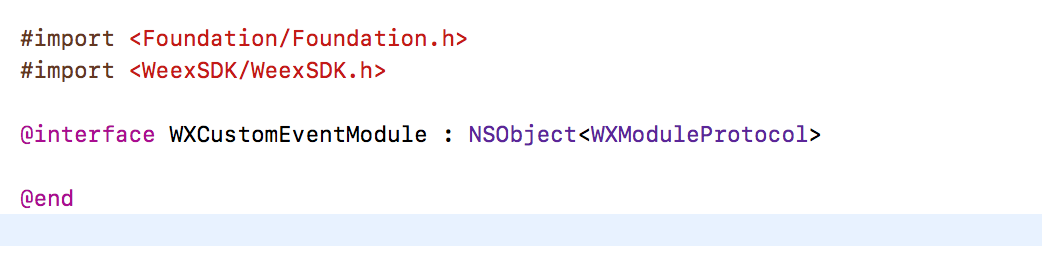 -```objective-c -@implementation WXEventModule + 2. add your module method and then exports using macro `WX_EXPORT_METHOD` -@synthesize weexInstance; -WX_EXPORT_METHOD(@selector(openURL:callback:)) + 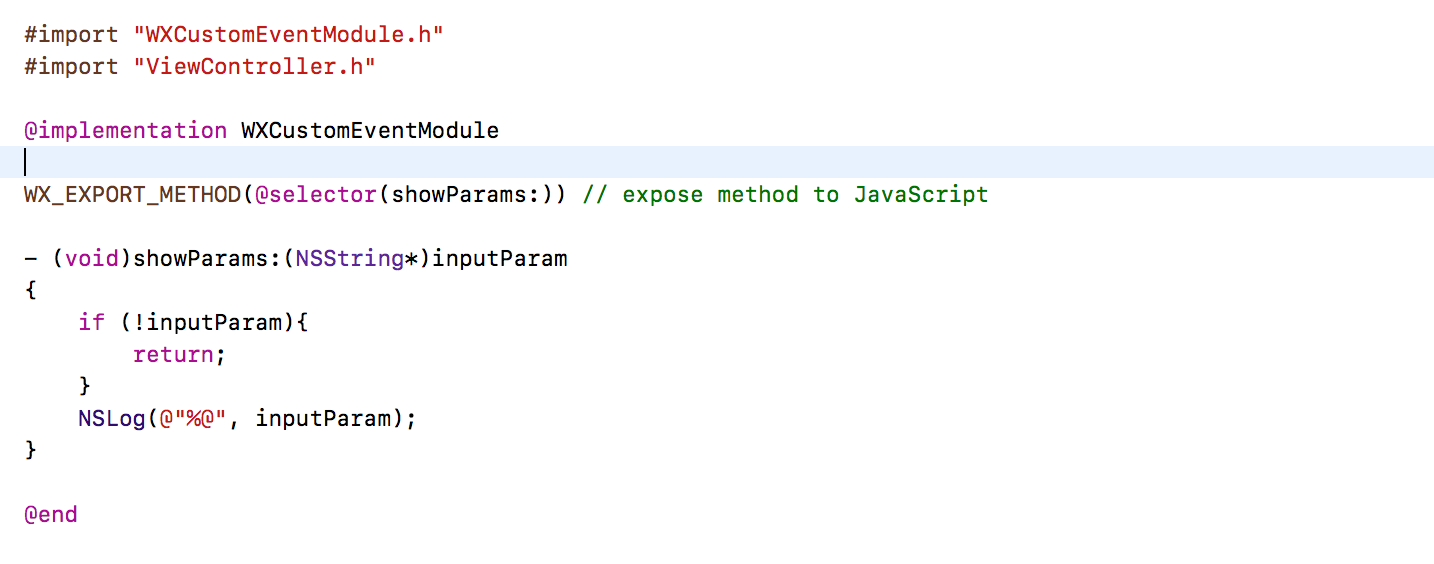 -- (void)openURL:(NSString *)url callback:(WXModuleCallback)callback -{ - NSString *newURL = url; - if ([url hasPrefix:@"//"]) { - newURL = [NSString stringWithFormat:@"http:%@", url]; - } else if (![url hasPrefix:@"http"]) { - newURL = [NSURL URLWithString:url relativeToURL:weexInstance.scriptURL].absoluteString; - } + 3. register module after WeexSDK's initialization - UIViewController *controller = [[WXDemoViewController alloc] init]; - ((WXDemoViewController *)controller).url = [NSURL URLWithString:newURL]; +  - [[weexInstance.viewController navigationController] pushViewController:controller animated:YES]; - callback(@{@"result":@"success"}); -} + by far, we've finished a basic custom module, and you may understand how to custom a weex module in iOS using Objective-C. -@end -``` + We can use it in javaScript code like this: -#### export synchronous methods <span class="api-version">v0.10+</span> + ```javaScript + weex.requireModule("event").showParams("hello Weex) + ``` -If you want to export synchronous methods which could make Javascript receive return values from natvie, you can use `WX_EXPORT_METHOD_SYNC` macro. +- advanced extendibility -native code: + you must understand more in `WXModuleProtocol` protocol, we'll talk more about blueprint methods and properties in this protocol. -```objective-c -@implementation WXEventModule + 1. `weexInstance` + The instance of `WXSDKInstance` holds the references of all modules created in a single page. if you add `@synthesize weexInstance` in your module class, your module will hold a reference to the instance of `WXSDKInstance` who create and initialize your module, or you get nothing. You can get more details by `weexInstance` such as pageName. -WX_EXPORT_METHOD_SYNC(@selector(getString)) + 2. `targetExecuteThread` + We will schedule your module method to main thread(UI thread), we highly recommend that you can not do much works here, if must, you can add implementation for this method. You can provide a thread so that we can schedule to. -- (NSString *)getString -{ - return @"testString"; -} + 3. `WXModuleKeepAliveCallback` + Sometimes you can return your result to your caller, callback is important in this scene,the params for callback can be string or dictionary. You must specify a second params to keep your callback function id in js after used. We'll create a new function id every time callback, `NO` will be a better choice for memory. -@end -``` + 4. `WX_EXPORT_METHOD_SYNC` + > This feature only works on WeexSDK 0.10 and later. Synchronous method only works in JavaScript thread, you cannot do much works here. + exports asynchronous method using `WX_EXPORT_METHOD`, you may get result in callback function. + `WX_EXPORT_METHOD_SYNC` to export synchronous method. You can get result on the left of operand `=`. -js code: +### extend custom component -```javascript -const eventModule = weex.requireModule('event') -const returnString = syncTest.getString() // return "testString" -``` +- new a class derived from `WXComponent` class + if we do nothing in this class and then register to WeexSDK engine, its functionality is just like `div`. -You can alse return number/array/dictionary except string. +- override the lifecycle of `WXComponent` -`notice:` the exported synchronous native method **can only be called on JS thread**. **Do not** do heavy work which will block js execution. + - `loadView` + We will load a view for a component default, if you didn't override this method, supperclass will provide a `WXView` derived from `UIView`. If we want to load html or just to show a map, override `loadView` and provide a custom view is a good choice. -`notice:` Vue 2.0 has not supported this feature yet. It will be supported in version 0.12 at the soonest. + ``` + - (UIView *)loadView { + return [MKMapView new]; + } + ``` + - `viewDidLoad` + If you want to make some configurations for your custom view like set delegate, you can finish here. + You don't need to set frame for your custom view if it doesn't has any subview, weexSDK will set it's frame according to style. -#### Register the module + ``` + - (void)viewDidLoad { + ((MKMapView*)self.view).delegate = self; + } + ``` +- register component -You can register the customized module by calling the method `registerModule:withClass` in WXSDKEngine. + ``` + [WXSDKEngine registerComponent:@"map" withClass:[WXMapComponent class]]; + ``` -```objective-c -WXSDKEngine.h -/** -* @abstract Registers a module for a given name -* @param name The module name to register -* @param clazz The module class to register -**/ -+ (void)registerModule:(NSString *)name withClass:(Class)clazz; + by far you can use your custom component in front-end -[WXSDKEngine registerModule:@"event" withClass:[WXEventModule class]]; + ```html + <template> + <div> + <map style="width:200px;height:200px"></map> + </div> + </template> ``` -### Handler extend - -Weex SDK doesn't have capabilitis, such as image download ãnavigator operationï¼please implement these protocols by yourself. - -#### WXImgLoaderProtocol -<font color="gray"> -Weex SDK has no image download capability, you need to implement `WXImgLoaderProtocol`. Refer to the following examples. - -```objective-c -WXImageLoaderProtocol.h -@protocol WXImgLoaderProtocol <WXModuleProtocol> - -/** - * @abstract Creates a image download handler with a given URL - * @param imageUrl The URL of the image to download - * @param imageFrame The frame of the image you want to set - * @param options : The options to be used for this download - * @param completedBlock : A block called once the download is completed. - image : the image which has been download to local. - error : the error which has happened in download. - finished : a Boolean value indicating whether download action has finished. - */ - -(id<WXImageOperationProtocol>)downloadImageWithURL:(NSString *)url imageFrame:(CGRect)imageFrame userInfo:(NSDictionary *)options completed:(void(^)(UIImage *image, NSError *error, BOOL finished))completedBlock; - @end -``` - -Implement above protocol as follows. - - -```objective-c -@implementation WXImgLoaderDefaultImpl -#pragma mark - -#pragma mark WXImgLoaderProtocol - -- (id<WXImageOperationProtocol>)downloadImageWithURL:(NSString *)url imageFrame:(CGRect)imageFrame userInfo:(NSDictionary *)userInfo completed:(void(^)(UIImage *image, NSError *error, BOOL finished))completedBlock -{ - if ([url hasPrefix:@"//"]) { - url = [@"http:" stringByAppendingString:url]; - } - return (id<WXImageOperationProtocol>)[[SDWebImageManager sharedManager] downloadImageWithURL:[NSURL URLWithString:url] options:0 progress:^(NSInteger receivedSize, NSInteger expectedSize) { - } completed:^(UIImage *image, NSError *error, SDImageCacheType cacheType, BOOL finished, NSURL *imageURL) { - if (completedBlock) { - completedBlock(image, error, finished); +Weex engine has done some works to support common events and other attributes, if you want support your own attributes, let's continue. + +- custom events for your component + Our target is that support `mapLoaded` event for the component we just implement, and then we can use in front-end directyly. The front-end code can be like this. + + ```html + <template> + <div> + <map style="width:200px;height:200px" @mapLoaded="onMapLoaded"></map> + </div> + </template> + + <script> + export default { + methods: { + onMapLoaded:function(e) { + console.log("map loaded"+JSON.stringify(e)) + } + } } - }]; -} -@end + </script> ``` - -#### Register the handler - -You can register the handler which implements the protocol by calling `registerHandler:withProtocol` in WXSDKEngine. - -```objective-c -WXSDKEngine.h -/** -* @abstract Registers a handler for a given handler instance and specific protocol -* @param handler The handler instance to register -* @param protocol The protocol to confirm -*/ -+ (void)registerHandler:(id)handler withProtocol:(Protocol *)protocol; - -[WXSDKEngine registerHandler:[WXImgLoaderDefaultImpl new] withProtocol:@protocol(WXImgLoaderProtocol)]; -``` - -## Custom Native Components for iOS - -### Component extend - -There are a lot of native components ready to be used in the Weex SDK, but users always have their own use cases. You might have written an awesome native UI widget in your previous work and just want to wrap up it and export to Weex. So we provide a way to enable developers to create their own custom fully-native components. - -This guide will use the implementation of existing component `image` to show you how to build a native component. It will also assume that you are familiar with iOS programming. - -#### Registration - -Defining a custom native component is simple. Just call `[WXSDKEngine registerComponent:withClass:]` with the component's tag name as first argument. - -```objective-c -[WXSDKEngine registerComponent:@"image" withClass:[WXImageComponent class]]; -``` - -Then you can create a `WXImageComponent` class to represent the implementation of image component. - -Now you can use `<image>` wherever you want in the template. +we must save status for event added or not, so we add a `BOOL` member named `mapLoaded` for the component class to make it record, and when event map loaded, we can fire event according to this record. + +- custom event + - override method add/remove event + + ```Objective-C + - (void)addEvent:(NSString *)eventName { + if ([eventName isEqualToString:@"mapLoaded"]) { + _mapLoaded = YES; + } + } + + - (void)removeEvent:(NSString *)eventName + { + if ([eventName isEqualToString:@"mapLoaded"]) { + _mapLoaded = NO; + } + } + ``` + - fire event to front-end + we'll fire `mapLoaded` event when map loaded finish according to our record. + > do not forget to set delegate for MKMapView. + + ```object-c + - (void)mapViewDidFinishLoadingMap:(MKMapView *)mapView { + if (_mapLoaded) { + [self fireEvent:@"mapLoaded" params:@{@"customKey":@"customValue"} domChanges:nil] + } + } + ``` + +We have finish our custom event, so what about custom attributes? this is the same important as custom events. + +- custom attributes + The next target is that we add a custom attribute `showTraffic`, we can display real time traffic or not according to this attribute. The front-end code can be like the following. ```html -<image></image> -``` - -#### Adding Properties - -The next thing we can do is to extend some native properties to make the component more powerful. As an image, let's say we should have a `src` attribute as image's remote source and a `resize` attribute as image's resize mode(contain/cover/stretch). - -```objective-c -@interface WXImageComponent () - -@property (nonatomic, strong) NSString *imageSrc; -@property (nonatomic, assign) UIViewContentMode resizeMode; - -@end + <template> + <div> + <map style="width:200px;height:200px" showTraffic="true"></map> + </div> + </template> ``` -All of the styles, attributes and events will be passed to the component's initialization method, so here you can store the properties which you are interested in. - -```objective-c -@implementation WXImageComponent - -- (instancetype)initWithRef:(NSString *)ref type:(NSString *)type styles:(NSDictionary *)styles attributes:(NSDictionary *)attributes events:(NSArray *)events weexInstance:(WXSDKInstance *)weexInstance -{ - if (self = [super initWithRef:ref type:type styles:styles attributes:attributes events:events weexInstance:weexInstance]) { - _imageSrc = [WXConvert NSString:attributes[@"src"]]; - _resizeMode = [WXConvert UIViewContentMode:attributes[@"resize"]]; + - override component init method `initWithRef...` + add a `BOOL` member `showsTraffic` to make the status whether front-end user use the attribute or not record. We can get all the attribute for this component by override init method of component. + + ```object-c + - (instancetype)initWithRef:(NSString *)ref type:(NSString *)type styles:(NSDictionary *)styles attributes:(NSDictionary *)attributes events:(NSArray *)events weexInstance:(WXSDKInstance *)weexInstance { + if(self = [super initWithRef:ref type:type styles:styles attributes:attributes events:events weexInstance:weexInstance]) { + + if (attributes[@"showsTraffic"]) { + _showsTraffic = [WXConvert BOOL: attributes[@"showsTraffic"]]; + } + } + return self; } - - return self; -} - -@end -``` - -The properties getted in the attributes are of `id` type, so we have to convert them to the type we want using a conversion function. Basic conversion functions can be found in the `WXConvert` file, or you can just add your own conversion function. - - -#### Hooking Render Life Cycle + ``` + - set property for custom view. + ```object-c + - (void)viewDidLoad { + ((MKMapView*)self.view).showsTraffic = _showsTraffic; + } + ``` + - support attribute updates + + ```object-c + - (void)updateAttributes:(NSDictionary *)attributes + { + if (attributes[@"showsTraffic"]) { + _showsTraffic = [WXConvert BOOL: attributes[@"showsTraffic"]]; + ((MKMapView*)self.view).showsTraffic = _showsTraffic; + } + } + ``` +- more life cycle for component A Native Component has a life cycle managed by Weex. Weex creates it, layout it, renders it and destroys it. Weex offers component life cycle hooks that give you visibility into these key moments and the ability to act when they occur. -| method | description | -| :------------------: | ---------------------------------------- | -| initWithRef:type:... | Initializes a new component using the specified properties. | -| layoutDidFinish | Called when the component has just laid out. | -| loadView | Creates the view that the component manages. | -| viewWillLoad | Called before the load of component's view . | -| viewDidLoad | Called after the component's view is loaded and set. | -| viewWillUnload | Called just before releasing the component's view. | -| viewDidUnload | Called when the component's view is released. | -| updateStyles: | Called when component's style are updated. | -| updateAttributes: | Called when component's attributes are updated. | -| addEvent: | Called when adding an event to the component. | -| removeEvent: | Called when removing an event frome the component. | - - -As in the image component example, if we need to use our own image view, we can override the `loadView` method. - - -```objective-c -- (UIView *)loadView -{ - return [[WXImageView alloc] init]; -} -``` - -Now Weex will use `WXImageView` to render the `image` component. - -As an image component, we will need to fetch the remote image and set it to the image view. This can be done in `viewDidLoad` method when the view is created and loaded. `viewDidLoad` is also the best time to perform additional initialization for your viewï¼ such as content mode changing. - - -```objective-c -- (void)viewDidLoad -{ - UIImageView *imageView = (UIImageView *)self.view; - imageView.contentMode = _resizeMode; - imageView.userInteractionEnabled = YES; - imageView.clipsToBounds = YES; - imageView.exclusiveTouch = YES; - - // Do your image fetching and updating logic -} -``` - -If image's remote source can be changed, you can also hook the `updateAttributes:` method to perform your attributes changing logic. Component's view always has been loaded while `updateAttributes:` or `updateStyles:` is called. - - -```objective-c -- (void)updateAttributes:(NSDictionary *)attributes -{ - if (attributes[@"src"]) { - _imageSrc = [WXConvert NSString:attributes[@"src"]]; - // Do your image updating logic - } - - if (attributes[@"resize"]) { - _resizeMode = [WXConvert UIViewContentMode:attributes[@"resize"]]; - self.view.contentMode = _resizeMode; - } -} -``` - -Maybe there is even more life cycle hooks you might need to consider, such as `layoutDidFinish` while layout computing is finished. If you want to go deeper, check out the `WXComponent.h` file in the source code. - -Now you can use `<image>` and its attributes wherever you want in the template. - -```html -<image style="your-custom-style" src="image-remote-source" resize="contain/cover/stretch"></image> -``` - -#### Component Method + | method | description | + | :------------------: | ---------------------------------------- | + | initWithRef:type:... | Initializes a new component using the specified properties. | + | layoutDidFinish | Called when the component has just laid out. | + | loadView | Creates the view that the component manages. | + | viewWillLoad | Called before the load of component's view . | + | viewDidLoad | Called after the component's view is loaded and set. | + | viewWillUnload | Called just before releasing the component's view. | + | viewDidUnload | Called when the component's view is released. | + | updateStyles: | Called when component's style are updated. | + | updateAttributes: | Called when component's attributes are updated. | + | addEvent: | Called when adding an event to the component. | + | removeEvent: | Called when removing an event frome the component. | + +### Component Method from WeexSDK `0.9.5`, you can define your component method by macro `WX_EXPORT_METHOD` for example: @@ -338,3 +256,53 @@ after your registration for your own custom component, now you can call it in yo } </script> ``` + +### custom your handlers + +We don't provide functionality for downloading image but defines a blueprint of methods in `WXImgLoaderProtocol` for loading image, and image component get image content from these methods. You must implement methods in `WXImgLoaderProtocol` except the `optional` methods to display image from specified url. +You can also define your own `protocol` and implement its handler. + +- new a class derived from `NSObject` conforming `WXImgLoaderProtocol` and then add implementation for methods in `WXImgLoaderProtocol`. + +> the flowing code may require SDWebImage as dependency, you can download remote url image by your own way without SDWebImage. + + ```object-c + @implementation WXImgLoaderDefaultImpl + - (id<WXImageOperationProtocol>)downloadImageWithURL:(NSString *)url imageFrame:(CGRect)imageFrame userInfo:(NSDictionary *)userInfo completed:(void(^)(UIImage *image, NSError *error, BOOL finished))completedBlock + { + if ([url hasPrefix:@"//"]) { + url = [@"http:" stringByAppendingString:url]; + } + return (id<WXImageOperationProtocol>)[[SDWebImageManager sharedManager] downloadImageWithURL:[NSURL URLWithString:url] options:0 progress:^(NSInteger receivedSize, NSInteger expectedSize) { + } completed:^(UIImage *image, NSError *error, SDImageCacheType cacheType, BOOL finished, NSURL *imageURL) { + if (completedBlock) { + completedBlock(image, error, finished); + } + }]; + } + @end +``` +- register handler + register handler by the method `registerHandler:withProtocol` in WXSDKEngine + + ```object-c + WXSDKEngine.h + /** + * @abstract Registers a handler for a given handler instance and specific protocol + * @param handler The handler instance to register + * @param protocol The protocol to confirm + */ + + (void)registerHandler:(id)handler withProtocol:(Protocol *)protocol; + + [WXSDKEngine registerHandler:[WXImgLoaderDefaultImpl new] withProtocol:@protocol(WXImgLoaderProtocol)] + + ``` +- use handler + you can use your handle in any native code including `component`, `module` and other `handlers` + ```object-c + id<WXImgLoaderProtocol> imageLoader = [WXSDKEngine handlerForProtocol:@protocol(WXImgLoaderProtocol)]; + [iamgeLoader downloadImageWithURL:imageURl imageFrame:frame userInfo:customParam completed:^(UIImage *image, NSError *error, BOOL finished){ + }]; + ``` + + http://git-wip-us.apache.org/repos/asf/incubator-weex-site/blob/78182898/source/guide/extend-module-using-swift.md ---------------------------------------------------------------------- diff --git a/source/guide/extend-module-using-swift.md b/source/guide/extend-module-using-swift.md new file mode 100644 index 0000000..c9047ed --- /dev/null +++ b/source/guide/extend-module-using-swift.md @@ -0,0 +1,114 @@ +--- +title: Extend weex using swift +type: guide +group: Extend +order: 6.4 +version: 2.1 +--- + +## Swift In Weex + +[Swift and Objective-C](https://developer.apple.com/library/ios/documentation/Swift/Conceptual/BuildingCocoaApps/MixandMatch.html#//apple_ref/doc/uid/TP40014216-CH10-ID122) mix-up + +a complete [demo](https://github.com/acton393/WeexSwiftSample.git) + +### extend module using swift + + As we export moudle method using macro and calling in runtime, so we can extend module using swift by `extension` `bjective-C` class. + > You can also finish extending module by write an category for swift class in Objective-C class. + +- new `WXSwiftTestModule.h/m` and `WXSwiftTestModule.swift` file ï¼you will get a tip as follow during the creation +  + choose `Create Bridging Header`, as we need to access method in `Objective-C` in swift file, and the `Bridging header` can help us. And the format name of the header file is `yourTarget-Bridging-Header.h`, and mine is `WeexDemo-Bridging-Header.h`. + +- implementation in `WXSwiftTestModule.h/m` + - WXSwiftTestModule.h + + ``` + #import <Foundation/Foundation.h> + #import <WeexSDK/WeexSDK.h> + + @interface WXSwiftTestModule : NSObject <WXModuleProtocol> + + @end + + ``` + - WXSwiftTestModule.m + + you can search WeexDemo-Swift.h after building your project, Xcode will generate this file for us. + + for simulator the file path may be: + ``` + weex/ios/playground/DerivedData/WeexDemo/Build/Intermediates/WeexDemo.build/Debug-iphonesimulator/WeexDemo.build/DerivedSources/WeexDemo-Swift.h + ``` + export method define in swift file. + ``` + #import "WXSwiftTestModule.h" + #import "WeexDemo-Swift.h" // you need to import the header to make Objective-C code recognize the method defined in swift file. + + @implementation WXSwiftTestModule + #pragma clang diagnostic push //forbid unknow selector warrning + #pragma clang diagnostic ignored "-Wundeclared-selector" + + WX_EXPORT_METHOD(@selector(printSome:callback:)) //method name in Swift, you can get the final method name in `WeexDemo-Swift.h` as the convert of Xcode. + + #pragma clang diagnostic pop + + @end + + ``` +- in Swift + make an extension for Objective-C class `WXSwiftTestModule`, add a method, and then export it in Objective-C, then we can use it in javaScript. + + - WXSwiftTestModule.swift + + ``` + import Foundation + public extension WXSwiftTestModule { + public func printSome(someThing:String, callback:WXModuleCallback) { + print(someThing) + callback(someThing) + } + } + ``` + + we need to expose `WXSwiftTestModule` `WXModuleCallback` in `WeexDemo-Bridging-Header` as our `Objective-C` need to access them + + - WeexDemo-Bridging-Header.h + + ``` + // + // Use this file to import your target's public headers that you would like to expose to Swift. + // + #import "WXSwiftTestModule.h" + #import "WeexSDK.h" + ``` + + by far we have finished our module using swift. + + ### module usage + - register module to WeexSDK + + ``` + [WXSDKEngine registerModule:@"swifter" withClass:[WXSwiftTestModule class]]; + + ``` + - front-end usage + + ``` + <template> + <text>Swift Module</text> + </template> + + <script> + module.exports = { + ready: function() { + var swifter = weex.require('swifter'); + swifter.printSome("https://www.taobao.com",function(param){ + nativeLog(param); + }); + } + + }; + </script> + ``` http://git-wip-us.apache.org/repos/asf/incubator-weex-site/blob/78182898/source/wiki/component-introduction.md ---------------------------------------------------------------------- diff --git a/source/wiki/component-introduction.md b/source/wiki/component-introduction.md new file mode 100644 index 0000000..f6c9e84 --- /dev/null +++ b/source/wiki/component-introduction.md @@ -0,0 +1,28 @@ +--- +title: component +type: wiki +group: concept +order: 5.1 +version: 2.1 +--- + +### what's component + Generallyï¼`component` is a entity `Widget` in Weex engine, and it can be loaded if confirm to some details rules whlile the Weex engine init. It can display some detail contents, receive touch or other custom events, custom attributes. There are some internal components registered such as `div`, `image` and `text`, you can custom your own component if these can not meet your needs. + + +### component method + + you can call custom methods for a entity component after adding `ref` attributes, for example: + + ```html + <template> + <mycomponent ref='mycomponent'></mycomponent> + </template> + <script> + module.exports = { + created:function() { + this.$refs.mycomponent.focus(); + } + } + </script> + ``` http://git-wip-us.apache.org/repos/asf/incubator-weex-site/blob/78182898/source/wiki/handler-introduction.md ---------------------------------------------------------------------- diff --git a/source/wiki/handler-introduction.md b/source/wiki/handler-introduction.md new file mode 100644 index 0000000..c86da9a --- /dev/null +++ b/source/wiki/handler-introduction.md @@ -0,0 +1,55 @@ +--- +title: handler +type: wiki +group: concept +order: 4.3 +version: 2.1 +--- + +### what's handler + handler(adapter) is just like service in WeexSDK engine, it can service for component and module, you can use it directly in componentãmodule and other native code. + +### handler caller + +handler decouples the interface implementation and its interface. You don't need to care more details about the implementation as a handler user, this can be done by the handler developer and the instance of handler will be only one during the lifecycle of application. You can define your own handler interface(protocol in iOS) and use it in any native code. + +### the difference between module and handler + +- position in app + + 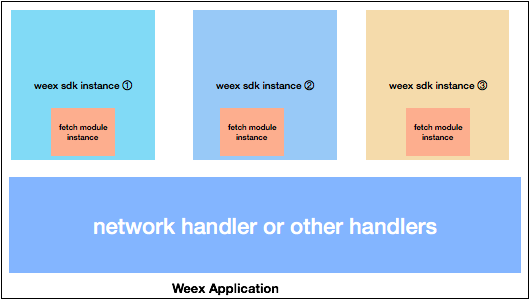 + Assume that we have three weex page(WeexSDK instance) in navigation stacks, and they all use fetch module method during the render of page. There will be an instance of fetch module class in every page(WeexSDK instance) destroyed with page destroyed, but there will be only one for the instance of handler class. + +- usage + + handler can be called in any native code including weex native component, module and other handlers, it cannot be used in javaScript directly. + module can export some methods by native developers to front-end developers, it can be used in javaScript code. + +### introduction to internal handler + + - navigationHandler + + There is a default implementation for navigation insterface(protocol), this handler can be used in navigation module methods which complete pop and push operations. + + - imageLoaderHandler + + The image component is a container for image, you can specify url to load image, the logic for download image is in the imageLoaderHandler handler, image component only display image contents. + + WeexSDK doesn't provide default loader for image handler. + + - AppMonitorHandler + + There are some metrics collected during the render progress, and module caller frequency also collect, you can got these metrics by implementing `AppMonitorHandler` handler. + WeexSDK doesn't provide default handler for `AppMonitorHandler`. + + - JSExceptionHandler + + There are some runtime exceptions during the execution of javaScript code, JSExceptionHandler provide the monitor for javaScript exception, WeexSDK will invoke this handler while exceptions occurs. + + WeexSDK doesn't provide default handler for `JSExceptionHandler`. + + - URLRewriteHandler + + imageãvideo and web load content from specified url by adopting this rewrite rules, you can define your own rules for custom path. + + WeexSDK provide default handler for `URLRewriteHandler`. Get more details about the default [rewrite rules](../guide/advanced/path.html) http://git-wip-us.apache.org/repos/asf/incubator-weex-site/blob/78182898/source/wiki/module-introduction.md ---------------------------------------------------------------------- diff --git a/source/wiki/module-introduction.md b/source/wiki/module-introduction.md new file mode 100644 index 0000000..76c4696 --- /dev/null +++ b/source/wiki/module-introduction.md @@ -0,0 +1,34 @@ +--- +title: module +type: wiki +group: concept +order: 5.3 +version: 2.1 +--- +## what's module + module is a set of method operation, you can `require` it and call method in it. During the initialization of WeexSDK, some internal modules has been registered to the engine. + +## native module process of module registration + 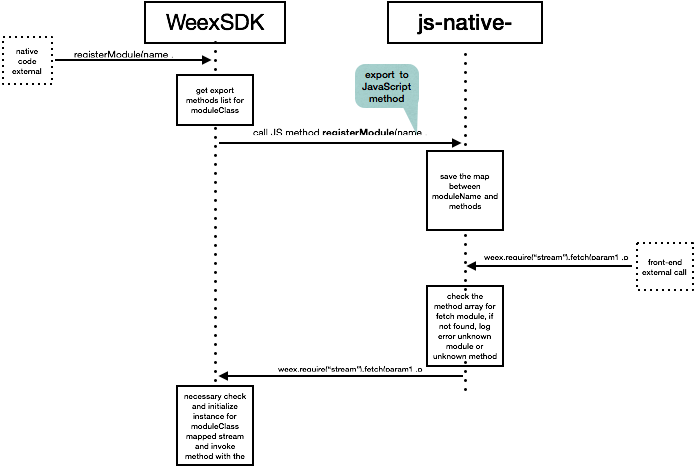 + +## internal module + +`stream` module: it provide a method called `fetch` which can invoke a network request to specified server, you can get more details [here](../references/modules/stream.html). + +for example: + + ```javaScript + var stream = weex.requireModule('stream'); + stream.fetch({ + method: 'GET', + url: 'http://httpbin.org/get', + type:'jsonp' + }, function(ret) { + console.log('in completion') + },function(response){ + console.log('in progress') + }); + ``` + +## differnce between module method and component method + For module method you can call after require the target module and it doesn't rely on any component instance. For component method you must get the ref for component first and then call the [component method](./component-introduction.html) \ No newline at end of file





