On 2015-09-06 17:52, Holger Brunn wrote:
Dear readers,
I played with compiling my own coreboot image for my Acer CB5 [1] and
failed
miserably - the bios is messed up and the device won't boot any more.
Now I'm
busy following some guides to undo the damage [2], [3] by flashing the
original bios again, but given I'm quite clueless about hardware, I'd
like to
ask you for advice about how to proceed:
I ordered a Raspberry PI, some connector cables [4], and then I
probably need
a clip to connect the chip [5].
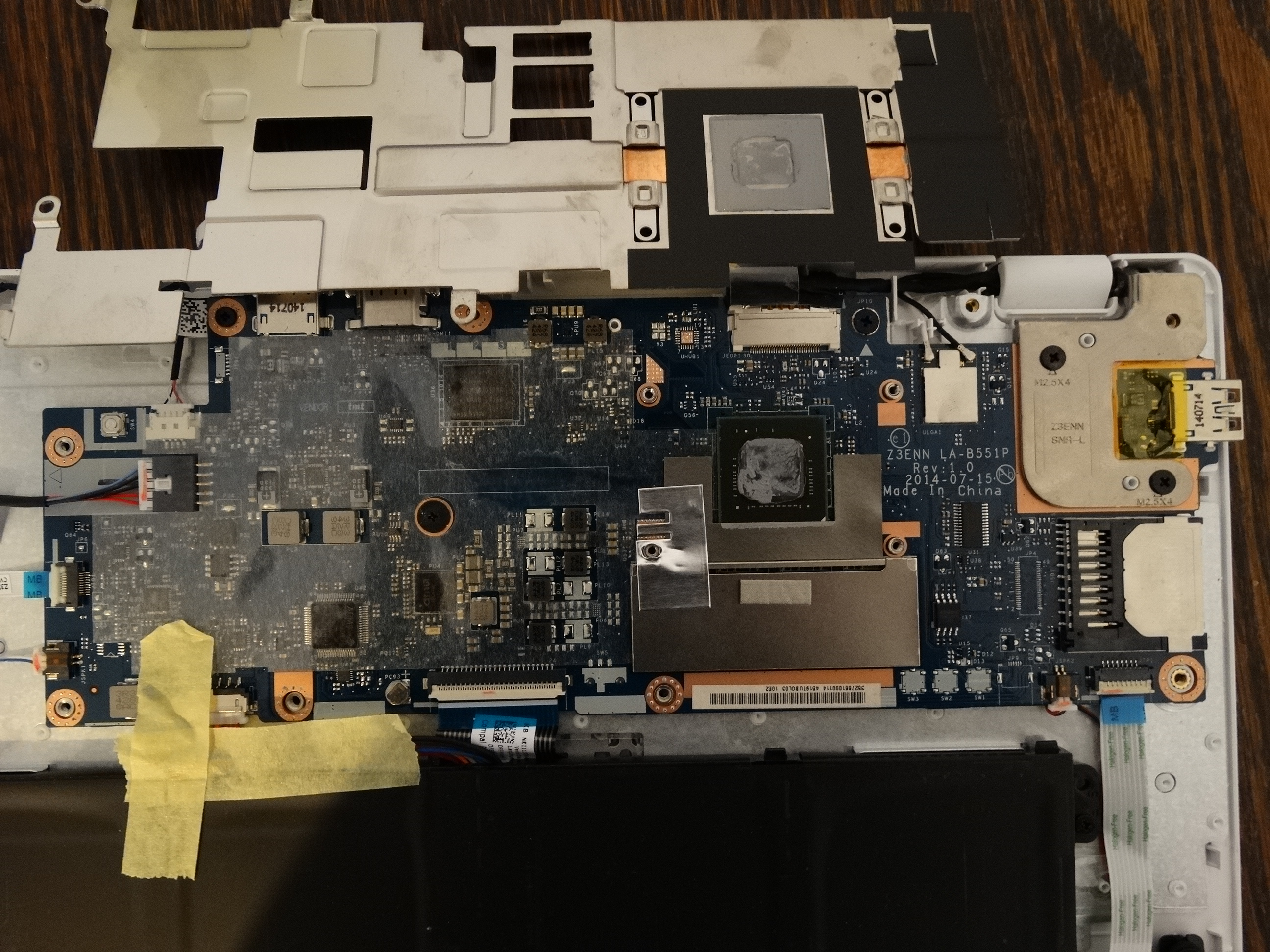
My question to you is how to locate the chip? The mainboard looks like
that:
http://opensource.holgerbrunn.net/debian-on-acer-cb5/images/DSC01629.JPG
and
the only chip that looks like those in the examples is U37 in the lower
right.
Is there any way to know beforehand if it's the correct one? And then
when
connecting the pins, can I look up somewhere what the correct
assignment is or
is this trial and error? I can't read what is printed on it, but if
relevant,
I'll get a magnifying glass to post the text.
Yes, u37 looks like it. But, bear in mind many Chromebooks have the SPI
on the other side of the board. If the chip is the wrong size (early
Chromebooks had a separate EC on a 512k SPI) Flashrom will crap out and
complain when you try to flash an 8MB binary to it. Pin assignment is
available in various articles on the web, this is one I found by
searching -
https://github.com/bibanon/Coreboot-ThinkPads/wiki/Hardware-Flashing-with-Raspberry-Pi.
I have used a magnifying app on my smart-phone before, but it's
unnecessary.
HTH,

John.
Thank you a lot in advance, and be sure that I won't come back whining
if
anything goes wrong and I fry the chip following your advice - that's
entirely
my fault then.
I'll log the process on the above website if successful so that the
next
person messing this up won't have to bother you.

Regards,
Holger

Links:
[1]
https://www.chromium.org/chromium-os/developer-information-for-chrome-os-devices/acer-cb5-311-chromebook-13
[2]
http://www.tnhh.net/2014/08/25/unbricking-chromebook-with-beaglebone.html
[3] https://johnlewis.ie/unbricking-a-samsung-series-5-550-chromebook
[4]
https://www.conrad.nl/nl/raspberry-pi-verbindingskabel-rb-cb5-025-bont-banana-pi-pcduino-arduino-raspberry-pi-a-b-b-1290220.html?sc.ref=Homepage
[5] http://www.digikey.nl/product-detail/en/5250/501-1311-ND/745102
--
coreboot mailing list: [email protected]
http://www.coreboot.org/mailman/listinfo/coreboot