Hello all,

Just a quick question:-)
I almost finished a small website for a friend.

Here's the link: http://lelion.info/web/cantarco/en/information/
Here's the CSS: http://lelion.info/web/cantarco/css/master.css

If I :hover a link on the page, which contains the small thumbnails, only PART
of the BORDER changes color - in IE 6.0/WinXP.

Here's the relevant code:

   .shortinfo img {float: left; margin: 0 5px 2px 0; padding: 1px;}
   .shortinfo a img {border: 1px solid #832A0C;}
   .shortinfo a:hover img {border: 1px solid #CCC;}

It works OK in FireFox 1.5, Opera 9, but IE 6.0 - no...

Here's the html excerpt:

<p><a href="../../img/information/picture.jpg" rel="lightbox" title="Ensemble
Cantarco"><img src="../../img/information/picture_tn.jpg" width="160"
height="110" alt="Ensemble Cantarco" /></a>Ensemble Cantarco .. text .. text ..
text .. text .. text .. text .. etc.<</p>

   <div class="clear"><!--clear--></div>
<!--/shortinfo--></div>

Am I doing a mistake here so the whole border does not change color on :hover,
or it's an IE bug which I maybe somehoow address?

What's REALLY weird, it's that if I right-click the THUMBNAIL, then whole
BORDER
changes color in IE, as intended - but on :hover, nope :-(

OK, this was my first question...

* * *


Second question:

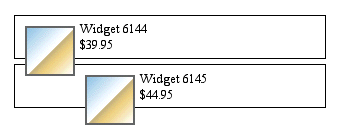
As you can see, I use a separate clearing element (in case there's no enough
text) and to prevent the image thumbnail "falling" on the next paragraph/image.
[ of course, I do not want the following:
http://complexspiral.com/publications/containing-floats/fig1.gif ;-) ]

So, I was thinking about a better way of doing this ("self-clearing way"),
using
:after (there are some techniques available already), but as IE 6.0/and below
does not support ":after", and the new IE 7.0 beta3 (soon: final) is emerging,
I
am not sure, what's the best way of doing this.

Any guidelines regarding this will be much appreciated, or an example (small
code snippet - like, what should I add in the styles for .shortinfo, which is
the basic container, sometimes containing a floating image) - because I never
used this technique, actually, always using a small hidden separate DIV or SPAN
for the purpose... But I guess, I do not need anymore this superfluous element,
and can do it better way? :-)

maybe I cna explain it (just in case) using this example:


<div class="shortinfo">

<h3>Some Title</h3>

<p><a href="#"><img src="image.gif" alt="" /></a>Here is some text.. text..
text.. text.. text.. text.. text.. text.. text.. text.. text.. text.. text..
text.. text.. text.. text.. text.. text.. text.. text.. text.. </p>

   <!--but without clearing element here-->
<!--/shortinfo--></div>


What should I add in the CSS, so, IN CASE there's not enough text in the
paragraph, and the image is maybe bigger, the image WON'T STICK below the
container "shortinfo" and overlap the NEXT "shortinfo" DIV? Can it be done
without a clearing element right before the ending DIV tag? And work in all
browsers of today, incl. IE 6, 7?

* * *


Thank you for all the help!!

This list always have been an inspiration for me!!! :-)


Michel

Web Designer


______________________________________________________________________
css-discuss [EMAIL PROTECTED]
http://www.css-discuss.org/mailman/listinfo/css-d
IE7b2 testing hub -- http://css-discuss.incutio.com/?page=IE7
List wiki/FAQ -- http://css-discuss.incutio.com/
Supported by evolt.org -- http://www.evolt.org/help_support_evolt/