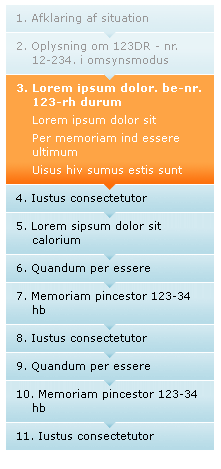
I'm currently HTML'ifying a cool design for a progress bar. Have a look at
the graphic:
http://justaddwater.dk/wp-content/uploads/2007/10/train.png
HTML version:
http://justaddwater.dk/wp-content/uploads/2007/10/train_css_d.html
This vertical progress bar is very good looking and very intuitive to
understand. Now, the challenge for me is that I want it implemented with the
simplest possible HTML and CSS.

My thoughts until now is:
* use an ordered list with numbers inline.
* class the "done", "current" and "undone" list items for light-blue, orange
and dark blue gradient backgrounds.
* The small "tip" below each list item must be in front of the next list
item.
* The small "tip" must not occur on the last list item, thus it must have
added css class "final"

There are two things that cause  me a problem so far:
The "tip"  will add an extra element in the html, so  for now I add an empty
"b" element with class="tip" at the end of each li-element. Now, this tip
must overlap the following list item, but strangely it gets behind. I tried
fiddling with setting z-index, but that did not help me. I'm blank on what
to do here. Thats problem number 1.

For the tip to be properly positioned, I place it absolutely 8 px below the
bottom of the li element. Therefore I set position:relative on the li
element, but this causes IE7 to add extra whitespace around the element,
ignoring any top margin or top border. That's problem number two.

Ideally, I would prefer doing this without an extra element in the HTML, but
since the gradients are bottom-aligned, I can't really see how I can place a
top-aligned tip in that element.
Also, having not looked further into browser compatibility, there may also
be some problems with other browsers: IE6, Safari

Please give any feedback or suggestions on how to implement this.

=====HTML CODE: ====
  <ol class="train">
    <li class="done">første step <b class="tip"></b></li>
    <li class="done">andet step  <b class="tip"></b></li>
    <li class="current">tredie step
      <p>This one has extra text that can only be seen when selected</p>
      <b class="tip"></b>
    </li>
    <li class="undone next">fjerde step <b class="tip"></b></li>
    <li class="undone">femte step <b class="tip"></b></li>
    <li class="undone final">sidste step <b class="tip"></b></li>
  </ol>

=====CSS CODE: ======
  ol.train{
    width: 208px;
    margin:0;
    padding:0;

  }
  ol.train li{
    list-style-position:inside;
    margin:1px 0px 0px 0px;
    padding:9px 0 5px 10px;
    position: relative;
    bottom:10px;
    z-index: 1;
}
  ol.train li p{
    margin:0;
    padding:0;
    font-weight: normal;
  }

.train .done{
  background: url(images/train-done.png) #e8f4f7 repeat-x bottom;;
  color: #999797
}
.train .current{
  background: url(images/train-current.png) #fea445 repeat-x bottom;
  color: #fff;
  font-weight: bold
}
.train .undone{
  background: url(images/train-undone.png) #d2e9f0 repeat-x bottom;;
}

.train .tip{
  height:8px;
/*  border: 1px dotted green;*/
  position:absolute;
  bottom:-6px;
  left:0;
  width:100%;
  z-index:2;
}

.train .done b.tip{
  background: url(images/train-done-tip.png) no-repeat top;
}
.train .current b.tip{
  background: url(images/train-current-tip.png) no-repeat top;
}
.train .undone b.tip{
  background: url(images/train-undone-tip.png) no-repeat top;
}
.train .final b.tip{
  background:none;
}

See working HTML file at
http://justaddwater.dk/wp-content/uploads/2007/10/train_css_d.html

--
___________________________________________________________

Jesper Rønn-Jensen / Capgemini Denmark
Tel. +45 3977 8220 / Mob. +45 2373 6220 / Fax +45 7011 2201
www.dk.capgemini.com / Blog http://justaddwater.dk/
Oernegaardsvej 16 / DK-2820 Gentofte / Denmark
jesperrr#gmail#com (Private e-mail and Google Talk IM)
___________________________________________________________
______________________________________________________________________
css-discuss [EMAIL PROTECTED]
http://www.css-discuss.org/mailman/listinfo/css-d
List wiki/FAQ -- http://css-discuss.incutio.com/
List policies -- http://css-discuss.org/policies.html
Supported by evolt.org -- http://www.evolt.org/help_support_evolt/