Ed Leafe wrote:
> On Jun 27, 2007, at 3:53 PM, Brendan Barnwell wrote:
>
>>      I'm trying to make a dListControl that's sorted.  However, if I
>> set the Sorted
>> property of my object to True, I get this traceback
> [snip]
>>      self._setChoices(self._choices)
>> AttributeError: 'dListControl' object has no attribute '_choices'
>
>       Of all the UI controls, dListControl has probably gotten the least
> attention. I haven't looked at that code in ages.
        I see.  Does this mean I should try to find some other widget to use,
or just
that it may be awhile before anything gets fixed?

        Actually, let me expand a bit on what I'm trying to do, and maybe you
can
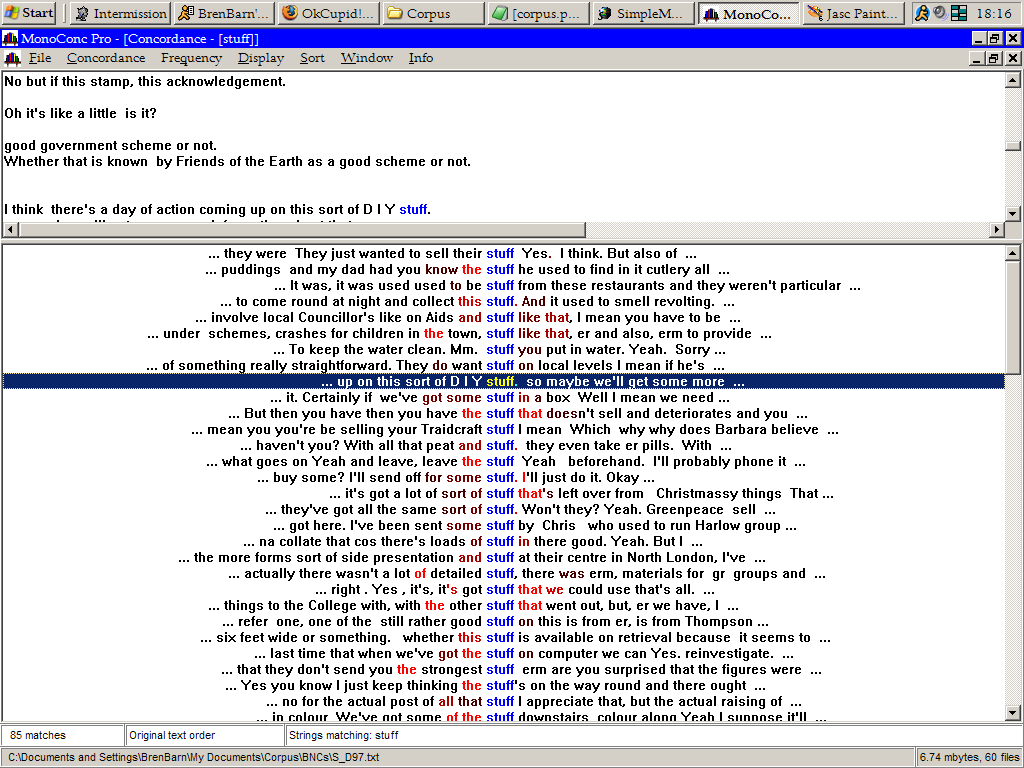
suggest how to do it with Dabo.  I want an interface like the one in the
screenshot at http://www.brenbarn.net/misc/monoconc.png

        I'm not too worried about the two-pane design; the demos seem to
indicate Dabo
can handle that fine.  What I'm most interested in is that lower pane, where
you
see all the sentences aligned on the word "stuff".  The following features are
key here:

        1) The user can select one line at a time from this window.  I need to
be able
to hook into the select event to update the display in the upper pane to scroll
to the appropriate place in the file.  This is why I originally tried
dListControl, because it seemed the closest thing to this control.
        2) I can style the text that's displayed.  It's not clear to me if this
is
possible with dListControl.  I see that I can set properties like color for a
list item as a whole, but not for individual pieces in the list.
        3) I can align the text in a custom way.

        I'm sort of wondering if I should be using a grid instead, so I can
separate
out that middle word ("stuff" in the screenshot) to style the text and align,
but I don't want any extraneous gridlines or column headers.  Each line in the
"table" should appear as a continuous string of text.  Also, I need to hook
into
the grid so I can preprocess the text before it's displayed, because it also
contains custom markup tags that I want to strip out from the display (or not
--- I want the user to be able to toggle this option).  From what I've seen it
looks like I'd be able to do this but I haven't really looked into how.  For
now
I'm just trying to get the interface straight.

        So is a dListControl the right tool for this job, or should I be using
a grid
somehow?

>>      Also, I have another question.  Is there any way to force a re-
>> sort of the list
>> without adding and subtracting an element?  I want to make a list
>> where the user
>> can specify a sort key in the form, and then hit a button to get
>> the list to
>> resort using that key.  So I'd like to have some hook where I can call
>> mydListControl.doTheSort and have it perform the sort using the new
>> SortFunction.
>
>       I don't see a current way to do this, but I think it's something
> that should be added. Could you add a ticket for this?

        Done.

--
--Brendan Barnwell
"Do not follow where the path may lead.  Go, instead, where there is no path,
and leave a trail."
        --author unknown


_______________________________________________
Post Messages to: [email protected]
Subscription Maintenance: http://leafe.com/mailman/listinfo/dabo-users
Searchable Archives: http://leafe.com/archives/search/dabo-users
This message: http://leafe.com/archives/byMID/dabo-users/[EMAIL PROTECTED]