Thanks for the advice Ronny

Next week we have a school holiday, so I will try it and let you know. I
think I will reconfigure the printers (only half a dozen) and see what
happens with the APs. If all else fails I will call in the network company
to reconfigure the APs.
nigel


> On Tue, 2006-02-28 at 15:07 +0900, nigel barker wrote:
>> Sorry to bother you busy people (and thanks for the good work!), but is
>> there a user list for skolelinux in english?
>>
>> If not, here's my question
>>
>> I have an established network on 192.168.0.0, which contains about 20
>> static IPs (servers, printers and wireless AP)
>>
>> I want to switch to skolelinux, becuase it looks like a much more
>> complete
>> solution than my current home made mandrake-ltsp, where clients and
>> servers are all active on the 192.168.0.0 network (terminal servers
>> serve
>> clients according to MAC address).
>>
>> I would be happy to convert the whole network over, but the AP are
>> configured in Japanese, and one of them is bridging two buildings, so I
>> would rather leave them alone.
>>
>> Finally my question:
>> Can I stick all my fixed IP devices (actually just AP and printers)
>> behind
>> a  router (eg. IPcop), and have Skolelinux take over the rest of the
>> network? Would users still be able to get the printers on 192.168.0.xx?
>> And would wireless users be able to get to tjener from that side? I'm
>> not
>> clear how a terminal client on a private 192.168.0.xx from a ltsp server
>> would access a printer on the 'main' 192.168.0.xx. I hope I'm making
>> myself clear!
>>
>> Is this the best solution?
>>
>> sorry for taking up your time.
>
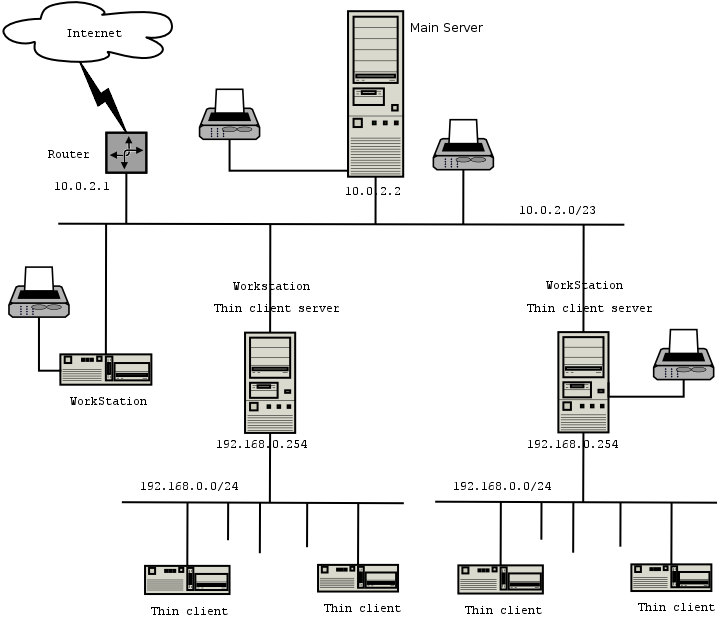
> Personaly i think the best solution is to migrate fully to a skolelinux
> setup.  http://developer.skolelinux.no/arkitektur/network-arch_en.png
> It will save you grief in the long run and make upgrades easier.
>
> As long as you'r AccessPoints are Bridging devices the ip address on
> them are only used for configuration of the device in any case. so you
> can safely switch the whole network to skolelinux's default ip subnet
> 10.0.2.0/23 just make sure you label the AP's with their ip address so
> you can get access to them later for configuration.
>
> The printers should all be set to recive dhcp address and configured
> with the printers mac addresses in the skolelinux main dhcp server. they
> will then get the same address allways, from the range 10.0.2.30 -
> 10.0.2.49. Windows hosts can print using a generic postscript driver
> towards the skolelinux main server, or using the printers own driver
> towards the printers ip address.
> using the postscript driver have cut down on our windows maintainance a
> lot since you only have to worry about that single driver. :)
>
>
> IF you chose to retain you'r printers on 192.168.0.0/24. you'r ltsp
> servers will be confused since they already have 192.168.0.0/24 network
> on the thin-client subnet. if you want to go this path you can either
>
> Connect the printers static subnet to a 3rd leg on your firewall
> 10.0.2.1.  the default route should then be sufficient to obtain ip
> connectivity. Provided you did set a default route in your printers ip
> configuration. Many do  not do this.
> migrate each ltsp-server to use a different subnet from 192.168.0.0/24
> on the thin-client network.
>
> Or do 1 to 1 NAT from skolelinux printer range 10.0.2.30 - 10.0.2.49 to
> your printer subnet to whatever ip's the printers have there. this can
> also be done on a leg on the firewall. or a separate router. And do not
> require a working default route on the printersubnet.
>
>
> My recomendations is migrate fully to skolelinux network achitecture.
> set your printers to dhcp, and be a happy camper.
>
> Good luck, and be sure to tell us what you did and how it worked out.
>
> with regards
> Ronny Aasen
>
>
>


--
--
nigel


--
To UNSUBSCRIBE, email to [EMAIL PROTECTED]
with a subject of "unsubscribe". Trouble? Contact [EMAIL PROTECTED]