Joe Emenaker wrote:
I asked this to the list a few months ago, but didn't seem to find any
definite solution.
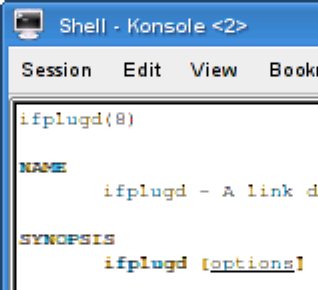
So, I figured that I'd include an actual screenshot of my problem.

http://joe.emenaker.com/snapshot1.png

This snapshot is of a Konsole window using font Monospaced-Regular-10pt.
The image on the URL is a portion of that window enlarged to 200% so
that it's easier to see the problem.

Notice the brown/orange and blue/green tinting on various letters. I
know that it's not a problem with my screen because it actually turns up
in the screen capture. So I know that the pixels are actually colored.

Anybody know how to stop this?
It might be the settings in "K-Menu > Control Center > Appearance & Themes >
Fonts". You probably have selected "Use anti-aliasing for fonts". Click on the
"Configure..." box and check if "Use subpixel hinting" is activated.
Deactivating it and/or changing the hinting style might fix your problem.

Regard,
         Florian


--
To UNSUBSCRIBE, email to [EMAIL PROTECTED]
with a subject of "unsubscribe". Trouble? Contact [EMAIL PROTECTED]