Hi Sylain,

It's very very nice! The interative mockup is a good approach to show the
workflow you are purposing. But I was thinking: how can I resize the
left/top borders? Would you include an "move" option to the object inside to
make it possible?(I don't know if I've been clear with my - not good -
english, so let me know if I didn't
Thank you for your effort! :-)
~Paulo
--
Paulo José O. Amaro
Estudante de Ciência da Computação / UFSJ
Webdesigner / Linked E.J.
Blogueiro / CasaTwain.com


2011/3/13 Rick Hansson <[email protected]>

> Sylvain,
>
> This is great.
>
> Rick
>
> On Fri, Mar 11, 2011 at 8:06 AM, ubuntulesjours <[email protected]
> >wrote:
>
> > Hello everybody,
> >
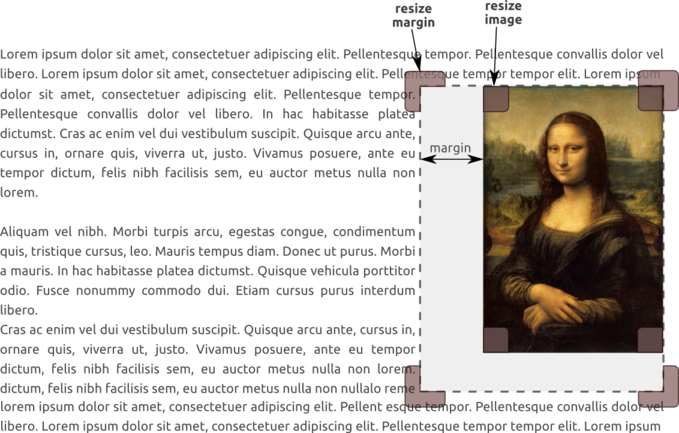
> > I have imagined a new way to*resize margin* around an image in
> LibreOffice
> > because it was quite difficult to do it in OpenOffice.
> >
> > - You can see it in this *picture* :
> > http://ubuntulesjours.free.fr/wp-content/uploads/lo_image.png
> > - I have also developed an *interactive mockup* in HTML to make it more
> > understandable :
> >
> http://ubuntulesjours.free.fr/wp-content/uploads/mockup_libreoffice.html(onlybottom
>  right corner is active)
> >
> > I don't know if it could be interesting for LibreOffice but don't
> hesitate
> > to comment this idea.
> > Thank you !
> >
> > Sylvain.
> >
> > PS : sorry for my poor skills in English.
> >
> >
> > --
> > Unsubscribe instructions: E-mail to [email protected]
> > List archive: http://listarchives.libreoffice.org/www/design/
> > *** All posts to this list are publicly archived for eternity ***
> >
> >
>
> --
> Unsubscribe instructions: E-mail to [email protected]
> List archive: http://listarchives.libreoffice.org/www/design/
> *** All posts to this list are publicly archived for eternity ***
>
>

--
Unsubscribe instructions: E-mail to [email protected]
List archive: http://listarchives.libreoffice.org/www/design/
*** All posts to this list are publicly archived for eternity ***