Hello there,

> I have attached several images.
Argh ... this list strips out all attachments (for size reasons, I
guess). You'll have to upload to somewhere like Flickr, the wiki or
Imageshack.
> 1) Removing screen icons where functionality can be tied to events and
>>>
>>> displayed when needed. This allows to screen simplification. I've got an
>>> excellent example of how this would work.
>>
>> There's a Whiteboard section in the wiki, currently there's not very
>> much in there and I think you're welcome to add a page with your
>> thoughts, see http://wiki.documentfoundation.org/Design/Whiteboards/ .
>
> I created a login for the website and got to Whiteboards but could not see
> how a page is created. Could you give me some guidance on this?

Starting a new wiki page is actually pretty easy (although in the
first few hours after signing up the wiki can sometimes be a little
confused whether you are logged in etc.): all you have to do is go to
an as-yet-inexistent page, like:
http://wiki.documentfoundation.org/Design/Whiteboards/Screen_icons and
click on "Create" in the right part of the toolbar.


> There are many studies available on the Internet - I have attached a more
> recent one. Donald Norman has researched and written about software and has
> very readable books. I have also read Jeff Raskin (The Humane Interface) and
> Alan Cooper (The Inmates are Running the Asylum). Refer to
> UsabilityofIcons.pdf

Even though your attachment was stripped by the mailing list software,
please be careful with copyright there and simply post a link (to an
abstract, if the full text isn't freely available online)!

>>> 4) Marking Text - provide an alternative method of inserting block start
>>> and
>>> end points. When someone is highlighting a block that extends over more
>>> than
>>> one page, it becomes very frustrating to control this when you are
>>> holding
>>> the mouse pointer at the bottom of the screen as the text speeds past. It
>>> would be cool to have the ability to move a block of text using the arrow
>>> keys (up and down).
>>
>> If you use Ctrl-Shift-Up/Down, LibreOffice will mark entire paragraphs
>> at once. Does that help or is this too slow?
>>
> I wasn't aware of these keyboard commands - that certainly makes a
> difference. For Mouse users you could have an option under the Right click
> menu to put a section start and a section end.

That might be a good idea, additionally this function could be invoked
by Ctrl-Click or Alt-Click. Since context menus don't display keyboard
shortcuts, it would be a good idea to add this to the edit menu, too.

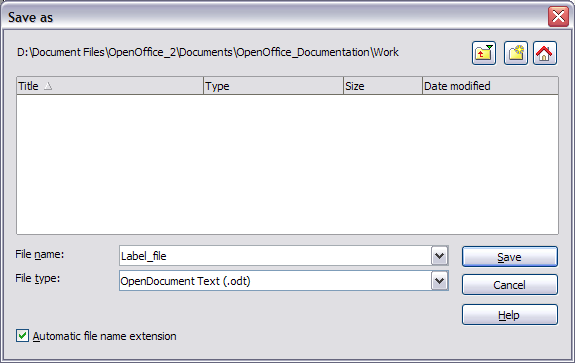
>>> 5) When saving and opening files - allow for a list of favourite
>>> locations,
>>> which are displayed for easy selection. Every time I upgrade my computer
>>> I
>>> use the same folder to copy across and this always conflicts with what
>>> Windows thinks I want to do. I don't use Documents and Settings and still
>>> use My Documents from an older version of Windows when it was in the
>>> Root.
>>
>> I'm unsure how much can be done about this, since the file chooser on
>> Windows is the standard Windows file chooser, but it might be worth
>> researching. I'm happy to inform you, though, that on Gnome for
>> instance, bookmarked folders are displayed.
>>
>
> I guess we are all slaves of MS in the sense that many applications use
> their default open and save file dialog boxes. I personally don't use their
> shortcuts to My Documents and recent files but if I could maintain my own
> list of frequently used locations, I would be slightly more productive. I
> can kick off a White Paper on this and see what ensues. It might strike a
> chord with other members.

There is a custom Open/Save dialog in LibreOffice, see here:
http://wiki.services.openoffice.org/w/images/d/d3/WG11-14a.png . I
don't think this is what you want as it is very simple and currently
only ever used as a fallback.
However, I personally don't feel that an application should try to
replace such integral parts of the user's operating system -- I think
it would be much better if this functionality could be added by
tweaking the Windows file chooser.

>
>>> 6) When Browsing for files to load, remembering what position the file
>>> pointer was in a particular folder so that when you drop down to open a
>>> sub-folder and then return to the same parent folder, you don't get put
>>> to
>>> the top again.
>>
>> I'm unsure what you mean by this... I know Windows weirdly puts the
>> Desktop folder at the top of file trees (though in actuality it's only
>> a sub-folder of a user's home directory), which means you can load a
>> file via Desktop/My Computer/C:/Users/User Name/Documents/file.odt or
>> Desktop/Documents/file.odt. If there's something going wrong there,
>> then that is Windows's fault and LibreOffice can't do anything.
>>
> Constraints imposed by MS. When browsing in and out of sub-folders, each
> time you go back up to a parent level you had started from, the displays
> always reverts to the top, so there is a lot of time wasting first
> remembering where you were and then having to go to the next item. If
> LibreOffice ever wanted to make this easier by using its own routines, then
> I would help with ideas.  Probably worth a Whitepaper at least.

Again, this touches integral parts of the experience with Windows and
this is behavior only Microsoft should modify. Otherwise you might end
up only onfusing users.
In Windows Vista and Seven there are also little arrows in the path
that open drop-down with all sub-folders. This should cut down on
browsing time significantly already.

>
>>> 7) When I open at TXT file in Calc I don't want to see it open in Writer.
>>> I
>>> know what I am doing and don't want the system to make that decision for
>>> me.
>>
>> I don't agree here. Please consider that LibreOffice is one large
>> application, and which component of it is opened wholly depends on the
>> parameters it was started with. For instance, starting "soffice.exe
>> -writer" will do the same as starting the tiny "swriter.exe". In a
>> similar vein, opening a file from Calc does exactly the same as
>> opening a file from Writer or the start centre. So, opening TXT's in
>> Writer and CSV's in Calc is simply the sanest solution.
>> If you have ever tried to open a Powerpoint presentation in Excel,
>> you'll know why, on the whole, LibreOffice's behaviour is also better.
>> (Please note that the last version of Office that I extensively worked
>> with was 2000, so things might have changed in the meantime.)
>>
> Sometimes I have a tab-delimited file with a TXT extension and I am in Calc
> and want to open it to look at it. Instead I have to import it. I know it's
> silly to want to open PPT files in excel - I was only thinking about this
> one exception and agree as a general rule with the approach.

I agree with you that LibreOffice currently makes a pretty dumb guess
simply based on the file extension and could try harder to discern the
true file type, but even if it did this by inspecting the content,
it's error rate might even be higher than today. Although some smarter
CSV import code might at least make the import window superfluous
(that would pretty huge already).

Astron.

--
Unsubscribe instructions: E-mail to [email protected]
Posting guidelines + more: http://wiki.documentfoundation.org/Netiquette
List archive: http://listarchives.libreoffice.org/www/design/
All messages sent to this list will be publicly archived and cannot be deleted