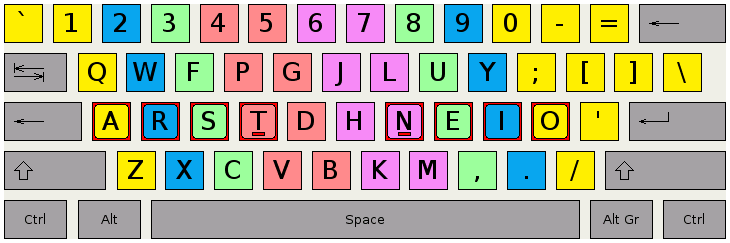
I found what it seems to be a breakthrough on this issue. I hope it does
not only relate to my case.
I use a Colemak layout. Compared to the standard QWERTY, in Colemak the
T is where the F is in QWERTY, and where T is in QWERTY Colemak has a G.
See http://colemak.com/wiki/images/e/ef/Colemak_fingers.png for a visual
comparison.

Well, what do you know? ctrl-alt-t does not work, but ctrl-alt-g (which
is the qwerty shortcut for ctrl-alt-t) behaves as expected, firing up
the terminal.

It looks like the package responsible for the CTRL-ALT-T shortcut still
uses the default keyboard layout, not picking up the new layout (Colemak
in my case) at startup. Perhaps a loading order bug?

Can you guys test it and see if that's the case for you too?

--
You received this bug notification because you are a member of Ubuntu
Desktop Bugs, which is subscribed to gnome-terminal in Ubuntu.
https://bugs.launchpad.net/bugs/1292113

Title:
  CTRL+ALT+T - shortcut to open Terminal is does not work

To manage notifications about this bug go to:
https://bugs.launchpad.net/gnome-terminal/+bug/1292113/+subscriptions

--
desktop-bugs mailing list
[email protected]
https://lists.ubuntu.com/mailman/listinfo/desktop-bugs