Generally I favor "fewer steps" to "more steps".

Your conclusion that this cannot be undone is not correct. It can always be
undone in the same step-intensive way you currently have to do it in the first
place.
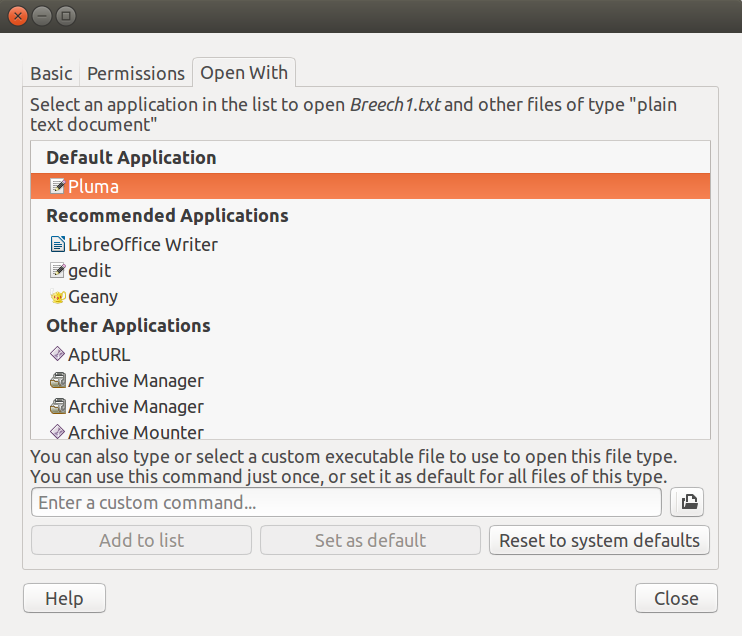
5 steps:
Right-click > Properties > Open With > Set Default Application > "Close"
http://neartalk.com/ss/2016-06-07_003_742x636.png

Currently you have do all these non-intuitive steps anytime you want to change
the default application, when usually it would be nicer to set this in one step
as proposed, the first time you open the file type, and then only do the longer
steps in the event that you "change you mind".

I favor "fewer steps" to "more steps". Especially when it is more intuitive (as
what I've proposed is). Concept: "Put settings closer where they're
used".

--
You received this bug notification because you are a member of Ubuntu
Desktop Bugs, which is subscribed to nautilus in Ubuntu.
https://bugs.launchpad.net/bugs/986189

Title:
  Missing "Always Use" checkbox in "Open With" Dialog

To manage notifications about this bug go to:
https://bugs.launchpad.net/nautilus/+bug/986189/+subscriptions

--
desktop-bugs mailing list
[email protected]
https://lists.ubuntu.com/mailman/listinfo/desktop-bugs