Public bug reported:

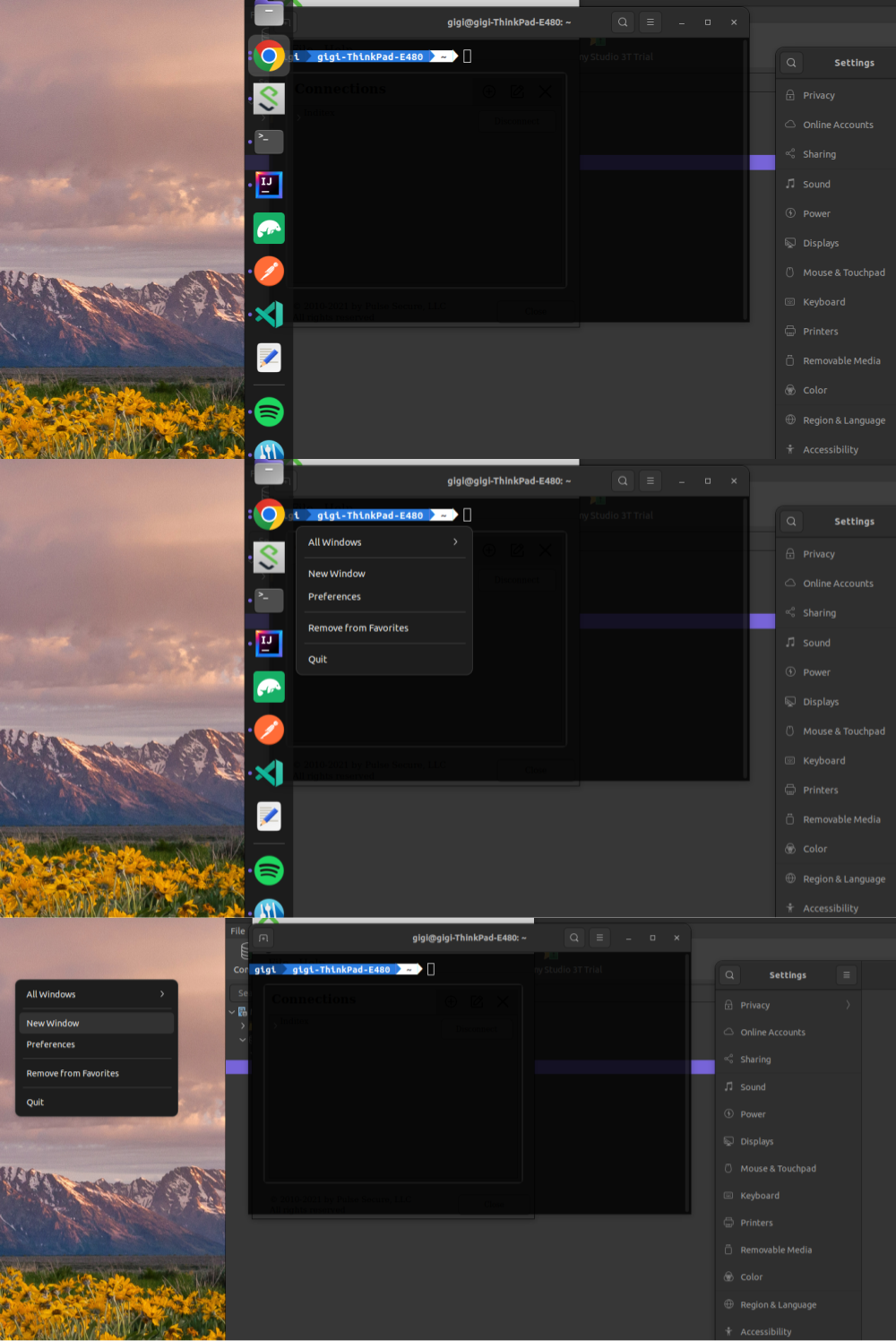
When I right-click an application from the Dock, the context-menu/dialog
comes up with the different options, but when I click on one of them,
for some reason, the context-menu/dialog appears one more time but in
the left screen and when I click again in the context option in which
I'm interested it works correctly.
I have 2 screens, the secondary is on the left, and the dock is on the primary.
Im gonna attach screenshots of the process.

In the first image I bring the cursor near the Dock and it opens.
In the second image I right-click on an application, Terminal in this case.
After that I click on 'New Window'.
In the third image the context-menu/dialog shows up again in the secondary
screen.


1.
Description:    Ubuntu 22.04 LTS
Release:        22.04

2.
gnome-shell-extension-ubuntu-dock:
  Installed: 72~ubuntu5
  Candidate: 72~ubuntu5
  Version table:
 *** 72~ubuntu5 500
        500 http://es.archive.ubuntu.com/ubuntu jammy/main amd64 Packages
        500 http://es.archive.ubuntu.com/ubuntu jammy/main i386 Packages
        100 /var/lib/dpkg/status

3. I expected to execute the action, instead of opening the context menu
again but on the left screen.

4. The context menu opened again, but on the left screen.

** Affects: gnome-shell-extension-ubuntu-dock (Ubuntu)
     Importance: Undecided
         Status: New

** Attachment added: "Three merged images reproducing the issue"

https://bugs.launchpad.net/bugs/1979064/+attachment/5597959/+files/MergedImages.png

--
You received this bug notification because you are a member of Ubuntu
Desktop Bugs, which is subscribed to gnome-shell-extension-ubuntu-dock
in Ubuntu.
https://bugs.launchpad.net/bugs/1979064

Title:
  Context menu shows again on other screen

To manage notifications about this bug go to:
https://bugs.launchpad.net/ubuntu/+source/gnome-shell-extension-ubuntu-dock/+bug/1979064/+subscriptions


--
desktop-bugs mailing list
[email protected]
https://lists.ubuntu.com/mailman/listinfo/desktop-bugs