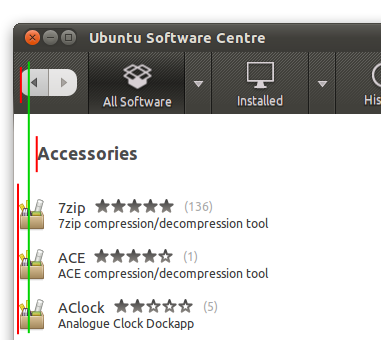
** Attachment added: "Screenshot with alignment lines marked"

https://bugs.launchpad.net/bugs/830229/+attachment/2295589/+files/Heading%20alignment.png
** Changed in: software-center (Ubuntu)
   Importance: Undecided => Low

** Summary changed:

- Heading for software list view isn't lined up with the list items
+ [GTK3] Heading for software list view isn't lined up with the list items

--
You received this bug notification because you are a member of Desktop
Packages, which is subscribed to software-center in Ubuntu.
https://bugs.launchpad.net/bugs/830229

Title:
  [GTK3] Heading for software list view isn't lined up with the list
  items

Status in “software-center” package in Ubuntu:
  New

Bug description:
  software-center-gtk3 trunk r2155, Ubuntu Ocelot

  1. Go to any software item list, e.g. "Accessories".

  What you see: The left edge of the heading is far to the right of the
  left edge of the item icons.

  What you should see: The left edge of the heading is exactly aligned
  with the left edge of the item icons. Ideally, they are both also
  lined up with the left edge of the Back button (see also bug 828213).

  This involves indenting the contents of the list items a bit (not the
  selectable list items as a whole, just their contents), and moving the
  heading left to match.

To manage notifications about this bug go to:
https://bugs.launchpad.net/ubuntu/+source/software-center/+bug/830229/+subscriptions

--
Mailing list: https://launchpad.net/~desktop-packages
Post to     : [email protected]
Unsubscribe : https://launchpad.net/~desktop-packages
More help   : https://help.launchpad.net/ListHelp