I have the same problem on 2 different systems with Ubuntu 12.04 (32 and 64
bits). I confirm
this was not a problem before 12.04.
Those videos still play OK in xine, vlc, mplayer.

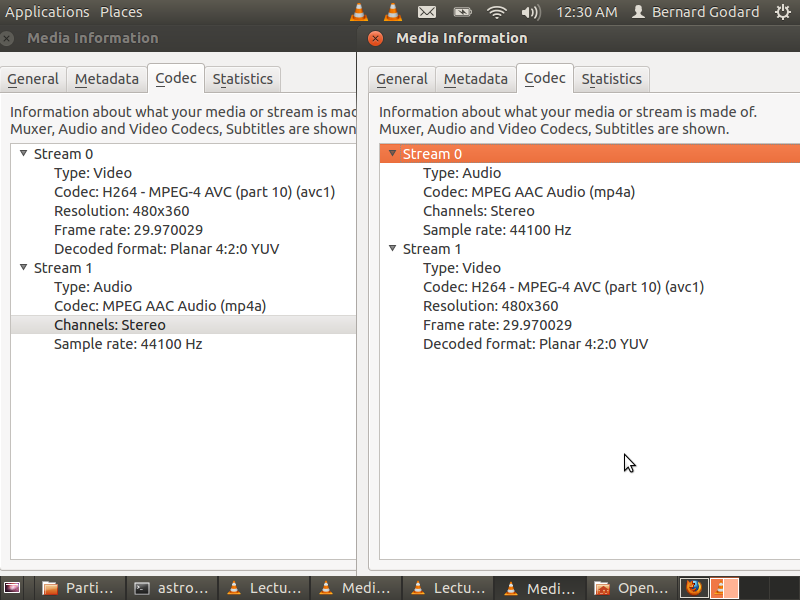
See attached picture showing media information from VLC for 2 MP4 files:
- the one which has video in stream #0 and audio in stream #1 plays with
totem-gstreamer and previews in nautilus.
- the one which has video in stream #1 and audio in stream #0 does not play
with totem-gstreamer and does not preview in nautilus.


** Attachment added: "Media information from VLC"

https://bugs.launchpad.net/ubuntu/+source/gstreamer0.10/+bug/1022788/+attachment/3253564/+files/Screenshot%20from%202012-08-09%2000%3A30%3A14.png

--
You received this bug notification because you are a member of Desktop
Packages, which is subscribed to gstreamer0.10 in Ubuntu.
https://bugs.launchpad.net/bugs/1022788

Title:
  totem/Nautilus does not correctly play/preview some mp4 video files

Status in “gstreamer0.10” package in Ubuntu:
  Confirmed

Bug description:
  Nautilus previews do not display for some mp4 files. Totem does not
  play these files correctly. Audio plays, video does not. These worked
  in prior versions of Ubuntu and they also currerntly work with
  mplayer.

  ProblemType: Bug
  DistroRelease: Ubuntu 12.04
  Package: libgstreamer0.10-0 0.10.36-1ubuntu1
  ProcVersionSignature: Ubuntu 3.2.0-26.41-generic-pae 3.2.19
  Uname: Linux 3.2.0-26-generic-pae i686
  NonfreeKernelModules: nvidia
  ApportVersion: 2.0.1-0ubuntu8
  Architecture: i386
  Date: Mon Jul  9 21:10:02 2012
  InstallationMedia: Ubuntu 12.04 LTS "Precise Pangolin" - Release i386
(20120423)
  ProcEnviron:
   TERM=xterm
   PATH=(custom, no user)
   LANG=en_US.UTF-8
   SHELL=/bin/bash
  SourcePackage: gstreamer0.10
  UpgradeStatus: No upgrade log present (probably fresh install)

To manage notifications about this bug go to:
https://bugs.launchpad.net/ubuntu/+source/gstreamer0.10/+bug/1022788/+subscriptions

--
Mailing list: https://launchpad.net/~desktop-packages
Post to     : [email protected]
Unsubscribe : https://launchpad.net/~desktop-packages
More help   : https://help.launchpad.net/ListHelp