I have no idea, which package I should choose.

** Package changed: software-center (Ubuntu) => ubuntu
** Tags removed: themes xfce
** Tags added: xfce4-themes

** Description changed:

  Hi, when I want to change the 'elementary Xfce dark' or 'elementary
  Xubuntu/Xfce dark' icons style to the GNOME and LowContrast style (in
  Xfce 4.8) in 'Greybird' theme, there is not any effect. It seems to me
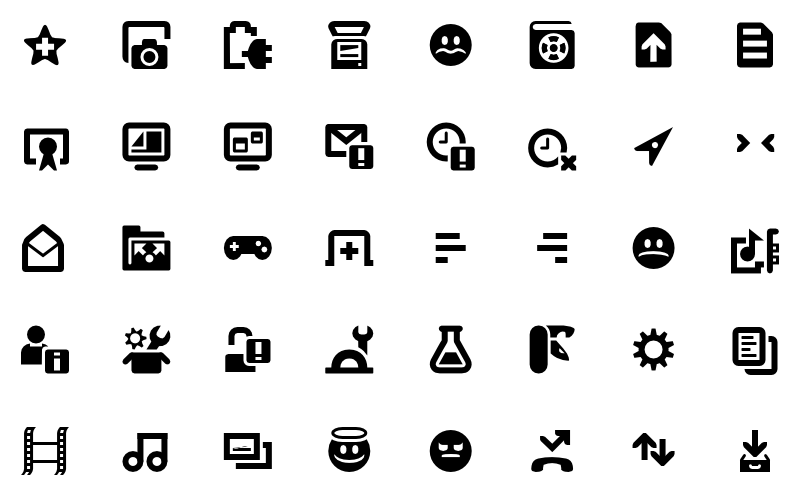
  that a better description of the problem will be picture [1]. Screen
  shows the way in which icons look, for example, in the main '/'
  directory (after the change). This problem occurs in every available
  theme in default Xubuntu 12.04 installation. No new themes were
  installed.

  I have no idea with whom of the packages it may be related. Maybe 'gtk2
  -engines-murrine'? One more thing; all icons, such as 'HighContrast',
  'HighContrastInverse' have the same effect/appearance as a 'Humanity'
  icons [2]. As we know, they should look like e.g. this way; [3], right?

  /* NOTE: If somebody know, please assign the exact package for this
- problem, because I have no idea, which package I should choose. Thanks!
- */
+ problem, because I have no idea, which package I should choose. Maybe
+ 'xfce4-themes'? Thanks! */

  ,----
  | $ lsb_release -rd
  | Description:        Ubuntu 12.04.1 LTS
  | Release:    12.04
  `----

  Best regards!
  _______________
  [1] http://postimage.org/image/ns77fc7vb/
  [2] http://postimage.org/image/q642ngwod/
  [3]
http://library.gnome.org/misc/release-notes/3.4/figures/rna11y-high-contrast.png.en_GB
  [3.a]
https://commons.wikimedia.org/wiki/Category:GNOME_High_contrast_icons,_actions

** Description changed:

  Hi, when I want to change the 'elementary Xfce dark' or 'elementary
  Xubuntu/Xfce dark' icons style to the GNOME and LowContrast style (in
  Xfce 4.8) in 'Greybird' theme, there is not any effect. It seems to me
  that a better description of the problem will be picture [1]. Screen
  shows the way in which icons look, for example, in the main '/'
  directory (after the change). This problem occurs in every available
  theme in default Xubuntu 12.04 installation. No new themes were
  installed.

  I have no idea with whom of the packages it may be related. Maybe 'gtk2
  -engines-murrine'? One more thing; all icons, such as 'HighContrast',
  'HighContrastInverse' have the same effect/appearance as a 'Humanity'
  icons [2]. As we know, they should look like e.g. this way; [3], right?

  /* NOTE: If somebody know, please assign the exact package for this
  problem, because I have no idea, which package I should choose. Maybe
- 'xfce4-themes'? Thanks! */
+ 'xfce4-themes' or 'gnome-icon-theme'? Thanks! */

  ,----
  | $ lsb_release -rd
  | Description:        Ubuntu 12.04.1 LTS
  | Release:    12.04
  `----

  Best regards!
  _______________
  [1] http://postimage.org/image/ns77fc7vb/
  [2] http://postimage.org/image/q642ngwod/
  [3]
http://library.gnome.org/misc/release-notes/3.4/figures/rna11y-high-contrast.png.en_GB
  [3.a]
https://commons.wikimedia.org/wiki/Category:GNOME_High_contrast_icons,_actions

--
You received this bug notification because you are a member of Desktop
Packages, which is subscribed to software-center in Ubuntu.
https://bugs.launchpad.net/bugs/1083285

Title:
  No (icons) effect while icons changing in Xubuntu 12.04.

Status in Ubuntu:
  New

Bug description:
  Hi, when I want to change the 'elementary Xfce dark' or 'elementary
  Xubuntu/Xfce dark' icons style to the GNOME and LowContrast style (in
  Xfce 4.8) in 'Greybird' theme, there is not any effect. It seems to me
  that a better description of the problem will be picture [1]. Screen
  shows the way in which icons look, for example, in the main '/'
  directory (after the change). This problem occurs in every available
  theme in default Xubuntu 12.04 installation. No new themes were
  installed.

  I have no idea with whom of the packages it may be related. Maybe
  'gtk2-engines-murrine'? One more thing; all icons, such as
  'HighContrast', 'HighContrastInverse' have the same effect/appearance
  as a 'Humanity' icons [2]. As we know, they should look like e.g. this
  way; [3], right?

  /* NOTE: If somebody know, please assign the exact package for this
  problem, because I have no idea, which package I should choose. Maybe
  'xfce4-themes' or 'gnome-icon-theme'? Thanks! */

  ,----
  | $ lsb_release -rd
  | Description:        Ubuntu 12.04.1 LTS
  | Release:    12.04
  `----

  Best regards!
  _______________
  [1] http://postimage.org/image/ns77fc7vb/
  [2] http://postimage.org/image/q642ngwod/
  [3]
http://library.gnome.org/misc/release-notes/3.4/figures/rna11y-high-contrast.png.en_GB
  [3.a]
https://commons.wikimedia.org/wiki/Category:GNOME_High_contrast_icons,_actions

To manage notifications about this bug go to:
https://bugs.launchpad.net/ubuntu/+bug/1083285/+subscriptions

--
Mailing list: https://launchpad.net/~desktop-packages
Post to     : [email protected]
Unsubscribe : https://launchpad.net/~desktop-packages
More help   : https://help.launchpad.net/ListHelp