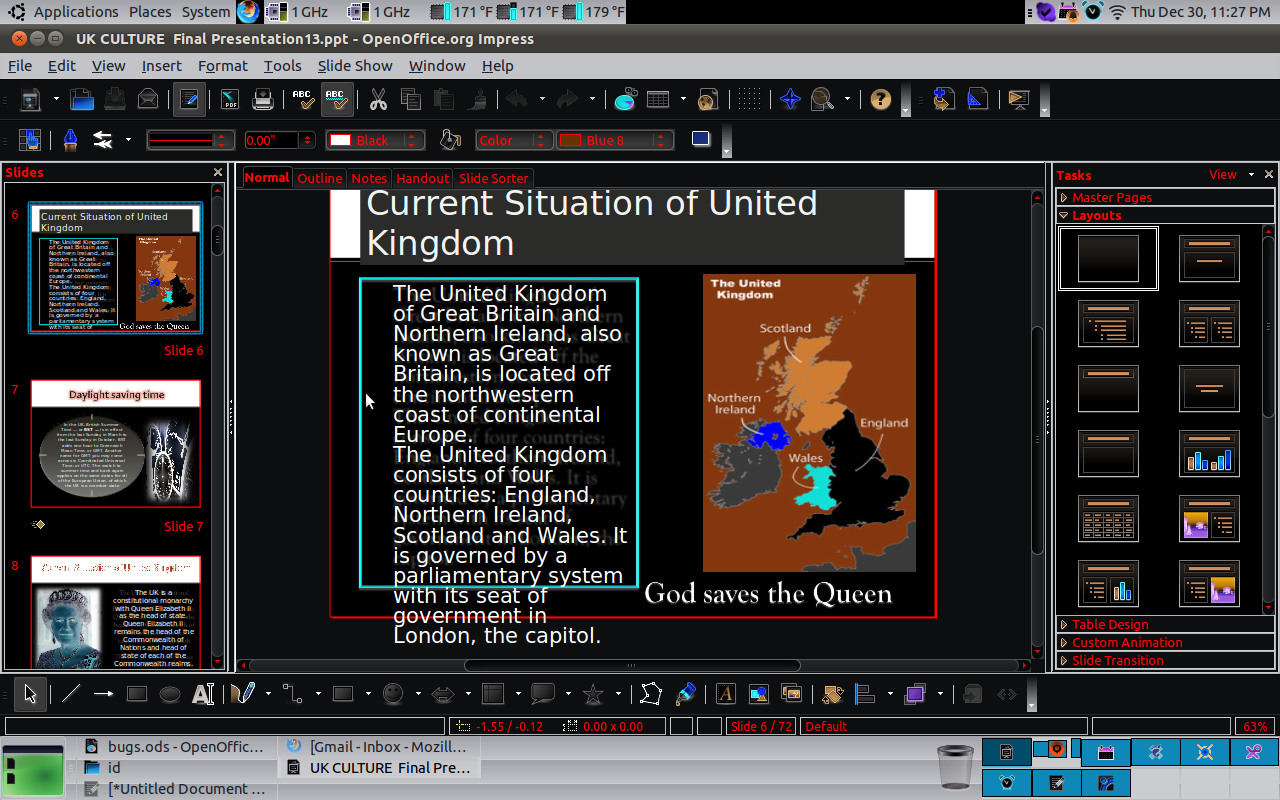
Following provides solutions for this report:
1) If you don't have a Goudy Old Style font file, in LO click Tools -> Options
-> Fonts -> check checkbox Apply replacement table -> drop down box Font Goudy
Old Style -> drop down Replace with Goudy Bookletter 1911 -> click check mark
-> check checkbox Always -> button OK.
2) If you do have a Goudy Old Style font file, copy font files from MS Office
2010 WINE install:
sudo cp ~/.wine/drive_c/windows/Fonts/*.TTF /usr/share/fonts/msofficefonts &&
sudo cp ~/.wine/drive_c/windows/Fonts/*.TTC /usr/share/fonts/msofficefonts &&
sudo fc-cache -f -v

** Changed in: libreoffice (Ubuntu)
       Status: Triaged => Invalid

--
You received this bug notification because you are a member of Desktop
Packages, which is subscribed to libreoffice in Ubuntu.
https://bugs.launchpad.net/bugs/695898

Title:
  [Upstream] Impress not honoring font size or look of Goudy Old Style
  font from MS PowerPoint 2007 file

Status in LibreOffice Productivity Suite:
  Confirmed
Status in “libreoffice” package in Ubuntu:
  Invalid

Bug description:
  Binary package hint: openoffice.org

  1) lsb_release -rd
  Description: Ubuntu 12.10
  Release: 12.10

  2) apt-cache policy libreoffice-impress
  libreoffice-impress:
    Installed: 1:3.6.2~rc2-0ubuntu3
    Candidate: 1:3.6.2~rc2-0ubuntu3
    Version table:
   *** 1:3.6.2~rc2-0ubuntu3 0
          500 http://archive.ubuntu.com/ubuntu/ quantal/main i386 Packages
          100 /var/lib/dpkg/status

  3) What is expected to happen in Impress via a terminal:
  cd ~/Desktop && wget
https://bugs.launchpad.net/ubuntu/+source/libreoffice/+bug/695898/+attachment/2656056/+files/slide6.ppt
 && loimpress --nologo slide6.ppt

  is the "Goudy Old Style" font size and look is the same as in the
  PowerPoint 2010 screenshot

https://bugs.launchpad.net/ubuntu/+source/libreoffice/+bug/695898/+attachment/3428000/+files/screenshot2.png
  .

  4) What happens instead is the font size and look is not the same as
  per the Impress screenshot

https://bugs.launchpad.net/ubuntu/+source/libreoffice/+bug/695898/+attachment/3427997/+files/Screenshot1.png
  .

  This was first identified in LO 3.3.0, as well as OOo 3.2.1.

  One possible solution is to map Goudy Old Style, when the actual font
  GOUDOS.TTF is not installed, to the Goudy Bookletter 1911 font
  provided by the package ttf-goudybookletter
  https://launchpad.net/ubuntu/+source/ttf-goudybookletter . While it is
  not exactly the same pixel for pixel (ex. the half circle center of
  the "e" points slightly upwards in Goudy Bookletter 1911, while in
  Goudy Old Style it's flat), it's so close otherwise to be virtually
  indistinguishable. As well, this solution would minimize round trip
  complaints.

  apt-cache policy ttf-goudybookletter
  ttf-goudybookletter:
    Installed: 2010.07.03-1ubuntu1
    Candidate: 2010.07.03-1ubuntu1
    Version table:
   *** 2010.07.03-1ubuntu1 0
          500 http://archive.ubuntu.com/ubuntu/ quantal/universe i386 Packages
          100 /var/lib/dpkg/status

  WORKAROUND: Copy the GOUDOS.TTF file from the PowerPoint install:
  sudo mv GOUDOS.TTF /usr/share/fonts && sudo fc-cache -f -v

  WORKAROUND: Open PPT file in PowerPoint via WINE with Existing
  overrides: riched20 (native, builtin) .

  Microsoft Office Professional Plus 2010 PowerPoint Version
  14.0.6023.1000 (32-bit)

  apt-cache policy wine1.5
  wine1.5:
    Installed: 1.5.16-0ubuntu1
    Candidate: 1.5.16-0ubuntu1
    Version table:
   *** 1.5.16-0ubuntu1 0
          500 http://ppa.launchpad.net/ubuntu-wine/ppa/ubuntu/ quantal/main
i386 Packages
          100 /var/lib/dpkg/status

  ProblemType: Bug
  DistroRelease: Ubuntu 10.10
  Package: openoffice.org-impress 1:3.2.1-7ubuntu1
  ProcVersionSignature: Ubuntu 2.6.35-24.42-generic 2.6.35.8
  Uname: Linux 2.6.35-24-generic i686
  Architecture: i386
  Date: Thu Dec 30 23:34:58 2010
  EcryptfsInUse: Yes
  InstallationMedia: Ubuntu 10.10 "Maverick Meerkat" - Release i386 (20101007)
  ProcEnviron:
   LANG=en_US.utf8
   SHELL=/bin/bash
  SourcePackage: openoffice.org

To manage notifications about this bug go to:
https://bugs.launchpad.net/df-libreoffice/+bug/695898/+subscriptions

--
Mailing list: https://launchpad.net/~desktop-packages
Post to     : [email protected]
Unsubscribe : https://launchpad.net/~desktop-packages
More help   : https://help.launchpad.net/ListHelp