Launchpad has imported 21 comments from the remote bug at
https://bugs.freedesktop.org/show_bug.cgi?id=54275.
If you reply to an imported comment from within Launchpad, your comment
will be sent to the remote bug automatically. Read more about
Launchpad's inter-bugtracker facilities at
https://help.launchpad.net/InterBugTracking.

------------------------------------------------------------------------
On 2012-08-30T16:59:50+00:00 joehahn wrote:

Created attachment 66352
Screenshots of errors

Unable to "Save As" on Samba,"Windows Share",gvfs created from Nautilus

When trying to "Save As" to a "Windows Share" (gvfs) mounted with
Nautilus in Ubuntu, three errors occur.

- The file is not created.

- Error messages appear.
-- "Error saving the document" "Nonexistent file"
-- "Error saving the document" "General Error." "General input/output error."

- Libreoffice can no longer be closed from the menu and must be Force
Quit. Most menu features are now greyed out, including "About".

We are able to open and save existing files on the share with
Libreoffice. Other applications, such as Sublime Text, are able to
create new files and Save As.

It also appears that after we force quit, it leaves the lock files in
place, which LO does initially successfully create on the share when
opening an existing file. Does this mean that the file creation process
for LO's lock/temp files is entirely different from how it access the
share when trying to create or save normal files?

This appears to have been a problem for a long time, specific to shares
mounted with these methods.

Reply at:
https://bugs.launchpad.net/ubuntu/+source/libreoffice/+bug/1069757/comments/0

------------------------------------------------------------------------
On 2012-09-17T15:56:57+00:00 Bru-baldovi wrote:

Same problem here on Ubuntu 12.04 and LibreOffice PPA (libreoffice
3.6.0). Solved removing PPA (sudo ppa-purge libreoffice) and reverting
to Ubuntu repos version (libreoffice 3.5.4.2).

Seems related to http://lists.debian.org/debian-openoffice/2012/01/msg00091.html
"enable gio, disable gvfs"

Reply at:
https://bugs.launchpad.net/ubuntu/+source/libreoffice/+bug/1069757/comments/1

------------------------------------------------------------------------
On 2012-09-25T06:20:00+00:00 Andy Iverson wrote:

I have the same problem as Bru Baldovi.  Using LO 3.6 installed from the
LO stable PPA (libreoffice/ppa) I cannot "Save" OR "Save As" to a SMB
fileshare (connected to ~/.gvfs/xxxx through Nautilus "connect to
server" dialogue).

The error messages from the attachment are the same.

UPDATE: I can get it to save by manually navigating to ~/.gvfs/xxxxxx in
the Save or Save As dialogue.  So the problem only exists when you try
to Save or Save As using the share shortcut in the dialogue.  I will
attempt to add a screenshot to show what I mean.

Reply at:
https://bugs.launchpad.net/ubuntu/+source/libreoffice/+bug/1069757/comments/2

------------------------------------------------------------------------
On 2012-09-25T06:43:22+00:00 Andy Iverson wrote:

Created attachment 67666
SaveAs workaround by manually navigating to folder

Screenshot of SaveAs dialogue that will give an error (selecting share
from left panel), and of SaveAs dialogue that will be able to save
(manually navigate to ~/.gvfs/share folder)

Reply at:
https://bugs.launchpad.net/ubuntu/+source/libreoffice/+bug/1069757/comments/3

------------------------------------------------------------------------
On 2012-10-08T15:21:40+00:00 Chris B wrote:

This issue also affects me, identical to symptoms described, using
Libreoffice 3.6.1.2 installed using the debs on the libreoffice.org
website, on Ubuntu 12.04.

Chris

Reply at:
https://bugs.launchpad.net/ubuntu/+source/libreoffice/+bug/1069757/comments/4

------------------------------------------------------------------------
On 2012-10-08T15:35:04+00:00 Chris B wrote:

This issue also appears for me with the debs for 3.6.2.2 downloaded/installed 8
October.
'Save' works as expected, 'Save As' does not.
'Save As' by manually navigating to the .gvfs/foo local mount point is a
workaround.
Chris

Reply at:
https://bugs.launchpad.net/ubuntu/+source/libreoffice/+bug/1069757/comments/5

------------------------------------------------------------------------
On 2012-10-29T23:30:20+00:00 nipuL wrote:

If I create an empty file, I am able to save the document. However, it
does not save it correctly. Rather it saves the file one directory
higher with the name of the directory in the file name.

If I create the file (using touch) ".../dir1/dir2/file.odt" then select
it as the save as file, the file ".../dir1/dir2 file.odt" is created
instead.

Reply at:
https://bugs.launchpad.net/ubuntu/+source/libreoffice/+bug/1069757/comments/12

------------------------------------------------------------------------
On 2012-11-06T13:44:39+00:00 Sergio Zanchetta wrote:

I confirm this Bug using Libreoffice 3.6 from PPA. (ubuntu 12.04.1)

Reverting to Ubuntu repos version (libreoffice 3.5.2.2) fixes the issue.

Reply at:
https://bugs.launchpad.net/ubuntu/+source/libreoffice/+bug/1069757/comments/13

------------------------------------------------------------------------
On 2012-12-07T14:59:11+00:00 Freedesktop-org-4 wrote:

Confirmed this bug on Arch Linux with libreoffice-base 3.6.3-3

Reply at:
https://bugs.launchpad.net/ubuntu/+source/libreoffice/+bug/1069757/comments/14

------------------------------------------------------------------------
On 2012-12-26T14:55:34+00:00 Andy Iverson wrote:

I am not sure what the other commenters in 5 and 6 are seeing.  Maybe
they are indicating if you open an existing document on a .gvfs share,
modify it, and then "save" it will save correctly, which I can confirm.

To clarify the bug, in my testing I am NOT able to "save" OR "save as"
on a NEW document IF the target is a samba share (mounted to ~/.gvfs
/share-name).

I have just finished installing and testing on the following version:

Version 4.0.0.0.beta2 (Build ID:
4104d660979c57e1160b5135634f732918460a0)

for Ubuntu 12.04 64 bit.

I have added this bug to the 3.6 mab (bug #44446) as 3.6 appears to be
the place this bug first appeared.

Reply at:
https://bugs.launchpad.net/ubuntu/+source/libreoffice/+bug/1069757/comments/15

------------------------------------------------------------------------
On 2012-12-26T15:00:33+00:00 Sergio Zanchetta wrote:

Comment # 9 on bug 54275 from iveand
>
> I am not sure what the other commenters in 5 and 6 are seeing.  Maybe
they are
> indicating if you open an existing document on a .gvfs share, modify it,
and
> then "save" it will save correctly, which I can confirm.
>
> To clarify the bug, in my testing I am NOT able to "save" OR "save as" on
a NEW
> document IF the target is a samba share (mounted to ~/.gvfs/share-name).

I confirm it all.
This bug is a blocker.

Reply at:
https://bugs.launchpad.net/ubuntu/+source/libreoffice/+bug/1069757/comments/16

------------------------------------------------------------------------
On 2012-12-27T16:06:15+00:00 Michael Meeks wrote:

Bjoern - another duplicate of the Ubuntu specific(?) samba bug - now
apparently a 3.6 MAB.

Reply at:
https://bugs.launchpad.net/ubuntu/+source/libreoffice/+bug/1069757/comments/17

------------------------------------------------------------------------
On 2013-01-27T18:03:40+00:00 Joren-libreoffice wrote:

Hi,

Because this is that much confirmed I think we can mark this bug as NEW.
If this is indeed a duplicate we can mark it as such, but this bug isn't
unconfirmed :-).

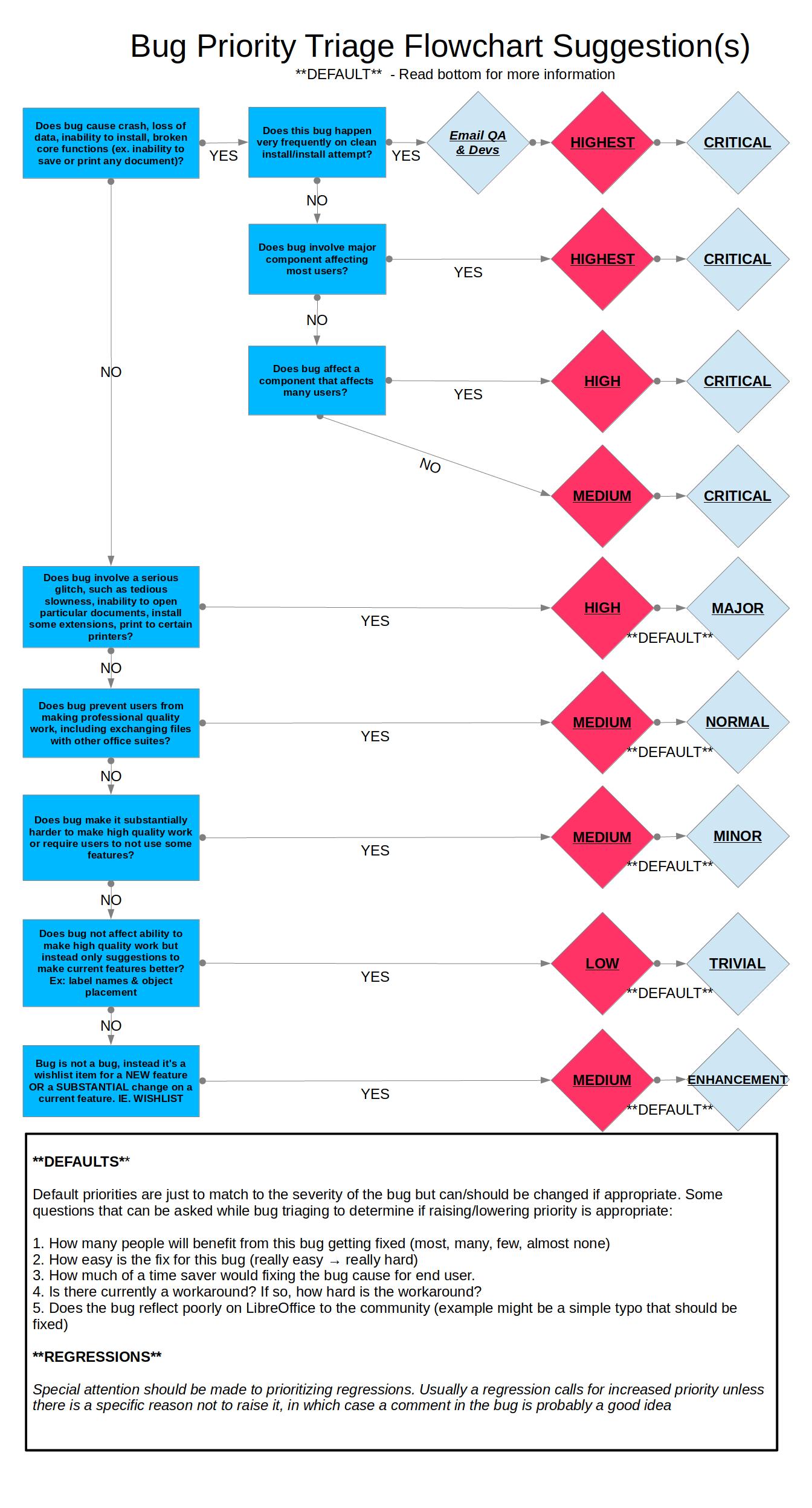
Following [1] I mark this bug as 'Major High'

[1]
https://wiki.documentfoundation.org/images/0/06/Prioritizing_Bugs_Flowchart.jpg

Reply at:
https://bugs.launchpad.net/ubuntu/+source/libreoffice/+bug/1069757/comments/20

------------------------------------------------------------------------
On 2013-01-28T11:56:04+00:00 Elicoten wrote:

Also affecting me, Ubuntu 12.10 x64, LibreOffice Version 3.6.2.2 (Build
ID: 360m1(Build:2))

Reply at:
https://bugs.launchpad.net/ubuntu/+source/libreoffice/+bug/1069757/comments/21

------------------------------------------------------------------------
On 2013-02-08T10:11:45+00:00 Sergio Zanchetta wrote:

I've just installed LibreOffice 4.0.0.3 on Ubuntu 12.04 i386 and this
bug is still present.

It's a nasty "blocker" bug.

Reply at:
https://bugs.launchpad.net/ubuntu/+source/libreoffice/+bug/1069757/comments/22

------------------------------------------------------------------------
On 2013-02-08T15:09:54+00:00 Michael Meeks wrote:

primes2h: that is annoying, can you do:

pkill -9 -f soffice.bin
strace -f -ttt -s 256 -o /tmp/slog soffice

And then try to save a blank file as some well known name eg.
"foobaa.odt" on a gvfs samba share.

Then kill it (ctrl-c is good) - and gzip / attach /tmp/slog :-)

I imagine there is some obscure / odd system error returned via FUSE for
that that we are not handling properly ... it'd be great to find out
what it is.

Thanks !

Reply at:
https://bugs.launchpad.net/ubuntu/+source/libreoffice/+bug/1069757/comments/23

------------------------------------------------------------------------
On 2013-02-08T17:38:36+00:00 Sergio Zanchetta wrote:

Created attachment 74442
strace of libreoffice 4.0

Hi Michael, here you have!

Tell me if you need more info, I really hope it'll be fixed soon.

Thanks for your help.

Reply at:
https://bugs.launchpad.net/ubuntu/+source/libreoffice/+bug/1069757/comments/24

------------------------------------------------------------------------
On 2013-02-11T11:18:54+00:00 Sergio Zanchetta wrote:

Created attachment 74599
strace libreoffice 3.6

@Michael
Here you have the strace using libreoffice 3.6

The first strace I uploaded was from libreoffice 4.0 (affected by this
bug as well)

Let me know if you need something.

Reply at:
https://bugs.launchpad.net/ubuntu/+source/libreoffice/+bug/1069757/comments/25

------------------------------------------------------------------------
On 2013-02-11T14:18:28+00:00 Michael Meeks wrote:

Fun so we're not using FUSE, but a direct channel to the VFS.

9008  1360581100.835641 socket(PF_FILE, SOCK_STREAM, 0) = 50
9008  1360581100.835842 connect(50, {sa_family=AF_FILE,
path=@"/dbus-vfs-daemon/socket-pSgdFfMM"}, 35) = 0

9008  1360581100.835995 socket(PF_FILE, SOCK_STREAM|SOCK_CLOEXEC, 0) = 51
9008  1360581100.836036 connect(51, {sa_family=AF_FILE,
path=@"/dbus-vfs-daemon/socket-TWLvJq4h"}, 35) = 0

Which is odd:

9008  1360581094.195836
open("/usr/lib/libreoffice/program/../program/ucpgio1.uno.so",
O_RDONLY|O_CLOEXEC) = 29

Looks like we're using the gio backend - which is fun. I guess we'd want
to do some more debugging with symbols and work out which methods are
failing.

Failing that - potentially there is some gio debugging mechanism that we
could turn on to see what is going on (I suspect).

I imagine that if we just move away the 'libucpgiolo.so' or whatever
then we'll fall-back to using FUSE which will work better - but ... who
knows.

Of course - this -could- be an issue with the gvfs samba implementation
too - perhaps worth stracing that ... not sure.

Reply at:
https://bugs.launchpad.net/ubuntu/+source/libreoffice/+bug/1069757/comments/26

------------------------------------------------------------------------
On 2013-02-11T18:37:26+00:00 Jmadero-dev wrote:

Should this be taken out of MAB or marked as NEW, we usually don't keep
NEEDINFO bugs in MAB. I can save to samba after a patch put out a week
or so ago but this may be a separate issue.

Michael - thoughts?

Reply at:
https://bugs.launchpad.net/ubuntu/+source/libreoffice/+bug/1069757/comments/27

------------------------------------------------------------------------
On 2013-02-11T19:22:57+00:00 Andy Iverson wrote:

Thanks for all the activity on this bug -- it is indeed a signifiant
"blocker" that is preventing me from being able to implement for our
office.  Just to act as a reminder, this problem does NOT exist in 3.5.x
series.

I am sorry to not be a programmer, but I wonder if there is a useful way
to "diff" between 3.5.x and the newest 4.0.x version to find anything?

Reply at:
https://bugs.launchpad.net/ubuntu/+source/libreoffice/+bug/1069757/comments/28


** Changed in: df-libreoffice
       Status: Unknown => Incomplete

** Changed in: df-libreoffice
   Importance: Unknown => Medium

--
You received this bug notification because you are a member of Desktop
Packages, which is subscribed to libreoffice in Ubuntu.
https://bugs.launchpad.net/bugs/1069757

Title:
  Libreoffice: problems with saving docs to directories of Windows
  networks (through samba-connection)

Status in LibreOffice Productivity Suite:
  Incomplete
Status in “libreoffice” package in Ubuntu:
  Confirmed

Bug description:
  At the office I use my Ubuntu computer as a work station and connect
  it to our Windows network by establishing Samba (smb) connections. In
  this way I can not only use the print facilities but also use directly
  the network directories for opening, saving of documents.

  Since ubuntu 12.04 directories of windows networks have been
  integrated in the procedure for opening, saving of documents in
  Libreoffice. Directories available through open samba-connections thus
  are integrated in the list of directories on which docs can be saved.
  This was a great new features, since before 12.04 one had to save
  files on a local directory first and then move or copy them to the
  windows directory in Nautilus.

  After having done the upgrade to ubuntu 12.10 QQ this facility does
  not work as it should. The network directories are still shown and it
  it still possible to open a document. But is it not possible to save
  it and giving it another name.  Another thing which had become
  impossible is to open a document from another source than the network
  directory (e.g. local directory, attached doc to a mail) and save it
  in a directory of the network server.

  When doing this the system gives the information 'Error saving the document
#name#. The file does not exist' (see screenshot 1, text in italian). If one
then presses the OK-button there is a second error communication with the
following text:
  Error is saving the document #name#:
  General Error
  Generel I/O error
  (see screenshot 2, text in italian)

  I have checked whether the same kind of error also occurs in other
  programs, at least in Evince (pdf-reader). This is not the case.

  A last issue I want to report is that when one opens a doc (e.g. odt)
  from a network directory, modifies it and then save it, this seems to
  work. There is no error messsage. When checking by re-opening the
  saved document, in a few experiments I did the modifications were not
  saved. In nautilus the date indication of the file also remained the
  same. In other experiments however the saving of the documents with
  the modifications seemed to work as it should.

  conclusion: the integration of network directories in LO has become
  unreliable, with a high risk of loss of information for the user.

  ProblemType: Bug
  DistroRelease: Ubuntu 12.10
  Package: libreoffice 1:3.6.2~rc2-0ubuntu3
  ProcVersionSignature: Ubuntu 3.5.0-18.29-generic 3.5.7
  Uname: Linux 3.5.0-18-generic i686
  ApportVersion: 2.6.1-0ubuntu4
  Architecture: i386
  Date: Mon Oct 22 12:47:08 2012
  InstallationMedia: Ubuntu 12.04 LTS "Precise Pangolin" - Release i386
(20120423)
  MarkForUpload: True
  SourcePackage: libreoffice
  UpgradeStatus: Upgraded to quantal on 2012-10-19 (2 days ago)

To manage notifications about this bug go to:
https://bugs.launchpad.net/df-libreoffice/+bug/1069757/+subscriptions

--
Mailing list: https://launchpad.net/~desktop-packages
Post to     : [email protected]
Unsubscribe : https://launchpad.net/~desktop-packages
More help   : https://help.launchpad.net/ListHelp