Well I have a better understanding of what is happening at the human level than
at #3 above.
 - qa XRef - Tc-Nfm-001
== Distribution ==
head --lines 9 dists/raring/Release
Origin: Ubuntu
Label: Ubuntu
Suite: raring
Version: 13.04
Codename: raring
Date: Wed, 13 Feb 2013  7:20:15 UTC
Architectures: i386
Components: main restricted
Description: Ubuntu Raring 13.04

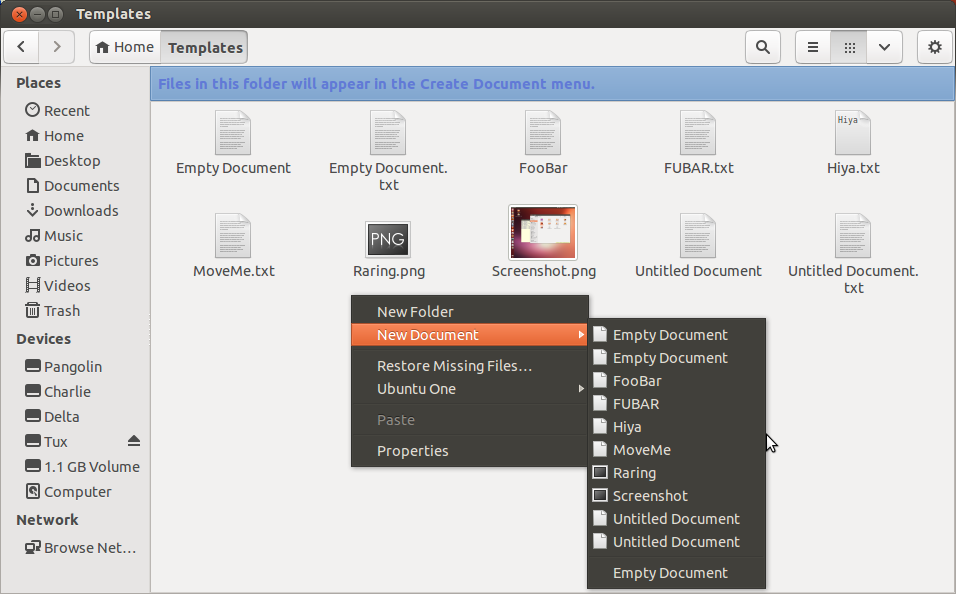
- Changes from what I observed in #3 above
  - Before we had prebuild empty document as well as the test created template
in the context menu
    - xxx and xxx.txt
  - the context menu showed both without the suffix so it _looked_ a bit weird
        - since somebody decided no not show the real filename
    - It did work accurately though

- This version does eliminate the paper ... scratch I cited above...
sorta

- Only if you start with an empty template folder as per Tc-Nfm-001
    - AND you use touch to create the document not Nautilus

- Now IF the Template Folder is empty
  - There is NO context menu to create a new document
  - I believe that to be a step backwards from before
    - A Quickfix workaround might be to put some documents in the Templates
folder
      - Text, Letter, Drawing, Spreadsheet ...

- You can create all the docs you want with bash in ~/Templates
  - They will not show up in a New Document Menu

- If you use Nautilus to drag a document into the Templates folder
   - It will appear on the New Document context menu immediately
  - Along with the default Empty Document menu Item from #3 above

- If you restart the system all the documents in ~/Templates will appear
on the context menu

I tried to issue a bug-report from the running iso but it fought me

** Attachment added: "raring new doc context menu"

https://bugs.launchpad.net/ubuntu/+source/nautilus/+bug/1119832/+attachment/3528525/+files/raring_Bug-1119832_Dist13feb-0720.png

--
You received this bug notification because you are a member of Desktop
Packages, which is subscribed to nautilus in Ubuntu.
https://bugs.launchpad.net/bugs/1119832

Title:
  After creating a blank txt file in ~/Templates there are 2 "Empty
  Document" options in context menu

Status in Nautilus:
  Invalid
Status in “nautilus” package in Ubuntu:
  Triaged

Bug description:
  easily fixed, was done so in git on 11/05 & can be applied to current
nautilus 3.6.3 source in raring with no issues
  https://bugzilla.gnome.org/show_bug.cgi?id=687139

  ProblemType: Bug
  DistroRelease: Ubuntu 13.04
  Package: nautilus 1:3.6.3-0ubuntu5
  ProcVersionSignature: Ubuntu 3.8.0-4.8-generic 3.8.0-rc6
  Uname: Linux 3.8.0-4-generic x86_64
  ApportVersion: 2.8-0ubuntu4
  Architecture: amd64
  Date: Fri Feb  8 17:24:16 2013
  GsettingsChanges: b'org.gnome.nautilus.window-state' b'geometry'
b"'994x528+65+24'"
  InstallationDate: Installed on 2013-02-08 (0 days ago)
  InstallationMedia: Ubuntu 13.04 "Raring Ringtail" - Alpha amd64 (20130205)
  MarkForUpload: True
  ProcEnviron:
   TERM=xterm
   PATH=(custom, no user)
   XDG_RUNTIME_DIR=<set>
   LANG=en_US.UTF-8
   SHELL=/bin/bash
  SourcePackage: nautilus
  UpgradeStatus: No upgrade log present (probably fresh install)

To manage notifications about this bug go to:
https://bugs.launchpad.net/nautilus/+bug/1119832/+subscriptions

--
Mailing list: https://launchpad.net/~desktop-packages
Post to     : [email protected]
Unsubscribe : https://launchpad.net/~desktop-packages
More help   : https://help.launchpad.net/ListHelp