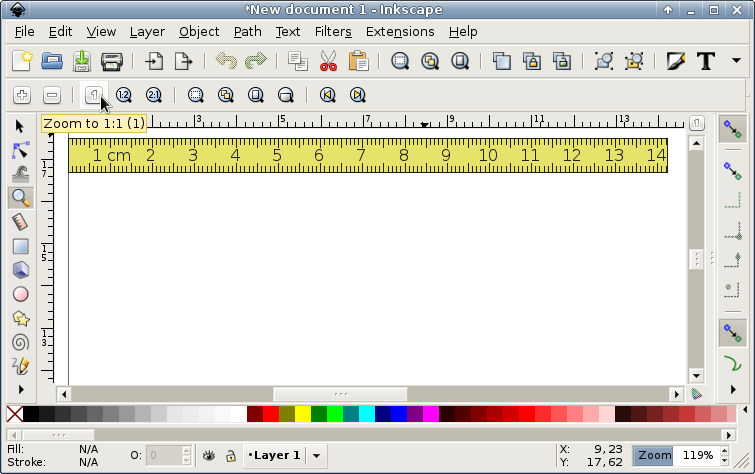
I am using Inkscape 0.48+devel r (May 17 2013). The "zoom correction
factor" allows to change the zoom factor. The zomm tool 1:1 makes the
dimensions of the page to be shown correct. At the same time the
information at the bottom right corner states that the zoom level is not
100%. I should be able to set zoom 1:1 just typing 100% in the box at
the  bottom right corner as well.
** Attachment added: "wrong_distance.png"

https://bugs.launchpad.net/inkscape/+bug/166970/+attachment/3701387/+files/wrong_distance.png

--
You received this bug notification because you are a member of Desktop
Packages, which is subscribed to inkscape in Ubuntu.
https://bugs.launchpad.net/bugs/166970

Title:
  Allow user to specify screen resolution other than 90 dpi

Status in Inkscape: A Vector Drawing Tool:
  Opinion
Status in “inkscape” package in Ubuntu:
  Opinion
Status in “inkscape” package in Debian:
  Confirmed

Bug description:
  Hi,

  on debian's BTS I got the following report at
  http://bugs.debian.org/326051 by Cyril Humbert (cyril
  dot humbert at univ-mlv dot fr) some time ago:

  "The zoom scale doesn't take into account the actual screen
  resolution.

  For example, with a 17" CRT monitor, if the screen size is
  1024x768 (=> about 80 dpi):

  - Open a new A4 document;
  - Set the zoom factor to 100%;
  - The page appears bigger than the A4 format (in fact, it
  seems  that a 90 dpi resolution is assumed).

  Perhaps, it would be nice to have an option to manually
  adjust which value is the screen resolution (like in e.g.
  gimp or scribus)."

  Thanks,

  Wolfi

To manage notifications about this bug go to:
https://bugs.launchpad.net/inkscape/+bug/166970/+subscriptions

--
Mailing list: https://launchpad.net/~desktop-packages
Post to     : [email protected]
Unsubscribe : https://launchpad.net/~desktop-packages
More help   : https://help.launchpad.net/ListHelp