Christopher Barrington-Leigh, thank you for taking the time to report
this bug and helping to make Ubuntu better. However, I am closing it
because the bug has been fixed in the latest development version of
Ubuntu - Trusty Tahr.
This is a significant bug in Ubuntu. If you need a fix for the bug in
previous versions of Ubuntu, please perform as much as possible of the
SRU Procedure [1] to bring the need to a developer's attention.

[1]: https://wiki.ubuntu.com/StableReleaseUpdates#Procedure

lsb_release -rd
Description:    Ubuntu Trusty Tahr (development branch)
Release:        14.04

apt-cache policy libreoffice-writer
libreoffice-writer:
  Installed: 1:4.2.0-0ubuntu1
  Candidate: 1:4.2.0-0ubuntu1
  Version table:
     1:4.2.1-0ubuntu1 0
        400 http://us.archive.ubuntu.com/ubuntu/ trusty-proposed/main amd64
Packages
 *** 1:4.2.0-0ubuntu1 0
        500 http://us.archive.ubuntu.com/ubuntu/ trusty/main amd64 Packages
        100 /var/lib/dpkg/status

** Changed in: libreoffice (Ubuntu)
       Status: Triaged => Fix Released

--
You received this bug notification because you are a member of Desktop
Packages, which is subscribed to libreoffice in Ubuntu.
https://bugs.launchpad.net/bugs/898791

Title:
  [Upstream] Long table at end of .doc document cut off

Status in LibreOffice Productivity Suite:
  Confirmed
Status in “libreoffice” package in Ubuntu:
  Fix Released

Bug description:
  1)  lsb_release -rd
  Description:  Ubuntu 11.10
  Release:      11.10

  2) apt-cache policy libreoffice-writer
  libreoffice-writer:
    Installed: 1:3.4.4-0ubuntu1
    Candidate: 1:3.4.4-0ubuntu1
    Version table:
   *** 1:3.4.4-0ubuntu1 0
          500 http://us.archive.ubuntu.com/ubuntu/ oneiric-updates/main i386
Packages
          100 /var/lib/dpkg/status
       1:3.4.3-3ubuntu2 0
          500 http://us.archive.ubuntu.com/ubuntu/ oneiric/main i386 Packages

  3) What is expected to happen in LibreOffice Writer via the Terminal:

  cd ~/Desktop && wget -c

https://bugs.launchpad.net/ubuntu/+source/libreoffice/+bug/898791/+attachment/2614990/+files
  /ACT7DAYS_-_def.doc -O example.doc && lowriter -nologo example.doc

  is the text at the beginning of the document is right above the table
  in the Word screenshot

https://bugs.launchpad.net/ubuntu/+source/libreoffice/+bug/898791/+attachment/2618025/+files
  /word-screenshot.png and rows 8 through 20 are visible when scrolling
  down.

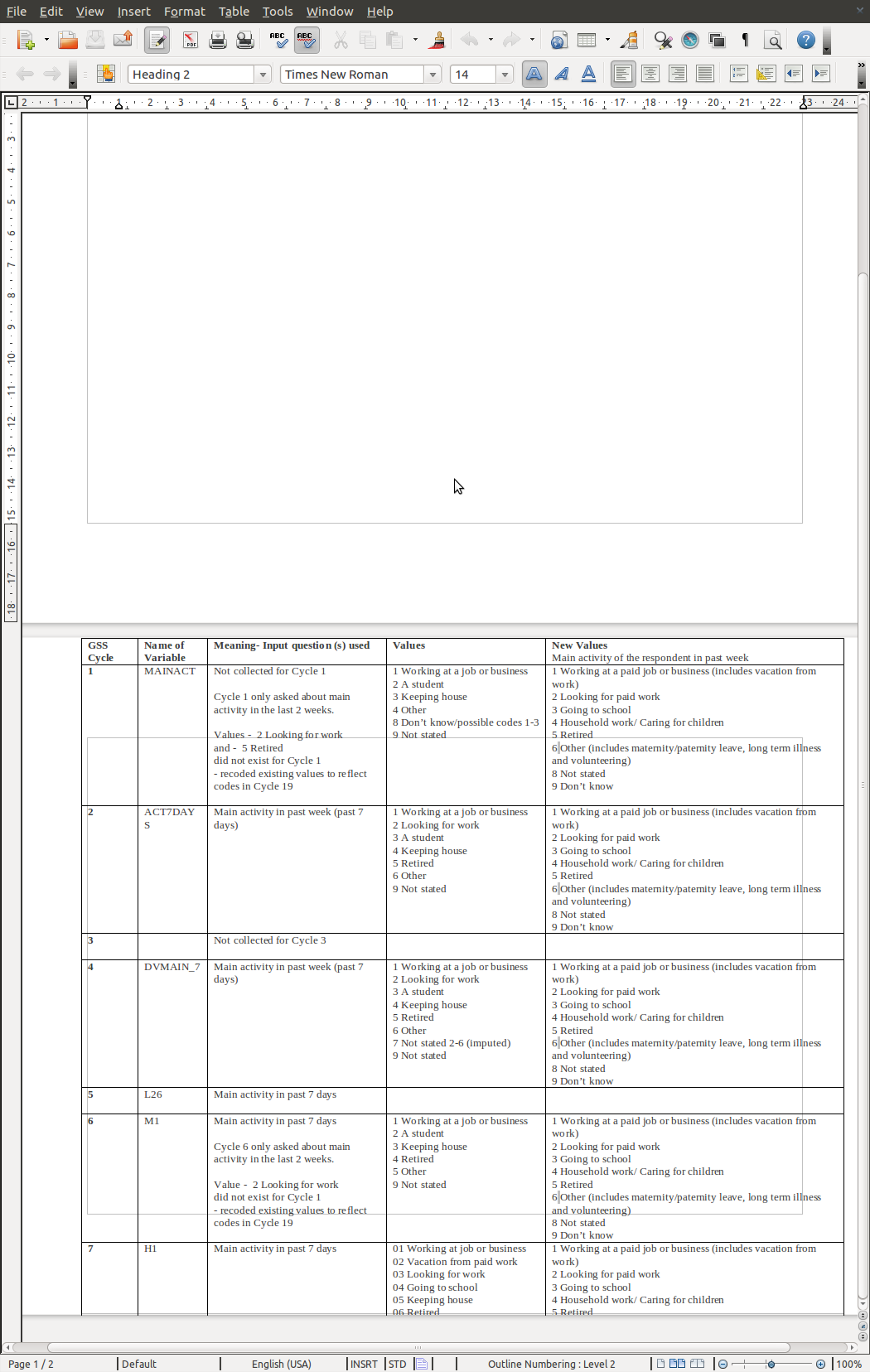
  4) What happens instead is the text is separated by almost an entire
  page as in the Writer screenshot

https://bugs.launchpad.net/ubuntu/+source/libreoffice/+bug/898791/+attachment/2614992/+files/stuckTable.png
  and rows 8 through 20 are not able to be viewed by scrolling down.

  ProblemType: Bug
  DistroRelease: Ubuntu 11.10
  Package: libreoffice-writer 1:3.4.4-0ubuntu1
  ProcVersionSignature: Ubuntu 3.0.0-13.22-generic 3.0.6
  Uname: Linux 3.0.0-13-generic x86_64
  ApportVersion: 1.23-0ubuntu4
  Architecture: amd64
  Date: Thu Dec  1 14:46:13 2011
  InstallationMedia: Ubuntu 11.10 "Oneiric Ocelot" - Beta amd64 (20110921.2)
  ProcEnviron:
   LANGUAGE=en_CA:en
   PATH=(custom, user)
   LANG=en_CA.UTF-8
   SHELL=/bin/bash
  SourcePackage: libreoffice
  UpgradeStatus: No upgrade log present (probably fresh install)

To manage notifications about this bug go to:
https://bugs.launchpad.net/df-libreoffice/+bug/898791/+subscriptions

--
Mailing list: https://launchpad.net/~desktop-packages
Post to     : [email protected]
Unsubscribe : https://launchpad.net/~desktop-packages
More help   : https://help.launchpad.net/ListHelp