Public bug reported:

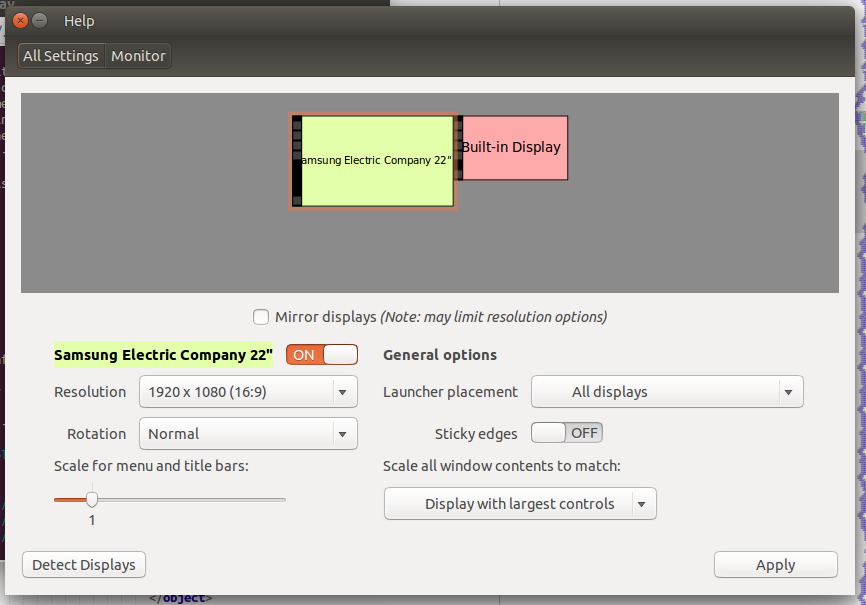
As defined in [1] the unity control center design panel should be
redesigned to use a 2-columns style that splits the general options and
monitor options.
Also to give the ability to HiDPI users to define how to scale the interface
when multiple monitors are attached, we're adding a combo box that allows to
select the monitor scaling we should match, at global level.
Note that not to involve other changes in unity, we aren't introducing the
designed "Scale windows content" slider for 14.04.

You can see the results of this work at [2].

This will introduce 5 new strings:
 - "Scale for menu and title bars:"
 - "General options"
 - "Scale for window _contents matches:"
 - "Largest available size"
 - "Smallest available size"

[1] https://wiki.ubuntu.com/BrightnessAndDisplays#Scaling
[2] http://people.ubuntu.com/~3v1n0/shots/ucc-display-scaling-rework.png

** Affects: unity-control-center
     Importance: Undecided
     Assignee: Marco Trevisan (Treviño) (3v1n0)
         Status: In Progress

** Affects: unity-control-center (Ubuntu)
     Importance: Undecided
     Assignee: Marco Trevisan (Treviño) (3v1n0)
         Status: New

** Also affects: unity-control-center
   Importance: Undecided
       Status: New

** Changed in: unity-control-center (Ubuntu)
     Assignee: (unassigned) => Marco Trevisan (Treviño) (3v1n0)

** Changed in: unity-control-center
     Assignee: (unassigned) => Marco Trevisan (Treviño) (3v1n0)

** Changed in: unity-control-center
       Status: New => In Progress

** Branch linked: lp:~3v1n0/unity-control-center/applications-scaling-
selector

--
You received this bug notification because you are a member of Desktop
Packages, which is subscribed to unity-control-center in Ubuntu.
https://bugs.launchpad.net/bugs/1297053

Title:
  [UIFe/FFe] Add Window Contents scaling options to Display panel

Status in Unity Control Center:
  In Progress
Status in “unity-control-center” package in Ubuntu:
  New

Bug description:
  As defined in [1] the unity control center design panel should be
  redesigned to use a 2-columns style that splits the general options
  and monitor options.

  Also to give the ability to HiDPI users to define how to scale the interface
when multiple monitors are attached, we're adding a combo box that allows to
select the monitor scaling we should match, at global level.
  Note that not to involve other changes in unity, we aren't introducing the
designed "Scale windows content" slider for 14.04.

  You can see the results of this work at [2].

  This will introduce 5 new strings:
   - "Scale for menu and title bars:"
   - "General options"
   - "Scale for window _contents matches:"
   - "Largest available size"
   - "Smallest available size"

  [1] https://wiki.ubuntu.com/BrightnessAndDisplays#Scaling
  [2] http://people.ubuntu.com/~3v1n0/shots/ucc-display-scaling-rework.png

To manage notifications about this bug go to:
https://bugs.launchpad.net/unity-control-center/+bug/1297053/+subscriptions

--
Mailing list: https://launchpad.net/~desktop-packages
Post to     : [email protected]
Unsubscribe : https://launchpad.net/~desktop-packages
More help   : https://help.launchpad.net/ListHelp